CD player CHEVROLET SILVERADO 2017 3.G User Guide
[x] Cancel search | Manufacturer: CHEVROLET, Model Year: 2017, Model line: SILVERADO, Model: CHEVROLET SILVERADO 2017 3.GPages: 509, PDF Size: 8.87 MB
Page 200 of 509
Chevrolet Silverado Owner Manual (GMNA-Localizing-U.S./Canada/Mexico-9956065) - 2017 - CRC - 4/29/16
Infotainment System 199
USB Port (Base Radio)
Playing from a USB
AUSBmassstoragedeviceorMedia Transfer Protocol (MTP)device can be connected to theUSB port.
The vehicle may have USB ports inthe front of the center console,armrest, or one in the upper glovebox. SeeCenter Console Storage011 6andGlove Box011 5.
USB MP3 Player and USB Drives
.The USB MP3 players and USBdrives connected must complywith the USB Mass StorageClass specification (USB MSC).
.Hard disk drives are notsupported.
.Supported file system is FAT32.
To p l a y a U S B d e v i c e :
.Connect the USB.
.Press MEDIA on the faceplateuntil the connected device isshown.
While the USB source is active,press the corresponding faceplatebutton for the icons on the screen tooperate USB function:
.t
.u
.j/r
.Z
For information on how to use thescreen icons, see“Playing anAudio CD.”
USB Menu
Press MENU to display the USBmenu and the following may display:
Browse :Select to display the filesand folders on the USB device.
To n e S e t t i n g s :Select to adjustBass, Midrange, Treble, Balance,Fade, and EQ (Equalizer). See“To n e S e t t i n g s”inAM-FM Radio(Base Radio with Touchscreen)0191orAM-FM Radio (BaseRadio)0189.
Auto Volume :If equipped, see“Auto Volume”inAM-FM Radio(Base Radio with Touchscreen)0191orAM-FM Radio (BaseRadio)0189.
EQ (Equalizer) :If equipped, thisfeature adjusts the equalizersettings. See“EQ (Equalizer)Settings”inAM-FM Radio (BaseRadio with Touchscreen)0191orAM-FM Radio (Base Radio)0189.
Playing from an iPod®/iPad®/
iPhone®
This feature supports the followingdevices:
.iPod nano®(1st, 2nd, 3rd, and4th generation)
.iPod with video (5.0 and 5.5generation)
.iPod classic®(6th generation)
.iPod touch®(1st and 2ndgeneration)
.iPad
.iPhone 3G, iPhone 3GS,iPhone 4
Page 205 of 509
Chevrolet Silverado Owner Manual (GMNA-Localizing-U.S./Canada/Mexico-9956065) - 2017 - CRC - 4/29/16
204 Infotainment System
.The iPod/iPhone playbackfunctions and the informationdisplayed may be different whenplayed on the infotainmentsystem.
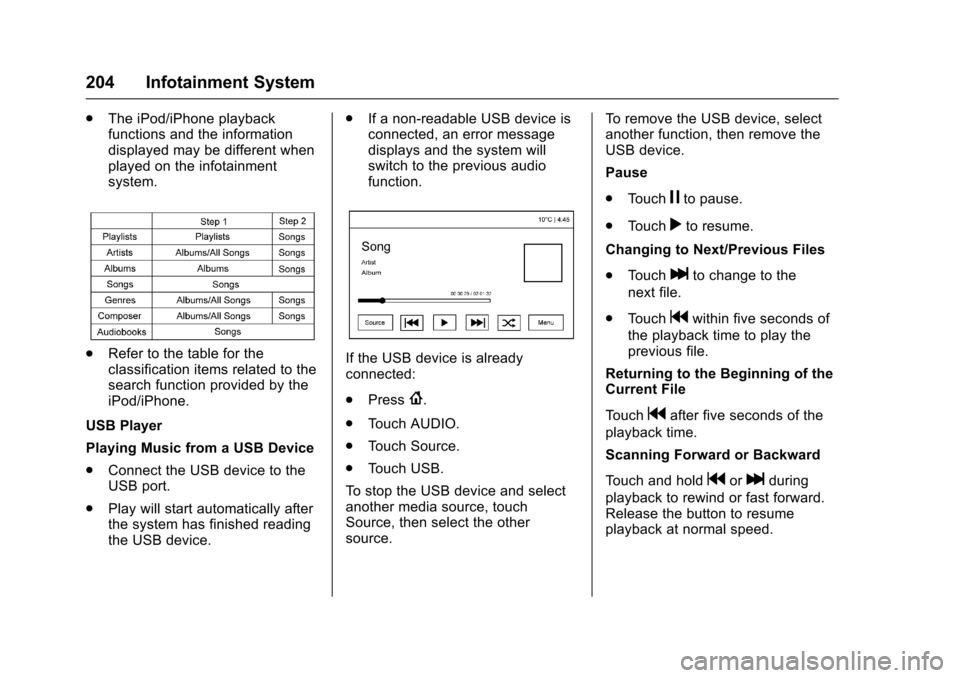
.Refer to the table for theclassification items related to thesearch function provided by theiPod/iPhone.
USB Player
Playing Music from a USB Device
.Connect the USB device to theUSB port.
.Play will start automatically afterthe system has finished readingthe USB device.
.If a non-readable USB device isconnected, an error messagedisplays and the system willswitch to the previous audiofunction.
If the USB device is alreadyconnected:
.Press{.
.To u c h A U D I O .
.To u c h S o u r c e .
.To u c h U S B .
To s t o p t h e U S B d e v i c e a n d s e l e c tanother media source, touchSource, then select the othersource.
To r e m o v e t h e U S B d e v i c e , s e l e c tanother function, then remove theUSB device.
Pause
.To u c hjto pause.
.To u c hrto resume.
Changing to Next/Previous Files
.To u c hlto change to the
next file.
.To u c hgwithin five seconds of
the playback time to play theprevious file.
Returning to the Beginning of theCurrent File
To u c hgafter five seconds of the
playback time.
Scanning Forward or Backward
To u c h a n d h o l dgorlduring
playback to rewind or fast forward.Release the button to resumeplayback at normal speed.
Page 206 of 509
Chevrolet Silverado Owner Manual (GMNA-Localizing-U.S./Canada/Mexico-9956065) - 2017 - CRC - 4/29/16
Infotainment System 205
Playing a File Randomly
To u c hZduring playback.
.ON: Plays all files randomly.
.OFF: Returns to normalplayback.
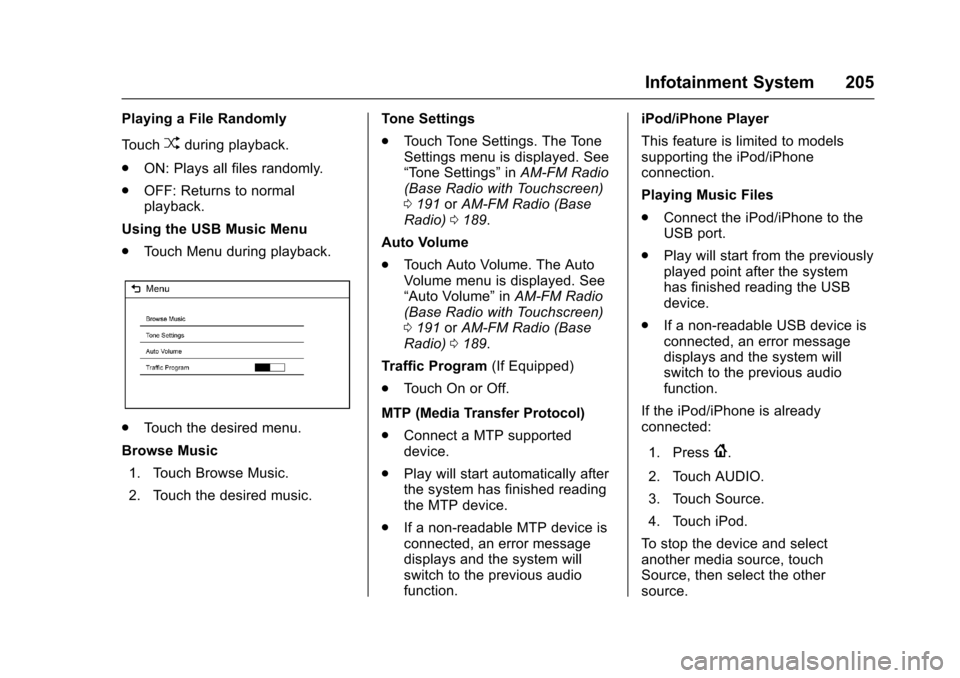
Using the USB Music Menu
.To u c h M e n u d u r i n g p l a y b a c k .
.To u c h t h e d e s i r e d m e n u .
Browse Music
1. Touch Browse Music.
2. Touch the desired music.
To n e S e t t i n g s
.To u c h To n e S e t t i n g s . T h e To n eSettings menu is displayed. See“To n e S e t t i n g s”inAM-FM Radio(Base Radio with Touchscreen)0191orAM-FM Radio (BaseRadio)0189.
Auto Volume
.To u c h A u t o V o l u m e . T h e A u t oVolume menu is displayed. See“Auto Volume”inAM-FM Radio(Base Radio with Touchscreen)0191orAM-FM Radio (BaseRadio)0189.
Tr a f f i c P r o g r a m(If Equipped)
.To u c h O n o r O f f .
MTP (Media Transfer Protocol)
.Connect a MTP supporteddevice.
.Play will start automatically afterthe system has finished readingthe MTP device.
.If a non-readable MTP device isconnected, an error messagedisplays and the system willswitch to the previous audiofunction.
iPod/iPhone Player
This feature is limited to modelssupporting the iPod/iPhoneconnection.
Playing Music Files
.Connect the iPod/iPhone to theUSB port.
.Play will start from the previouslyplayed point after the systemhas finished reading the USBdevice.
.If a non-readable USB device isconnected, an error messagedisplays and the system willswitch to the previous audiofunction.
If the iPod/iPhone is alreadyconnected:
1. Press{.
2. Touch AUDIO.
3. Touch Source.
4. Touch iPod.
To s t o p t h e d e v i c e a n d s e l e c tanother media source, touchSource, then select the othersource.
Page 208 of 509
Chevrolet Silverado Owner Manual (GMNA-Localizing-U.S./Canada/Mexico-9956065) - 2017 - CRC - 4/29/16
Infotainment System 207
2. Touch the screen to open to fullscreen. Touch the screen againto return to the previousscreen.
If the USB device is alreadyconnected:
1. Press{.
2. Touch GALLERY.
Some features are disabled whilethe vehicle is in motion.
Viewing a Slide Show
1. Touchzfrom the picture
screen.
2. Touch the screen to cancel theslide show during the slideshow playback.
Viewing a Previous or NextPicture
To u c hSorTfrom the picture
screen.
Rotating a Picture
To u c hwfrom the picture screen.
Enlarging a Picture
To u c hxfrom the picture screen.
Using the USB Picture Menu
1. Touch MENU from the picturescreen.
2. Touch the appropriate menu:
.Slide Show Time: Allowsselection of the slide showinterval.
.Clock, Temp. Display:Allows selection of On orOff to show the clock andtemperature on the fullscreen.
.Display Settings: Adjustsfor Brightness and Contrast.
3. Touch0to exit.
Auxiliary Jack
This vehicle may have an AUX jackin the center console or armrest.SeeCenter Console Storage011 6.
Possible auxiliary audio sourcesinclude:
.Laptop computer
.Audio music player
This jack is not an audio output. Donot plug headphones into theauxiliary input jack. Auxiliarydevices should be set up while thevehicle is in P (Park).
Connect a 3.5 mm (1/8 in) cablefrom the auxiliary device to theauxiliary input jack.
If an auxiliary device has alreadybeen connected, but a differentsource is currently active, press theMEDIA faceplate button repeatedlyto scroll through all of the availableaudio source screens, until the AUXsource screen is shown.
Base Radio
Playing from the AUX Jack
An auxiliary device is playedthrough the audio system andcontrolled through the device itself.
Page 210 of 509
Chevrolet Silverado Owner Manual (GMNA-Localizing-U.S./Canada/Mexico-9956065) - 2017 - CRC - 4/29/16
Infotainment System 209
2. Once paired, go into the audioapplication from the HomePage or via the application tray.Select MEDIA until Bluetoothdisplays.
Bluetooth Audio Menu
Press the MENU screen button todisplay the Bluetooth Audio menu.The following may be available:
To n e :Turn the MENU knob toadjust the tone settings.
PressoBACK to go back to the
previous menu.
Manage Bluetooth Devices:Selectto go to the Bluetooth page to addor delete devices.
When selecting Bluetooth Audio, theradio may not be able to launch theaudio player on the connecteddevice to start playing. When thevehicle is not moving, use thephone to begin playback.
All devices launch audio differently.When selecting Bluetooth Audio asasource,theradiomayshowaspaused on the screen. Press play
on the device or pressrto begin
playback.
Some phones support sendingBluetooth music information todisplay on the radio. When the radioreceives this information, it willcheck to see if any is available anddisplay it. For more informationabout supported Bluetooth features,see www.gm.com/bluetooth for U.S.and Canada only.
Voice Recognition
If equipped, voice recognition allowsfor hands-free operation within theaudio and phone applications. Thisfeature can be started by pressing
either thegbutton on the steering
wheel or by selecting thegon the
screen display.
However, not all features withinthese areas are supported by voicecommands. Generally, only complextasks that require multiple manualinteractions to complete aresupported by voice commands.
For example, tasks that take morethan one or two button presses suchas selecting a song or artist to playfrom a media device would besupported by voice commands.Other tasks, like adjusting thevolume or seeking up or down areaudio features that are easilyperformed by pressing one or twobuttons, and are not supported byvoice commands.
In general there are flexible ways tospeak commands for completing thetasks. Most of them, except
Page 227 of 509
Chevrolet Silverado Owner Manual (GMNA-Localizing-U.S./Canada/Mexico-9956065) - 2017 - CRC - 4/29/16
226 Infotainment System
The cell phone's normal promptmessages will go through their cycleaccording to the phone's operatinginstructions.
Dual Tone Multi-Frequency
(DTMF) Tones
The Bluetooth system can sendnumbers and the numbers stored asname tags during a call. You canuse this feature when calling amenu-driven phone system.Account numbers can also bestored for use.
Sending a Number or Name TagDuring a Call
1. Pressg.Thesystemresponds
“Ready,”followed by a tone.
2. Say“Dial.”
3. Say the number or name tagto send.
Clearing the System
Unless information is deleted out ofthe in-vehicle Bluetooth system, itwill be retained indefinitely. Thisincludes all phone pairing
information. For information on howto delete this information, see“Deleting a Paired Phone.”
Bluetooth (Infotainment
Controls - Base Radio
with Touchscreen)
To u s e i n f o t a i n m e n t c o n t r o l s t oaccess the menu system, seeOverview (Base Radio withTo u c h s c r e e n )0183orOverview(Base Radio)0184.
Pairing
ABluetooth-enabledcellphonemust be paired to the Bluetoothsystem and then connected to thevehicle before it can be used. Seeyour cell phone manufacturer's userguide for Bluetooth functions beforepairing the cell phone. If a Bluetoothphone is not connected, calls will bemade using OnStar Hands-FreeCalling, if available. SeeOnStarOverview0486.
Pairing Information
.ABluetoothphonewithMP3capability cannot be paired tothe vehicle as a phone and anMP3 player at the same time.
.Up to 10 cell phones can bepaired to the Bluetooth system.
.The pairing process is disabledwhen the vehicle is moving.
.Pairing only needs to becompleted once, unless thepairing information on the cellphone changes or the cell phoneis deleted from the system.
.Only one paired cell phone canbe connected to the Bluetoothsystem at a time.
.If multiple paired cell phones arewithin range of the system, thesystem connects to the firstavailable paired cell phone in theorder that they were first pairedto the system.
When the Bluetooth device andinfotainment system aresuccessfully paired, the phone bookis downloaded automatically. This isdependent on the type of the phone
Page 498 of 509

Chevrolet Silverado Owner Manual (GMNA-Localizing-U.S./Canada/Mexico-9956065) - 2017 - CRC - 4/29/16
Index 497
Antilock Brake System(ABS) (cont'd)
Warning Light . . . . . . . . . . . . . . . . . 141
Appearance Care
Exterior . . . . . . . . . . . . . . . . . . . . . . . 441
Interior . . . . . . . . . . . . . . . . . . . . . . . . 446
Apple CarPlay and
Android Auto . . . . . . . . . . . . . . . . . . 230
Assistance Program,
Roadside . . . . . . . . . . . . . . . . . . . . . . 476
Assistance Systems for
Driving . . . . . . . . . . . . . . . . . . . . . . . . 304
Assistance Systems for
Parking and Backing . . . . . . . . . . 302
Audio
Bluetooth . . . . . . . . . . . . . . . . . . . . . 208
Theft-Deterrent Feature . . . . . . . 182
Audio Players
CD . . . . . . . . . . . . . . . . . . . . . . . . . . . 196
Automatic
Dimming Mirrors . . . . . . . . . . . . . . . . 49
Door Locks . . . . . . . . . . . . . . . . . . . . . 41
Forward Braking . . . . . . . . . . . . . . 306
Headlamp System . . . . . . . . . . . . 174
Transmission . . . . . . . . . . . . . . . . . 277
Transmission Fluid . . . . . . 363, 366
Automatic Transmission
Manual Mode . . . . . . . . . . . . . . . . . 280
Automatic Transmission (cont'd)
Shift Lock Control Function
Check . . . . . . . . . . . . . . . . . . . . . . . 383
Auxiliary
Roof Mounted Lamp . . . . . . . . . . 176
Auxiliary Jack . . . . . . . . . . . . . . . . . . . 207
Avoiding Untrusted Media
Devices . . . . . . . . . . . . . . . . . . . . . . . 196
Axle, Front . . . . . . . . . . . . . . . . . . . . . . 380
Axle, Rear . . . . . . . . . . . . . . . . . . . . . . 380
B
Battery
Load Management . . . . . . . . . . . . 179
Power Protection . . . . . . . . . . . . . 180
Voltage and Charging
Messages . . . . . . . . . . . . . . . . . . . 150
Battery - North America . . . . 378, 432
Blade Replacement, Wiper . . . . . 384
Blind Spot Mirrors . . . . . . . . . . . . . . . 49
Bluetooth
Overview . . . . . . . . 216, 217,221, 226
Bluetooth Audio . . . . . . . . . . . . . . . . 208
Brake
Pedal and Adjustable
Throttle . . . . . . . . . . . . . . . . . . . . . . 267
System Warning Light . . . . . . . . 140
Brakes . . . . . . . . . . . . . . . . . . . . . . . . . . 376
Brakes (cont'd)
Antilock . . . . . . . . . . . . . . . . . . . . . . . 292
Assist . . . . . . . . . . . . . . . . . . . . . . . . . 294
Fluid . . . . . . . . . . . . . . . . . . . . . . . . . . 377
Parking . . . . . . . . . . . . . . . . . . . . . . . 293
System Messages . . . . . . . . . . . . 151
Braking . . . . . . . . . . . . . . . . . . . . . . . . . 248
Automatic Forward . . . . . . . . . . . 306
Break-In, New Vehicle . . . . . . . . . . 267
Bulb Replacement . . . . . . . . . . . . . . 389
Center High-Mounted
Stoplamp (CHMSL) and
Cargo Lamp . . . . . . . . . . . . . . . . . 389
Fog Lamps . . . . . . . . . . . . . . . . . . . 387
Halogen Bulbs . . . . . . . . . . . . . . . . 385
Headlamp Aiming . . . . . . . . . . . . . 385
Headlamps . . . . . . . . . . . . . . . . . . . 385
Headlamps, Front Turn
Signal, Sidemarker, and
Parking Lamps . . . . . . . . . . . . . . 386
High Intensity Discharge
(HID) Lighting . . . . . . . . . . . . . . . 386
Ta i l l a m p s . . . . . . . . . . . . . . . . . . . . . 3 8 7
Ta i l l a m p s , T u r n S i g n a l ,
Stoplamps, and Back-up
Lamps . . . . . . . . . . . . . . . . . . . . . . 387
Buying New Tires . . . . . . . . . . . . . . . 415
Page 499 of 509

Chevrolet Silverado Owner Manual (GMNA-Localizing-U.S./Canada/Mexico-9956065) - 2017 - CRC - 4/29/16
498 Index
C
Calibration . . . . . . . . . . . . . . . . . . . . . . 122
California
Fuel Requirements . . . . . . . . . . . 312
Perchlorate Materials
Requirements . . . . . . . . . . . . . . . 352
California
Proposition
65 Warning . . . . . . . . . .351, 378, 432
Canadian Vehicle Owners . . . . . . . . 2
Capacities and
Specifications . . . . . . . . . . . . . . . . . 468
Carbon Monoxide
Engine Exhaust . . . . . . . . . . . . . . . 276
Ta i l g a t e . . . . . . . . . . . . . . . . . . . . . . . . . 4 2
Winter Driving . . . . . . . . . . . . . . . . 257
Cargo
Tie-Downs . . . . . . . . . . . . . . . . . . . . . 117
Cargo Lamp . . . . . . . . . . . . . . . . . . . . 177
Caution, Danger, and Warning . . . . 3
CD Player . . . . . . . . . . . . . . . . . . . . . . 196
Center Console Storage . . . . . . . . 116
Center High-Mounted
Stoplamp (CHMSL) and
Cargo Lamp . . . . . . . . . . . . . . . . . . . 389
Center Seat . . . . . . . . . . . . . . . . . . . . . 58
Chains, Tire . . . . . . . . . . . . . . . . . . . . 419
Charging
Wireless . . . . . . . . . . . . . . . . . . . . . . 126
Charging System Light . . . . . . . . . 138
Check
Ignition Transmission Lock . . . 383
Malfunction Indicator
Engine Light . . . . . . . . . . . . . . . . 138
Child Restraints
Infants and Young Children . . . . . 90
Lower Anchors and Tethers
for Children . . . . . . . . . . . . . . . . . . . 96
Older Children . . . . . . . . . . . . . . . . . . 88
Securing . . . . . . . . . . . . . . . . . 102, 106
Systems . . . . . . . . . . . . . . . . . . . . . . . . 92
Cleaning
Exterior Care . . . . . . . . . . . . . . . . . 441
Interior Care . . . . . . . . . . . . . . . . . . 446
Climate Control
Systems . . . . . . . . . . . . . . . . . 237, 238
Air Conditioning . . . . . . . . . 237, 238
Dual Automatic . . . . . . . . . . . . . . . 240
Heating . . . . . . . . . . . . . . . . . . 237, 238
Clock . . . . . . . . . . . . . . . . . . . . . . . . . . . 123
Cluster, Instrument . . . . . . . . . . . . . 128
Clutch, Hydraulic . . . . . . . . . . . . . . . 366
Collision Damage Repair . . . . . . . 479
Compartments
Storage . . . . . . . . . . . . . . . . . . . . . . . .115
Compass . . . . . . . . . . . . . . . . . . . . . . . 122
Messages . . . . . . . . . . . . . . . . . . . . 151
Connections
OnStar®...................... 488
Control . . . . . . . . . . . . . . . . . . . . . . . . . 297
Traction and Electronic
Stability . . . . . . . . . . . . . . . . . . . . . 295
Control Light
Hill Descent . . . . . . . . . . . . . . . . . . 141
Control of a Vehicle . . . . . . . . . . . . . 248
Convex Mirrors . . . . . . . . . . . . . . . . . . 46
Coolant
Engine . . . . . . . . . . . . . . . . . . . . . . . . 369
Engine Temperature Gauge . . 133
Cooling System . . . . . . . . . . . . . . . . . 368
Engine Messages . . . . . . . . . . . . 152
Courtesy Transportation
Program . . . . . . . . . . . . . . . . . . . . . . . 478
Cruise Control . . . . . . . . . . . . . . . . . . 298
Light . . . . . . . . . . . . . . . . . . . . . . . . . . 145
Cupholders . . . . . . . . . . . . . . . . . . . . . 116
Customer Assistance . . . . . . . . . . . 475
Offices . . . . . . . . . . . . . . . . . . . . . . . . 474
Te x t Te l e p h o n e ( T T Y )
Users . . . . . . . . . . . . . . . . . . . . . . . 475
Customer Information
Service Publications
Ordering Information . . . . . . . . 481