ECO mode CHEVROLET SILVERADO 2017 3.G User Guide
[x] Cancel search | Manufacturer: CHEVROLET, Model Year: 2017, Model line: SILVERADO, Model: CHEVROLET SILVERADO 2017 3.GPages: 509, PDF Size: 8.87 MB
Page 152 of 509
Chevrolet Silverado Owner Manual (GMNA-Localizing-U.S./Canada/Mexico-9956065) - 2017 - CRC - 4/29/16
Instruments and Controls 151
SERVICE BATTERY
CHARGING SYSTEM
On some vehicles, this messagedisplays if there is a problem withthe battery charging system. Undercertain conditions, the chargingsystem light may also turn on in theinstrument cluster. SeeChargingSystem Light0138.Drivingwiththisproblem could drain the battery.Turn off all unnecessaryaccessories. Have the electricalsystem checked as soon aspossible. See your dealer.
TRANSPORT MODE ON
This message is displayed when thevehicle is in transport mode. Somefeatures can be disabled while inthis mode, including RemoteKeyless Entry (RKE), remote start,and the vehicle alarm system. Takethe vehicle to your dealer for serviceto turn transport mode off.
Brake System Messages
BRAKE FLUID LOW
This message is displayed when thebrake fluid level is low. SeeBrakeFluid0377.
SERVICE BRAKE ASSIST
This message may be displayedwhen there is a problem with thebrake boost assist system. Whenthis message is displayed, the brakeboost assist motor might be heardoperating and you might noticepulsation in the brake pedal. This isnormal under these conditions. Takethe vehicle to your dealer forservice.
SERVICE TRAILER BRAKE
SYSTEM
On vehicles with the IntegratedTrailer Brake Control (ITBC) system,this message displays and a chimemay sound when there is a problemwith the ITBC system.
When this message displays, poweris no longer available to the trailerbrakes.
As soon as it is safe to do so,carefully pull your vehicle over tothe side of the road and turn theignition off. Check the wiringconnection to the trailer and turn theignition back on. If this message stilldisplays, either your vehicle or thetrailer needs service. See yourdealer.
See“Integrated Trailer BrakeControl System”underTo w i n gEquipment0335for moreinformation.
Compass Messages
Dashes may be displayed if thevehicle temporarily losescommunication with the GlobalPositioning System (GPS).
Door Ajar Messages
DOOR OPEN
This message displays and a chimemay sound if a door is not fullyclosed. Stop and turn off thevehicle, check the door for
Page 153 of 509
Chevrolet Silverado Owner Manual (GMNA-Localizing-U.S./Canada/Mexico-9956065) - 2017 - CRC - 4/29/16
152 Instruments and Controls
obstructions, and close the dooragain. Check to see if the messagestill appears on the DIC.
HOOD OPEN
This message displays and a chimemay sound if the hood is not fullyclosed. Stop and turn off thevehicle, check the hood forobstructions, and close the hoodagain. Check to see if the messagestill appears on the DIC.
Engine Cooling System
Messages
A/C OFF DUE TO HIGH
ENGINE TEMP
This message displays when theengine coolant becomes hotter thanthe normal operating temperature.SeeEngine Coolant TemperatureGauge0133.Toavoidaddedstrainon a hot engine, the air conditioningcompressor automatically turns off.When the coolant temperaturereturns to normal, the airconditioning compressor turns backon. You can continue to drive yourvehicle.
If this message continues to appear,have the system repaired by yourdealer as soon as possible to avoiddamage to the engine.
ENGINE OVERHEATING IDLE
ENGINE
This message displays when theengine coolant temperature is toohot. Stop and allow the vehicle toidle until it cools down. SeeEngineCoolant Temperature Gauge0133.
When towing, use Tow/Haul modeto prevent damage to the engine ortransmission. SeeTo w / H a u lMode0282.
ENGINE OVERHEATED STOP
ENGINE
This message displays and a chimemay sound if the engine coolingsystem reaches unsafetemperatures for operation. Stopand turn off the vehicle as soon as itis safe to do so to avoid severedamage. This message clears whenthe engine has cooled to a safeoperating temperature.
Engine Oil Messages
CHANGE ENGINE OIL SOON
This message displays when theengine oil needs to be changed.When you change the engine oil, besure to reset the CHANGE ENGINEOIL SOON message. SeeEngineOil Life System0362forinformation on how to reset themessage. SeeEngine Oil0359andMaintenance Schedule0452.
ENGINE OIL LOW ADD OIL
On some vehicles, this messagedisplays when the engine oil levelmay be too low. Check the oil levelbefore filling to the recommendedlevel. If the oil is not low and thismessage remains on, take thevehicle to your dealer for service.SeeEngine Oil0359.
ENGINE OIL HOT IDLE
ENGINE
This message displays when theengine oil becomes hotter than thenormal operating temperature. Stop
Page 154 of 509
Chevrolet Silverado Owner Manual (GMNA-Localizing-U.S./Canada/Mexico-9956065) - 2017 - CRC - 4/29/16
Instruments and Controls 153
and allow the vehicle to idle until itcools down. SeeEngine CoolantTe m p e r a t u r e G a u g e0133.
OIL PRESSURE LOW STOP
ENGINE
This message displays if low oilpressure levels occur. Stop thevehicle as soon as safely possibleand do not operate it until the causeof the low oil pressure has beencorrected. Check the oil as soon aspossible and have the vehicleserviced by your dealer. SeeEngineOil0359.
Engine Power Messages
ENGINE POWER IS REDUCED
This message displays and a chimemay sound when the cooling systemtemperature gets too hot and theengine further enters the enginecoolant protection mode. SeeEngine Overheating0372for moreinformation.
This message also displays whenthe vehicle's engine power isreduced. Reduced engine powercan affect the vehicle's ability to
accelerate. If this message is on,but there is no reduction inperformance, proceed to yourdestination. The performance maybe reduced the next time the vehicleis driven. The vehicle may be drivenat a reduced speed while thismessage is on, but acceleration andspeed may be reduced. Anytimethis message stays on, the vehicleshould be taken to your dealer forservice as soon as possible.
Fuel System Messages
FUEL LEVEL LOW
This message displays and a chimemay sound if the fuel level is low.Refuel as soon as possible. SeeFuel Gauge0131andFuel0311.
Key and Lock Messages
REPLACE BATTERY IN
REMOTE KEY
This message displays if a RemoteKeyless Entry (RKE) transmitterbattery is low. The battery needs tobe replaced in the transmitter. See
“Battery Replacement”underRemote Keyless Entry (RKE)System Operation036.
Lamp Messages
TURN SIGNAL ON
This message displays and a chimesounds if a turn signal is left on for1.2 km (0.75 mi). Move the turnsignal lever to the off position.
Object Detection System
Messages
FORWARD COLLISION
ALERT OFF
This message displays when theForward Collision Alert has beenturned off.
FRONT CAMERA BLOCKED
CLEAN WINDSHIELD
This message displays when thecamera is blocked. Cleaning theoutside of the windshield behind therearview mirror may correct theissue. The Lane Departure Warning
Page 157 of 509
Chevrolet Silverado Owner Manual (GMNA-Localizing-U.S./Canada/Mexico-9956065) - 2017 - CRC - 4/29/16
156 Instruments and Controls
or other electronic device—is onthe front outboard passenger seat.If this happens, remove the objectfrom the seat or buckle thesafety belt.
If the driver or front outboardpassenger unbuckles their safetybelt while driving, the safety beltreminder chime and light(s) willcome on. SeeSafety BeltReminders0134.
SHIFTER UNLOCKED. BRAKE
TO SHIFT
This message displays when theSafety Belt Assurance System timesout and allows the vehicle to beshifted out of P (Park) after30 seconds following brake apply.See“Safety Belts”and“ChildRestraints”in the Index forinformation about the importance ofproper restraint use.
This system may not functionproperly if the airbag readiness lightis on. SeeAirbag ReadinessLight0135.
Security Messages
SERVICE THEFT DETERRENT
SYSTEM
This message displays when thereis a problem with the theft-deterrentsystem. The vehicle may or may notrestart, so you may want to take thevehicle to your dealer before turningoff the engine. SeeImmobilizerOperation045.
Steering System
Messages
STEERING ASSIST IS
REDUCED DRIVE WITH CARE
This message may display if aproblem occurs with the electricpower steering system. If thismessage appears, steering effortmay be slightly higher than normal.The vehicle is still safe to drive. Usecaution while in reduced assistmode. If this message is persistentor appears repeatedly, take thevehicle to your dealer for service.SeeSteering0249.
SERVICE POWER STEERING
(1500 Series)
This message displays when thereis a problem with electric powersteering. If this message displaysand a reduction in steeringperformance or loss of powersteering assistance is noticed. Seeyour dealer. SeeSteering0249.
SERVICE POWER STEERING
(2500/3500 Series)
This message displays when thereis a problem with the power steeringassist system. If this messagedisplays the vehicle can be drivenbut should be repaired as soon aspossible. See your dealer. SeeSteering0249.
Page 160 of 509
Chevrolet Silverado Owner Manual (GMNA-Localizing-U.S./Canada/Mexico-9956065) - 2017 - CRC - 4/29/16
Instruments and Controls 159
TRANSMISSION HOT IDLE
ENGINE
This message displays and a chimemay sound if the transmission fluidin the vehicle gets hot. Driving withthe transmission fluid temperaturehigh can cause damage to thevehicle. Stop the vehicle and let itidle to allow the transmission tocool. This message clears and thechime stops when the fluidtemperature reaches a safe level.
When towing, use Tow/Haul Modeto prevent damage to the engine ortransmission. SeeTo w / H a u lMode0282.
VEHICLE IN 4WD LOW
This message will display if the
vehicle is driven in 4nfor about
10 minutes above 72 km/h (45 mph).
Vehicle Reminder
Messages
CHECK TRAILER WIRING
On vehicles with the IntegratedTrailer Brake Control (ITBC) system,this message may display and achime may sound when one of thefollowing conditions exists:
.Atrailerwithelectricbrakesbecomes disconnected from thevehicle.
⇣If the disconnect occurs whilethe vehicle is stopped, thismessage clears itself after ashort time.
⇣If the disconnect occurs whilethe vehicle is moving, thismessage stays on until theignition is turned off.
.There is a short in the wiring tothe electric trailer brakes.
When this message displays, poweris no longer available to the trailerbrakes.
As soon as it is safe to do so,carefully pull the vehicle over to theside of the road and turn the ignitionoff. Check the wiring connection tothe trailer and turn the ignition backon. This message clears if the traileris reconnected. This message alsoclears if you acknowledge it. If thismessage still displays, either thevehicle or the trailer needs service.See your dealer.
See“Integrated Trailer BrakeControl System”underTo w i n gEquipment0335.
ICE POSSIBLE DRIVE
WITH CARE
This message displays when iceconditions are possible.
TRAILER CONNECTED
On vehicles with the IntegratedTrailer Brake Control (ITBC) system,this message displays briefly whenatrailerwithelectricorelectricoverhydraulic brakes is first connectedto the vehicle.
Page 162 of 509
Chevrolet Silverado Owner Manual (GMNA-Localizing-U.S./Canada/Mexico-9956065) - 2017 - CRC - 4/29/16
Instruments and Controls 161
Uplevel Radio Audio SystemControls
1. Touch the desired feature todisplay a list of availableoptions.
2. Touch to select the desiredfeature setting.
3. PressoBACK on the
faceplate or the0screen
button to return to the previousmenu or exit.
Turn the vehicle to ON/RUN toaccess the Settings menu, thenselect SETTINGS from the Homepage on the infotainment systemdisplay.
Personalization Menus
The following list of menu items maybe available:
.Time and Date
.Language (Language)
.Rear Seat Reminder
.Te e n D r i v e r
.Va l e t M o d e
.Radio
.Vehicle
.Bluetooth
.Apple CarPlay
.Android Auto
.USB Auto Launch
.Voice
.Display
.Rear Camera
.Return to Factory Settings
.Software Information
Detailed information for each menufollows.
Time and Date
Manually set the time and date. SeeClock0123.
Language (Language)
Select Language, then select fromthe available language(s).
The selected language will displayon the system, and voicerecognition will reflect the selectedlanguage.
Rear Seat Reminder
This allows for a chime and amessage‘Look in Rear Seat’whenthe rear door has been openedbefore or during operation of thevehicle.
Select Off or On.
Teen Driver
See“Te e n D r i v e r”under“Settings”in the infotainment manual.
Valet Mode
This will lock the infotainmentsystem and steering wheel controls.It may also limit access to vehiclestorage locations (if equipped).
To e n a b l e v a l e t m o d e :
1. Enter a four-digit code on thekeypad.
2. Select Enter to go to theconfirmation screen.
3. Re-enter the four-digit code.
Press LOCK or UNLOCK to lock orunlock the system. Press Back to goback to the previous menu.
Page 176 of 509
Chevrolet Silverado Owner Manual (GMNA-Localizing-U.S./Canada/Mexico-9956065) - 2017 - CRC - 4/29/16
Lighting 175
leaves the garage, there is a slightdelay before the automaticheadlamp system changes to theDRL. During that delay, theinstrument cluster may not be asbright as usual. Make sure theinstrument panel brightness controlis in the full bright position. SeeInstrument Panel IlluminationControl0177.
When it is bright enough outside,the headlamps will turn off or maychange to Daytime RunningLamps (DRL).
The automatic headlamp systemturns off when the exterior lamp
control is turned toOor the ignition
is off.
Lights On with Wipers
If the windshield wipers areactivated in daylight with the engineon, and the exterior lamp control isin AUTO, the headlamps, parkinglamps, and other exterior lampscome on. The transition time for thelamps coming on varies based onwiper speed. When the wipers are
not operating, these lamps turn off.
Move the exterior lamp control toO
or;to disable this feature.
Hazard Warning Flashers
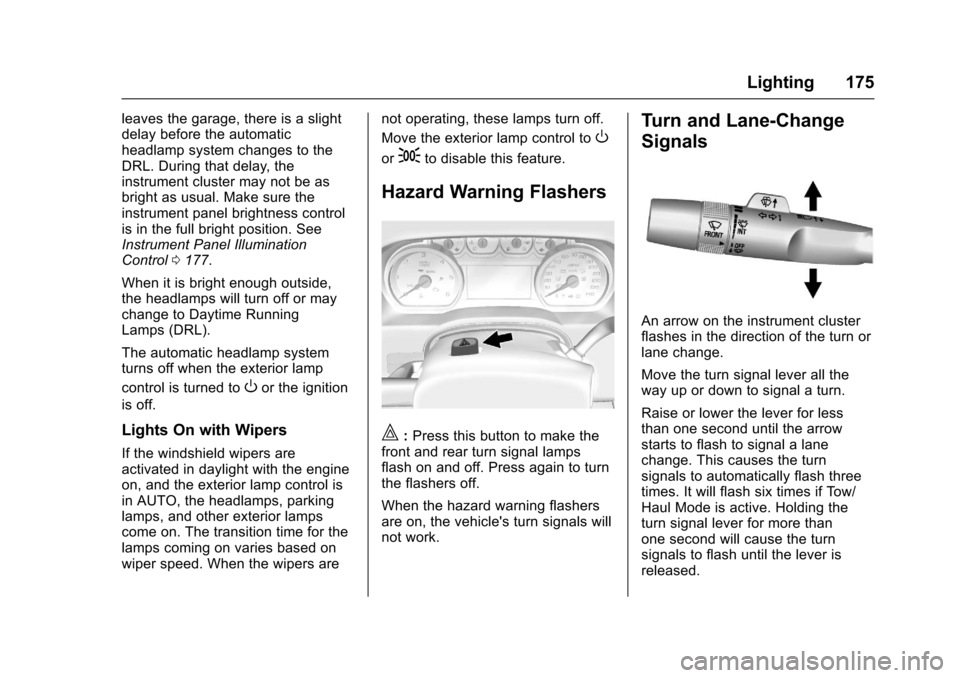
|:Press this button to make thefront and rear turn signal lampsflash on and off. Press again to turnthe flashers off.
When the hazard warning flashersare on, the vehicle's turn signals willnot work.
Turn and Lane-Change
Signals
An arrow on the instrument clusterflashes in the direction of the turn orlane change.
Move the turn signal lever all theway up or down to signal a turn.
Raise or lower the lever for lessthan one second until the arrowstarts to flash to signal a lanechange. This causes the turnsignals to automatically flash threetimes. It will flash six times if Tow/Haul Mode is active. Holding theturn signal lever for more thanone second will cause the turnsignals to flash until the lever isreleased.
Page 204 of 509

Chevrolet Silverado Owner Manual (GMNA-Localizing-U.S./Canada/Mexico-9956065) - 2017 - CRC - 4/29/16
Infotainment System 203
.Connection with i-Stick TypeUSB storage devices may befaulty due to vehicle vibration.
.Do not touch the USBconnecting terminal.
.Only USB storage devicesformatted in FAT16/32 or exFATfile systems are recognized.NTFS and other file systems arenot recognized.
.The time it takes to process fileswill depend on the USB storagedevice type and capacity, andthe type of files stored.
.Some USB storage device filesmay not be compatible.
.Up to two USB devices and oneiPod can be played through aUSB hub. All devices may not besupported, depending on theperformance of the USB hub.If there is not enough powersupply, it may not operatenormally.
.Do not disconnect the USBstorage device while it is playing.This may cause damage to theproduct or affect theperformance of the USB device.
.Disconnect the USB storagedevice when the ignition isturned off. If the ignition is turnedon while the USB device isconnected, the USB device maybe damaged or may not operatenormally.
.USB storage devices can onlybe connected for playing music,viewing photo files,or upgrading.
.Do not use the USB terminal tocharge USB accessoryequipment. The heat generatedmay cause performance issuesor damage.
.Music files to which Digital RightManagement (DRM) is appliedcannot be played.
.USB storage device that are incapacity with a limit of 5,000files, such as music, photo,video, 15 stages of folder
structure. Normal usage cannotbe guaranteed for a storagedevice that exceeds this limit.The iPod/iPhone can play allmusic files that are supported.The music file lists will onlydisplay up to 5,000 files on thescreen. These files are sorted inalphabetical order.
.Some iPod/iPhone productmodels may not support theconnectivity or functionality ofthis product.
.Only connect the iPod/iPhonewith connection cablessupported by iPod/iPhoneproducts. Other connectioncables cannot be used.
.The iPod/iPhone may bedamaged if it is connected to thevehicle with the ignition on.When not in use, disconnect theiPod/iPhone.
.When the iPod/iPhone isconnected to the USB port byusing the iPod/iPhone cable, theBluetooth music is notsupported.
Page 206 of 509
Chevrolet Silverado Owner Manual (GMNA-Localizing-U.S./Canada/Mexico-9956065) - 2017 - CRC - 4/29/16
Infotainment System 205
Playing a File Randomly
To u c hZduring playback.
.ON: Plays all files randomly.
.OFF: Returns to normalplayback.
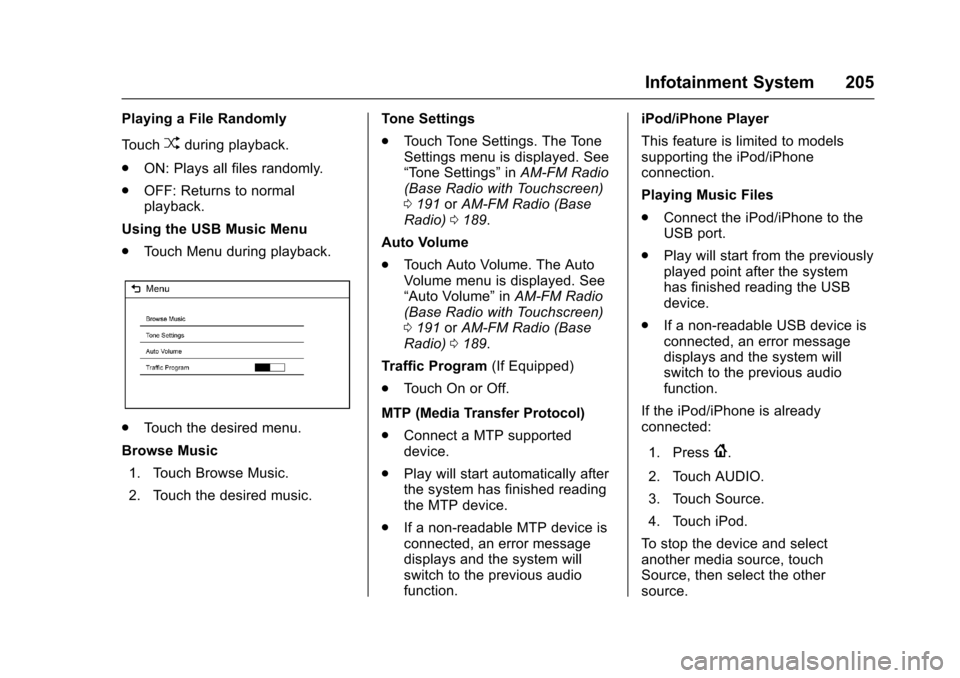
Using the USB Music Menu
.To u c h M e n u d u r i n g p l a y b a c k .
.To u c h t h e d e s i r e d m e n u .
Browse Music
1. Touch Browse Music.
2. Touch the desired music.
To n e S e t t i n g s
.To u c h To n e S e t t i n g s . T h e To n eSettings menu is displayed. See“To n e S e t t i n g s”inAM-FM Radio(Base Radio with Touchscreen)0191orAM-FM Radio (BaseRadio)0189.
Auto Volume
.To u c h A u t o V o l u m e . T h e A u t oVolume menu is displayed. See“Auto Volume”inAM-FM Radio(Base Radio with Touchscreen)0191orAM-FM Radio (BaseRadio)0189.
Tr a f f i c P r o g r a m(If Equipped)
.To u c h O n o r O f f .
MTP (Media Transfer Protocol)
.Connect a MTP supporteddevice.
.Play will start automatically afterthe system has finished readingthe MTP device.
.If a non-readable MTP device isconnected, an error messagedisplays and the system willswitch to the previous audiofunction.
iPod/iPhone Player
This feature is limited to modelssupporting the iPod/iPhoneconnection.
Playing Music Files
.Connect the iPod/iPhone to theUSB port.
.Play will start from the previouslyplayed point after the systemhas finished reading the USBdevice.
.If a non-readable USB device isconnected, an error messagedisplays and the system willswitch to the previous audiofunction.
If the iPod/iPhone is alreadyconnected:
1. Press{.
2. Touch AUDIO.
3. Touch Source.
4. Touch iPod.
To s t o p t h e d e v i c e a n d s e l e c tanother media source, touchSource, then select the othersource.
Page 207 of 509
Chevrolet Silverado Owner Manual (GMNA-Localizing-U.S./Canada/Mexico-9956065) - 2017 - CRC - 4/29/16
206 Infotainment System
To r e m o v e t h e d e v i c e , s e l e c tanother function, then remove thedevice.
Pause
.To u c hjto pause.
.To u c hrto resume.
Changing to Next/Previous Song
.To u c hlto change to the
next song.
.To u c hgwithin two seconds of
the playback time to play theprevious file.
Returning to the Beginning of theCurrent File
To u c hgafter two seconds of the
playback time.
Scanning Forward or Backward
To u c h a n d h o l dgorlduring
playback to rewind or fast forward.Release the button to resumeplayback at normal speed.
Playing a File Randomly
To u c hZduring playback.
.ON: Plays all files randomly.
.OFF: Returns to normalplayback.
Using the iPod Menu
.To u c h M e n u d u r i n g p l a y b a c k .
.To u c h t h e a p p r o p r i a t eplay mode.
Browse Music
1. Touch Browse Music.
2. Touch the desired music.
To n e S e t t i n g s
.To u c h To n e S e t t i n g s . T h e To n eSettings menu is displayed. See“To n e S e t t i n g s”under“BaseRadio with Touchscreen”inAM-FM Radio (Base Radio withTo u c h s c r e e n )0191orAM-FMRadio (Base Radio)0189.
Auto Volume
.To u c h A u t o V o l u m e . T h e A u t oVolume menu is displayed. See“Auto Volume”under“BaseRadio with Touchscreen”inAM-FM Radio (Base Radio withTo u c h s c r e e n )0191orAM-FMRadio (Base Radio)0189.
Picture System Information
The infotainment system can viewpicture files stored on a USBstorage device and devices thatsupport Media TransferProtocol (MTP).
.Supported file extensions: .jpg,.bmp, .png, .gif.
.Animated GIF files are notsupported.
.Some files may not operate dueto a different recording format orthe condition of the file.
Viewing Pictures
1. Connect the USB device to theUSB port.