ECO mode CHEVROLET SILVERADO 2017 3.G Workshop Manual
[x] Cancel search | Manufacturer: CHEVROLET, Model Year: 2017, Model line: SILVERADO, Model: CHEVROLET SILVERADO 2017 3.GPages: 509, PDF Size: 8.87 MB
Page 340 of 509
Chevrolet Silverado Owner Manual (GMNA-Localizing-U.S./Canada/Mexico-9956065) - 2017 - CRC - 4/29/16
Driving and Operating 339
.White: Ground
.White/Green: Back-up Lamps
.Red/Green: Battery Feed
.Dark Blue: Trailer Brake
If the vehicle is equipped with theheavy-duty trailering option, see“Heavy-Duty Trailer Wiring HarnessPackage”earlier in this section.
When the camper-wiring harness isordered without the heavy-dutytrailering package, a seven-wireharness with a seven-pin connectoris at the rear of the vehicle and istied to the vehicle's frame.
Electric Brake Control Wiring
Provisions
These wiring provisions areincluded with the vehicle as part ofthe trailer wiring package. Theseprovisions are for an electric brakecontroller.
The harness should be installed byyour dealer or a qualified servicecenter.
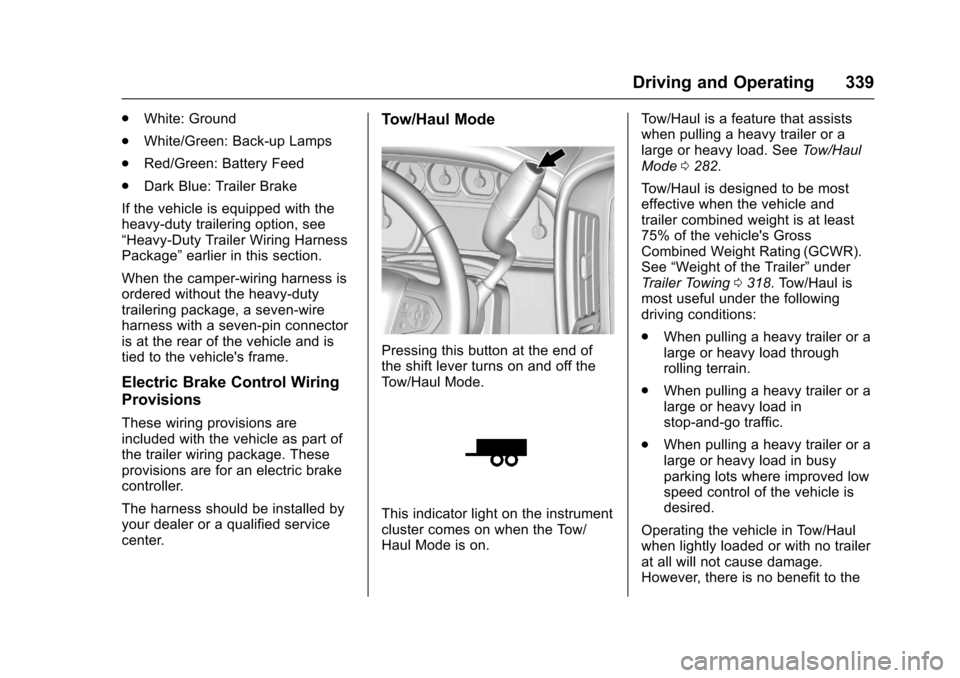
Tow/Haul Mode
Pressing this button at the end ofthe shift lever turns on and off theTo w / H a u l M o d e .
This indicator light on the instrumentcluster comes on when the Tow/Haul Mode is on.
To w / H a u l i s a f e a t u r e t h a t a s s i s t swhen pulling a heavy trailer or alarge or heavy load. SeeTo w / H a u lMode0282.
To w / H a u l i s d e s i g n e d t o b e m o s teffective when the vehicle andtrailer combined weight is at least75% of the vehicle's GrossCombined Weight Rating (GCWR).See“Weight of the Trailer”underTr a i l e r To w i n g0318.Tow/Haulismost useful under the followingdriving conditions:
.When pulling a heavy trailer or alarge or heavy load throughrolling terrain.
.When pulling a heavy trailer or alarge or heavy load instop-and-go traffic.
.When pulling a heavy trailer or alarge or heavy load in busyparking lots where improved lowspeed control of the vehicle isdesired.
Operating the vehicle in Tow/Haulwhen lightly loaded or with no trailerat all will not cause damage.However, there is no benefit to the
Page 368 of 509
Chevrolet Silverado Owner Manual (GMNA-Localizing-U.S./Canada/Mexico-9956065) - 2017 - CRC - 4/29/16
Vehicle Care 367
When to Check and What
to Use
The hydraulic clutch fluid reservoiris filled with DOT 3 brake fluid asindicated on the reservoir cap. SeeEngine Compartment Overview0354for reservoir location.
How to Check and Add Fluid
Visually check the clutch fluidreservoir to make sure the fluid levelis at the MIN (minimum) line on theside of the reservoir. The hydraulicclutch fluid system should be closedand sealed.
Do not remove the cap to check thefluid level or to top-off the fluid level.Remove the cap only whennecessary to add the proper fluiduntil the level reaches the MIN line.
Engine Air Cleaner/Filter
If the vehicle has a diesel engine,see“8-Cylinder Pickup Models”under“Engine Air Cleaner/Filter”inthe Duramax diesel supplement forthe correct inspection andreplacement procedures.
The engine air cleaner/filter is onthe passenger side of the enginecompartment. SeeEngineCompartment Overview0354.
When to Inspect the Engine Air
Cleaner/Filter
For intervals on changing andinspecting the engine air filter, seeMaintenance Schedule0452.
How to Inspect the Engine Air
Cleaner/Filter
Do not start the engine or have theengine running with the engine aircleaner/filter housing open. Beforeremoving the engine air cleaner/filter, make sure that the engine aircleaner/filter housing and nearbycomponents are free of dirt anddebris. Remove the engine aircleaner/filter. Lightly tap and shakethe engine air cleaner/filter (awayfrom the vehicle), to release loosedust and dirt. Inspect the engine aircleaner/filter for damage, andreplace if damaged. Do not cleanthe engine air cleaner/filter orcomponents with water orcompressed air.
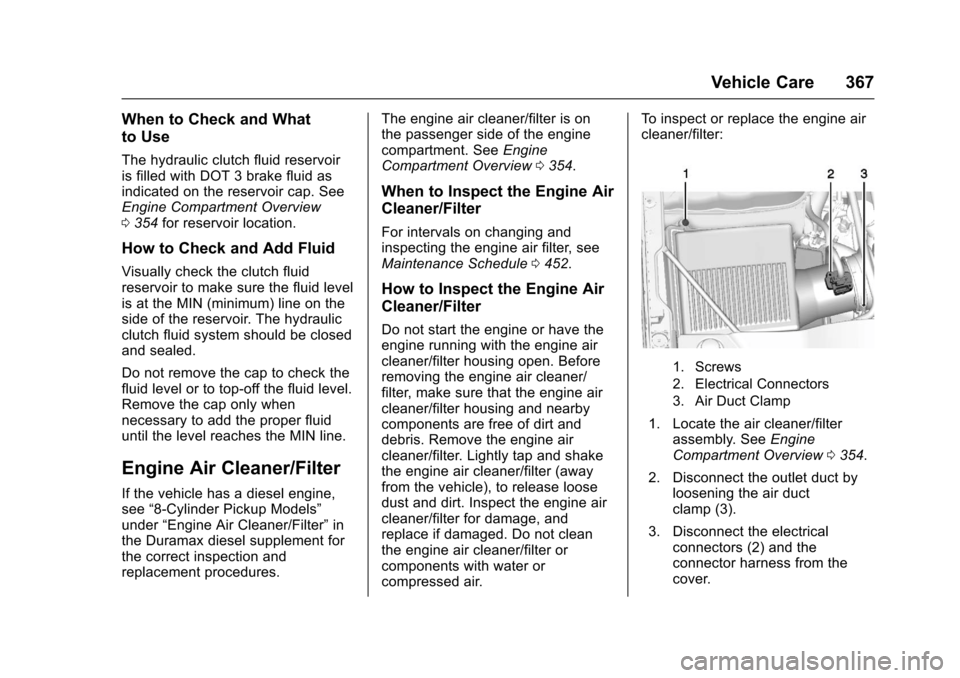
To i n s p e c t o r r e p l a c e t h e e n g i n e a i rcleaner/filter:
1. Screws
2. Electrical Connectors
3. Air Duct Clamp
1. Locate the air cleaner/filterassembly. SeeEngineCompartment Overview0354.
2. Disconnect the outlet duct byloosening the air ductclamp (3).
3. Disconnect the electricalconnectors (2) and theconnector harness from thecover.
Page 375 of 509
Chevrolet Silverado Owner Manual (GMNA-Localizing-U.S./Canada/Mexico-9956065) - 2017 - CRC - 4/29/16
374 Vehicle Care
Overheated Engine
Protection
Operating Mode
If an overheated engine conditionexists and the ENGINE POWER ISREDUCED message displays, anoverheat protection mode whichalternates firing groups of cylindershelps to prevent engine damage. Inthis mode, a loss in power andengine performance will be noticed.This operating mode allows thevehicle to be driven to a safe placein an emergency. Driving extendeddistances and/or towing a trailer inthe overheat protection modeshould be avoided.
Caution
After driving in the overheated
engine protection operating
mode, the engine oil will be
severely degraded. Any repairs
performed before the engine is
cool may cause engine damage.
Allow the engine to cool before
(Continued)
Caution (Continued)
attempting any repair. Repair the
cause of coolant loss, change the
oil, and reset the oil life system.
SeeEngine Oil0359.
Engine Fan
If the vehicle has a clutched enginecooling fan, when the clutch isengaged, the fan spins faster toprovide more air to cool the engine.In most everyday driving conditions,the fan is spinning slower and theclutch is not fully engaged. Thisimproves fuel economy and reducesfan noise. Under heavy vehicleloading, trailer towing, and/or highoutside temperatures, the fan speedincreases as the clutch more fullyengages, so an increase in fannoise may be heard. This is normaland should not be mistaken as thetransmission slipping or makingextra shifts. It is merely the coolingsystem functioning properly. The fanwill slow down when additionalcooling is not required and theclutch disengages.
This fan noise may also be heardwhen starting the engine. It will goaway as the fan clutch partiallydisengages.
If the vehicle has electric coolingfan(s), the fans may be heardspinning at low speed during mosteveryday driving. The fans may turnoff if no cooling is required. Underheavy vehicle loading, trailer towing,high outside temperatures,or operation of the air conditioningsystem, the fans may change tohigh speed and an increase in fannoise may be heard. This is normaland indicates that the coolingsystem is functioning properly. Thefans will change to low speed whenadditional cooling is no longerrequired.
The electric engine cooling fansmay run after the engine has beenturned. off. This is normal and noservice is required.
Page 388 of 509
Chevrolet Silverado Owner Manual (GMNA-Localizing-U.S./Canada/Mexico-9956065) - 2017 - CRC - 4/29/16
Vehicle Care 387
5. Remove the bulb by pulling itstraight out of the bulb socket.
6. Install new bulb into bulbsocket.
7. Turn the bulb socket clockwiseto install it in the headlampassembly.
8. 2500/3500 Series vehiclesonly, driver side:
8.1. Reposition the auxiliarybattery (3).
8.2. Install the auxiliarybattery retainer (1) andbattery retainer bolt (3).
9. If replacing a bulb on thepassenger side, reinstall theengine air cleaner.
10. Close the hood.
Fog Lamps
To r e p l a c e t h e f r o n t f o g l a m p b u l b :
1. Locate the fog lamp under thefront bumper.
2. Disconnect the electricalconnector from the fog lampbulb assembly by pressing theconnector release.
3. Remove the bulb from thehousing by squeezing the tworelease tabs and pulling itstraight out of the assembly.
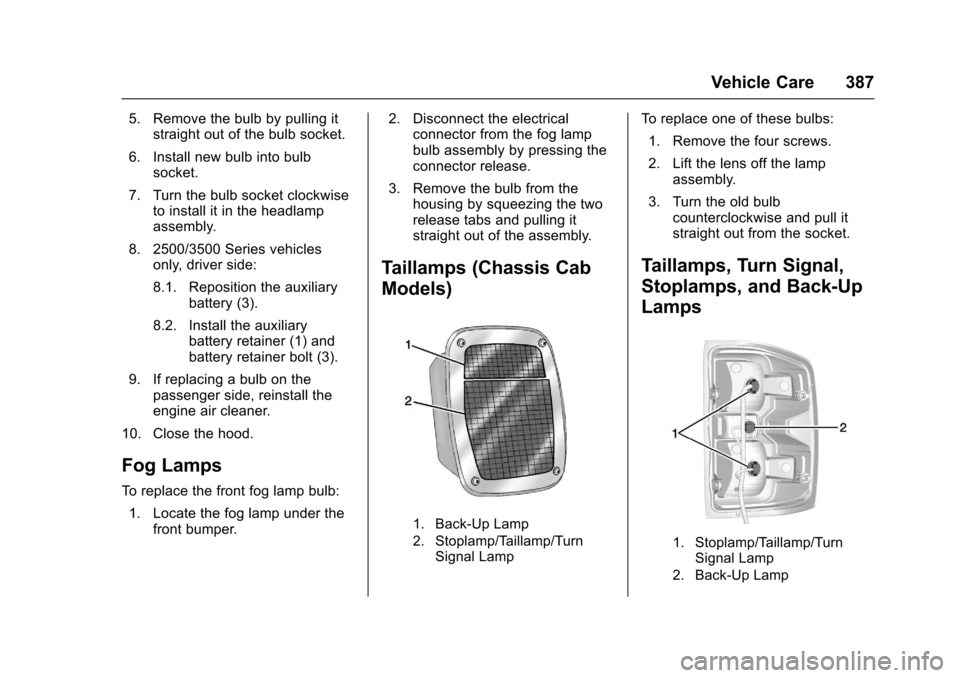
Taillamps (Chassis Cab
Models)
1. Back-Up Lamp
2. Stoplamp/Taillamp/TurnSignal Lamp
To r e p l a c e o n e o f t h e s e b u l b s :
1. Remove the four screws.
2. Lift the lens off the lampassembly.
3. Turn the old bulbcounterclockwise and pull itstraight out from the socket.
Taillamps, Turn Signal,
Stoplamps, and Back-Up
Lamps
1. Stoplamp/Taillamp/TurnSignal Lamp
2. Back-Up Lamp
Page 412 of 509
Chevrolet Silverado Owner Manual (GMNA-Localizing-U.S./Canada/Mexico-9956065) - 2017 - CRC - 4/29/16
Vehicle Care 411
3. Uplevel DIC Only: Make surethe Tire Pressure info pageoption is turned on. The infopages on the DIC can beturned on and off through theSettings menu. SeeDriverInformation Center (DIC) (BaseLevel)0145orDriverInformation Center (DIC)(Uplevel)0147.
4. If the vehicle has an uplevelDIC, use the DIC controls onthe right side of the steeringwheel to scroll to the TirePressure screen under the DICinfo page.
If the vehicle has a base levelDIC, use the trip odometerreset stem to scroll to the TirePressure screen.
5. If the vehicle has an uplevel
DIC, press and hold theV
(Set/Reset) button located inthe center of the DIC controls.
If the vehicle has a base levelDIC, press and hold the tripodometer reset stem for aboutfive seconds. A messageasking if the process should
begin should appear. Selectyes and press the tripodometer reset stem to confirmthe selection.
The horn sounds twice tosignal the receiver is in relearnmode and the TIRELEARNING ACTIVE messagedisplays on the DIC screen.
6. Start with the driver sidefront tire.
7. Place the relearn tool againstthe tire sidewall, near the valvestem. Then press the button toactivate the TPMS sensor.Ahornchirpconfirmsthatthesensor identification code hasbeen matched to this tire andwheel position.
8. Proceed to the passenger sidefront tire, and repeat theprocedure in Step 7.
9. Proceed to the passenger siderear tire, and repeat theprocedure in Step 7.
10. Proceed to the driver side reartire, and repeat the procedurein Step 7. The horn sounds two
times to indicate the sensoridentification code has beenmatched to the driver side reartire, and the TPMS sensormatching process is no longeractive. The TIRE LEARNINGACTIVE message on the DICdisplay screen goes off.
11 . Tu r n t h e i g n i t i o n s w i t c h t oLOCK/OFF.
12. Set all four tires to therecommended air pressurelevel as indicated on the Tireand Loading Information label.
Tire Inspection
We recommend that the tires,
including the spare tire, if the
vehicle has one, be inspected
for signs of wear or damage at
least once a month.
Replace the tire if:
.The indicators at three or
more places around the tire
can be seen.
Page 424 of 509
Chevrolet Silverado Owner Manual (GMNA-Localizing-U.S./Canada/Mexico-9956065) - 2017 - CRC - 4/29/16
Vehicle Care 423
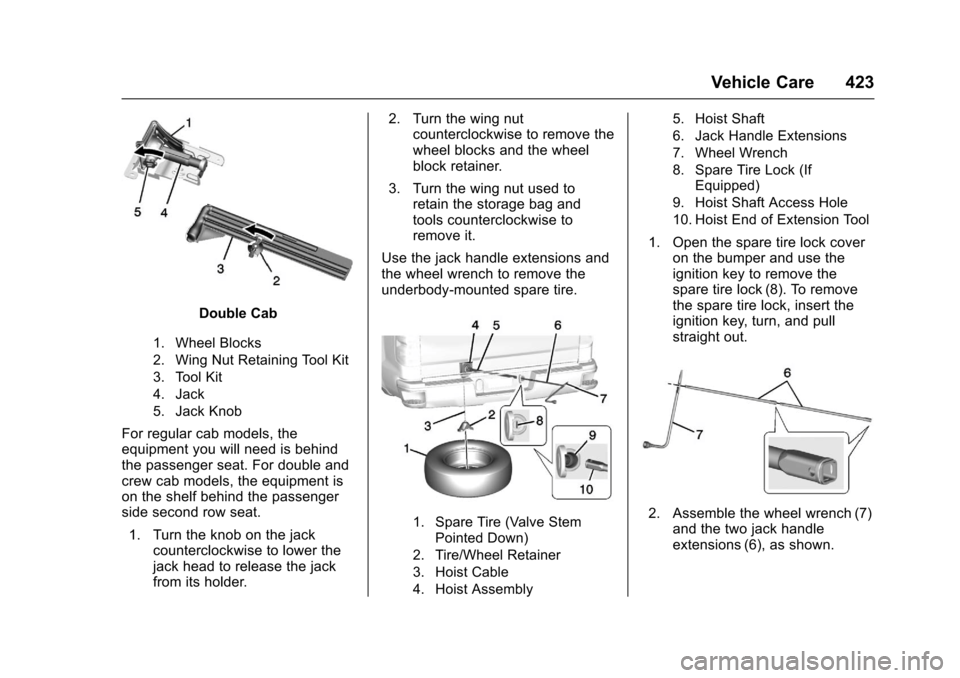
Double Cab
1. Wheel Blocks
2. Wing Nut Retaining Tool Kit
3. Tool Kit
4. Jack
5. Jack Knob
For regular cab models, theequipment you will need is behindthe passenger seat. For double andcrew cab models, the equipment ison the shelf behind the passengerside second row seat.
1. Turn the knob on the jackcounterclockwise to lower thejack head to release the jackfrom its holder.
2. Turn the wing nutcounterclockwise to remove thewheel blocks and the wheelblock retainer.
3. Turn the wing nut used toretain the storage bag andtools counterclockwise toremove it.
Use the jack handle extensions andthe wheel wrench to remove theunderbody-mounted spare tire.
1. Spare Tire (Valve StemPointed Down)
2. Tire/Wheel Retainer
3. Hoist Cable
4. Hoist Assembly
5. Hoist Shaft
6. Jack Handle Extensions
7. Wheel Wrench
8. Spare Tire Lock (IfEquipped)
9. Hoist Shaft Access Hole
10. Hoist End of Extension Tool
1. Open the spare tire lock coveron the bumper and use theignition key to remove thespare tire lock (8). To removethe spare tire lock, insert theignition key, turn, and pullstraight out.
2. Assemble the wheel wrench (7)and the two jack handleextensions (6), as shown.
Page 477 of 509
Chevrolet Silverado Owner Manual (GMNA-Localizing-U.S./Canada/Mexico-9956065) - 2017 - CRC - 4/29/16
476 Customer Information
.Retrieve your favorite articles,quizzes, tips, and multimediagalleries organized into theFeatured Articles and Auto CareSections.
.Download owner manuals.
.Find theChevrolet-recommendedmaintenance services.
GM Mobility
Reimbursement Program
This program is available toqualified applicants for costreimbursement of eligibleaftermarket adaptive equipmentrequired for the vehicle, such ashand controls or a wheelchair/scooter lift for the vehicle.
For more information on the limitedoffer, visit www.gmmobility.com orcall the GM Mobility AssistanceCenter at 1-800-323-9935. TextTe l e p h o n e ( T T Y ) u s e r s , c a l l1-800-833-9935.
General Motors of Canada also hasaMobilityProgram.Visitwww.gm.caor call 1-800-GM-DRIVE (463-7483)for details. TTY users call1-800-263-3830.
Roadside Assistance
Program
For U.S.-purchased vehicles, call1-800-243-8872. (Text Telephone(TTY): 1-888-889-2438.)
For Canadian-purchased vehicles,call 1-800-268-6800.
Service is available 24 hours a day,365 days a year.
Calling for Assistance
When calling Roadside Assistance,have the following informationready:
.Yo u r n a m e , h o m e a d d r e s s , a n dhome telephone number.
.Te l e p h o n e n u m b e r o f y o u rlocation.
.Location of the vehicle.
.Model, year, color, and licenseplate number of the vehicle.
.Odometer reading, VehicleIdentification Number (VIN), anddelivery date of the vehicle.
.Description of the problem.
Coverage
Services are provided for theduration of the vehicle’spowertrainwarranty.
In the U.S., anyone driving thevehicle is covered. In Canada, aperson driving the vehicle withoutpermission from the owner is notcovered.
Roadside Assistance is not a part ofthe New Vehicle Limited Warranty.General Motors North America andChevrolet reserve the right to makeany changes or discontinue theRoadside Assistance program atany time without notification.
Page 482 of 509
Chevrolet Silverado Owner Manual (GMNA-Localizing-U.S./Canada/Mexico-9956065) - 2017 - CRC - 4/29/16
Customer Information 481
.Vehicle license plate number.
.Vehicle make, model, andmodel year.
.Vehicle IdentificationNumber (VIN).
.Insurance company and policynumber.
.General description of thedamage to the other vehicle.
Choose a reputable repair facilitythat uses quality replacement parts.See“Collision Parts”earlier in thissection.
If the airbag has inflated, seeWhatWill You See after an AirbagInflates?079.
Managing the Vehicle Damage
Repair Process
In the event that the vehicle requiresdamage repairs, GM recommendsthat you take an active role in itsrepair. If you have a pre-determinedrepair facility of choice, take thevehicle there, or have it towed there.
Specify to the facility that anyrequired replacement collision partsbe original equipment parts, eithernew Genuine GM parts or recycledoriginal GM parts. Remember,recycled parts will not be covered bythe GM vehicle warranty.
Insurance pays the bill for the repair,but you must live with the repair.Depending on your policy limits,your insurance company mayinitially value the repair usingaftermarket parts. Discuss this withthe repair professional, and insist onGenuine GM parts. Remember,if the vehicle is leased, you may beobligated to have the vehiclerepaired with Genuine GM parts,even if your insurance coveragedoes not pay the full cost.
If another party's insurancecompany is paying for the repairs,you are not obligated to accept arepair valuation based on thatinsurance company's collision policyrepair limits, as you have nocontractual limits with that company.
In such cases, you can have controlof the repair and parts choices aslong as the cost stays withinreasonable limits.
Service Publications
Ordering Information
Service Manuals
Service Manuals have the diagnosisand repair information on theengines, transmission, axle,suspension, brakes, electrical,steering, body, etc.
Service Bulletins
Service Bulletins give additionaltechnical service informationneeded to knowledgeably serviceGeneral Motors cars and trucks.Each bulletin contains instructionsto assist in the diagnosis andservice of the vehicle.
Page 500 of 509

Chevrolet Silverado Owner Manual (GMNA-Localizing-U.S./Canada/Mexico-9956065) - 2017 - CRC - 4/29/16
Index 499
Customer Satisfaction
Procedure . . . . . . . . . . . . . . . . . . . . . 472
D
Damage Repair, Collision . . . . . . . 479
Danger, Warning, and Caution . . . . 3
Data Collection
Infotainment System . . . . . . . . . . 485
OnStar . . . . . . . . . . . . . . . . . . . . . . . 485
Data Recorders, Event . . . . . . . . . 484
Daytime Running
Lamps (DRL) . . . . . . . . . . . . . . . . . . 174
Defensive Driving . . . . . . . . . . . . . . . 248
Delayed Locking . . . . . . . . . . . . . . . . . 40
Diagnostics
OnStar®...................... 490
Distracted Driving . . . . . . . . . . . . . . . 247
Dome Lamps . . . . . . . . . . . . . . . . . . . 178
Door
Ajar Messages . . . . . . . . . . . . . . . 151
Delayed Locking . . . . . . . . . . . . . . . . 40
Locks . . . . . . . . . . . . . . . . . . . . . . . . . . . 39
Power Locks . . . . . . . . . . . . . . . . . . . . 40
Drive Belt Routing, Engine . . . . . . 471
Driver Assistance Systems . . . . . 301
Driver Information
Center (DIC) . . . . . . . . . . . . . 145, 147
Driving
Assistance Systems . . . . . . . . . . 304
Driving (cont'd)
Characteristics and
To w i n g T i p s . . . . . . . . . . . . . . . . . 3 1 5
Defensive . . . . . . . . . . . . . . . . . . . . . 248
Drunk . . . . . . . . . . . . . . . . . . . . . . . . . 248
For Better Fuel Economy . . . . . . . 31
Hill and Mountain Roads . . . . . . 256
If the Vehicle is Stuck . . . . . . . . . 258
Loss of Control . . . . . . . . . . . . . . . 250
Off-Road . . . . . . . . . . . . . . . . . . . . . 251
Off-Road Recovery . . . . . . . . . . . 250
Vehicle Load Limits . . . . . . . . . . . 259
Wet Roads . . . . . . . . . . . . . . . . . . . 255
Winter . . . . . . . . . . . . . . . . . . . . . . . . 257
Dual Automatic Climate
Control System . . . . . . . . . . . . . . . . 240
E
E85 or FlexFuel . . . . . . . . . . . . . . . . 312
Electrical Equipment,
Add-On . . . . . . . . . . . . . . . . . . . . . . . 345
Electrical System
Engine Compartment Fuse
Block . . . . . . . . . . . . . . . . . . . . . . . . 390
Fuses . . . . . . . . . . . . . . . . . . . . . . . . 390
Instrument Panel Fuse
Block . . . . . . . . . . . . . . . . . . . 393, 395
Overload . . . . . . . . . . . . . . . . . . . . . 389
Emergency
OnStar®...................... 487
Engine
Air Cleaner/Filter . . . . . . . . . . . . . 367
Check and Service Engine
Soon Light . . . . . . . . . . . . . . . . . . 138
Compartment Overview . . . . . . . 354
Coolant . . . . . . . . . . . . . . . . . . . . . . . 369
Coolant Heater . . . . . . . . . . . . . . . 272
Coolant Temperature
Gauge . . . . . . . . . . . . . . . . . . . . . . 133
Cooling System . . . . . . . . . . . . . . . 368
Cooling System Messages . . . 152
Drive Belt Routing . . . . . . . . . . . . 471
Exhaust . . . . . . . . . . . . . . . . . . . . . . 276
Fan . . . . . . . . . . . . . . . . . . . . . . . . . . . 374
Oil Life System . . . . . . . . . . . . . . . 362
Oil Messages . . . . . . . . . . . . . . . . . 152
Oil Pressure Gauge . . . . . . . . . . 132
Overheated Protection
Operating Mode . . . . . . . . . . . . . 374
Overheating . . . . . . . . . . . . . . . . . . 372
Power Messages . . . . . . . . . . . . . 153
Running While Parked . . . . . . . . 277
Starting . . . . . . . . . . . . . . . . . . . . . . . 269
Entry Lighting . . . . . . . . . . . . . . . . . . . 179
Equipment, Towing . . . . . . . . . . . . . 335
Event Data Recorders . . . . . . . . . . 484
Page 503 of 509

Chevrolet Silverado Owner Manual (GMNA-Localizing-U.S./Canada/Mexico-9956065) - 2017 - CRC - 4/29/16
502 Index
Lamps (cont'd)
Daytime Running (DRL) . . . . . . 174
Dome . . . . . . . . . . . . . . . . . . . . . . . . . 178
Exterior Controls . . . . . . . . . . . . . . 171
Exterior Lamps Off
Reminder . . . . . . . . . . . . . . . . . . . 173
Malfunction Indicator . . . . . . . . . 138
Messages . . . . . . . . . . . . . . . . . . . . 153
On Reminder . . . . . . . . . . . . . . . . . 145
Reading . . . . . . . . . . . . . . . . . . . . . . 178
Ta i l l a m p s . . . . . . . . . . . . . . . . . . . . . 3 8 7
Lane Departure
Warning (LDW) . . . . . . . . . . . . . . . . 307
Lane Departure Warning
Light . . . . . . . . . . . . . . . . . . . . . . . . . . 142
Lane Keep Assist (LKA) . . . . . . . . 309
Lane Keep Assist Light . . . . . . . . . 142
Lap Belt . . . . . . . . . . . . . . . . . . . . . . . . . 72
Lap-Shoulder Belt . . . . . . . . . . . . . . . 68
LATCH System
Replacing Parts after a
Crash . . . . . . . . . . . . . . . . . . . . . . . 102
LATCH, Lower Anchors and
Te t h e r s f o r C h i l d r e n . . . . . . . . . . . . 9 6
LED Lighting . . . . . . . . . . . . . . . . . . . . 386
Light
Hill Decent Control . . . . . . . . . . . 141
Lighting
Entry . . . . . . . . . . . . . . . . . . . . . . . . . 179
Exit . . . . . . . . . . . . . . . . . . . . . . . . . . . 179
Illumination Control . . . . . . . . . . . 177
LED . . . . . . . . . . . . . . . . . . . . . . . . . . 386
Lights . . . . . . . . . . . . . . . . . . . . . . . . . . . 142
Airbag On-Off . . . . . . . . . . . . . . . . . 136
Airbag Readiness . . . . . . . . . . . . . 135
Antilock Brake System
(ABS) Warning . . . . . . . . . . . . . . 141
Brake System Warning . . . . . . . 140
Charging System . . . . . . . . . . . . . 138
Cruise Control . . . . . . . . . . . . . . . . 145
Flash-to-Pass . . . . . . . . . . . . . . . . . 174
Four-Wheel-Drive . . . . . . . . . . . . . 141
Front Fog Lamp . . . . . . . . . . . . . . 145
High-Beam On . . . . . . . . . . . . . . . . 144
High/Low Beam Changer . . . . . 173
Lane Departure Warning . . . . . . 142
Low Fuel Warning . . . . . . . . . . . . 144
Safety Belt Reminders . . . . . . . . 134
Security . . . . . . . . . . . . . . . . . . . . . . 144
StabiliTrak®OFF . . . . . . . . . . . . . 143
Tire Pressure . . . . . . . . . . . . . . . . . 143
To w / H a u l M o d e . . . . . . . . . . . . . . . 1 4 1
Traction Control System
(TCS)/StabiliTrak®.......... 143
Traction Off . . . . . . . . . . . . . . . . . . . 142
Locking Rear Axle . . . . . . . . . . . . . . 298
Locks
Automatic Door . . . . . . . . . . . . . . . . . 41
Delayed Locking . . . . . . . . . . . . . . . . 40
Door . . . . . . . . . . . . . . . . . . . . . . . . . . . . 39
Lockout Protection . . . . . . . . . . . . . . 41
Power Door . . . . . . . . . . . . . . . . . . . . . 40
Safety . . . . . . . . . . . . . . . . . . . . . . . . . . 41
Loss of Control . . . . . . . . . . . . . . . . . 250
Low Fuel Warning Light . . . . . . . . . 144
Low-Profile Tires . . . . . . . . . . . . . . . . 399
Lower Anchors and Tethers
for Children (LATCH
System) . . . . . . . . . . . . . . . . . . . . . . . . 96
Lumbar Adjustment . . . . . . . . . . . . . . 59
Front Seats . . . . . . . . . . . . . . . . . . . . . 59
M
Maintenance
Records . . . . . . . . . . . . . . . . . . . . . . 466
Maintenance and Care
Additional . . . . . . . . . . . . . . . . . . . . . 459
Maintenance Schedule . . . . . . . . . 452
Recommended Fluids and
Lubricants . . . . . . . . . . . . . . . . . . . 462
Transfer Case . . . . . . . . . . . . . . . . 284
Malfunction Indicator Lamp . . . . . 138
Manual Mirrors . . . . . . . . . . . . . . . . . . 46
Manual Mode . . . . . . . . . . . . . . . . . . . 280