Transmission CHEVROLET SILVERADO 2017 3.G User Guide
[x] Cancel search | Manufacturer: CHEVROLET, Model Year: 2017, Model line: SILVERADO, Model: CHEVROLET SILVERADO 2017 3.GPages: 509, PDF Size: 8.87 MB
Page 158 of 509
Chevrolet Silverado Owner Manual (GMNA-Localizing-U.S./Canada/Mexico-9956065) - 2017 - CRC - 4/29/16
Instruments and Controls 157
Tire Messages
SERVICE TIRE MONITOR
SYSTEM
If equipped with the Tire PressureMonitor System (TPMS), thismessage displays if a part on thesystem is not working properly. Thetire pressure light also flashes andthen remains on during the sameignition cycle. SeeTire PressureLight0143.Severalconditionsmaycause this message to appear. SeeTire Pressure Monitor Operation0408.Ifthewarningcomesonandstays on, there may be a problemwith the TPMS. See your dealer.
TIRE LEARNING ACTIVE
If equipped with the Tire PressureMonitor System (TPMS), thismessage displays when the systemis relearning the tire positions onyour vehicle. The tire positions mustbe relearned after rotating the tiresor after replacing a tire or sensor.SeeTire Inspection0411,TireRotation0412,Tire PressureMonitor System0407,andTirePressure0405.
TIRE PRESSURE LOW ADD
AIR TO TIRE
If equipped with the Tire PressureMonitor System (TPMS), thismessage displays when thepressure in one or more of thevehicle's tires is low. This messagealso displays with a vehicle pictureto indicate the location of the lowtire. The low tire pressure warninglight will also come on. SeeTirePressure Light0143.Youcanreceive more than one tire pressuremessage at a time. If a tire pressuremessage appears on the DIC, stopas soon as you can. Have the tirepressures checked and set to thoseshown on the Tire and LoadingInformation label. SeeTires0397,Vehicle Load Limits0259,andTirePressure0405.TheDICalsoshows the tire pressure values. SeeDriver Information Center (DIC)(Base Level)0145orDriverInformation Center (DIC)(Uplevel)0147.
Transmission Messages
4WD OFF
If equipped with four-wheel drive,this message displays when thefour-wheel-drive system istemporarily disabled due to anoverheated condition. The vehiclewill run in two-wheel drive when thismessage is present. Once thefour-wheel-drive system cools down,the message turns off and thefour-wheel-drive system returns tonormal operation.
4WD SHIFT IN PROGRESS
This message will display while thefour-wheel-drive system is shifting.
FOR 4WD LOW SHIFT TO
NEUTRAL
If a four-wheel drive shift into 4nis
requested, and the vehicle speed iscorrect, but the transmission is notin N (Neutral), this message willdisplay until the transmission isshifted to N (Neutral).
Page 159 of 509
Chevrolet Silverado Owner Manual (GMNA-Localizing-U.S./Canada/Mexico-9956065) - 2017 - CRC - 4/29/16
158 Instruments and Controls
FOR 4WD LOW SLOW TO XXX
If a four-wheel drive shift into 4nis
requested, but the vehicle speed istoo high, this message will displayuntil the correct vehicle speed isreached.
GRADE BRAKING ACTIVE
This message displays when gradebraking has been activated whiledriving on downhill grades. Thismessage will only appear the firsttime the feature is activated in anignition cycle. SeeTo w / H a u l M o d e0282,Automatic Transmission0277,andCruise Control0298.
GRADE BRAKING OFF
This message displays when gradebraking has been disabled with theTo w / H a u l M o d e b u t t o n o n t h e e n d o fthe shift lever. SeeTo w / H a u l M o d e0282,Automatic Transmission0277,andCruise Control0298.
GRADE BRAKING ON
This message displays when gradebraking has been enabled with theTo w / H a u l M o d e b u t t o n o n t h e e n d o fthe shift lever. SeeTo w / H a u l M o d e0282,Automatic Transmission0277,andCruise Control0298.
SERVICE 4WD
If the vehicle has four-wheel drive,this message may display if aproblem occurs with thefour-wheel-drive system. If thismessage appears, stop as soon aspossible and turn off the vehicle.Make sure the key is in the LOCK/OFF position for at leastone minute, then restart the vehicleand check for the message on theDIC display. If the message is stilldisplayed or appears again whenyou begin driving, thefour-wheel-drive system needsservice. See your dealer.
SHIFT DENIED
This message displays when theshift lever is in M (Manual Mode)and a transmission range has beenselected that is unavailable at thecurrent vehicle speed.
TO EXIT 4WD LOW SHIFT TO
NEUTRAL
If a four-wheel drive shift out of 4nis
requested, and the vehicle speed iscorrect, but the transmission is notin N (Neutral), this message willdisplay until the transmission isshifted to N (Neutral).
TO EXIT 4WD LOW SLOW
TO XXX
If a four-wheel drive shift out of 4nis
requested, but the vehicle speed istoo high, this message will displayuntil the correct vehicle speed isreached.
Page 160 of 509
Chevrolet Silverado Owner Manual (GMNA-Localizing-U.S./Canada/Mexico-9956065) - 2017 - CRC - 4/29/16
Instruments and Controls 159
TRANSMISSION HOT IDLE
ENGINE
This message displays and a chimemay sound if the transmission fluidin the vehicle gets hot. Driving withthe transmission fluid temperaturehigh can cause damage to thevehicle. Stop the vehicle and let itidle to allow the transmission tocool. This message clears and thechime stops when the fluidtemperature reaches a safe level.
When towing, use Tow/Haul Modeto prevent damage to the engine ortransmission. SeeTo w / H a u lMode0282.
VEHICLE IN 4WD LOW
This message will display if the
vehicle is driven in 4nfor about
10 minutes above 72 km/h (45 mph).
Vehicle Reminder
Messages
CHECK TRAILER WIRING
On vehicles with the IntegratedTrailer Brake Control (ITBC) system,this message may display and achime may sound when one of thefollowing conditions exists:
.Atrailerwithelectricbrakesbecomes disconnected from thevehicle.
⇣If the disconnect occurs whilethe vehicle is stopped, thismessage clears itself after ashort time.
⇣If the disconnect occurs whilethe vehicle is moving, thismessage stays on until theignition is turned off.
.There is a short in the wiring tothe electric trailer brakes.
When this message displays, poweris no longer available to the trailerbrakes.
As soon as it is safe to do so,carefully pull the vehicle over to theside of the road and turn the ignitionoff. Check the wiring connection tothe trailer and turn the ignition backon. This message clears if the traileris reconnected. This message alsoclears if you acknowledge it. If thismessage still displays, either thevehicle or the trailer needs service.See your dealer.
See“Integrated Trailer BrakeControl System”underTo w i n gEquipment0335.
ICE POSSIBLE DRIVE
WITH CARE
This message displays when iceconditions are possible.
TRAILER CONNECTED
On vehicles with the IntegratedTrailer Brake Control (ITBC) system,this message displays briefly whenatrailerwithelectricorelectricoverhydraulic brakes is first connectedto the vehicle.
Page 165 of 509
Chevrolet Silverado Owner Manual (GMNA-Localizing-U.S./Canada/Mexico-9956065) - 2017 - CRC - 4/29/16
164 Instruments and Controls
Auto Mirror Folding
When on, the outside rearviewmirrors will automatically fold orunfold when the Remote KeylessEntry (RKE) transmitter lock orunlock button is pressed and held.
Select Off or On.
Lighting
Select and the following maydisplay:
.Vehicle Locator Lights
.Exit Lighting
Vehicle Locator Lights
This feature will flash the exteriorlamps and allows some of theexterior lamps and most of theinterior lamps to turn on briefly
whenKon the Remote Keyless
Entry (RKE) transmitter is pressedto locate the vehicle.
Select Off or On.
Exit Lighting
This allows the selection of howlong the exterior lamps stay onwhen leaving the vehicle when it isdark outside.
Select Off, 30 Seconds, 60Seconds, or 120 Seconds.
Power Door Locks
Select and the following maydisplay:
.Auto Door Unlock
.Delayed Door Lock
Auto Door Unlock
This allows selection of which of thedoors will automatically unlock whenthe vehicle is shifted into P (Park)with an automatic transmission orwhen the vehicle is turned off with amanual transmission.
Select Off, All Doors, or Driver Door.
Delayed Door Lock
When on, this feature will delay thelocking of the doors. To override thedelay, press the power door lockswitch on the door.
Select Off or On.
Remote Lock, Unlock, Start
Select and the following maydisplay:
.Remote Unlock Light Feedback
.Remote Lock Feedback
.Remote Door Unlock
.Remote Start Auto Cool Seats
.Remote Start Auto Heat Seats
.Remote Window Operation
.Passive Door Unlock
.Passive Door Lock
.Remote Left in Vehicle Alert
Remote Unlock Light Feedback
When on, the exterior lamps willflash when unlocking the vehiclewith the RKE transmitter.
Select Off or Flash Lights.
Remote Lock Feedback
This allows selection of what type offeedback is given when locking thevehicle with the RKE transmitter.
Page 169 of 509
Chevrolet Silverado Owner Manual (GMNA-Localizing-U.S./Canada/Mexico-9956065) - 2017 - CRC - 4/29/16
168 Instruments and Controls
Universal Remote
System
SeeRadio FrequencyStatement0482.
Universal Remote System
Programming
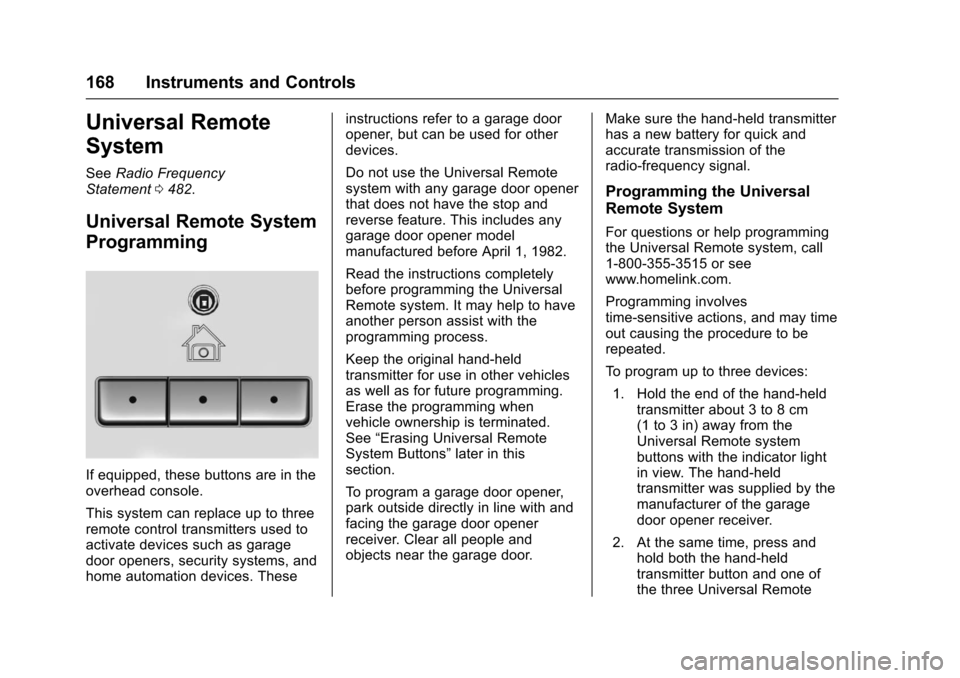
If equipped, these buttons are in theoverhead console.
This system can replace up to threeremote control transmitters used toactivate devices such as garagedoor openers, security systems, andhome automation devices. These
instructions refer to a garage dooropener, but can be used for otherdevices.
Do not use the Universal Remotesystem with any garage door openerthat does not have the stop andreverse feature. This includes anygarage door opener modelmanufactured before April 1, 1982.
Read the instructions completelybefore programming the UniversalRemote system. It may help to haveanother person assist with theprogramming process.
Keep the original hand-heldtransmitter for use in other vehiclesas well as for future programming.Erase the programming whenvehicle ownership is terminated.See“Erasing Universal RemoteSystem Buttons”later in thissection.
To p r o g r a m a g a r a g e d o o r o p e n e r ,park outside directly in line with andfacing the garage door openerreceiver. Clear all people andobjects near the garage door.
Make sure the hand-held transmitterhas a new battery for quick andaccurate transmission of theradio-frequency signal.
Programming the Universal
Remote System
For questions or help programmingthe Universal Remote system, call1-800-355-3515 or seewww.homelink.com.
Programming involvestime-sensitive actions, and may timeout causing the procedure to berepeated.
To p r o g r a m u p t o t h r e e d e v i c e s :
1. Hold the end of the hand-heldtransmitter about 3 to 8 cm(1 to 3 in) away from theUniversal Remote systembuttons with the indicator lightin view. The hand-heldtransmitter was supplied by themanufacturer of the garagedoor opener receiver.
2. At the same time, press andhold both the hand-heldtransmitter button and one ofthe three Universal Remote
Page 171 of 509
Chevrolet Silverado Owner Manual (GMNA-Localizing-U.S./Canada/Mexico-9956065) - 2017 - CRC - 4/29/16
170 Instruments and Controls
Radio Signals for Canada and
Some Gate Operators
For questions or programming help,call 1-800-355-3515 or seewww.homelink.com.
Canadian radio-frequency laws andsome U.S. gate operators requiretransmitter signals to time out or quitafter several seconds oftransmission. This may not be longenough for the Universal Remotesystem to pick up the signal duringprogramming.
If the programming did not work,replace Step 2 under“Programmingthe Universal Remote System”withthe following:
Press and hold the UniversalRemote system button whilepressing and releasing thehand-held transmitter button everytwo seconds until the signal hasbeen successfully accepted by theUniversal Remote system. TheUniversal Remote system indicatorlight will flash slowly at first and thenrapidly. Proceed with Step 3 under“Programming the Universal RemoteSystem”to complete.
Universal Remote System
Operation
Using the Universal Remote
System
Press and hold the appropriateUniversal Remote system button forat least one-half second. Theindicator light will come on while thesignal is being transmitted.
Erasing Universal Remote
System Buttons
Erase all programmed buttons whenvehicle ownership is terminated.
To e r a s e :
1. Press and hold the two outsidebuttons until the indicator lightbegins to flash. This shouldtake about 10 seconds.
2. Release both buttons.
Reprogramming a Single
Universal Remote System
Button
To r e p r o g r a m a n y o f t h e s y s t e mbuttons:
1. Press and hold any one of thebuttons. Do not release thebutton.
2. The indicator light will begin toflash after 20 seconds. Withoutreleasing the button, proceedwith Step 1 under“Programming the UniversalRemote System.”
Page 175 of 509
Chevrolet Silverado Owner Manual (GMNA-Localizing-U.S./Canada/Mexico-9956065) - 2017 - CRC - 4/29/16
174 Lighting
Flash-to-Pass
This feature lets you use thehigh-beam headlamps to signal adriver in front of you that you wantto pass. It works even if theheadlamps are in the automaticposition.
To u s e i t , p u l l t h e t u r n s i g n a l l e v e rtoward you, then release it.
If the headlamps are in theautomatic position or on low beam,the high-beam headlamps will turnon. Depending on the type ofheadlamp, they will either turn offafter a short duration or stay on aslong as you hold the lever towardyou. The high-beam indicator on theinstrument cluster will come on.Release the lever to return tonormal operation.
Daytime Running
Lamps (DRL)
DRL can make it easier for others tosee the front of the vehicle duringthe day. Fully functional DRL arerequired on all vehicles first sold inCanada.
The DRL system comes on whenthe following conditions are met:
.The ignition is on.
.The exterior lamp control isin AUTO.
.The transmission is not inP(Park).
.The light sensor determines it isdaytime.
When the DRL system is on, onlythe DRL are on. The taillamps,sidemarker lamps, instrument panellights, and other lamps will notbe on.
When it begins to get dark, theautomatic headlamp systemswitches from DRL to theheadlamps.
To t u r n o f f t h e D R L , t u r n t h e e x t e r i o rlamp control to the off position andthen release. For vehicles first soldin Canada, off will only work whenthe vehicle is in P (Park).
Automatic Headlamp
System
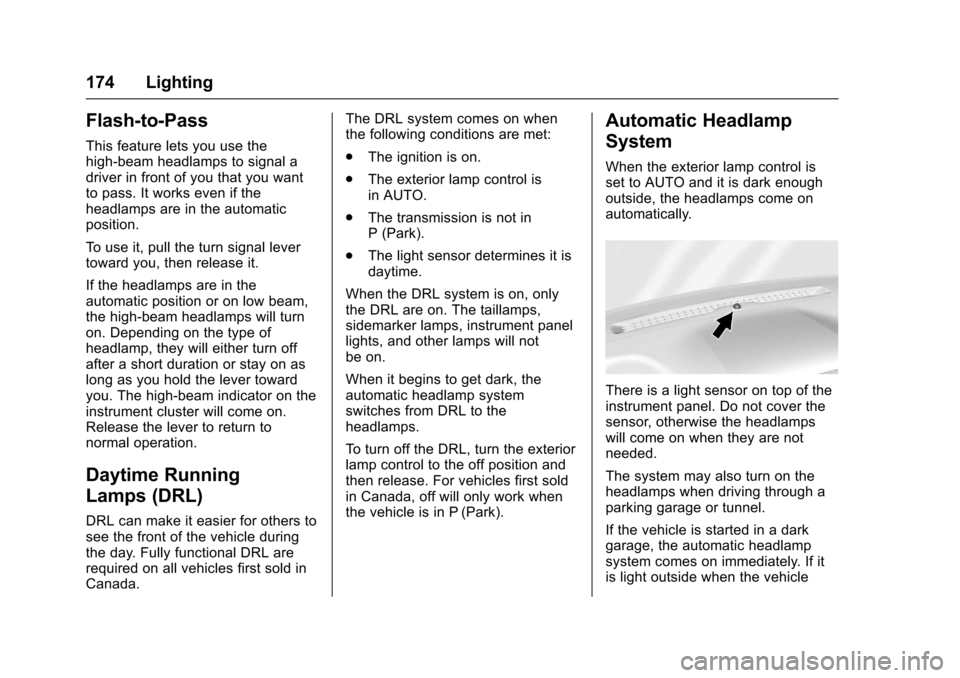
When the exterior lamp control isset to AUTO and it is dark enoughoutside, the headlamps come onautomatically.
There is a light sensor on top of theinstrument panel. Do not cover thesensor, otherwise the headlampswill come on when they are notneeded.
The system may also turn on theheadlamps when driving through aparking garage or tunnel.
If the vehicle is started in a darkgarage, the automatic headlampsystem comes on immediately. If itis light outside when the vehicle
Page 247 of 509
Chevrolet Silverado Owner Manual (GMNA-Localizing-U.S./Canada/Mexico-9956065) - 2017 - CRC - 4/29/16
246 Driving and Operating
Driving and
Operating
Driving Information
Distracted Driving . . . . . . . . . . . . 247Defensive Driving . . . . . . . . . . . . . 248Drunk Driving . . . . . . . . . . . . . . . . . 248Control of a Vehicle . . . . . . . . . . . 248Braking . . . . . . . . . . . . . . . . . . . . . . . 248Steering . . . . . . . . . . . . . . . . . . . . . . 249Off-Road Recovery . . . . . . . . . . . 250Loss of Control . . . . . . . . . . . . . . . 250Off-Road Driving . . . . . . . . . . . . . 251Driving on Wet Roads . . . . . . . . 255Hill and Mountain Roads . . . . . 256Winter Driving . . . . . . . . . . . . . . . . 257If the Vehicle Is Stuck . . . . . . . . 258Vehicle Load Limits . . . . . . . . . . . 259Truck-Camper LoadingInformation . . . . . . . . . . . . . . . . . . 265
Starting and Operating
New Vehicle Break-In . . . . . . . . . 267Adjustable Throttle and BrakePedal . . . . . . . . . . . . . . . . . . . . . . . 267Ignition Positions . . . . . . . . . . . . . 268Starting the Engine . . . . . . . . . . . 269Fast Idle System . . . . . . . . . . . . . 271
Retained AccessoryPower (RAP) . . . . . . . . . . . . . . . . 271Engine Coolant Heater . . . . . . . 272Shifting Into Park . . . . . . . . . . . . . 273Shifting out of Park . . . . . . . . . . . 275Parking (ManualTransmission) . . . . . . . . . . . . . . . 275Parking over ThingsThat Burn . . . . . . . . . . . . . . . . . . . 275Active Fuel Management®.... 275
Engine Exhaust
Engine Exhaust . . . . . . . . . . . . . . 276Running the Vehicle WhileParked . . . . . . . . . . . . . . . . . . . . . . 277
Automatic Transmission
Automatic Transmission . . . . . . 277Manual Mode . . . . . . . . . . . . . . . . . 280To w / H a u l M o d e . . . . . . . . . . . . . . . 2 8 2
Manual Transmission
Manual Transmission . . . . . . . . . 283
Drive Systems
Four-Wheel Drive . . . . . . . . . . . . . 284
Brakes
Antilock BrakeSystem (ABS) . . . . . . . . . . . . . . . 292Parking Brake . . . . . . . . . . . . . . . . 293Brake Assist . . . . . . . . . . . . . . . . . . 294
Hill Start Assist (HSA) . . . . . . . . 294
Ride Control Systems
Traction Control/ElectronicStability Control . . . . . . . . . . . . . 295Hill Descent Control (HDC) . . . 297Locking Rear Axle . . . . . . . . . . . . 298
Cruise Control
Cruise Control . . . . . . . . . . . . . . . . 298
Driver Assistance Systems
Driver Assistance Systems . . . 301Assistance Systems forParking or Backing . . . . . . . . . . 302Assistance Systems forDriving . . . . . . . . . . . . . . . . . . . . . . 304Forward Collision Alert (FCA)System . . . . . . . . . . . . . . . . . . . . . . 304Forward AutomaticBraking (FAB) . . . . . . . . . . . . . . . 306Lane Departure Warning(LDW) (2500/3500Series) . . . . . . . . . . . . . . . . . . . . . . 307Lane Keep Assist (LKA) (1500Series) . . . . . . . . . . . . . . . . . . . . . . 309
Fuel
Fuel . . . . . . . . . . . . . . . . . . . . . . . . . . 311California FuelRequirements . . . . . . . . . . . . . . . 312Fuels in Foreign Countries . . . 312
Page 254 of 509
Chevrolet Silverado Owner Manual (GMNA-Localizing-U.S./Canada/Mexico-9956065) - 2017 - CRC - 4/29/16
Driving and Operating 253
{Warning
Driving to the top of a hill at high
speed can cause an accident.
There could be a drop-off,
embankment, cliff, or even
another vehicle. You could be
seriously injured or killed. As you
near the top of a hill, slow down
and stay alert.
.Never go downhill forward orbackward with either thetransmission or transfer case inN(Neutral).Thebrakescouldoverheat and you could losecontrol.
{Warning
If the vehicle has the two⇣speed
automatic transfer case, shifting
the transfer case to N (Neutral)
can cause your vehicle to roll
even if the transmission is in
P(Park).Thisisbecausethe
N(Neutral)positiononthe
(Continued)
Warning (Continued)
transfer case overrides the
transmission. You or someone
else could be injured. If leaving
the vehicle, set the parking brake
and shift the transmission to
P(Park).Shiftthetransfercaseto
any position but N (Neutral).
.When driving down a hill, keepthe vehicle headed straightdown. Use a low gear becausethe engine will work with thebrakes to slow the vehicle andhelp keep the vehicle undercontrol.
{Warning
Heavy braking when going down
ahillcancauseyourbrakesto
overheat and fade. This could
cause loss of control and you or
others could be injured or killed.
Apply the brakes lightly when
(Continued)
Warning (Continued)
descending a hill and use a low
gear to keep vehicle speed under
control.
If the vehicle stalls on a hill:
1. Apply the brakes to stop thevehicle, and then apply theparking brake.
2. Shift into P (Park) and thenrestart the engine.
.If driving uphill when thevehicle stalls, shift toR(Reverse),releasetheparking brake, and backstraight down.
.Never try to turn the vehiclearound. If the hill is steepenough to stall the vehicle,it is steep enough to causeit to roll over.
.If you cannot make it up thehill, back straight downthe hill.
Page 257 of 509
Chevrolet Silverado Owner Manual (GMNA-Localizing-U.S./Canada/Mexico-9956065) - 2017 - CRC - 4/29/16
256 Driving and Operating
{Warning
Wet brakes can cause crashes.
They might not work as well in a
quick stop and could cause
pulling to one side. You could
lose control of the vehicle.
After driving through a large
puddle of water or a car/vehicle
wash, lightly apply the brake
pedal until the brakes work
normally.
Flowing or rushing water creates
strong forces. Driving through
flowing water could cause the
vehicle to be carried away. If this
happens, you and other vehicle
occupants could drown. Do not
ignore police warnings and be
very cautious about trying to drive
through flowing water.
Hydroplaning
Hydroplaning is dangerous. Watercan build up under the vehicle'stires so they actually ride on thewater. This can happen if the road iswet enough and you are going fastenough. When the vehicle ishydroplaning, it has little or nocontact with the road.
There is no hard and fast rule abouthydroplaning. The best advice is toslow down when the road is wet.
Other Rainy Weather Tips
Besides slowing down, other wetweather driving tips include:
.Allow extra following distance.
.Pass with caution.
.Keep windshield wipingequipment in good shape.
.Keep the windshield washer fluidreservoir filled.
.Have good tires with propertread depth. SeeTires0397.
.Turn off cruise control.
Hill and Mountain Roads
Driving on steep hills or throughmountains is different than drivingon flat or rolling terrain. Tips include:
.Keep the vehicle serviced and ingood shape.
.Check all fluid levels and brakes,tires, cooling system, andtransmission.
.Shift to a lower gear when goingdown steep or long hills.
{Warning
Using the brakes to slow the
vehicle on a long downhill slope
can cause brake overheating, can
reduce brake performance, and
could result in a loss of braking.
Shift the transmission to a lower
gear to let the engine assist the
brakes on a steep downhill slope.