automatic transmission CHEVROLET SILVERADO 2017 3.G Owners Manual
[x] Cancel search | Manufacturer: CHEVROLET, Model Year: 2017, Model line: SILVERADO, Model: CHEVROLET SILVERADO 2017 3.GPages: 509, PDF Size: 8.87 MB
Page 6 of 509
Chevrolet Silverado Owner Manual (GMNA-Localizing-U.S./Canada/Mexico-9956065) - 2017 - CRC - 4/29/16
In Brief 5
In Brief
Instrument Panel
Instrument Panel . . . . . . . . . . . . . . . . 6
Initial Drive Information
Initial Drive Information . . . . . . . . . . 8Remote Keyless Entry (RKE)System . . . . . . . . . . . . . . . . . . . . . . . . 8Remote Vehicle Start . . . . . . . . . . . 9Door Locks . . . . . . . . . . . . . . . . . . . . . 9Windows . . . . . . . . . . . . . . . . . . . . . . . 10Seat Adjustment . . . . . . . . . . . . . . . 11Memory Features . . . . . . . . . . . . . . 13Heated and Ventilated Seats . . . 13Head Restraint Adjustment . . . . 14Safety Belts . . . . . . . . . . . . . . . . . . . . 14Passenger Sensing System . . . 14Mirror Adjustment . . . . . . . . . . . . . . 15Steering Wheel Adjustment . . . . 16Interior Lighting . . . . . . . . . . . . . . . . 17Exterior Lighting . . . . . . . . . . . . . . . 18Windshield Wiper/Washer . . . . . . 18Climate Controls . . . . . . . . . . . . . . . 19Transmission . . . . . . . . . . . . . . . . . . 21Four-Wheel Drive . . . . . . . . . . . . . . 22
Vehicle Features
Infotainment System . . . . . . . . . . . 23Radio(s) . . . . . . . . . . . . . . . . . . . . . . . 23Satellite Radio . . . . . . . . . . . . . . . . . 24Portable Audio Devices . . . . . . . . 24Bluetooth®..................... 24Steering Wheel Controls . . . . . . . 25Cruise Control . . . . . . . . . . . . . . . . . 26Driver InformationCenter (DIC) . . . . . . . . . . . . . . . . . 26Forward Collision Alert (FCA)System . . . . . . . . . . . . . . . . . . . . . . . 27Forward AutomaticBraking (FAB) . . . . . . . . . . . . . . . . 27Lane DepartureWarning (LDW) . . . . . . . . . . . . . . . 27Lane Keep Assist (LKA) . . . . . . . 27Rear Vision Camera (RVC) . . . . 27Parking Assist . . . . . . . . . . . . . . . . . 28Power Outlets . . . . . . . . . . . . . . . . . 28Universal Remote System . . . . . 28Sunroof . . . . . . . . . . . . . . . . . . . . . . . . 29
Performance and Maintenance
Traction Control/ElectronicStability Control . . . . . . . . . . . . . . 29Tire Pressure Monitor . . . . . . . . . . 30Fuel (Except L86 6.2LEngine) . . . . . . . . . . . . . . . . . . . . . . . 30Fuel (L86 6.2L Engine) . . . . . . . . 30E85 or FlexFuel . . . . . . . . . . . . . . . . 31Engine Oil Life System . . . . . . . . 31Driving for Better FuelEconomy . . . . . . . . . . . . . . . . . . . . . 31Roadside AssistanceProgram . . . . . . . . . . . . . . . . . . . . . . 32
Page 9 of 509
Chevrolet Silverado Owner Manual (GMNA-Localizing-U.S./Canada/Mexico-9956065) - 2017 - CRC - 4/29/16
8 In Brief
Auxiliary Button (If Equipped).SeeAdd-On ElectricalEquipment0345.
17.Instrument Panel Storage011 5(If Equipped).
18.Climate Control Systems (withHeater Only)0237orClimateControl Systems (with AirConditioning)0238(IfEquipped).
Dual Automatic Climate ControlSystem0240(If Equipped).
19. Parking Brake Release(Manual Transmission Only, IfEquipped). SeeParkingBrake0293
20.Steering Wheel Controls0121(If Equipped).
Driver Information Center (DIC)Controls (If Equipped). SeeDriver Information Center (DIC)(Base Level)0145orDriverInformation Center (DIC)(Uplevel)0147.
21. Hood Release. SeeHood0353.
22.Horn0122.
23.Steering Wheel Adjustment0120(Out of View).
24.Cruise Control0298.
Forward Collision Alert (FCA)System0304(If Equipped).
25. Data Link Connector (DLC)(Out of View). SeeMalfunctionIndicator Lamp (Check EngineLight)0138.
26.Parking Brake0293.
27. Electronic Transfer CaseControl (If Equipped). SeeFour-Wheel Drive0284.
Card Holder (If Equipped). SeeInstrument PanelStorage011 5.
Initial Drive
Information
This section provides a briefoverview about some of theimportant features that may or maynot be on your specific vehicle.
For more detailed information, referto each of the features which can befound later in this owner manual.
Remote Keyless Entry
(RKE) System
The Remote Keyless Entry (RKE)transmitter functions may work fromup to 60 m (197 ft) away from thevehicle.
Page 22 of 509
Chevrolet Silverado Owner Manual (GMNA-Localizing-U.S./Canada/Mexico-9956065) - 2017 - CRC - 4/29/16
In Brief 21
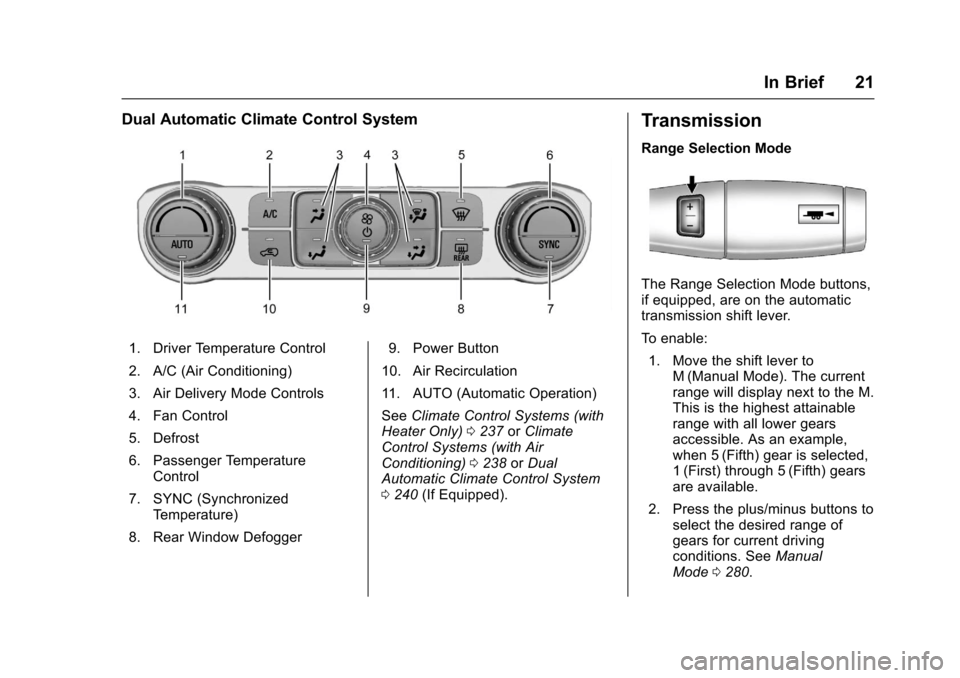
Dual Automatic Climate Control System
1. Driver Temperature Control
2. A/C (Air Conditioning)
3. Air Delivery Mode Controls
4. Fan Control
5. Defrost
6. Passenger TemperatureControl
7. SYNC (SynchronizedTe m p e r a t u r e )
8. Rear Window Defogger
9. Power Button
10. Air Recirculation
11 . A U T O ( A u t o m a t i c O p e r a t i o n )
SeeClimate Control Systems (withHeater Only)0237orClimateControl Systems (with AirConditioning)0238orDualAutomatic Climate Control System0240(If Equipped).
Transmission
Range Selection Mode
The Range Selection Mode buttons,if equipped, are on the automatictransmission shift lever.
To e n a b l e :
1. Move the shift lever toM(Manual Mode). The currentrange will display next to the M.This is the highest attainablerange with all lower gearsaccessible. As an example,when 5 (Fifth) gear is selected,1(First) through 5(Fifth) gearsare available.
2. Press the plus/minus buttons toselect the desired range ofgears for current drivingconditions. SeeManualMode0280.
Page 42 of 509
Chevrolet Silverado Owner Manual (GMNA-Localizing-U.S./Canada/Mexico-9956065) - 2017 - CRC - 4/29/16
Keys, Doors, and Windows 41
This feature will not operate if thekey is in the ignition.
Turn delayed locking on or off usingvehicle personalization. SeeVehiclePersonalization0160.
Automatic Door Locks
If equipped, the doors will lockautomatically when all doors areclosed, the ignition is on, and theshift lever is moved out of P (Park)for automatic transmissions orvehicle speed is above 13 km/h(8 mph) for manual transmissions.
To u n l o c k t h e d o o r s :
.PressKon a power door lock
switch.
.If equipped with an automatictransmission, shift thetransmission into P (Park)
.If equipped with manualtransmission, remove the keyfrom the ignition when parked.
Automatic Door locking cannot bedisabled. Automatic door unlockingcan be programmed. SeeVehiclePersonalization0160.
Lockout Protection
When locking is requested with thedriver door open and the key in theignition, all the doors will lock andthen the driver door will unlock.
This can be manually overridden by
pressing and holdingQon the
power door lock switch.
Safety Locks
The rear door safety locks preventpassengers from opening the reardoors from inside the vehicle.
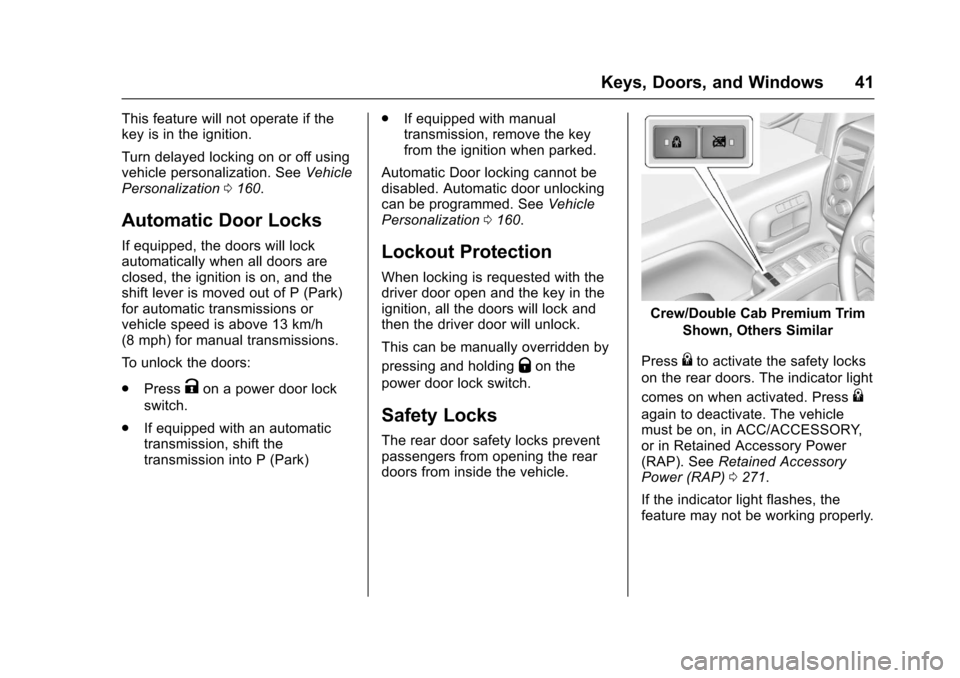
Crew/Double Cab Premium Trim
Shown, Others Similar
Press{to activate the safety locks
on the rear doors. The indicator light
comes on when activated. Press{
again to deactivate. The vehiclemust be on, in ACC/ACCESSORY,or in Retained Accessory Power(RAP). SeeRetained AccessoryPower (RAP)0271.
If the indicator light flashes, thefeature may not be working properly.
Page 148 of 509
Chevrolet Silverado Owner Manual (GMNA-Localizing-U.S./Canada/Mexico-9956065) - 2017 - CRC - 4/29/16
Instruments and Controls 147
Transmission Fluid Temperature
The temperature of the automatictransmission fluid displays in eitherdegrees Celsius (°C) or degreesFahrenheit (°F).
Trailer Brake
On vehicles with the IntegratedTrailer Brake Control (ITBC) system,turn the trip odometer reset stemuntil TRAILER GAIN and TRAILEROUTPUT displays.
TRAILER GAIN shows the TrailerGain setting. This setting can beadjusted from 0.0 to 10.0 with eitheratrailerconnectedordisconnected.
TRAILER OUTPUT shows thepower output to the trailer anytime atrailer with electric brakes isconnected. Output is displayed as abar graph. Dashes may appear inthe TRAILER OUTPUT display if atrailer is not connected.
Hourmeter
This display shows the total numberof hours the engine has run.
Unit
This will change the displays on theinstrument cluster and DIC to eithermetric or English (US)measurements. To change the units,press the trip odometer reset stemwhen UNITS is displayed to enterthe Unit menu. Turn the tripodometer reset stem to switchbetween English and metric. Pressthe trip odometer reset stem whenthe desired setting is displayed.
Compass
The vehicle may have a compass inthe Driver Information Center (DIC).SeeCompass0122.
Driver Information Center
(DIC) (Uplevel)
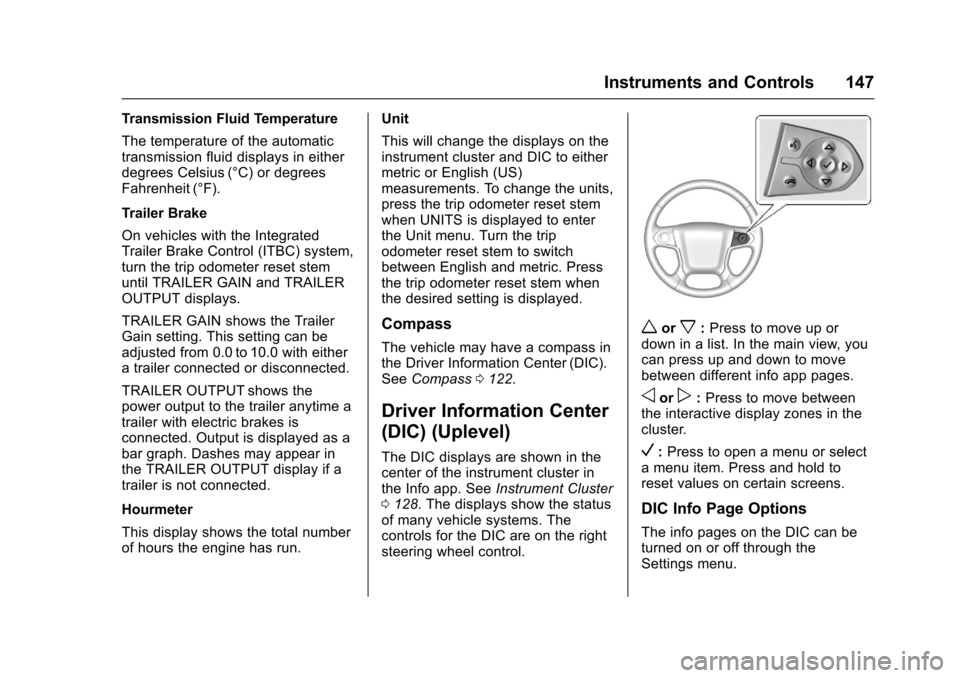
The DIC displays are shown in thecenter of the instrument cluster inthe Info app. SeeInstrument Cluster0128.Thedisplaysshowthestatusof many vehicle systems. Thecontrols for the DIC are on the rightsteering wheel control.
worx:Press to move up ordown in a list. In the main view, youcan press up and down to movebetween different info app pages.
oorp:Press to move betweenthe interactive display zones in thecluster.
V:Press to open a menu or selectamenuitem.Pressandholdtoreset values on certain screens.
DIC Info Page Options
The info pages on the DIC can beturned on or off through theSettings menu.
Page 150 of 509
Chevrolet Silverado Owner Manual (GMNA-Localizing-U.S./Canada/Mexico-9956065) - 2017 - CRC - 4/29/16
Instruments and Controls 149
the next oil change. To reset theengine oil life system, press and
holdVfor several seconds while
the Oil Life display is active. SeeEngine Oil Life System0362.
Tire Pressure :Shows theapproximate pressures of all fourtires. Tire pressure is displayed ineither kilopascal (kPa) or in poundsper square inch (psi). If the pressureis low, the value for that tire isshown in amber. SeeTire PressureMonitor System0407andTirePressure Monitor Operation0408.
Fuel Economy :The centerdisplays the approximateinstantaneous fuel economy as anumber and bar graph. Displayedabove the bar graph is a runningaverage of fuel economy for themost recently traveled selecteddistance. Displayed below the bargraph is the best average fueleconomy that has been achieved forthe selected distance. The selecteddistance is displayed at the top ofthe page as“last xxx mi/km.”Nextto the odometer, the Active FuelManagement displays the number of
cylinders the vehicle is runningon. SeeActive FuelManagement®0275.
Presspto select the distance or
reset best value. Usewandxto
choose the distance and pressV.
Presswandxto select“Reset
Best Score.”PressVto reset the
best average fuel economy. Afterreset, the momentary average fueleconomy will display.
The display provides information onhow current driving behavior affectsthe running average and how wellrecent driving compares to the bestthat has been achieved for theselected distance.
Timer :This display can be used as
atimer.Tostartthetimer,pressV
while this display is active. Thedisplay will show the amount of timethat has passed since the timer was
last reset. To stop the timer, pressV
briefly while this display is activeand the timer is running. To reset
the timer to zero, press and holdV
while this display is active, or presspand select reset.
Speed Limit (If Equipped) :Showssign information, which comes fromaroadwaydatabaseintheonboardnavigation.
Engine Hours :Shows the totalnumber of hours the engine has run.
Tr a n s m i s s i o n F l u i dTe m p e r a t u r e :Shows thetemperature of the automatictransmission fluid in either degreesCelsius (°C) or degreesFahrenheit (°F).
Tr a i l e r B r a k e ( I f E q u i p p e d ) :Onvehicles with the Integrated TrailerBrake Control (ITBC) system, thetrailer brake display appears inthe DIC.
TRAILER GAIN shows the trailergain setting. This setting can beadjusted from 0.0 to 10.0 with eitheratrailerconnectedordisconnected.
Page 153 of 509
Chevrolet Silverado Owner Manual (GMNA-Localizing-U.S./Canada/Mexico-9956065) - 2017 - CRC - 4/29/16
152 Instruments and Controls
obstructions, and close the dooragain. Check to see if the messagestill appears on the DIC.
HOOD OPEN
This message displays and a chimemay sound if the hood is not fullyclosed. Stop and turn off thevehicle, check the hood forobstructions, and close the hoodagain. Check to see if the messagestill appears on the DIC.
Engine Cooling System
Messages
A/C OFF DUE TO HIGH
ENGINE TEMP
This message displays when theengine coolant becomes hotter thanthe normal operating temperature.SeeEngine Coolant TemperatureGauge0133.Toavoidaddedstrainon a hot engine, the air conditioningcompressor automatically turns off.When the coolant temperaturereturns to normal, the airconditioning compressor turns backon. You can continue to drive yourvehicle.
If this message continues to appear,have the system repaired by yourdealer as soon as possible to avoiddamage to the engine.
ENGINE OVERHEATING IDLE
ENGINE
This message displays when theengine coolant temperature is toohot. Stop and allow the vehicle toidle until it cools down. SeeEngineCoolant Temperature Gauge0133.
When towing, use Tow/Haul modeto prevent damage to the engine ortransmission. SeeTo w / H a u lMode0282.
ENGINE OVERHEATED STOP
ENGINE
This message displays and a chimemay sound if the engine coolingsystem reaches unsafetemperatures for operation. Stopand turn off the vehicle as soon as itis safe to do so to avoid severedamage. This message clears whenthe engine has cooled to a safeoperating temperature.
Engine Oil Messages
CHANGE ENGINE OIL SOON
This message displays when theengine oil needs to be changed.When you change the engine oil, besure to reset the CHANGE ENGINEOIL SOON message. SeeEngineOil Life System0362forinformation on how to reset themessage. SeeEngine Oil0359andMaintenance Schedule0452.
ENGINE OIL LOW ADD OIL
On some vehicles, this messagedisplays when the engine oil levelmay be too low. Check the oil levelbefore filling to the recommendedlevel. If the oil is not low and thismessage remains on, take thevehicle to your dealer for service.SeeEngine Oil0359.
ENGINE OIL HOT IDLE
ENGINE
This message displays when theengine oil becomes hotter than thenormal operating temperature. Stop
Page 159 of 509
Chevrolet Silverado Owner Manual (GMNA-Localizing-U.S./Canada/Mexico-9956065) - 2017 - CRC - 4/29/16
158 Instruments and Controls
FOR 4WD LOW SLOW TO XXX
If a four-wheel drive shift into 4nis
requested, but the vehicle speed istoo high, this message will displayuntil the correct vehicle speed isreached.
GRADE BRAKING ACTIVE
This message displays when gradebraking has been activated whiledriving on downhill grades. Thismessage will only appear the firsttime the feature is activated in anignition cycle. SeeTo w / H a u l M o d e0282,Automatic Transmission0277,andCruise Control0298.
GRADE BRAKING OFF
This message displays when gradebraking has been disabled with theTo w / H a u l M o d e b u t t o n o n t h e e n d o fthe shift lever. SeeTo w / H a u l M o d e0282,Automatic Transmission0277,andCruise Control0298.
GRADE BRAKING ON
This message displays when gradebraking has been enabled with theTo w / H a u l M o d e b u t t o n o n t h e e n d o fthe shift lever. SeeTo w / H a u l M o d e0282,Automatic Transmission0277,andCruise Control0298.
SERVICE 4WD
If the vehicle has four-wheel drive,this message may display if aproblem occurs with thefour-wheel-drive system. If thismessage appears, stop as soon aspossible and turn off the vehicle.Make sure the key is in the LOCK/OFF position for at leastone minute, then restart the vehicleand check for the message on theDIC display. If the message is stilldisplayed or appears again whenyou begin driving, thefour-wheel-drive system needsservice. See your dealer.
SHIFT DENIED
This message displays when theshift lever is in M (Manual Mode)and a transmission range has beenselected that is unavailable at thecurrent vehicle speed.
TO EXIT 4WD LOW SHIFT TO
NEUTRAL
If a four-wheel drive shift out of 4nis
requested, and the vehicle speed iscorrect, but the transmission is notin N (Neutral), this message willdisplay until the transmission isshifted to N (Neutral).
TO EXIT 4WD LOW SLOW
TO XXX
If a four-wheel drive shift out of 4nis
requested, but the vehicle speed istoo high, this message will displayuntil the correct vehicle speed isreached.
Page 165 of 509
Chevrolet Silverado Owner Manual (GMNA-Localizing-U.S./Canada/Mexico-9956065) - 2017 - CRC - 4/29/16
164 Instruments and Controls
Auto Mirror Folding
When on, the outside rearviewmirrors will automatically fold orunfold when the Remote KeylessEntry (RKE) transmitter lock orunlock button is pressed and held.
Select Off or On.
Lighting
Select and the following maydisplay:
.Vehicle Locator Lights
.Exit Lighting
Vehicle Locator Lights
This feature will flash the exteriorlamps and allows some of theexterior lamps and most of theinterior lamps to turn on briefly
whenKon the Remote Keyless
Entry (RKE) transmitter is pressedto locate the vehicle.
Select Off or On.
Exit Lighting
This allows the selection of howlong the exterior lamps stay onwhen leaving the vehicle when it isdark outside.
Select Off, 30 Seconds, 60Seconds, or 120 Seconds.
Power Door Locks
Select and the following maydisplay:
.Auto Door Unlock
.Delayed Door Lock
Auto Door Unlock
This allows selection of which of thedoors will automatically unlock whenthe vehicle is shifted into P (Park)with an automatic transmission orwhen the vehicle is turned off with amanual transmission.
Select Off, All Doors, or Driver Door.
Delayed Door Lock
When on, this feature will delay thelocking of the doors. To override thedelay, press the power door lockswitch on the door.
Select Off or On.
Remote Lock, Unlock, Start
Select and the following maydisplay:
.Remote Unlock Light Feedback
.Remote Lock Feedback
.Remote Door Unlock
.Remote Start Auto Cool Seats
.Remote Start Auto Heat Seats
.Remote Window Operation
.Passive Door Unlock
.Passive Door Lock
.Remote Left in Vehicle Alert
Remote Unlock Light Feedback
When on, the exterior lamps willflash when unlocking the vehiclewith the RKE transmitter.
Select Off or Flash Lights.
Remote Lock Feedback
This allows selection of what type offeedback is given when locking thevehicle with the RKE transmitter.
Page 175 of 509
Chevrolet Silverado Owner Manual (GMNA-Localizing-U.S./Canada/Mexico-9956065) - 2017 - CRC - 4/29/16
174 Lighting
Flash-to-Pass
This feature lets you use thehigh-beam headlamps to signal adriver in front of you that you wantto pass. It works even if theheadlamps are in the automaticposition.
To u s e i t , p u l l t h e t u r n s i g n a l l e v e rtoward you, then release it.
If the headlamps are in theautomatic position or on low beam,the high-beam headlamps will turnon. Depending on the type ofheadlamp, they will either turn offafter a short duration or stay on aslong as you hold the lever towardyou. The high-beam indicator on theinstrument cluster will come on.Release the lever to return tonormal operation.
Daytime Running
Lamps (DRL)
DRL can make it easier for others tosee the front of the vehicle duringthe day. Fully functional DRL arerequired on all vehicles first sold inCanada.
The DRL system comes on whenthe following conditions are met:
.The ignition is on.
.The exterior lamp control isin AUTO.
.The transmission is not inP(Park).
.The light sensor determines it isdaytime.
When the DRL system is on, onlythe DRL are on. The taillamps,sidemarker lamps, instrument panellights, and other lamps will notbe on.
When it begins to get dark, theautomatic headlamp systemswitches from DRL to theheadlamps.
To t u r n o f f t h e D R L , t u r n t h e e x t e r i o rlamp control to the off position andthen release. For vehicles first soldin Canada, off will only work whenthe vehicle is in P (Park).
Automatic Headlamp
System
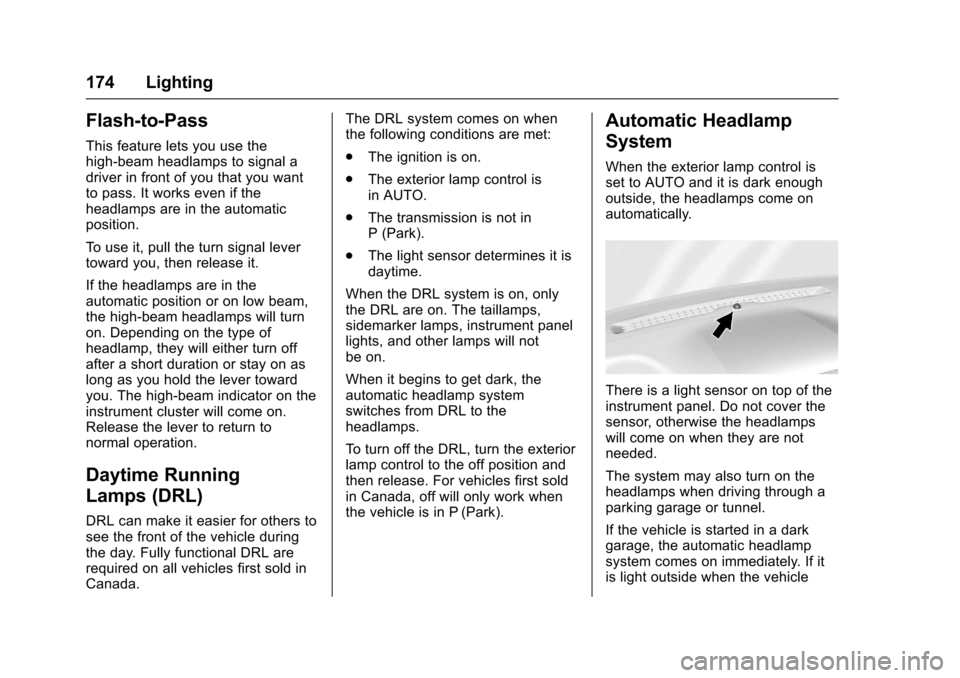
When the exterior lamp control isset to AUTO and it is dark enoughoutside, the headlamps come onautomatically.
There is a light sensor on top of theinstrument panel. Do not cover thesensor, otherwise the headlampswill come on when they are notneeded.
The system may also turn on theheadlamps when driving through aparking garage or tunnel.
If the vehicle is started in a darkgarage, the automatic headlampsystem comes on immediately. If itis light outside when the vehicle