clock CHEVROLET SILVERADO 2017 3.G User Guide
[x] Cancel search | Manufacturer: CHEVROLET, Model Year: 2017, Model line: SILVERADO, Model: CHEVROLET SILVERADO 2017 3.GPages: 509, PDF Size: 8.87 MB
Page 242 of 509
Chevrolet Silverado Owner Manual (GMNA-Localizing-U.S./Canada/Mexico-9956065) - 2017 - CRC - 4/29/16
Climate Controls 241
The recirculation light will not comeon when automatically controlled.
Press@to manually select
recirculation; press it again to selectoutside air.
Do not cover the solar sensor on thetop of the instrument panel near thewindshield. This sensor regulatesair temperature based on sun load.See“Sensors”later in this section.
Manual Operation
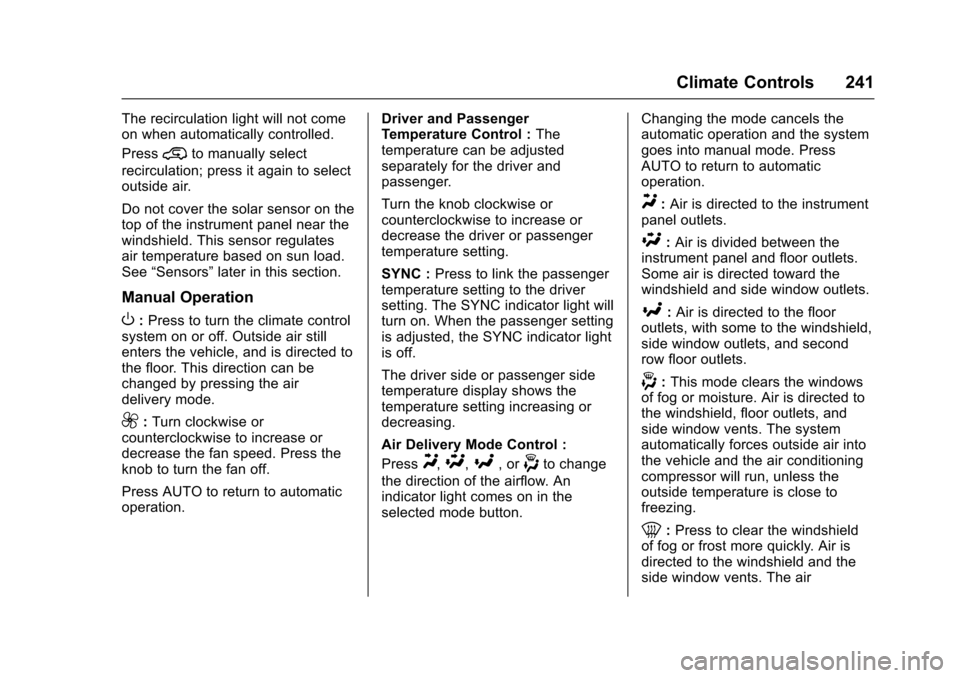
O:Press to turn the climate controlsystem on or off. Outside air stillenters the vehicle, and is directed tothe floor. This direction can bechanged by pressing the airdelivery mode.
9:Turn clockwise orcounterclockwise to increase ordecrease the fan speed. Press theknob to turn the fan off.
Press AUTO to return to automaticoperation.
Driver and PassengerTe m p e r a t u r e C o n t r o l :Thetemperature can be adjustedseparately for the driver andpassenger.
Turn the knob clockwise orcounterclockwise to increase ordecrease the driver or passengertemperature setting.
SYNC :Press to link the passengertemperature setting to the driversetting. The SYNC indicator light willturn on. When the passenger settingis adjusted, the SYNC indicator lightis off.
The driver side or passenger sidetemperature display shows thetemperature setting increasing ordecreasing.
Air Delivery Mode Control :
PressY,\,[,or-to change
the direction of the airflow. Anindicator light comes on in theselected mode button.
Changing the mode cancels theautomatic operation and the systemgoes into manual mode. PressAUTO to return to automaticoperation.
Y:Air is directed to the instrumentpanel outlets.
\:Air is divided between theinstrument panel and floor outlets.Some air is directed toward thewindshield and side window outlets.
[:Air is directed to the flooroutlets, with some to the windshield,side window outlets, and secondrow floor outlets.
-:This mode clears the windowsof fog or moisture. Air is directed tothe windshield, floor outlets, andside window vents. The systemautomatically forces outside air intothe vehicle and the air conditioningcompressor will run, unless theoutside temperature is close tofreezing.
0:Press to clear the windshieldof fog or frost more quickly. Air isdirected to the windshield and theside window vents. The air
Page 289 of 509
Chevrolet Silverado Owner Manual (GMNA-Localizing-U.S./Canada/Mexico-9956065) - 2017 - CRC - 4/29/16
288 Driving and Operating
1. The ignition must be in ON/RUN and the vehicle must bestopped or moving less than5km/h (3mph) with thetransmission in N (Neutral). It isbest for the vehicle to bemoving 1.6 to 3.2 km/h(1 to 2 mph).
2. Turn the knob to 4n.Waitfor
the 4nindicator light to stop
flashing before shifting thetransmission into gear.
If the transmission is in gear and/ormoving more than 5 km/h (3 mph),
the 4nindicator light will flash for
30 seconds and not complete theshift. After 30 seconds the transfer
case will shift to 4m.Turntheknob
to 4mto see the indicator. With the
vehicle moving less than 5 km/h(3 mph), and the transmission inN(Neutral), attempt the shift again.
Shifting Out of 4n
1. To shift out of 4nthe vehicle
must be stopped or movingless than 5 km/h (3 mph) withthe transmission in N (Neutral)
and the ignition in ON/RUN.It is best for the vehicle to bemoving 1.6 to 3.2 km/h(1 to 2 mph).
2. Turn the knob to 4mor 2m.
Wait for the 4mor 2mindicator
light to stop flashing beforeshifting the transmissioninto gear.
If the transmission is in gear and/ormoving more than 5 km/h (3 mph),
the 4mor 2mindicator light will flash
for 30 seconds, but will not completethe shift. With the vehicle movingless than 5 km/h (3 mph), and thetransmission in N (Neutral), attemptthe shift again.
Shifting Into N (Neutral)
To s h i f t :
1. Park the vehicle on a levelsurface.
2. Set the parking brake andpress and hold the brakepedal. SeeParkingBrake0293.
3. Start the vehicle or turn theignition to ON/RUN.
4. Shift the transmission toN(Neutral).
5. Shift the transfer case to 2m.
6. Turn the transfer case knobclockwise to N (Neutral) until itstops and hold it there until theN(Neutral) light starts blinking.This will take at least10 seconds. Then slowly
release the dial to the 4n
position. The N (Neutral) lightwill come on when the transfercase shift to N (Neutral) iscomplete.
7. With the engine running, verifythat the transfer case is inN(Neutral) by shifting thetransmission to R (Reverse),then to D (Drive). There shouldbe no movement of the vehiclewhile shifting the transmission.
8. Turn the engine off, and theignition to ACC/ACCESSORY.
9. Place the transmission shiftlever in P (Park). SeeRecreational VehicleTo w i n g0437.
Page 292 of 509
Chevrolet Silverado Owner Manual (GMNA-Localizing-U.S./Canada/Mexico-9956065) - 2017 - CRC - 4/29/16
Driving and Operating 291
If the transmission is in gear and/ormoving more than 5 km/h (3 mph),
the 4nindicator light will flash for
30 seconds and not complete theshift. After 30 seconds the transfer
case will shift to 4m.Turntheknob
to 4mto display the indicator. With
the vehicle moving less than 5 km/h(3 mph), and the transmission inN(Neutral), attempt the shift again.
Shifting Out of 4n
To s h i f t :
1. The vehicle must be stopped ormoving less than 5 km/h(3 mph) with the transmissionin N (Neutral) and the ignition inON/RUN. It is best for thevehicle to be moving1.6 to 3.2 km/h (1 to 2 mph).
2. Turn the knob to 4m,AUTO,
or 2m.Waitforthe4m,AUTO,
or 2mindicator light to stop
flashing before shifting thetransmission into gear.
Caution
Shifting the transmission into gear
before the requested mode
indicator light has stopped
flashing could damage the
transfer case.
If the transmission is in gear and/ormoving more than 5 km/h (3 mph),
the 4m,AUTO,or2mindicator light
will flash for 30 seconds but will notcomplete the shift. With the vehiclemoving less than 5 km/h (3 mph),and the transmission in N (Neutral),attempt the shift again.
Shifting Into N (Neutral)
To s h i f t i n t o N ( N e u t r a l ) :
1. Park the vehicle on a levelsurface.
2. Set the parking brake andpress and hold the brakepedal. SeeParkingBrake0293.
3. Start the vehicle or turn theignition to ON/RUN.
4. Shift the transmission toN(Neutral).
5. Shift the transfer case to 2m.
6. Turn the transfer case knobclockwise to N (Neutral) until itstops and hold it there until theN(Neutral) light starts blinking.This will take at least10 seconds. Then slowly
release the dial to the 4n
position. The N (Neutral) lightwill come on when the transfercase shift to N (Neutral) iscomplete.
7. With the engine running, verifythat the transfer case is inN(Neutral) by shifting thetransmission to R (Reverse),then shift the transmission toD(Drive). There should be nomovement of the vehicle whileshifting the transmission.
8. Turn the engine off, and theignition to ACC/ACCESSORY.
9. Place the transmission shiftlever in P (Park). SeeRecreational VehicleTo w i n g0437.
Page 372 of 509
Chevrolet Silverado Owner Manual (GMNA-Localizing-U.S./Canada/Mexico-9956065) - 2017 - CRC - 4/29/16
Vehicle Care 371
the FULL COLD mark. If it is not,there may be a leak in the coolingsystem.
If coolant is visible but the coolantlevel is not at or above the FULLCOLD mark, see“How to AddCoolant to the Coolant Surge Tankfor Gasoline Engines,”following.
How to Add Coolant to the
Coolant Surge Tank for
Gasoline Engines
If the vehicle has a diesel engine,see“Cooling System”in theDuramax diesel supplement for theproper coolant fill procedure.
{Warning
Yo u c a n b e b u r n e d i f y o u s p i l l
coolant on hot engine parts.
Coolant contains ethylene glycol
and it will burn if the engine parts
are hot enough. Do not spill
coolant on a hot engine.
Caution
This vehicle has a specific
coolant fill procedure. Failure to
follow this procedure could cause
the engine to overheat and be
severely damaged.
{Warning
Steam and scalding liquids from a
hot cooling system can blow out
and burn you badly. Never turn
the cap when the cooling system,
including the surge tank pressure
cap, is hot. Wait for the cooling
system and surge tank pressure
cap to cool.
If no coolant is visible in the surgetank, add coolant.
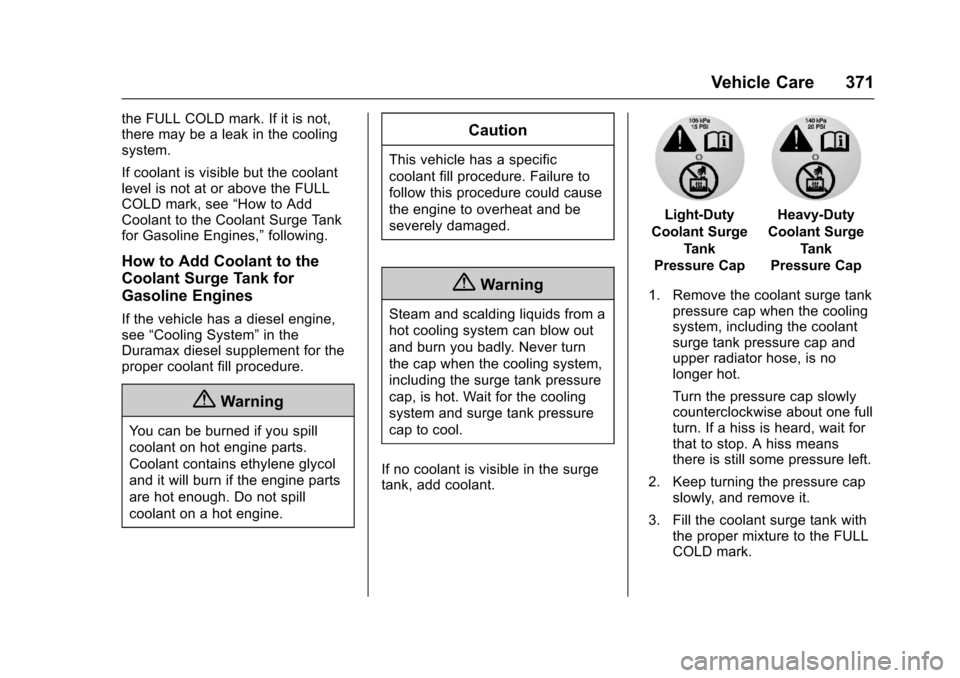
Light-Duty
Coolant Surge
Tank
Pressure Cap
Heavy-Duty
Coolant Surge
Tank
Pressure Cap
1. Remove the coolant surge tankpressure cap when the coolingsystem, including the coolantsurge tank pressure cap andupper radiator hose, is nolonger hot.
Turn the pressure cap slowlycounterclockwise about one fullturn. If a hiss is heard, wait forthat to stop. A hiss meansthere is still some pressure left.
2. Keep turning the pressure capslowly, and remove it.
3. Fill the coolant surge tank withthe proper mixture to the FULLCOLD mark.
Page 387 of 509
Chevrolet Silverado Owner Manual (GMNA-Localizing-U.S./Canada/Mexico-9956065) - 2017 - CRC - 4/29/16
386 Vehicle Care
High Intensity Discharge
(HID) Lighting
{Warning
The High Intensity Discharge
(HID) lighting system operates at
averyhighvoltage.Ifyoutryto
service any of the system
components, you could be
seriously injured. Have your
dealer or a qualified technician
service them.
After an HID headlamp bulb hasbeen replaced, the beam might be aslightly different shade than it wasoriginally. This is normal.
LED Lighting
This vehicle has several LED lamps.For replacement of any LED lightingassembly, contact your dealer.
Headlamps, Front Turn
Signal, Sidemarker, and
Parking Lamps
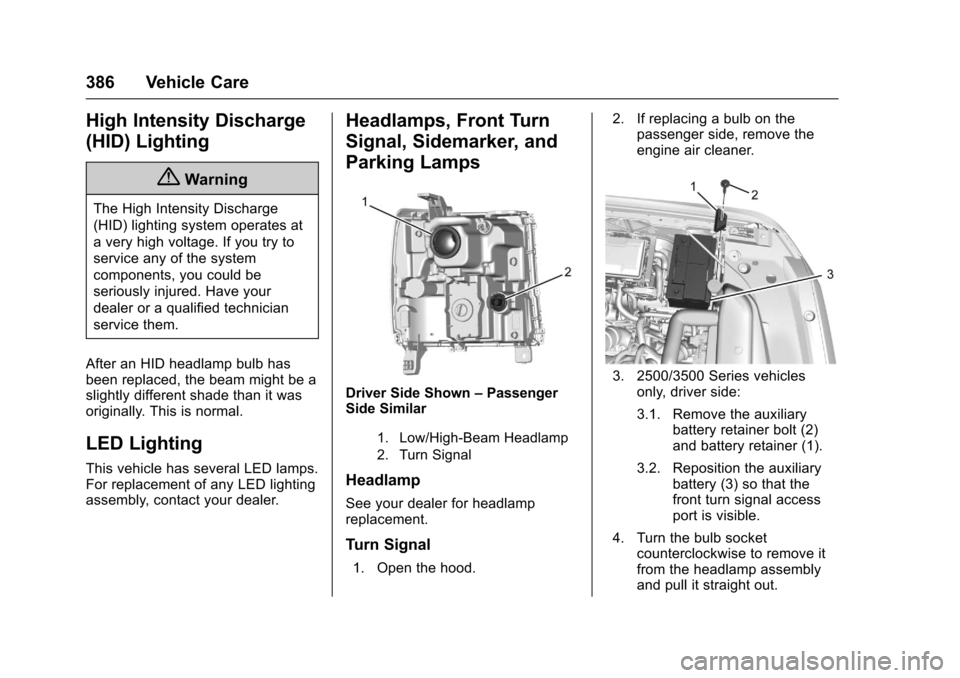
Driver Side Shown–PassengerSide Similar
1. Low/High-Beam Headlamp
2. Turn Signal
Headlamp
See your dealer for headlampreplacement.
Turn Signal
1. Open the hood.
2. If replacing a bulb on thepassenger side, remove theengine air cleaner.
3. 2500/3500 Series vehiclesonly, driver side:
3.1. Remove the auxiliarybattery retainer bolt (2)and battery retainer (1).
3.2. Reposition the auxiliarybattery (3) so that thefront turn signal accessport is visible.
4. Turn the bulb socketcounterclockwise to remove itfrom the headlamp assemblyand pull it straight out.
Page 388 of 509
Chevrolet Silverado Owner Manual (GMNA-Localizing-U.S./Canada/Mexico-9956065) - 2017 - CRC - 4/29/16
Vehicle Care 387
5. Remove the bulb by pulling itstraight out of the bulb socket.
6. Install new bulb into bulbsocket.
7. Turn the bulb socket clockwiseto install it in the headlampassembly.
8. 2500/3500 Series vehiclesonly, driver side:
8.1. Reposition the auxiliarybattery (3).
8.2. Install the auxiliarybattery retainer (1) andbattery retainer bolt (3).
9. If replacing a bulb on thepassenger side, reinstall theengine air cleaner.
10. Close the hood.
Fog Lamps
To r e p l a c e t h e f r o n t f o g l a m p b u l b :
1. Locate the fog lamp under thefront bumper.
2. Disconnect the electricalconnector from the fog lampbulb assembly by pressing theconnector release.
3. Remove the bulb from thehousing by squeezing the tworelease tabs and pulling itstraight out of the assembly.
Taillamps (Chassis Cab
Models)
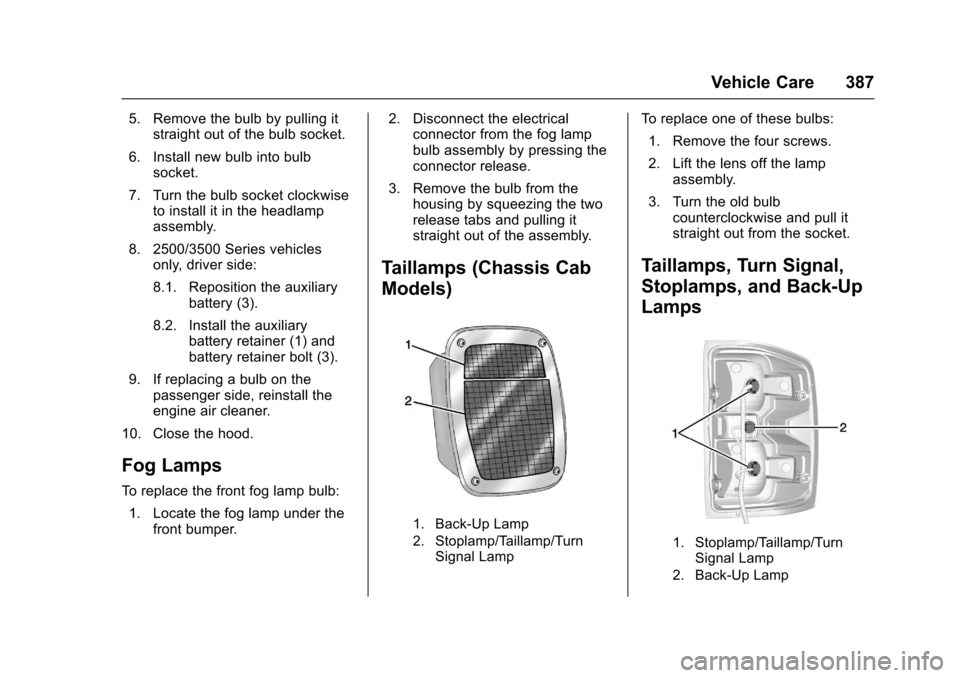
1. Back-Up Lamp
2. Stoplamp/Taillamp/TurnSignal Lamp
To r e p l a c e o n e o f t h e s e b u l b s :
1. Remove the four screws.
2. Lift the lens off the lampassembly.
3. Turn the old bulbcounterclockwise and pull itstraight out from the socket.
Taillamps, Turn Signal,
Stoplamps, and Back-Up
Lamps
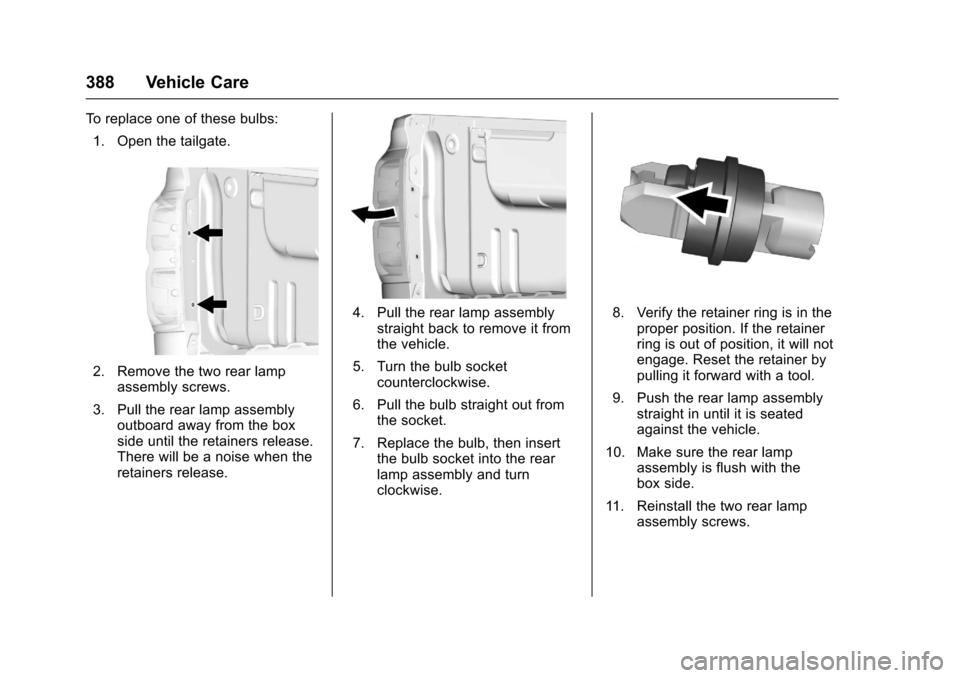
1. Stoplamp/Taillamp/TurnSignal Lamp
2. Back-Up Lamp
Page 389 of 509
Chevrolet Silverado Owner Manual (GMNA-Localizing-U.S./Canada/Mexico-9956065) - 2017 - CRC - 4/29/16
388 Vehicle Care
To r e p l a c e o n e o f t h e s e b u l b s :
1. Open the tailgate.
2. Remove the two rear lampassembly screws.
3. Pull the rear lamp assemblyoutboard away from the boxside until the retainers release.There will be a noise when theretainers release.
4. Pull the rear lamp assemblystraight back to remove it fromthe vehicle.
5. Turn the bulb socketcounterclockwise.
6. Pull the bulb straight out fromthe socket.
7. Replace the bulb, then insertthe bulb socket into the rearlamp assembly and turnclockwise.
8. Verify the retainer ring is in theproper position. If the retainerring is out of position, it will notengage. Reset the retainer bypulling it forward with a tool.
9. Push the rear lamp assemblystraight in until it is seatedagainst the vehicle.
10. Make sure the rear lampassembly is flush with thebox side.
11 . R e i n s t a l l t h e t w o r e a r l a m passembly screws.
Page 390 of 509
Chevrolet Silverado Owner Manual (GMNA-Localizing-U.S./Canada/Mexico-9956065) - 2017 - CRC - 4/29/16
Vehicle Care 389
Center High-Mounted
Stoplamp (CHMSL) and
Cargo Lamp
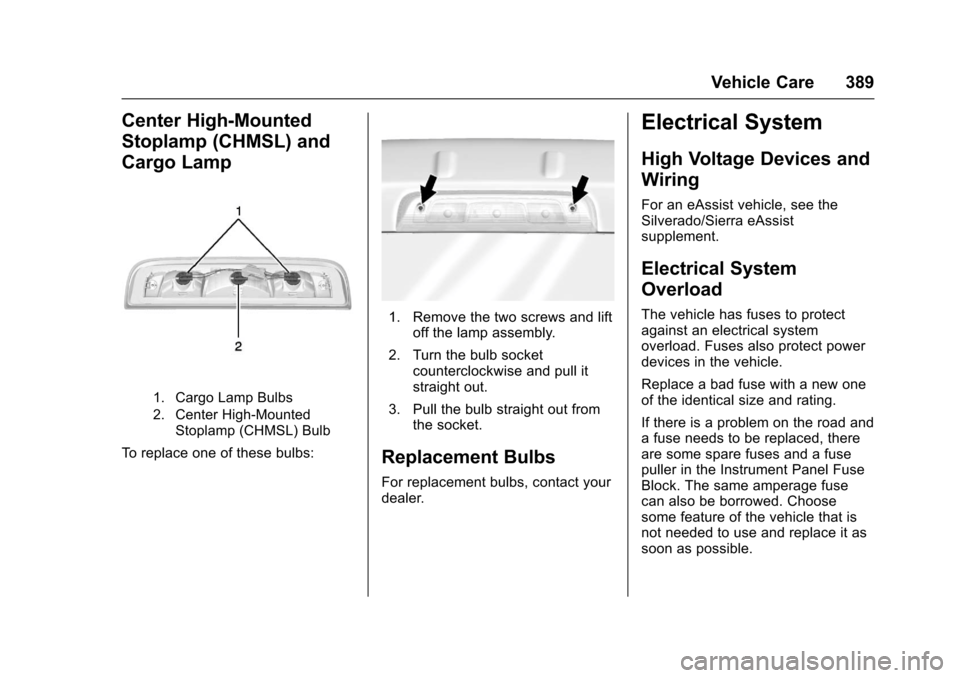
1. Cargo Lamp Bulbs
2. Center High-MountedStoplamp (CHMSL) Bulb
To r e p l a c e o n e o f t h e s e b u l b s :
1. Remove the two screws and liftoff the lamp assembly.
2. Turn the bulb socketcounterclockwise and pull itstraight out.
3. Pull the bulb straight out fromthe socket.
Replacement Bulbs
For replacement bulbs, contact yourdealer.
Electrical System
High Voltage Devices and
Wiring
For an eAssist vehicle, see theSilverado/Sierra eAssistsupplement.
Electrical System
Overload
The vehicle has fuses to protectagainst an electrical systemoverload. Fuses also protect powerdevices in the vehicle.
Replace a bad fuse with a new oneof the identical size and rating.
If there is a problem on the road andafuseneedstobereplaced,thereare some spare fuses and a fusepuller in the Instrument Panel FuseBlock. The same amperage fusecan also be borrowed. Choosesome feature of the vehicle that isnot needed to use and replace it assoon as possible.
Page 424 of 509
Chevrolet Silverado Owner Manual (GMNA-Localizing-U.S./Canada/Mexico-9956065) - 2017 - CRC - 4/29/16
Vehicle Care 423
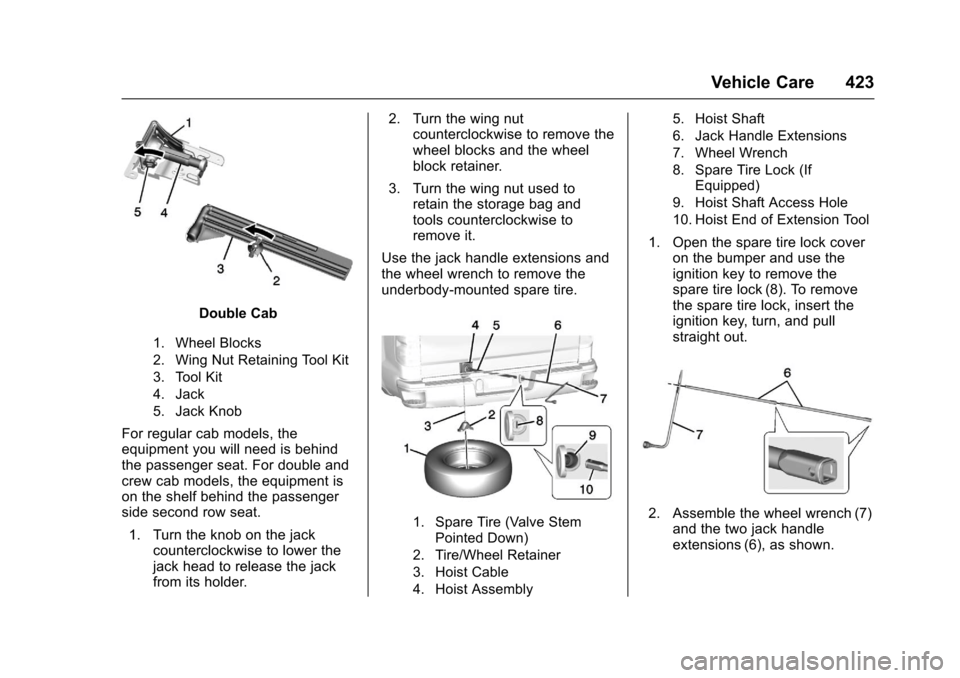
Double Cab
1. Wheel Blocks
2. Wing Nut Retaining Tool Kit
3. Tool Kit
4. Jack
5. Jack Knob
For regular cab models, theequipment you will need is behindthe passenger seat. For double andcrew cab models, the equipment ison the shelf behind the passengerside second row seat.
1. Turn the knob on the jackcounterclockwise to lower thejack head to release the jackfrom its holder.
2. Turn the wing nutcounterclockwise to remove thewheel blocks and the wheelblock retainer.
3. Turn the wing nut used toretain the storage bag andtools counterclockwise toremove it.
Use the jack handle extensions andthe wheel wrench to remove theunderbody-mounted spare tire.
1. Spare Tire (Valve StemPointed Down)
2. Tire/Wheel Retainer
3. Hoist Cable
4. Hoist Assembly
5. Hoist Shaft
6. Jack Handle Extensions
7. Wheel Wrench
8. Spare Tire Lock (IfEquipped)
9. Hoist Shaft Access Hole
10. Hoist End of Extension Tool
1. Open the spare tire lock coveron the bumper and use theignition key to remove thespare tire lock (8). To removethe spare tire lock, insert theignition key, turn, and pullstraight out.
2. Assemble the wheel wrench (7)and the two jack handleextensions (6), as shown.
Page 425 of 509
Chevrolet Silverado Owner Manual (GMNA-Localizing-U.S./Canada/Mexico-9956065) - 2017 - CRC - 4/29/16
424 Vehicle Care
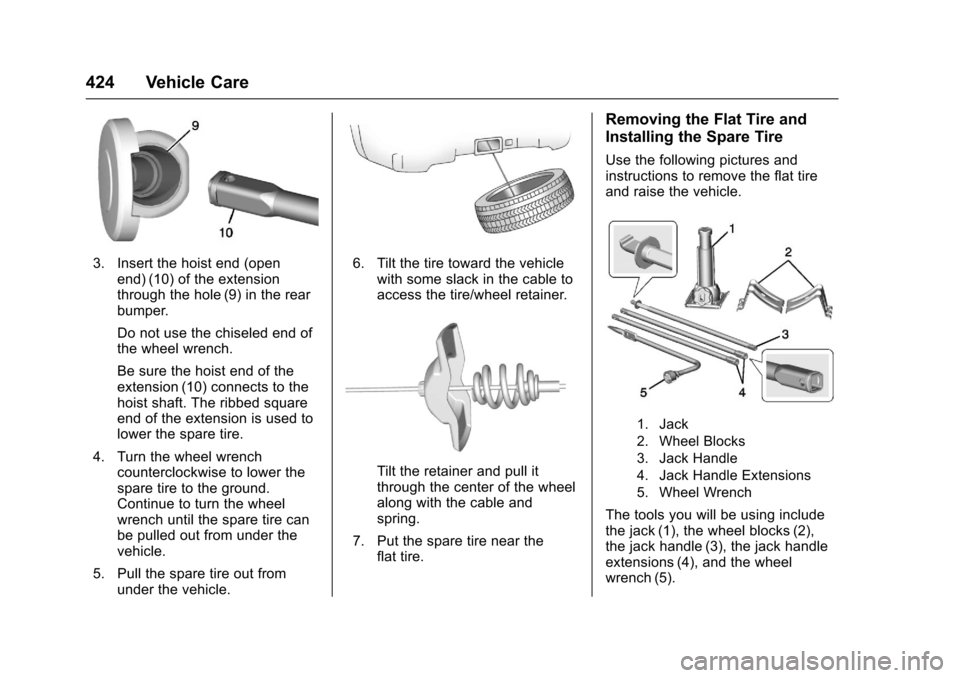
3. Insert the hoist end (openend) (10) of the extensionthrough the hole (9) in the rearbumper.
Do not use the chiseled end ofthe wheel wrench.
Be sure the hoist end of theextension (10) connects to thehoist shaft. The ribbed squareend of the extension is used tolower the spare tire.
4. Turn the wheel wrenchcounterclockwise to lower thespare tire to the ground.Continue to turn the wheelwrench until the spare tire canbe pulled out from under thevehicle.
5. Pull the spare tire out fromunder the vehicle.
6. Tilt the tire toward the vehiclewith some slack in the cable toaccess the tire/wheel retainer.
Tilt the retainer and pull itthrough the center of the wheelalong with the cable andspring.
7. Put the spare tire near theflat tire.
Removing the Flat Tire and
Installing the Spare Tire
Use the following pictures andinstructions to remove the flat tireand raise the vehicle.
1. Jack
2. Wheel Blocks
3. Jack Handle
4. Jack Handle Extensions
5. Wheel Wrench
The tools you will be using includethe jack (1), the wheel blocks (2),the jack handle (3), the jack handleextensions (4), and the wheelwrench (5).