clock CHEVROLET SILVERADO 2017 3.G Owner's Manual
[x] Cancel search | Manufacturer: CHEVROLET, Model Year: 2017, Model line: SILVERADO, Model: CHEVROLET SILVERADO 2017 3.GPages: 509, PDF Size: 8.87 MB
Page 426 of 509
Chevrolet Silverado Owner Manual (GMNA-Localizing-U.S./Canada/Mexico-9956065) - 2017 - CRC - 4/29/16
Vehicle Care 425
1. Do a safety check beforeproceeding. SeeIf a Tire GoesFlat0420.
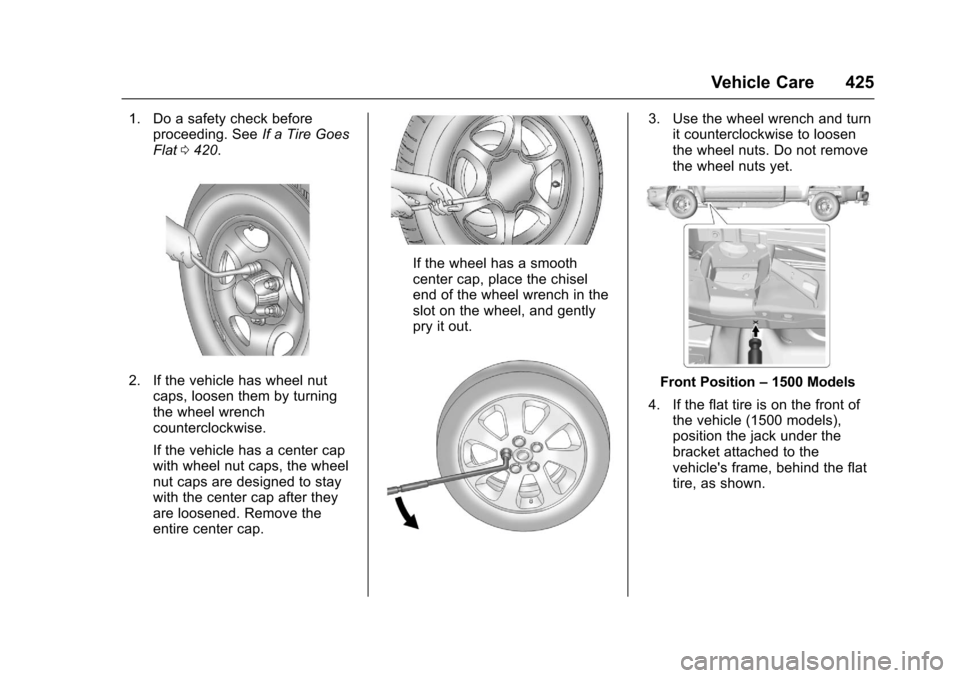
2. If the vehicle has wheel nutcaps, loosen them by turningthe wheel wrenchcounterclockwise.
If the vehicle has a center capwith wheel nut caps, the wheelnut caps are designed to staywith the center cap after theyare loosened. Remove theentire center cap.
If the wheel has a smoothcenter cap, place the chiselend of the wheel wrench in theslot on the wheel, and gentlypry it out.
3. Use the wheel wrench and turnit counterclockwise to loosenthe wheel nuts. Do not removethe wheel nuts yet.
Front Position–1500 Models
4. If the flat tire is on the front ofthe vehicle (1500 models),position the jack under thebracket attached to thevehicle's frame, behind the flattire, as shown.
Page 428 of 509
Chevrolet Silverado Owner Manual (GMNA-Localizing-U.S./Canada/Mexico-9956065) - 2017 - CRC - 4/29/16
Vehicle Care 427
{Warning
Getting under a vehicle when it is
lifted on a jack is dangerous.
If the vehicle slips off the jack,
you could be badly injured or
killed. Never get under a vehicle
when it is supported only by
ajack.
{Warning
Raising the vehicle with the jack
improperly positioned can
damage the vehicle and even
make the vehicle fall. To help
avoid personal injury and vehicle
damage, be sure to fit the jack lift
head into the proper location
before raising the vehicle.
6. Turn the wheel wrenchclockwise to raise the vehicle.Raise the vehicle far enoughoff the ground so there isenough room for the spare tireto fit under the wheel well.
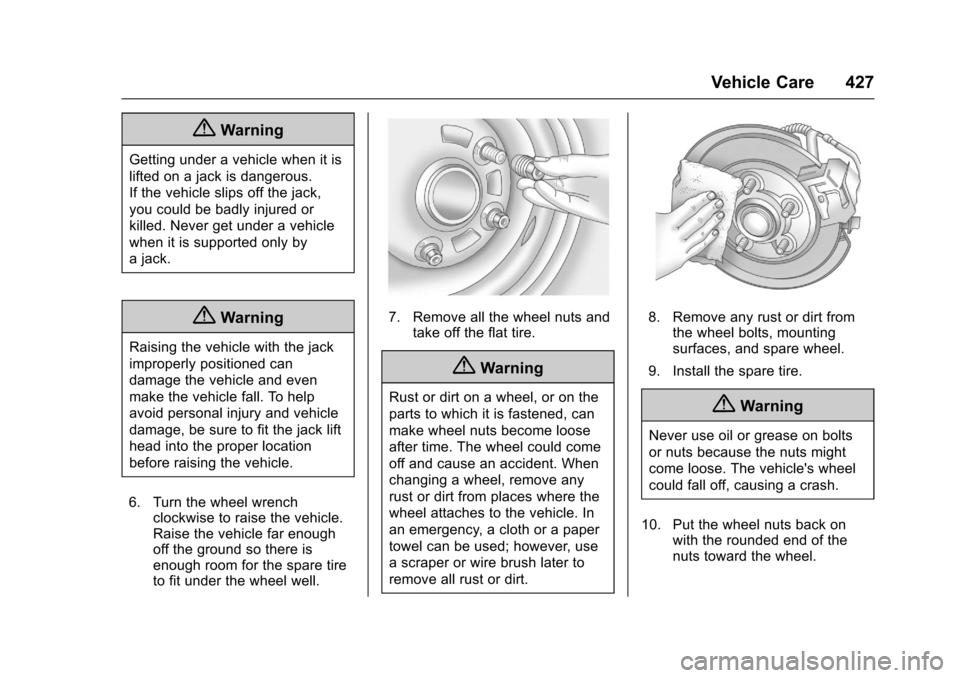
7. Remove all the wheel nuts andtake off the flat tire.
{Warning
Rust or dirt on a wheel, or on the
parts to which it is fastened, can
make wheel nuts become loose
after time. The wheel could come
off and cause an accident. When
changing a wheel, remove any
rust or dirt from places where the
wheel attaches to the vehicle. In
an emergency, a cloth or a paper
towel can be used; however, use
ascraperorwirebrushlaterto
remove all rust or dirt.
8. Remove any rust or dirt fromthe wheel bolts, mountingsurfaces, and spare wheel.
9. Install the spare tire.
{Warning
Never use oil or grease on bolts
or nuts because the nuts might
come loose. The vehicle's wheel
could fall off, causing a crash.
10. Put the wheel nuts back onwith the rounded end of thenuts toward the wheel.
Page 429 of 509
Chevrolet Silverado Owner Manual (GMNA-Localizing-U.S./Canada/Mexico-9956065) - 2017 - CRC - 4/29/16
428 Vehicle Care
11 . Ti g h t e n e a c h w h e e l n u t b yhand. Then use the wheelwrench to tighten the nuts untilthe wheel is held againstthe hub.
12. Turn the wheel wrenchcounterclockwise to lower thevehicle. Lower the jackcompletely.
{Warning
If wheel studs are damaged, they
can break. If all the studs on a
wheel broke, the wheel could
come off and cause a crash.
If any stud is damaged because
of a loose-running wheel, it could
be that all of the studs are
damaged. To be sure, replace all
studs on the wheel. If the stud
holes in a wheel have become
larger, the wheel could collapse in
operation. Replace any wheel if
its stud holes have become larger
or distorted in any way. Inspect
hubs and hub⇣piloted wheels for
damage. Because of loose
(Continued)
Warning (Continued)
running wheels, piloting pad
damage may occur and require
replacement of the entire hub, for
proper centering of the wheels.
When replacing studs, hubs,
wheel nuts or wheels, be sure to
use GM original equipment parts.
{Warning
Wheel nuts that are improperly or
incorrectly tightened can cause
the wheels to become loose or
come off. The wheel nuts should
be tightened with a torque wrench
to the proper torque specification
after replacing. Follow the torque
specification supplied by the
aftermarket manufacturer when
using accessory locking wheel
nuts. SeeCapacities and
Specifications0468for original
equipment wheel nut torque
specifications.
Caution
Improperly tightened wheel nuts
can lead to brake pulsation and
rotor damage. To avoid expensive
brake repairs, evenly tighten the
wheel nuts in the proper
sequence and to the proper
torque specification. See
Capacities and Specifications
0468for the wheel nut torque
specification.
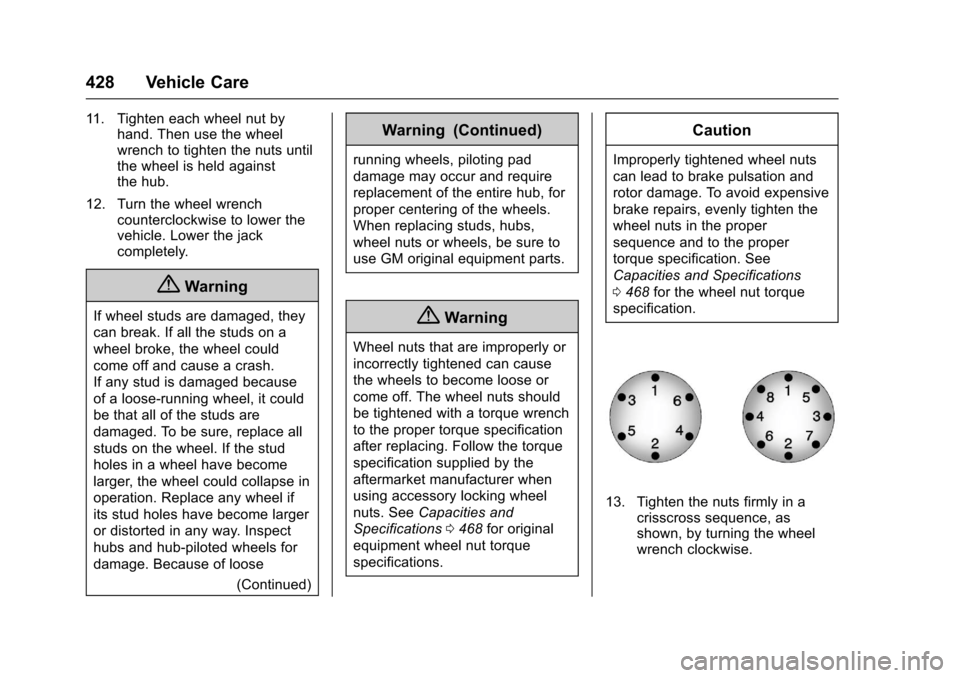
13. Tighten the nuts firmly in acrisscross sequence, asshown, by turning the wheelwrench clockwise.
Page 431 of 509
Chevrolet Silverado Owner Manual (GMNA-Localizing-U.S./Canada/Mexico-9956065) - 2017 - CRC - 4/29/16
430 Vehicle Care
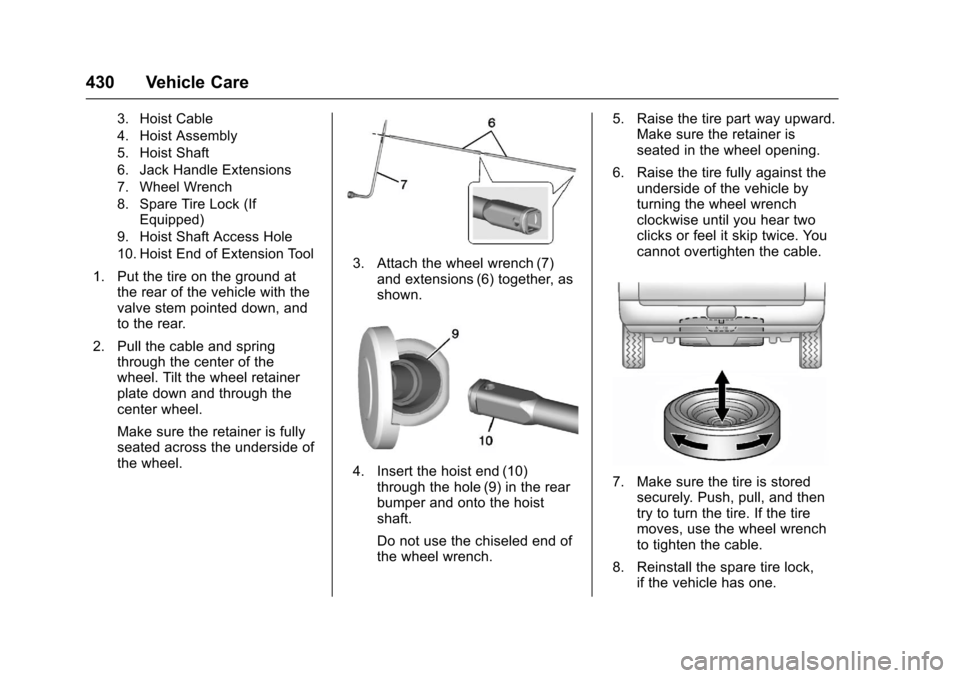
3. Hoist Cable
4. Hoist Assembly
5. Hoist Shaft
6. Jack Handle Extensions
7. Wheel Wrench
8. Spare Tire Lock (IfEquipped)
9. Hoist Shaft Access Hole
10. Hoist End of Extension Tool
1. Put the tire on the ground atthe rear of the vehicle with thevalve stem pointed down, andto the rear.
2. Pull the cable and springthrough the center of thewheel. Tilt the wheel retainerplate down and through thecenter wheel.
Make sure the retainer is fullyseated across the underside ofthe wheel.
3. Attach the wheel wrench (7)and extensions (6) together, asshown.
4. Insert the hoist end (10)through the hole (9) in the rearbumper and onto the hoistshaft.
Do not use the chiseled end ofthe wheel wrench.
5. Raise the tire part way upward.Make sure the retainer isseated in the wheel opening.
6. Raise the tire fully against theunderside of the vehicle byturning the wheel wrenchclockwise until you hear twoclicks or feel it skip twice. Youcannot overtighten the cable.
7. Make sure the tire is storedsecurely. Push, pull, and thentry to turn the tire. If the tiremoves, use the wheel wrenchto tighten the cable.
8. Reinstall the spare tire lock,if the vehicle has one.
Page 499 of 509

Chevrolet Silverado Owner Manual (GMNA-Localizing-U.S./Canada/Mexico-9956065) - 2017 - CRC - 4/29/16
498 Index
C
Calibration . . . . . . . . . . . . . . . . . . . . . . 122
California
Fuel Requirements . . . . . . . . . . . 312
Perchlorate Materials
Requirements . . . . . . . . . . . . . . . 352
California
Proposition
65 Warning . . . . . . . . . .351, 378, 432
Canadian Vehicle Owners . . . . . . . . 2
Capacities and
Specifications . . . . . . . . . . . . . . . . . 468
Carbon Monoxide
Engine Exhaust . . . . . . . . . . . . . . . 276
Ta i l g a t e . . . . . . . . . . . . . . . . . . . . . . . . . 4 2
Winter Driving . . . . . . . . . . . . . . . . 257
Cargo
Tie-Downs . . . . . . . . . . . . . . . . . . . . . 117
Cargo Lamp . . . . . . . . . . . . . . . . . . . . 177
Caution, Danger, and Warning . . . . 3
CD Player . . . . . . . . . . . . . . . . . . . . . . 196
Center Console Storage . . . . . . . . 116
Center High-Mounted
Stoplamp (CHMSL) and
Cargo Lamp . . . . . . . . . . . . . . . . . . . 389
Center Seat . . . . . . . . . . . . . . . . . . . . . 58
Chains, Tire . . . . . . . . . . . . . . . . . . . . 419
Charging
Wireless . . . . . . . . . . . . . . . . . . . . . . 126
Charging System Light . . . . . . . . . 138
Check
Ignition Transmission Lock . . . 383
Malfunction Indicator
Engine Light . . . . . . . . . . . . . . . . 138
Child Restraints
Infants and Young Children . . . . . 90
Lower Anchors and Tethers
for Children . . . . . . . . . . . . . . . . . . . 96
Older Children . . . . . . . . . . . . . . . . . . 88
Securing . . . . . . . . . . . . . . . . . 102, 106
Systems . . . . . . . . . . . . . . . . . . . . . . . . 92
Cleaning
Exterior Care . . . . . . . . . . . . . . . . . 441
Interior Care . . . . . . . . . . . . . . . . . . 446
Climate Control
Systems . . . . . . . . . . . . . . . . . 237, 238
Air Conditioning . . . . . . . . . 237, 238
Dual Automatic . . . . . . . . . . . . . . . 240
Heating . . . . . . . . . . . . . . . . . . 237, 238
Clock . . . . . . . . . . . . . . . . . . . . . . . . . . . 123
Cluster, Instrument . . . . . . . . . . . . . 128
Clutch, Hydraulic . . . . . . . . . . . . . . . 366
Collision Damage Repair . . . . . . . 479
Compartments
Storage . . . . . . . . . . . . . . . . . . . . . . . .115
Compass . . . . . . . . . . . . . . . . . . . . . . . 122
Messages . . . . . . . . . . . . . . . . . . . . 151
Connections
OnStar®...................... 488
Control . . . . . . . . . . . . . . . . . . . . . . . . . 297
Traction and Electronic
Stability . . . . . . . . . . . . . . . . . . . . . 295
Control Light
Hill Descent . . . . . . . . . . . . . . . . . . 141
Control of a Vehicle . . . . . . . . . . . . . 248
Convex Mirrors . . . . . . . . . . . . . . . . . . 46
Coolant
Engine . . . . . . . . . . . . . . . . . . . . . . . . 369
Engine Temperature Gauge . . 133
Cooling System . . . . . . . . . . . . . . . . . 368
Engine Messages . . . . . . . . . . . . 152
Courtesy Transportation
Program . . . . . . . . . . . . . . . . . . . . . . . 478
Cruise Control . . . . . . . . . . . . . . . . . . 298
Light . . . . . . . . . . . . . . . . . . . . . . . . . . 145
Cupholders . . . . . . . . . . . . . . . . . . . . . 116
Customer Assistance . . . . . . . . . . . 475
Offices . . . . . . . . . . . . . . . . . . . . . . . . 474
Te x t Te l e p h o n e ( T T Y )
Users . . . . . . . . . . . . . . . . . . . . . . . 475
Customer Information
Service Publications
Ordering Information . . . . . . . . 481