engine CHEVROLET SILVERADO 2017 3.G User Guide
[x] Cancel search | Manufacturer: CHEVROLET, Model Year: 2017, Model line: SILVERADO, Model: CHEVROLET SILVERADO 2017 3.GPages: 509, PDF Size: 8.87 MB
Page 37 of 509
Chevrolet Silverado Owner Manual (GMNA-Localizing-U.S./Canada/Mexico-9956065) - 2017 - CRC - 4/29/16
36 Keys, Doors, and Windows
5. Repeat Steps 2–4twomoretimes. After the third time, turnto ON/RUN; the key is learnedand all previously known keyswill no longer work with thevehicle.
6. To learn a second key, turn toOFF, insert the second key tobe learned, and rotate toON/RUN.
After two keys are learned, theremaining keys can be learned byfollowing the procedure in“Programming with TwoRecognized Keys.”
The key has a bar-coded key tagthat the dealer or qualified locksmithcan use to make new keys. Storethis information in a safe place, notin the vehicle.
See your dealer if a replacementkey or additional key is needed.
If it becomes difficult to turn a key,inspect the key blade for debris.Periodically clean with a brushor pick.
With an active OnStar subscription,an OnStar Advisor may remotelyunlock the vehicle. SeeOnStarOverview0486.
Remote Keyless Entry
(RKE) System
SeeRadio FrequencyStatement0482.
If there is a decrease in the RemoteKeyless Entry (RKE) operatingrange:
.Check the distance. Thetransmitter may be too far fromthe vehicle.
.Check the location. Othervehicles or objects may beblocking the signal.
.Check the transmitter's battery.See“Battery Replacement”laterin this section.
.If the transmitter is still notworking correctly, see yourdealer or a qualified technicianfor service.
Remote Keyless Entry
(RKE) System Operation
The RKE transmitter functions maywork up to 60 m (197 ft) away fromthe vehicle.
Other conditions can affect theperformance of the transmitter. SeeRemote Keyless Entry (RKE)System036.
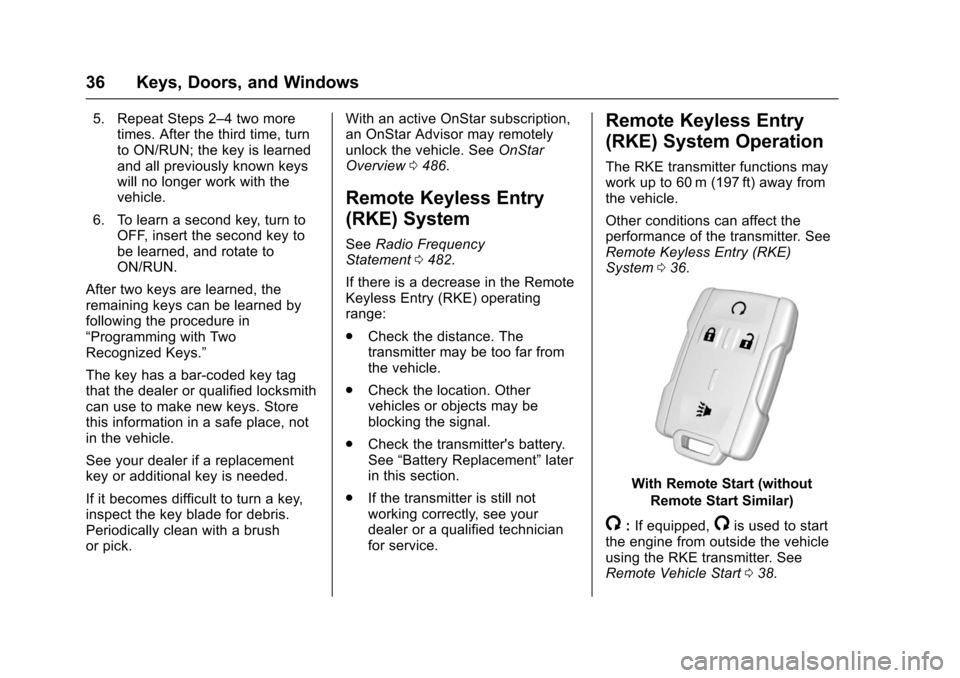
With Remote Start (without
Remote Start Similar)
/:If equipped,/is used to startthe engine from outside the vehicleusing the RKE transmitter. SeeRemote Vehicle Start038.
Page 40 of 509
Chevrolet Silverado Owner Manual (GMNA-Localizing-U.S./Canada/Mexico-9956065) - 2017 - CRC - 4/29/16
Keys, Doors, and Windows 39
The engine will turn off during aremote vehicle start if:
.The coolant temperature getstoo high.
.The oil pressure gets low.
The RKE transmitter range may bereduced while the vehicle is running.
Other conditions can affect theperformance of the transmitter. SeeRemote Keyless Entry (RKE)System036orVehiclePersonalization0160.
Starting the Engine Using RemoteStart
1. Press and releaseQ.
2. Immediately press and hold/
until the turn signal lamps flashor for at least four seconds.
When the vehicle starts, theparking lamps will turn on. Thedoors will be locked and theclimate control system maycome on.
The engine will continue to runfor 10 minutes. After30 seconds, repeatSteps 1 and 2 for a 10-minutetime extension.
Place the ignition in ON/RUN tooperate the vehicle.
Extending Engine Run Time
The engine run time can beextended by 10 minutes, for a totalof 20 minutes, if during the first10 minutes Steps 1 and 2 arerepeated while the engine is stillrunning. An extension can berequested 30 seconds after starting.
Amaximumoftworemotestarts,or a single start with an extension,is allowed between ignition cycles.
The vehicle's ignition must beturned on and then back off to useremote start again.
Canceling a Remote Start
To c a n c e l a r e m o t e s t a r t , d o o n e o fthe following:
.Press and hold/until the
parking lamps turn off.
.Turn on the hazard warningflashers.
.Turn the ignition on and then off.
Door Locks
{Warning
Unlocked doors can be
dangerous.
.Passengers, especiallychildren, can easily openthe doors and fall out of amoving vehicle. When adoor is locked, the handlewill not open it. The chanceof being thrown out of thevehicle in a crash isincreased if the doors arenot locked. So, allpassengers should wearsafety belts properly and thedoors should be lockedwhenever the vehicle isdriven.
(Continued)
Page 47 of 509
Chevrolet Silverado Owner Manual (GMNA-Localizing-U.S./Canada/Mexico-9956065) - 2017 - CRC - 4/29/16
46 Keys, Doors, and Windows
The security light, in the instrumentcluster, comes on if there is aproblem with arming or disarmingthe theft-deterrent system.
When trying to start the vehicle, thesecurity light comes on briefly whenthe ignition is turned on.
If the engine does not start and thesecurity light stays on, there is aproblem with the system. Turn theignition off and try again.
If the engine still does not start, andthe key appears to be undamaged,try another ignition key. It may benecessary to check the fuse. SeeFuses0390.Iftheenginestilldoesnot start with the other key, thevehicle needs service. If the vehicledoes start, the first key may befaulty. See your dealer.
It is possible for the immobilizersystem to learn new or replacementkeys. Up to eight keys can beprogrammed for the vehicle. Toprogram additional keys, seeKeys033.Toprogramadditionaltransmitters, seeRemote KeylessEntry (RKE) System Operation036.
Do not leave the key or device thatdisarms or deactivates the vehicletheft system in the vehicle.
See your dealer to get a new keyblank cut exactly as the ignition keythat operates the system.
Exterior Mirrors
Convex Mirrors
{Warning
Aconvexmirrorcanmakethings,
like other vehicles, look farther
away than they really are. If you
cut too sharply into the right lane,
you could hit a vehicle on the
right. Check the inside mirror or
glance over your shoulder before
changing lanes.
The passenger side mirror is convexshaped. A convex mirror's surface iscurved so more can be seen fromthe driver seat.
Manual Mirrors
If equipped, adjust manual mirrorsby moving the mirror up and downor left to right to see a little of theside of the vehicle and to have aclear view behind the vehicle.
Page 64 of 509
Chevrolet Silverado Owner Manual (GMNA-Localizing-U.S./Canada/Mexico-9956065) - 2017 - CRC - 4/29/16
Seats and Restraints 63
Heated and Ventilated
Front Seats
{Warning
If you cannot feel temperature
change or pain to the skin, the
seat heater may cause burns. To
reduce the risk of burns, people
with such a condition should use
care when using the seat heater,
especially for long periods of
time. Do not place anything on
the seat that insulates against
heat, such as a blanket, cushion,
cover, or similar item. This may
cause the seat heater to
overheat. An overheated seat
heater may cause a burn or may
damage the seat.
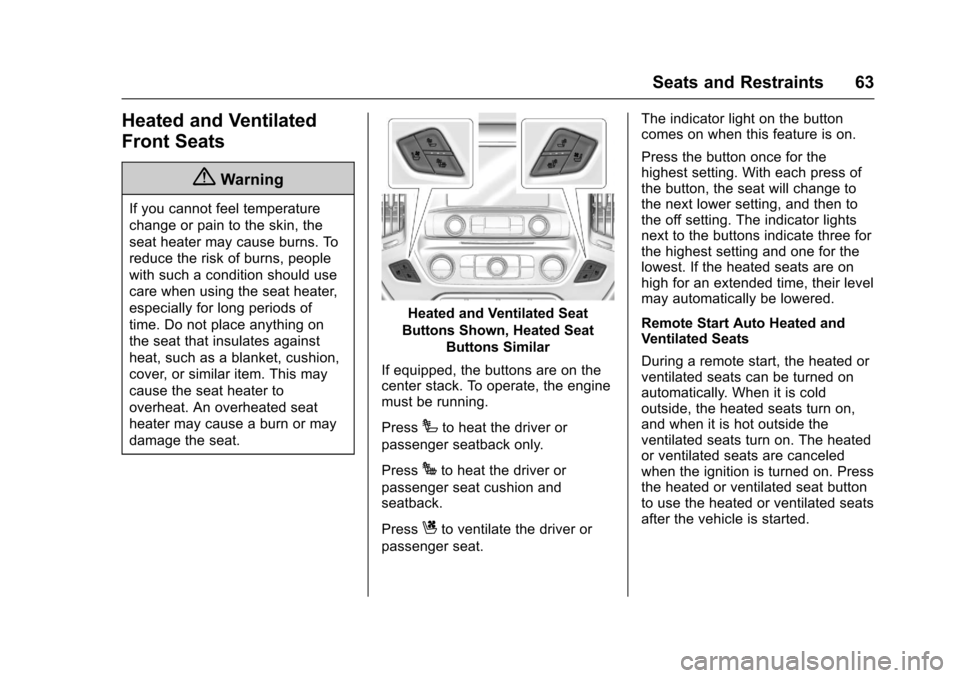
Heated and Ventilated Seat
Buttons Shown, Heated Seat
Buttons Similar
If equipped, the buttons are on thecenter stack. To operate, the enginemust be running.
PressIto heat the driver or
passenger seatback only.
PressJto heat the driver or
passenger seat cushion andseatback.
PressCto ventilate the driver or
passenger seat.
The indicator light on the buttoncomes on when this feature is on.
Press the button once for thehighest setting. With each press ofthe button, the seat will change tothe next lower setting, and then tothe off setting. The indicator lightsnext to the buttons indicate three forthe highest setting and one for thelowest. If the heated seats are onhigh for an extended time, their levelmay automatically be lowered.
Remote Start Auto Heated andVentilated Seats
During a remote start, the heated orventilated seats can be turned onautomatically. When it is coldoutside, the heated seats turn on,and when it is hot outside theventilated seats turn on. The heatedor ventilated seats are canceledwhen the ignition is turned on. Pressthe heated or ventilated seat buttonto use the heated or ventilated seatsafter the vehicle is started.
Page 81 of 509
Chevrolet Silverado Owner Manual (GMNA-Localizing-U.S./Canada/Mexico-9956065) - 2017 - CRC - 4/29/16
80 Seats and Restraints
{Warning
Acrashsevereenoughtoinflate
the airbags may have also
damaged important functions in
the vehicle, such as the fuel
system, brake and steering
systems, etc. Even if the vehicle
appears to be drivable after a
moderate crash, there may be
concealed damage that could
make it difficult to safely operate
the vehicle.
Use caution if you should attempt
to restart the engine after a crash
has occurred.
In many crashes severe enough toinflate the airbag, windshields arebroken by vehicle deformation.Additional windshield breakage mayalso occur from the front outboardpassenger airbag.
.Airbags are designed to inflateonly once. After an airbaginflates, you will need some newparts for the airbag system.If you do not get them, the
airbag system will not be thereto help protect you in anothercrash. A new system will includeairbag modules and possiblyother parts. The service manualfor the vehicle covers the needto replace other parts.
.The vehicle has a crash sensingand diagnostic module whichrecords information after acrash. SeeVehicle DataRecording and Privacy0484andEvent DataRecorders0484.
.Let only qualified technicianswork on the airbag systems.Improper service can mean thatan airbag system will not workproperly. See your dealer forservice.
Airbag On-Off Switch
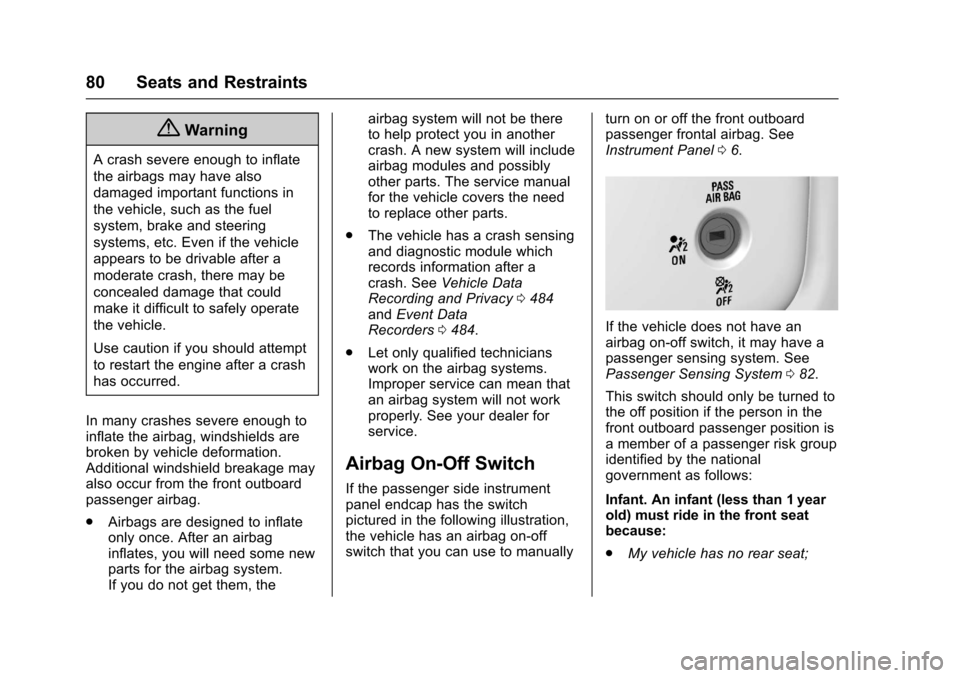
If the passenger side instrumentpanel endcap has the switchpictured in the following illustration,the vehicle has an airbag on-offswitch that you can use to manually
turn on or off the front outboardpassenger frontal airbag. SeeInstrument Panel06.
If the vehicle does not have anairbag on-off switch, it may have apassenger sensing system. SeePassenger Sensing System082.
This switch should only be turned tothe off position if the person in thefront outboard passenger position isamemberofapassengerriskgroupidentified by the nationalgovernment as follows:
Infant. An infant (less than 1 yearold) must ride in the front seatbecause:
.My vehicle has no rear seat;
Page 120 of 509
Chevrolet Silverado Owner Manual (GMNA-Localizing-U.S./Canada/Mexico-9956065) - 2017 - CRC - 4/29/16
Instruments and Controls 119
Instruments and
Controls
Controls
Steering Wheel Adjustment . . . 120Steering Wheel Controls . . . . . . 121Heated Steering Wheel . . . . . . . 121Horn . . . . . . . . . . . . . . . . . . . . . . . . . . 122Windshield Wiper/Washer . . . . 122Compass . . . . . . . . . . . . . . . . . . . . . 122Clock . . . . . . . . . . . . . . . . . . . . . . . . . 123Power Outlets . . . . . . . . . . . . . . . . 124Wireless Charging . . . . . . . . . . . . 126
Warning Lights, Gauges, and
Indicators
Warning Lights, Gauges, andIndicators . . . . . . . . . . . . . . . . . . . 127Instrument Cluster . . . . . . . . . . . . 128Speedometer . . . . . . . . . . . . . . . . . 131Odometer . . . . . . . . . . . . . . . . . . . . . 131Trip Odometer . . . . . . . . . . . . . . . . 131Ta c h o m e t e r . . . . . . . . . . . . . . . . . . . 1 3 1Fuel Gauge . . . . . . . . . . . . . . . . . . . 131Engine Oil PressureGauge . . . . . . . . . . . . . . . . . . . . . . 132Engine Coolant TemperatureGauge . . . . . . . . . . . . . . . . . . . . . . 133Voltmeter Gauge . . . . . . . . . . . . . 134
Safety Belt Reminders . . . . . . . . 134Airbag Readiness Light . . . . . . . 135Airbag On-Off Light . . . . . . . . . . . 136Passenger Airbag StatusIndicator . . . . . . . . . . . . . . . . . . . . 137Charging System Light . . . . . . . 138Malfunction Indicator Lamp(Check Engine Light) . . . . . . . . 138Brake System WarningLight . . . . . . . . . . . . . . . . . . . . . . . . 140Antilock Brake System (ABS)Warning Light . . . . . . . . . . . . . . . 141Four-Wheel-Drive Light . . . . . . . 141To w / H a u l M o d e L i g h t . . . . . . . . . 1 4 1Hill Descent Control Light . . . . 141Lane Departure Warning(LDW) Light (2500/3500Series) . . . . . . . . . . . . . . . . . . . . . . 142Lane Keep Assist (LKA) Light(1500 Series) . . . . . . . . . . . . . . . 142Vehicle Ahead Indicator . . . . . . 142Traction Off Light . . . . . . . . . . . . . 142StabiliTrak®OFF Light . . . . . . . . 143Traction Control System (TCS)/StabiliTrak®Light . . . . . . . . . . . 143Tire Pressure Light . . . . . . . . . . . 143Low Fuel Warning Light . . . . . . 144Security Light . . . . . . . . . . . . . . . . . 144High-Beam On Light . . . . . . . . . . 144Front Fog Lamp Light . . . . . . . . . 145Lamps On Reminder . . . . . . . . . 145
Cruise Control Light . . . . . . . . . . 145
Information Displays
Driver Information Center (DIC)(Base Level) . . . . . . . . . . . . . . . . 145Driver Information Center (DIC)(Uplevel) . . . . . . . . . . . . . . . . . . . . 147
Vehicle Messages
Vehicle Messages . . . . . . . . . . . . 150Battery Voltage and ChargingMessages . . . . . . . . . . . . . . . . . . . 150Brake System Messages . . . . . 151Compass Messages . . . . . . . . . . 151Door Ajar Messages . . . . . . . . . . 151Engine Cooling SystemMessages . . . . . . . . . . . . . . . . . . . 152Engine Oil Messages . . . . . . . . . 152Engine Power Messages . . . . . 153Fuel System Messages . . . . . . . 153Key and Lock Messages . . . . . 153Lamp Messages . . . . . . . . . . . . . . 153Object Detection SystemMessages . . . . . . . . . . . . . . . . . . . 153Ride Control SystemMessages . . . . . . . . . . . . . . . . . . . 154Airbag System Messages . . . . 155Safety Belt Messages . . . . . . . . 155Security Messages . . . . . . . . . . . 156Steering SystemMessages . . . . . . . . . . . . . . . . . . . 156
Page 128 of 509
Chevrolet Silverado Owner Manual (GMNA-Localizing-U.S./Canada/Mexico-9956065) - 2017 - CRC - 4/29/16
Instruments and Controls 127
To c h a r g e a m o b i l e d e v i c e :
1. Remove all objects from thecharging pad. The system maynot charge if there are anyobjects on the charging pad.
2. Place the mobile device face
up on the@symbol on the
charging pad.
3. The}will display on theV
on the infotainment screen.This indicates that the mobiledevice is properly positionedand charging. If a phone isplaced on the charging pad
and}does not display,
remove the phone from thepad, turn 180 degrees and waitthree seconds before placing/aligning the phone on the padagain.
Warning Lights,
Gauges, and
Indicators
Warning lights and gauges cansignal that something is wrongbefore it becomes serious enoughto cause an expensive repair orreplacement. Paying attention to thewarning lights and gauges couldprevent injury.
Some warning lights come on brieflywhen the engine is started toindicate they are working. Whenone of the warning lights comes onand stays on while driving, or whenone of the gauges shows there maybe a problem, check the section thatexplains what to do. Waiting to dorepairs can be costly and evendangerous.
Page 132 of 509
Chevrolet Silverado Owner Manual (GMNA-Localizing-U.S./Canada/Mexico-9956065) - 2017 - CRC - 4/29/16
Instruments and Controls 131
be displayed in the Info app. See“Driver Information Center (DIC)(Uplevel)”in the Index.
Speed Warning :The SpeedWarning display allows the driver toset a speed that they do not want toexceed. To set the Speed Warning,
presspwhen Speed Warning is
displayed, or pressVon the main
view to set the speed value. Pressworxto adjust the value. PressVto set the speed. Once the speedis set, this feature can be turned off
by pressingVwhile viewing this
page. If the selected speed limit isexceeded, a pop-up warning isdisplayed with a chime.
Software Information :Pressp
while Software Information ishighlighted to display open sourcesoftware information.
Speedometer
The speedometer shows thevehicle's speed in either kilometersper hour (km/h) or miles perhour (mph).
Odometer
The odometer shows how far thevehicle has been driven, in eitherkilometers or miles.
Trip Odometer
The trip odometer shows how farthe vehicle has been driven sincethe trip odometer was last reset.
The trip odometer is accessed andreset through the Driver InformationCenter (DIC). SeeDriverInformation Center (DIC) (BaseLevel)0145orDriver InformationCenter (DIC) (Uplevel)0147.
Tachometer
The tachometer displays the enginespeed in revolutions perminute (rpm).
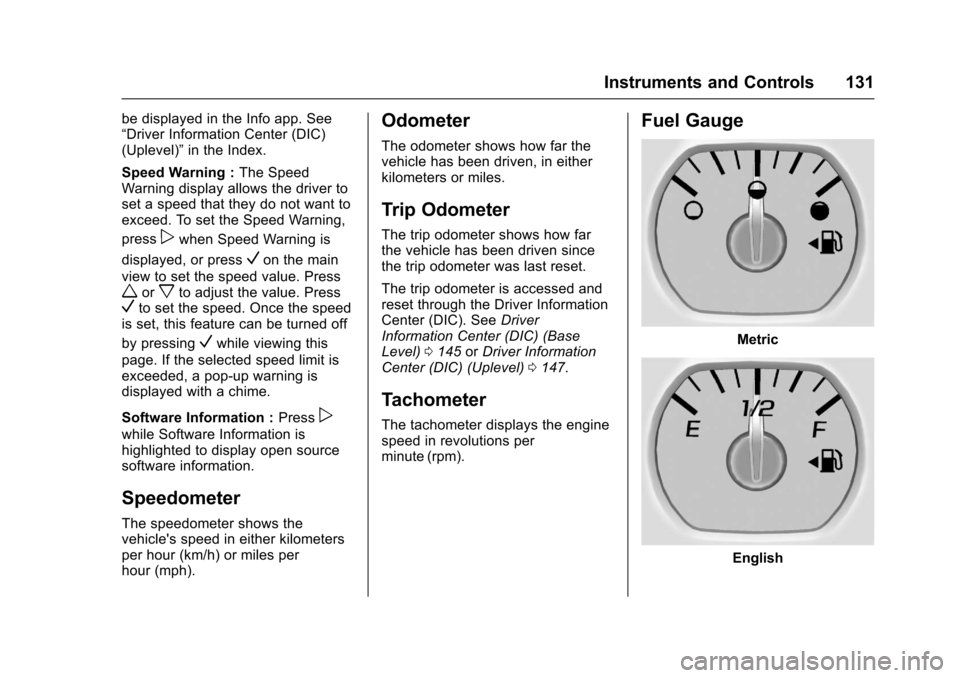
Fuel Gauge
Metric
English
Page 133 of 509
Chevrolet Silverado Owner Manual (GMNA-Localizing-U.S./Canada/Mexico-9956065) - 2017 - CRC - 4/29/16
132 Instruments and Controls
When the ignition is on, the fuelgauge indicates about how muchfuel is left in the tank.
There is an arrow near the fuelgauge pointing to the side of thevehicle the fuel door is on.
When the indicator nears empty, thelow fuel light comes on. There still isalittlefuelleft,butthevehicleshould be refueled soon.
Here are four things that someowners ask about. None of theseshow a problem with the fuel gauge:
.At the service station, the fuelpump shuts off before the gaugereads full.
.It takes a little more or less fuelto fill up than the gaugeindicated. For example, thegauge may have indicated thetank was half full, but it actuallytook a little more or less thanhalf the tank's capacity to fillthe tank.
.The gauge moves a little whileturning a corner or speeding up.
.The gauge takes a few secondsto stabilize after the ignition isturned on, and goes back toempty when the ignition isturned off.
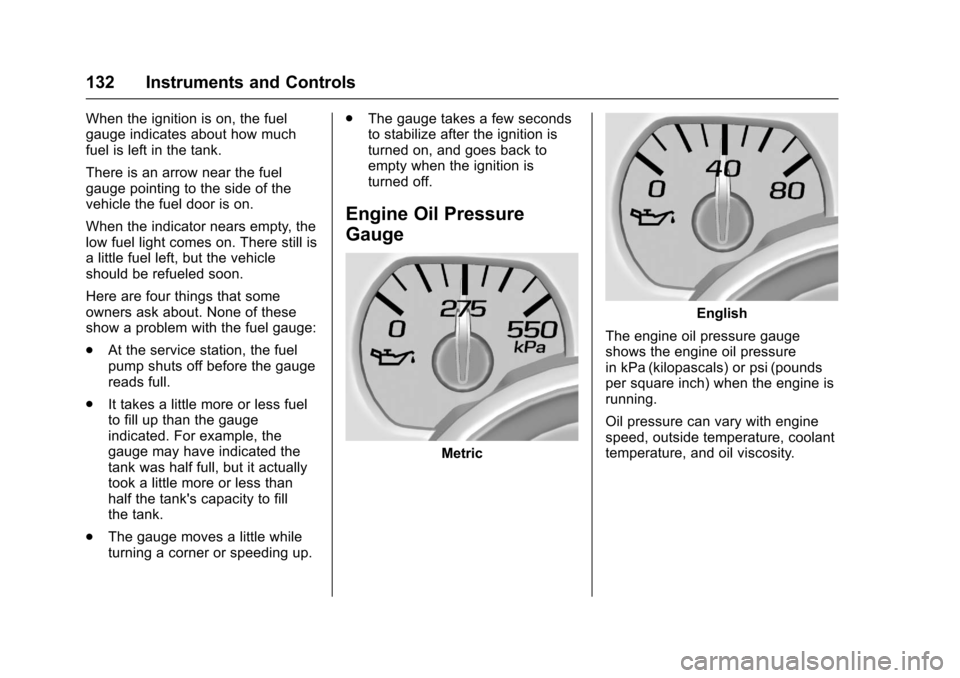
Engine Oil Pressure
Gauge
Metric
English
The engine oil pressure gaugeshows the engine oil pressurein kPa (kilopascals) or psi (poundsper square inch) when the engine isrunning.
Oil pressure can vary with enginespeed, outside temperature, coolanttemperature, and oil viscosity.
Page 134 of 509
Chevrolet Silverado Owner Manual (GMNA-Localizing-U.S./Canada/Mexico-9956065) - 2017 - CRC - 4/29/16
Instruments and Controls 133
Areadingoutsidethenormaloperating range can be caused by adangerously low oil level or someother problem causing low oilpressure. Check the vehicle's oil assoon as possible. See“OILPRESSURE LOW STOP ENGINE”underEngine Oil Messages0152andEngine Oil0359.
Caution
Lack of proper engine oil
maintenance can damage the
engine. Driving with the engine oil
low can also damage the engine.
The repairs would not be covered
by the vehicle warranty. Check
the oil level as soon as possible.
Add oil if required, but if the oil
level is within the operating range
and the oil pressure is still low,
have the vehicle serviced. Always
follow the maintenance schedule
for changing engine oil.
If the vehicle has a diesel engine,see the Duramax dieselsupplement.
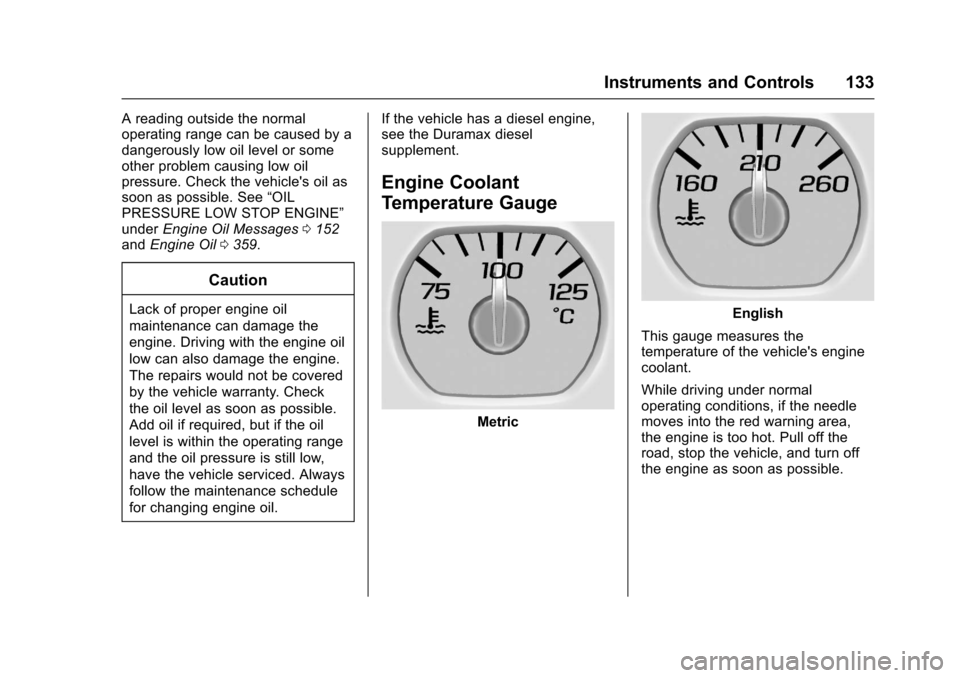
Engine Coolant
Temperature Gauge
Metric
English
This gauge measures thetemperature of the vehicle's enginecoolant.
While driving under normaloperating conditions, if the needlemoves into the red warning area,the engine is too hot. Pull off theroad, stop the vehicle, and turn offthe engine as soon as possible.