seats CHEVROLET SILVERADO 2017 3.G User Guide
[x] Cancel search | Manufacturer: CHEVROLET, Model Year: 2017, Model line: SILVERADO, Model: CHEVROLET SILVERADO 2017 3.GPages: 509, PDF Size: 8.87 MB
Page 51 of 509
Chevrolet Silverado Owner Manual (GMNA-Localizing-U.S./Canada/Mexico-9956065) - 2017 - CRC - 4/29/16
50 Keys, Doors, and Windows
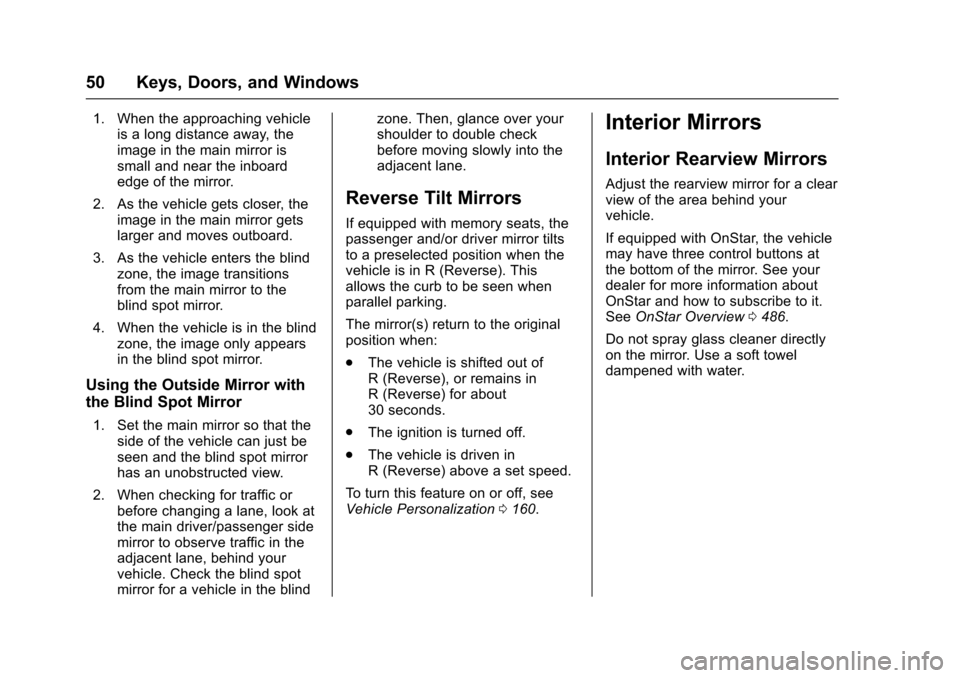
1. When the approaching vehicleis a long distance away, theimage in the main mirror issmall and near the inboardedge of the mirror.
2. As the vehicle gets closer, theimage in the main mirror getslarger and moves outboard.
3. As the vehicle enters the blindzone, the image transitionsfrom the main mirror to theblind spot mirror.
4. When the vehicle is in the blindzone, the image only appearsin the blind spot mirror.
Using the Outside Mirror with
the Blind Spot Mirror
1. Set the main mirror so that theside of the vehicle can just beseen and the blind spot mirrorhas an unobstructed view.
2. When checking for traffic orbefore changing a lane, look atthe main driver/passenger sidemirror to observe traffic in theadjacent lane, behind yourvehicle. Check the blind spotmirror for a vehicle in the blind
zone. Then, glance over yourshoulder to double checkbefore moving slowly into theadjacent lane.
Reverse Tilt Mirrors
If equipped with memory seats, thepassenger and/or driver mirror tiltsto a preselected position when thevehicle is in R (Reverse). Thisallows the curb to be seen whenparallel parking.
The mirror(s) return to the originalposition when:
.The vehicle is shifted out ofR(Reverse),orremainsinR(Reverse)forabout30 seconds.
.The ignition is turned off.
.The vehicle is driven inR(Reverse)aboveasetspeed.
To t u r n t h i s f e a t u r e o n o r o f f , s e eVehicle Personalization0160.
Interior Mirrors
Interior Rearview Mirrors
Adjust the rearview mirror for a clearview of the area behind yourvehicle.
If equipped with OnStar, the vehiclemay have three control buttons atthe bottom of the mirror. See yourdealer for more information aboutOnStar and how to subscribe to it.SeeOnStar Overview0486.
Do not spray glass cleaner directlyon the mirror. Use a soft toweldampened with water.
Page 57 of 509
Chevrolet Silverado Owner Manual (GMNA-Localizing-U.S./Canada/Mexico-9956065) - 2017 - CRC - 4/29/16
56 Seats and Restraints
Seats and
Restraints
Head Restraints
Head Restraints . . . . . . . . . . . . . . . 57
Front Seats
Seat Adjustment . . . . . . . . . . . . . . . 58Center Seat . . . . . . . . . . . . . . . . . . . . 58Power Seat Adjustment . . . . . . . . 59Lumbar Adjustment . . . . . . . . . . . . 59Reclining Seatbacks . . . . . . . . . . . 60Memory Seats . . . . . . . . . . . . . . . . . 61Heated and Ventilated FrontSeats . . . . . . . . . . . . . . . . . . . . . . . . . 63
Rear Seats
Rear Seats (Double Cab FullBench) . . . . . . . . . . . . . . . . . . . . . . . 64Rear Seats (Split Bench) . . . . . . 65
Safety Belts
Safety Belts . . . . . . . . . . . . . . . . . . . . 66How to Wear Safety BeltsProperly . . . . . . . . . . . . . . . . . . . . . . 67Lap-Shoulder Belt . . . . . . . . . . . . . 68Safety Belt Use DuringPregnancy . . . . . . . . . . . . . . . . . . . . 71Lap Belt . . . . . . . . . . . . . . . . . . . . . . . 72
Safety Belt Extender . . . . . . . . . . . 72Safety System Check . . . . . . . . . . 72Safety Belt Care . . . . . . . . . . . . . . . 73Replacing Safety Belt SystemParts after a Crash . . . . . . . . . . . 73
Airbag System
Airbag System . . . . . . . . . . . . . . . . . 74Where Are the Airbags? . . . . . . . 75When Should an AirbagInflate? . . . . . . . . . . . . . . . . . . . . . . . 76What Makes an AirbagInflate? . . . . . . . . . . . . . . . . . . . . . . . 78How Does an AirbagRestrain? . . . . . . . . . . . . . . . . . . . . . 78What Will You See after anAirbag Inflates? . . . . . . . . . . . . . . 79Airbag On-Off Switch . . . . . . . . . . 80Passenger Sensing System . . . 82Servicing the Airbag-EquippedVehicle . . . . . . . . . . . . . . . . . . . . . . . 86Adding Equipment to theAirbag-Equipped Vehicle . . . . . 87Airbag System Check . . . . . . . . . . 88Replacing Airbag System Partsafter a Crash . . . . . . . . . . . . . . . . . 88
Child Restraints
Older Children . . . . . . . . . . . . . . . . . 88Infants and Young Children . . . . 90Child Restraint Systems . . . . . . . 92
Where to Put the Restraint . . . . . 94Lower Anchors and Tethers forChildren (LATCH System) . . . . 96Replacing LATCH SystemParts After a Crash . . . . . . . . . 102Securing Child Restraints (Withthe Safety Belt in theRear Seat) . . . . . . . . . . . . . . . . . . 102Securing Child Restraints (Withthe Safety Belt in the CenterFront Seat) . . . . . . . . . . . . . . . . . . 106Securing Child Restraints (Withthe Safety Belt in the FrontPassenger Seat) . . . . . . . . . . . . 106
Page 58 of 509
Chevrolet Silverado Owner Manual (GMNA-Localizing-U.S./Canada/Mexico-9956065) - 2017 - CRC - 4/29/16
Seats and Restraints 57
Head Restraints
Front Seats
The vehicle’sfrontseatshaveadjustable head restraints in theoutboard seating positions.
{Warning
With head restraints that are not
installed and adjusted properly,
there is a greater chance that
occupants will suffer a neck/
spinal injury in a crash. Do not
drive until the head restraints for
all occupants are installed and
adjusted properly.
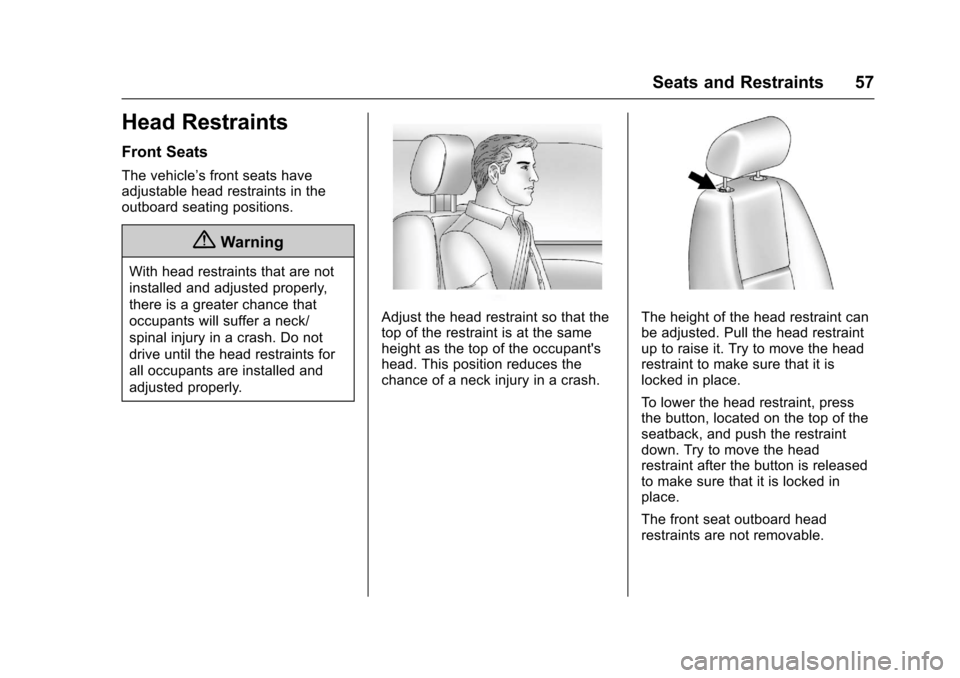
Adjust the head restraint so that thetop of the restraint is at the sameheight as the top of the occupant'shead. This position reduces thechance of a neck injury in a crash.
The height of the head restraint canbe adjusted. Pull the head restraintup to raise it. Try to move the headrestraint to make sure that it islocked in place.
To l o w e r t h e h e a d r e s t r a i n t , p r e s sthe button, located on the top of theseatback, and push the restraintdown. Try to move the headrestraint after the button is releasedto make sure that it is locked inplace.
The front seat outboard headrestraints are not removable.
Page 59 of 509
Chevrolet Silverado Owner Manual (GMNA-Localizing-U.S./Canada/Mexico-9956065) - 2017 - CRC - 4/29/16
58 Seats and Restraints
Rear Seats
The rear seat has adjustableheadrests in the outboard seatingpositions.
The height of the headrest can beadjusted. Pull the headrest up toraise it. To lower the headrest, pushthe headrest down.
If you are installing a child restraintin the rear seat, see“Securing aChild Restraint Designed for theLATCH System”underLowerAnchors and Tethers for Children(LATCH System)096.
Front Seats
Seat Adjustment
{Warning
Yo u c a n l o s e c o n t r o l o f t h e
vehicle if you try to adjust a driver
seat while the vehicle is moving.
Adjust the driver seat only when
the vehicle is not moving.
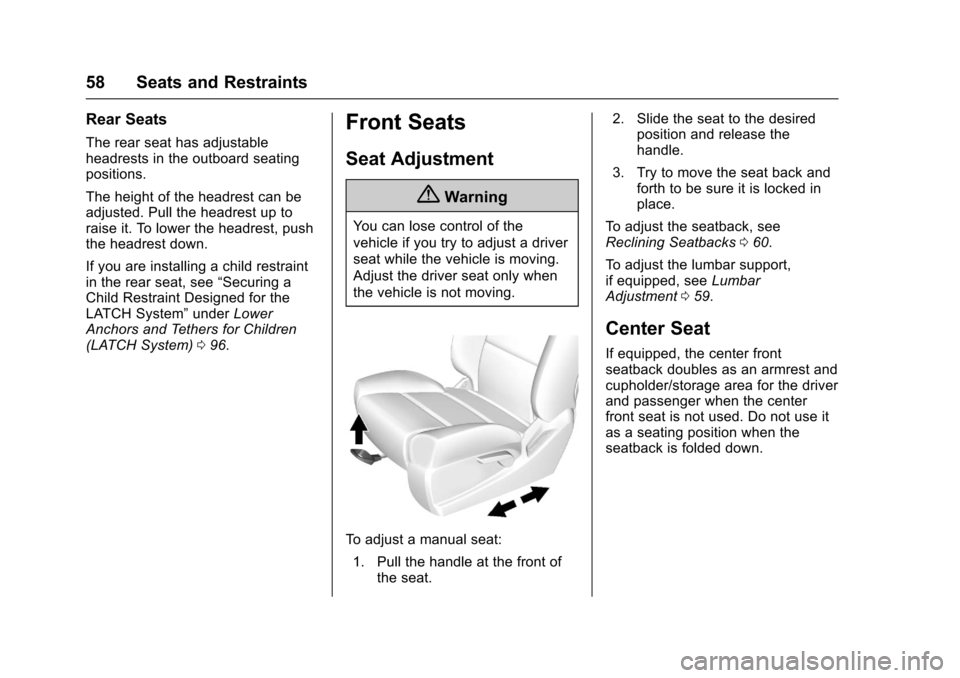
To a d j u s t a m a n u a l s e a t :
1. Pull the handle at the front ofthe seat.
2. Slide the seat to the desiredposition and release thehandle.
3. Try to move the seat back andforth to be sure it is locked inplace.
To a d j u s t t h e s e a t b a c k , s e eReclining Seatbacks060.
To a d j u s t t h e l u m b a r s u p p o r t ,if equipped, seeLumbarAdjustment059.
Center Seat
If equipped, the center frontseatback doubles as an armrest andcupholder/storage area for the driverand passenger when the centerfront seat is not used. Do not use itas a seating position when theseatback is folded down.
Page 60 of 509
Chevrolet Silverado Owner Manual (GMNA-Localizing-U.S./Canada/Mexico-9956065) - 2017 - CRC - 4/29/16
Seats and Restraints 59
Power Seat Adjustment
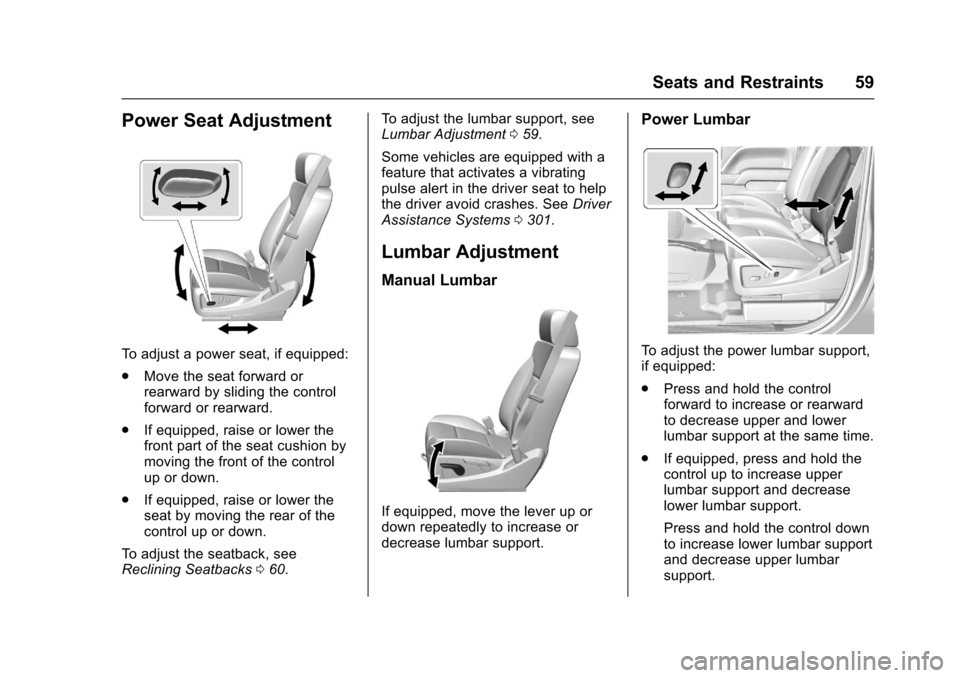
To a d j u s t a p o w e r s e a t , i f e q u i p p e d :
.Move the seat forward orrearward by sliding the controlforward or rearward.
.If equipped, raise or lower thefront part of the seat cushion bymoving the front of the controlup or down.
.If equipped, raise or lower theseat by moving the rear of thecontrol up or down.
To a d j u s t t h e s e a t b a c k , s e eReclining Seatbacks060.
To a d j u s t t h e l u m b a r s u p p o r t , s e eLumbar Adjustment059.
Some vehicles are equipped with afeature that activates a vibratingpulse alert in the driver seat to helpthe driver avoid crashes. SeeDriverAssistance Systems0301.
Lumbar Adjustment
Manual Lumbar
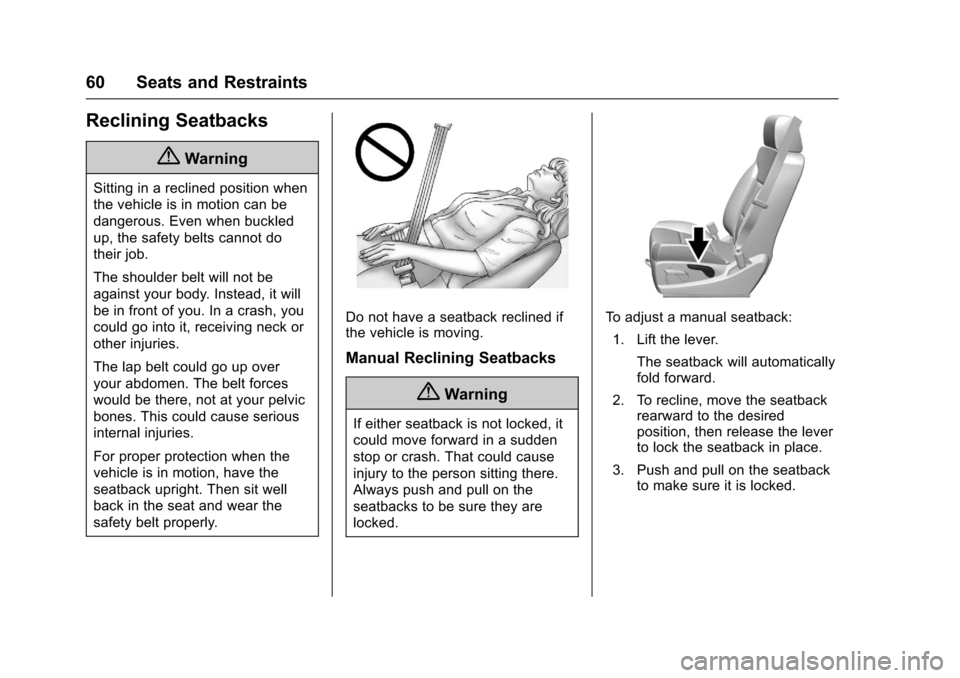
If equipped, move the lever up ordown repeatedly to increase ordecrease lumbar support.
Power Lumbar
To a d j u s t t h e p o w e r l u m b a r s u p p o r t ,if equipped:
.Press and hold the controlforward to increase or rearwardto decrease upper and lowerlumbar support at the same time.
.If equipped, press and hold thecontrol up to increase upperlumbar support and decreaselower lumbar support.
Press and hold the control downto increase lower lumbar supportand decrease upper lumbarsupport.
Page 61 of 509
Chevrolet Silverado Owner Manual (GMNA-Localizing-U.S./Canada/Mexico-9956065) - 2017 - CRC - 4/29/16
60 Seats and Restraints
Reclining Seatbacks
{Warning
Sitting in a reclined position when
the vehicle is in motion can be
dangerous. Even when buckled
up, the safety belts cannot do
their job.
The shoulder belt will not be
against your body. Instead, it will
be in front of you. In a crash, you
could go into it, receiving neck or
other injuries.
The lap belt could go up over
your abdomen. The belt forces
would be there, not at your pelvic
bones. This could cause serious
internal injuries.
For proper protection when the
vehicle is in motion, have the
seatback upright. Then sit well
back in the seat and wear the
safety belt properly.
Do not have a seatback reclined ifthe vehicle is moving.
Manual Reclining Seatbacks
{Warning
If either seatback is not locked, it
could move forward in a sudden
stop or crash. That could cause
injury to the person sitting there.
Always push and pull on the
seatbacks to be sure they are
locked.
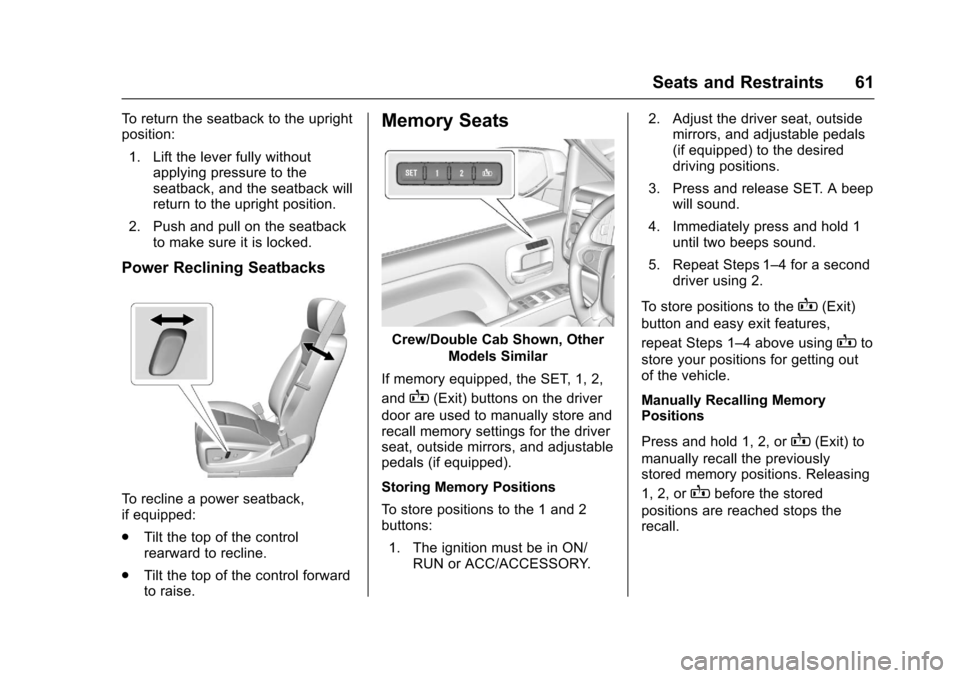
To a d j u s t a m a n u a l s e a t b a c k :
1. Lift the lever.
The seatback will automaticallyfold forward.
2. To recline, move the seatbackrearward to the desiredposition, then release the leverto lock the seatback in place.
3. Push and pull on the seatbackto make sure it is locked.
Page 62 of 509
Chevrolet Silverado Owner Manual (GMNA-Localizing-U.S./Canada/Mexico-9956065) - 2017 - CRC - 4/29/16
Seats and Restraints 61
To r e t u r n t h e s e a t b a c k t o t h e u p r i g h tposition:
1. Lift the lever fully withoutapplying pressure to theseatback, and the seatback willreturn to the upright position.
2. Push and pull on the seatbackto make sure it is locked.
Power Reclining Seatbacks
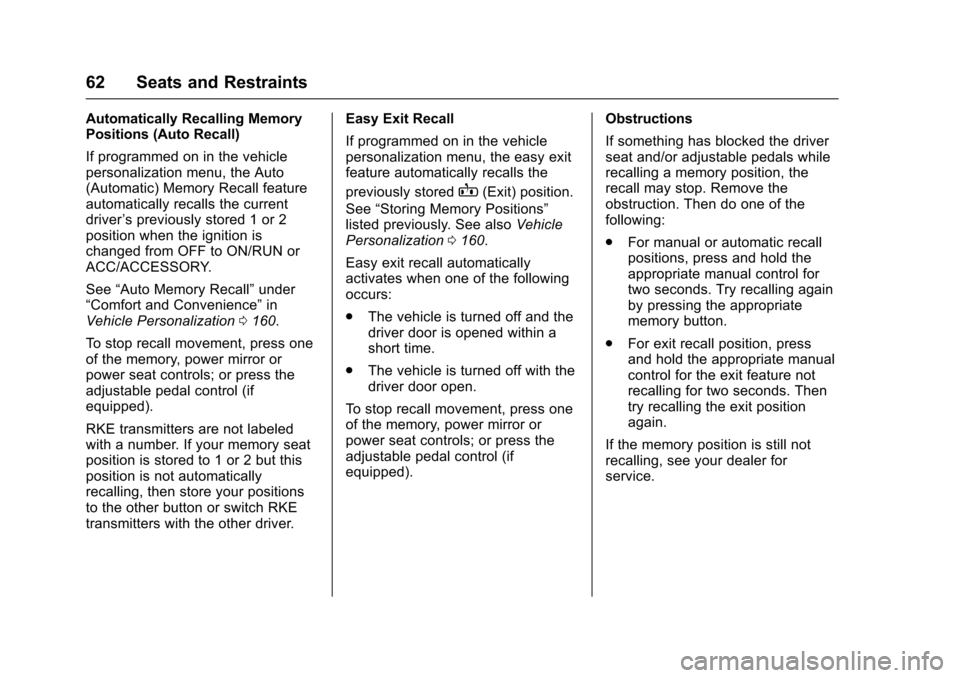
To r e c l i n e a p o w e r s e a t b a c k ,if equipped:
.Tilt the top of the controlrearward to recline.
.Tilt the top of the control forwardto raise.
Memory Seats
Crew/Double Cab Shown, Other
Models Similar
If memory equipped, the SET, 1, 2,
andB(Exit) buttons on the driver
door are used to manually store andrecall memory settings for the driverseat, outside mirrors, and adjustablepedals (if equipped).
Storing Memory Positions
To s t o r e p o s i t i o n s t o t h e 1 a n d 2buttons:
1. The ignition must be in ON/RUN or ACC/ACCESSORY.
2. Adjust the driver seat, outsidemirrors, and adjustable pedals(if equipped) to the desireddriving positions.
3. Press and release SET. A beepwill sound.
4. Immediately press and hold 1until two beeps sound.
5. Repeat Steps 1–4foraseconddriver using 2.
To s t o r e p o s i t i o n s t o t h eB(Exit)
button and easy exit features,
repeat Steps 1–4aboveusingBto
store your positions for getting outof the vehicle.
Manually Recalling MemoryPositions
Press and hold 1, 2, orB(Exit) to
manually recall the previouslystored memory positions. Releasing
1, 2, orBbefore the stored
positions are reached stops therecall.
Page 63 of 509
Chevrolet Silverado Owner Manual (GMNA-Localizing-U.S./Canada/Mexico-9956065) - 2017 - CRC - 4/29/16
62 Seats and Restraints
Automatically Recalling MemoryPositions (Auto Recall)
If programmed on in the vehiclepersonalization menu, the Auto(Automatic) Memory Recall featureautomatically recalls the currentdriver’spreviouslystored1or2position when the ignition ischanged from OFF to ON/RUN orACC/ACCESSORY.
See“Auto Memory Recall”under“Comfort and Convenience”inVehicle Personalization0160.
To s t o p r e c a l l m o v e m e n t , p r e s s o n eof the memory, power mirror orpower seat controls; or press theadjustable pedal control (ifequipped).
RKE transmitters are not labeledwith a number. If your memory seatposition is stored to 1 or 2 but thisposition is not automaticallyrecalling, then store your positionsto the other button or switch RKEtransmitters with the other driver.
Easy Exit Recall
If programmed on in the vehiclepersonalization menu, the easy exitfeature automatically recalls the
previously storedB(Exit) position.
See“Storing Memory Positions”listed previously. See alsoVehiclePersonalization0160.
Easy exit recall automaticallyactivates when one of the followingoccurs:
.The vehicle is turned off and thedriver door is opened within ashort time.
.The vehicle is turned off with thedriver door open.
To s t o p r e c a l l m o v e m e n t , p r e s s o n eof the memory, power mirror orpower seat controls; or press theadjustable pedal control (ifequipped).
Obstructions
If something has blocked the driverseat and/or adjustable pedals whilerecalling a memory position, therecall may stop. Remove theobstruction. Then do one of thefollowing:
.For manual or automatic recallpositions, press and hold theappropriate manual control fortwo seconds. Try recalling againby pressing the appropriatememory button.
.For exit recall position, pressand hold the appropriate manualcontrol for the exit feature notrecalling for two seconds. Thentry recalling the exit positionagain.
If the memory position is still notrecalling, see your dealer forservice.
Page 64 of 509
Chevrolet Silverado Owner Manual (GMNA-Localizing-U.S./Canada/Mexico-9956065) - 2017 - CRC - 4/29/16
Seats and Restraints 63
Heated and Ventilated
Front Seats
{Warning
If you cannot feel temperature
change or pain to the skin, the
seat heater may cause burns. To
reduce the risk of burns, people
with such a condition should use
care when using the seat heater,
especially for long periods of
time. Do not place anything on
the seat that insulates against
heat, such as a blanket, cushion,
cover, or similar item. This may
cause the seat heater to
overheat. An overheated seat
heater may cause a burn or may
damage the seat.
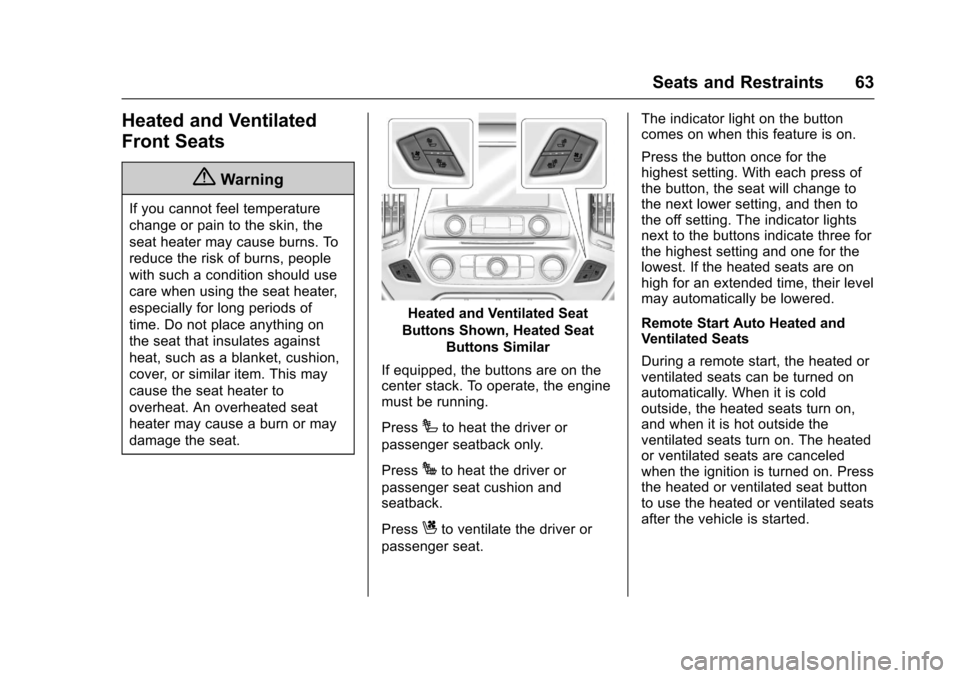
Heated and Ventilated Seat
Buttons Shown, Heated Seat
Buttons Similar
If equipped, the buttons are on thecenter stack. To operate, the enginemust be running.
PressIto heat the driver or
passenger seatback only.
PressJto heat the driver or
passenger seat cushion andseatback.
PressCto ventilate the driver or
passenger seat.
The indicator light on the buttoncomes on when this feature is on.
Press the button once for thehighest setting. With each press ofthe button, the seat will change tothe next lower setting, and then tothe off setting. The indicator lightsnext to the buttons indicate three forthe highest setting and one for thelowest. If the heated seats are onhigh for an extended time, their levelmay automatically be lowered.
Remote Start Auto Heated andVentilated Seats
During a remote start, the heated orventilated seats can be turned onautomatically. When it is coldoutside, the heated seats turn on,and when it is hot outside theventilated seats turn on. The heatedor ventilated seats are canceledwhen the ignition is turned on. Pressthe heated or ventilated seat buttonto use the heated or ventilated seatsafter the vehicle is started.
Page 65 of 509
Chevrolet Silverado Owner Manual (GMNA-Localizing-U.S./Canada/Mexico-9956065) - 2017 - CRC - 4/29/16
64 Seats and Restraints
The heated or ventilated seatindicator lights do not turn on duringaremotestart.
The temperature performance of anunoccupied seat may be reduced.This is normal.
The heated or ventilated seats willnot turn on during a remote startunless they are enabled in thevehicle personalization menu. SeeRemote Vehicle Start038andVehicle Personalization0160.
Rear Seats
Rear Seats (Double Cab
Full Bench)
Rear Seat Reminder (Full
Bench Only)
Look in Rear Seat ReminderFeature
If equipped, this message displaysunder certain conditions indicatingthere may be an item or passengerin the rear seat. Check beforeexiting the vehicle.
This feature will activate when asecond row door is opened whilethe vehicle is on or up to 10 minutesbefore the vehicle is turned on,including if the vehicle was startedremotely. There will be an alertwhen the vehicle is turned off. Thealert does not directly detect objectsin the rear seat; instead, undercertain conditions, it detects when arear door is opened and closed,indicating that there may besomething in the rear seat.
The feature is active only once eachtime the vehicle is turned on and off,and will require reactivation byopening and closing the second rowdoors. There may be an alert evenwhen there is nothing in the rearseat; for example, if a child enteredthe vehicle through the rear doorand left the vehicle without thevehicle being shut off.
The feature can be turned on or offthroughVehiclePersonalization0160.
Folding the Rear Seat
Caution
Folding a rear seat with the safety
belts still fastened may cause
damage to the seat or the safety
belts. Always unbuckle the safety
belts and return them to their
normal stowed position before
folding a rear seat.