stop start CHEVROLET SILVERADO 2017 3.G Owner's Manual
[x] Cancel search | Manufacturer: CHEVROLET, Model Year: 2017, Model line: SILVERADO, Model: CHEVROLET SILVERADO 2017 3.GPages: 509, PDF Size: 8.87 MB
Page 283 of 509
Chevrolet Silverado Owner Manual (GMNA-Localizing-U.S./Canada/Mexico-9956065) - 2017 - CRC - 4/29/16
282 Driving and Operating
If the vehicle has an exhaust brake,it can also be used, but will notautomatically downshift thetransmission. See“Exhaust Brake”in the Duramax diesel supplement.
Caution
Spinning the tires or holding the
vehicle in one place on a hill
using only the accelerator pedal
may damage the transmission.
The repair will not be covered by
the vehicle warranty. If you are
stuck, do not spin the tires. When
stopping on a hill, use the brakes
to hold the vehicle in place.
Low Traction Mode
If equipped, Low Traction Modeassists in vehicle acceleration whenroad conditions are slippery, suchas with ice or snow. While thevehicle is at a stop, select L2 usingRange Selection Mode. This willlimit torque to the wheels and helpto prevent the tires from spinning.
Tow/Haul Mode
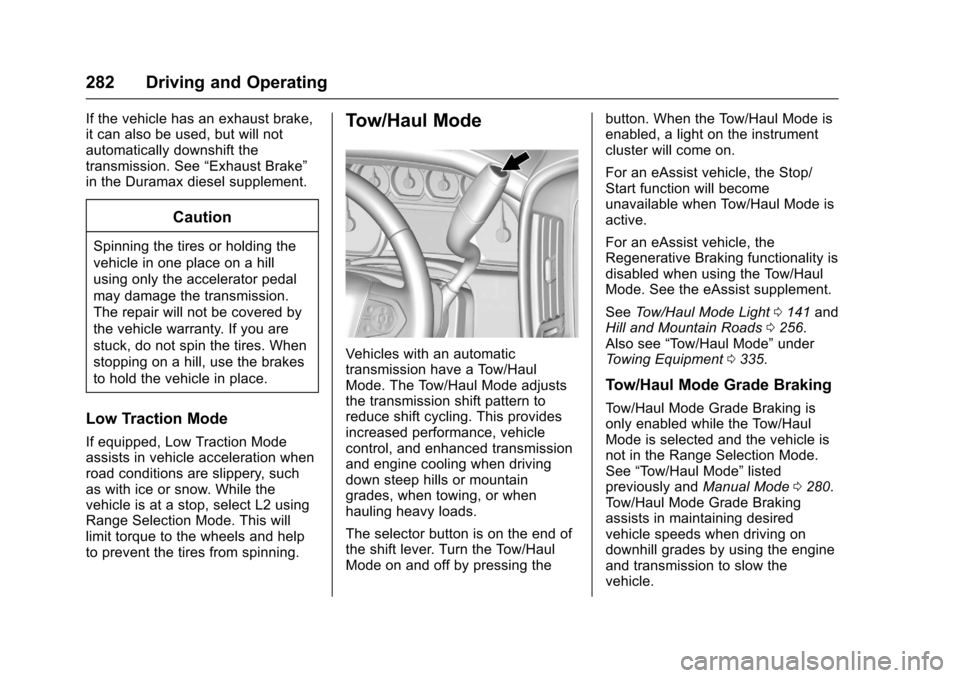
Vehicles with an automatictransmission have a Tow/HaulMode. The Tow/Haul Mode adjuststhe transmission shift pattern toreduce shift cycling. This providesincreased performance, vehiclecontrol, and enhanced transmissionand engine cooling when drivingdown steep hills or mountaingrades, when towing, or whenhauling heavy loads.
The selector button is on the end ofthe shift lever. Turn the Tow/HaulMode on and off by pressing the
button. When the Tow/Haul Mode isenabled, a light on the instrumentcluster will come on.
For an eAssist vehicle, the Stop/Start function will becomeunavailable when Tow/Haul Mode isactive.
For an eAssist vehicle, theRegenerative Braking functionality isdisabled when using the Tow/HaulMode. See the eAssist supplement.
SeeTo w / H a u l M o d e L i g h t0141andHill and Mountain Roads0256.Also see“To w / H a u l M o d e”underTo w i n g E q u i p m e n t0335.
Tow/Haul Mode Grade Braking
To w / H a u l M o d e G r a d e B r a k i n g i sonly enabled while the Tow/HaulMode is selected and the vehicle isnot in the Range Selection Mode.See“To w / H a u l M o d e”listedpreviously andManual Mode0280.To w / H a u l M o d e G r a d e B r a k i n gassists in maintaining desiredvehicle speeds when driving ondownhill grades by using the engineand transmission to slow thevehicle.
Page 284 of 509
Chevrolet Silverado Owner Manual (GMNA-Localizing-U.S./Canada/Mexico-9956065) - 2017 - CRC - 4/29/16
Driving and Operating 283
If equipped, on vehicles with agasoline engine, to disable orenable Tow/Haul Grade Brakingwithin the current ignition key cycle,press and hold the Tow/Haul buttonfor five seconds. When the button isreleased, the requested modechange is made. A DIC message isdisplayed. SeeTr a n s m i s s i o nMessages0157.
On vehicles with a diesel engine,To w / H a u l M o d e G r a d e B r a k i n g c a nbe enabled or disabled by pressingthe Tow/Haul Mode button. Use theexhaust brake and Tow/Haul Modefor maximum grade braking.
SeeTo w i n g E q u i p m e n t0335.
For other forms of grade braking,seeAutomatic Transmission0277andCruise Control0298.
Manual Transmission
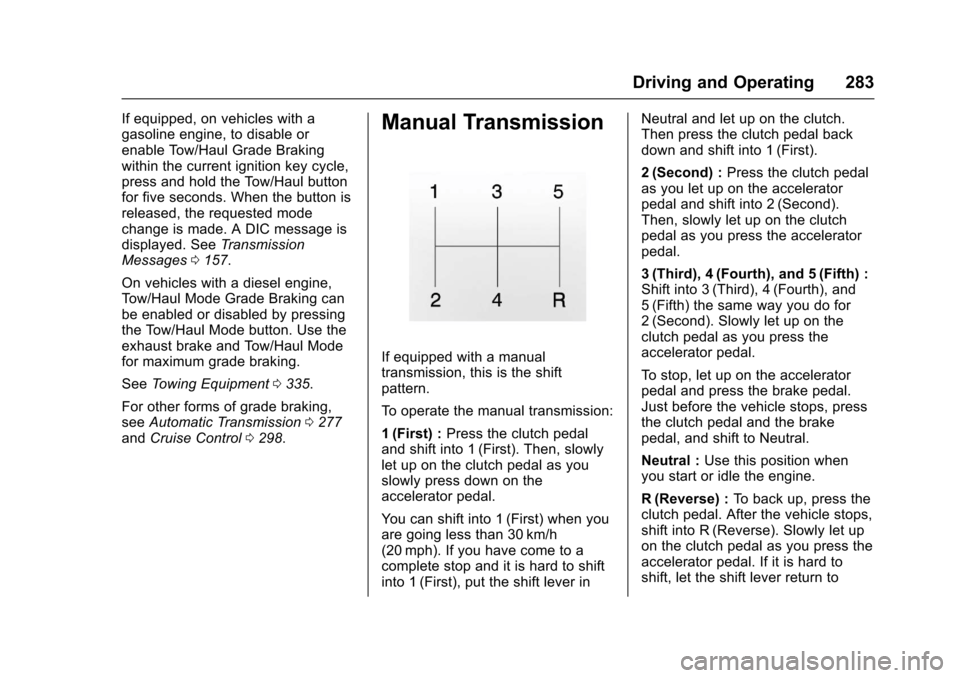
If equipped with a manualtransmission, this is the shiftpattern.
To o p e r a t e t h e m a n u a l t r a n s m i s s i o n :
1(First) :Press the clutch pedaland shift into 1 (First). Then, slowlylet up on the clutch pedal as youslowly press down on theaccelerator pedal.
Yo u c a n s h i f t i n t o 1 ( F i r s t ) w h e n y o uare going less than 30 km/h(20 mph). If you have come to acomplete stop and it is hard to shiftinto 1 (First), put the shift lever in
Neutral and let up on the clutch.Then press the clutch pedal backdown and shift into 1 (First).
2(Second) :Press the clutch pedalas you let up on the acceleratorpedal and shift into 2 (Second).Then, slowly let up on the clutchpedal as you press the acceleratorpedal.
3(Third), 4(Fourth), and 5(Fifth) :Shift into 3 (Third), 4 (Fourth), and5(Fifth) the same way you do for2(Second). Slowly let up on theclutch pedal as you press theaccelerator pedal.
To s t o p , l e t u p o n t h e a c c e l e r a t o rpedal and press the brake pedal.Just before the vehicle stops, pressthe clutch pedal and the brakepedal, and shift to Neutral.
Neutral :Use this position whenyou start or idle the engine.
R(Reverse) :To b a c k u p , p r e s s t h eclutch pedal. After the vehicle stops,shift into R (Reverse). Slowly let upon the clutch pedal as you press theaccelerator pedal. If it is hard toshift, let the shift lever return to
Page 289 of 509
Chevrolet Silverado Owner Manual (GMNA-Localizing-U.S./Canada/Mexico-9956065) - 2017 - CRC - 4/29/16
288 Driving and Operating
1. The ignition must be in ON/RUN and the vehicle must bestopped or moving less than5km/h (3mph) with thetransmission in N (Neutral). It isbest for the vehicle to bemoving 1.6 to 3.2 km/h(1 to 2 mph).
2. Turn the knob to 4n.Waitfor
the 4nindicator light to stop
flashing before shifting thetransmission into gear.
If the transmission is in gear and/ormoving more than 5 km/h (3 mph),
the 4nindicator light will flash for
30 seconds and not complete theshift. After 30 seconds the transfer
case will shift to 4m.Turntheknob
to 4mto see the indicator. With the
vehicle moving less than 5 km/h(3 mph), and the transmission inN(Neutral), attempt the shift again.
Shifting Out of 4n
1. To shift out of 4nthe vehicle
must be stopped or movingless than 5 km/h (3 mph) withthe transmission in N (Neutral)
and the ignition in ON/RUN.It is best for the vehicle to bemoving 1.6 to 3.2 km/h(1 to 2 mph).
2. Turn the knob to 4mor 2m.
Wait for the 4mor 2mindicator
light to stop flashing beforeshifting the transmissioninto gear.
If the transmission is in gear and/ormoving more than 5 km/h (3 mph),
the 4mor 2mindicator light will flash
for 30 seconds, but will not completethe shift. With the vehicle movingless than 5 km/h (3 mph), and thetransmission in N (Neutral), attemptthe shift again.
Shifting Into N (Neutral)
To s h i f t :
1. Park the vehicle on a levelsurface.
2. Set the parking brake andpress and hold the brakepedal. SeeParkingBrake0293.
3. Start the vehicle or turn theignition to ON/RUN.
4. Shift the transmission toN(Neutral).
5. Shift the transfer case to 2m.
6. Turn the transfer case knobclockwise to N (Neutral) until itstops and hold it there until theN(Neutral) light starts blinking.This will take at least10 seconds. Then slowly
release the dial to the 4n
position. The N (Neutral) lightwill come on when the transfercase shift to N (Neutral) iscomplete.
7. With the engine running, verifythat the transfer case is inN(Neutral) by shifting thetransmission to R (Reverse),then to D (Drive). There shouldbe no movement of the vehiclewhile shifting the transmission.
8. Turn the engine off, and theignition to ACC/ACCESSORY.
9. Place the transmission shiftlever in P (Park). SeeRecreational VehicleTo w i n g0437.
Page 290 of 509
Chevrolet Silverado Owner Manual (GMNA-Localizing-U.S./Canada/Mexico-9956065) - 2017 - CRC - 4/29/16
Driving and Operating 289
10. Turn the ignition to LOCK/OFF.
Shifting Out of N (Neutral)
To s h i f t :
1. Set the parking brake andapply the brake pedal.
2. Turn the ignition to ON/RUNwith the engine off.
3. Shift the transmission toN(Neutral).
4. Turn the transfer case knob to
2m.
After the transfer case hasshifted out of N (Neutral), theN(Neutral) light will goout.
5. Release the parking brake.
Caution
Shifting the transmission into gear
before the requested mode
indicator light has stopped
flashing could damage the
transfer case.
6. Start the engine and shift thetransmission to thedesired gear.
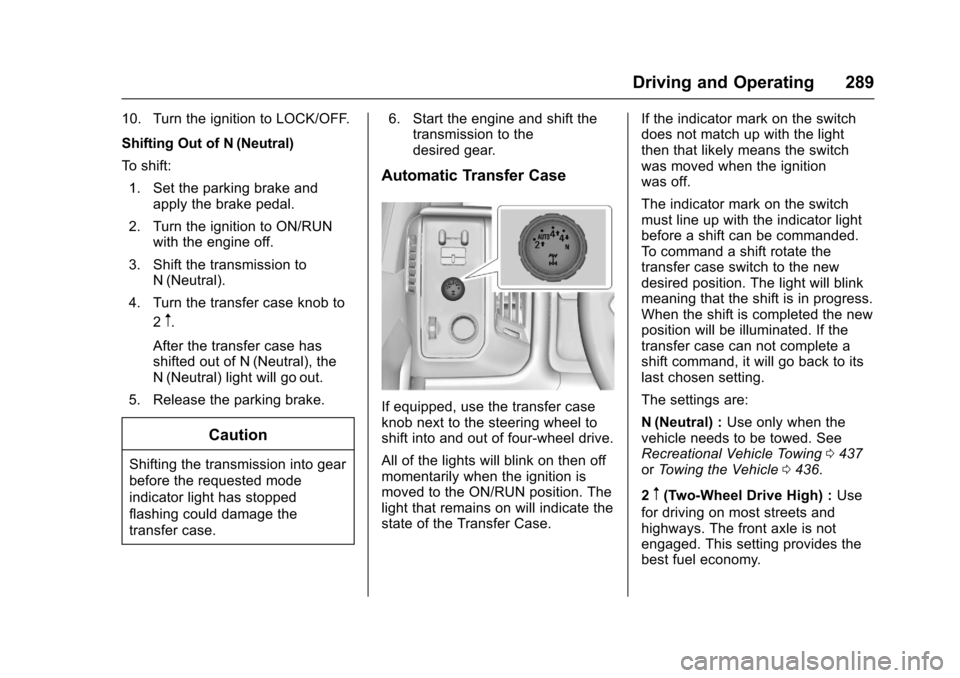
Automatic Transfer Case
If equipped, use the transfer caseknob next to the steering wheel toshift into and out of four-wheel drive.
All of the lights will blink on then offmomentarily when the ignition ismoved to the ON/RUN position. Thelight that remains on will indicate thestate of the Transfer Case.
If the indicator mark on the switchdoes not match up with the lightthen that likely means the switchwas moved when the ignitionwas off.
The indicator mark on the switchmust line up with the indicator lightbefore a shift can be commanded.To c o m m a n d a s h i f t r o t a t e t h etransfer case switch to the newdesired position. The light will blinkmeaning that the shift is in progress.When the shift is completed the newposition will be illuminated. If thetransfer case can not complete ashift command, it will go back to itslast chosen setting.
The settings are:
N(Neutral) :Use only when thevehicle needs to be towed. SeeRecreational Vehicle Towing0437orTo w i n g t h e V e h i c l e0436.
2m(Two-Wheel Drive High) :Use
for driving on most streets andhighways. The front axle is notengaged. This setting provides thebest fuel economy.
Page 292 of 509
Chevrolet Silverado Owner Manual (GMNA-Localizing-U.S./Canada/Mexico-9956065) - 2017 - CRC - 4/29/16
Driving and Operating 291
If the transmission is in gear and/ormoving more than 5 km/h (3 mph),
the 4nindicator light will flash for
30 seconds and not complete theshift. After 30 seconds the transfer
case will shift to 4m.Turntheknob
to 4mto display the indicator. With
the vehicle moving less than 5 km/h(3 mph), and the transmission inN(Neutral), attempt the shift again.
Shifting Out of 4n
To s h i f t :
1. The vehicle must be stopped ormoving less than 5 km/h(3 mph) with the transmissionin N (Neutral) and the ignition inON/RUN. It is best for thevehicle to be moving1.6 to 3.2 km/h (1 to 2 mph).
2. Turn the knob to 4m,AUTO,
or 2m.Waitforthe4m,AUTO,
or 2mindicator light to stop
flashing before shifting thetransmission into gear.
Caution
Shifting the transmission into gear
before the requested mode
indicator light has stopped
flashing could damage the
transfer case.
If the transmission is in gear and/ormoving more than 5 km/h (3 mph),
the 4m,AUTO,or2mindicator light
will flash for 30 seconds but will notcomplete the shift. With the vehiclemoving less than 5 km/h (3 mph),and the transmission in N (Neutral),attempt the shift again.
Shifting Into N (Neutral)
To s h i f t i n t o N ( N e u t r a l ) :
1. Park the vehicle on a levelsurface.
2. Set the parking brake andpress and hold the brakepedal. SeeParkingBrake0293.
3. Start the vehicle or turn theignition to ON/RUN.
4. Shift the transmission toN(Neutral).
5. Shift the transfer case to 2m.
6. Turn the transfer case knobclockwise to N (Neutral) until itstops and hold it there until theN(Neutral) light starts blinking.This will take at least10 seconds. Then slowly
release the dial to the 4n
position. The N (Neutral) lightwill come on when the transfercase shift to N (Neutral) iscomplete.
7. With the engine running, verifythat the transfer case is inN(Neutral) by shifting thetransmission to R (Reverse),then shift the transmission toD(Drive). There should be nomovement of the vehicle whileshifting the transmission.
8. Turn the engine off, and theignition to ACC/ACCESSORY.
9. Place the transmission shiftlever in P (Park). SeeRecreational VehicleTo w i n g0437.
Page 293 of 509
Chevrolet Silverado Owner Manual (GMNA-Localizing-U.S./Canada/Mexico-9956065) - 2017 - CRC - 4/29/16
292 Driving and Operating
10. Turn the ignition to LOCK/OFF.
Shifting Out of N (Neutral)
To s h i f t o u t o f N ( N e u t r a l ) :
1. Set the parking brake andapply the brake pedal.
2. Turn the ignition to ON/RUNwith the engine off.
3. Shift the transmission toN(Neutral).
4. Turn the transfer case knob tothe desired setting.
After the transfer case hasshifted out of N (Neutral), theN(Neutral) light will goout.
5. Release the parking brake.
6. Start the engine and shift thetransmission to thedesired gear.
Brakes
Antilock Brake
System (ABS)
This vehicle has an Antilock BrakeSystem (ABS), an advancedelectronic braking system that helpsprevent a braking skid.
When the vehicle begins to driveaway, ABS checks itself.Amomentarymotororclickingnoisemay be heard while this test is goingon, and it may even be noticed thatthe brake pedal moves a little. Thisis normal.
If there is a problem with ABS, thiswarning light stays on. SeeAntilockBrake System (ABS) WarningLight0141.
If driving safely on a wet road and itbecomes necessary to slam on thebrakes and continue braking toavoid a sudden obstacle, acomputer senses the wheels areslowing down. If one of the wheelsis about to stop rolling, the computerwill separately work the brakes ateach wheel.
ABS can change the brake pressureto each wheel, as required, fasterthan any driver could. This can helpyou steer around the obstacle whilebraking hard.
As the brakes are applied, thecomputer keeps receiving updateson wheel speed and controlsbraking pressure accordingly.
Remember: ABS does not changethe time needed to get a foot up tothe brake pedal or always decreasestopping distance. If you get tooclose to the vehicle in front of you,there will not be enough time toapply the brakes if that vehiclesuddenly slows or stops. Alwaysleave enough room up ahead tostop, even with ABS.
Page 295 of 509
Chevrolet Silverado Owner Manual (GMNA-Localizing-U.S./Canada/Mexico-9956065) - 2017 - CRC - 4/29/16
294 Driving and Operating
Achimesoundsandthewarninglight flashes when the parking brakeis applied and the vehicle is movingat least 8 km/h (5 mph).
To r e l e a s e t h e p a r k i n g b r a k e , h o l dthe regular brake pedal down. Thenpull the bottom edge of the leverwith the parking brake symbol,located to the right of the steeringcolumn.
If the ignition is on when the parkingbrake is released, the brake systemwarning light goes off.
Caution
Driving with the parking brake on
can overheat the brake system
and cause premature wear or
damage to brake system parts.
Make sure that the parking brake
is fully released and the brake
warning light is off before driving.
If you are towing a trailer and areparking on any hill, seeDrivingCharacteristics and TowingTips0315.
Brake Assist
The Brake Assist feature isdesigned to assist the driver instopping or decreasing vehiclespeed in emergency drivingconditions. This feature uses thestability system hydraulic brakecontrol module to supplement thepower brake system underconditions where the driver hasquickly and forcefully applied thebrake pedal in an attempt to quicklystop or slow down the vehicle. Thestability system hydraulic brakecontrol module increases brakepressure at each corner of thevehicle until the ABS activates.Minor brake pedal pulsation orpedal movement during this time isnormal and the driver shouldcontinue to apply the brake pedal asthe driving situation dictates TheBrake Assist feature willautomatically disengage when thebrake pedal is released or brakepedal pressure is quicklydecreased.
Hill Start Assist (HSA)
This vehicle has a Hill Start Assist(HSA) feature, which may be usefulwhen the vehicle is stopped on agrade. This feature is designed toprevent the vehicle from rolling,either forward or rearward, duringvehicle drive off. After youcompletely stop and hold the vehiclein a complete standstill on a grade,HSA will automatically activate.During the transition period betweenwhen you release the brake pedaland start to accelerate to drive offon a grade, HSA holds the brakingpressure for a maximum oftwo seconds to ensure that there isno rolling. The brakes willautomatically release when theaccelerator pedal is applied withinthe two-second window. If thevehicle is equipped with theIntegrated Trailer Brake Control(ITBC) system, HSA may also applythe trailer brakes. It will not activateif the vehicle is in a drive gear and
Page 297 of 509
Chevrolet Silverado Owner Manual (GMNA-Localizing-U.S./Canada/Mexico-9956065) - 2017 - CRC - 4/29/16
296 Driving and Operating
disabled,gcomes on, and the
appropriate message will appear onthe DIC. Both traction control andStabiliTrak are automaticallydisabled in this condition.
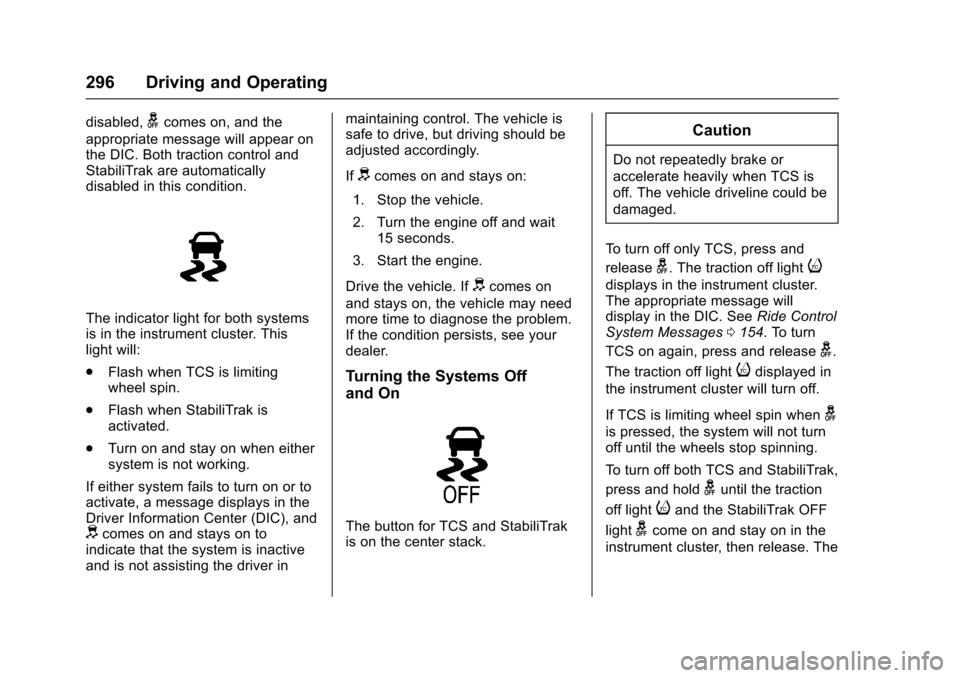
The indicator light for both systemsis in the instrument cluster. Thislight will:
.Flash when TCS is limitingwheel spin.
.Flash when StabiliTrak isactivated.
.Turn on and stay on when eithersystem is not working.
If either system fails to turn on or toactivate, a message displays in theDriver Information Center (DIC), anddcomes on and stays on toindicate that the system is inactiveand is not assisting the driver in
maintaining control. The vehicle issafe to drive, but driving should beadjusted accordingly.
Ifdcomes on and stays on:
1. Stop the vehicle.
2. Turn the engine off and wait15 seconds.
3. Start the engine.
Drive the vehicle. Ifdcomes on
and stays on, the vehicle may needmore time to diagnose the problem.If the condition persists, see yourdealer.
Turning the Systems Off
and On
The button for TCS and StabiliTrakis on the center stack.
Caution
Do not repeatedly brake or
accelerate heavily when TCS is
off. The vehicle driveline could be
damaged.
To t u r n o f f o n l y T C S , p r e s s a n d
releaseg.Thetractionofflighti
displays in the instrument cluster.The appropriate message willdisplay in the DIC. SeeRide ControlSystem Messages0154.Toturn
TCS on again, press and releaseg.
The traction off lightidisplayed in
the instrument cluster will turn off.
If TCS is limiting wheel spin wheng
is pressed, the system will not turnoff until the wheels stop spinning.
To t u r n o f f b o t h T C S a n d S t a b i l i T r a k ,
press and holdguntil the traction
off lightiand the StabiliTrak OFF
lightgcome on and stay on in the
instrument cluster, then release. The
Page 315 of 509
Chevrolet Silverado Owner Manual (GMNA-Localizing-U.S./Canada/Mexico-9956065) - 2017 - CRC - 4/29/16
314 Driving and Operating
Warning (Continued)
.Fuel can spray out if therefueling nozzle is insertedtoo quickly. This spray canhappen if the tank is nearlyfull, and is more likely in hotweather. Insert the refuelingnozzle slowly and wait forany hiss noise to stop priorto beginning to flow fuel.
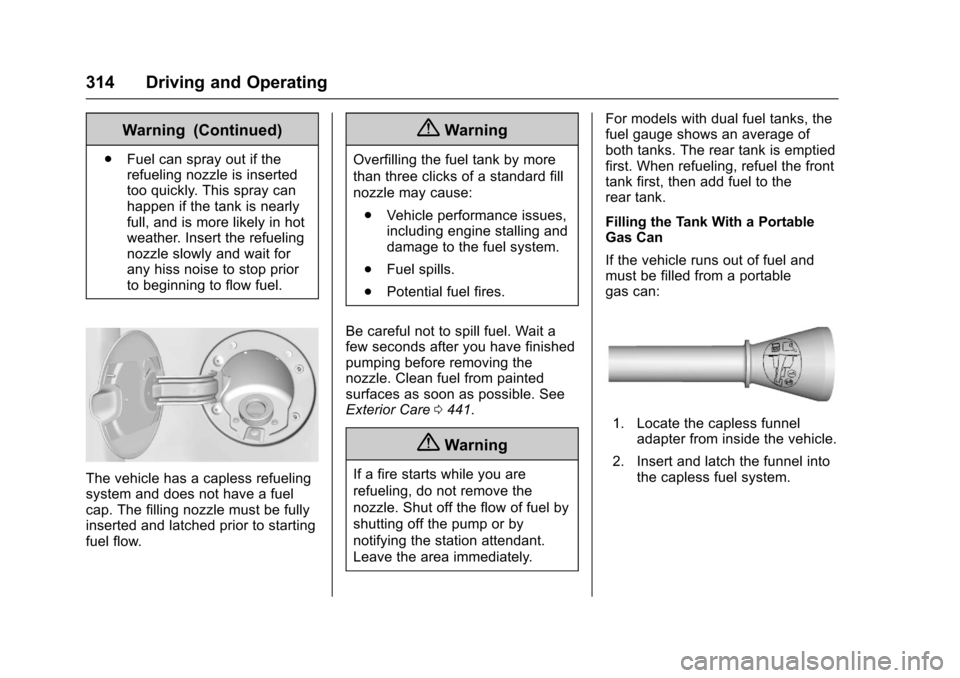
The vehicle has a capless refuelingsystem and does not have a fuelcap. The filling nozzle must be fullyinserted and latched prior to startingfuel flow.
{Warning
Overfilling the fuel tank by more
than three clicks of a standard fill
nozzle may cause:
.Vehicle performance issues,including engine stalling anddamage to the fuel system.
.Fuel spills.
.Potential fuel fires.
Be careful not to spill fuel. Wait afew seconds after you have finishedpumping before removing thenozzle. Clean fuel from paintedsurfaces as soon as possible. SeeExterior Care0441.
{Warning
If a fire starts while you are
refueling, do not remove the
nozzle. Shut off the flow of fuel by
shutting off the pump or by
notifying the station attendant.
Leave the area immediately.
For models with dual fuel tanks, thefuel gauge shows an average ofboth tanks. The rear tank is emptiedfirst. When refueling, refuel the fronttank first, then add fuel to therear tank.
Filling the Tank With a PortableGas Can
If the vehicle runs out of fuel andmust be filled from a portablegas can:
1. Locate the capless funneladapter from inside the vehicle.
2. Insert and latch the funnel intothe capless fuel system.
Page 319 of 509
Chevrolet Silverado Owner Manual (GMNA-Localizing-U.S./Canada/Mexico-9956065) - 2017 - CRC - 4/29/16
318 Driving and Operating
If parking the rig on a hill:
1. Press the brake pedal, but donot shift into P (Park) yet. Turnthe wheels into the curb iffacing downhill or into traffic iffacing uphill.
2. Have someone place chocksunder the trailer wheels.
3. When the wheel chocks are inplace, release the regularbrakes until the chocks absorbthe load.
4. Reapply the brake pedal. Thenapply the parking brake andshift into P (Park).
5. Release the brake pedal.
Leaving After Parking on a Hill
1. Apply and hold the brakepedal.
2. Start the engine.
3. Shift into a gear.
4. Release the parking brake.
5. Let up on the brake pedal.
6. Drive slowly until the trailer isclear of the chocks.
7. Stop and have someone pickup and store the chocks.
Maintenance when Trailer
Towing
The vehicle needs service moreoften when pulling a trailer. SeeMaintenance Schedule0452.Things that are especially importantin trailer operation are automatictransmission fluid, engine oil, axlelubricant, belts, cooling system, andbrake system. It is a good idea toinspect these before and duringthe trip.
Check periodically to see that allhitch nuts and bolts are tight.
Trailer Towing
If the vehicle has a diesel engine,see the Duramax dieselsupplement.
If the vehicle is bi-fuel, see thebi-fuel supplement.
Do not tow a trailer during break-in.SeeNew Vehicle Break-In0267.
{Warning
The driver can lose control when
pulling a trailer if the correct
equipment is not used or the
vehicle is not driven properly. For
example, if the trailer is too heavy
or the trailer brakes are
inadequate for the load, the
vehicle may not stop as expected.
The driver and passengers could
be seriously injured. The vehicle
may also be damaged; the
resulting repairs would not be
covered by the vehicle warranty.
Pull a trailer only if all the steps in
this section have been followed.
Ask your dealer for advice and
information about towing a trailer
with the vehicle.
Caution
Pulling a trailer improperly can
damage the vehicle and result in
costly repairs not covered by the
(Continued)