belt CHEVROLET SILVERADO 2017 3.G Workshop Manual
[x] Cancel search | Manufacturer: CHEVROLET, Model Year: 2017, Model line: SILVERADO, Model: CHEVROLET SILVERADO 2017 3.GPages: 509, PDF Size: 8.87 MB
Page 114 of 509

Chevrolet Silverado Owner Manual (GMNA-Localizing-U.S./Canada/Mexico-9956065) - 2017 - CRC - 4/29/16
Seats and Restraints 113
Warning (Continued)
airbag. Always secure a
rear-facing child restraint in a
rear seat.
If a child restraint uses a top tether,seeLower Anchors and Tethers forChildren (LATCH System)096fortop tether anchor locations.
Do not secure a child seat in aposition without a top tether anchorif a national or local law requiresthat the top tether be anchored, or ifthe instructions that come with thechild restraint say that the top strapmust be anchored.
In Canada, the law requires thatforward-facing child restraints haveatoptether,andthatthetetherbeattached.
When using the lap-shoulder belt tosecure the child restraint in thisposition, follow the instructions thatcame with the child restraint and thefollowing instructions:
1. Move the seat as far back as itwill go before securing theforward-facing child restraint.Move the seat upward or theseatback to an upright position,if needed, to get a tightinstallation of the childrestraint.
2. Put the child restraint onthe seat.
3. Pick up the latch plate, and runthe lap and shoulder portionsof the vehicle's safety beltthrough or around the restraint.The child restraint instructionswill show you how.
4. Push the latch plate into thebuckle until it clicks.
Position the release button,away from the child restraintsystem, so that the safety beltcould be quickly unbuckled ifnecessary.
Page 115 of 509
Chevrolet Silverado Owner Manual (GMNA-Localizing-U.S./Canada/Mexico-9956065) - 2017 - CRC - 4/29/16
114 Seats and Restraints
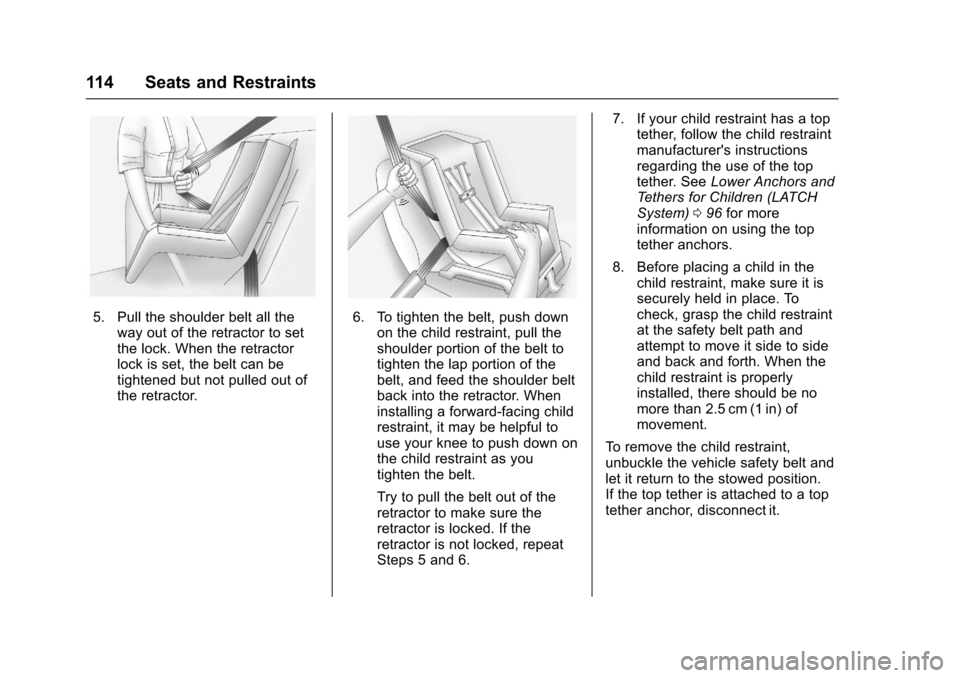
5. Pull the shoulder belt all theway out of the retractor to setthe lock. When the retractorlock is set, the belt can betightened but not pulled out ofthe retractor.
6. To tighten the belt, push downon the child restraint, pull theshoulder portion of the belt totighten the lap portion of thebelt, and feed the shoulder beltback into the retractor. Wheninstalling a forward-facing childrestraint, it may be helpful touse your knee to push down onthe child restraint as youtighten the belt.
Try to pull the belt out of theretractor to make sure theretractor is locked. If theretractor is not locked, repeatSteps 5 and 6.
7. If your child restraint has a toptether, follow the child restraintmanufacturer's instructionsregarding the use of the toptether. SeeLower Anchors andTe t h e r s f o r C h i l d r e n ( L AT C HSystem)096for moreinformation on using the toptether anchors.
8. Before placing a child in thechild restraint, make sure it issecurely held in place. Tocheck, grasp the child restraintat the safety belt path andattempt to move it side to sideand back and forth. When thechild restraint is properlyinstalled, there should be nomore than 2.5 cm (1 in) ofmovement.
To r e m o v e t h e c h i l d r e s t r a i n t ,unbuckle the vehicle safety belt andlet it return to the stowed position.If the top tether is attached to a toptether anchor, disconnect it.
Page 120 of 509
Chevrolet Silverado Owner Manual (GMNA-Localizing-U.S./Canada/Mexico-9956065) - 2017 - CRC - 4/29/16
Instruments and Controls 119
Instruments and
Controls
Controls
Steering Wheel Adjustment . . . 120Steering Wheel Controls . . . . . . 121Heated Steering Wheel . . . . . . . 121Horn . . . . . . . . . . . . . . . . . . . . . . . . . . 122Windshield Wiper/Washer . . . . 122Compass . . . . . . . . . . . . . . . . . . . . . 122Clock . . . . . . . . . . . . . . . . . . . . . . . . . 123Power Outlets . . . . . . . . . . . . . . . . 124Wireless Charging . . . . . . . . . . . . 126
Warning Lights, Gauges, and
Indicators
Warning Lights, Gauges, andIndicators . . . . . . . . . . . . . . . . . . . 127Instrument Cluster . . . . . . . . . . . . 128Speedometer . . . . . . . . . . . . . . . . . 131Odometer . . . . . . . . . . . . . . . . . . . . . 131Trip Odometer . . . . . . . . . . . . . . . . 131Ta c h o m e t e r . . . . . . . . . . . . . . . . . . . 1 3 1Fuel Gauge . . . . . . . . . . . . . . . . . . . 131Engine Oil PressureGauge . . . . . . . . . . . . . . . . . . . . . . 132Engine Coolant TemperatureGauge . . . . . . . . . . . . . . . . . . . . . . 133Voltmeter Gauge . . . . . . . . . . . . . 134
Safety Belt Reminders . . . . . . . . 134Airbag Readiness Light . . . . . . . 135Airbag On-Off Light . . . . . . . . . . . 136Passenger Airbag StatusIndicator . . . . . . . . . . . . . . . . . . . . 137Charging System Light . . . . . . . 138Malfunction Indicator Lamp(Check Engine Light) . . . . . . . . 138Brake System WarningLight . . . . . . . . . . . . . . . . . . . . . . . . 140Antilock Brake System (ABS)Warning Light . . . . . . . . . . . . . . . 141Four-Wheel-Drive Light . . . . . . . 141To w / H a u l M o d e L i g h t . . . . . . . . . 1 4 1Hill Descent Control Light . . . . 141Lane Departure Warning(LDW) Light (2500/3500Series) . . . . . . . . . . . . . . . . . . . . . . 142Lane Keep Assist (LKA) Light(1500 Series) . . . . . . . . . . . . . . . 142Vehicle Ahead Indicator . . . . . . 142Traction Off Light . . . . . . . . . . . . . 142StabiliTrak®OFF Light . . . . . . . . 143Traction Control System (TCS)/StabiliTrak®Light . . . . . . . . . . . 143Tire Pressure Light . . . . . . . . . . . 143Low Fuel Warning Light . . . . . . 144Security Light . . . . . . . . . . . . . . . . . 144High-Beam On Light . . . . . . . . . . 144Front Fog Lamp Light . . . . . . . . . 145Lamps On Reminder . . . . . . . . . 145
Cruise Control Light . . . . . . . . . . 145
Information Displays
Driver Information Center (DIC)(Base Level) . . . . . . . . . . . . . . . . 145Driver Information Center (DIC)(Uplevel) . . . . . . . . . . . . . . . . . . . . 147
Vehicle Messages
Vehicle Messages . . . . . . . . . . . . 150Battery Voltage and ChargingMessages . . . . . . . . . . . . . . . . . . . 150Brake System Messages . . . . . 151Compass Messages . . . . . . . . . . 151Door Ajar Messages . . . . . . . . . . 151Engine Cooling SystemMessages . . . . . . . . . . . . . . . . . . . 152Engine Oil Messages . . . . . . . . . 152Engine Power Messages . . . . . 153Fuel System Messages . . . . . . . 153Key and Lock Messages . . . . . 153Lamp Messages . . . . . . . . . . . . . . 153Object Detection SystemMessages . . . . . . . . . . . . . . . . . . . 153Ride Control SystemMessages . . . . . . . . . . . . . . . . . . . 154Airbag System Messages . . . . 155Safety Belt Messages . . . . . . . . 155Security Messages . . . . . . . . . . . 156Steering SystemMessages . . . . . . . . . . . . . . . . . . . 156
Page 135 of 509
Chevrolet Silverado Owner Manual (GMNA-Localizing-U.S./Canada/Mexico-9956065) - 2017 - CRC - 4/29/16
134 Instruments and Controls
Voltmeter Gauge
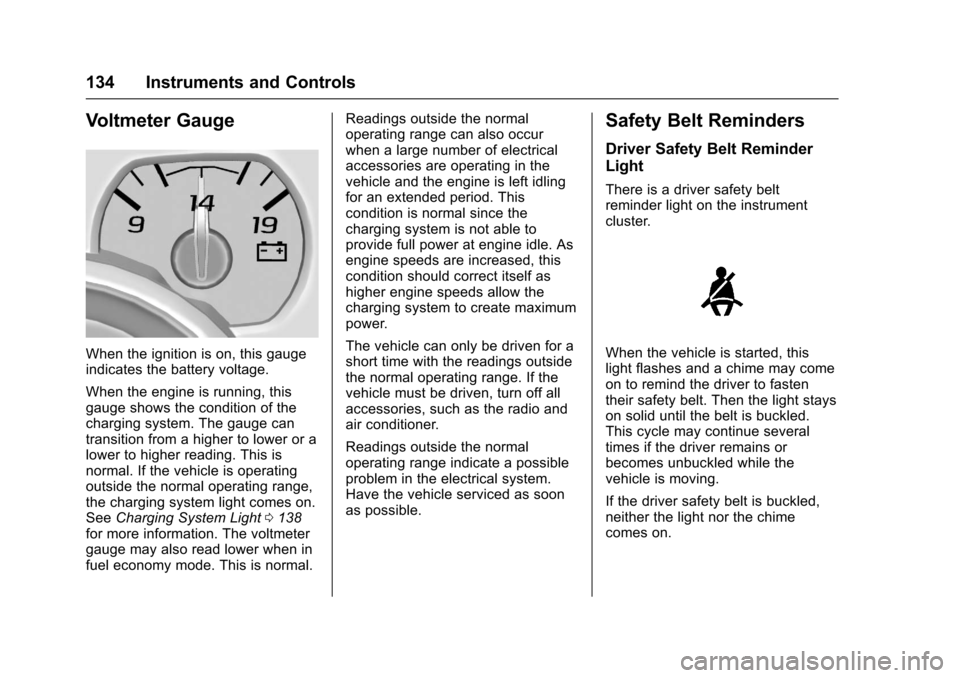
When the ignition is on, this gaugeindicates the battery voltage.
When the engine is running, thisgauge shows the condition of thecharging system. The gauge cantransition from a higher to lower or alower to higher reading. This isnormal. If the vehicle is operatingoutside the normal operating range,the charging system light comes on.SeeCharging System Light0138for more information. The voltmetergauge may also read lower when infuel economy mode. This is normal.
Readings outside the normaloperating range can also occurwhen a large number of electricalaccessories are operating in thevehicle and the engine is left idlingfor an extended period. Thiscondition is normal since thecharging system is not able toprovide full power at engine idle. Asengine speeds are increased, thiscondition should correct itself ashigher engine speeds allow thecharging system to create maximumpower.
The vehicle can only be driven for ashort time with the readings outsidethe normal operating range. If thevehicle must be driven, turn off allaccessories, such as the radio andair conditioner.
Readings outside the normaloperating range indicate a possibleproblem in the electrical system.Have the vehicle serviced as soonas possible.
Safety Belt Reminders
Driver Safety Belt Reminder
Light
There is a driver safety beltreminder light on the instrumentcluster.
When the vehicle is started, thislight flashes and a chime may comeon to remind the driver to fastentheir safety belt. Then the light stayson solid until the belt is buckled.This cycle may continue severaltimes if the driver remains orbecomes unbuckled while thevehicle is moving.
If the driver safety belt is buckled,neither the light nor the chimecomes on.
Page 136 of 509
Chevrolet Silverado Owner Manual (GMNA-Localizing-U.S./Canada/Mexico-9956065) - 2017 - CRC - 4/29/16
Instruments and Controls 135
Passenger Safety Belt
Reminder Light
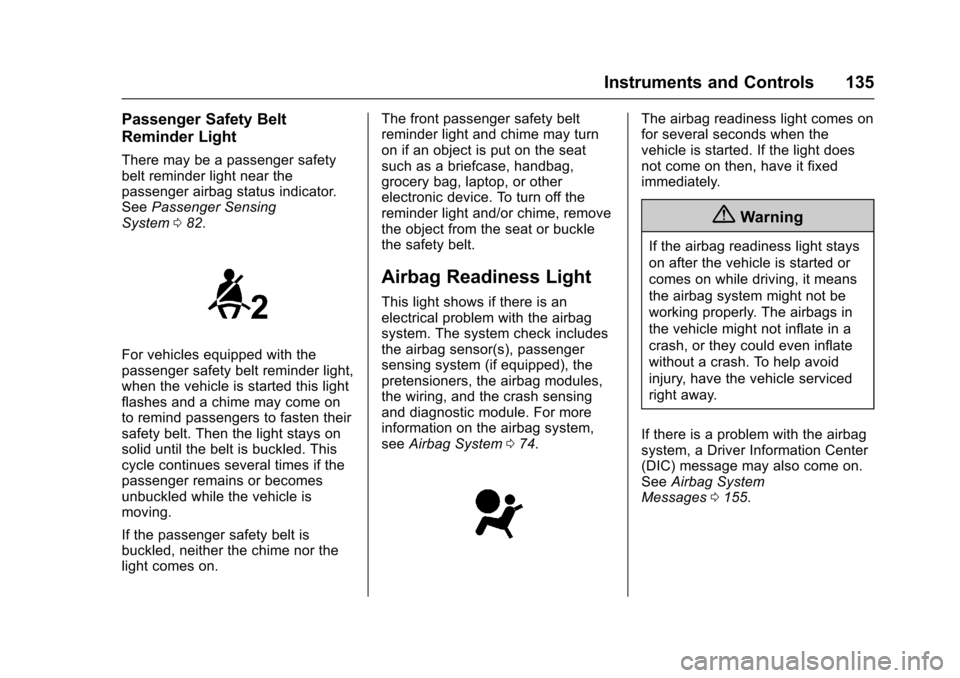
There may be a passenger safetybelt reminder light near thepassenger airbag status indicator.SeePassenger SensingSystem082.
For vehicles equipped with thepassenger safety belt reminder light,when the vehicle is started this lightflashes and a chime may come onto remind passengers to fasten theirsafety belt. Then the light stays onsolid until the belt is buckled. Thiscycle continues several times if thepassenger remains or becomesunbuckled while the vehicle ismoving.
If the passenger safety belt isbuckled, neither the chime nor thelight comes on.
The front passenger safety beltreminder light and chime may turnon if an object is put on the seatsuch as a briefcase, handbag,grocery bag, laptop, or otherelectronic device. To turn off thereminder light and/or chime, removethe object from the seat or bucklethe safety belt.
Airbag Readiness Light
This light shows if there is anelectrical problem with the airbagsystem. The system check includesthe airbag sensor(s), passengersensing system (if equipped), thepretensioners, the airbag modules,the wiring, and the crash sensingand diagnostic module. For moreinformation on the airbag system,seeAirbag System074.
The airbag readiness light comes onfor several seconds when thevehicle is started. If the light doesnot come on then, have it fixedimmediately.
{Warning
If the airbag readiness light stays
on after the vehicle is started or
comes on while driving, it means
the airbag system might not be
working properly. The airbags in
the vehicle might not inflate in a
crash, or they could even inflate
without a crash. To help avoid
injury, have the vehicle serviced
right away.
If there is a problem with the airbagsystem, a Driver Information Center(DIC) message may also come on.SeeAirbag SystemMessages0155.
Page 156 of 509
Chevrolet Silverado Owner Manual (GMNA-Localizing-U.S./Canada/Mexico-9956065) - 2017 - CRC - 4/29/16
Instruments and Controls 155
STABILITRAK INITIALIZING
This message may come on if theStabiliTrak system has not fullyinitialized because of roadconditions or the incorrect tire size.When the StabiliTrak system is fullyinitialized, the message will turn off.SeeTr a c t i o n C o n t r o l / E l e c t r o n i cStability Control0295.Ifthismessage continues to be displayedfor multiple ignition cycles and ondifferent road surfaces, see yourdealer for service.
TRACTION CONTROL OFF
This message displays when thetraction control has been turned off.SeeTr a c t i o n C o n t r o l / E l e c t r o n i cStability Control0295.
TRACTION CONTROL ON
This message displays when thetraction control is active. SeeTr a c t i o n C o n t r o l / E l e c t r o n i c S t a b i l i t yControl0295.
STABILITRAK OFF
This message displays when theStabiliTrak system has been turnedoff. Adjust your driving accordingly.
To l i m i t w h e e l s p i n a n d r e a l i z e t h efull benefits of the stabilityenhancement system, you shouldnormally leave StabiliTrak on. SeeTr a c t i o n C o n t r o l / E l e c t r o n i c S t a b i l i t yControl0295.
STABILITRAK OFF may alsodisplay when the stability controlhas been automatically disabled.The following conditions can causethis message to appear:
.The system is overheating,which could occur if StabiliTrakactivates continuously for anextended period of time.
.The brake system warning lightis on. SeeBrake SystemWarning Light0140.
.The stability system takes longerthan usual to complete itsdiagnostic checks due to drivingconditions.
.An engine or vehicle-relatedproblem has been detected andthe vehicle needs service. Seeyour dealer.
.The transfer case is inFour-Wheel Drive Low.
The message turns off as soon asthe conditions that caused themessage to be displayed are nolonger present.
Airbag System Messages
SERVICE AIRBAG
This message displays if there is aproblem with the airbag system.Ta k e t h e v e h i c l e t o y o u r d e a l e r f o rservice.
Safety Belt Messages
SHIFTER LOCKED. BUCKLE
SEATBELT
This message displays if the vehicleis equipped with the Safety BeltAssurance System and the driverand front outboard passenger,if present, safety belts are notbuckled. The vehicle will not shiftout of P (Park). Buckle the safetybelt(s) to unlock the shift lever.
This system may not allow thevehicle to shift out of P (Park) if anobject—such as a briefcase,handbag, grocery bag, laptop,
Page 157 of 509
Chevrolet Silverado Owner Manual (GMNA-Localizing-U.S./Canada/Mexico-9956065) - 2017 - CRC - 4/29/16
156 Instruments and Controls
or other electronic device—is onthe front outboard passenger seat.If this happens, remove the objectfrom the seat or buckle thesafety belt.
If the driver or front outboardpassenger unbuckles their safetybelt while driving, the safety beltreminder chime and light(s) willcome on. SeeSafety BeltReminders0134.
SHIFTER UNLOCKED. BRAKE
TO SHIFT
This message displays when theSafety Belt Assurance System timesout and allows the vehicle to beshifted out of P (Park) after30 seconds following brake apply.See“Safety Belts”and“ChildRestraints”in the Index forinformation about the importance ofproper restraint use.
This system may not functionproperly if the airbag readiness lightis on. SeeAirbag ReadinessLight0135.
Security Messages
SERVICE THEFT DETERRENT
SYSTEM
This message displays when thereis a problem with the theft-deterrentsystem. The vehicle may or may notrestart, so you may want to take thevehicle to your dealer before turningoff the engine. SeeImmobilizerOperation045.
Steering System
Messages
STEERING ASSIST IS
REDUCED DRIVE WITH CARE
This message may display if aproblem occurs with the electricpower steering system. If thismessage appears, steering effortmay be slightly higher than normal.The vehicle is still safe to drive. Usecaution while in reduced assistmode. If this message is persistentor appears repeatedly, take thevehicle to your dealer for service.SeeSteering0249.
SERVICE POWER STEERING
(1500 Series)
This message displays when thereis a problem with electric powersteering. If this message displaysand a reduction in steeringperformance or loss of powersteering assistance is noticed. Seeyour dealer. SeeSteering0249.
SERVICE POWER STEERING
(2500/3500 Series)
This message displays when thereis a problem with the power steeringassist system. If this messagedisplays the vehicle can be drivenbut should be repaired as soon aspossible. See your dealer. SeeSteering0249.
Page 249 of 509
Chevrolet Silverado Owner Manual (GMNA-Localizing-U.S./Canada/Mexico-9956065) - 2017 - CRC - 4/29/16
248 Driving and Operating
Refer to the infotainment section formore information on using thatsystem and the navigation system,if equipped, including pairing andusing a cell phone.
Defensive Driving
Defensive driving means“alwaysexpect the unexpected.”The firststep in driving defensively is to wearthe safety belt. SeeSafetyBelts066.
.Assume that other road users(pedestrians, bicyclists, andother drivers) are going to becareless and make mistakes.Anticipate what they might doand be ready.
.Allow enough following distancebetween you and the driver infront of you.
.Focus on the task of driving.
Drunk Driving
Death and injury associated withdrinking and driving is a globaltragedy.
{Warning
Drinking and then driving is very
dangerous. Your reflexes,
perceptions, attentiveness, and
judgment can be affected by even
asmallamountofalcohol.You
can have a serious—or even
fatal—collision if you drive after
drinking.
Do not drink and drive or ride with
adriverwhohasbeendrinking.
Ride home in a cab; or if you are
with a group, designate a driver
who will not drink.
Control of a Vehicle
Braking, steering, and acceleratingare important factors in helping tocontrol a vehicle while driving.
Braking
Braking action involves perceptiontime and reaction time. Deciding topush the brake pedal is perceptiontime. Actually doing it isreaction time.
Average driver reaction time isabout three-quarters of a second. Inthat time, a vehicle moving at100 km/h (60 mph) travels 20 m(66 ft), which could be a lot ofdistance in an emergency.
Helpful braking tips to keep in mindinclude:
.Keep enough distance betweenyou and the vehicle in frontof you.
.Avoid needless heavy braking.
.Keep pace with traffic.
If the engine ever stops while thevehicle is being driven, brakenormally but do not pump thebrakes. Doing so could make thepedal harder to push down. If theengine stops, there will be somepower brake assist but it will beused when the brake is applied.Once the power assist is used up, itcan take longer to stop and thebrake pedal will be harder to push.
Page 252 of 509
Chevrolet Silverado Owner Manual (GMNA-Localizing-U.S./Canada/Mexico-9956065) - 2017 - CRC - 4/29/16
Driving and Operating 251
The vehicle may straighten out.Be ready for a second skid if itoccurs.
.Slow down and adjust yourdriving according to weatherconditions. Stopping distancecan be longer and vehiclecontrol can be affected whentraction is reduced by water,snow, ice, gravel, or othermaterial on the road. Learn torecognize warning clues—suchas enough water, ice, or packedsnow on the road to make amirrored surface—and slowdown when you have any doubt.
.Try to avoid sudden steering,acceleration, or braking,including reducing vehicle speedby shifting to a lower gear. Anysudden changes could causethe tires to slide.
Remember: Antilock brakes helpavoid only the braking skid.
Off-Road Driving
Four-wheel-drive vehicles can beused for off-road driving. Vehicleswithout four-wheel drive and
vehicles not equipped with AllTe r r a i n ( AT ) o r O n - O f f R o a d ( O O R )tires must not be driven off-roadexcept on a level, solid surface. Forcontact information about theoriginal equipment tires, see thewarranty manual.
One of the best ways for successfuloff-road driving is to control thespeed.
{Warning
When driving off-road, bouncing
and quick changes in direction
can easily throw you out of
position. This could cause you to
lose control and crash. You and
your passengers should always
wear safety belts.
Before Driving Off-Road
.Have all necessary maintenanceand service work completed.
.Fuel the vehicle, fill fluid levels,and check inflation pressure inall tires, including the spare,if equipped.
.Read all the information aboutfour-wheel-drive vehicles in thismanual.
.Remove any underbody airdeflector, if equipped. Re-attachthe air deflector after off-roaddriving.
.SeeHill Descent Control(HDC)0297
.Know the local laws that apply tooff-road driving.
To g a i n m o r e g r o u n d c l e a r a n c e i fneeded, it may be necessary toremove the front fascia lower airdam. However, driving without theair dam reduces fuel economy.
Caution
Operating the vehicle for
extended periods without the front
fascia lower air dam installed can
cause improper airflow to the
engine. Reattach the front fascia
air dam after off-road driving.
Page 276 of 509
Chevrolet Silverado Owner Manual (GMNA-Localizing-U.S./Canada/Mexico-9956065) - 2017 - CRC - 4/29/16
Driving and Operating 275
Shifting out of Park
This vehicle is equipped with anelectronic shift lock release system.The shift lock release isdesigned to:
.Prevent ignition key removalunless the shift lever is inP(Park).
.Prevent movement of the shiftlever out of P (Park), unless theignition is in ON/RUN and theregular brake pedal is applied.
The shift lock release is alwaysfunctional except in the case of anuncharged or low voltage (less than9volt) battery.
If the vehicle has an unchargedbattery or a battery with low voltage,try charging or jump starting thebattery. SeeJump Starting - NorthAmerica0432.
To s h i f t o u t o f P ( P a r k ) :
1. Apply the brake pedal.
2. Move the shift lever to thedesired position.
If you still are unable to shift out ofP(Park):
1. Ease the pressure on the shiftlever.
2. While holding down the brakepedal, press the shift lever allthe way into P (Park).
3. Move the shift lever to thedesired position.
If you are still having a problemshifting, then have the vehicleserviced soon.
This vehicle may have the SafetyBelt Assurance System, which mayprevent the vehicle from shifting outof P (Park). SeeSafety BeltMessages0155.
Parking (Manual
Transmission)
If the vehicle has a manualtransmission, before you get out ofthe vehicle, move the shift lever intoR(Reverse), and firmly apply theparking brake. Once the shift leverhas been placed into R (Reverse)with the clutch pedal pressed in,
turn the ignition key to LOCK/OFF,remove the key and release theclutch.
If you are parking on a hill, or if thevehicle is pulling a trailer, seeDriving Characteristics and TowingTips0315.
Parking over Things
That Burn
{Warning
Things that can burn could touch
hot exhaust parts under the
vehicle and ignite. Do not park
over papers, leaves, dry grass,
or other things that can burn.
Active Fuel Management®
Vehicles with a V8 or V6 gasolineengine may have Active FuelManagement. This system allowsthe engine to operate on either all ofits cylinders, or in V4 mode,depending on the driving conditions.