service CHEVROLET SILVERADO 2017 3.G Workshop Manual
[x] Cancel search | Manufacturer: CHEVROLET, Model Year: 2017, Model line: SILVERADO, Model: CHEVROLET SILVERADO 2017 3.GPages: 509, PDF Size: 8.87 MB
Page 256 of 509
Chevrolet Silverado Owner Manual (GMNA-Localizing-U.S./Canada/Mexico-9956065) - 2017 - CRC - 4/29/16
Driving and Operating 255
Traction is reduced on hard packedsnow and ice and it is easy to losecontrol. Reduce vehicle speed whendriving on hard packed snowand ice.
{Warning
Driving on frozen lakes, ponds,
or rivers can be dangerous. Ice
conditions vary greatly and the
vehicle could fall through the ice;
you and your passengers could
drown. Drive your vehicle on safe
surfaces only.
Driving in Water
{Warning
Driving through rushing water can
be dangerous. Deep water can
sweep your vehicle downstream
and you and your passengers
could drown. If it is only shallow
water, it can still wash away the
ground from under your tires.
(Continued)
Warning (Continued)
Traction could be lost, and the
vehicle could roll over. Do not
drive through rushing water.
Caution
Do not drive through standing
water if it is deep enough to cover
the wheel hubs, axles, or exhaust
pipe. Deep water can damage the
axle and other vehicle parts.
If the standing water is not too deep,drive slowly through it. At fasterspeeds, water splashes and thevehicle can stall. When goingthrough water, the brakes get wetand it may take longer to stop. See“Driving on Wet Roads”later in thissection.
After Off-Road Driving
Remove any brush or debris thathas collected on the underbody orchassis, or under the hood. Theseaccumulations can be a fire hazard.
After operation in mud or sand,have the brake linings cleaned andchecked. These substances cancause glazing and uneven braking.Check the body structure, steering,suspension, wheels, tires, andexhaust system for damage andcheck the fuel lines and coolingsystem for any leakage.
More frequent maintenance serviceis required. See theMaintenanceSchedule0452.
Driving on Wet Roads
Rain and wet roads can reducevehicle traction and affect yourability to stop and accelerate.Always drive slower in these typesof driving conditions and avoiddriving through large puddles anddeep-standing or flowing water.
Page 257 of 509
Chevrolet Silverado Owner Manual (GMNA-Localizing-U.S./Canada/Mexico-9956065) - 2017 - CRC - 4/29/16
256 Driving and Operating
{Warning
Wet brakes can cause crashes.
They might not work as well in a
quick stop and could cause
pulling to one side. You could
lose control of the vehicle.
After driving through a large
puddle of water or a car/vehicle
wash, lightly apply the brake
pedal until the brakes work
normally.
Flowing or rushing water creates
strong forces. Driving through
flowing water could cause the
vehicle to be carried away. If this
happens, you and other vehicle
occupants could drown. Do not
ignore police warnings and be
very cautious about trying to drive
through flowing water.
Hydroplaning
Hydroplaning is dangerous. Watercan build up under the vehicle'stires so they actually ride on thewater. This can happen if the road iswet enough and you are going fastenough. When the vehicle ishydroplaning, it has little or nocontact with the road.
There is no hard and fast rule abouthydroplaning. The best advice is toslow down when the road is wet.
Other Rainy Weather Tips
Besides slowing down, other wetweather driving tips include:
.Allow extra following distance.
.Pass with caution.
.Keep windshield wipingequipment in good shape.
.Keep the windshield washer fluidreservoir filled.
.Have good tires with propertread depth. SeeTires0397.
.Turn off cruise control.
Hill and Mountain Roads
Driving on steep hills or throughmountains is different than drivingon flat or rolling terrain. Tips include:
.Keep the vehicle serviced and ingood shape.
.Check all fluid levels and brakes,tires, cooling system, andtransmission.
.Shift to a lower gear when goingdown steep or long hills.
{Warning
Using the brakes to slow the
vehicle on a long downhill slope
can cause brake overheating, can
reduce brake performance, and
could result in a loss of braking.
Shift the transmission to a lower
gear to let the engine assist the
brakes on a steep downhill slope.
Page 269 of 509
Chevrolet Silverado Owner Manual (GMNA-Localizing-U.S./Canada/Mexico-9956065) - 2017 - CRC - 4/29/16
268 Driving and Operating
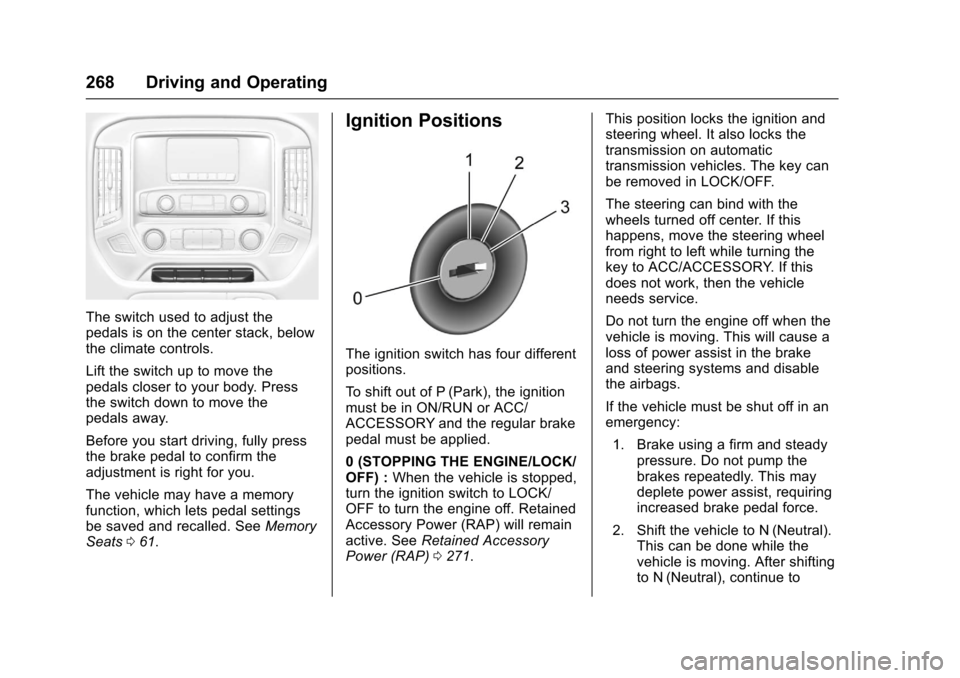
The switch used to adjust thepedals is on the center stack, belowthe climate controls.
Lift the switch up to move thepedals closer to your body. Pressthe switch down to move thepedals away.
Before you start driving, fully pressthe brake pedal to confirm theadjustment is right for you.
The vehicle may have a memoryfunction, which lets pedal settingsbe saved and recalled. SeeMemorySeats061.
Ignition Positions
The ignition switch has four differentpositions.
To s h i f t o u t o f P ( P a r k ) , t h e i g n i t i o nmust be in ON/RUN or ACC/ACCESSORY and the regular brakepedal must be applied.
0(STOPPINGTHEENGINE/LOCK/OFF) :When the vehicle is stopped,turn the ignition switch to LOCK/OFF to turn the engine off. RetainedAccessory Power (RAP) will remainactive. SeeRetained AccessoryPower (RAP)0271.
This position locks the ignition andsteering wheel. It also locks thetransmission on automatictransmission vehicles. The key canbe removed in LOCK/OFF.
The steering can bind with thewheels turned off center. If thishappens, move the steering wheelfrom right to left while turning thekey to ACC/ACCESSORY. If thisdoes not work, then the vehicleneeds service.
Do not turn the engine off when thevehicle is moving. This will cause aloss of power assist in the brakeand steering systems and disablethe airbags.
If the vehicle must be shut off in anemergency:
1. Brake using a firm and steadypressure. Do not pump thebrakes repeatedly. This maydeplete power assist, requiringincreased brake pedal force.
2. Shift the vehicle to N (Neutral).This can be done while thevehicle is moving. After shiftingto N (Neutral), continue to
Page 270 of 509
Chevrolet Silverado Owner Manual (GMNA-Localizing-U.S./Canada/Mexico-9956065) - 2017 - CRC - 4/29/16
Driving and Operating 269
firmly apply the brakes andsteer the vehicle to a safelocation.
3. Come to a complete stop. Shiftto P (Park) with an automatictransmission, or Neutral with amanual transmission. Turn theignition to LOCK/OFF.
4. Set the parking brake. SeeParking Brake0293.
{Warning
Turning off the vehicle while
moving may cause loss of power
assist in the brake and steering
systems and disable the airbags.
While driving, only shut the
vehicle off in an emergency.
If the vehicle cannot be pulled over,and must be shut off while driving,turn the ignition to ACC/ACCESSORY.
On vehicles with an automatictransmission, the shift lever must bein P (Park) to turn the ignition switchto LOCK/OFF.
Caution
Using a tool to force the key to
turn in the ignition could cause
damage to the switch or break the
key. Use the correct key, make
sure it is all the way in, and turn it
only with your hand. If the key
cannot be turned by hand, see
your dealer.
1(ACC/ACCESSORY):Thisposition lets things like the radioand the windshield wipers operatewhile the engine is off. It alsounlocks the steering wheel. Use thisposition if the vehicle must bepushed or towed.
2(ON/RUN):This position can beused to operate the electricalaccessories and to display someinstrument cluster warning andindicator lights. This position canalso be used for service anddiagnostics, and to verify the properoperation of the malfunctionindicator lamp as may be requiredfor emission inspection purposes.The switch stays in this position
when the engine is running. Thetransmission is also unlocked in thisposition on automatic transmissionvehicles.
If the key is left in the ACC/ACCESSORY or ON/RUN positionwith the engine off, the battery couldbe drained. The vehicle may notstart if the battery is allowed to drainfor an extended period of time.
3(START):This is the position thatstarts the engine. When the enginestarts, release the key. The ignitionswitch returns to ON/RUN fordriving.
Awarningtonewillsoundwhenthedriver door is opened, the ignition isin ACC/ACCESSORY or LOCK/OFF, and the key is in the ignition.
Starting the Engine
If the vehicle has a diesel engine,see the Duramax dieselsupplement.
For an eAssist vehicle, see theSilverado/Sierra eAssistsupplement.
Page 276 of 509
Chevrolet Silverado Owner Manual (GMNA-Localizing-U.S./Canada/Mexico-9956065) - 2017 - CRC - 4/29/16
Driving and Operating 275
Shifting out of Park
This vehicle is equipped with anelectronic shift lock release system.The shift lock release isdesigned to:
.Prevent ignition key removalunless the shift lever is inP(Park).
.Prevent movement of the shiftlever out of P (Park), unless theignition is in ON/RUN and theregular brake pedal is applied.
The shift lock release is alwaysfunctional except in the case of anuncharged or low voltage (less than9volt) battery.
If the vehicle has an unchargedbattery or a battery with low voltage,try charging or jump starting thebattery. SeeJump Starting - NorthAmerica0432.
To s h i f t o u t o f P ( P a r k ) :
1. Apply the brake pedal.
2. Move the shift lever to thedesired position.
If you still are unable to shift out ofP(Park):
1. Ease the pressure on the shiftlever.
2. While holding down the brakepedal, press the shift lever allthe way into P (Park).
3. Move the shift lever to thedesired position.
If you are still having a problemshifting, then have the vehicleserviced soon.
This vehicle may have the SafetyBelt Assurance System, which mayprevent the vehicle from shifting outof P (Park). SeeSafety BeltMessages0155.
Parking (Manual
Transmission)
If the vehicle has a manualtransmission, before you get out ofthe vehicle, move the shift lever intoR(Reverse), and firmly apply theparking brake. Once the shift leverhas been placed into R (Reverse)with the clutch pedal pressed in,
turn the ignition key to LOCK/OFF,remove the key and release theclutch.
If you are parking on a hill, or if thevehicle is pulling a trailer, seeDriving Characteristics and TowingTips0315.
Parking over Things
That Burn
{Warning
Things that can burn could touch
hot exhaust parts under the
vehicle and ignite. Do not park
over papers, leaves, dry grass,
or other things that can burn.
Active Fuel Management®
Vehicles with a V8 or V6 gasolineengine may have Active FuelManagement. This system allowsthe engine to operate on either all ofits cylinders, or in V4 mode,depending on the driving conditions.
Page 307 of 509
Chevrolet Silverado Owner Manual (GMNA-Localizing-U.S./Canada/Mexico-9956065) - 2017 - CRC - 4/29/16
306 Driving and Operating
or Off. The first button press showsthe current setting on the DIC.Additional button presses willchange this setting. The chosensetting will remain until it is changedand will affect the timing of both theCollision Alert and the TailgatingAlert features. The timing of bothalerts will vary based on vehiclespeed. The faster the vehicle speed,the farther away the alert will occur.Consider traffic and weatherconditions when selecting the alerttiming. The range of selectable alerttiming may not be appropriate for alldrivers and driving conditions.
Unnecessary Alerts
FCA may provide unnecessaryalerts for turning vehicles, vehiclesin other lanes, objects that are notvehicles, or shadows. These alertsare normal operation and thevehicle does not need service.
Cleaning the System
If the FCA system does not seem tooperate properly, cleaning theoutside of the windshield in front ofthe rearview mirror, and cleaning the
front of the vehicle where radarsensors are located, may correctthe issue.
Forward Automatic
Braking (FAB)
If the vehicle has Forward CollisionAlert (FCA), it also has FAB, whichincludes Intelligent BrakeAssist (IBA). When the systemdetects a vehicle ahead in your paththat is traveling in the samedirection that you may be about tocrash into, it can provide a boost tobraking or automatically brake thevehicle. This can help avoid orlessen the severity of crashes whendriving in a forward gear. Dependingon the situation, the vehicle mayautomatically brake moderately orhard. This forward automaticbraking can only occur if a vehicle isdetected. This is shown by the FCAvehicle ahead indicator being lit.SeeForward Collision Alert (FCA)System0304.
The system works when driving in aforward gear between 8 km/h(5 mph) and 80 km/h (37 mph).It can detect vehicles up toapproximately 60 m (197 ft).
{Warning
FA B i s a n e m e r g e n c y c r a s h
preparation feature and is not
designed to avoid crashes. Do
not rely on FAB to brake the
vehicle. FAB will not brake
outside of its operating speed
range and only responds to
detected vehicles.
FA B m a y n o t :
.Detect a vehicle ahead onwinding or hilly roads.
.Detect all vehicles,especially vehicles with atrailer, tractors, muddyvehicles, etc.
.Detect a vehicle whenweather limits visibility, suchas in fog, rain, or snow.
(Continued)
Page 310 of 509
Chevrolet Silverado Owner Manual (GMNA-Localizing-U.S./Canada/Mexico-9956065) - 2017 - CRC - 4/29/16
Driving and Operating 309
If the LDW system is not functioningproperly when lane markings areclearly visible, cleaning thewindshield may help.
LDW alerts may occur due to tarmarks, shadows, cracks in the road,temporary or construction lanemarkings, or other roadimperfections. This is normal systemoperation; the vehicle does not needservice. Turn LDW off if theseconditions continue.
Lane Keep Assist (LKA)
(1500 Series)
If equipped, LKA may help avoidcrashes due to unintentional lanedepartures. It may assist by gentlyturning the steering wheel if thevehicle approaches a detected lanemarking without using a turn signalin that direction. It may also provideaLaneDepartureWarning(LDW)system alert as the lane marking iscrossed. The LKA system will notassist or provide an LDW alert if itdetects that you are activelysteering. Override LKA by turningthe steering wheel. LKA uses a
camera to detect lane markingsbetween 60 km/h (37 mph) and180 km/h (112 mph).
{Warning
The LKA system does not
continuously steer the vehicle.
It may not keep the vehicle in the
lane or give a Lane Departure
Warning (LDW) alert, even if a
lane marking is detected.
The LKA and LDW systems
may not:
.Provide an alert or enoughsteering assist to avoid alane departure or crash.
.Detect lane markings underpoor weather or visibilityconditions. This can occur ifthe windshield orheadlamps are blocked bydirt, snow, or ice, if they arenot in proper condition, or ifthe sun shines directly intothe camera.
.Detect road edges.
(Continued)
Warning (Continued)
.Detect lanes on winding orhilly roads.
If LKA only detects lane markings
on one side of the road, it will
only assist or provide an LDW
alert when approaching the lane
on the side where it has detected
alanemarking.EvenwithLKA
and LDW, you must steer the
vehicle. Always keep your
attention on the road and
maintain proper vehicle position
within the lane, or vehicle
damage, injury, or death could
occur. Always keep the
windshield, headlamps, and
camera sensors clean and in
good repair. Do not use LKA in
bad weather conditions.
Page 311 of 509
Chevrolet Silverado Owner Manual (GMNA-Localizing-U.S./Canada/Mexico-9956065) - 2017 - CRC - 4/29/16
310 Driving and Operating
{Warning
Using LKA while towing a trailer
or on slippery roads could cause
loss of control of the vehicle and
acrash.Turnthesystemoff.
How the System Works
The LKA camera sensor is on thewindshield ahead of the rearviewmirror.
To t u r n L K A o n a n d o f f , p r e s sA
on the center stack.
When on,Ais green if LKA is
available to assist and provide LDWalerts. It may assist by gentlyturning the steering wheel and
displayAas amber if the vehicle
approaches a detected lane markingwithout using a turn signal in thatdirection. It may also provide an
LDW alert by flashingAamber
as the lane marking is crossed.Additionally, there will be threebeeps, or the driver seat will pulse
three times, on the right or left,depending on the lane departuredirection.
The LKA system does notcontinuously steer the vehicle.If LKA does not detect active driversteering, an alert and chime may beprovided. Move the steering wheelto dismiss.
When the System Does Not
Seem to Work Properly
The system performance may beaffected by:
.Close vehicles ahead.
.Sudden lighting changes, suchas when driving through tunnels.
.Banked roads.
.Roads with poor lane markings,such as two-lane roads.
If the LKA system is not functioningproperly when lane markings areclearly visible, cleaning thewindshield may help.
LKA assistance and/or LDW alertsmay occur due to tar marks,shadows, cracks in the road,temporary or construction lanemarkings, or other roadimperfections. This is normal systemoperation; the vehicle does not needservice. Turn LKA off if theseconditions continue.
Page 312 of 509
Chevrolet Silverado Owner Manual (GMNA-Localizing-U.S./Canada/Mexico-9956065) - 2017 - CRC - 4/29/16
Driving and Operating 311
Fuel
For diesel engine vehicles, see“Fuel for Diesel Engines”in theDuramax diesel supplement.
GM recommends the use of TOPTIER Detergent Gasoline to keepthe engine cleaner and reduceengine deposits. Seewww.toptiergas.com for a list of TOPTIER Detergent Gasoline marketersand applicable countries.
If the vehicle has a yellow sticker onthe fuel door, E85 or FlexFuel canbe used. SeeE85 orFlexFuel0312.
Except the 6.2L engine, use regularunleaded gasoline meeting ASTMspecification D4814 with a postedoctane rating of 87 or higher. Do notuse gasoline with a posted octanerating of less than 87, as this maycause engine knock and will lowerfuel economy.
For the 6.2L engine, premiumunleaded gasoline meeting ASTMspecification D4814 with a postedoctane rating of 93 is highlyrecommended for best performanceand fuel economy. Unleadedgasoline with an octane rated as lowas 87 can be used. Using unleadedgasoline rated below 93 octane,however, will lead to reducedacceleration and fuel economy.If knocking occurs, use a gasolinerated at 93 octane as soon aspossible, otherwise, the enginecould be damaged. If heavyknocking is heard when usinggasoline with a 93 octane rating, theengine needs service.
Prohibited Fuels
Caution
Do not use fuels with any of the
following conditions; doing so
may damage the vehicle and void
its warranty:
.For vehicles which are notFlexFuel, fuel labeledgreater than 15% ethanol byvolume, such as mid-levelethanol blends (16–50%ethanol), E85, or FlexFuel.
.Fuel with any amount ofmethanol, methylal, andaniline. These fuels cancorrode metal fuel systemparts or damage plastic andrubber parts.
.Fuel containing metals suchas methylcyclopentadienylmanganese tricarbonyl(MMT), which can damagethe emissions controlsystem and spark plugs.
(Continued)
Page 319 of 509
Chevrolet Silverado Owner Manual (GMNA-Localizing-U.S./Canada/Mexico-9956065) - 2017 - CRC - 4/29/16
318 Driving and Operating
If parking the rig on a hill:
1. Press the brake pedal, but donot shift into P (Park) yet. Turnthe wheels into the curb iffacing downhill or into traffic iffacing uphill.
2. Have someone place chocksunder the trailer wheels.
3. When the wheel chocks are inplace, release the regularbrakes until the chocks absorbthe load.
4. Reapply the brake pedal. Thenapply the parking brake andshift into P (Park).
5. Release the brake pedal.
Leaving After Parking on a Hill
1. Apply and hold the brakepedal.
2. Start the engine.
3. Shift into a gear.
4. Release the parking brake.
5. Let up on the brake pedal.
6. Drive slowly until the trailer isclear of the chocks.
7. Stop and have someone pickup and store the chocks.
Maintenance when Trailer
Towing
The vehicle needs service moreoften when pulling a trailer. SeeMaintenance Schedule0452.Things that are especially importantin trailer operation are automatictransmission fluid, engine oil, axlelubricant, belts, cooling system, andbrake system. It is a good idea toinspect these before and duringthe trip.
Check periodically to see that allhitch nuts and bolts are tight.
Trailer Towing
If the vehicle has a diesel engine,see the Duramax dieselsupplement.
If the vehicle is bi-fuel, see thebi-fuel supplement.
Do not tow a trailer during break-in.SeeNew Vehicle Break-In0267.
{Warning
The driver can lose control when
pulling a trailer if the correct
equipment is not used or the
vehicle is not driven properly. For
example, if the trailer is too heavy
or the trailer brakes are
inadequate for the load, the
vehicle may not stop as expected.
The driver and passengers could
be seriously injured. The vehicle
may also be damaged; the
resulting repairs would not be
covered by the vehicle warranty.
Pull a trailer only if all the steps in
this section have been followed.
Ask your dealer for advice and
information about towing a trailer
with the vehicle.
Caution
Pulling a trailer improperly can
damage the vehicle and result in
costly repairs not covered by the
(Continued)