service CHEVROLET SILVERADO 2017 3.G Owner's Guide
[x] Cancel search | Manufacturer: CHEVROLET, Model Year: 2017, Model line: SILVERADO, Model: CHEVROLET SILVERADO 2017 3.GPages: 509, PDF Size: 8.87 MB
Page 155 of 509
Chevrolet Silverado Owner Manual (GMNA-Localizing-U.S./Canada/Mexico-9956065) - 2017 - CRC - 4/29/16
154 Instruments and Controls
(LDW), Lane Keep Assist (LKA),and Forward Collision Alert (FCA)will not operate.
LANE DEPARTURE WARNING
UNAVAILABLE
This message displays whenattempting to activate the LaneDeparture Warning (LDW) systemwhen it is temporarily unavailable.The LDW system does not needservice.
This message could be due to thecamera being blocked. Cleaning theoutside of the windshield behind therearview mirror may correct theissue.
LANE KEEPING ASSIST
UNAVAILABLE
This message displays when theLane Keep Assist (LKA) and LaneDeparture Warning (LDW) system istemporarily unavailable. The LKAsystem does not need service.
This message could be due to thecamera being blocked. Cleaning theoutside of the windshield behind therearview mirror may correct theissue.
PARK ASSIST OFF
This message displays when theParking Assist system has beenturned off or when there is atemporary condition causing thesystem to be disabled.
SERVICE FRONT CAMERA
If this message remains on aftercontinued driving, the vehicle needsservice. Do not use the Lane KeepAssist (LKA), Lane DepartureWarning (LDW), and ForwardCollision Alert (FCA) features. Takethe vehicle to your dealer.
SERVICE PARKING ASSIST
This message displays if there is aproblem with the Parking Assistsystem. Do not use this system tohelp you park. See your dealer forservice.
Ride Control System
Messages
SERVICE STABILITRAK
If this message displays, it meansthere may be a problem with theStabiliTrak system. If you see thismessage, try to reset the system.Stop; turn off the engine for at least15 seconds; then start the engineagain. If this message still comeson, it means there is a problem. Youshould see your dealer for service.The vehicle is safe to drive;however, you do not have thebenefit of StabiliTrak, so reduceyour speed and drive accordingly.
SERVICE TRACTION
CONTROL
This message displays when thereis a problem with the TractionControl System (TCS). When thismessage displays, the system willnot limit wheel spin. Adjust yourdriving accordingly. See your dealerfor service. SeeTr a c t i o n C o n t r o l /Electronic Stability Control0295.
Page 156 of 509
Chevrolet Silverado Owner Manual (GMNA-Localizing-U.S./Canada/Mexico-9956065) - 2017 - CRC - 4/29/16
Instruments and Controls 155
STABILITRAK INITIALIZING
This message may come on if theStabiliTrak system has not fullyinitialized because of roadconditions or the incorrect tire size.When the StabiliTrak system is fullyinitialized, the message will turn off.SeeTr a c t i o n C o n t r o l / E l e c t r o n i cStability Control0295.Ifthismessage continues to be displayedfor multiple ignition cycles and ondifferent road surfaces, see yourdealer for service.
TRACTION CONTROL OFF
This message displays when thetraction control has been turned off.SeeTr a c t i o n C o n t r o l / E l e c t r o n i cStability Control0295.
TRACTION CONTROL ON
This message displays when thetraction control is active. SeeTr a c t i o n C o n t r o l / E l e c t r o n i c S t a b i l i t yControl0295.
STABILITRAK OFF
This message displays when theStabiliTrak system has been turnedoff. Adjust your driving accordingly.
To l i m i t w h e e l s p i n a n d r e a l i z e t h efull benefits of the stabilityenhancement system, you shouldnormally leave StabiliTrak on. SeeTr a c t i o n C o n t r o l / E l e c t r o n i c S t a b i l i t yControl0295.
STABILITRAK OFF may alsodisplay when the stability controlhas been automatically disabled.The following conditions can causethis message to appear:
.The system is overheating,which could occur if StabiliTrakactivates continuously for anextended period of time.
.The brake system warning lightis on. SeeBrake SystemWarning Light0140.
.The stability system takes longerthan usual to complete itsdiagnostic checks due to drivingconditions.
.An engine or vehicle-relatedproblem has been detected andthe vehicle needs service. Seeyour dealer.
.The transfer case is inFour-Wheel Drive Low.
The message turns off as soon asthe conditions that caused themessage to be displayed are nolonger present.
Airbag System Messages
SERVICE AIRBAG
This message displays if there is aproblem with the airbag system.Ta k e t h e v e h i c l e t o y o u r d e a l e r f o rservice.
Safety Belt Messages
SHIFTER LOCKED. BUCKLE
SEATBELT
This message displays if the vehicleis equipped with the Safety BeltAssurance System and the driverand front outboard passenger,if present, safety belts are notbuckled. The vehicle will not shiftout of P (Park). Buckle the safetybelt(s) to unlock the shift lever.
This system may not allow thevehicle to shift out of P (Park) if anobject—such as a briefcase,handbag, grocery bag, laptop,
Page 157 of 509
Chevrolet Silverado Owner Manual (GMNA-Localizing-U.S./Canada/Mexico-9956065) - 2017 - CRC - 4/29/16
156 Instruments and Controls
or other electronic device—is onthe front outboard passenger seat.If this happens, remove the objectfrom the seat or buckle thesafety belt.
If the driver or front outboardpassenger unbuckles their safetybelt while driving, the safety beltreminder chime and light(s) willcome on. SeeSafety BeltReminders0134.
SHIFTER UNLOCKED. BRAKE
TO SHIFT
This message displays when theSafety Belt Assurance System timesout and allows the vehicle to beshifted out of P (Park) after30 seconds following brake apply.See“Safety Belts”and“ChildRestraints”in the Index forinformation about the importance ofproper restraint use.
This system may not functionproperly if the airbag readiness lightis on. SeeAirbag ReadinessLight0135.
Security Messages
SERVICE THEFT DETERRENT
SYSTEM
This message displays when thereis a problem with the theft-deterrentsystem. The vehicle may or may notrestart, so you may want to take thevehicle to your dealer before turningoff the engine. SeeImmobilizerOperation045.
Steering System
Messages
STEERING ASSIST IS
REDUCED DRIVE WITH CARE
This message may display if aproblem occurs with the electricpower steering system. If thismessage appears, steering effortmay be slightly higher than normal.The vehicle is still safe to drive. Usecaution while in reduced assistmode. If this message is persistentor appears repeatedly, take thevehicle to your dealer for service.SeeSteering0249.
SERVICE POWER STEERING
(1500 Series)
This message displays when thereis a problem with electric powersteering. If this message displaysand a reduction in steeringperformance or loss of powersteering assistance is noticed. Seeyour dealer. SeeSteering0249.
SERVICE POWER STEERING
(2500/3500 Series)
This message displays when thereis a problem with the power steeringassist system. If this messagedisplays the vehicle can be drivenbut should be repaired as soon aspossible. See your dealer. SeeSteering0249.
Page 158 of 509
Chevrolet Silverado Owner Manual (GMNA-Localizing-U.S./Canada/Mexico-9956065) - 2017 - CRC - 4/29/16
Instruments and Controls 157
Tire Messages
SERVICE TIRE MONITOR
SYSTEM
If equipped with the Tire PressureMonitor System (TPMS), thismessage displays if a part on thesystem is not working properly. Thetire pressure light also flashes andthen remains on during the sameignition cycle. SeeTire PressureLight0143.Severalconditionsmaycause this message to appear. SeeTire Pressure Monitor Operation0408.Ifthewarningcomesonandstays on, there may be a problemwith the TPMS. See your dealer.
TIRE LEARNING ACTIVE
If equipped with the Tire PressureMonitor System (TPMS), thismessage displays when the systemis relearning the tire positions onyour vehicle. The tire positions mustbe relearned after rotating the tiresor after replacing a tire or sensor.SeeTire Inspection0411,TireRotation0412,Tire PressureMonitor System0407,andTirePressure0405.
TIRE PRESSURE LOW ADD
AIR TO TIRE
If equipped with the Tire PressureMonitor System (TPMS), thismessage displays when thepressure in one or more of thevehicle's tires is low. This messagealso displays with a vehicle pictureto indicate the location of the lowtire. The low tire pressure warninglight will also come on. SeeTirePressure Light0143.Youcanreceive more than one tire pressuremessage at a time. If a tire pressuremessage appears on the DIC, stopas soon as you can. Have the tirepressures checked and set to thoseshown on the Tire and LoadingInformation label. SeeTires0397,Vehicle Load Limits0259,andTirePressure0405.TheDICalsoshows the tire pressure values. SeeDriver Information Center (DIC)(Base Level)0145orDriverInformation Center (DIC)(Uplevel)0147.
Transmission Messages
4WD OFF
If equipped with four-wheel drive,this message displays when thefour-wheel-drive system istemporarily disabled due to anoverheated condition. The vehiclewill run in two-wheel drive when thismessage is present. Once thefour-wheel-drive system cools down,the message turns off and thefour-wheel-drive system returns tonormal operation.
4WD SHIFT IN PROGRESS
This message will display while thefour-wheel-drive system is shifting.
FOR 4WD LOW SHIFT TO
NEUTRAL
If a four-wheel drive shift into 4nis
requested, and the vehicle speed iscorrect, but the transmission is notin N (Neutral), this message willdisplay until the transmission isshifted to N (Neutral).
Page 159 of 509
Chevrolet Silverado Owner Manual (GMNA-Localizing-U.S./Canada/Mexico-9956065) - 2017 - CRC - 4/29/16
158 Instruments and Controls
FOR 4WD LOW SLOW TO XXX
If a four-wheel drive shift into 4nis
requested, but the vehicle speed istoo high, this message will displayuntil the correct vehicle speed isreached.
GRADE BRAKING ACTIVE
This message displays when gradebraking has been activated whiledriving on downhill grades. Thismessage will only appear the firsttime the feature is activated in anignition cycle. SeeTo w / H a u l M o d e0282,Automatic Transmission0277,andCruise Control0298.
GRADE BRAKING OFF
This message displays when gradebraking has been disabled with theTo w / H a u l M o d e b u t t o n o n t h e e n d o fthe shift lever. SeeTo w / H a u l M o d e0282,Automatic Transmission0277,andCruise Control0298.
GRADE BRAKING ON
This message displays when gradebraking has been enabled with theTo w / H a u l M o d e b u t t o n o n t h e e n d o fthe shift lever. SeeTo w / H a u l M o d e0282,Automatic Transmission0277,andCruise Control0298.
SERVICE 4WD
If the vehicle has four-wheel drive,this message may display if aproblem occurs with thefour-wheel-drive system. If thismessage appears, stop as soon aspossible and turn off the vehicle.Make sure the key is in the LOCK/OFF position for at leastone minute, then restart the vehicleand check for the message on theDIC display. If the message is stilldisplayed or appears again whenyou begin driving, thefour-wheel-drive system needsservice. See your dealer.
SHIFT DENIED
This message displays when theshift lever is in M (Manual Mode)and a transmission range has beenselected that is unavailable at thecurrent vehicle speed.
TO EXIT 4WD LOW SHIFT TO
NEUTRAL
If a four-wheel drive shift out of 4nis
requested, and the vehicle speed iscorrect, but the transmission is notin N (Neutral), this message willdisplay until the transmission isshifted to N (Neutral).
TO EXIT 4WD LOW SLOW
TO XXX
If a four-wheel drive shift out of 4nis
requested, but the vehicle speed istoo high, this message will displayuntil the correct vehicle speed isreached.
Page 160 of 509
Chevrolet Silverado Owner Manual (GMNA-Localizing-U.S./Canada/Mexico-9956065) - 2017 - CRC - 4/29/16
Instruments and Controls 159
TRANSMISSION HOT IDLE
ENGINE
This message displays and a chimemay sound if the transmission fluidin the vehicle gets hot. Driving withthe transmission fluid temperaturehigh can cause damage to thevehicle. Stop the vehicle and let itidle to allow the transmission tocool. This message clears and thechime stops when the fluidtemperature reaches a safe level.
When towing, use Tow/Haul Modeto prevent damage to the engine ortransmission. SeeTo w / H a u lMode0282.
VEHICLE IN 4WD LOW
This message will display if the
vehicle is driven in 4nfor about
10 minutes above 72 km/h (45 mph).
Vehicle Reminder
Messages
CHECK TRAILER WIRING
On vehicles with the IntegratedTrailer Brake Control (ITBC) system,this message may display and achime may sound when one of thefollowing conditions exists:
.Atrailerwithelectricbrakesbecomes disconnected from thevehicle.
⇣If the disconnect occurs whilethe vehicle is stopped, thismessage clears itself after ashort time.
⇣If the disconnect occurs whilethe vehicle is moving, thismessage stays on until theignition is turned off.
.There is a short in the wiring tothe electric trailer brakes.
When this message displays, poweris no longer available to the trailerbrakes.
As soon as it is safe to do so,carefully pull the vehicle over to theside of the road and turn the ignitionoff. Check the wiring connection tothe trailer and turn the ignition backon. This message clears if the traileris reconnected. This message alsoclears if you acknowledge it. If thismessage still displays, either thevehicle or the trailer needs service.See your dealer.
See“Integrated Trailer BrakeControl System”underTo w i n gEquipment0335.
ICE POSSIBLE DRIVE
WITH CARE
This message displays when iceconditions are possible.
TRAILER CONNECTED
On vehicles with the IntegratedTrailer Brake Control (ITBC) system,this message displays briefly whenatrailerwithelectricorelectricoverhydraulic brakes is first connectedto the vehicle.
Page 177 of 509
Chevrolet Silverado Owner Manual (GMNA-Localizing-U.S./Canada/Mexico-9956065) - 2017 - CRC - 4/29/16
176 Lighting
The lever returns to its startingposition whenever it is released.
If after signaling a turn or a lanechange the arrows flash rapidly ordo not come on, a signal bulb couldbe burned out. If equipped with LEDturn signals, see your dealer.
Replace any burned out bulbs. If abulb is not burned out, check thefuse. SeeFuses0390.
Turn Signal On Chime
If the turn signal is left on for morethan 1.2 km (0.75 mi), a chimesounds at each flash of the turnsignal. The message TURNSIGNAL ON will also appear in theDriver Information Center (DIC). Toturn the chime and message off,move the turn signal lever to the offposition.
Fog Lamps
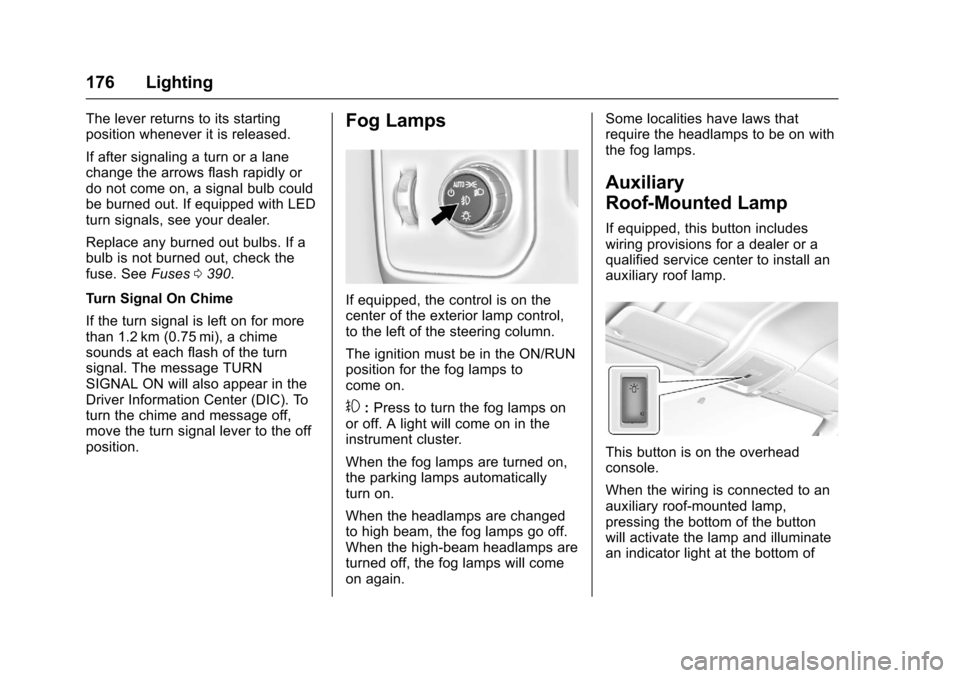
If equipped, the control is on thecenter of the exterior lamp control,to the left of the steering column.
The ignition must be in the ON/RUNposition for the fog lamps tocome on.
#:Press to turn the fog lamps onor off. A light will come on in theinstrument cluster.
When the fog lamps are turned on,the parking lamps automaticallyturn on.
When the headlamps are changedto high beam, the fog lamps go off.When the high-beam headlamps areturned off, the fog lamps will comeon again.
Some localities have laws thatrequire the headlamps to be on withthe fog lamps.
Auxiliary
Roof-Mounted Lamp
If equipped, this button includeswiring provisions for a dealer or aqualified service center to install anauxiliary roof lamp.
This button is on the overheadconsole.
When the wiring is connected to anauxiliary roof-mounted lamp,pressing the bottom of the buttonwill activate the lamp and illuminatean indicator light at the bottom of
Page 194 of 509
Chevrolet Silverado Owner Manual (GMNA-Localizing-U.S./Canada/Mexico-9956065) - 2017 - CRC - 4/29/16
Infotainment System 193
3. Touch and hold down any ofthe preset buttons to save thecurrent radio station to thatbutton of the selectedfavorites page.
To c h a n g e a p r e s e t b u t t o n , t u n e t othe new desired radio station andtouch and hold the preset button.
Satellite Radio (Base
Radio)
SiriusXM®Satellite Radio
Service (If Equipped)
Vehicles with a SiriusXM satelliteradio tuner and a valid SiriusXMsatellite radio subscription canreceive SiriusXM programming.
SiriusXM is a satellite radio servicebased in the 48 contiguous UnitedStates and 10 Canadian provinces.SiriusXM satellite radio has a widevariety of programming andcommercial-free music, coast tocoast, and in digital-quality sound.Aservicefeeisrequiredtoreceivethe SiriusXM service. Seewww.siriusxm.com or call
1-888-601-6296 (U.S.); or seewww.siriusxm.ca or call1-877-438-9677 (Canada).
When SiriusXM is active, thechannel name and number,category name, song title, and artistdisplay on the screen.
Browsing SiriusXM Channels
(If Equipped)
To b r o w s e t h e S i r i u s X M c h a n n e l s :
1. Press the MENU knob.
2. Turn the MENU knob tohighlight SXM Channel List.
3. Turn the MENU knob tohighlight the desired SXMChannels.
Satellite Radio (Base
Radio with Touchscreen)
Vehicles with an SXM SatelliteRadio tuner and a valid SiriusXM®
Satellite Radio subscription canreceive SiriusXM programming.
SiriusXM Satellite Radio
Service (If Equipped)
SiriusXM is a satellite radio servicebased in the 48 contiguous UnitedStates and 10 Canadian provinces.SiriusXM Satellite Radio has a widevariety of programming andcommercial-free music, coast tocoast, and in digital-quality sound.Aservicefeeisrequiredtoreceivethe SiriusXM service. For moreinformation, contact SiriusXM atwww.siriusxm.com or1-866-635-2349 (U.S.), andwww.xmradio.ca or 1-877-209-0079(Canada).
Listening to SiriusXM Radio (If
Equipped)
1. Press{.
2. Touch AUDIO.
3. Touch Source.
4. Touch SXM and the mostrecent listened to SiriusXMchannel will display.
To u c h0to return to the
HOME menu.
Page 196 of 509
Chevrolet Silverado Owner Manual (GMNA-Localizing-U.S./Canada/Mexico-9956065) - 2017 - CRC - 4/29/16
Infotainment System 195
Explicit Content Filter
When on, only a filtered list ofchannels will be received. When off,all regular SXM programmingsubscribed to will be received.
1. Touch SXM Explicit Filter.
2. Select On or Off.
Radio Reception
Frequency interference and staticcan occur during normal radioreception if items such as phonechargers, vehicle convenienceaccessories, and external electronicdevices are plugged into theaccessory power outlet. If there isinterference or static, unplug theitem from the accessory poweroutlet.
FM
FM signals only reach about 16 to65 km (10 to 40 mi). Although theradio has a built-in electronic circuitthat automatically works to reduceinterference, some static can occur,
especially around tall buildings orhills, causing the sound to fade inand out.
AM
The range for most AM stations isgreater than for FM, especially atnight. The longer range can causestation frequencies to interfere witheach other. Static can also occurwhen things like storms and powerlines interfere with radio reception.When this happens, try reducing thetreble on the radio.
SiriusXM Satellite Radio
Service
If equipped, SiriusXM SatelliteRadio Service provides digital radioreception. Tall buildings or hills caninterfere with satellite radio signals,causing the sound to fade in andout. In addition, traveling or standingunder heavy foliage, bridges,garages, or tunnels may cause lossof the SiriusXM signal for a periodof time.
Cell Phone Usage
Cell phone usage, such as makingor receiving phone calls, charging,or just having the phone on maycause static interference in theradio. Unplug the phone or turn it offif this happens.
Fixed Mast Antenna
The fixed mast antenna will gothrough most car washes as long asit is securely attached. If theantenna becomes slightly bent,straighten it out by hand. If it isbadly bent, replace it.
Occasionally check that the antennais tight at the base. If tightening isrequired, protect the paint fromdamage.
Page 197 of 509
Chevrolet Silverado Owner Manual (GMNA-Localizing-U.S./Canada/Mexico-9956065) - 2017 - CRC - 4/29/16
196 Infotainment System
Multi-Band Antenna
The multi-band antenna is on theroof of the vehicle. The antenna isused for OnStar, the SiriusXMSatellite Radio Service System, andGPS (Global Positioning System),if the vehicle has these features.Keep the antenna clear ofobstructions for clear reception.
If the vehicle has a sunroof, and it isopen, reception can also beaffected.
Items on the roof of the vehicle caninterfere with the performance of theradio system and OnStar (ifequipped). Make sure themulti-band antenna is notobstructed.
Audio Players
Avoiding Untrusted Media
Devices
When using media devices such asCDs, DVDs, Blu-Ray Discs®,SDcards, USB drives, and mobiledevices, consider the source.Untrusted media devices couldcontain files that affect systemoperation or performance. Avoid useif the content or origin cannot betrusted.
CD Player
If the vehicle is equipped with a CDplayer, it can be used for CD andMP3 audio.
With the vehicle on, insert a discinto the slot, label side up. Press theMEDIA button to select CD as asource.
The system is capable ofplaying most:
.Audio CDs
.CD-R
.CD-RW
.MP3 or unprotected WMAformats
When playing any compatiblerecordable disc, the sound qualitycan be reduced due to disc quality,the method of recording, the qualityof the music that has beenrecorded, or the way the disc hasbeen handled.
There can be increased skipping,difficulty in finding tracks, and/ordifficulty in loading and ejecting.If these problems occur, check thedisc for damage or try a knowngood disc.
To a v o i d d a m a g e t o t h e C D p l a y e r :
.Do not use scratched ordamaged discs.
.Do not apply labels to discs. Thelabels could get caught in theplayer.
.Insert only one disc at a time.
.Keep the loading slot free offoreign materials, liquids, anddebris.