maintenance CHEVROLET SILVERADO EV 2024 User Guide
[x] Cancel search | Manufacturer: CHEVROLET, Model Year: 2024, Model line: SILVERADO EV, Model: CHEVROLET SILVERADO EV 2024Pages: 429, PDF Size: 8.98 MB
Page 190 of 429
Chevrolet Silverado EV Owner Manual (GMNA-Localizing-U.S./Canada-
16702912) - 2024 - CRC - 1/17/23
Driving and Operating 189
.After exiting the water, repeatedly and
gently apply the brakes to dry them off
and restore effectiveness.
If Something Goes Wrong
If during your off-road experience a warning
light or warning message displays on the
instrument cluster, or if the vehicle sustains
damage, stop driving as soon as it is safe to
do so. Correct the condition if possible
before continuing driving. If a warning light
or message appears, or if the condition
cannot be corrected, see your dealer. See
Vehicle Messages0135.
If the vehicle is operating with reduced
acceleration or reduced propulsion, stop
your off-road experience and drive slowly to
an accessible point for further assistance.
The vehicle should be taken to your dealer
for service as soon as possible. See
Propulsion Power Messages 0136 and
Propulsion Power is Limited Light 0115.
{Warning
A vehicle with driveline damage may roll
when shifted into P (Park). Always set
the Electric Parking Brake before
inspecting for driveline damage or when
(Continued)
Warning (Continued)
securing the vehicle on a flatbed tow
truck. SeeElectric Parking Brake 0205
and
Transporting a Disabled Vehicle 0378.
After Driving Your Vehicle Off-Road
Be sure to switch out of Off-Road Mode or
Terrain Mode to return to normal driving.
See Driver Mode Control 0209.
Remove any brush or debris that has
collected on the underbody or chassis,
or under the hood. Clean the lens of the
underbody camera. These accumulations can
be a fire hazard.
The extreme conditions of off-road driving
require more frequent maintenance service.
See "Severe Conditions Requiring More
Frequent Maintenance" and "Additional
Required Services —Severe Service" on
Maintenance Schedule 0389.
After operation in mud or sand, have the
brake linings cleaned and checked. These
substances can cause glazing and uneven
braking. Check the body structure, driveline, steering,
suspension, wheels, tires, and other vehicle
systems for damage, or have these
inspections done by your dealer.
{Warning
Lifting a vehicle and getting under it to
do maintenance or repairs is dangerous
without the appropriate safety equipment
and training. If a jack is provided with
the vehicle, it is designed only for
changing a flat tire. If it is used for
anything else, you or others could be
badly injured or killed if the vehicle slips
off the jack. If a jack is provided with the
vehicle, only use it for changing a
flat tire.
Driving on Wet Roads
Rain and wet roads can reduce vehicle
traction and affect your ability to stop and
accelerate. Always drive slower in these
types of driving conditions and avoid driving
through large puddles and deep-standing or
flowing water.
Page 200 of 429
Chevrolet Silverado EV Owner Manual (GMNA-Localizing-U.S./Canada-
16702912) - 2024 - CRC - 1/17/23
Driving and Operating 199
Service Mode
This mode is available for service and
diagnostics, and to verify the proper
operation of the service vehicle soon light as
may be required for inspection or
maintenance purposes.
To place the vehicle in Service Mode:1. Ensure the vehicle is off, the driver door is open, and the brake pedal is not
applied.
2. Press and release the accelerator pedal three times within five seconds, keeping
the accelerator pressed on the
third time.
The instrument cluster and infotainment
systems will operate normally, but the
vehicle will not be able to be driven. The
propulsion system will not be active in
Service Mode. Press the brake pedal to turn
the vehicle on or press
fon the
infotainment display to turn the vehicle off.
Caution
Placing the vehicle in Service Mode will
use the 12-volt battery. Do not use
Service Mode for an extended period,
or the vehicle may not start.
Shifting Into Park
To shift into P (Park):
1. Hold the brake pedal down and set the parking brake. See Electric Parking Brake
0 205.
2. Press the P (Park) switch at the end of the shift lever. See Electric Drive Unit
0 200.
3. The P indicator on the shift lever will turn red when the vehicle is in P (Park).
If the vehicle is shifted into P (Park) on a
hill, the Electric Parking Brake (EPB) may
apply automatically. The driver may not be
able to release the EPB using the EPB
switch. It should automatically release when
the vehicle is shifted out of P (Park).
Leaving the Vehicle with the Propulsion
System On
{Warning
It is dangerous to get out of the vehicle
if the vehicle is not in P (Park) with the
parking brake set. The vehicle can roll. (Continued)
Warning (Continued)
Do not leave the vehicle when the
propulsion system is on. If you have left
the propulsion system on, the vehicle can
move suddenly. You or others could be
injured. To be sure the vehicle will not
move, even when you are on fairly level
ground, always set the parking brake and
press the P (Park) button. SeeShifting
Into Park 0199.
If the vehicle must be left with the
propulsion system on, be sure that the
vehicle is in P (Park) with the EPB set, before
leaving the vehicle. After pressing the
P (Park) button, hold down the regular brake
pedal. If you cannot see the P (Park)
indicator in the instrument cluster, it means
that the vehicle has not shifted to P (Park).
Shifting out of Park
This vehicle is equipped with an electric
drive unit. To shift out of P (Park) the vehicle
must be on, the brake pedal applied, and
the charge cord unplugged.
Page 212 of 429
Chevrolet Silverado EV Owner Manual (GMNA-Localizing-U.S./Canada-
16702912) - 2024 - CRC - 1/17/23
Driving and Operating 211
Maximum vehicle speed may be limited if
the four-wheel steering system becomes
inoperable.
When towing a trailer the four-wheel
steering provides enhanced stability allowing
the trailer to follow the path of the tow
vehicle more closely, especially during lane
changes. SeeGeneral Towing Information
0 293 for more information on towing a
trailer.
Four-Wheel Steering Behavior at 0 MPH
The rear wheels may not steer to full travel
when the vehicle is stationary. Additional
travel may be achieved once the vehicle
begins to move.
Care should be taken to ensure the vehicle
path is clear of obstacles if the rear tires
steer once the vehicle is moving.
Limited-Slip Differential
If equipped, the limited-slip differential can
give more traction on snow, mud, ice, sand,
or gravel. It works like a standard axle most
of the time, but when traction is low, this
feature allows the drive wheel with the
most traction to move the vehicle. For
vehicles with the limited-slip differential, driven under severe conditions, the rear axle
fluid should be changed. See
Maintenance
Schedule 0389.
Air Suspension
If equipped, the Air Suspension feature
provides full time load leveling capability
along with the benefit of adjusting ride
height for increased convenience and
capability.
{Warning
To help avoid personal injury or death,
make sure the area underneath the
vehicle and inside the wheel wells is clear
when lowering the vehicle.
{Warning
To help avoid personal injury or death,
always select the lowest ride height for
the current driving conditions. Higher ride
heights raise the vehicle's center of
gravity, increasing the chance of a
rollover during extreme maneuvers.
{Warning
Heavy loads on the roof rack will make
the vehicle's center of gravity higher,
increasing the possibility of a rollover. To
avoid losing control of the vehicle, always
select the normal height setting and
avoid high speeds, sudden starts, sharp
turns, sudden braking, or abrupt
maneuvers when carrying cargo on the
roof rack.
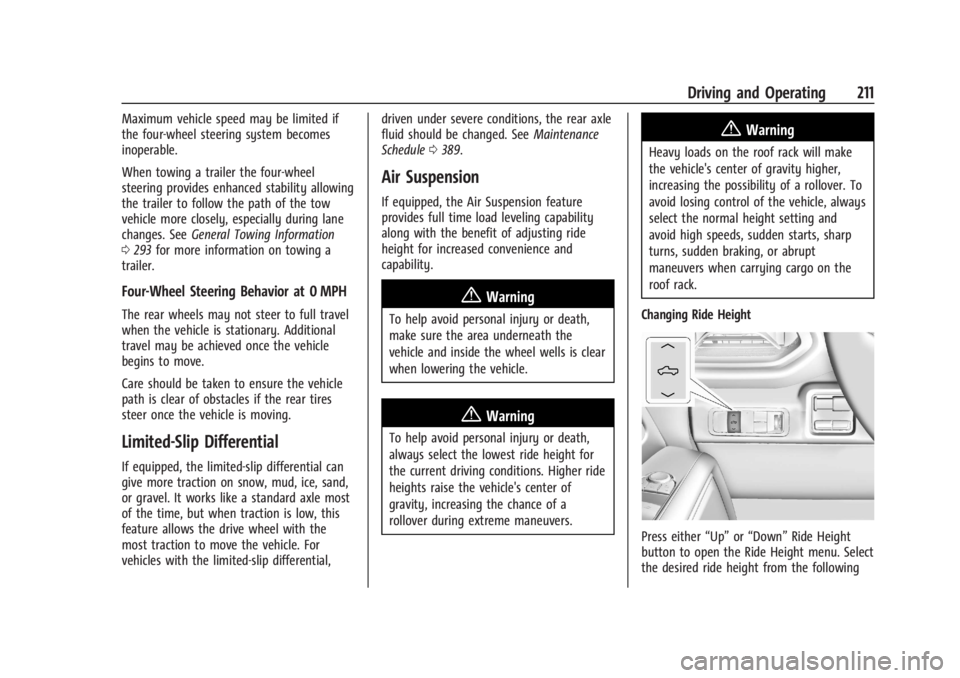
Changing Ride Height
Press either “Up”or“Down” Ride Height
button to open the Ride Height menu. Select
the desired ride height from the following
Page 298 of 429
Chevrolet Silverado EV Owner Manual (GMNA-Localizing-U.S./Canada-
16702912) - 2024 - CRC - 1/17/23
Driving and Operating 297
Pulling the Trailer from the Water1. Press and hold the brake pedal.
2. Start the vehicle and shift into D (Drive) or L (Low).
3. Release the parking brake.
4. Let up on the brake pedal.
5. Drive slowly until the tires are clear of the chocks.
6. Stop and have someone pick up and store the chocks.
7. Slowly pull the trailer from the water.
Caution
If the vehicle tires begin to spin and the
vehicle begins to slide toward the water,
remove your foot from the accelerator
pedal and apply the brake pedal. Seek
help to have the vehicle towed up
the ramp.
Maintenance when Trailer Towing
The vehicle needs service more often when
used to tow trailers. See Maintenance
Schedule 0389. It is especially important to
check the cooling system and brake system
before and during each trip. Check periodically that all nuts and bolts on
the trailer hitch are tight.
Trailer Towing
Caution
Towing a trailer improperly can damage
the vehicle and result in costly repairs
not covered by the vehicle warranty. To
tow a trailer correctly, follow the
directions in this section and see your
dealer for important information about
towing a trailer with the vehicle.
Trailering is different than just driving the
vehicle by itself. Trailering means changes in
handling, acceleration, braking, and
durability. Successful, safe trailering takes
correct equipment, and it has to be used
properly.
The following information has many
time-tested, important trailering tips and
safety rules. Many of these are important
for your safety and that of your passengers.
Read this section carefully before pulling a
trailer.
Trailer Weight
{Warning
Never exceed the towing capacity for
your vehicle.
Safe trailering requires monitoring the
weight, speed, altitude, road grades, outside
temperature, and how frequently the vehicle
is used to tow a trailer.
Trailer Weight Ratings
When towing a trailer, the combined weight
of the vehicle, vehicle contents, trailer, and
trailer contents must be below all of the
maximum weight ratings for the vehicle,
including:
.Gross Combined Weight Rating (GCWR)
.Gross Vehicle Weight Rating (GVWR)
.Maximum Trailer Weight Rating
.Maximum Trailer Tongue Weight Rating
.Gross Axle Weight Rating-Rear (GAWR-RR)
See “Weight-Distributing Hitch and
Adjustment” underTowing Equipment 0301
to determine if equalizer bars are required
to obtain the maximum trailer weight
rating.
Page 313 of 429
Chevrolet Silverado EV Owner Manual (GMNA-Localizing-U.S./Canada-
16702912) - 2024 - CRC - 1/17/23
312 Driving and Operating
See“Integrated Trailer Brake Control
System” section under Towing Equipment
0 301.
Trailering App
If equipped, the Trailering App is on the
Home Page of the infotainment home
screen.
If equipped, this feature allows profiles for
connected trailers to be created to view
status, to store and track trailer usage
information, and to set up towing assist
features.
The Trailering App welcome page appears
when the Trailering App is opened for the
first time from the infotainment home
screen.
When a trailer is electrically connected and
a trailer profile has not been created, there
is an option to create a profile, use a guest
profile, or select Accessory/No trailer.
When a trailer is electrically connected after
a Trailer Profile has been created, the trailer
detection pop-up appears with a list of all of
the custom Trailer Profiles made on the
vehicle. To load an existing Trailer Profile,
select one of the Trailer Profiles listed,
or load the Guest Trailer Profile by selecting GUEST TRAILER. Touching Accessory/No
trailer selects Accessory/No trailer as the
active Trailer Profile and dismisses the
pop-up.
Create a Trailer Profile
1. Touch Add Trailer on the trailer detection pop-up or touch + Add Trailer in the
Trailering App.
2. Follow the on-screen instructions to set up a profile.
3. After a profile is created, set up for additional trailer features may become
available, such as Tow/Haul mode
reminder, Trailer Tire Pressure
Monitoring System, maintenance
reminders, or camera views and guides.
Import a Trailer Profile 1. Touch Import on the trailer detection pop-up or touch Import in the
Trailering App.
2. Follow the on-screen instructions to import a profile.
3. After a profile is imported, it can be selected from the trailer list. The Tow/
Haul mode reminder, Brake Gain Setting
and Trailer Tire Pressure sensor learning,
if equipped, do not import.
Trailer Feature Setup
Tow/Haul Mode Reminder
To turn the Tow/Haul Mode Reminder
setting on, touch Yes. To turn it off,
touch No.
Trailer Tire Monitoring
If the TTPMS is detected, touch the Trailer
Tire Monitoring icon to set up trailer tire
monitoring.
1. Select trailer tire speed rating.
2. Enter trailer tire manufacturing date number.
3. Follow the on-screen instructions to complete the trailer tire sensor learn
process.
The trailer tire pressure sensors can transmit
up to 7 m (23 feet) from the hitch receiver of
the vehicle.
A trailer must be electrically connected to
the vehicle before starting the
sensor-to-vehicle learn process.
After selecting Start from the Learn Sensors
screen, use the Tool Method or the Manual
Method (described below) to learn each
TTPMS sensor, during which the current tire
number will be highlighted. The vehicle has
Page 314 of 429
Chevrolet Silverado EV Owner Manual (GMNA-Localizing-U.S./Canada-
16702912) - 2024 - CRC - 1/17/23
Driving and Operating 313
a maximum of two minutes to detect and
label each TTPMS sensor. After each sensor
is learned, a check mark appears next to the
tire, the vehicle horn sounds, the vehicle
brake lamps flash, and all working trailer
lamps flash.
The recommended tire pressure must be
entered for the trailer tires. An alert appears
when a trailer tire's pressure is high or low.
Tool Method: A TTPMS activation tool can
be purchased separately to learn the trailer
TTPMS sensor locations.
Manual Method: Without the TTPMS
activation tool, the air pressure can be
increased or decreased in each tire for
10 seconds. Do not exceed the maximum
inflation pressure found on the tire
sidewalls. Make sure to readjust tire
pressure to the recommended level when
the process is complete.
Sensor Learning Steps
To complete the sensor-to-vehicle learn
process:1. Touch Start on the Learn Sensors screen. The horn chirps twice and the Learning
Active screen appears on the
infotainment display. 2. Start with the driver side front
trailer tire.
3. Activate the tool near the valve stem or adjust the air pressure of this tire until
the horn chirps and all working vehicle
and trailer lights flash.
The process stops without saving the
sensor locations if this step takes more
than two minutes.
4. Move to the next tire and repeat Step 3 for each sensor. The horn chirps twice
when all sensors are completed.
5. Return to the vehicle to complete the setup.
Maintenance Reminders
To set up maintenance reminders, touch the
Trailer Maintenance icon. Follow the
on-screen prompts. The maximum number
of reminders is 50.
Camera Views and Guides
To set up the trailer camera and guideline
features, if equipped, touch the Camera
Views and Guides icon.
1. Select the number of axles on the trailer.
2. Select the wheel location on the trailer (inboard or outboard). 3. Enter the trailer dimensions as prompted.
Follow the on-screen instructions to
complete setup for available features.
Certain trailer features require a compatible
trailer profile be configured and selected.
A compatible trailer is a box-type trailer
(cargo, camper, etc.) with a conventional
hitch.
Transparent Trailer Setup
If equipped, the rear trailer camera must be
mounted on the trailer and electrically
connected to the vehicle before transparent
trailer feature can be used. See Assistance
Systems for Parking or Backing 0246.
Follow the on-screen instructions to enter
the trailer dimensions.
Trailer dimensions must be in range and
transparent trailer must be calibrated
before use.
.Trailer Length: Measure from center of
coupler to furthest rear point on the
trailer.
.Trailer Total Width: Measure from the left
most edge of trailer, including the wheels,
to the right most edge.
Page 316 of 429
Chevrolet Silverado EV Owner Manual (GMNA-Localizing-U.S./Canada-
16702912) - 2024 - CRC - 1/17/23
Driving and Operating 315
.Maintenance
.Checklist
.Weight
.Brakes (if equipped)
Each section shows high level status
information for the feature. Selecting a
section opens up a new screen with
additional information and/or options.
Selecting the checklist, camera,
or maintenance icon opens up the
corresponding screen.
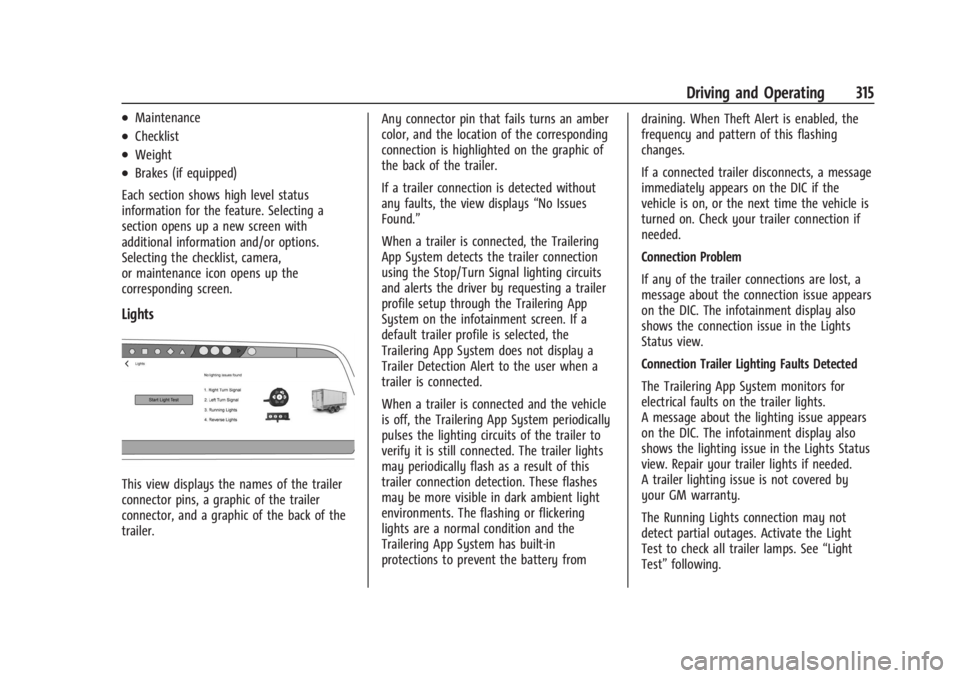
Lights
This view displays the names of the trailer
connector pins, a graphic of the trailer
connector, and a graphic of the back of the
trailer. Any connector pin that fails turns an amber
color, and the location of the corresponding
connection is highlighted on the graphic of
the back of the trailer.
If a trailer connection is detected without
any faults, the view displays
“No Issues
Found.”
When a trailer is connected, the Trailering
App System detects the trailer connection
using the Stop/Turn Signal lighting circuits
and alerts the driver by requesting a trailer
profile setup through the Trailering App
System on the infotainment screen. If a
default trailer profile is selected, the
Trailering App System does not display a
Trailer Detection Alert to the user when a
trailer is connected.
When a trailer is connected and the vehicle
is off, the Trailering App System periodically
pulses the lighting circuits of the trailer to
verify it is still connected. The trailer lights
may periodically flash as a result of this
trailer connection detection. These flashes
may be more visible in dark ambient light
environments. The flashing or flickering
lights are a normal condition and the
Trailering App System has built-in
protections to prevent the battery from draining. When Theft Alert is enabled, the
frequency and pattern of this flashing
changes.
If a connected trailer disconnects, a message
immediately appears on the DIC if the
vehicle is on, or the next time the vehicle is
turned on. Check your trailer connection if
needed.
Connection Problem
If any of the trailer connections are lost, a
message about the connection issue appears
on the DIC. The infotainment display also
shows the connection issue in the Lights
Status view.
Connection Trailer Lighting Faults Detected
The Trailering App System monitors for
electrical faults on the trailer lights.
A message about the lighting issue appears
on the DIC. The infotainment display also
shows the lighting issue in the Lights Status
view. Repair your trailer lights if needed.
A trailer lighting issue is not covered by
your GM warranty.
The Running Lights connection may not
detect partial outages. Activate the Light
Test to check all trailer lamps. See
“Light
Test” following.
Page 317 of 429
Chevrolet Silverado EV Owner Manual (GMNA-Localizing-U.S./Canada-
16702912) - 2024 - CRC - 1/17/23
316 Driving and Operating
Light Test
Touch Start Light Test to cycle the trailer
lights on and off to determine if they are
working. The test follows this sequence:1. The running lights turn on first and remain on throughout the sequence.
2. The brake lights turn on for about two seconds.
3. The left turn signal light flashes three times.
4. The right turn signal light flashes three times.
5. The reverse lights turn on for about two seconds.
6. Steps 2–5 repeat for approximately one minute and 45 seconds, or until the
test deactivates.
Touch Stop to manually stop the test. The
test automatically ends after one minute
and 45 seconds.
The Light Test also deactivates when any of
the following occur:
.The vehicle is turned off.
.The vehicle is shifted out of P (Park).
.The brake pedal is pressed.
.The turn signal is activated.
.The hazard warning flashers are activated.
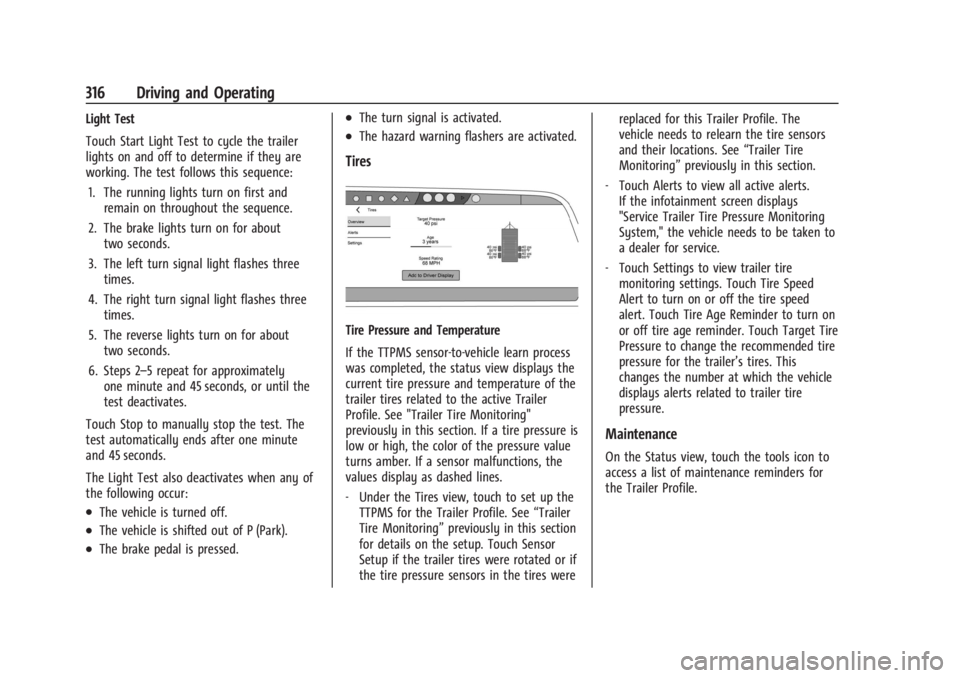
Tires
Tire Pressure and Temperature
If the TTPMS sensor-to-vehicle learn process
was completed, the status view displays the
current tire pressure and temperature of the
trailer tires related to the active Trailer
Profile. See "Trailer Tire Monitoring"
previously in this section. If a tire pressure is
low or high, the color of the pressure value
turns amber. If a sensor malfunctions, the
values display as dashed lines.
‐ Under the Tires view, touch to set up the
TTPMS for the Trailer Profile. See “Trailer
Tire Monitoring” previously in this section
for details on the setup. Touch Sensor
Setup if the trailer tires were rotated or if
the tire pressure sensors in the tires were replaced for this Trailer Profile. The
vehicle needs to relearn the tire sensors
and their locations. See
“Trailer Tire
Monitoring” previously in this section.
‐ Touch Alerts to view all active alerts.
If the infotainment screen displays
"Service Trailer Tire Pressure Monitoring
System," the vehicle needs to be taken to
a dealer for service.
‐ Touch Settings to view trailer tire
monitoring settings. Touch Tire Speed
Alert to turn on or off the tire speed
alert. Touch Tire Age Reminder to turn on
or off tire age reminder. Touch Target Tire
Pressure to change the recommended tire
pressure for the trailer’s tires. This
changes the number at which the vehicle
displays alerts related to trailer tire
pressure.
Maintenance
On the Status view, touch the tools icon to
access a list of maintenance reminders for
the Trailer Profile.
Page 318 of 429
Chevrolet Silverado EV Owner Manual (GMNA-Localizing-U.S./Canada-
16702912) - 2024 - CRC - 1/17/23
Driving and Operating 317
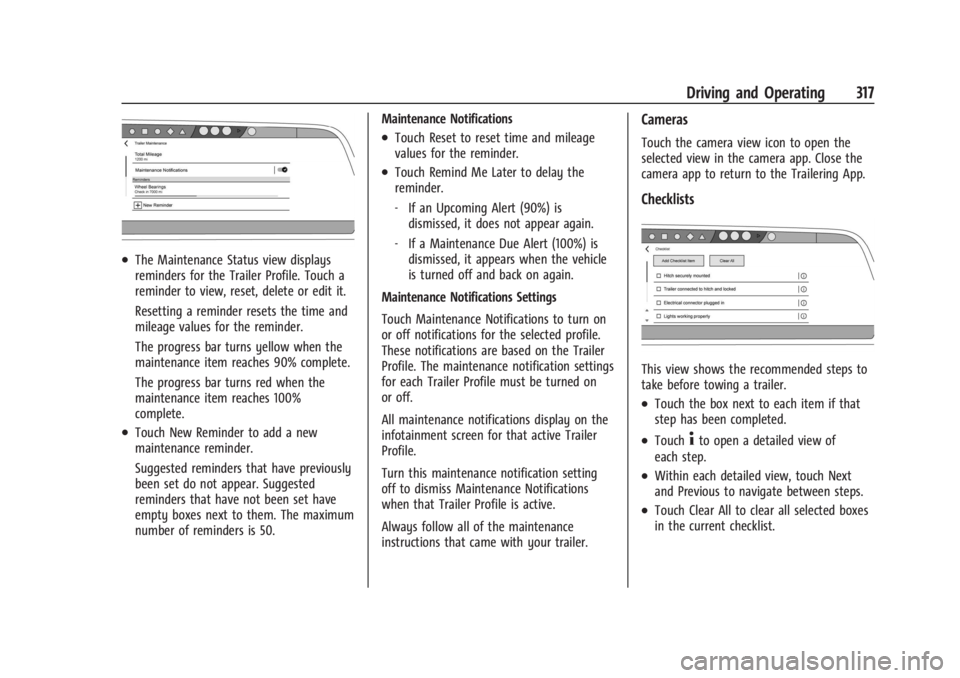
.The Maintenance Status view displays
reminders for the Trailer Profile. Touch a
reminder to view, reset, delete or edit it.
Resetting a reminder resets the time and
mileage values for the reminder.
The progress bar turns yellow when the
maintenance item reaches 90% complete.
The progress bar turns red when the
maintenance item reaches 100%
complete.
.Touch New Reminder to add a new
maintenance reminder.
Suggested reminders that have previously
been set do not appear. Suggested
reminders that have not been set have
empty boxes next to them. The maximum
number of reminders is 50.Maintenance Notifications
.Touch Reset to reset time and mileage
values for the reminder.
.Touch Remind Me Later to delay the
reminder.
‐
If an Upcoming Alert (90%) is
dismissed, it does not appear again.
‐ If a Maintenance Due Alert (100%) is
dismissed, it appears when the vehicle
is turned off and back on again.
Maintenance Notifications Settings
Touch Maintenance Notifications to turn on
or off notifications for the selected profile.
These notifications are based on the Trailer
Profile. The maintenance notification settings
for each Trailer Profile must be turned on
or off.
All maintenance notifications display on the
infotainment screen for that active Trailer
Profile.
Turn this maintenance notification setting
off to dismiss Maintenance Notifications
when that Trailer Profile is active.
Always follow all of the maintenance
instructions that came with your trailer.
Cameras
Touch the camera view icon to open the
selected view in the camera app. Close the
camera app to return to the Trailering App.
Checklists
This view shows the recommended steps to
take before towing a trailer.
.Touch the box next to each item if that
step has been completed.
.Touch4to open a detailed view of
each step.
.Within each detailed view, touch Next
and Previous to navigate between steps.
.Touch Clear All to clear all selected boxes
in the current checklist.
Page 320 of 429
Chevrolet Silverado EV Owner Manual (GMNA-Localizing-U.S./Canada-
16702912) - 2024 - CRC - 1/17/23
Driving and Operating 319
Profile is active. The Trailer Tire Pressure
Monitoring System or maintenance
reminders cannot be set up for a Guest
Trailer Profile. The Guest Trailer Profile
cannot be edited.
Accessory/No Trailer
If the Accessory/No Trailer Profile is active,
alerts are not sent and the system does not
track mileage. The Trailer Tire Pressure
Monitoring System or maintenance
reminders cannot be set up for the
Accessory/No Trailer Profile. The Accessory/
No Trailer profile cannot be edited.
No Trailer Connected
When there is no trailer connected, Trailer
Profiles cannot be activated but most
options can be edited.
Trailer Brake Gain Memory
The system can store the brake gain setting
of a Trailer Profile or a Guest Trailer Profile.
When a Trailer Profile or Guest Trailer Profile
is selected, and a brake gain setting is set
for that Trailer Profile, the system recalls the
stored brake gain value.If a Trailer Profile is already active and the
brake gain setting had been set for that
Trailer Profile, the system recalls the stored
brake gain value whenever the vehicle is
turned on.
If there was an error in setting the brake
gain for a Trailer Profile, there is a
notification. This pop-up does not appear if
the Guest Trailer Profile is active or if there
is no trailer connected.
Trailer brake gain should be set for a specific
trailering condition and must be adjusted
anytime vehicle loading, trailer loading,
or road surface conditions change.
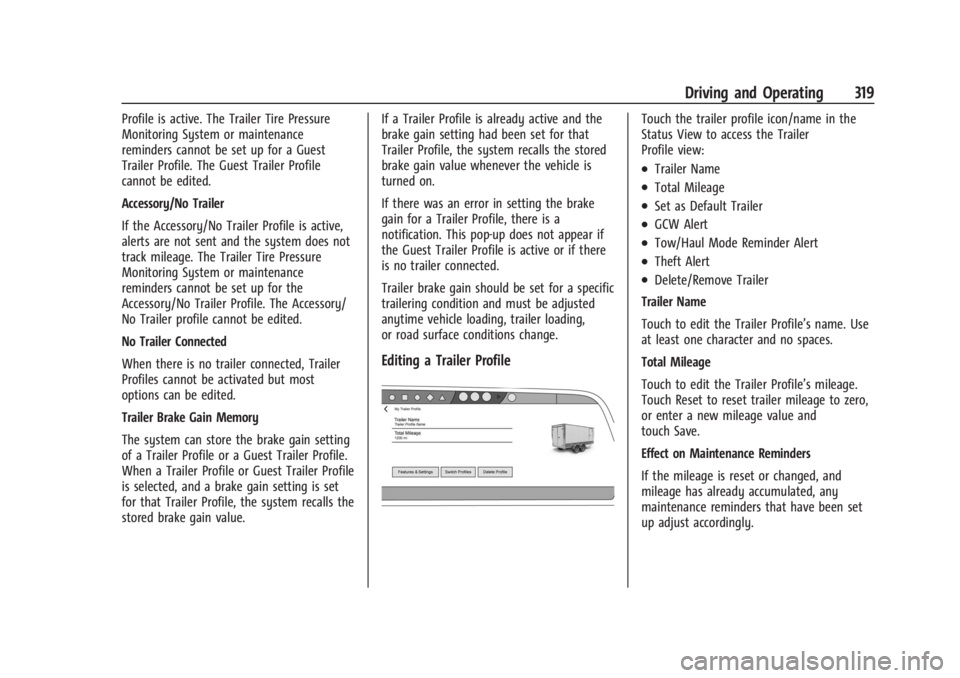
Editing a Trailer Profile
Touch the trailer profile icon/name in the
Status View to access the Trailer
Profile view:
.Trailer Name
.Total Mileage
.Set as Default Trailer
.GCW Alert
.Tow/Haul Mode Reminder Alert
.Theft Alert
.Delete/Remove Trailer
Trailer Name
Touch to edit the Trailer Profile’s name. Use
at least one character and no spaces.
Total Mileage
Touch to edit the Trailer Profile’s mileage.
Touch Reset to reset trailer mileage to zero,
or enter a new mileage value and
touch Save.
Effect on Maintenance Reminders
If the mileage is reset or changed, and
mileage has already accumulated, any
maintenance reminders that have been set
up adjust accordingly.