ESP CHEVROLET SILVERADO EV 2024 Owner's Guide
[x] Cancel search | Manufacturer: CHEVROLET, Model Year: 2024, Model line: SILVERADO EV, Model: CHEVROLET SILVERADO EV 2024Pages: 429, PDF Size: 8.98 MB
Page 267 of 429
Chevrolet Silverado EV Owner Manual (GMNA-Localizing-U.S./Canada-
16702912) - 2024 - CRC - 1/17/23
266 Driving and Operating
front, or both sides of the Safety Alert Seat
will pulse five times. When this Collision
Alert occurs, the brake system may prepare
for driver braking to occur more rapidly
which can cause a brief, mild deceleration.
Continue to apply the brake pedal as
needed.
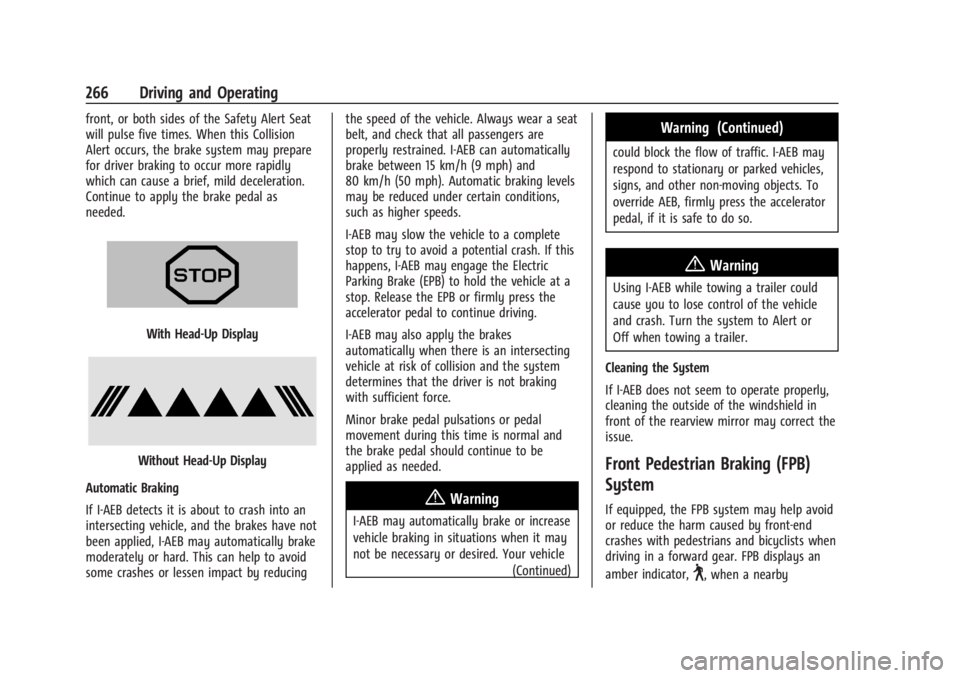
With Head-Up Display
Without Head-Up Display
Automatic Braking
If I-AEB detects it is about to crash into an
intersecting vehicle, and the brakes have not
been applied, I-AEB may automatically brake
moderately or hard. This can help to avoid
some crashes or lessen impact by reducing the speed of the vehicle. Always wear a seat
belt, and check that all passengers are
properly restrained. I-AEB can automatically
brake between 15 km/h (9 mph) and
80 km/h (50 mph). Automatic braking levels
may be reduced under certain conditions,
such as higher speeds.
I-AEB may slow the vehicle to a complete
stop to try to avoid a potential crash. If this
happens, I-AEB may engage the Electric
Parking Brake (EPB) to hold the vehicle at a
stop. Release the EPB or firmly press the
accelerator pedal to continue driving.
I-AEB may also apply the brakes
automatically when there is an intersecting
vehicle at risk of collision and the system
determines that the driver is not braking
with sufficient force.
Minor brake pedal pulsations or pedal
movement during this time is normal and
the brake pedal should continue to be
applied as needed.
{Warning
I-AEB may automatically brake or increase
vehicle braking in situations when it may
not be necessary or desired. Your vehicle
(Continued)
Warning (Continued)
could block the flow of traffic. I-AEB may
respond to stationary or parked vehicles,
signs, and other non-moving objects. To
override AEB, firmly press the accelerator
pedal, if it is safe to do so.
{Warning
Using I-AEB while towing a trailer could
cause you to lose control of the vehicle
and crash. Turn the system to Alert or
Off when towing a trailer.
Cleaning the System
If I-AEB does not seem to operate properly,
cleaning the outside of the windshield in
front of the rearview mirror may correct the
issue.
Front Pedestrian Braking (FPB)
System
If equipped, the FPB system may help avoid
or reduce the harm caused by front-end
crashes with pedestrians and bicyclists when
driving in a forward gear. FPB displays an
amber indicator,
~, when a nearby
Page 268 of 429
Chevrolet Silverado EV Owner Manual (GMNA-Localizing-U.S./Canada-
16702912) - 2024 - CRC - 1/17/23
Driving and Operating 267
pedestrian or bicyclist is detected ahead.
When approaching a detected pedestrian or
bicyclist too quickly, FPB provides a red
flashing alert on the windshield and rapidly
beeps or pulses the driver seat. FPB can
provide a boost to braking or automatically
brake the vehicle. This system includes
Intelligent Brake Assist (IBA), and the
Automatic Emergency Braking (AEB) system
may also respond to pedestrians or
bicyclists. SeeAutomatic Emergency Braking
(AEB) 0263. Always wear a seat belt and
ensure that all passengers are properly
restrained.
The FPB system can detect and alert to
pedestrians or bicyclists in a forward gear at
speeds between 8 km/h (5 mph) and
80 km/h (50 mph). During daytime driving,
the system detects pedestrians or bicyclists
up to a distance of approximately 40 m
(131 ft). During nighttime driving, system
performance is very limited.{Warning
FPB does not provide an alert or
automatically brake the vehicle, unless it
detects a pedestrian or bicyclist. FPB may
not detect pedestrians, including children,
or bicyclists:
.When the pedestrian or bicyclist is not
directly ahead, fully visible,
or standing upright, or when part of a
group.
.Due to poor visibility, including
nighttime conditions, fog, rain,
or snow.
.If the FPB sensor is blocked by dirt,
snow, or ice.
.If the headlamps or windshield are not
cleaned or in proper condition.
Be ready to take action and apply the
brakes. For more information, see
Defensive Driving 0183. Keep the
windshield, headlamps, and FPB sensor
clean and in good repair. FPB can be set to Off, Alert, or Alert and
Brake through vehicle settings. To view
available settings from the infotainment
screen, touch Settings > Vehicle >
Collision/Detection Systems.
Detecting the Pedestrian or Bicyclist
Ahead
FPB alerts and automatic braking will not
occur unless the FPB system detects a
pedestrian or bicyclist. When a nearby
pedestrian or bicyclist is detected in front of
the vehicle, the pedestrian ahead indicator
will display amber.
Front Pedestrian Alert
With Head-Up Display
Page 270 of 429
Chevrolet Silverado EV Owner Manual (GMNA-Localizing-U.S./Canada-
16702912) - 2024 - CRC - 1/17/23
Driving and Operating 269
flash as an extra warning not to change
lanes. Since this system is part of the Lane
Change Alert (LCA) system, read the entire
LCA section before using this feature.
Lane Change Alert (LCA)
If equipped, the LCA system is a
lane-changing aid that assists drivers with
avoiding lane change crashes that occur with
moving vehicles in the side blind zone
(or spot) areas or with vehicles rapidly
approaching these areas from behind. The
LCA warning display will light up in the
corresponding outside mirror and will flash
if the turn signal is on.
Side Blind Zone Alert (SBZA) is included as
part of the LCA system.
{Warning
LCA does not alert the driver to vehicles
outside of the system detection zones,
pedestrians, bicyclists, or animals. It may
not provide alerts when changing lanes
under all driving conditions. Failure to use
proper care when changing lanes may
result in injury, death, or vehicle damage.(Continued)
Warning (Continued)
Before making a lane change, always
check mirrors, glance over your shoulder,
and use the turn signals.
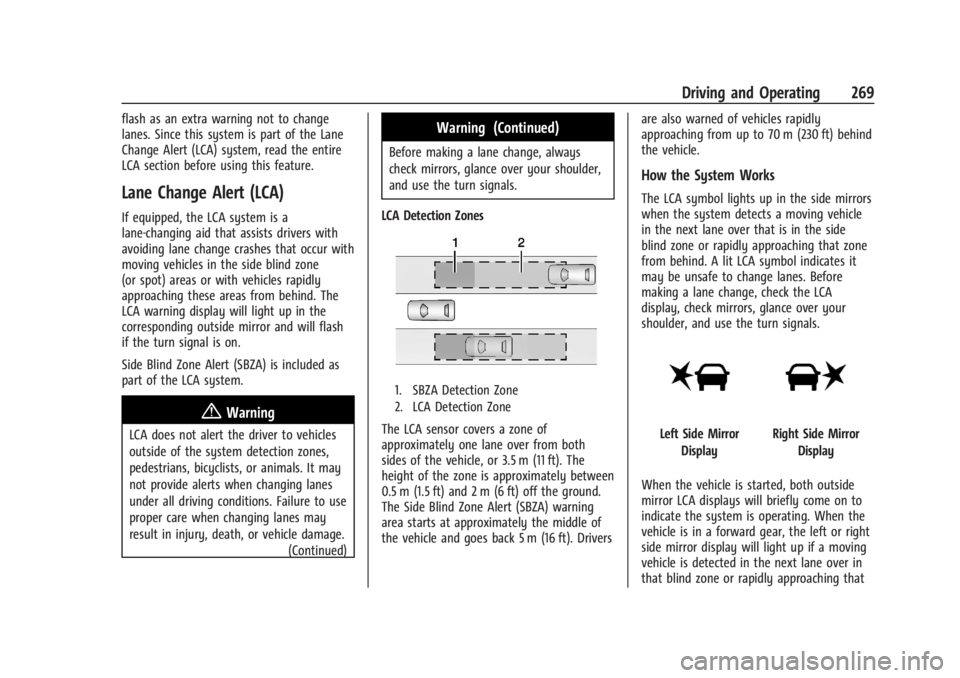
LCA Detection Zones
1. SBZA Detection Zone
2. LCA Detection Zone
The LCA sensor covers a zone of
approximately one lane over from both
sides of the vehicle, or 3.5 m (11 ft). The
height of the zone is approximately between
0.5 m (1.5 ft) and 2 m (6 ft) off the ground.
The Side Blind Zone Alert (SBZA) warning
area starts at approximately the middle of
the vehicle and goes back 5 m (16 ft). Drivers are also warned of vehicles rapidly
approaching from up to 70 m (230 ft) behind
the vehicle.
How the System Works
The LCA symbol lights up in the side mirrors
when the system detects a moving vehicle
in the next lane over that is in the side
blind zone or rapidly approaching that zone
from behind. A lit LCA symbol indicates it
may be unsafe to change lanes. Before
making a lane change, check the LCA
display, check mirrors, glance over your
shoulder, and use the turn signals.
Left Side Mirror
DisplayRight Side Mirror Display
When the vehicle is started, both outside
mirror LCA displays will briefly come on to
indicate the system is operating. When the
vehicle is in a forward gear, the left or right
side mirror display will light up if a moving
vehicle is detected in the next lane over in
that blind zone or rapidly approaching that
Page 271 of 429
Chevrolet Silverado EV Owner Manual (GMNA-Localizing-U.S./Canada-
16702912) - 2024 - CRC - 1/17/23
270 Driving and Operating
zone. If the turn signal is activated in the
same direction as a detected vehicle, this
display will flash as an extra warning not to
change lanes.
LCA can be disabled through vehicle
personalization.To view available settings
from the infotainment screen, touch
Settings > Vehicle > Collision/Detection
Systems. If LCA is disabled by the driver, the
LCA mirror displays will not light up.
When the System Does Not Seem to
Work Properly
The LCA system requires some driving for
the system to calibrate to maximum
performance. This calibration may occur
more quickly if the vehicle is driven on a
straight highway road with traffic and
roadside objects (e.g., guardrails, barriers).
LCA displays may not come on when
passing a vehicle quickly or for a stopped
vehicle. LCA may alert to objects attached to
the vehicle, such as a bicycle, or object
extending out to either side of the vehicle.
Attached objects may also interfere with the
detection of vehicles. This is normal system
operation; the vehicle does not need service.LCA may not always alert the driver to
vehicles in the next lane over, especially in
wet conditions or when driving on sharp
curves. The system does not need to be
serviced. The system may light up due to
guardrails, signs, trees, shrubs, and other
non-moving objects. This is normal system
operation; the vehicle does not need service.
LCA may not operate when the LCA sensors
in the left or right corners of the rear
bumper are covered with mud, dirt, snow,
ice, or slush, or in heavy rainstorms. For
cleaning instructions, see "Washing the
Vehicle" under
Exterior Care0379. If the DIC
still displays the system unavailable
message after cleaning both sides of the
vehicle toward the rear corners of the
vehicle, see your dealer.
If the LCA displays do not light up when
moving vehicles are in the side blind zone or
rapidly approaching this zone and the
system is clean, the system may need
service. Take the vehicle to your dealer.
Driving with a Trailer
If equipped with Lane Change Alert (LCA),
the LCA detection zones that extend back
from the side of the vehicle do not move
further back when a trailer is towed. Use caution while changing lanes when
towing a trailer.
Bicycle Detection
If equipped, the system may detect a
bicyclist approaching from the side or rear
of the vehicle.
If this occurs, a chime will sound in the
direction of the detection, and the Safety
Alert Seat will pulse if enabled through
vehicle settings. To view available settings
from the infotainment screen, touch
Settings > Vehicle > Collision/Detection
Systems.
Bicyclist Detection is available when the
vehicle is in D (Drive), P (Park), and for a
short time after the vehicle is turned off.
If the vehicle detects a bicyclist when it is
off, a DIC message may display and alert to
the direction of the detection. In some
cases, an Unavailable message may display.
This is normal and does not mean that the
system is broken.
Detection Zones
When the vehicle is in P (Park) or is turned
off, a bicyclist can be detected 11 m (36 ft)
behind the vehicle or 10 m (33 ft) to the
side of the vehicle.
Page 273 of 429
Chevrolet Silverado EV Owner Manual (GMNA-Localizing-U.S./Canada-
16702912) - 2024 - CRC - 1/17/23
272 Driving and Operating
Caution (Continued)
The system does not discern any signs
other than the conventional traffic signs
that might give or end a speed limit.
It may not detect some electronic speed
signs.
Depending on the weather conditions or
problems with traffic signs, a traffic sign
may not be recognized or a sign different
from the actual traffic sign may be
displayed.
Do not let this special feature tempt you
into taking risks when driving.
Always adapt vehicle speed to the road
conditions.
Driver assistance systems do not relieve
the driver from full responsibility for
vehicle operation.
Traffic signs that are detected are:
.Speed Limit
.Constraint Signs
Display Indication
The currently detected speed limit is
displayed in the DIC until the next speed
limit or end of speed limit sign is detected.
Depending on the vehicle, the current valid
speed limit is permanently displayed on the
DIC or in the upper left of the instrument
cluster.
A (–) symbol in a frame indicates there is a
sign detected which cannot be clearly
identified by the system.
A (/) symbol in a frame indicates that the
feature is turned off or has failed.
See Driver Information Center (DIC) (Base
Level) 0129 or
Driver Information Center (DIC) (Uplevel)
0 130.
Alert Function
If equipped, a chime may sound when you
have exceeded the indicated speed limit,
or if a new speed limit is detected.
The alert function can be turned on or off.
To view available settings from the
infotainment screen, touch Settings >
Vehicle > Collision/Detection Systems. Each time the vehicle is started, the
customization options will be turned on.
Exceeding Indicated Speed Limit
If the indicated traffic sign speed limit is
exceeded by 5 km/h (3 mph) or more, the
permanently displayed traffic sign symbol
will flash until the vehicle speed is reduced
to or below the indicated speed limit.
System Reset
The content of the traffic sign display can
be cleared. To view available settings from
the infotainment screen, touch Settings >
Vehicle > Collision/Detection Systems.
Upon successful reset, a
(–)symbol displays
until the next traffic sign is detected or
provided by the navigation system map
data. In some cases, traffic sign memory is
cleared automatically by the system.
Alert function will automatically be turned
on when the system is reset.
See Driver Information Center (DIC) (Base
Level) 0129 or
Driver Information Center (DIC) (Uplevel)
0 130.
Page 279 of 429
Chevrolet Silverado EV Owner Manual (GMNA-Localizing-U.S./Canada-
16702912) - 2024 - CRC - 1/17/23
278 Driving and Operating
.All files can be viewed on the playback
app or when the SD card is read by a
personal computer (PC).
.Once the SD card is full, the oldest files
will be overwritten.
To Delete Data : Remove the SD card from
the vehicle and insert into a PC to manually
delete the file.
Error messages can occur if:
.No SD card is present.
.An empty SD card is present.
.The video files are the wrong format.
.The video files are corrupt.
.The SD card is full.
.There is a system error.
Other files should not be stored on the
same SD card as the surround vision
recorder files. Storing other files on the
same card may increase recording start up
and playback time or result in a loss of
data. An error message may be displayed if
no surround vision recorded video file is
available for playback.
Charging
When to Charge
When the high voltage battery is low, the
following charging messages may display on
the Driver Information Center (DIC):
CHARGE VEHICLE SOON : The battery needs
to be charged soon.
REDUCED ACCELERATION DRIVE WITH CARE :
The accelerator pedal response is reduced
and the remaining range value changes to
LOW, charge the vehicle immediately. See
Propulsion Power Messages 0136.
OUT OF ENERGY, CHARGE VEHICLE NOW :
The battery charge is fully depleted. The
vehicle will slow to a stop. Brake and
steering assist will continue operating. Once
stopped, turn the vehicle off.
Plug-In Charging
Plug-in charge times vary based on the
battery condition, charge level, and the
outside temperature. See Charging0123 for
charge mode selection.
Do not allow the vehicle to remain in
temperature extremes for long periods
without being driven or plugged in. When temperatures are below 0 °C (32 °F) and
above 32 °C (90 °F), plug in the vehicle to
maximize high voltage battery life.
In extreme temperature conditions, a full
charge will take additional time.
Charging will slow down as the battery fills
up. Charge the battery to 80% for daily
driving, or when driving in mountainous
terrain. The vehicle can be charged above
80% for long trips when not driving in
mountainous terrain.
It is normal to hear fans, pumps, and
electrical devices clicking while the vehicle is
turned off and charging.
The vehicle does not require indoor charging
area ventilation before, during, or after
charging.
The vehicle cannot be driven while the
charge cord is plugged into the vehicle.Caution
To avoid damage to the vehicle, make
sure the charging cord plug is in good
condition, is not worn or damaged, and is
connected securely to the vehicle's
charging port. If vehicle charging is
(Continued)
Page 285 of 429
Chevrolet Silverado EV Owner Manual (GMNA-Localizing-U.S./Canada-
16702912) - 2024 - CRC - 1/17/23
284 Driving and Operating
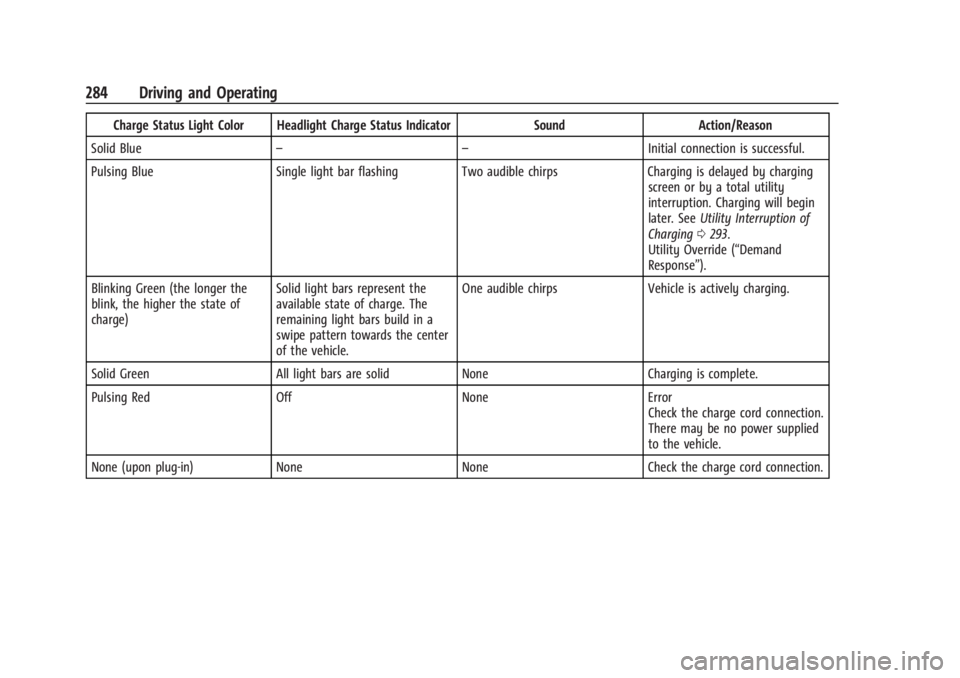
Charge Status Light Color Headlight Charge Status IndicatorSoundAction/Reason
Solid Blue – – Initial connection is successful.
Pulsing Blue Single light bar flashing Two audible chirps Charging is delayed by charging
screen or by a total utility
interruption. Charging will begin
later. See Utility Interruption of
Charging 0293.
Utility Override (“Demand
Response”).
Blinking Green (the longer the
blink, the higher the state of
charge) Solid light bars represent the
available state of charge. The
remaining light bars build in a
swipe pattern towards the center
of the vehicle. One audible chirps
Vehicle is actively charging.
Solid Green All light bars are solid None Charging is complete.
Pulsing Red Off NoneError
Check the charge cord connection.
There may be no power supplied
to the vehicle.
None (upon plug-in) None NoneCheck the charge cord connection.
Page 294 of 429
Chevrolet Silverado EV Owner Manual (GMNA-Localizing-U.S./Canada-
16702912) - 2024 - CRC - 1/17/23
Driving and Operating 293
Utility Interruption of Charging
This vehicle responds to requests through
the utility company to limit or completely
block electrical power grid use. This feature
is inactive during DC charging. A utility
interruption will lengthen the vehicle
charge time.
When electrical grid power is completely
blocked, the vehicle will not charge until the
utility interruption has expired. The vehicle
should be left plugged in so that the vehicle
will automatically resume charging.
Changing the charge mode to Charge Now
or performing a delayed charging override
will not disable a utility interruption.
A message will display on the instrument
cluster indicating that a utility interruption
has occurred.
Charging Station Troubleshooting
If the vehicle does not charge after being
plugged in to a residential 240-volt charging
station:1. Verify that the charge mode is set to Charge Now.
2. Verify that the charging station circuit breaker is not tripped. 3. Plug the portable charge cord into the
wall outlet, verify that the indicator light
on the charge cord is solid green, and
connect it to the vehicle. See “Charge
Cord Status Indicators” inCharge Cord
0 286.
4. If the vehicle charges with the portable charge cord and a different 240-volt
charging station, such as a public station,
there may be a problem with the
charging station. Contact the charging
station manufacturer for service.
Electrical Requirements for
Battery Charging
The vehicle is designed for compatibility
with most standard vehicle charging
equipment in the region of sale. Check for
charger compatibility before purchasing a
charger
The portable charge cord defaults to
120 volts and 8 amps. Have the outlet
inspected before changing to 12 amps on the
Charging Screens. If 12 amps is selected, a
pop-up will show on the infotainment
display to confirm the change to 12 amps.
See the “Active Charging” section under
Charging 0123.
Caution
Do not use portable or stationary backup
generating equipment to charge the
vehicle. This may cause damage to the
vehicle's charging system. Only charge
the vehicle from utility supplied power.
Trailer Towing
General Towing Information
Only use towing equipment that has been
designed for the vehicle. Contact your dealer
or trailering dealer for assistance with
preparing the vehicle to tow a trailer. Read
the entire section before towing a trailer.
To tow a disabled vehicle, see Transporting
a Disabled Vehicle 0378. To tow the vehicle
behind another vehicle such as a motor
home, see Recreational Vehicle Towing
0 379.
Page 295 of 429
Chevrolet Silverado EV Owner Manual (GMNA-Localizing-U.S./Canada-
16702912) - 2024 - CRC - 1/17/23
294 Driving and Operating
Driving Characteristics and
Towing Tips
{Warning
You can lose control when towing a
trailer if the correct equipment is not
used or the vehicle is not driven properly.
For example, if the trailer is too heavy or
the trailer brakes are inadequate for the
load, the vehicle may not stop as
expected. You and others could be
seriously injured. The vehicle may also be
damaged, and the repairs would not be
covered by the vehicle warranty. Pull a
trailer only if all the steps in this section
have been followed. Ask your dealer for
advice and information about towing a
trailer with the vehicle.
Driving with a Trailer
Trailering is different than just driving the
vehicle by itself. Trailering affects handling,
acceleration, braking, and durability.
Successful and safe trailering requires proper
use of the correct equipment.The following information has many
time-tested, important trailering tips and
safety rules. Many of these are important
for your safety and that of your passengers.
Read this section carefully before towing a
trailer.
When towing a trailer:
.Become familiar with, and follow all state
and local laws that apply to trailer
towing. These requirements vary from
state to state.
.State laws may require the use of
extended side view mirrors. If your
visibility is limited or restricted while
towing, install extended side view mirrors
on your vehicle, even if not required.
.Do not tow a trailer during the first
800 km (500 mi) of vehicle use to prevent
damage to vehicle.
.Do not drive over 800 km/h (50 mph) and
do not make starts at full throttle during
the first 800 km (500 mi) of trailer
towing.
.Tow in D (Drive). Tow/Haul Mode is
recommended for heavier trailers. See
Driver Mode Control
0209.
.One-Pedal Driving can be a useful feature
when towing. See One-Pedal Driving
0 203. The following advanced driver assistance
features should be turned off when towing
a trailer, and may turn off automatically
when a trailer is detected:
.Park Assist
.Reverse Automatic Braking (RAB)
.Rear Cross Traffic Alert (RCTA)
.Rear Cross Traffic Braking (RCTB)
.Lane Change Alert (LCA)
.Super Cruise and Adaptive Cruise Control
(ACC), unless equipped with trailering
functionality, see
Adaptive Cruise Control
(Advanced) 0217.
Automatic Emergency Braking (AEB) and
Front Pedestrian Braking (FPB) should be set
to Alert unless equipped with Super Cruise.
Do not use Automatic Parking Assist (APA)
while towing a trailer.
Towing a trailer requires experience. The
combination of the vehicle and trailer is
longer and not as responsive as the vehicle
itself. Become familiar with handling and
braking of the combination by driving on a
level road surface before driving on public
roads.
Page 297 of 429
Chevrolet Silverado EV Owner Manual (GMNA-Localizing-U.S./Canada-
16702912) - 2024 - CRC - 1/17/23
296 Driving and Operating
When parking your vehicle and trailer on
a hill:1. Press and hold the brake pedal, but do not shift into P (Park). Turn the wheels
toward the curb if facing downhill or
toward traffic if facing uphill.
2. Have someone place chocks under the trailer wheels.
3. When the wheel chocks are in place, gradually release the brake pedal to
allow the chocks to absorb the load of
the trailer.
4. Reapply the brake pedal. Then apply the electric parking brake and shift into
P (Park).
5. Release the brake pedal.
Leaving After Parking on a Hill
1. Apply and hold the brake pedal.
.Start the vehicle.
.Shift into the desired gear.
.Release the parking brake.
2. Let up on the brake pedal.
3. Drive slowly until the trailer is clear of the chocks.
4. Stop and have someone pick up and store the chocks.
Launching and Retrieving a Boat
Backing the Trailer into the Water
{Warning
.Have all passengers get out of the
vehicle before backing onto the sloped
part of the ramp. Lower the driver and
passenger side windows before
backing onto the ramp. This will
provide a means of escape in the
unlikely event the vehicle slides into
the water.
.If the boat launch surface is slippery,
have the driver remain in the vehicle
with the brake pedal applied while the
boat is being launched. The boat
launch can be especially slippery at
low tide when part of the ramp was
previously submerged at high tide. Do
not back onto the ramp to launch the
boat if you are not sure the vehicle
can maintain traction.
.Do not move the vehicle if someone is
in the path of the trailer. Some parts
of the trailer might be underwater and
not visible to people who are assisting
in launching the boat. Disconnect the trailer wiring before backing
the trailer into the water to prevent damage
to the electrical circuits. Reconnect the
wiring to the trailer after removing the
trailer from the water. If the trailer has
electric brakes that can function when the
trailer is submerged, it might help to leave
the electrical trailer connector attached to
maintain trailer brake functionality while on
the boat ramp.
To back the trailer into the water:
1. Slowly back down the boat ramp until the boat is floating, but no further than
necessary.
2. Press and hold the brake pedal, but do not shift into P (Park).
3. Have someone place chocks under the front wheels of the vehicle.
4. Gradually release the brake pedal to allow the chocks to absorb the load of
the trailer.
5. Reapply the brake pedal. Then apply the parking brake and shift into P (Park).
6. Release the brake pedal.