remote start CHEVROLET SONIC 2016 2.G User Guide
[x] Cancel search | Manufacturer: CHEVROLET, Model Year: 2016, Model line: SONIC, Model: CHEVROLET SONIC 2016 2.GPages: 353, PDF Size: 7.74 MB
Page 49 of 353
Chevrolet Sonic Owner Manual (GMNA-Localizing-U.S/Canada-9085902) -
2016 - CRC - 5/27/15
48 Seats and Restraints
be canceled when the ignition is
turned on. Press the heated seat
controls to use the heated seats
after the vehicle is started.
The heated seat indicator lights do
not turn on during a remote start.
The temperature performance of an
unoccupied seat may be reduced.
This is normal.
SeeRemote Vehicle Start 029.Rear Seats
Folding the Seatback
Either side of the seatback can be
folded down for more cargo space.
Fold a seatback only when the
vehicle is not moving.
Caution
Folding a rear seat with the safety
belts still fastened may cause
damage to the seat or the safety
belts. Always unbuckle the safety
belts and return them to their
normal stowed position before
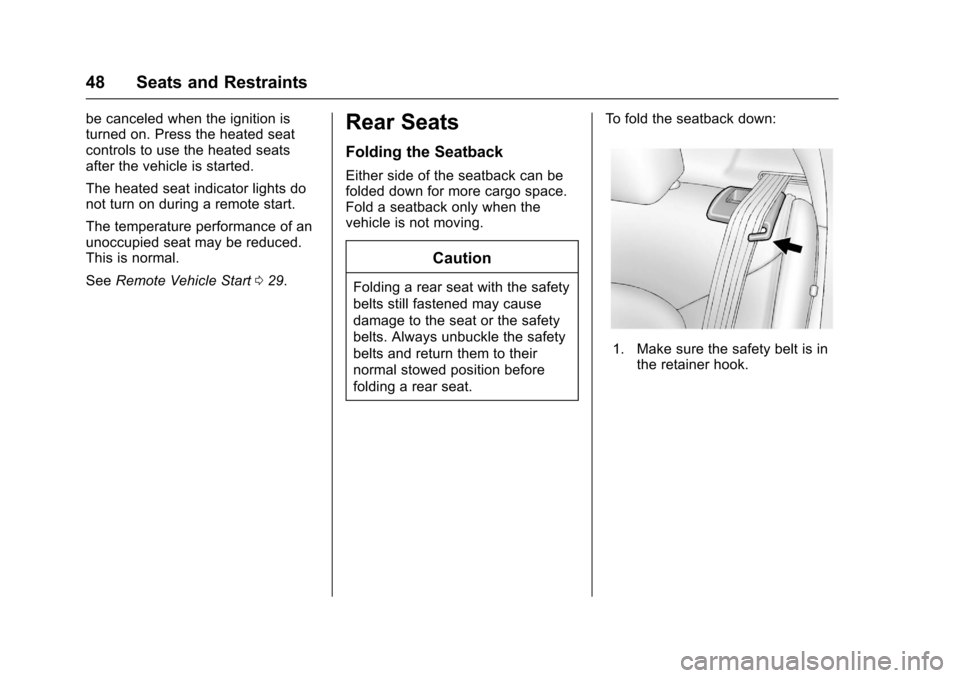
folding a rear seat. To fold the seatback down:
1. Make sure the safety belt is in
the retainer hook.
Page 115 of 353
Chevrolet Sonic Owner Manual (GMNA-Localizing-U.S/Canada-9085902) -
2016 - CRC - 5/27/15
114 Instruments and Controls
Entering the Personalization
Menus1. Press CONFIG to access the Configuration Settings menu.
2. Turn the MENU/TUNE knob to highlight Vehicle Settings.
3. Press MENU/TUNE to select the Vehicle Settings menu.
The following list of menu items may
be available:
. Comfort and Convenience
. Language
. Lighting
. Power Door Locks
. Remote Lock, Unlock, Start
. Return to Factory Settings
Comfort and Convenience
Select the Comfort and
Convenience menu and the
following may display:
.
Chime Volume
. Auto Wipe in Reverse Gear Chime Volume
This allows selection of the chime
volume level.
Select Normal or High.
Auto Wipe in Reverse Gear
When on and the vehicle is on, this
feature will turn the rear wipers on
when the vehicle is placed in
R (Reverse) with the front wipers on.
Select On or Off.
Language
Select Language, then select from
the available language(s).
Lighting
Select the Lighting menu and the
following may display:
.
Exterior Vehicle Locator Lights
. Exit Lighting
Exterior Vehicle Locator Lights
This allows selection of whether the
exterior lamps will turn on when
unlocking the vehicle.
Select On or Off. Exit Lighting
Select Off, 30 Seconds, 1 Minute,
or 2 Minutes.
Power Door Locks
Select Power Door Locks and the
following may display:
.
Auto Door Unlock
. Unlock Door Anti Lock Out
. Delayed Door Lock
Auto Door Unlock
This allows selection of which of the
doors will automatically unlock when
the vehicle is shifted into P (Park) or
the key is removed.
Select All Doors, Driver Door, or Off.
Unlock Door Anti Lock Out
When on, this feature will keep the
driver door from locking when the
door is open. If Off is selected, the
Unlock Door Anti Lock Out menu
will be available and the door will
lock as programmed through
this menu.
Select On or Off.
Page 116 of 353
Chevrolet Sonic Owner Manual (GMNA-Localizing-U.S/Canada-9085902) -
2016 - CRC - 5/27/15
Instruments and Controls 115
Delayed Door Lock
When on, this feature will delay the
locking of the doors until
five seconds after the last door is
closed. Three chimes will signal that
delayed locking is in use. Pressing
will override the delayed locking
feature and immediately lock all of
the doors.
Select On or Off.
Remote Lock, Unlock, Start
Select Remote Lock, Unlock, Start
and the following may display:
.Remote Unlock Feedback
. Remote Lock Feedback
. Remote Door Unlock
Remote Unlock Feedback
When on, the exterior lamps will
flash when unlocking the vehicle
with the RKE transmitter.
Select On or Off.
Remote Lock Feedback
This allows selection of what type of
feedback is given when locking the
vehicle with the RKE transmitter. Select Lights and Horn, Lights Only,
Horn Only, or Off.
Remote Door Unlock
This allows selection of which doors
will unlock when pressing
Kon the
RKE transmitter.
Select All Doors or Driver Door
Only. When set to Driver Door Only,
the driver door will unlock the first
time
Kis pressed and all doors will
unlock when
Kis pressed a second
time. When set to All Doors, all of
the doors will unlock at the first
press of
K.
Return to Factory Settings
Select Return to Factory Settings to
return all of the vehicle
personalization to the default
settings.
Select Yes or No.
Personalization Menu (Radio
with Touchscreen)
Settings can be made with the
ignition on and the vehicle not
moving. Use the audio system controls to
access the personalization menus
for customizing vehicle features.
The following are all possible
personalization features. Depending
on the vehicle, some may not be
available.
D(Home) :
Press to access the
Home Page Menu.
QorR: Press to scroll through the
menus or setup items.
4: Press to exit, or return to the
previous screen or menu.
To access the menu:
1. Press
D.
2. Press Settings.
The following list of menu items may
be available:
. Time & Date Settings
. Radio Settings
. Connection Settings
. Vehicle Settings
. Language
. Text Scroll
Page 118 of 353
Chevrolet Sonic Owner Manual (GMNA-Localizing-U.S/Canada-9085902) -
2016 - CRC - 5/27/15
Instruments and Controls 117
Bluetooth Settings
Select this feature to:
.Connect, disconnect, or delete a
device
. Change or set a Personal
Identification Number (PIN)
. Turn on or off the Bluetooth
connection
. Make the infotainment system
discoverable by Bluetooth
devices
. Check the device information
Change Ringtone
Select to set different ringtones.
Ringtone Volume
Select to set the ringtone volume.
Press
SorT.
Vehicle Settings
Select and the following may
display:
. Climate & Air Quality
. Comfort & Convenience
. Collision/Detection .
Lighting
. Power Door Locks
. Lock, Unlock Settings
. Rear Camera Option
. Vehicle Factory Settings
Climate & Air Quality
Select and Remote Start Heated
Seats may display.
Select On or Off.
Comfort & Convenience
Select and the following may
display:
.Chime Volume
. Auto Wipe in Reverse Gear
Chime Volume
Select to set the chime volume
level.
Select Normal or High. Auto Wipe in Reverse Gear
Select to set this feature on or off.
When on, and the front wipers are
on, the rear window wiper will turn
on automatically when the vehicle is
shifted into R (Reverse).
Select On or Off.
Collision/Detection
Select and Park Assist may display.
Select On or Off.
Lighting
Select and the following may
display:
.
Exit Lighting
. Vehicle Locator Lights
Exit Lighting
Select to set how long the exterior
lamps stay on when leaving the
vehicle and it is dark outside.
Select Off, 30 Sec, 60 Sec,
or 120 Sec.
Page 221 of 353
Chevrolet Sonic Owner Manual (GMNA-Localizing-U.S/Canada-9085902) -
2016 - CRC - 5/27/15
220 Vehicle Care
Tire Chains . . . . . . . . . . . . . . . . . . . 273
If a Tire Goes Flat . . . . . . . . . . . . 273
Tire Sealant andCompressor Kit . . . . . . . . . . . . . 275
Storing the Tire Sealant and
Compressor Kit . . . . . . . . . . . . . 281
Tire Changing . . . . . . . . . . . . . . . . 281
Compact Spare Tire . . . . . . . . . . 286
Jump Starting
Jump Starting - North America . . . . . . . . . . . . . . . . . . . . . 287
Towing the Vehicle
Towing the Vehicle . . . . . . . . . . . 289
Recreational VehicleTowing . . . . . . . . . . . . . . . . . . . . . . 290
Appearance Care
Exterior Care . . . . . . . . . . . . . . . . . 292
Interior Care . . . . . . . . . . . . . . . . . . 297
Floor Mats . . . . . . . . . . . . . . . . . . . . 300
General Information
For service and parts needs, visit
your dealer. You will receive
genuine GM parts and GM-trained
and supported service people.
Genuine GM parts have one of
these marks:
California Proposition
65 Warning
WARNING: Most motor vehicles,
including this one, contain and/or
emit chemicals known to the State
of California to cause cancer and
birth defects or other reproductive harm. Engine exhaust, many parts
and systems, many fluids, and
some component wear by-products
contain and/or emit these
chemicals.
See
Battery - North America 0240
and Jump Starting - North America
0 287.
California Perchlorate
Materials Requirements
Certain types of automotive
applications, such as airbag
initiators, safety belt pretensioners,
and lithium batteries contained in
Remote Keyless Entry transmitters,
may contain perchlorate materials.
Special handling may be necessary.
For additional information, see
www.dtsc.ca.gov/hazardouswaste/
perchlorate.
Accessories and
Modifications
Adding non-dealer accessories or
making modifications to the vehicle
can affect vehicle performance and
safety, including such things as
Page 324 of 353
Chevrolet Sonic Owner Manual (GMNA-Localizing-U.S/Canada-9085902) -
2016 - CRC - 5/27/15
Customer Information 323
Services Provided
.Emergency Fuel Delivery:
Delivery of enough fuel for the
vehicle to get to the nearest
service station.
. Lock-Out Service: Service to
unlock the vehicle if you are
locked out. A remote unlock may
be available if you have OnStar.
For security reasons, the driver
must present identification
before this service is given.
. Emergency Tow from a Public
Road or Highway: Tow to the
nearest Chevrolet dealer for
warranty service, or if the vehicle
was in a crash and cannot be
driven. Assistance is not given
when the vehicle is stuck in the
sand, mud, or snow.
. Flat Tire Change: Service to
change a flat tire with the spare
tire. The spare tire, if equipped,
must be in good condition and
properly inflated. It is the owner's
responsibility for the repair or
replacement of the tire if it is not
covered by the warranty. .
Battery Jump Start: Service to
jump start a dead battery.
. Trip Interruption Benefits and
Assistance: If your trip is
interrupted due to a warranty
event, incidental expenses may
be reimbursed within the
Powertrain warranty period.
Items considered are reasonable
and customary hotel, meals,
rental car, or a vehicle being
delivered back to the customer,
up to 805 km (500 mi).
Services Not Included in
Roadside Assistance
. Impound towing caused by
violation of any laws.
. Legal fines.
. Mounting, dismounting,
or changing of snow tires,
chains, or other traction devices.
Service is not provided if a vehicle
is in an area that is not accessible
to the service vehicle or is not a
regularly traveled or maintained
public road, which includes ice and
winter roads. Off-road use is not
covered.
Services Specific to
Canadian-Purchased Vehicles
. Fuel Delivery: Reimbursement
is up to 7 liters. If available,
diesel fuel delivery may be
restricted. Propane and other
fuels are not provided through
this service.
. Lock-Out Service: Vehicle
registration is required.
. Trip Interruption Benefits and
Assistance: Must be over
150 km from where your trip was
started to qualify. General
Motors of Canada Limited
requires pre-authorization,
original detailed receipts, and a
copy of the repair orders. Once
authorization has been received,
the Roadside Assistance advisor
will help to make arrangements
and explain how to receive
payment.
. Alternative Service: If
assistance cannot be provided
right away, the Roadside
Assistance advisor may give
permission to get local
emergency road service. You will
Page 334 of 353
Chevrolet Sonic Owner Manual (GMNA-Localizing-U.S/Canada-9085902) -
2016 - CRC - 5/27/15
OnStar 333
.Obtain the Wi-Fi®hotspot name
or SSID and password,
if equipped.
Press
Qto connect to an
Advisor to:
. Verify account information or
update contact information.
. Get driving directions.
. Receive a Diagnostic check of
the vehicle's key operating
systems.
. Receive Roadside Assistance.
. Manage Wi-Fi Settings,
if equipped.
Press
>to get a priority connection
to an OnStar Advisor available 24/
7 to:
. Get help for an emergency.
. Be a Good Samaritan or
respond to an AMBER Alert.
. Get assistance in severe
weather or other crisis situations
and find evacuation routes.
OnStar Services
Emergency
OnStar Emergency Services require
a specific OnStar subscription plan.
With Automatic Crash Response, in
many crashes, built-in sensors can
automatically alert a specially
trained OnStar Advisor who is
immediately connected to the
vehicle to help.
Press
>for a priority connection to
an OnStar Advisor who can contact
emergency service providers, direct
them to your exact location, and
relay important information.
With OnStar Crisis Assist, specially
trained Advisors are available
24 hours a day, 7 days a week, to
provide a central point of contact,
assistance, and information during a
crisis.
With Roadside Assistance, Advisors
can locate a nearby service provider
to help with a flat tire, a battery
jump, or an empty gas tank.
Security
If equipped, OnStar provides these
services:
. With Stolen Vehicle Assistance,
OnStar Advisors can use GPS to
pinpoint the vehicle and help
authorities quickly recover it.
. With Remote Ignition Block,
if equipped, OnStar can block
the engine from being started.
. With Stolen Vehicle Slowdown,
if equipped, OnStar can work
with law enforcement to
gradually slow the vehicle down.
Navigation
OnStar navigation requires a
specific OnStar subscription plan.
Press
Qto receive Turn-by-Turn
directions or have them sent to the
vehicle’s navigation screen,
if equipped.
Page 336 of 353
Chevrolet Sonic Owner Manual (GMNA-Localizing-U.S/Canada-9085902) -
2016 - CRC - 5/27/15
OnStar 335
2. The Wi-Fi settings will displaythe Wi-Fi hotspot name (SSID),
password, and on some
vehicles, the connection type
(no Internet connection, 3G,
4G, 4G LTE), and signal quality
(poor, good, excellent).
3. To change the SSID or password, press
Qor call
1-888-4ONSTAR to connect
with an Advisor.
OnStar RemoteLink
®Mobile App
(If Equipped)
Download the OnStar RemoteLink
mobile app to select Apple
®,
Android™, BlackBerry®,
or Windows®mobile devices.
OnStar Subscribers can access the
following services from a mobile
device:
. Remotely start/stop the vehicle,
if factory-equipped.
. Lock/unlock doors, if equipped
with automatic locks.
. Activate the horn and lamps. .
Check the vehicle’s fuel level, oil
life, or tire pressure,
if factory-equipped with the Tire
Pressure Monitor System.
. Send directions to the vehicle.
. Locate the vehicle on a map
(U.S. market only).
. Turn the vehicle's Wi-Fi hotspot
on/off, manage settings, and
monitor data consumption,
if equipped.
For OnStar RemoteLink information
and compatibility, see
www.onstar.com (U.S.) or
www.onstar.ca (Canada).Remote Services
Contact an OnStar Advisor to
unlock the doors or sound the horn
and flash the lamps.
OnStar AtYourService
OnStar Advisors can provide
savings offers from restaurants and
retailers on your route, help locate
hotels, or book a room.
OnStar Hands-Free Calling
Make and receive calls with the
built-in wireless calling service.
Make a Call
1. Press
=. System responds:
“OnStar ready.”
2. Say “Call.”System responds:
“Call. Please say the name or
number to call.”
3. Say the entire number without pausing, including a “1”and the
area code. System responds:
“OK, calling.”
Calling 911 Emergency
1. Press=. System responds:
“OnStar ready.”
2. Say “Call.”System responds:
“Call. Please say the name or
number to call.”
3. Say “911”without pausing.
System responds: “911.”
4. Say “Call.”System responds:
“OK, dialing 911.”
Page 339 of 353
Chevrolet Sonic Owner Manual (GMNA-Localizing-U.S/Canada-9085902) -
2016 - CRC - 5/27/15
338 OnStar
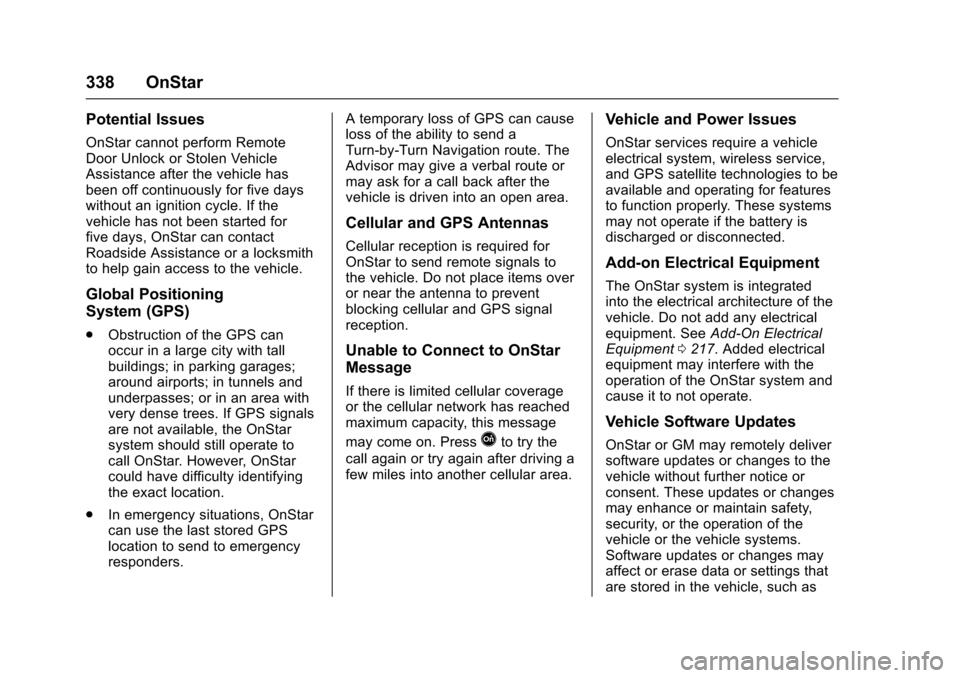
Potential Issues
OnStar cannot perform Remote
Door Unlock or Stolen Vehicle
Assistance after the vehicle has
been off continuously for five days
without an ignition cycle. If the
vehicle has not been started for
five days, OnStar can contact
Roadside Assistance or a locksmith
to help gain access to the vehicle.
Global Positioning
System (GPS)
.Obstruction of the GPS can
occur in a large city with tall
buildings; in parking garages;
around airports; in tunnels and
underpasses; or in an area with
very dense trees. If GPS signals
are not available, the OnStar
system should still operate to
call OnStar. However, OnStar
could have difficulty identifying
the exact location.
. In emergency situations, OnStar
can use the last stored GPS
location to send to emergency
responders. A temporary loss of GPS can cause
loss of the ability to send a
Turn-by-Turn Navigation route. The
Advisor may give a verbal route or
may ask for a call back after the
vehicle is driven into an open area.
Cellular and GPS Antennas
Cellular reception is required for
OnStar to send remote signals to
the vehicle. Do not place items over
or near the antenna to prevent
blocking cellular and GPS signal
reception.
Unable to Connect to OnStar
Message
If there is limited cellular coverage
or the cellular network has reached
maximum capacity, this message
may come on. Press
Qto try the
call again or try again after driving a
few miles into another cellular area.
Vehicle and Power Issues
OnStar services require a vehicle
electrical system, wireless service,
and GPS satellite technologies to be
available and operating for features
to function properly. These systems
may not operate if the battery is
discharged or disconnected.
Add-on Electrical Equipment
The OnStar system is integrated
into the electrical architecture of the
vehicle. Do not add any electrical
equipment. See Add-On Electrical
Equipment 0217. Added electrical
equipment may interfere with the
operation of the OnStar system and
cause it to not operate.
Vehicle Software Updates
OnStar or GM may remotely deliver
software updates or changes to the
vehicle without further notice or
consent. These updates or changes
may enhance or maintain safety,
security, or the operation of the
vehicle or the vehicle systems.
Software updates or changes may
affect or erase data or settings that
are stored in the vehicle, such as
Page 347 of 353
Chevrolet Sonic Owner Manual (GMNA-Localizing-U.S/Canada-9085902) -
2016 - CRC - 5/27/15
346 Index
General InformationService and Maintenance . . . . . 301
Towing . . . . . . . . . . . . . . . . . . . . . . . . 217
Vehicle Care . . . . . . . . . . . . . . . . . . 220
Glove Box . . . . . . . . . . . . . . . . . . . . . . . 86
GM Mobility Reimbursement Program . . . . . . . . . . . . . . . . . . . . . . . 322
H
Halogen Bulbs . . . . . . . . . . . . . . . . . . 243
Hands-Free Phone . . . . . . . . . . . . . 158
Hazard Warning Flashers . . . . . . . 122
Head Restraints . . . . . . . . . . . . . . . . . 43
Headlamps
Aiming . . . . . . . . . . . . . . . . . . . . . . . . 243
Automatic . . . . . . . . . . . . . . . . . . . . . 122
Bulb Replacement . . . . . . . . . . . . 243
Daytime RunningLamps (DRL) . . . . . . . . . . . . . . . . 121
Daytime Running Lamps (DRL) Indicator Light . . . . . . . . 108
Flash-to-Pass . . . . . . . . . . . . . . . . . 121
High-Beam On Light . . . . . . . . . . 108
High/Low Beam Changer . . . . . 121
Lamps On Reminder . . . . . . . . . 108
Heated Front Seats . . . . . . . . . . . . . . 47
Heated Mirrors . . . . . . . . . . . . . . . . . . . 39
Heater
Engine . . . . . . . . . . . . . . . . . . . . . . . . 193 Heating and Air Conditioning . . . 176
High-Beam On Light . . . . . . . . . . . . 108
Hill and Mountain Roads . . . . . . . . 185
Hill Start Assist (HSA) . . . . . . . . . . 203
Home Page . . . . . . . . . . . . . . . . . . . . . 131
Hood . . . . . . . . . . . . . . . . . . . . . . . . . . . 222
Horn . . . . . . . . . . . . . . . . . . . . . . . . . . . . . 90
How to Wear Safety Belts
Properly . . . . . . . . . . . . . . . . . . . . . . . . 51
Hydraulic Clutch . . . . . . . . . . . . . . . . 230
I
Ignition Positions . . . . . . . . . . . . . . . 191
Ignition Transmission Lock Check . . . . . . . . . . . . . . . . . . . . . . . . . 241
Immobilizer . . . . . . . . . . . . . . . . . . . . . . 37 Light . . . . . . . . . . . . . . . . . . . . . . . . . . 107
Indicator Owner Manual . . . . . . . . . . . . . . . . 102
Vehicle Ahead . . . . . . . . . . . . . . . . 104
Infants and Young Children,
Restraints . . . . . . . . . . . . . . . . . . . . . . 69
Infotainment . . . . . . . . . . . . . . . . . . . . 127
Instrument Cluster . . . . . . . . . . . . . . . 96
Instrument Panel Storage Area . . . . . . . . . . . . . . . . . . . 86
Introduction . . . . . . . . . . . . . . . . . . . . . . . 2
J
Jump Starting - North America . . . . . . . . . . . . . . . . . . . . . . . 287
K
Keyless EntryRemote (RKE) System . . . . . . . . . 27
Keys . . . . . . . . . . . . . . . . . . . . . . . . . . . . . 25
L
Labeling, Tire Sidewall . . . . . . . . . . 256
Lamps Courtesy . . . . . . . . . . . . . . . . . . . . . . 124
Daytime Running (DRL) . . . . . . 121
Dome . . . . . . . . . . . . . . . . . . . . . . . . . 124
Exterior Controls . . . . . . . . . . . . . . 120
Exterior Lighting BatterySaver . . . . . . . . . . . . . . . . . . . . . . . 126
Headlamps, Front Turn Signal, and Parking
Lamps . . . . . . . . . . . . . . . . . . . . . . 244
License Plate . . . . . . . . . . . . . . . . . 246
Malfunction Indicator . . . . . . . . . 100
On Reminder . . . . . . . . . . . . . . . . . 108
Reading . . . . . . . . . . . . . . . . . . . . . . 124
Lane Departure Warning (LDW) . . . . . . . . . . . . . . . . 212
Lane Departure Warning Light . . . . . . . . . . . . . . . . . . . . . . . . . . 104