headlamp CHEVROLET SONIC 2017 2.G User Guide
[x] Cancel search | Manufacturer: CHEVROLET, Model Year: 2017, Model line: SONIC, Model: CHEVROLET SONIC 2017 2.GPages: 342, PDF Size: 7.2 MB
Page 138 of 342
Chevrolet Sonic Owner Manual (GMNA-Localizing-U.S./Canada-10122660) -2017 - crc - 5/13/16
Lighting 137
Fog Lamps
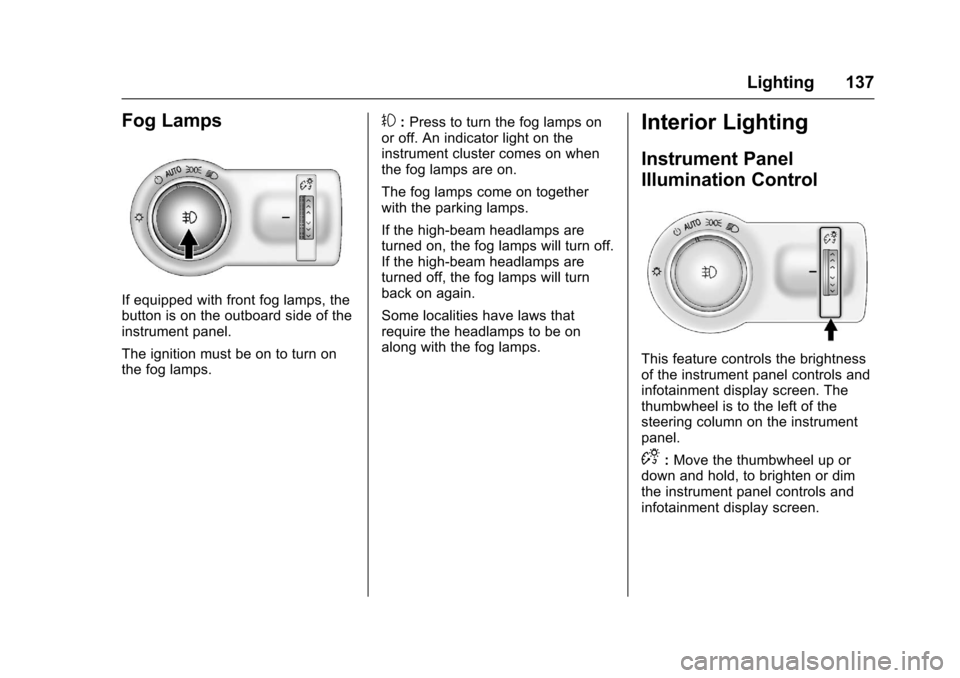
If equipped with front fog lamps, thebutton is on the outboard side of theinstrument panel.
The ignition must be on to turn onthe fog lamps.
#:Press to turn the fog lamps onor off. An indicator light on theinstrument cluster comes on whenthe fog lamps are on.
The fog lamps come on togetherwith the parking lamps.
If the high-beam headlamps areturned on, the fog lamps will turn off.If the high-beam headlamps areturned off, the fog lamps will turnback on again.
Some localities have laws thatrequire the headlamps to be onalong with the fog lamps.
Interior Lighting
Instrument Panel
Illumination Control
This feature controls the brightnessof the instrument panel controls andinfotainment display screen. Thethumbwheel is to the left of thesteering column on the instrumentpanel.
D:Move the thumbwheel up ordown and hold, to brighten or dimthe instrument panel controls andinfotainment display screen.
Page 140 of 342
Chevrolet Sonic Owner Manual (GMNA-Localizing-U.S./Canada-10122660) -2017 - crc - 5/13/16
Lighting 139
If equipped with Keyless Access,the exterior lamps automatically turnon when a door is opened after theignition is changed to the OFFposition. The dome lamps alsocome on after the ignition ischanged to the OFF position. SeeIgnition Positions (Key Access)0182orIgnition Positions (KeylessAccess)0183.
The exterior lamps turn offimmediately by turning the exteriorlamps control off.
This feature can be changed. SeeVehicle Personalization0127.
Battery Load
Management
The vehicle has Electric PowerManagement (EPM) that estimatesthe battery's temperature and stateof charge. It then adjusts the voltagefor best performance and extendedlife of the battery.
When the battery's state of chargeis low, the voltage is raised slightlyto quickly bring the charge back up.When the state of charge is high,
the voltage is lowered slightly toprevent overcharging. If the vehiclehas a voltmeter gauge or a voltagedisplay on the Driver InformationCenter (DIC), you may see thevoltage move up or down. This isnormal. If there is a problem, analert will be displayed.
The battery can be discharged atidle if the electrical loads are veryhigh. This is true for all vehicles.This is because the generator(alternator) may not be spinning fastenough at idle to produce all thepower needed for very highelectrical loads.
Ahighelectricalloadoccurswhenseveral of the following are on, suchas: headlamps, high beams, foglamps, rear window defogger,climate control fan at high speed,heated seats, engine cooling fans,trailer loads, and loads plugged intoaccessory power outlets.
EPM works to prevent excessivedischarge of the battery. It does thisby balancing the generator's outputand the vehicle's electrical needs.It can increase engine idle speed to
generate more power, wheneverneeded. It can temporarily reducethe power demands of someaccessories.
Normally, these actions occur insteps or levels, without beingnoticeable. In rare cases at thehighest levels of corrective action,this action may be noticeable to thedriver.
Battery Power Protection
The battery saver feature isdesigned to protect the vehicle'sbattery.
If some interior lamps are left onand the ignition is turned off, thebattery rundown protection systemautomatically turns the lamp off aftersome time.
Exterior Lighting Battery
Saver
The exterior lamps turn off about10 minutes after the ignition isturned off, if the parking lamps orheadlamps have been manually lefton. This protects against draining
Page 141 of 342
Chevrolet Sonic Owner Manual (GMNA-Localizing-U.S./Canada-10122660) -2017 - crc - 5/13/16
140 Lighting
the battery. To restart the 10-minutetimer, turn the exterior lamp controlto the off position and then back tothe parking lamp or headlampposition.
To k e e p t h e l a m p s o n f o r m o r e t h a n10 minutes, the ignition must be inthe ACC/ACCESSORY or ON/RUNposition.
Page 178 of 342
Chevrolet Sonic Owner Manual (GMNA-Localizing-U.S./Canada-10122660) -2017 - crc - 5/13/16
Driving and Operating 177
clear roads in shaded areas.The surface of a curve or anoverpass can remain icy whenthe surrounding roads are clear.Avoid sudden steeringmaneuvers and braking whileon ice.
.Turn off cruise control.
Blizzard Conditions
Stop the vehicle in a safe place andsignal for help. Stay with the vehicleunless there is help nearby.If possible, use RoadsideAssistance. SeeRoadsideAssistance Program0311.Togethelp and keep everyone in thevehicle safe:
.Turn on the hazard warningflashers.
.Tie a red cloth to an outsidemirror.
{Warning
Snow can trap engine exhaust
under the vehicle. This may
cause exhaust gases to get
inside. Engine exhaust contains
carbon monoxide (CO), which
cannot be seen or smelled. It can
cause unconsciousness and even
death.
If the vehicle is stuck in snow:
.Clear snow from the base ofthe vehicle, especially anyblocking the exhaust pipe.
.Open a window about 5 cm(2 in) on the vehicle sidethat is away from the wind,to bring in fresh air.
.Fully open the air outlets onor under the instrumentpanel.
.Adjust the climate controlsystem to circulate the airinside the vehicle and set
(Continued)
Warning (Continued)
the fan speed to the highestsetting. See“ClimateControl Systems.”
For more information about CO,
seeEngine Exhaust0190.
To s a v e f u e l , r u n t h e e n g i n e f o rshort periods to warm the vehicleand then shut the engine off andpartially close the window. Movingabout to keep warm also helps.
If it takes time for help to arrive,when running the engine, push theaccelerator pedal slightly so theengine runs faster than the idlespeed. This keeps the batterycharged to restart the vehicle and tosignal for help with the headlamps.Do this as little as possible, tosave fuel.
Page 204 of 342
Chevrolet Sonic Owner Manual (GMNA-Localizing-U.S./Canada-10122660) -2017 - crc - 5/13/16
Driving and Operating 203
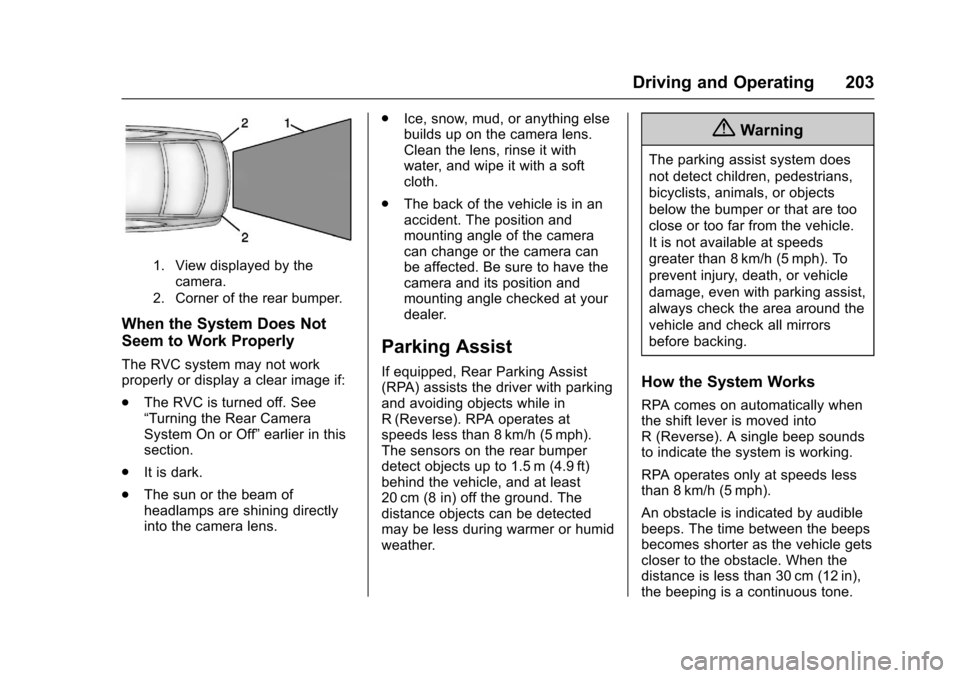
1. View displayed by thecamera.
2. Corner of the rear bumper.
When the System Does Not
Seem to Work Properly
The RVC system may not workproperly or display a clear image if:
.The RVC is turned off. See“Turning the Rear CameraSystem On or Off”earlier in thissection.
.It is dark.
.The sun or the beam ofheadlamps are shining directlyinto the camera lens.
.Ice, snow, mud, or anything elsebuilds up on the camera lens.Clean the lens, rinse it withwater, and wipe it with a softcloth.
.The back of the vehicle is in anaccident. The position andmounting angle of the cameracan change or the camera canbe affected. Be sure to have thecamera and its position andmounting angle checked at yourdealer.
Parking Assist
If equipped, Rear Parking Assist(RPA) assists the driver with parkingand avoiding objects while inR(Reverse). RPA operates atspeeds less than 8 km/h (5 mph).The sensors on the rear bumperdetect objects up to 1.5 m (4.9 ft)behind the vehicle, and at least20 cm (8 in) off the ground. Thedistance objects can be detectedmay be less during warmer or humidweather.
{Warning
The parking assist system does
not detect children, pedestrians,
bicyclists, animals, or objects
below the bumper or that are too
close or too far from the vehicle.
It is not available at speeds
greater than 8 km/h (5 mph). To
prevent injury, death, or vehicle
damage, even with parking assist,
always check the area around the
vehicle and check all mirrors
before backing.
How the System Works
RPA comes on automatically whenthe shift lever is moved intoR(Reverse).Asinglebeepsoundsto indicate the system is working.
RPA operates only at speeds lessthan 8 km/h (5 mph).
An obstacle is indicated by audiblebeeps. The time between the beepsbecomes shorter as the vehicle getscloser to the obstacle. When thedistance is less than 30 cm (12 in),the beeping is a continuous tone.
Page 206 of 342
Chevrolet Sonic Owner Manual (GMNA-Localizing-U.S./Canada-10122660) -2017 - crc - 5/13/16
Driving and Operating 205
Warning (Continued)
closely, FCA may not provide a
warning with enough time to help
avoid a crash. It also may not
provide any warning at all. FCA
does not warn of pedestrians,
animals, signs, guardrails,
bridges, construction barrels,
or other objects. Be ready to take
action and apply the brakes. See
Defensive Driving0172.
FCA can be disabled with the FCAsteering wheel control.
Detecting the Vehicle Ahead
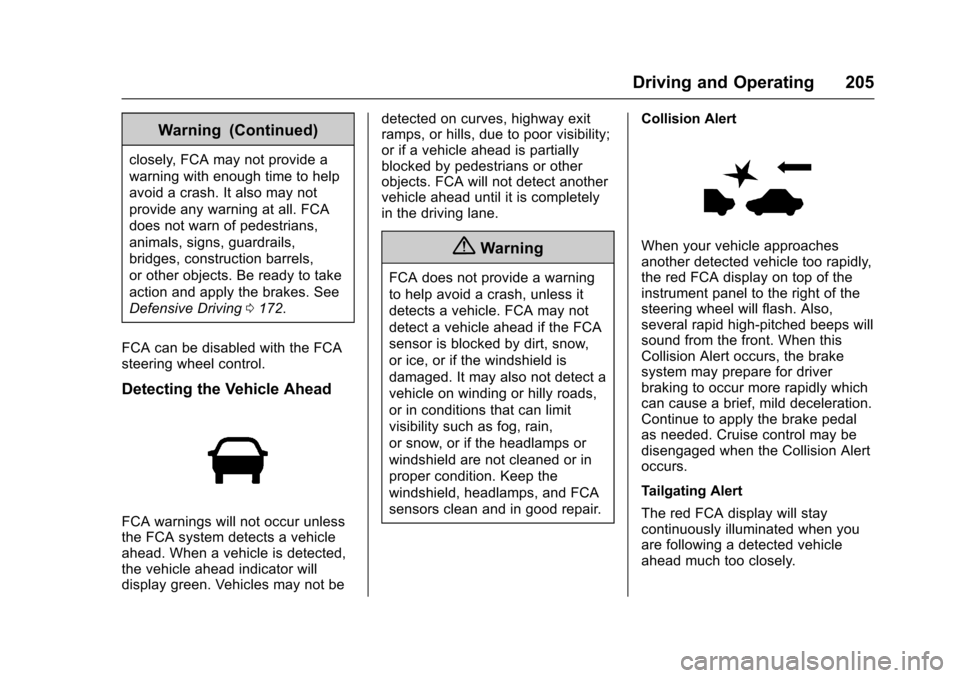
FCA warnings will not occur unlessthe FCA system detects a vehicleahead. When a vehicle is detected,the vehicle ahead indicator willdisplay green. Vehicles may not be
detected on curves, highway exitramps, or hills, due to poor visibility;or if a vehicle ahead is partiallyblocked by pedestrians or otherobjects. FCA will not detect anothervehicle ahead until it is completelyin the driving lane.
{Warning
FCA does not provide a warning
to help avoid a crash, unless it
detects a vehicle. FCA may not
detect a vehicle ahead if the FCA
sensor is blocked by dirt, snow,
or ice, or if the windshield is
damaged. It may also not detect a
vehicle on winding or hilly roads,
or in conditions that can limit
visibility such as fog, rain,
or snow, or if the headlamps or
windshield are not cleaned or in
proper condition. Keep the
windshield, headlamps, and FCA
sensors clean and in good repair.
Collision Alert
When your vehicle approachesanother detected vehicle too rapidly,the red FCA display on top of theinstrument panel to the right of thesteering wheel will flash. Also,several rapid high-pitched beeps willsound from the front. When thisCollision Alert occurs, the brakesystem may prepare for driverbraking to occur more rapidly whichcan cause a brief, mild deceleration.Continue to apply the brake pedalas needed. Cruise control may bedisengaged when the Collision Alertoccurs.
Tailgating Alert
The red FCA display will staycontinuously illuminated when youare following a detected vehicleahead much too closely.
Page 207 of 342
Chevrolet Sonic Owner Manual (GMNA-Localizing-U.S./Canada-10122660) -2017 - crc - 5/13/16
206 Driving and Operating
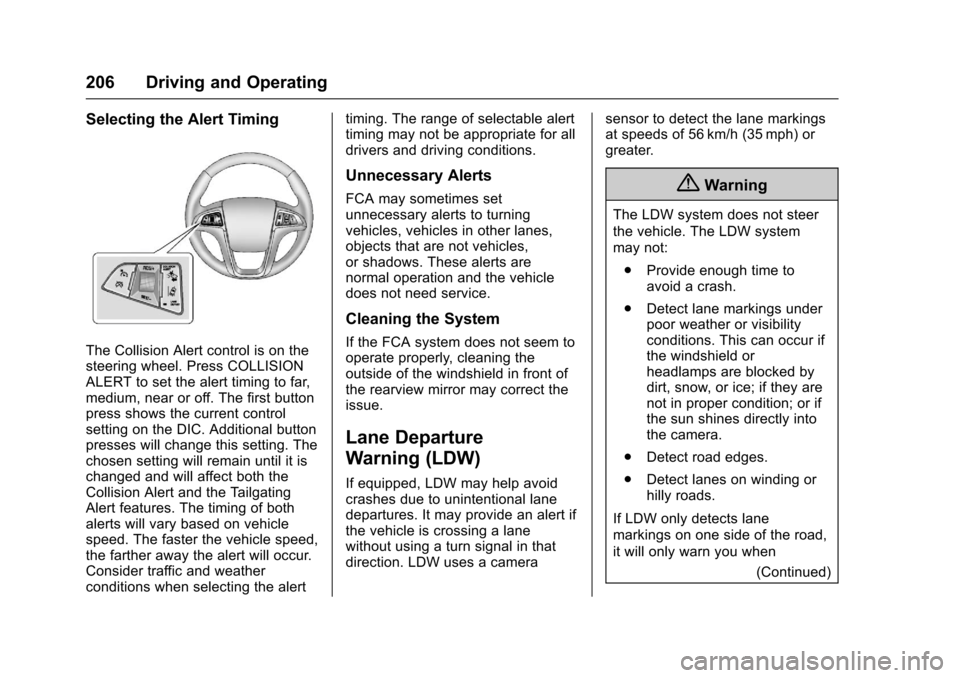
Selecting the Alert Timing
The Collision Alert control is on thesteering wheel. Press COLLISIONALERT to set the alert timing to far,medium, near or off. The first buttonpress shows the current controlsetting on the DIC. Additional buttonpresses will change this setting. Thechosen setting will remain until it ischanged and will affect both theCollision Alert and the TailgatingAlert features. The timing of bothalerts will vary based on vehiclespeed. The faster the vehicle speed,the farther away the alert will occur.Consider traffic and weatherconditions when selecting the alert
timing. The range of selectable alerttiming may not be appropriate for alldrivers and driving conditions.
Unnecessary Alerts
FCA may sometimes setunnecessary alerts to turningvehicles, vehicles in other lanes,objects that are not vehicles,or shadows. These alerts arenormal operation and the vehicledoes not need service.
Cleaning the System
If the FCA system does not seem tooperate properly, cleaning theoutside of the windshield in front ofthe rearview mirror may correct theissue.
Lane Departure
Warning (LDW)
If equipped, LDW may help avoidcrashes due to unintentional lanedepartures. It may provide an alert ifthe vehicle is crossing a lanewithout using a turn signal in thatdirection. LDW uses a camera
sensor to detect the lane markingsat speeds of 56 km/h (35 mph) orgreater.
{Warning
The LDW system does not steer
the vehicle. The LDW system
may not:
.Provide enough time toavoid a crash.
.Detect lane markings underpoor weather or visibilityconditions. This can occur ifthe windshield orheadlamps are blocked bydirt, snow, or ice; if they arenot in proper condition; or ifthe sun shines directly intothe camera.
.Detect road edges.
.Detect lanes on winding orhilly roads.
If LDW only detects lane
markings on one side of the road,
it will only warn you when
(Continued)
Page 208 of 342
Chevrolet Sonic Owner Manual (GMNA-Localizing-U.S./Canada-10122660) -2017 - crc - 5/13/16
Driving and Operating 207
Warning (Continued)
departing the lane on the side
where it has detected a lane
marking. Always keep your
attention on the road and
maintain proper vehicle position
within the lane, or vehicle
damage, injury, or death could
occur. Always keep the
windshield, headlamps, and
camera sensors clean and in
good repair. Do not use LDW in
bad weather conditions.
How the System Works
The LDW camera sensor is on thewindshield ahead of the rearviewmirror.
To t u r n L D W o n a n d o f f , p r e s s@on
the center console. The controlindicator will light when LDW is on.
When LDW is on,@is green if
LDW is available to warn of a lanedeparture. If the vehicle crosses adetected lane marking without using
the turn signal in that direction,@
changes to amber and flashes.Additionally, there will be threebeeps on the right or left, dependingon the lane departure direction.
When the System Does Not
Seem To Work Properly
The system may not detect lanes aswell when there are:
.Close vehicles ahead.
.Sudden lighting changes, suchas when driving through tunnels.
.Banked roads.
If the LDW system is not functioningproperly when lane markings areclearly visible, cleaning thewindshield may help.
LDW alerts may occur due to tarmarks, shadows, cracks in the road,temporary or construction lanemarkings, or other roadimperfections. This is normal systemoperation; the vehicle does not needservice. Turn LDW off if theseconditions continue.
Fuel
GM recommends the use of TOPTIER Detergent Gasoline®to keepthe engine cleaner and reduceengine deposits. Seewww.toptiergas.com for a list of TOPTIER Detergent Gasoline marketersand applicable countries.
Do not use any fuel labeled E85 orFlexFuel. Do not use gasoline withethanol levels greater than 15% byvolume.
Use regular unleaded gasolinemeeting ASTM specification D4814with a posted octane rating of 87 orhigher. Do not use gasoline with a
Page 213 of 342
Chevrolet Sonic Owner Manual (GMNA-Localizing-U.S./Canada-10122660) -2017 - crc - 5/13/16
212 Vehicle Care
Vehicle Care
General Information
General Information . . . . . . . . . . 213California Proposition65 Warning . . . . . . . . . . . . . . . . . 213California PerchlorateMaterials Requirements . . . . . 213Accessories andModifications . . . . . . . . . . . . . . . . 214
Vehicle Checks
Doing Your OwnService Work . . . . . . . . . . . . . . . 214Hood . . . . . . . . . . . . . . . . . . . . . . . . . 215Engine CompartmentOverview . . . . . . . . . . . . . . . . . . . . 217Engine Oil . . . . . . . . . . . . . . . . . . . . 220Engine Oil Life System . . . . . . . 222Automatic TransmissionFluid . . . . . . . . . . . . . . . . . . . . . . . . 223Manual Transmission Fluid . . . 224Hydraulic Clutch . . . . . . . . . . . . . . 224Engine Air Cleaner/Filter . . . . . . 224Cooling System . . . . . . . . . . . . . . 226Engine Coolant . . . . . . . . . . . . . . . 227Engine Overheating . . . . . . . . . . 230Washer Fluid . . . . . . . . . . . . . . . . . 231Brakes . . . . . . . . . . . . . . . . . . . . . . . 232Brake Fluid . . . . . . . . . . . . . . . . . . . 233
Battery - North America . . . . . . 234Starter Switch Check . . . . . . . . . 234Automatic Transmission ShiftLock Control FunctionCheck . . . . . . . . . . . . . . . . . . . . . . . 235Ignition Transmission LockCheck . . . . . . . . . . . . . . . . . . . . . . . 235Park Brake and P (Park)Mechanism Check . . . . . . . . . . 236Wiper Blade Replacement . . . . 236
Headlamp Aiming
Headlamp Aiming . . . . . . . . . . . . 237
Bulb Replacement
Bulb Replacement . . . . . . . . . . . . 238Halogen Bulbs . . . . . . . . . . . . . . . . 238Headlamps and Front TurnSignal . . . . . . . . . . . . . . . . . . . . . . . 238Fog Lamps . . . . . . . . . . . . . . . . . . . 239Ta i l l a m p s , T u r n S i g n a l ,Stoplamps, and Back-UpLamps . . . . . . . . . . . . . . . . . . . . . . 240License Plate Lamp . . . . . . . . . . 241Replacement Bulbs . . . . . . . . . . . 241
Electrical System
Electrical System Overload . . . 242Fuses and Circuit Breakers . . . 242Engine Compartment FuseBlock . . . . . . . . . . . . . . . . . . . . . . . . 243
Instrument Panel FuseBlock . . . . . . . . . . . . . . . . . . . . . . . . 246
Wheels and Tires
Tires . . . . . . . . . . . . . . . . . . . . . . . . . . 248All-Season Tires . . . . . . . . . . . . . . 249Winter Tires . . . . . . . . . . . . . . . . . . 249Summer Tires . . . . . . . . . . . . . . . . 250Tire Sidewall Labeling . . . . . . . . 250Tire Designations . . . . . . . . . . . . . 252Tire Terminology andDefinitions . . . . . . . . . . . . . . . . . . 253Tire Pressure . . . . . . . . . . . . . . . . . 256Tire Pressure MonitorSystem . . . . . . . . . . . . . . . . . . . . . . 257Tire Pressure MonitorOperation . . . . . . . . . . . . . . . . . . . 258Tire Inspection . . . . . . . . . . . . . . . . 260Tire Rotation . . . . . . . . . . . . . . . . . 261When It Is Time for NewTires . . . . . . . . . . . . . . . . . . . . . . . . 262Buying New Tires . . . . . . . . . . . . . 263Different Size Tires andWheels . . . . . . . . . . . . . . . . . . . . . . 264Uniform Tire QualityGrading . . . . . . . . . . . . . . . . . . . . . 264Wheel Alignment and TireBalance . . . . . . . . . . . . . . . . . . . . . 266Wheel Replacement . . . . . . . . . . 266Tire Chains . . . . . . . . . . . . . . . . . . . 267If a Tire Goes Flat . . . . . . . . . . . . 267
Page 238 of 342
Chevrolet Sonic Owner Manual (GMNA-Localizing-U.S./Canada-10122660) -2017 - crc - 5/13/16
Vehicle Care 237
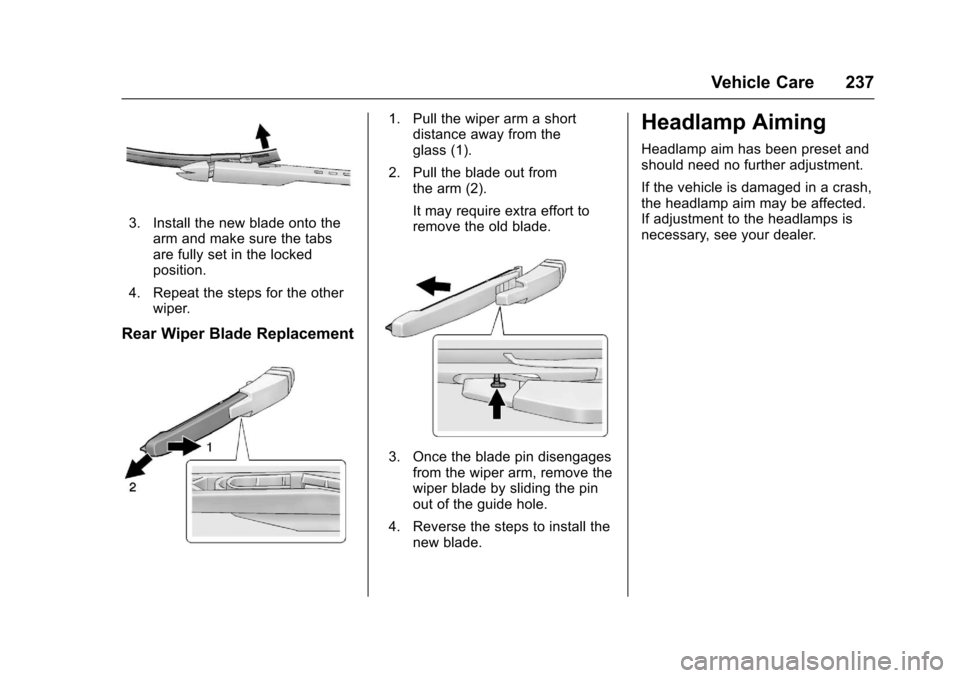
3. Install the new blade onto thearm and make sure the tabsare fully set in the lockedposition.
4. Repeat the steps for the otherwiper.
Rear Wiper Blade Replacement
1. Pull the wiper arm a shortdistance away from theglass (1).
2. Pull the blade out fromthe arm (2).
It may require extra effort toremove the old blade.
3. Once the blade pin disengagesfrom the wiper arm, remove thewiper blade by sliding the pinout of the guide hole.
4. Reverse the steps to install thenew blade.
Headlamp Aiming
Headlamp aim has been preset andshould need no further adjustment.
If the vehicle is damaged in a crash,the headlamp aim may be affected.If adjustment to the headlamps isnecessary, see your dealer.