horn CHEVROLET SONIC 2017 2.G User Guide
[x] Cancel search | Manufacturer: CHEVROLET, Model Year: 2017, Model line: SONIC, Model: CHEVROLET SONIC 2017 2.GPages: 342, PDF Size: 7.2 MB
Page 132 of 342
Chevrolet Sonic Owner Manual (GMNA-Localizing-U.S./Canada-10122660) -2017 - crc - 5/13/16
Instruments and Controls 131
Remote Start Auto Heat Seats
If equipped and turned on, thisfeature will turn the heated seats onwhen using remote start oncold days.
Select Off or On.
Passive Door Unlock
This allows the selection of whatdoors will unlock when using thebutton on the driver door to unlockthe vehicle.
Select All Doors or Driver Door.
Passive Door Lock
This feature can be turned on, off,or on with feedback. SeeRemoteKeyless Entry (RKE) SystemOperation (Keyless Access)031orRemote Keyless Entry (RKE)System Operation (KeyAccess)029.
Select Off, On with HornChirp, or On.
Remote Left in Vehicle Alert
This feature sounds an alert whenthe RKE transmitter is left in thevehicle.
Select Off or On.
Bluetooth
Select and the following maydisplay:
.Device Information
.Discoverable
.Device Management
.Change Pairing PIN
.Ringtones
.Sort Order
.Voice Mail Numbers
.Te x t M e s s a g e A l e r t s
Device Information
See information about the devicename, address, and PIN code.
Discoverable
This allows the system to find adevice.
Select Off or On.
Device Management
Select to connect to a differentphone source, disconnect a phone,or delete a phone.
Change Pairing PIN
Select to change the PIN of adevice.
Ringtones
Press to change the ring tone forthe specific phone. The phone doesnot need to be connected to changethe ring tones.
Sort Order
Select to change the order of thecontacts list.
Select First/Last or Last/First.
Voice Mail Numbers
This feature displays the voice mailnumber for all connected phones.To c h a n g e t h e v o i c e m a i l n u m b e r ,select EDIT. Type a new number,then select SAVE.
Text Message Alerts
This allows the feature to be turnedon or off.
Select Off or On.
Page 245 of 342
Chevrolet Sonic Owner Manual (GMNA-Localizing-U.S./Canada-10122660) -2017 - crc - 5/13/16
244 Vehicle Care
Mini Fuses Usage
17 Canister vent
18 Washer
19* Fuel pump
20 Engine controlmodule 5
21 Fuel system controlmodule 2/Leveling
22 TCM 1/ DC DCconverter
24 Engine controlmodule 1
25 Coil
26 Engine controlmodule 4
27 Engine controlmodule 3
28 Engine controlmodule 2
29 Injector/Ignition coil
30 ECM
31 A/C clutch
32 TCM
Mini Fuses Usage
33 Horn
34 Front fog lamps
35 Left high-beamheadlamp
36 Right high-beamheadlamp
*=Ifequipped
J-CaseFusesUsage
1Frontwipers
2ABSpump
3Blower
4Run/CrankIEC
6CoolingfanK4
7CoolingfanK5
8* SAI pump
9EVP
10 Start
*=Ifequipped
Relays Usage
RLY 1 Front wiper control
RLY 2* Rear fog lamp
RLY 3 Front wiper speed
RLY 4 Rear defogger
RLY 5 Run/Crank
RLY 6*–/SAI valve
RLY 8* Fuel pump
RLY 9* SAI pump
RLY 10 Cooling fan K3
RLY 11 P/T
RLY 12 Start
RLY 13 A/C clutch
RLY 14 High-beamheadlamps
RLY 15 Cooling fan K1
*=Ifequipped
Page 246 of 342
Chevrolet Sonic Owner Manual (GMNA-Localizing-U.S./Canada-10122660) -2017 - crc - 5/13/16
Vehicle Care 245
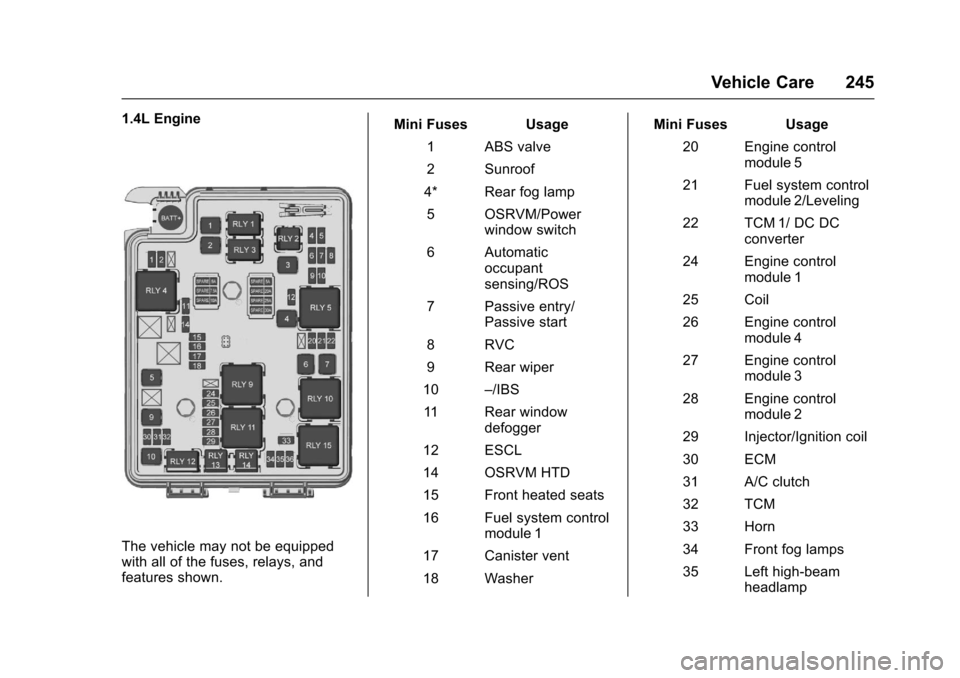
1.4L Engine
The vehicle may not be equippedwith all of the fuses, relays, andfeatures shown.
Mini Fuses Usage
1ABSvalve
2Sunroof
4* Rear fog lamp
5OSRVM/Powerwindow switch
6Automaticoccupantsensing/ROS
7Passiveentry/Passive start
8RVC
9Rearwiper
10–/IBS
11 R e a r w i n d o wdefogger
12 ESCL
14 OSRVM HTD
15 Front heated seats
16 Fuel system controlmodule 1
17 Canister vent
18 Washer
Mini Fuses Usage
20 Engine controlmodule 5
21 Fuel system controlmodule 2/Leveling
22 TCM 1/ DC DCconverter
24 Engine controlmodule 1
25 Coil
26 Engine controlmodule 4
27 Engine controlmodule 3
28 Engine controlmodule 2
29 Injector/Ignition coil
30 ECM
31 A/C clutch
32 TCM
33 Horn
34 Front fog lamps
35 Left high-beamheadlamp
Page 261 of 342
Chevrolet Sonic Owner Manual (GMNA-Localizing-U.S./Canada-10122660) -2017 - crc - 5/13/16
260 Vehicle Care
See your dealer for service or topurchase a relearn tool. A TPMSrelearn tool can also be purchased.See Tire Pressure Monitor SensorActivation Tool atwww.gmtoolsandequipment.com orcall 1-800-GM TOOLS(1-800-468-6657).
There are two minutes to match thefirst tire/wheel position, andfive minutes overall to match all fourtire/wheel positions. If it takeslonger, the matching process stopsand must be restarted.
The TPMS sensor matchingprocess is:
1. Set the parking brake.
2. Turn the ignition to ON/RUNwith the engine off or place thevehicle power mode in ON/RUN/START. SeeIgnitionPositions (Key Access)0182orIgnition Positions (KeylessAccess)0183.
3. Press the MENU button todisplay the menu items in theDriver InformationCenter (DIC).
4. Use the thumbwheel to scroll tothe Tire Learn menu itemscreen.
5. Press and hold the SET/CLRbutton to begin the sensormatching process.
Amessagerequestingacceptance of the process maydisplay.
6. The horn sounds twice tosignal the receiver is in relearnmode and the TIRE LEARNmessage may display on theDIC screen.
7. Start with the driver sidefront tire.
8. Place the relearn tool againstthe tire sidewall, near the valvestem. Then press the button toactivate the TPMS sensor.Ahornchirpconfirmsthatthesensor identification code hasbeen matched to this tire andwheel position.
9. Proceed to the passenger sidefront tire, and repeat theprocedure in Step 8.
10. Proceed to the passenger siderear tire, and repeat theprocedure in Step 8.
11 . P r o c e e d t o t h e d r i v e r s i d e r e a rtire, and repeat the procedurein Step 8. The horn sounds twotimes to indicate the sensoridentification code has beenmatched to the driver side reartire, and the TPMS sensormatching process is no longeractive. The TIRE LEARNmessage on the DIC displayscreen goes off.
12. Turn the vehicle off.
13. Set all four tires to therecommended air pressurelevel as indicated on the Tireand Loading Information label.
Tire Inspection
We recommend that the tires,
including the spare tire, if the
vehicle has one, be inspected
for signs of wear or damage at
least once a month.
Page 325 of 342
Chevrolet Sonic Owner Manual (GMNA-Localizing-U.S./Canada-10122660) -2017 - crc - 5/13/16
324 OnStar
from each other and use acombination of letters, numbers,and symbols to increase thesecurity.
.Change the default name of theSSID (Service Set Identifier).This is your network’snamethatis visible to other wirelessdevices. Choose a unique nameand avoid family names orvehicle descriptions.
OnStar Wi-Fi®Hotspot (IfEquipped)
The vehicle may have a built-inWi-Fi hotspot that provides accessto the Internet and web content at4G LTE speed. Up to seven mobiledevices can be connected. A dataplan is required. Use the in-vehiclecontrols only when it is safe todo so.
1. To retrieve Wi-Fi hotspot
information, press=,waitfor
the prompt, then say“Wi-Fisettings.”On some vehicles,touch Wi-Fi Settings on thescreen.
2. The Wi-Fi settings will displaythe Wi-Fi hotspot name (SSID),password, and on somevehicles, the connection type(no Internet connection, 3G,4G, 4G LTE), and signal quality(poor, good, excellent).
3. To change the SSID or
password, pressQor call
1-888-4ONSTAR to connectwith an Advisor.
After initial set-up, your vehicle’sWi-Fi hotspot will connectautomatically to your mobiledevices. Manage data usage byturning Wi-Fi on or off on yourmobile device, using theRemoteLink mobile app, or bycontacting an OnStar Advisor.
OnStar RemoteLink®Mobile App(If Equipped)
Download the OnStar RemoteLinkmobile app to select Apple®iOS,Android™,BlackBerry®,or Windows®mobile devices.OnStar Subscribers can access thefollowing services from a mobiledevice:
.Remotely start/stop the vehicle,if factory-equipped.
.Lock/unlock doors, if equippedwith automatic locks.
.Activate the horn and lamps.
.Check the vehicle’sfuellevel,oillife, or tire pressure,if factory-equipped with the TirePressure Monitor System.
.Send directions to the vehicle.
.Locate the vehicle on a map(U.S. market only).
.Turn the vehicle's Wi-Fi hotspoton/off, manage settings, andmonitor data consumption,if equipped.
For OnStar RemoteLink informationand compatibility, seewww.onstar.com (U.S.) orwww.onstar.ca (Canada).
Remote Services
Contact an OnStar Advisor tounlock the doors or sound the hornand flash the lamps.
Page 336 of 342

Chevrolet Sonic Owner Manual (GMNA-Localizing-U.S./Canada-10122660) -2017 - crc - 5/13/16
Index 335
Fuel (cont'd)
Requirements, California . . . . . 208
Fuses
Engine Compartment Fuse
Block . . . . . . . . . . . . . . . . . . . . . . . . 243
Fuses and Circuit Breakers . . . 242
Instrument Panel Fuse
Block . . . . . . . . . . . . . . . . . . . . . . . . 246
G
Gauges
Fuel . . . . . . . . . . . . . . . . . . . . . . . . . . 109
Odometer . . . . . . . . . . . . . . . . . . . . . 109
Speedometer . . . . . . . . . . . . . . . . . 109
Ta c h o m e t e r . . . . . . . . . . . . . . . . . . . 1 0 9
Trip Odometer . . . . . . . . . . . . . . . . 109
Warning Lights and
Indicators . . . . . . . . . . . . . . . . . . . 106
General Information
Service and Maintenance . . . . . 289
To w i n g . . . . . . . . . . . . . . . . . . . . . . . . . 2 11
Vehicle Care . . . . . . . . . . . . . . . . . . 213
Glove Box . . . . . . . . . . . . . . . . . . . . . . . 97
GM Mobility Reimbursement
Program . . . . . . . . . . . . . . . . . . . . . . . 311
H
Halogen Bulbs . . . . . . . . . . . . . . . . . . 238
Hands-Free Phone . . . . . . . . . . . . . 161
Hazard Warning Flashers . . . . . . . 136
Head Restraints . . . . . . . . . . . . . . . . . 52
Headlamps
Aiming . . . . . . . . . . . . . . . . . . . . . . . . 237
Automatic . . . . . . . . . . . . . . . . . . . . . 135
Bulb Replacement . . . . . . . . . . . . 238
Daytime Running
Lamps (DRL) . . . . . . . . . . . . . . . . 135
Flash-to-Pass . . . . . . . . . . . . . . . . . 135
High-Beam On Light . . . . . . . . . . 120
High/Low Beam Changer . . . . . 134
Lamps On Reminder . . . . . . . . . 120
Heated
Steering Wheel . . . . . . . . . . . . . . . 102
Heated Front Seats . . . . . . . . . . . . . . 56
Heated Mirrors . . . . . . . . . . . . . . . . . . . 47
Heater
Engine . . . . . . . . . . . . . . . . . . . . . . . . 186
Heating . . . . . . . . . . . . . . . . . . . . . . . . . 166
High-Beam On Light . . . . . . . . . . . . 120
Hill and Mountain Roads . . . . . . . . 176
Hill Start Assist (HSA) . . . . . . . . . . 197
Home Page . . . . . . . . . . . . . . . . . . . . . 144
Hood . . . . . . . . . . . . . . . . . . . . . . . . . . . 215
Horn . . . . . . . . . . . . . . . . . . . . . . . . . . . . 102
How to Wear Safety Belts
Properly . . . . . . . . . . . . . . . . . . . . . . . . 60
HVAC . . . . . . . . . . . . . . . . . . . . . . . . . . . 166
Hydraulic Clutch . . . . . . . . . . . . . . . . 224
I
Ignition Positions . . . . . . . . . . 182, 183
Ignition Transmission Lock
Check . . . . . . . . . . . . . . . . . . . . . . . . . 235
Immobilizer . . . . . . . . . . . . . . . . . . . . . . 45
Light . . . . . . . . . . . . . . . . . . . . . . . . . . .119
Indicator
Owner Manual . . . . . . . . . . . . . . . . .114
Vehicle Ahead . . . . . . . . . . . . . . . . . 116
Infants and Young Children,
Restraints . . . . . . . . . . . . . . . . . . . . . . 79
Infotainment . . . . . . . . . . . . . . . . . . . . 141
Instrument Cluster . . . . . . . . . . . . . . 107
Instrument Panel
Storage Area . . . . . . . . . . . . . . . . . . . 97
Introduction . . . . . . . . . . . . . . . . . . . . . . . 2
J
Jump Starting - North
America . . . . . . . . . . . . . . . . . . . . . . . 275