keyless CHEVROLET SONIC 2018 User Guide
[x] Cancel search | Manufacturer: CHEVROLET, Model Year: 2018, Model line: SONIC, Model: CHEVROLET SONIC 2018Pages: 349, PDF Size: 5.49 MB
Page 32 of 349
Chevrolet Sonic Owner Manual (GMNA-Localizing-U.S./Canada-11373973) -
2018 - crc - 10/9/17
Keys, Doors, and Windows 31
Battery Replacement
The battery is not rechargeable. To
replace the battery:
Caution
When replacing the battery, do
not touch any of the circuitry on
the transmitter. Static from your
body could damage the
transmitter.
1. Press the button on the transmitter to extend the key.
2. Remove the battery cover by prying with a finger.
3. Remove the old battery.
4. Insert the new battery, positive side facing up. Replace with a
CR2032 or equivalent battery.
5. Snap the battery cover back on to the transmitter.
Remote Keyless Entry
(RKE) System Operation
(Keyless Access)
The Keyless Access system allows
for vehicle entry when the Remote
Keyless Entry (RKE) transmitter is
within 1 m (3 ft). See “Keyless
Access Operation” following.
The RKE transmitter functions may
work up to 60 m (197 ft) away from
the vehicle.
Other conditions can impact the
performance of the transmitter.
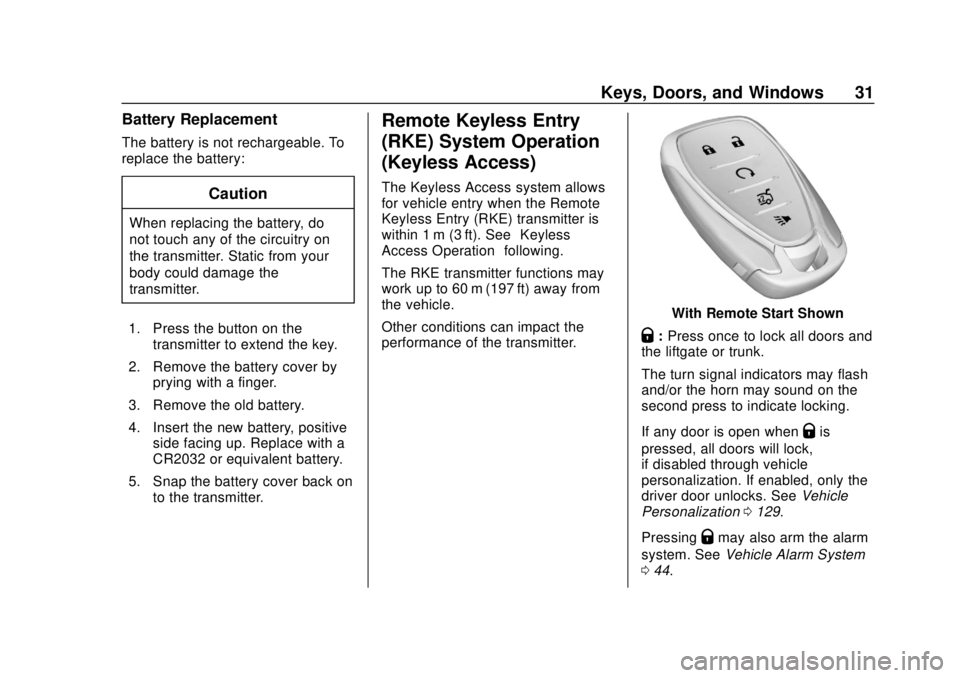
With Remote Start Shown
Q: Press once to lock all doors and
the liftgate or trunk.
The turn signal indicators may flash
and/or the horn may sound on the
second press to indicate locking.
If any door is open when
Qis
pressed, all doors will lock,
if disabled through vehicle
personalization. If enabled, only the
driver door unlocks. See Vehicle
Personalization 0129.
Pressing
Qmay also arm the alarm
system. See Vehicle Alarm System
0 44.
Page 33 of 349
Chevrolet Sonic Owner Manual (GMNA-Localizing-U.S./Canada-11373973) -
2018 - crc - 10/9/17
32 Keys, Doors, and Windows
K:Press to unlock the driver door
and the liftgate or trunk. Press again
to unlock all doors.
The turn signal indicators may flash
to indicate unlocking has occurred.
See Vehicle Personalization 0129.
Pressing
Kwill disarm the alarm
system. See Vehicle Alarm System
0 44.
X:If equipped, press twice to
release the trunk.
7: Press and release one time to
initiate vehicle locator. The exterior
lamps flash and the horn chirps
three times.
Press and hold
7for at least
three seconds to sound the panic
alarm. The horn sounds and the
turn signals flash for about
30 seconds until
7is pressed again
or the ignition is turned on.
/: If equipped, pressQand then
immediately press and hold
/for at
least four seconds or until the turn
signal lamps flash to start the
engine from outside the vehicle
using the RKE transmitter. See
Remote Vehicle Start 037.
Keyless Access Operation
Some vehicles have a Keyless
Access system that lets you lock
and unlock the doors without
removing the RKE transmitter from
your pocket, purse, briefcase, etc.
The RKE transmitter should be
within 1 m (3 ft) of the trunk or door
being opened. If the vehicle has this
feature, there will be buttons on the
outside door handles.
Keyless Access can be
programmed to unlock all doors on
the first unlock/lock button press
from the driver door. See Vehicle
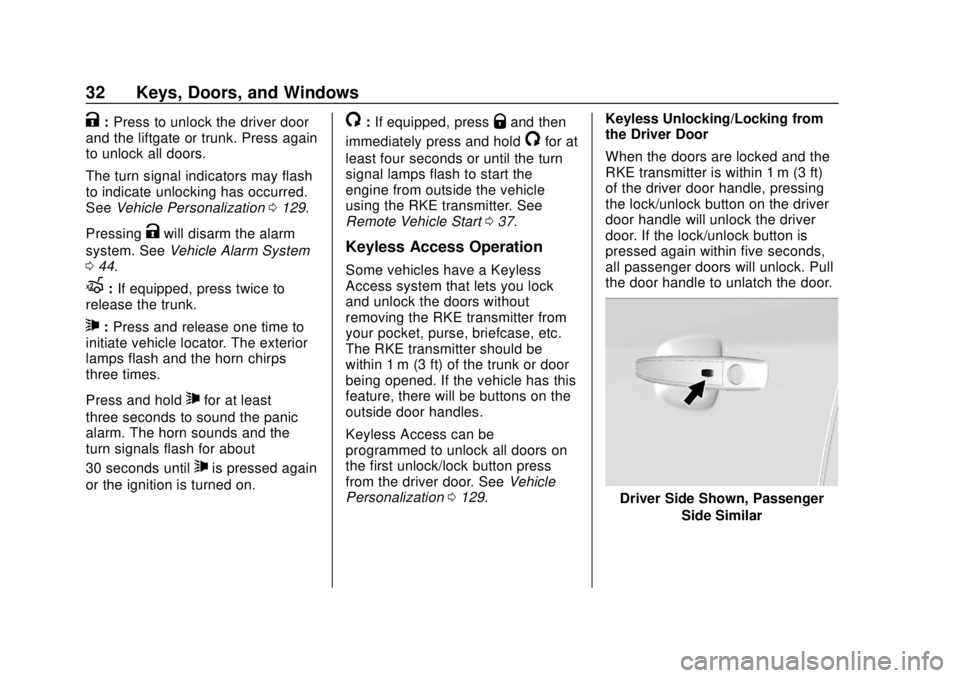
Personalization 0129. Keyless Unlocking/Locking from
the Driver Door
When the doors are locked and the
RKE transmitter is within 1 m (3 ft)
of the driver door handle, pressing
the lock/unlock button on the driver
door handle will unlock the driver
door. If the lock/unlock button is
pressed again within five seconds,
all passenger doors will unlock. Pull
the door handle to unlatch the door.
Driver Side Shown, Passenger
Side Similar
Page 34 of 349
Chevrolet Sonic Owner Manual (GMNA-Localizing-U.S./Canada-11373973) -
2018 - crc - 10/9/17
Keys, Doors, and Windows 33
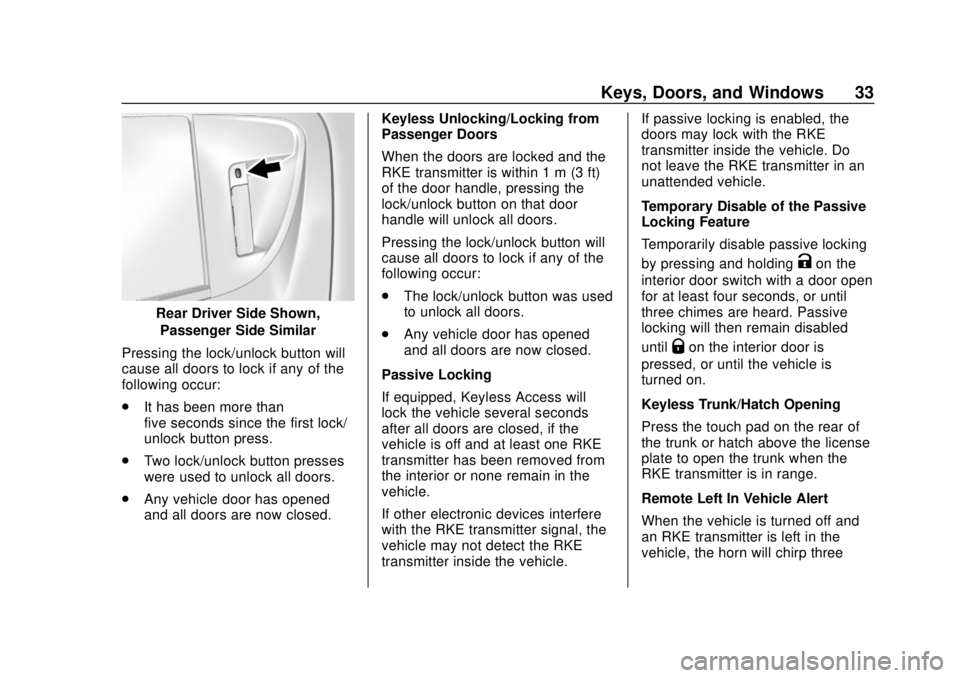
Rear Driver Side Shown,Passenger Side Similar
Pressing the lock/unlock button will
cause all doors to lock if any of the
following occur:
. It has been more than
five seconds since the first lock/
unlock button press.
. Two lock/unlock button presses
were used to unlock all doors.
. Any vehicle door has opened
and all doors are now closed. Keyless Unlocking/Locking from
Passenger Doors
When the doors are locked and the
RKE transmitter is within 1 m (3 ft)
of the door handle, pressing the
lock/unlock button on that door
handle will unlock all doors.
Pressing the lock/unlock button will
cause all doors to lock if any of the
following occur:
.
The lock/unlock button was used
to unlock all doors.
. Any vehicle door has opened
and all doors are now closed.
Passive Locking
If equipped, Keyless Access will
lock the vehicle several seconds
after all doors are closed, if the
vehicle is off and at least one RKE
transmitter has been removed from
the interior or none remain in the
vehicle.
If other electronic devices interfere
with the RKE transmitter signal, the
vehicle may not detect the RKE
transmitter inside the vehicle. If passive locking is enabled, the
doors may lock with the RKE
transmitter inside the vehicle. Do
not leave the RKE transmitter in an
unattended vehicle.
Temporary Disable of the Passive
Locking Feature
Temporarily disable passive locking
by pressing and holding
Kon the
interior door switch with a door open
for at least four seconds, or until
three chimes are heard. Passive
locking will then remain disabled
until
Qon the interior door is
pressed, or until the vehicle is
turned on.
Keyless Trunk/Hatch Opening
Press the touch pad on the rear of
the trunk or hatch above the license
plate to open the trunk when the
RKE transmitter is in range.
Remote Left In Vehicle Alert
When the vehicle is turned off and
an RKE transmitter is left in the
vehicle, the horn will chirp three
Page 38 of 349
Chevrolet Sonic Owner Manual (GMNA-Localizing-U.S./Canada-11373973) -
2018 - crc - 10/9/17
Keys, Doors, and Windows 37
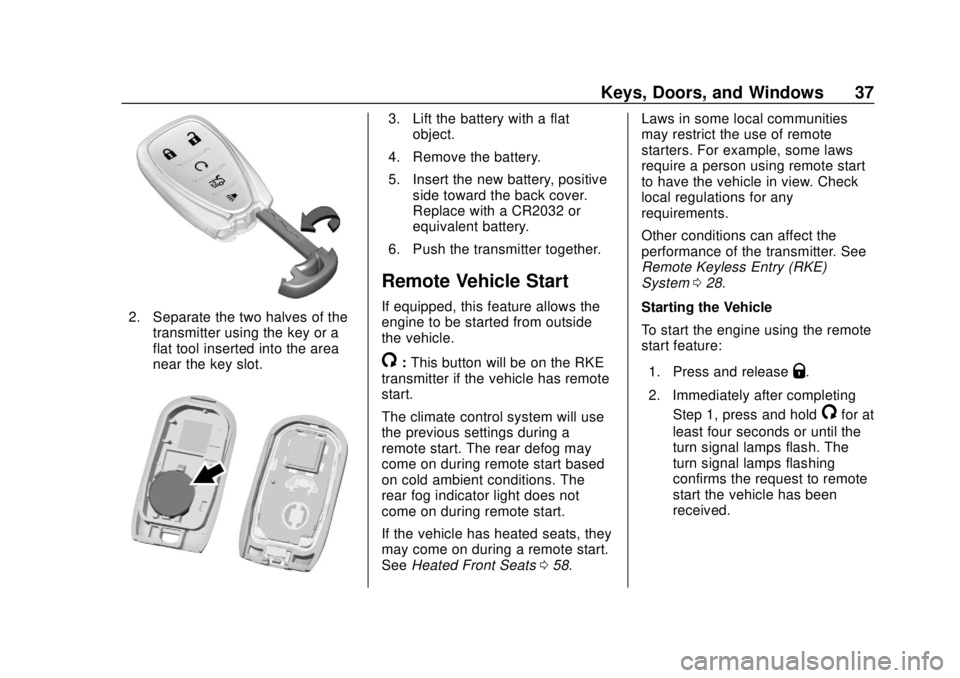
2. Separate the two halves of thetransmitter using the key or a
flat tool inserted into the area
near the key slot.
3. Lift the battery with a flatobject.
4. Remove the battery.
5. Insert the new battery, positive side toward the back cover.
Replace with a CR2032 or
equivalent battery.
6. Push the transmitter together.
Remote Vehicle Start
If equipped, this feature allows the
engine to be started from outside
the vehicle.
/: This button will be on the RKE
transmitter if the vehicle has remote
start.
The climate control system will use
the previous settings during a
remote start. The rear defog may
come on during remote start based
on cold ambient conditions. The
rear fog indicator light does not
come on during remote start.
If the vehicle has heated seats, they
may come on during a remote start.
See Heated Front Seats 058. Laws in some local communities
may restrict the use of remote
starters. For example, some laws
require a person using remote start
to have the vehicle in view. Check
local regulations for any
requirements.
Other conditions can affect the
performance of the transmitter. See
Remote Keyless Entry (RKE)
System
028.
Starting the Vehicle
To start the engine using the remote
start feature:
1. Press and releaseQ.
2. Immediately after completing Step 1, press and hold
/for at
least four seconds or until the
turn signal lamps flash. The
turn signal lamps flashing
confirms the request to remote
start the vehicle has been
received.
Page 39 of 349
Chevrolet Sonic Owner Manual (GMNA-Localizing-U.S./Canada-11373973) -
2018 - crc - 10/9/17
38 Keys, Doors, and Windows
When the engine starts, the parking
lamps will turn on and remain on as
long as the engine is running. The
doors will be locked and the climate
control system may come on.
The engine will continue to run for
10 minutes. After 30 seconds,
repeat the steps if a 10-minute
extension is desired. Remote start
can be extended only once.
Turn the ignition on before driving.
Extending Engine Run Time
The engine run time can also be
extended by another 10 minutes,
if during the first 10 minutes
Steps 1 and 2 are repeated while
the engine is still running. An
extension can be requested,
30 seconds after starting. This
provides a total of 20 minutes.
When the remote start is extended,
the second 10-minute period is
added on to the first 10 minutes for
a total of 20 minutes.
A maximum of two remote starts,
or a single start with an extension,
are allowed between ignition cycles.After this, the ignition must be
turned on then off before the remote
start procedure can be used again.
Canceling a Remote Start
To cancel a remote start, do one of
the following:
.
Press and hold
/until the
parking lamps turn off.
. Turn on the hazard warning
flashers.
. Turn the vehicle on and then off.
Conditions in Which Remote Start
Will Not Work
The remote vehicle start feature will
not operate if:
. The key is in the ignition (Key
Access).
. A transmitter is in the vehicle
(Keyless Access).
. The hood is not closed.
. The hazard warning flashers
are on.
. The malfunction indicator lamp
is on. .
The engine coolant temperature
is too high.
. The oil pressure is low.
. Two remote vehicle starts, or a
single remote start with an
extension, have already
been used.
. The vehicle is not in P (Park).
Door Locks
{Warning
Unlocked doors can be
dangerous.
. Passengers, especially
children, can easily open
the doors and fall out of a
moving vehicle. The doors
can be unlocked and
opened while the vehicle is
moving. The chance of
being thrown out of the
vehicle in a crash is
increased if the doors are
not locked. So, all
(Continued)
Page 40 of 349
Chevrolet Sonic Owner Manual (GMNA-Localizing-U.S./Canada-11373973) -
2018 - crc - 10/9/17
Keys, Doors, and Windows 39
Warning (Continued)
passengers should wear
seat belts properly and the
doors should be locked
whenever the vehicle is
driven.
. Young children who get into
unlocked vehicles may be
unable to get out. A child
can be overcome by
extreme heat and can suffer
permanent injuries or even
death from heat stroke.
Always lock the vehicle
whenever leaving it.
. Outsiders can easily enter
through an unlocked door
when you slow down or stop
the vehicle. Locking the
doors can help prevent this
from happening.
To lock or unlock the doors from
outside the vehicle:
. Use the key in the driver door to
lock all doors or unlock the
driver door only. .
Press
QorKon the Remote
Keyless Entry (RKE) transmitter.
See Remote Keyless Entry
(RKE) System Operation (Key
Access) 029 orRemote Keyless
Entry (RKE) System Operation
(Keyless Access) 031.
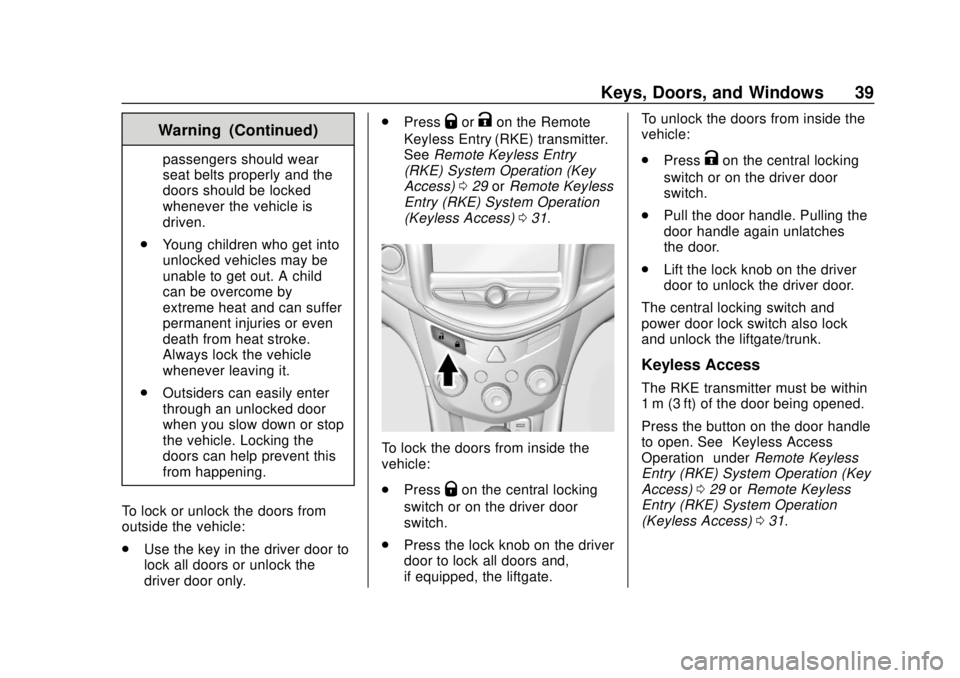
To lock the doors from inside the
vehicle:
.
Press
Qon the central locking
switch or on the driver door
switch.
. Press the lock knob on the driver
door to lock all doors and,
if equipped, the liftgate. To unlock the doors from inside the
vehicle:
.
Press
Kon the central locking
switch or on the driver door
switch.
. Pull the door handle. Pulling the
door handle again unlatches
the door.
. Lift the lock knob on the driver
door to unlock the driver door.
The central locking switch and
power door lock switch also lock
and unlock the liftgate/trunk.
Keyless Access
The RKE transmitter must be within
1 m (3 ft) of the door being opened.
Press the button on the door handle
to open. See “Keyless Access
Operation” underRemote Keyless
Entry (RKE) System Operation (Key
Access) 029 orRemote Keyless
Entry (RKE) System Operation
(Keyless Access) 031.
Page 42 of 349
Chevrolet Sonic Owner Manual (GMNA-Localizing-U.S./Canada-11373973) -
2018 - crc - 10/9/17
Keys, Doors, and Windows 41
Lockout Protection can be manually
overridden with the driver door open
by pressing and holding
Qon the
power door lock switch.
Open Door Anti-Lockout
If Open Door Anti-Lockout has been
turned on and the vehicle is off, the
driver door is open, and locking is
requested, all the doors will lock and
the driver door will remain unlocked.
Push the lock button on the door or
the RKE transmitter a second time
to lock the driver door. The Open
Door Anti-Lockout feature can be
turned on or off. See Vehicle
Personalization 0129.
Safety Locks
The rear door safety locks prevent
passengers from opening the rear
doors from inside the vehicle.
Manual Safety Locks
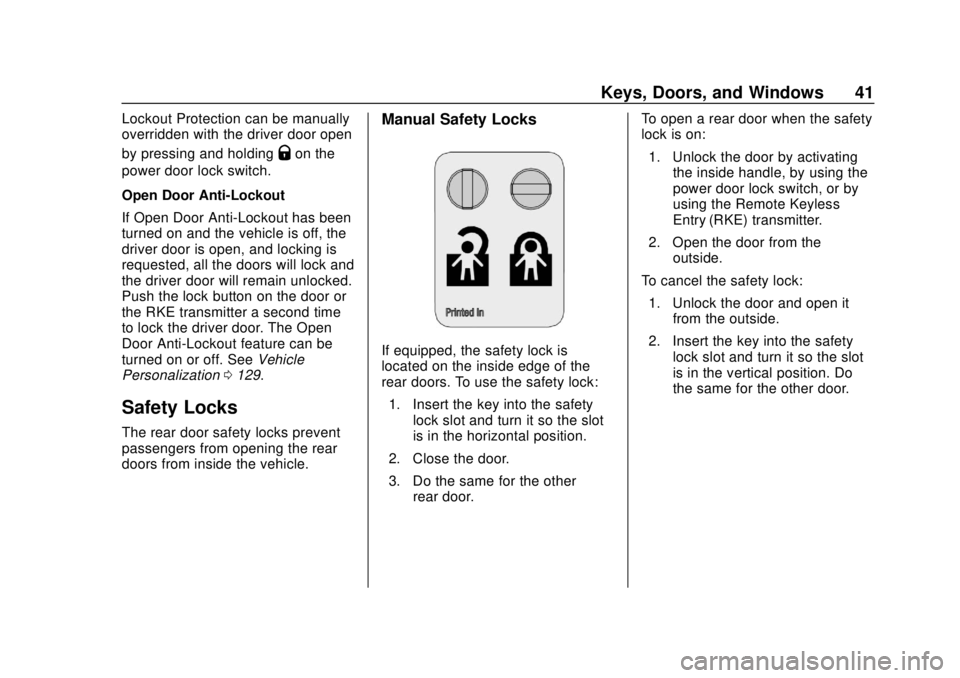
If equipped, the safety lock is
located on the inside edge of the
rear doors. To use the safety lock:
1. Insert the key into the safety lock slot and turn it so the slot
is in the horizontal position.
2. Close the door.
3. Do the same for the other rear door. To open a rear door when the safety
lock is on:
1. Unlock the door by activating the inside handle, by using the
power door lock switch, or by
using the Remote Keyless
Entry (RKE) transmitter.
2. Open the door from the outside.
To cancel the safety lock: 1. Unlock the door and open it from the outside.
2. Insert the key into the safety lock slot and turn it so the slot
is in the vertical position. Do
the same for the other door.
Page 44 of 349
Chevrolet Sonic Owner Manual (GMNA-Localizing-U.S./Canada-11373973) -
2018 - crc - 10/9/17
Keys, Doors, and Windows 43
To open the trunk from outside of
the vehicle:
.Press
Kon the RKE transmitter
to unlock all doors, then use the
touch pad.
. Press and hold
Yfor Key
Access, or press
Xtwice for
Keyless Access vehicles, on the
RKE transmitter.
See Remote Keyless Entry (RKE)
System Operation (Key Access)
0 29 orRemote Keyless Entry
(RKE) System Operation (Keyless
Access) 031.
To lock the trunk from outside press
Qon the RKE transmitter.
Emergency Trunk Release
Handle
Caution
Do not use the emergency trunk
release handle as a tie-down or
anchor point when securing items
in the trunk as it could damage
the handle.
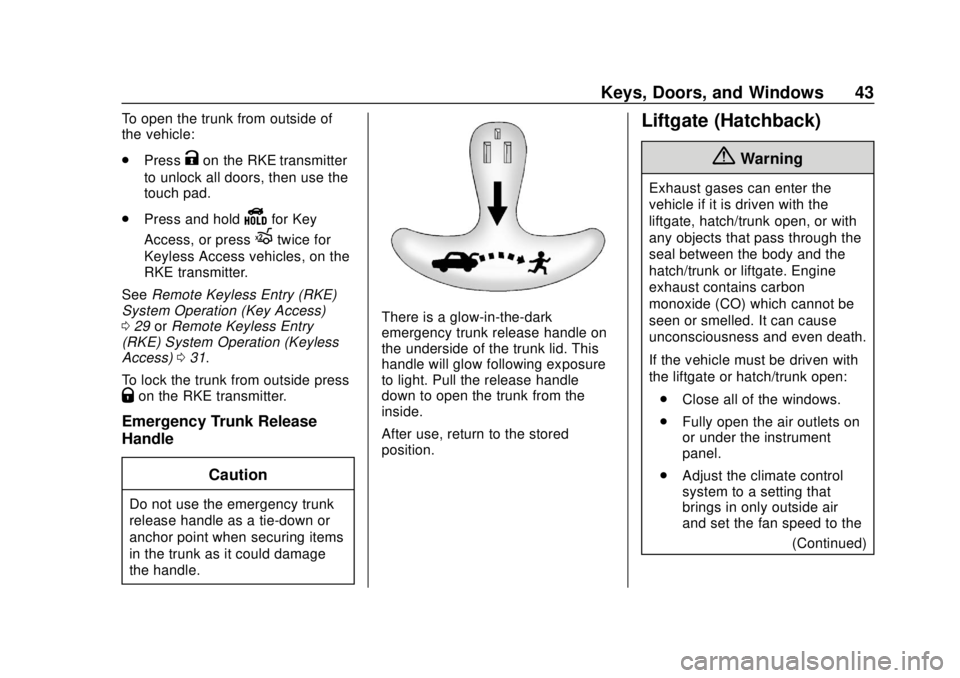
There is a glow-in-the-dark
emergency trunk release handle on
the underside of the trunk lid. This
handle will glow following exposure
to light. Pull the release handle
down to open the trunk from the
inside.
After use, return to the stored
position.
Liftgate (Hatchback)
{Warning
Exhaust gases can enter the
vehicle if it is driven with the
liftgate, hatch/trunk open, or with
any objects that pass through the
seal between the body and the
hatch/trunk or liftgate. Engine
exhaust contains carbon
monoxide (CO) which cannot be
seen or smelled. It can cause
unconsciousness and even death.
If the vehicle must be driven with
the liftgate or hatch/trunk open:. Close all of the windows.
. Fully open the air outlets on
or under the instrument
panel.
. Adjust the climate control
system to a setting that
brings in only outside air
and set the fan speed to the
(Continued)
Page 45 of 349
Chevrolet Sonic Owner Manual (GMNA-Localizing-U.S./Canada-11373973) -
2018 - crc - 10/9/17
44 Keys, Doors, and Windows
Warning (Continued)
highest setting. See
“Climate Control Systems”
in the Index.
. If the vehicle is equipped
with a power liftgate, disable
the power liftgate function.
For more information about
carbon monoxide, see Engine
Exhaust 0190.
To lock or unlock the liftgate from
the inside, press
QorKon the
central locking switch or on the
driver door switch.
The vehicle must be in P (Park) for
automatic transmissions. For
manual transmissions the parking
brake must be engaged.
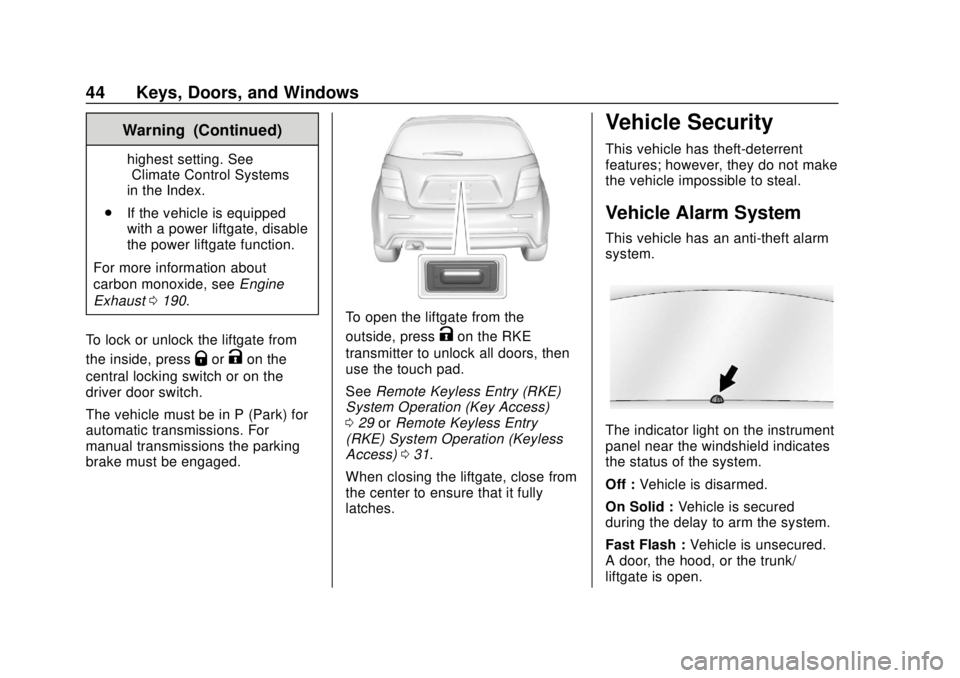
To open the liftgate from the
outside, press
Kon the RKE
transmitter to unlock all doors, then
use the touch pad.
See Remote Keyless Entry (RKE)
System Operation (Key Access)
0 29 orRemote Keyless Entry
(RKE) System Operation (Keyless
Access) 031.
When closing the liftgate, close from
the center to ensure that it fully
latches.
Vehicle Security
This vehicle has theft-deterrent
features; however, they do not make
the vehicle impossible to steal.
Vehicle Alarm System
This vehicle has an anti-theft alarm
system.
The indicator light on the instrument
panel near the windshield indicates
the status of the system.
Off : Vehicle is disarmed.
On Solid : Vehicle is secured
during the delay to arm the system.
Fast Flash : Vehicle is unsecured.
A door, the hood, or the trunk/
liftgate is open.
Page 47 of 349
Chevrolet Sonic Owner Manual (GMNA-Localizing-U.S./Canada-11373973) -
2018 - crc - 10/9/17
46 Keys, Doors, and Windows
Immobilizer Operation
(Key Access)
This vehicle has a passive
theft-deterrent system.
The system does not have to be
manually armed or disarmed.
The vehicle is automatically
immobilized when the key is
removed from the ignition.
The system is automatically
disarmed when the vehicle is
started with the correct key. The key
uses a transponder that matches an
immobilizer control unit in the
vehicle and automatically disarms
the system. Only an authorized key
starts the vehicle. The vehicle may
not start if the key is damaged.
The security light in the instrument
cluster comes on if there is a
problem with arming or disarming
the theft-deterrent system.
When trying to start the vehicle, the
security light comes on briefly when
the ignition is turned on.
If the engine does not start and the
security light stays on, there is a
problem with the system. Turn the
ignition off and try again.
If the engine still does not start, and
the key appears to be undamaged
or the light continues to stay on, try
another ignition key. If the engine
does not start with the other key, the
vehicle needs service. If the vehicle
does start, the first key may be
damaged. See your dealer who can
service the theft-deterrent system
and have a new key made.
Do not leave the transmitter or
device that disarms or deactivates
the theft-deterrent system in the
vehicle.Immobilizer Operation
(Keyless Access)
This vehicle has a passive
theft-deterrent system.
The system does not have to be
manually armed or disarmed.
The vehicle is automatically
immobilized when the transmitter
leaves the vehicle.
The immobilization system is
disarmed when ENGINE START/
STOP is pressed and a valid
transmitter is found in the vehicle.
The security light in the instrument
cluster comes on when there is a
problem with arming or disarming
the theft-deterrent system.