instrument panel CHEVROLET SONIC 2020 Owner's Guide
[x] Cancel search | Manufacturer: CHEVROLET, Model Year: 2020, Model line: SONIC, Model: CHEVROLET SONIC 2020Pages: 329, PDF Size: 5.56 MB
Page 124 of 329
Chevrolet Sonic Owner Manual (GMNA-Localizing-U.S./Canada-13566834) -
2020 - CRC - 10/4/19
Lighting 123
Interior Lighting
Instrument Panel
Illumination Control
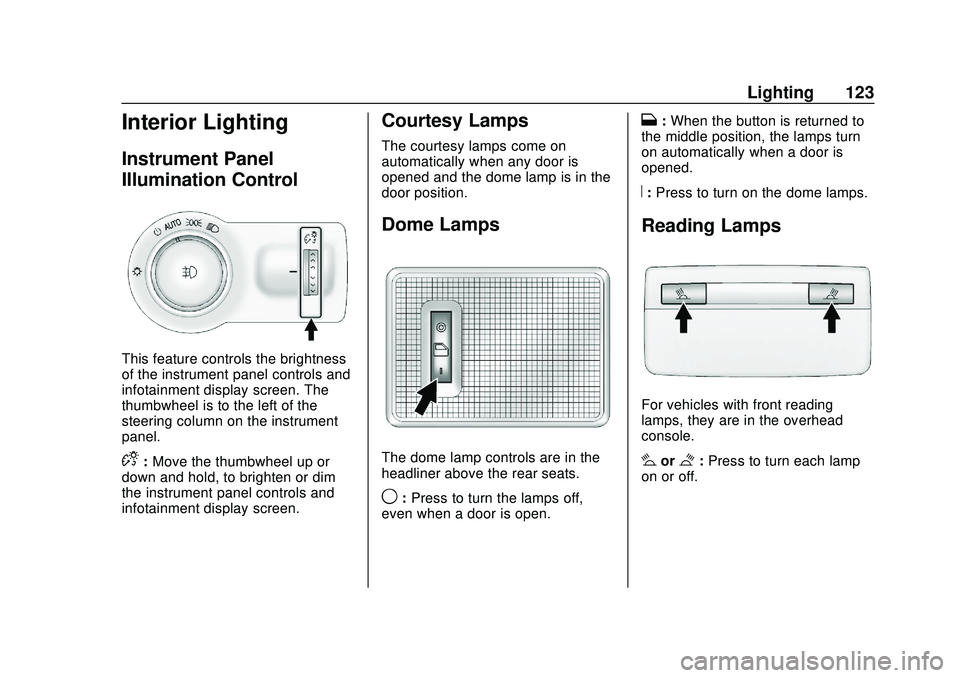
This feature controls the brightness
of the instrument panel controls and
infotainment display screen. The
thumbwheel is to the left of the
steering column on the instrument
panel.
D:Move the thumbwheel up or
down and hold, to brighten or dim
the instrument panel controls and
infotainment display screen.
Courtesy Lamps
The courtesy lamps come on
automatically when any door is
opened and the dome lamp is in the
door position.
Dome Lamps
The dome lamp controls are in the
headliner above the rear seats.
9: Press to turn the lamps off,
even when a door is open.
H: When the button is returned to
the middle position, the lamps turn
on automatically when a door is
opened.
R: Press to turn on the dome lamps.
Reading Lamps
For vehicles with front reading
lamps, they are in the overhead
console.
#or$:Press to turn each lamp
on or off.
Page 155 of 329
Chevrolet Sonic Owner Manual (GMNA-Localizing-U.S./Canada-13566834) -
2020 - CRC - 10/4/19
154 Climate Controls
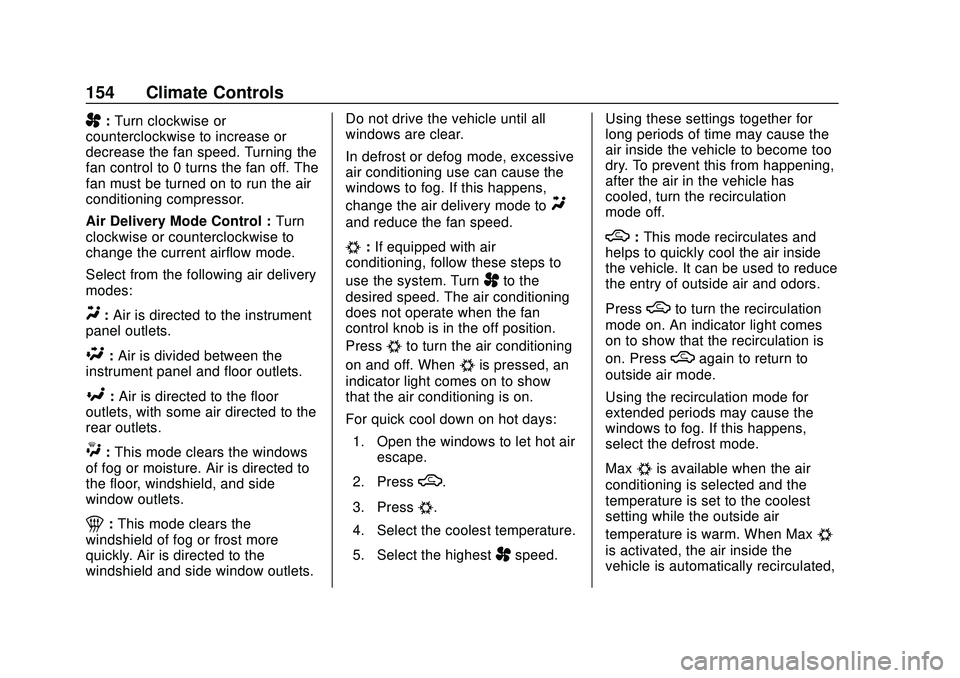
A:Turn clockwise or
counterclockwise to increase or
decrease the fan speed. Turning the
fan control to 0 turns the fan off. The
fan must be turned on to run the air
conditioning compressor.
Air Delivery Mode Control : Turn
clockwise or counterclockwise to
change the current airflow mode.
Select from the following air delivery
modes:
Y: Air is directed to the instrument
panel outlets.
\: Air is divided between the
instrument panel and floor outlets.
[: Air is directed to the floor
outlets, with some air directed to the
rear outlets.
W: This mode clears the windows
of fog or moisture. Air is directed to
the floor, windshield, and side
window outlets.
1: This mode clears the
windshield of fog or frost more
quickly. Air is directed to the
windshield and side window outlets. Do not drive the vehicle until all
windows are clear.
In defrost or defog mode, excessive
air conditioning use can cause the
windows to fog. If this happens,
change the air delivery mode to
Y
and reduce the fan speed.
#:
If equipped with air
conditioning, follow these steps to
use the system. Turn
Ato the
desired speed. The air conditioning
does not operate when the fan
control knob is in the off position.
Press
#to turn the air conditioning
on and off. When
#is pressed, an
indicator light comes on to show
that the air conditioning is on.
For quick cool down on hot days:
1. Open the windows to let hot air escape.
2. Press
M.
3. Press
#.
4. Select the coolest temperature.
5. Select the highest
Aspeed. Using these settings together for
long periods of time may cause the
air inside the vehicle to become too
dry. To prevent this from happening,
after the air in the vehicle has
cooled, turn the recirculation
mode off.
M:
This mode recirculates and
helps to quickly cool the air inside
the vehicle. It can be used to reduce
the entry of outside air and odors.
Press
Mto turn the recirculation
mode on. An indicator light comes
on to show that the recirculation is
on. Press
Magain to return to
outside air mode.
Using the recirculation mode for
extended periods may cause the
windows to fog. If this happens,
select the defrost mode.
Max
#is available when the air
conditioning is selected and the
temperature is set to the coolest
setting while the outside air
temperature is warm. When Max
#
is activated, the air inside the
vehicle is automatically recirculated,
Page 156 of 329
Chevrolet Sonic Owner Manual (GMNA-Localizing-U.S./Canada-13566834) -
2020 - CRC - 10/4/19
Climate Controls 155
which helps to quickly cool the
vehicle. The recirculation indicator
will not be lit.
To allow outside air to enter in these
conditions, press the recirculation
button twice. The recirculation
indicator will not be lit.
MorL:If equipped, press to heat
the driver or passenger seat. See
Heated Front Seats 041.
Rear Window and Outside
Mirror Defogger
1:Press to turn the rear window
and outside mirror defogger on or
off. An indicator light comes on to
show that the feature is on.
The rear window defogger can
be turned off by pressing
1again
or by turning the ignition off or to
ACC/ACCESSORY. If equipped with heated outside
mirrors, they turn on with the rear
window defogger and help to clear
fog or frost from the surface of the
mirror. See
Heated Mirrors 031.
Caution
Using a razor blade or sharp
object on the inside rear window
can damage the antenna or
defogger. Repairs would not be
covered by the vehicle warranty.
Do not stick anything to the rear
window.
Air Vents
Use the air vents located in the
center and on the side of the
instrument panel to direct the
airflow. Move the slats on the center
air vents to direct airflow.
Turn the knobs on the side air vents
counterclockwise or clockwise to
open or close off the airflow.
Operation Tips
.
Clear away any ice, snow,
or leaves from the air inlets at
the base of the windshield that
may block the flow of air into the
vehicle.
. Clear snow off the hood to
improve visibility and help
decrease moisture drawn into
the vehicle.
. Use of non-GM approved hood
deflectors may adversely affect
the performance of the system.
. Keep the path under the front
seats clear of objects to help
circulate the air inside the
vehicle more effectively.
Page 166 of 329
Chevrolet Sonic Owner Manual (GMNA-Localizing-U.S./Canada-13566834) -
2020 - CRC - 10/4/19
Driving and Operating 165
Assistance. SeeRoadside
Assistance Program 0298. To get
help and keep everyone in the
vehicle safe:
. Turn on the hazard warning
flashers.
. Tie a red cloth to an outside
mirror.
{Warning
Snow can trap engine exhaust
under the vehicle. This may
cause exhaust gases to get
inside. Engine exhaust contains
carbon monoxide (CO), which
cannot be seen or smelled. It can
cause unconsciousness and even
death.
If the vehicle is stuck in snow:
. Clear snow from the base of
the vehicle, especially any
blocking the exhaust pipe.
(Continued)
Warning (Continued)
.Open a window about 5 cm
(2 in) on the vehicle side
that is away from the wind,
to bring in fresh air.
. Fully open the air outlets on
or under the instrument
panel.
. Adjust the climate control
system to circulate the air
inside the vehicle and set
the fan speed to the highest
setting. See “Climate
Control Systems.”
For more information about CO,
see Engine Exhaust 0179.
To save fuel, run the engine for
short periods to warm the vehicle
and then shut the engine off and
partially close the window. Moving
about to keep warm also helps.
If it takes time for help to arrive,
when running the engine, push the
accelerator pedal slightly so the
engine runs faster than the idle speed. This keeps the battery
charged to restart the vehicle and to
signal for help with the headlamps.
Do this as little as possible, to
save fuel.
If the Vehicle Is Stuck
Slowly and cautiously spin the
wheels to free the vehicle when
stuck in sand, mud, ice, or snow.
If stuck too severely for the traction
system to free the vehicle, turn the
traction system off and use the
rocking method. See
Traction
Control/Electronic Stability Control
0 185.
{Warning
If the vehicle's tires spin at high
speed, they can explode, and you
or others could be injured. The
vehicle can overheat, causing an
engine compartment fire or other
damage. Spin the wheels as little
as possible and avoid going
above 56 km/h (35 mph).
Page 196 of 329
Chevrolet Sonic Owner Manual (GMNA-Localizing-U.S./Canada-13566834) -
2020 - CRC - 10/4/19
Driving and Operating 195
display green. Vehicles may not be
detected on curves, highway exit
ramps, or hills, due to poor visibility;
or if a vehicle ahead is partially
blocked by pedestrians or other
objects. FCA will not detect another
vehicle ahead until it is completely
in the driving lane.
{Warning
FCA does not provide a warning
to help avoid a crash, unless it
detects a vehicle. FCA may not
detect a vehicle ahead if the FCA
sensor is blocked by dirt, snow,
or ice, or if the windshield is
damaged. It may also not detect a
vehicle on winding or hilly roads,
or in conditions that can limit
visibility such as fog, rain,
or snow, or if the headlamps or
windshield are not cleaned or in
proper condition. Keep the
windshield, headlamps, and FCA
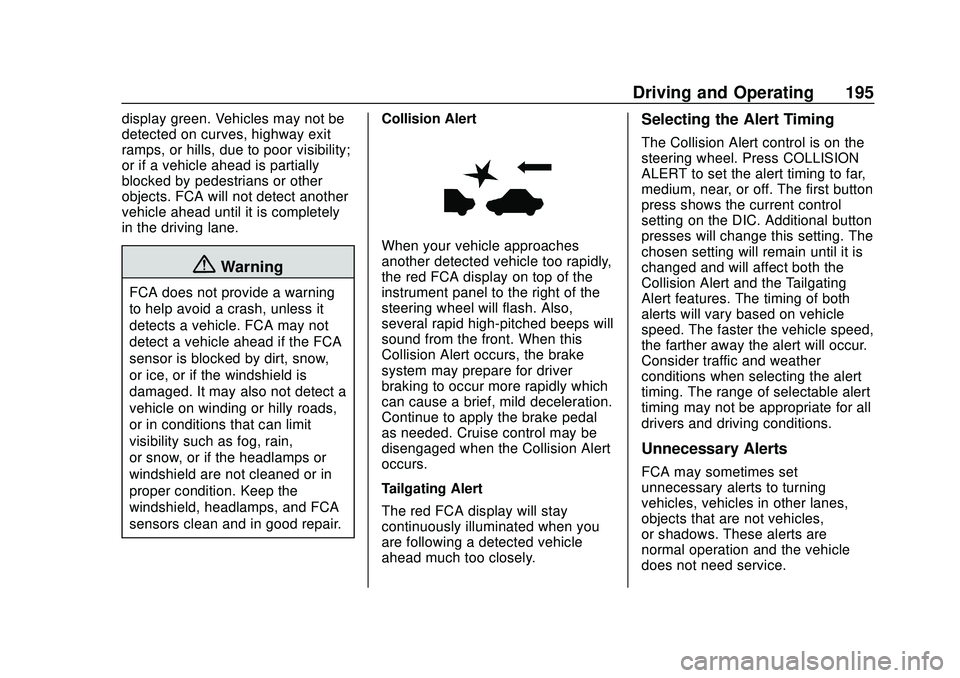
sensors clean and in good repair.Collision Alert
When your vehicle approaches
another detected vehicle too rapidly,
the red FCA display on top of the
instrument panel to the right of the
steering wheel will flash. Also,
several rapid high-pitched beeps will
sound from the front. When this
Collision Alert occurs, the brake
system may prepare for driver
braking to occur more rapidly which
can cause a brief, mild deceleration.
Continue to apply the brake pedal
as needed. Cruise control may be
disengaged when the Collision Alert
occurs.
Tailgating Alert
The red FCA display will stay
continuously illuminated when you
are following a detected vehicle
ahead much too closely.
Selecting the Alert Timing
The Collision Alert control is on the
steering wheel. Press COLLISION
ALERT to set the alert timing to far,
medium, near, or off. The first button
press shows the current control
setting on the DIC. Additional button
presses will change this setting. The
chosen setting will remain until it is
changed and will affect both the
Collision Alert and the Tailgating
Alert features. The timing of both
alerts will vary based on vehicle
speed. The faster the vehicle speed,
the farther away the alert will occur.
Consider traffic and weather
conditions when selecting the alert
timing. The range of selectable alert
timing may not be appropriate for all
drivers and driving conditions.
Unnecessary Alerts
FCA may sometimes set
unnecessary alerts to turning
vehicles, vehicles in other lanes,
objects that are not vehicles,
or shadows. These alerts are
normal operation and the vehicle
does not need service.
Page 197 of 329
Chevrolet Sonic Owner Manual (GMNA-Localizing-U.S./Canada-13566834) -
2020 - CRC - 10/4/19
196 Driving and Operating
Cleaning the System
If the FCA system does not seem to
operate properly, cleaning the
outside of the windshield in front of
the rearview mirror may correct the
issue.
Lane Departure
Warning (LDW)
If equipped, LDW may help avoid
crashes due to unintentional lane
departures. LDW uses a camera
sensor to detect the lane markings
at speeds of 56 km/h (35 mph) or
greater. It may provide an alert if the
vehicle is crossing a lane without
using a turn signal in that direction.
LDW light will not alert if the turn
signal is active in the direction of
lane departure, or if LDW detects
that you are accelerating, braking or
actively steering.
{Warning
The LDW system does not steer
the vehicle. The LDW system
may not:. Provide enough time to
avoid a crash.
. Detect lane markings under
poor weather or visibility
conditions. This can occur if
the windshield or
headlamps are blocked by
dirt, snow, or ice; if they are
not in proper condition; or if
the sun shines directly into
the camera.
. Detect road edges.
. Detect lanes on winding or
hilly roads.
If LDW only detects lane
markings on one side of the road,
it will only warn you when
departing the lane on the side
where it has detected a lane
marking. Always keep your (Continued)
Warning (Continued)
attention on the road and
maintain proper vehicle position
within the lane, or vehicle
damage, injury, or death could
occur. Always keep the
windshield, headlamps, and
camera sensors clean and in
good repair. Do not use LDW in
bad weather conditions.
How the System Works
LDW utilizes camera sensor
installed on the windshield ahead of
the rearview mirror to detect lane
markings.
To turn LDW on and off, press
@on
the instrument panel to the left of
the steering wheel. The control
indicator will light when LDW is on.
Page 203 of 329
Chevrolet Sonic Owner Manual (GMNA-Localizing-U.S./Canada-13566834) -
2020 - CRC - 10/4/19
202 Vehicle Care
Vehicle Care
General Information
General Information . . . . . . . . . . 203
California Proposition65 Warning . . . . . . . . . . . . . . . . . 203
California Perchlorate Materials Requirements . . . . . 204
Accessories and Modifications . . . . . . . . . . . . . . . . 204
Vehicle Checks
Doing Your OwnService Work . . . . . . . . . . . . . . . 204
Hood . . . . . . . . . . . . . . . . . . . . . . . . . 205
Engine Compartment Overview . . . . . . . . . . . . . . . . . . . . 207
Engine Oil . . . . . . . . . . . . . . . . . . . . 208
Engine Oil Life System . . . . . . . 210
Automatic Transmission Fluid . . . . . . . . . . . . . . . . . . . . . . . . 211
Engine Air Cleaner/Filter . . . . . . 212
Cooling System . . . . . . . . . . . . . . 213
Engine Overheating . . . . . . . . . . 216
Washer Fluid . . . . . . . . . . . . . . . . . 217
Brakes . . . . . . . . . . . . . . . . . . . . . . . 218
Brake Fluid . . . . . . . . . . . . . . . . . . . 219
Battery - North America . . . . . . 220
Starter Switch Check . . . . . . . . . 221 Automatic Transmission Shift
Lock Control Function
Check . . . . . . . . . . . . . . . . . . . . . . . 221
Ignition Transmission Lock Check . . . . . . . . . . . . . . . . . . . . . . . 221
Park Brake and P (Park) Mechanism Check . . . . . . . . . . 222
Wiper Blade Replacement . . . . 222
Windshield Replacement . . . . . 223
Gas Strut(s) . . . . . . . . . . . . . . . . . . 223
Headlamp Aiming
Front Headlamp Aiming . . . . . . 225
Bulb Replacement
Bulb Replacement . . . . . . . . . . . . 225
Halogen Bulbs . . . . . . . . . . . . . . . . 225
Headlamps and Front Turn Signal . . . . . . . . . . . . . . . . . . . . . . . 225
Taillamps, Turn Signal, Stoplamps, and Back-Up
Lamps . . . . . . . . . . . . . . . . . . . . . . 226
License Plate Lamp . . . . . . . . . . 227
Electrical System
Electrical System Overload . . . 228
Fuses and Circuit Breakers . . . 229
Engine Compartment Fuse Block . . . . . . . . . . . . . . . . . . . . . . . . 229
Instrument Panel Fuse Block . . . . . . . . . . . . . . . . . . . . . . . . 231
Wheels and Tires
Tires . . . . . . . . . . . . . . . . . . . . . . . . . . 233
All-Season Tires . . . . . . . . . . . . . . 234
Winter Tires . . . . . . . . . . . . . . . . . . 234
Summer Tires . . . . . . . . . . . . . . . . 235
Tire Sidewall Labeling . . . . . . . . 235
Tire Designations . . . . . . . . . . . . . 237
Tire Terminology andDefinitions . . . . . . . . . . . . . . . . . . 238
Tire Pressure . . . . . . . . . . . . . . . . . 240
Tire Pressure Monitor System . . . . . . . . . . . . . . . . . . . . . . 242
Tire Pressure Monitor Operation . . . . . . . . . . . . . . . . . . . 243
Tire Inspection . . . . . . . . . . . . . . . . 245
Tire Rotation . . . . . . . . . . . . . . . . . 246
When It Is Time for New Tires . . . . . . . . . . . . . . . . . . . . . . . . 247
Buying New Tires . . . . . . . . . . . . . 248
Different Size Tires and Wheels . . . . . . . . . . . . . . . . . . . . . . 249
Uniform Tire Quality Grading . . . . . . . . . . . . . . . . . . . . . 249
Wheel Alignment and Tire Balance . . . . . . . . . . . . . . . . . . . . . 251
Wheel Replacement . . . . . . . . . . 251
Tire Chains . . . . . . . . . . . . . . . . . . . 252
If a Tire Goes Flat . . . . . . . . . . . . 253
Tire Changing . . . . . . . . . . . . . . . . 254
Compact Spare Tire . . . . . . . . . . 259
Page 206 of 329
Chevrolet Sonic Owner Manual (GMNA-Localizing-U.S./Canada-13566834) -
2020 - CRC - 10/4/19
Vehicle Care 205
If equipped with remote vehicle
start, open the hood before
performing any service work to
prevent remote starting the vehicle
accidentally. SeeRemote Vehicle
Start 020.
Keep a record with all parts receipts
and list the mileage and the date of
any service work performed. See
Maintenance Records 0289.
Caution
Even small amounts of
contamination can cause damage
to vehicle systems. Do not allow
contaminants to contact the fluids,
reservoir caps, or dipsticks.
Hood
{Warning
Turn the vehicle off before
opening the hood. If the engine is
running with the hood open, you
or others could be injured.
{Warning
Components under the hood can
get hot from running the engine.
To help avoid the risk of burning
unprotected skin, never touch
these components until they have
cooled, and always use a glove or
towel to avoid direct skin contact.
Clear any snow from the hood
before opening.
To open the hood: 1. Pull the hood release lever with the
isymbol. It is on the
lower left side of the instrument
panel.
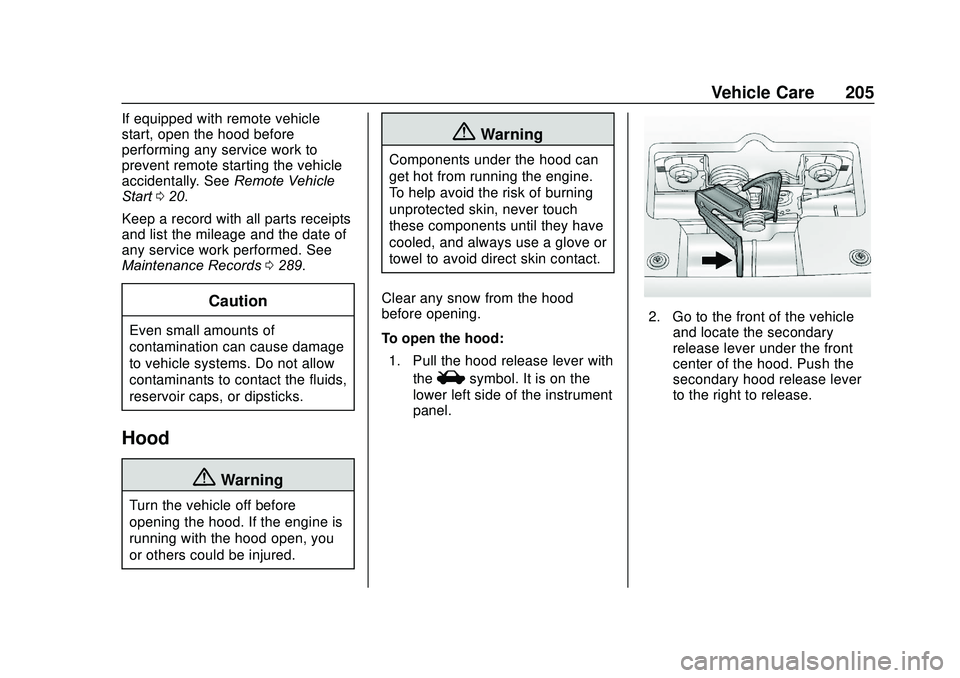
2. Go to the front of the vehicle and locate the secondary
release lever under the front
center of the hood. Push the
secondary hood release lever
to the right to release.
Page 232 of 329
Chevrolet Sonic Owner Manual (GMNA-Localizing-U.S./Canada-13566834) -
2020 - CRC - 10/4/19
Vehicle Care 231
J-CaseFuses Usage
6 Cooling fan K4
7 Cooling fan K5
9 Electric vacuum pump
10 Start
Relays Usage RLY 1 Front wiper control
RLY 2 Rear fog lamp
RLY 3 Front wiper speed
RLY 4 Rear window defogger
RLY 5 Run/Crank
RLY 9 Cooling fan K2
RLY 10 Cooling fan K3 RLY 11 P/T
RLY 12 Start
RLY 13 Air conditioning clutch
RLY 14 High-beam headlamps Relays Usage
RLY 15 Cooling fan K1
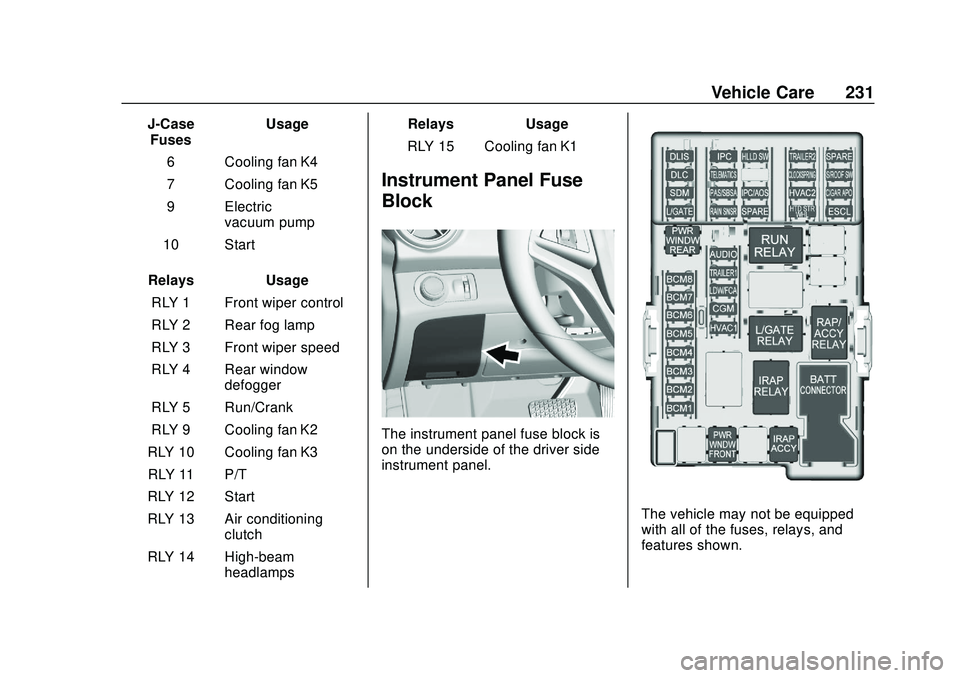
Instrument Panel Fuse
Block
The instrument panel fuse block is
on the underside of the driver side
instrument panel.
The vehicle may not be equipped
with all of the fuses, relays, and
features shown.
Page 233 of 329
Chevrolet Sonic Owner Manual (GMNA-Localizing-U.S./Canada-13566834) -
2020 - CRC - 10/4/19
232 Vehicle Care
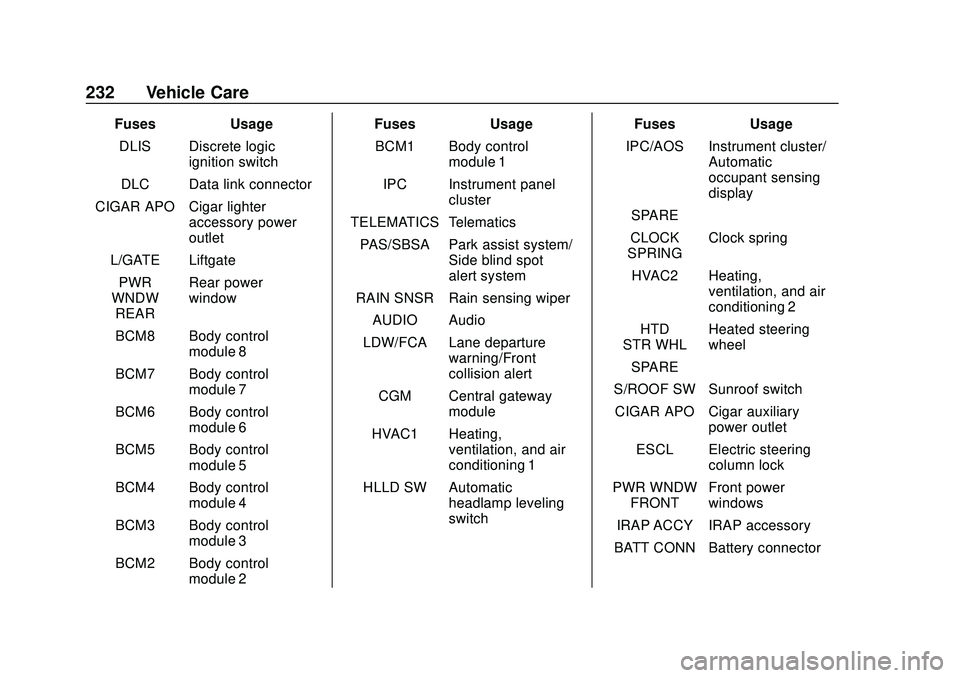
FusesUsage
DLIS Discrete logic ignition switch
DLC Data link connector
CIGAR APO Cigar lighter accessory power
outlet
L/GATE Liftgate PWR
WNDW REAR Rear power
window
BCM8 Body control module 8
BCM7 Body control module 7
BCM6 Body control module 6
BCM5 Body control module 5
BCM4 Body control module 4
BCM3 Body control module 3
BCM2 Body control module 2 Fuses
Usage
BCM1 Body control module 1
IPC Instrument panel cluster
TELEMATICS Telematics PAS/SBSA Park assist system/ Side blind spot
alert system
RAIN SNSR Rain sensing wiper AUDIO Audio
LDW/FCA Lane departure warning/Front
collision alert
CGM Central gateway module
HVAC1 Heating, ventilation, and air
conditioning 1
HLLD SW Automatic headlamp leveling
switch Fuses
Usage
IPC/AOS Instrument cluster/ Automatic
occupant sensing
display
SPARE –
CLOCK
SPRING Clock spring
HVAC2 Heating, ventilation, and air
conditioning 2
HTD
STR WHL Heated steering
wheel
SPARE –
S/ROOF SW Sunroof switch CIGAR APO Cigar auxiliary power outlet
ESCL Electric steering column lock
PWR WNDW FRONT Front power
windows
IRAP ACCY IRAP accessory
BATT CONN Battery connector