wheel CHEVROLET SS 2015 Repair Manual
[x] Cancel search | Manufacturer: CHEVROLET, Model Year: 2015, Model line: SS, Model: CHEVROLET SS 2015Pages: 435, PDF Size: 6.27 MB
Page 267 of 435
Black plate (30,1)Chevrolet SS Sedan Owner Manual (GMNA-Localizing-U.S.-7707491) - 2015 -
crc - 9/11/14
9-30 Driving and Operating
The system has a red parking brake
status light and an amber parking
brake warning light. SeeElectric
Parking Brake Light on page 5-15
and Service Electric Parking Brake
Light on page 5-15. There are also
parking brake-related Driver
Information Center (DIC) messages.
See Brake System Messages on
page 5-26. In case of insufficient
electrical power, the EPB cannot be
applied or released.
Before leaving the vehicle, check
the red parking brake status light to
ensure that the parking brake is
applied.
EPB Apply
To apply the EPB:
1. Be sure the vehicle is at a complete stop.
2. Lift up the EPB switch momentarily.
The red parking brake status light
will flash and then stay on once the
EPB is fully applied. If the red
parking brake status light flashes continuously, then the EPB is only
partially applied or there is a
problem with the EPB. A DIC
message will display. Release the
EPB and try to apply it again. If the
light does not come on, or keeps
flashing, have the vehicle serviced.
Do not drive the vehicle if the red
parking brake status light is flashing.
See your dealer. See
Electric
Parking Brake Light on page 5-15.
If the amber parking brake warning
light is on, lift up on the EPB switch
and hold it up. Continue to hold the
switch until the red parking brake
status light remains on. If the amber
parking brake warning light remains
on, see your dealer.
If the EPB is applied while the
vehicle is moving, the vehicle will
decelerate as long as the switch is
held up. If the switch is held up until
the vehicle comes to a stop, the
EPB will remain applied.
If the EPB fails to apply, the rear
wheels should be blocked to
prevent vehicle movement.
EPB Release
To release the EPB:
1. Place the ignition in the ACC/ ACCESSORY or ON/RUN
position.
2. Apply and hold the brake pedal.
3. Push down momentarily on the EPB switch.
The EPB is released when the red
parking brake status light is off.
If the amber parking brake warning
light is on, release the EPB by
pushing down on the EPB switch
and holding it down. Continue to
hold the switch until the red parking
brake status light is off. If either light
stays on after release is attempted,
see your dealer.
{Caution
Driving with the parking brake on
can overheat the brake system
and cause premature wear or (Continued)
ProCarManuals.com
Page 269 of 435
Black plate (32,1)Chevrolet SS Sedan Owner Manual (GMNA-Localizing-U.S.-7707491) - 2015 -
crc - 9/11/14
9-32 Driving and Operating
HSA will not activate if the vehicle is
in a forward gear position and facing
downhill, or if the vehicle is facing
uphill and the gear position is in
R (Reverse). When backing down a
hill, select R (Reverse) to
disable HSA.Ride Control Systems
Traction Control/
Electronic Stability
Control
System Operation
The vehicle has a Traction Control
System (TCS) and StabiliTrak®, an
electronic stability control system.
These systems help limit wheel slip
and assist the driver in maintaining
control, especially on slippery road
conditions.
TCS activates if it senses that any
of the drive wheels are spinning or
beginning to lose traction. When this
happens, TCS applies the brakes to
the spinning wheels and reduces
engine power to limit wheel spin.
StabiliTrak activates when the
vehicle senses a difference between
the intended path and the direction
the vehicle is actually traveling.
StabiliTrak selectively applies
braking pressure to any one of the vehicle wheel brakes to assist the
driver in keeping the vehicle on the
intended path.
If cruise control is being used and
traction control or StabiliTrak begins
to limit wheel spin, cruise control will
disengage. Cruise control may be
turned back on when road
conditions allow.
Both systems come on
automatically when the vehicle is
started and begins to move. The
systems may be heard or felt while
they are operating or while
performing diagnostic checks. This
is normal and does not mean there
is a problem with the vehicle.
It is recommended to leave both
systems on for normal driving
conditions, but it may be necessary
to turn TCS off if the vehicle gets
stuck in sand, mud, ice, or snow.
See
If the Vehicle Is Stuck on
page 9-11 and“Turning the Systems
Off and On” later in this section.
ProCarManuals.com
Page 270 of 435
Black plate (33,1)Chevrolet SS Sedan Owner Manual (GMNA-Localizing-U.S.-7707491) - 2015 -
crc - 9/11/14
Driving and Operating 9-33
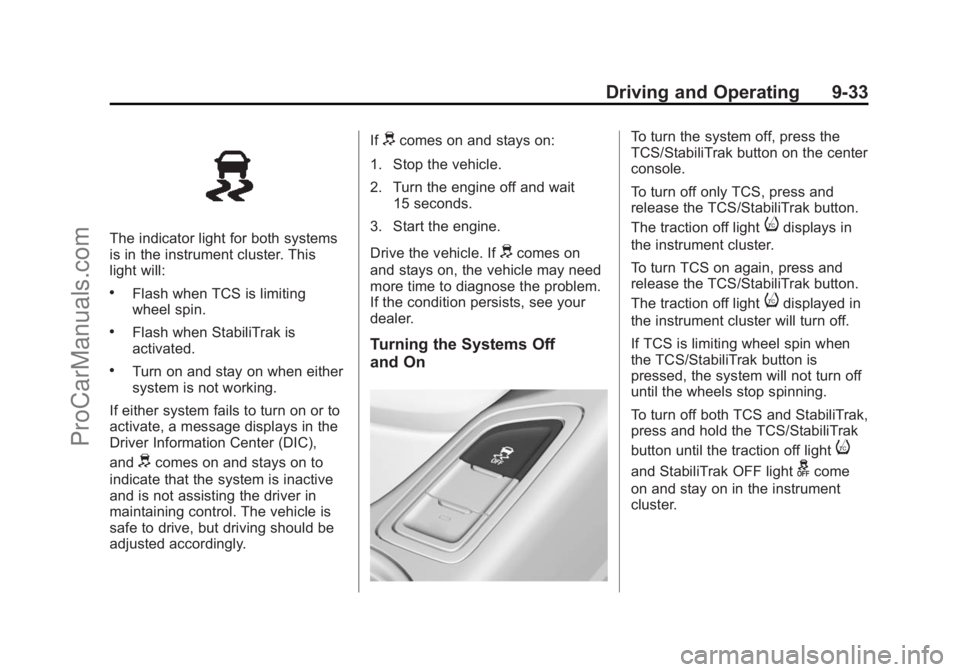
The indicator light for both systems
is in the instrument cluster. This
light will:
.Flash when TCS is limiting
wheel spin.
.Flash when StabiliTrak is
activated.
.Turn on and stay on when either
system is not working.
If either system fails to turn on or to
activate, a message displays in the
Driver Information Center (DIC),
and
dcomes on and stays on to
indicate that the system is inactive
and is not assisting the driver in
maintaining control. The vehicle is
safe to drive, but driving should be
adjusted accordingly. If
dcomes on and stays on:
1. Stop the vehicle.
2. Turn the engine off and wait 15 seconds.
3. Start the engine.
Drive the vehicle. If
dcomes on
and stays on, the vehicle may need
more time to diagnose the problem.
If the condition persists, see your
dealer.
Turning the Systems Off
and On
To turn the system off, press the
TCS/StabiliTrak button on the center
console.
To turn off only TCS, press and
release the TCS/StabiliTrak button.
The traction off light
idisplays in
the instrument cluster.
To turn TCS on again, press and
release the TCS/StabiliTrak button.
The traction off light
idisplayed in
the instrument cluster will turn off.
If TCS is limiting wheel spin when
the TCS/StabiliTrak button is
pressed, the system will not turn off
until the wheels stop spinning.
To turn off both TCS and StabiliTrak,
press and hold the TCS/StabiliTrak
button until the traction off light
i
and StabiliTrak OFF lightgcome
on and stay on in the instrument
cluster.
ProCarManuals.com
Page 272 of 435
Black plate (35,1)Chevrolet SS Sedan Owner Manual (GMNA-Localizing-U.S.-7707491) - 2015 -
crc - 9/11/14
Driving and Operating 9-35
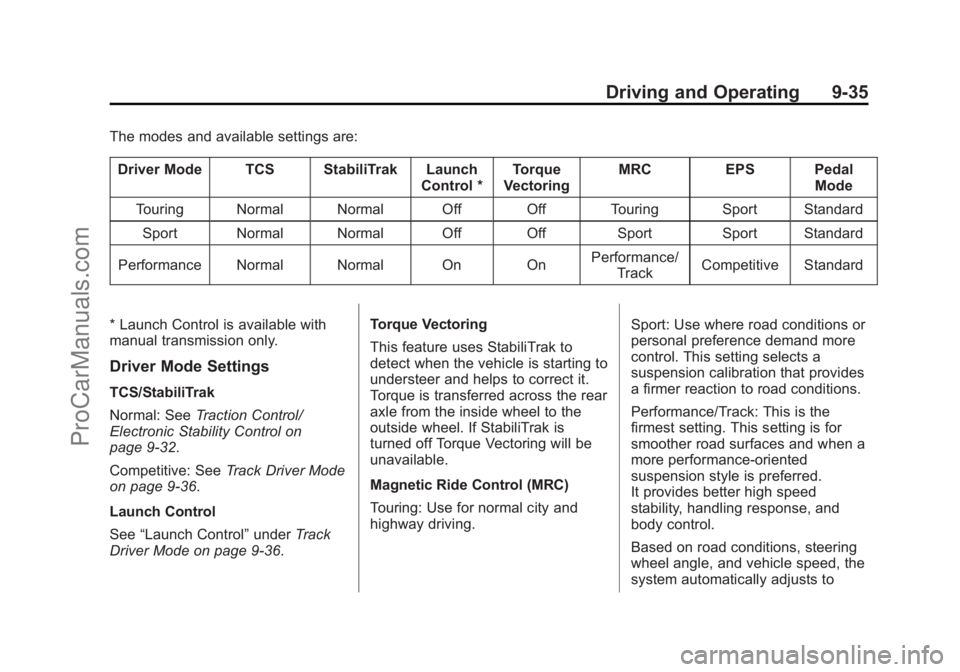
The modes and available settings are:Driver Mode TCS StabiliTrak Launch Control *Torque
Vectoring MRC
EPS Pedal
Mode
Touring Normal Normal Off Off Touring Sport Standard Sport Normal Normal Off Off Sport Sport Standard
Performance Normal Normal On On Performance/
Track Competitive Standard
* Launch Control is available with
manual transmission only.
Driver Mode Settings
TCS/StabiliTrak
Normal: See Traction Control/
Electronic Stability Control on
page 9-32.
Competitive: See Track Driver Mode
on page 9-36.
Launch Control
See “Launch Control” underTrack
Driver Mode on page 9-36. Torque Vectoring
This feature uses StabiliTrak to
detect when the vehicle is starting to
understeer and helps to correct it.
Torque is transferred across the rear
axle from the inside wheel to the
outside wheel. If StabiliTrak is
turned off Torque Vectoring will be
unavailable.
Magnetic Ride Control (MRC)
Touring: Use for normal city and
highway driving.
Sport: Use where road conditions or
personal preference demand more
control. This setting selects a
suspension calibration that provides
a firmer reaction to road conditions.
Performance/Track: This is the
firmest setting. This setting is for
smoother road surfaces and when a
more performance-oriented
suspension style is preferred.
It provides better high speed
stability, handling response, and
body control.
Based on road conditions, steering
wheel angle, and vehicle speed, the
system automatically adjusts to
ProCarManuals.com
Page 273 of 435
Black plate (36,1)Chevrolet SS Sedan Owner Manual (GMNA-Localizing-U.S.-7707491) - 2015 -
crc - 9/11/14
9-36 Driving and Operating
provide the best handling while
providing a smooth ride. The
Touring and Sport modes will feel
similar on a smooth road. These
settings can be changed when
driving conditions change.
If a malfunction occurs with the
MRC system, the appropriate
message will display in the DIC.
SeeRide Control System Messages
on page 5-30.
Electric Power Steering (EPS)
Sport: Adjusted for use with MRC
Touring and Sport Mode.
Competitive: For spirited and track
driving.
Pedal Mode
Standard: Default accelerator pedal
response.
Track: See Track Driver Mode on
page 9-36.Track Driver Mode
Track Driver Mode and Launch
Control are systems designed to
allow increased performance while
accelerating and/or cornering. This
is accomplished by regulating and
optimizing the engine, brakes, and
suspension performance. These
modes are for use at a closed
course race track and are not
intended for use on public roads.
These systems will not compensate
for driver inexperience or lack of
familiarity with the race track.
{Warning
Track Driver Mode and Launch
Control change the way
StabiliTrak and TCS perform and
should not be used on public
roads. These modes should only
be used on closed courses by
experienced drivers.
{Caution
Attempting to shift when the drive
wheels are spinning and do not
have traction may cause damage
to the transmission. Damage
caused by misuse of the vehicle
is not covered by the vehicle
warranty. Do not attempt to shift
when the drive wheels do not
have traction.
Racing will result in the premature
wear of brakes, tires, and driveline
components. Inspect and replace
components as necessary.
ProCarManuals.com
Page 274 of 435
Black plate (37,1)Chevrolet SS Sedan Owner Manual (GMNA-Localizing-U.S.-7707491) - 2015 -
crc - 9/11/14
Driving and Operating 9-37
The modes and available settings are:Driver Mode TCS StabiliTrak Launch Control *Torque
Vectoring MRC
EPS Pedal
Mode
Track Competitive Competitive On On Performance/
Track Competitive Track
In Track Driver Mode, TCS and
StabiliTrak are adjusted and Launch
Control is available. Adjust your
driving style to account for the more
available performance. See “Launch
Control” later in this section.
Track Driver Mode will return to the
previous setting, Touring, Sport or
Performance, when the vehicle is
restarted.
Press the StabiliTrak OFF button
twice quickly to set Track Driver
Mode. Messages display in the
Driver Information Center (DIC).
See Ride Control System Messages
on page 5-30. Also, the StabiliTrak
OFF light stays on when the vehicle
is in Track Driver Mode. To return the vehicle to normal TCS
and StabiliTrak operation, press the
StabiliTrak OFF button. Track Driver
Mode will return to the previous
setting.
Pedal Mode
In Track Driver Mode or with TCS
off, the accelerator pedal response
is changed to allow for smoother
throttle control on a track.
Launch Control (Manual
Transmissions Only)
This feature is available in Track
Driver Mode, and allows the vehicle
to reach high levels of acceleration
in a straight line. Launch Control
adjusts tire slip during standing start
launches. Use this feature duringclosed course race events where
consistent zero to sixty and quarter
mile times are desirable.
Launch Control is only
available when:
.Track Driver Mode is selected.
.The vehicle is not moving.
.The steering wheel is pointing
straight.
.The clutch pedal is pressed and
the vehicle is in 1 (First) gear.
.The accelerator pedal is rapidly
applied to wide open throttle.
This feature initially limits engine
speed as the accelerator pedal is
rapidly pressed to wide open
throttle. A smooth, quick release of
ProCarManuals.com
Page 275 of 435
Black plate (38,1)Chevrolet SS Sedan Owner Manual (GMNA-Localizing-U.S.-7707491) - 2015 -
crc - 9/11/14
9-38 Driving and Operating
the clutch pedal, while maintaining
the fully pressed accelerator pedal,
will manage wheel slip. SeeManual
Transmission on page 9-27.
After the vehicle is launched, the
system continues in Track
Driver Mode.
Limited-Slip Rear Axle
Vehicles with a limited-slip rear axle
can give more traction on snow,
mud, ice, sand, or gravel. When
traction is low, this feature allows
the drive wheel with the most
traction to move the vehicle. The
limited-slip rear axle also gives the
driver enhanced control when
cornering hard or completing a
maneuver, such as a lane change.
For vehicles with limited slip
differential, driven under severe
conditions, the rear axle fluid should
be changed. See Track Driver Mode
on page 9-36 andMaintenance
Schedule on page 11-2.
Cruise Control
With cruise control, the vehicle can
maintain a speed of about 40 km/h
(25 mph) or more without keeping
your foot on the accelerator. Cruise
control does not work at speeds
below 40 km/h (25 mph).
{Warning
Cruise control can be dangerous
where you cannot drive safely at
a steady speed. Do not use
cruise control on winding roads or
in heavy traffic.
Cruise control can be dangerous
on slippery roads. On such roads,
fast changes in tire traction can
cause excessive wheel slip, and
you could lose control. Do not use
cruise control on slippery roads.
If the vehicle has the StabiliTrak
®
system and begins to limit wheel
spin while using cruise control, the
cruise control will automatically disengage. See
Traction Control/
Electronic Stability Control on
page 9-32. If a collision alert occurs
when cruise control is activated,
cruise control is disengaged. See
Forward Collision Alert (FCA)
System on page 9-46. When road
conditions allow you to safely use it
again, the cruise control can be
turned back on.
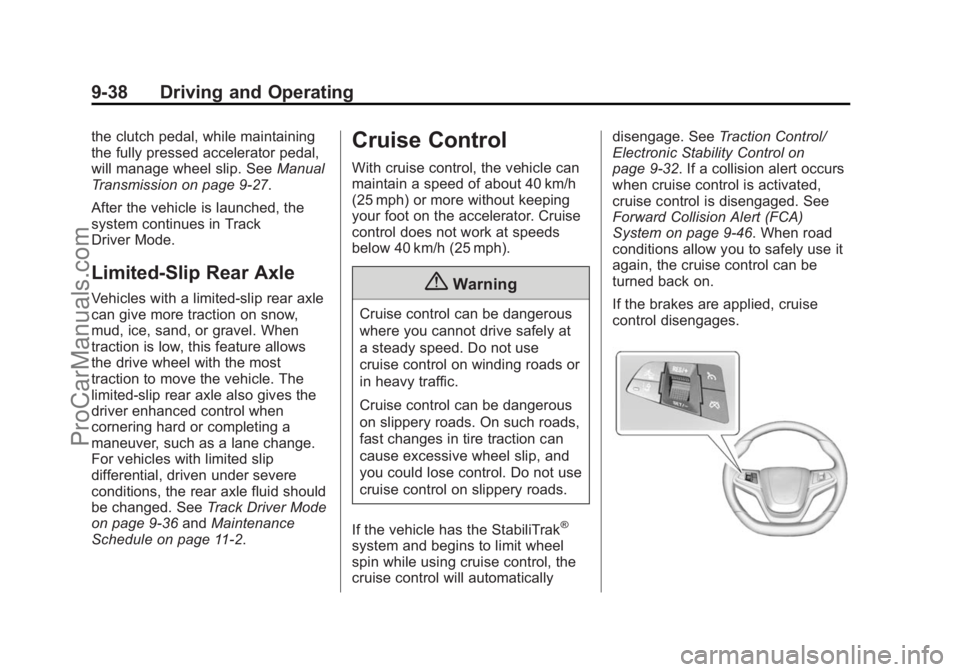
If the brakes are applied, cruise
control disengages.
ProCarManuals.com
Page 276 of 435
Black plate (39,1)Chevrolet SS Sedan Owner Manual (GMNA-Localizing-U.S.-7707491) - 2015 -
crc - 9/11/14
Driving and Operating 9-39
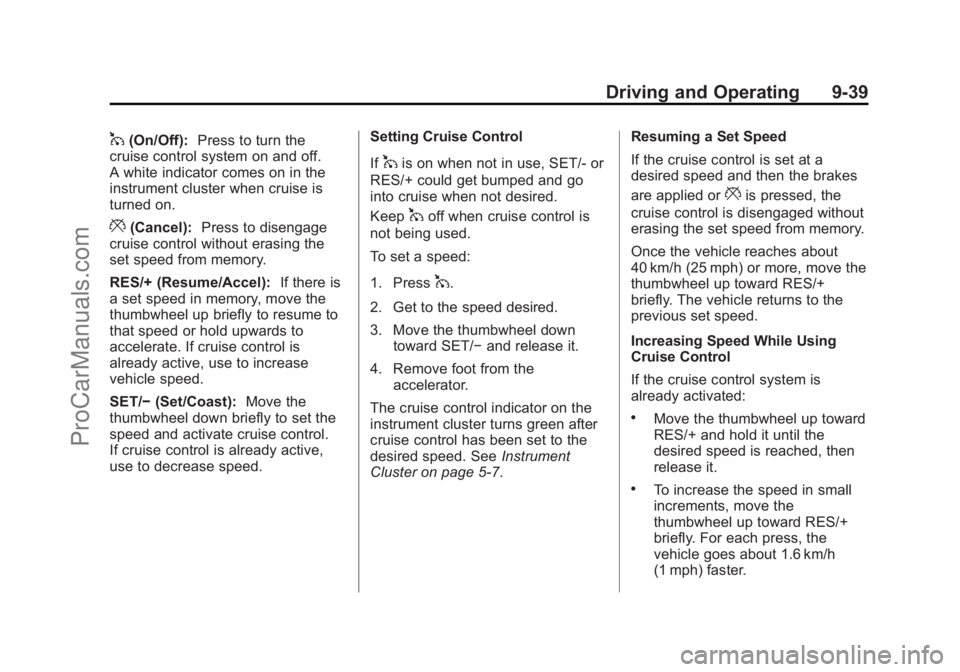
1(On/Off):Press to turn the
cruise control system on and off.
A white indicator comes on in the
instrument cluster when cruise is
turned on.
*(Cancel): Press to disengage
cruise control without erasing the
set speed from memory.
RES/+ (Resume/Accel): If there is
a set speed in memory, move the
thumbwheel up briefly to resume to
that speed or hold upwards to
accelerate. If cruise control is
already active, use to increase
vehicle speed.
SET/− (Set/Coast): Move the
thumbwheel down briefly to set the
speed and activate cruise control.
If cruise control is already active,
use to decrease speed. Setting Cruise Control
If
1is on when not in use, SET/- or
RES/+ could get bumped and go
into cruise when not desired.
Keep
1off when cruise control is
not being used.
To set a speed:
1. Press
1.
2. Get to the speed desired.
3. Move the thumbwheel down toward SET/− and release it.
4. Remove foot from the accelerator.
The cruise control indicator on the
instrument cluster turns green after
cruise control has been set to the
desired speed. See Instrument
Cluster on page 5-7. Resuming a Set Speed
If the cruise control is set at a
desired speed and then the brakes
are applied or
*is pressed, the
cruise control is disengaged without
erasing the set speed from memory.
Once the vehicle reaches about
40 km/h (25 mph) or more, move the
thumbwheel up toward RES/+
briefly. The vehicle returns to the
previous set speed.
Increasing Speed While Using
Cruise Control
If the cruise control system is
already activated:
.Move the thumbwheel up toward
RES/+ and hold it until the
desired speed is reached, then
release it.
.To increase the speed in small
increments, move the
thumbwheel up toward RES/+
briefly. For each press, the
vehicle goes about 1.6 km/h
(1 mph) faster.
ProCarManuals.com
Page 277 of 435
Black plate (40,1)Chevrolet SS Sedan Owner Manual (GMNA-Localizing-U.S.-7707491) - 2015 -
crc - 9/11/14
9-40 Driving and Operating
The speedometer reading can be
displayed in either English or metric
units. SeeDriver Information Center
(DIC) on page 5-20. The increment
value used depends on the units
displayed.
Reducing Speed While Using
Cruise Control
If the cruise control system is
already activated:
.Move the thumbwheel toward
SET/− and hold until the desired
lower speed is reached, then
release it.
.To decrease the vehicle speed in
small increments, move the
thumbwheel toward SET/−
briefly. For each press, the
vehicle goes about 1.6 km/h
(1 mph) slower.
The speedometer reading can be
displayed in either English or metric
units. See Driver Information Center
(DIC) on page 5-20. The increment
value used depends on the units
displayed. Passing Another Vehicle While
Using Cruise Control
Use the accelerator pedal to
increase the vehicle speed. When
you take your foot off the pedal, the
vehicle slows down to the previously
set cruise control speed. While
pressing the accelerator pedal or
shortly following the release to
override cruise control, briefly
moving the thumbwheel toward
SET/–
will result in cruise control set
to the current vehicle speed.
Using Cruise Control on Hills
How well the cruise control works
on hills depends upon the vehicle
speed, load, and the steepness of
the hills. When going up steep hills,
you might have to step on the
accelerator pedal to maintain the
vehicle speed. When going
downhill, you might have to brake or
shift to a lower gear to keep your
speed down. If the brake pedal is
applied, cruise control will
disengage. Ending Cruise Control
There are four ways to disengage
cruise control:
.Step lightly on the brake pedal
or clutch for a manual
transmission.
.Press*.
.Shift the transmission to
N (Neutral).
.To turn off the cruise control,
press
1.
Erasing Speed Memory
The cruise control set speed is
erased from memory if
1is pressed
or if the vehicle is turned off.
ProCarManuals.com
Page 282 of 435
Black plate (45,1)Chevrolet SS Sedan Owner Manual (GMNA-Localizing-U.S.-7707491) - 2015 -
crc - 9/11/14
Driving and Operating 9-45
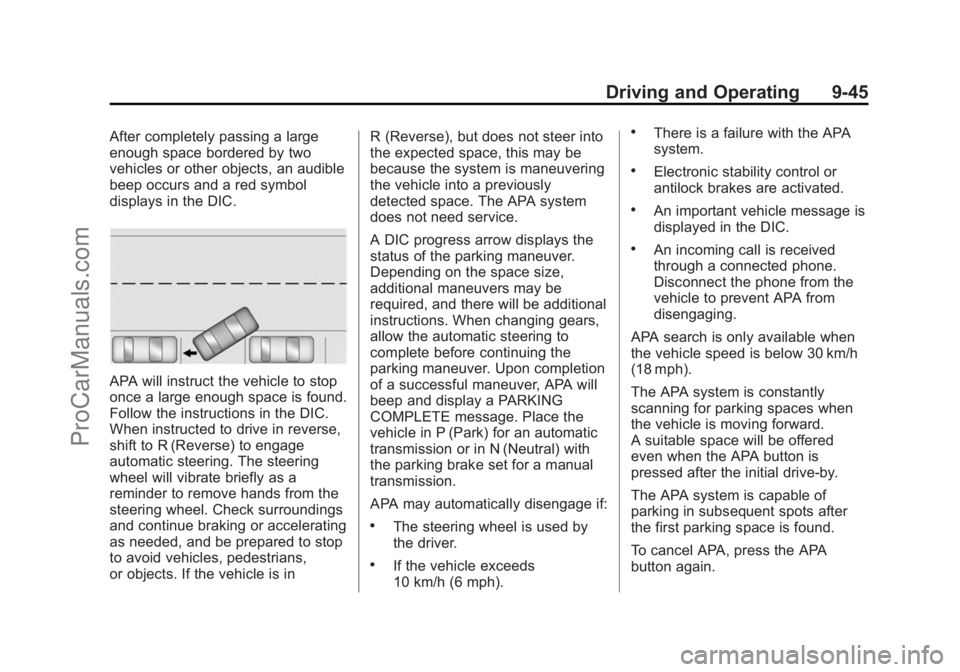
After completely passing a large
enough space bordered by two
vehicles or other objects, an audible
beep occurs and a red symbol
displays in the DIC.
APA will instruct the vehicle to stop
once a large enough space is found.
Follow the instructions in the DIC.
When instructed to drive in reverse,
shift to R (Reverse) to engage
automatic steering. The steering
wheel will vibrate briefly as a
reminder to remove hands from the
steering wheel. Check surroundings
and continue braking or accelerating
as needed, and be prepared to stop
to avoid vehicles, pedestrians,
or objects. If the vehicle is inR (Reverse), but does not steer into
the expected space, this may be
because the system is maneuvering
the vehicle into a previously
detected space. The APA system
does not need service.
A DIC progress arrow displays the
status of the parking maneuver.
Depending on the space size,
additional maneuvers may be
required, and there will be additional
instructions. When changing gears,
allow the automatic steering to
complete before continuing the
parking maneuver. Upon completion
of a successful maneuver, APA will
beep and display a PARKING
COMPLETE message. Place the
vehicle in P (Park) for an automatic
transmission or in N (Neutral) with
the parking brake set for a manual
transmission.
APA may automatically disengage if:
.The steering wheel is used by
the driver.
.If the vehicle exceeds
10 km/h (6 mph).
.There is a failure with the APA
system.
.Electronic stability control or
antilock brakes are activated.
.An important vehicle message is
displayed in the DIC.
.An incoming call is received
through a connected phone.
Disconnect the phone from the
vehicle to prevent APA from
disengaging.
APA search is only available when
the vehicle speed is below 30 km/h
(18 mph).
The APA system is constantly
scanning for parking spaces when
the vehicle is moving forward.
A suitable space will be offered
even when the APA button is
pressed after the initial drive-by.
The APA system is capable of
parking in subsequent spots after
the first parking space is found.
To cancel APA, press the APA
button again.
ProCarManuals.com