steering CHEVROLET SS 2016 Workshop Manual
[x] Cancel search | Manufacturer: CHEVROLET, Model Year: 2016, Model line: SS, Model: CHEVROLET SS 2016Pages: 397, PDF Size: 7.17 MB
Page 223 of 397
Chevrolet SS Sedan Owner Manual (GMNA-Localizing-U.S.-9234782) - 2016 -
CRC - 8/24/15
222 Driving and Operating
Winter Driving
Driving on Snow or Ice
Snow or ice between the tires and
the road creates less traction or
grip, so drive carefully. Wet ice can
occur at about 0 °C (32 °F) when
freezing rain begins to fall. Avoid
driving on wet ice or in freezing rain
until roads can be treated.
For Slippery Road Driving:
.Accelerate gently. Accelerating
too quickly causes the wheels to
spin and makes the surface
under the tires slick.
. Turn on Traction Control. See
Traction Control/Electronic
Stability Control 0242
ii.
. The Antilock Brake System
(ABS) improves vehicle stability
during hard stops, but the
brakes should be applied sooner
than when on dry pavement.
See Antilock Brake System
(ABS) 0239
ii.
. Allow greater following distance
and watch for slippery spots. Icy
patches can occur on otherwise clear roads in shaded areas.
The surface of a curve or an
overpass can remain icy when
the surrounding roads are clear.
Avoid sudden steering
maneuvers and braking while
on ice.
. Turn off cruise control.
Blizzard Conditions
Stop the vehicle in a safe place and
signal for help. Stay with the vehicle
unless there is help nearby.
If possible, use Roadside
Assistance. See Roadside
Assistance Program 0365
ii. To get
help and keep everyone in the
vehicle safe:
. Turn on the hazard warning
flashers.
. Tie a red cloth to an outside
mirror.
{Warning
Snow can trap engine exhaust
under the vehicle. This may
cause exhaust gases to get
inside. Engine exhaust contains
carbon monoxide (CO), which
cannot be seen or smelled. It can
cause unconsciousness and even
death.
If the vehicle is stuck in snow:
. Clear snow from the base of
the vehicle, especially any
blocking the exhaust pipe.
. Open a window about 5 cm
(2 in) on the vehicle side
that is away from the wind,
to bring in fresh air.
. Fully open the air outlets on
or under the instrument
panel.
. Adjust the climate control
system to circulate the air
inside the vehicle and set
(Continued)
ProCarManuals.com
Page 224 of 397
Chevrolet SS Sedan Owner Manual (GMNA-Localizing-U.S.-9234782) - 2016 -
CRC - 8/24/15
Driving and Operating 223
Warning (Continued)
the fan speed to the highest
setting. See“Climate
Control Systems.”
For more information about CO,
see Engine Exhaust 0233
ii.
To save fuel, run the engine for
short periods to warm the vehicle
and then shut the engine off and
partially close the window. Moving
about to keep warm also helps.
If it takes time for help to arrive,
when running the engine, push the
accelerator pedal slightly so the
engine runs faster than the idle
speed. This keeps the battery
charged to restart the vehicle and to
signal for help with the headlamps.
Do this as little as possible, to
save fuel.
If the Vehicle Is Stuck
Slowly and cautiously spin the
wheels to free the vehicle when
stuck in sand, mud, ice, or snow. If stuck too severely for the traction
system to free the vehicle, turn the
traction system off and use the
rocking method. See
Traction
Control/Electronic Stability Control
0 242
ii.
{Warning
If the vehicle's tires spin at high
speed, they can explode, and you
or others could be injured. The
vehicle can overheat, causing an
engine compartment fire or other
damage. Spin the wheels as little
as possible and avoid going
above 56 km/h (35 mph).
Rocking the Vehicle to Get
it Out
Turn the steering wheel left and
right to clear the area around the
front wheels. Turn off any traction
system. Shift back and forth
between R (Reverse) and a low
forward gear, spinning the wheels
as little as possible. To prevent
transmission wear, wait until the
wheels stop spinning before shifting gears. Release the accelerator
pedal while shifting, and press
lightly on the accelerator pedal
when the transmission is in gear.
Slowly spinning the wheels in the
forward and reverse directions
causes a rocking motion that could
free the vehicle. If that does not get
the vehicle out after a few tries, it
might need to be towed out. If the
vehicle does need to be towed out,
see
Towing the Vehicle 0334
ii.
Vehicle Load Limits
It is very important to know how
much weight the vehicle can
carry. This weight is called the
vehicle capacity weight and
includes the weight of all
occupants, cargo, and all
nonfactory-installed options.
Two labels on the vehicle may
show how much weight it may
properly carry: the Tire and
Loading Information label and
the Certification label.
ProCarManuals.com
Page 229 of 397
Chevrolet SS Sedan Owner Manual (GMNA-Localizing-U.S.-9234782) - 2016 -
CRC - 8/24/15
228 Driving and Operating
working, the vehicle may be near a
strong radio antenna signal causing
interference to the Keyless Access
system. SeeRemote Keyless Entry
(RKE) System Operation 024
ii.
To shift out of P (Park), the vehicle
must be in ACC/ACCESSORY or
ON/RUN and the brake pedal must
be applied.
Stopping the Engine/OFF (No
Indicator Lights) : When the
vehicle is stopped, press the
ENGINE START/STOP button once
to turn the engine off.
If the vehicle is in P (Park), the
ignition will turn off, and Retained
Accessory Power (RAP) will remain
active. See Retained Accessory
Power (RAP) 0230
ii.
Automatic Transmission
If the vehicle is not in P (Park), the
ignition will return to ACC/
ACCESSORY and display a
message in the Driver Information
Center (DIC). See Transmission
Messages 0116
ii. When the vehicle
is shifted into P (Park), the ignition
system will switch to OFF. Manual Transmission
If the vehicle is stationary, the
ignition will turn OFF, and Retained
Accessory Power (RAP) will remain
active. See
Retained Accessory
Power (RAP) 0230
ii.
Do not turn the engine off when the
vehicle is moving. This will cause a
loss of power assist in the brake
and steering systems and disable
the airbags.
If the vehicle must be shut off in an
emergency: 1. Brake using a firm and steady pressure. Do not pump the
brakes repeatedly. This may
deplete power assist, requiring
increased brake pedal force.
2. Shift the vehicle to N (Neutral). This can be done while the
vehicle is moving. After shifting
to N (Neutral), firmly apply the
brakes and steer the vehicle to
a safe location. 3. Come to a complete stop. Shift
to P (Park) with an automatic
transmission, or Neutral with a
manual transmission. Turn the
ignition to OFF.
4. Set the parking brake. See Electric Parking Brake 0240ii.
{Warning
Turning off the vehicle while
moving may cause loss of power
assist in the brake and steering
systems and disable the airbags.
While driving, only shut the
vehicle off in an emergency.
If the vehicle cannot be pulled over,
and must be shut off while driving,
press and hold the ENGINE START/
STOP button for longer than
two seconds, or press twice in
five seconds.
ACC/ACCESSORY (Amber
Indicator Light) : This mode allows
you to use some electrical
accessories when the engine is off.
ProCarManuals.com
Page 238 of 397
Chevrolet SS Sedan Owner Manual (GMNA-Localizing-U.S.-9234782) - 2016 -
CRC - 8/24/15
Driving and Operating 237
On the bottom of the display, M and
the currently selected gear appear
as long as A/S mode is selected.
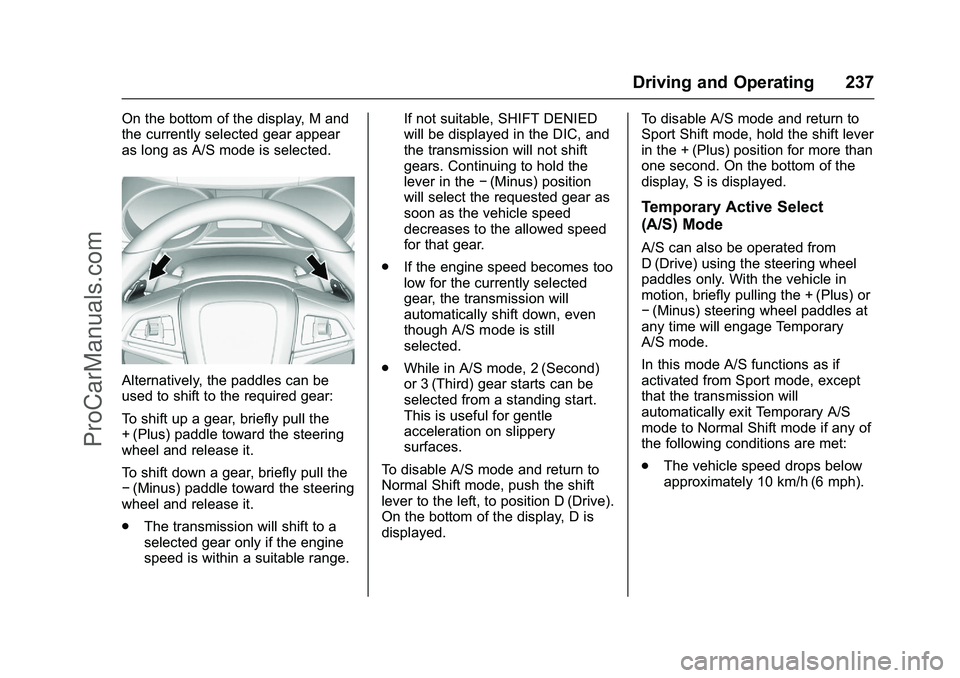
Alternatively, the paddles can be
used to shift to the required gear:
To shift up a gear, briefly pull the
+ (Plus) paddle toward the steering
wheel and release it.
To shift down a gear, briefly pull the
−(Minus) paddle toward the steering
wheel and release it.
. The transmission will shift to a
selected gear only if the engine
speed is within a suitable range. If not suitable, SHIFT DENIED
will be displayed in the DIC, and
the transmission will not shift
gears. Continuing to hold the
lever in the
−(Minus) position
will select the requested gear as
soon as the vehicle speed
decreases to the allowed speed
for that gear.
. If the engine speed becomes too
low for the currently selected
gear, the transmission will
automatically shift down, even
though A/S mode is still
selected.
. While in A/S mode, 2 (Second)
or 3 (Third) gear starts can be
selected from a standing start.
This is useful for gentle
acceleration on slippery
surfaces.
To disable A/S mode and return to
Normal Shift mode, push the shift
lever to the left, to position D (Drive).
On the bottom of the display, D is
displayed. To disable A/S mode and return to
Sport Shift mode, hold the shift lever
in the + (Plus) position for more than
one second. On the bottom of the
display, S is displayed.
Temporary Active Select
(A/S) Mode
A/S can also be operated from
D (Drive) using the steering wheel
paddles only. With the vehicle in
motion, briefly pulling the + (Plus) or
−
(Minus) steering wheel paddles at
any time will engage Temporary
A/S mode.
In this mode A/S functions as if
activated from Sport mode, except
that the transmission will
automatically exit Temporary A/S
mode to Normal Shift mode if any of
the following conditions are met:
. The vehicle speed drops below
approximately 10 km/h (6 mph).
ProCarManuals.com
Page 239 of 397
Chevrolet SS Sedan Owner Manual (GMNA-Localizing-U.S.-9234782) - 2016 -
CRC - 8/24/15
238 Driving and Operating
.No shift paddle is pressed, and
steady driving without
accelerating, decelerating,
or cornering is detected for
approximately seven seconds.
. The + (Plus) steering wheel
paddle is pulled and held for
more than one second.
. The shift lever is moved out of
D (Drive) to Sport Shift mode.Manual Transmission
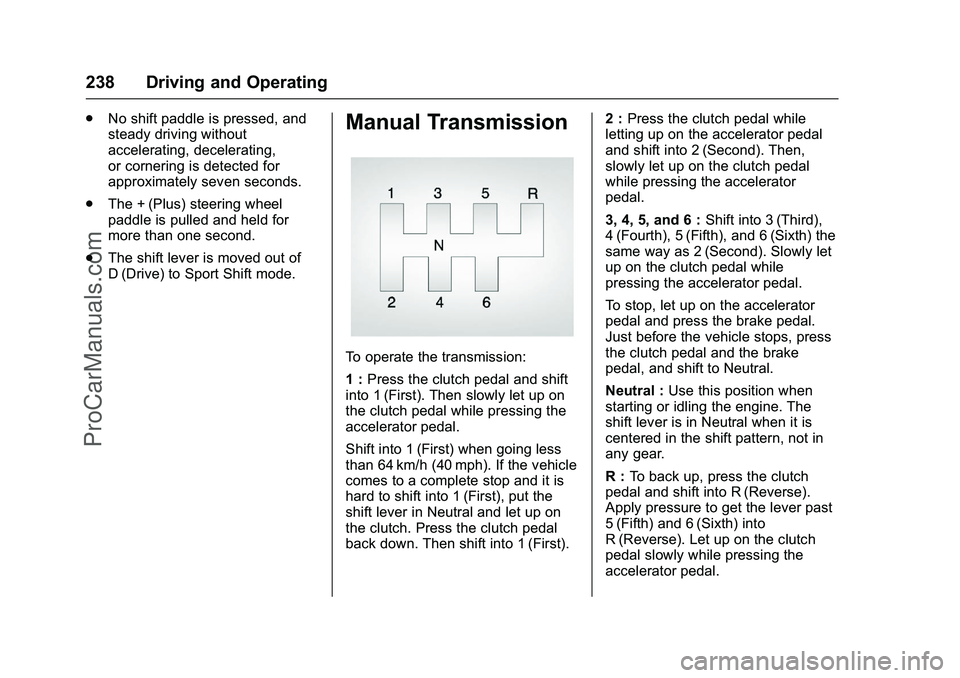
To operate the transmission:
1 :Press the clutch pedal and shift
into 1 (First). Then slowly let up on
the clutch pedal while pressing the
accelerator pedal.
Shift into 1 (First) when going less
than 64 km/h (40 mph). If the vehicle
comes to a complete stop and it is
hard to shift into 1 (First), put the
shift lever in Neutral and let up on
the clutch. Press the clutch pedal
back down. Then shift into 1 (First). 2 :
Press the clutch pedal while
letting up on the accelerator pedal
and shift into 2 (Second). Then,
slowly let up on the clutch pedal
while pressing the accelerator
pedal.
3, 4, 5, and 6 : Shift into 3 (Third),
4 (Fourth), 5 (Fifth), and 6 (Sixth) the
same way as 2 (Second). Slowly let
up on the clutch pedal while
pressing the accelerator pedal.
To stop, let up on the accelerator
pedal and press the brake pedal.
Just before the vehicle stops, press
the clutch pedal and the brake
pedal, and shift to Neutral.
Neutral : Use this position when
starting or idling the engine. The
shift lever is in Neutral when it is
centered in the shift pattern, not in
any gear.
R : To back up, press the clutch
pedal and shift into R (Reverse).
Apply pressure to get the lever past
5 (Fifth) and 6 (Sixth) into
R (Reverse). Let up on the clutch
pedal slowly while pressing the
accelerator pedal.
ProCarManuals.com
Page 241 of 397
Chevrolet SS Sedan Owner Manual (GMNA-Localizing-U.S.-9234782) - 2016 -
CRC - 8/24/15
240 Driving and Operating
avoid a sudden obstacle, a
computer senses the wheels are
slowing down. If one of the wheels
is about to stop rolling, the computer
will separately work the brakes at
each wheel.
ABS can change the brake pressure
to each wheel, as required, faster
than any driver could. This can help
you steer around the obstacle while
braking hard.
As the brakes are applied, the
computer keeps receiving updates
on wheel speed and controls
braking pressure accordingly.
Remember: ABS does not change
the time needed to get a foot up to
the brake pedal or always decrease
stopping distance. If you get too
close to the vehicle in front of you,
there will not be enough time to
apply the brakes if that vehicle
suddenly slows or stops. Always
leave enough room up ahead to
stop, even with ABS.Using ABS
Do not pump the brakes. Just hold
the brake pedal down firmly and let
ABS work. You may hear the ABS
pump or motor operating and feel
the brake pedal pulsate. This is
normal.
Braking in Emergencies
ABS allows you to steer and brake
at the same time. In many
emergencies, steering can help
more than even the very best
braking.
Electric Parking Brake
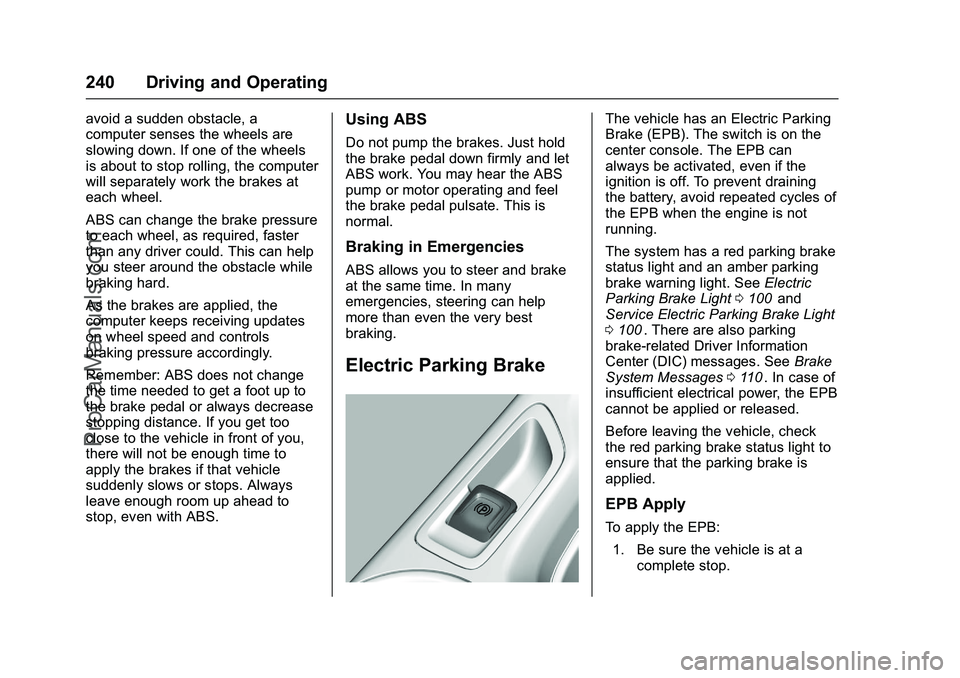
The vehicle has an Electric Parking
Brake (EPB). The switch is on the
center console. The EPB can
always be activated, even if the
ignition is off. To prevent draining
the battery, avoid repeated cycles of
the EPB when the engine is not
running.
The system has a red parking brake
status light and an amber parking
brake warning light. SeeElectric
Parking Brake Light 0100
iiand
Service Electric Parking Brake Light
0 100
ii. There are also parking
brake-related Driver Information
Center (DIC) messages. See Brake
System Messages 0110
ii. In case of
insufficient electrical power, the EPB
cannot be applied or released.
Before leaving the vehicle, check
the red parking brake status light to
ensure that the parking brake is
applied.
EPB Apply
To apply the EPB:
1. Be sure the vehicle is at a complete stop.
ProCarManuals.com
Page 246 of 397
Chevrolet SS Sedan Owner Manual (GMNA-Localizing-U.S.-9234782) - 2016 -
CRC - 8/24/15
Driving and Operating 245
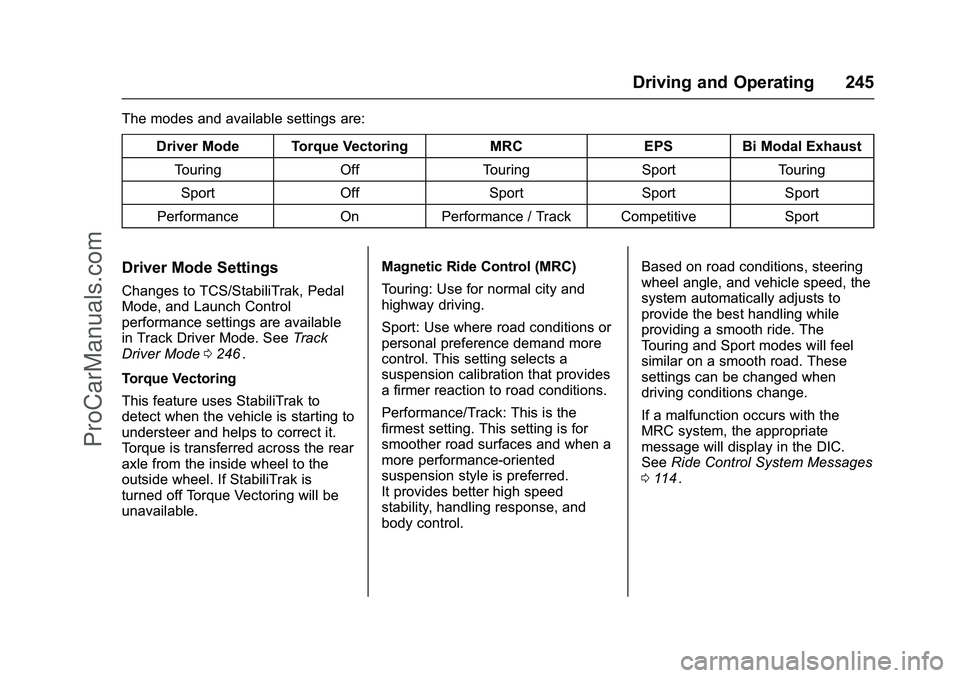
The modes and available settings are:Driver Mode Torque Vectoring MRC EPS Bi Modal ExhaustTouring Off Touring Sport Touring
Sport Off Sport Sport Sport
Performance On Performance / Track Competitive Sport
Driver Mode Settings
Changes to TCS/StabiliTrak, Pedal
Mode, and Launch Control
performance settings are available
in Track Driver Mode. See Track
Driver Mode 0246
ii.
Torque Vectoring
This feature uses StabiliTrak to
detect when the vehicle is starting to
understeer and helps to correct it.
Torque is transferred across the rear
axle from the inside wheel to the
outside wheel. If StabiliTrak is
turned off Torque Vectoring will be
unavailable. Magnetic Ride Control (MRC)
Touring: Use for normal city and
highway driving.
Sport: Use where road conditions or
personal preference demand more
control. This setting selects a
suspension calibration that provides
a firmer reaction to road conditions.
Performance/Track: This is the
firmest setting. This setting is for
smoother road surfaces and when a
more performance-oriented
suspension style is preferred.
It provides better high speed
stability, handling response, and
body control.Based on road conditions, steering
wheel angle, and vehicle speed, the
system automatically adjusts to
provide the best handling while
providing a smooth ride. The
Touring and Sport modes will feel
similar on a smooth road. These
settings can be changed when
driving conditions change.
If a malfunction occurs with the
MRC system, the appropriate
message will display in the DIC.
See
Ride Control System Messages
0 114
ii.
ProCarManuals.com
Page 247 of 397
Chevrolet SS Sedan Owner Manual (GMNA-Localizing-U.S.-9234782) - 2016 -
CRC - 8/24/15
246 Driving and Operating
Electric Power Steering (EPS)
Sport: Adjusted for use with MRC
Touring and Sport Mode.
Competitive: For spirited and track
driving.
Bi Modal Exhaust
The Bi Modal exhaust system has
valves in the exhaust tail pipes to
alter the tone of the exhaust sound.
Touring: Exhaust valves are closed.
Sport: Exhaust valves operate to
provide a sporty exhaust character.
Track Driver Mode
Track Driver Mode and Launch
Control are systems designed to
allow increased performance while
accelerating and/or cornering. This
is accomplished by regulating and
optimizing the engine, brakes, andsuspension performance. These
modes are for use at a closed
course race track and are not
intended for use on public roads.
These systems will not compensate
for driver inexperience or lack of
familiarity with the race track.
{Warning
Track Driver Mode and Launch
Control change the way
StabiliTrak and TCS perform and
should not be used on public
roads. These modes should only
be used on closed courses by
experienced drivers.
Caution
Attempting to shift when the drive
wheels are spinning and do not
have traction may cause damage
to the transmission. Damage
caused by misuse of the vehicle
is not covered by the vehicle
warranty. Do not attempt to shift
when the drive wheels do not
have traction.
Racing will result in the premature
wear of brakes, tires, and driveline
components. Inspect and replace
components as necessary.
ProCarManuals.com
Page 248 of 397
Chevrolet SS Sedan Owner Manual (GMNA-Localizing-U.S.-9234782) - 2016 -
CRC - 8/24/15
Driving and Operating 247
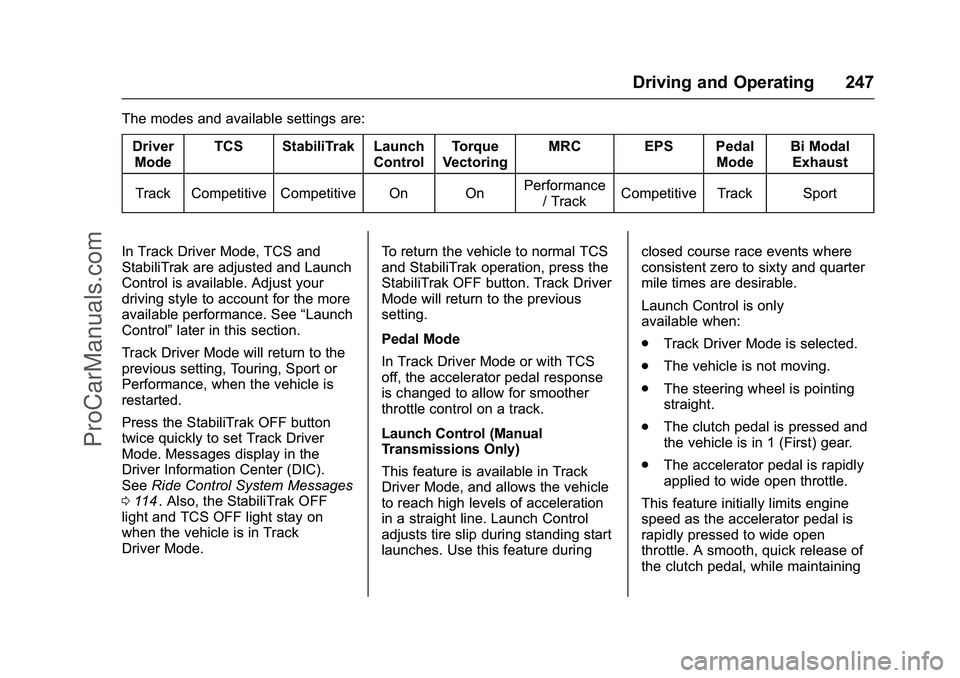
The modes and available settings are:DriverMode TCS StabiliTrak Launch
ControlTorque
Vectoring MRC EPS Pedal
ModeBi Modal
Exhaust
Track Competitive Competitive On On Performance
/ Track Competitive Track Sport
In Track Driver Mode, TCS and
StabiliTrak are adjusted and Launch
Control is available. Adjust your
driving style to account for the more
available performance. See “Launch
Control” later in this section.
Track Driver Mode will return to the
previous setting, Touring, Sport or
Performance, when the vehicle is
restarted.
Press the StabiliTrak OFF button
twice quickly to set Track Driver
Mode. Messages display in the
Driver Information Center (DIC).
See Ride Control System Messages
0 114
ii. Also, the StabiliTrak OFF
light and TCS OFF light stay on
when the vehicle is in Track
Driver Mode. To return the vehicle to normal TCS
and StabiliTrak operation, press the
StabiliTrak OFF button. Track Driver
Mode will return to the previous
setting.
Pedal Mode
In Track Driver Mode or with TCS
off, the accelerator pedal response
is changed to allow for smoother
throttle control on a track.
Launch Control (Manual
Transmissions Only)
This feature is available in Track
Driver Mode, and allows the vehicle
to reach high levels of acceleration
in a straight line. Launch Control
adjusts tire slip during standing start
launches. Use this feature duringclosed course race events where
consistent zero to sixty and quarter
mile times are desirable.
Launch Control is only
available when:
.
Track Driver Mode is selected.
. The vehicle is not moving.
. The steering wheel is pointing
straight.
. The clutch pedal is pressed and
the vehicle is in 1 (First) gear.
. The accelerator pedal is rapidly
applied to wide open throttle.
This feature initially limits engine
speed as the accelerator pedal is
rapidly pressed to wide open
throttle. A smooth, quick release of
the clutch pedal, while maintaining
ProCarManuals.com
Page 255 of 397
Chevrolet SS Sedan Owner Manual (GMNA-Localizing-U.S.-9234782) - 2016 -
CRC - 8/24/15
254 Driving and Operating
Warning (Continued)
parking space. APA does not
detect or avoid traffic that is
behind or alongside of the
vehicle. Always be prepared to
stop the vehicle during the
parking maneuver.
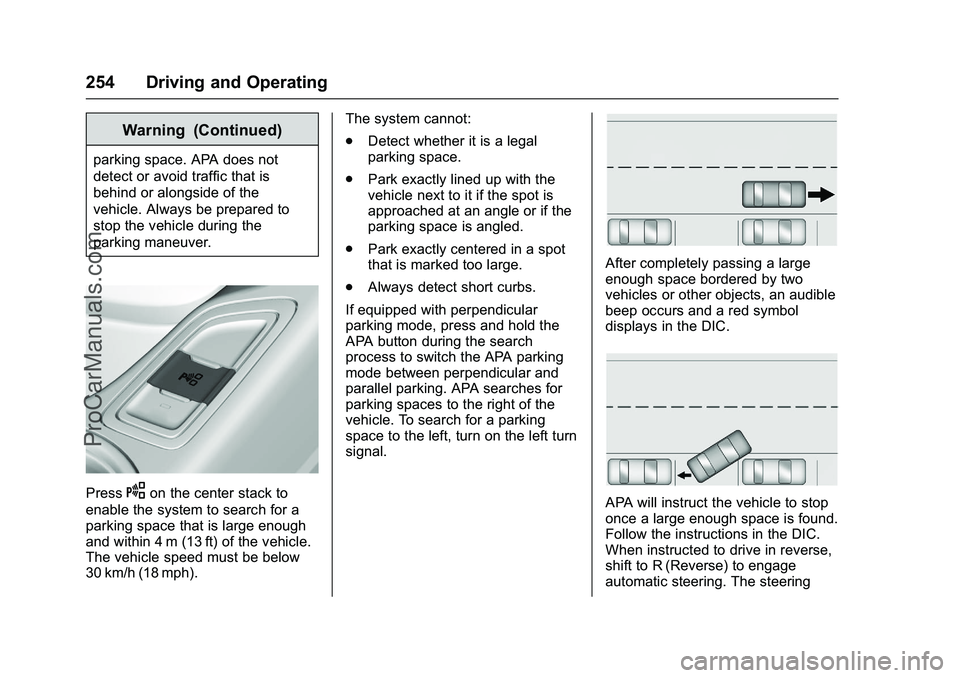
PressOon the center stack to
enable the system to search for a
parking space that is large enough
and within 4 m (13 ft) of the vehicle.
The vehicle speed must be below
30 km/h (18 mph). The system cannot:
.
Detect whether it is a legal
parking space.
. Park exactly lined up with the
vehicle next to it if the spot is
approached at an angle or if the
parking space is angled.
. Park exactly centered in a spot
that is marked too large.
. Always detect short curbs.
If equipped with perpendicular
parking mode, press and hold the
APA button during the search
process to switch the APA parking
mode between perpendicular and
parallel parking. APA searches for
parking spaces to the right of the
vehicle. To search for a parking
space to the left, turn on the left turn
signal.
After completely passing a large
enough space bordered by two
vehicles or other objects, an audible
beep occurs and a red symbol
displays in the DIC.
APA will instruct the vehicle to stop
once a large enough space is found.
Follow the instructions in the DIC.
When instructed to drive in reverse,
shift to R (Reverse) to engage
automatic steering. The steering
ProCarManuals.com