ESP CHEVROLET SS 2017 1.G User Guide
[x] Cancel search | Manufacturer: CHEVROLET, Model Year: 2017, Model line: SS, Model: CHEVROLET SS 2017 1.GPages: 400, PDF Size: 7.31 MB
Page 100 of 400
Chevrolet SS Sedan Owner Manual (GMNA-Localizing-U.S.-10122752) -2017 - crc - 8/31/16
Instruments and Controls 99
reminder light and/or chime, removethe object from the seat or bucklethe safety belt.
Second Row Passenger Belt
Reminder Light
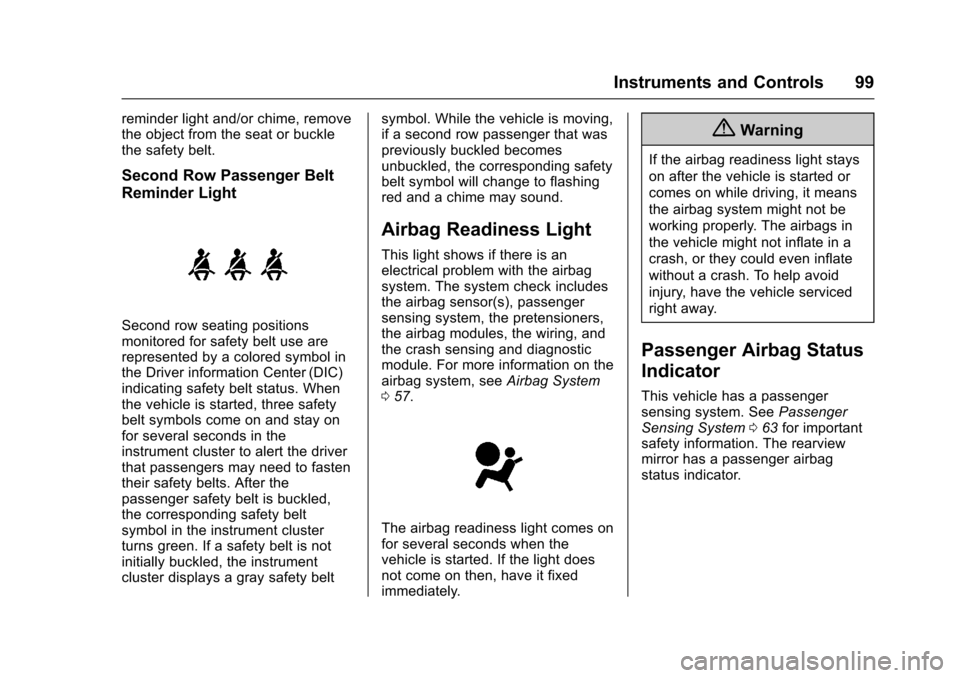
Second row seating positionsmonitored for safety belt use arerepresented by a colored symbol inthe Driver information Center (DIC)indicating safety belt status. Whenthe vehicle is started, three safetybelt symbols come on and stay onfor several seconds in theinstrument cluster to alert the driverthat passengers may need to fastentheir safety belts. After thepassenger safety belt is buckled,the corresponding safety beltsymbol in the instrument clusterturns green. If a safety belt is notinitially buckled, the instrumentcluster displays a gray safety belt
symbol. While the vehicle is moving,if a second row passenger that waspreviously buckled becomesunbuckled, the corresponding safetybelt symbol will change to flashingred and a chime may sound.
Airbag Readiness Light
This light shows if there is anelectrical problem with the airbagsystem. The system check includesthe airbag sensor(s), passengersensing system, the pretensioners,the airbag modules, the wiring, andthe crash sensing and diagnosticmodule. For more information on theairbag system, seeAirbag System057.
The airbag readiness light comes onfor several seconds when thevehicle is started. If the light doesnot come on then, have it fixedimmediately.
{Warning
If the airbag readiness light stays
on after the vehicle is started or
comes on while driving, it means
the airbag system might not be
working properly. The airbags in
the vehicle might not inflate in a
crash, or they could even inflate
without a crash. To help avoid
injury, have the vehicle serviced
right away.
Passenger Airbag Status
Indicator
This vehicle has a passengersensing system. SeePassengerSensing System063for importantsafety information. The rearviewmirror has a passenger airbagstatus indicator.
Page 110 of 400
Chevrolet SS Sedan Owner Manual (GMNA-Localizing-U.S.-10122752) -2017 - crc - 8/31/16
Instruments and Controls 109
.Average Vehicle Speed
.Navigation
Digital Speedometer
The speedometer, available onsome vehicles, shows how fast thevehicle is moving in eitherkilometers per hour (km/h) or milesper hour (mph). The speedometercannot be reset.
Tr i p
This display shows the currentdistance traveled in eitherkilometers (km) or miles (mi), sincethe last reset for the trip odometer.The trip odometer can be reset tozero by pressing SET/CLR while thetrip odometer display is showing.
Fuel Range
This display shows the approximatedistance the vehicle can be drivenwithout refueling. The fuel rangeestimate is based on an average ofthe vehicle's fuel economy overrecent driving history and theamount of fuel remaining in the fueltank. Fuel range cannot be reset.
Average Fuel Economy
This display shows the approximateaverage liters per 100 kilometers (L/100 km) or miles per gallon (mpg).This number is calculated based onthe number of L/100 km (mpg)recorded since the last time thismenu item was reset. This numberreflects only the approximateaverage fuel economy that thevehicle has right now, and willchange as driving conditionschange. The fuel economy can bereset by pressing SET/CLR whilethe Average Fuel Economy displayis showing. On some models, thisdisplay is shown on the same pagewith the instantaneous fuelconsumption display.
Instantaneous Fuel Economy
The instantaneous fuel consumptiondisplay shows the current fueleconomy in liters per 100kilometers (L/100 km) or miles pergallon (mpg). This number reflectsonly the approximate fuel economythat the vehicle has right now andchanges frequently as drivingconditions change. Unlike average
fuel economy, this display cannot bereset. On some models, this displayis shown on the same page with theaverage fuel economy display.
Average Vehicle Speed
This display shows the averagespeed of the vehicle in kilometersper hour (km/h) or miles perhour (mph). This average iscalculated based on the variousvehicle speeds recorded since thelast reset of this value. The averagespeed can be reset by pressingSET/CLR while the Average VehicleSpeed display is showing.
Navigation
This display shows the Navigationinformation when guidance isselected.
Vehicle Information Menu Items
Press MENU on the turn signallever until Vehicle Information menu
is displayed. Use\to scroll
through the following possible menuitems:
.Battery Voltage
.Speed Warning
Page 111 of 400
Chevrolet SS Sedan Owner Manual (GMNA-Localizing-U.S.-10122752) -2017 - crc - 8/31/16
110 Instruments and Controls
.Units
.Tire Pressure Monitoring
.Remaining Oil Life
Battery Voltage
This display, available on somevehicles, shows the current batteryvoltage. If the voltage is in thenormal range, the value will display.For example, the display may readBattery Voltage 15.0 Volts. Thevehicle's charging system regulatesvoltage based on the state of thebattery. The battery voltage canfluctuate while viewing thisinformation on the DIC. This isnormal. SeeCharging System Light0100.Ifthereisaproblemwiththebattery charging system, the DICwill display a message.
Speed Warning
This display is used to set thevehicle speed at which the speedwarning chime sounds and the alertis displayed. The speed can be setby pressing SET/CLR while thespeed warning display is showing.
Units
Move\to switch between metric
or US when the Units display isactive. Press SET/CLR to confirmthe setting. This will change thedisplays on the cluster and DIC toeither metric or English (US)measurements.
Tire Pressure Monitoring
This display will show a vehicle withthe approximate pressures of allfour tires. Tire pressure is displayedin either kilopascal (kPa) or poundsper square inch (psi). SeeTirePressure Monitor Operation0312.
Remaining Oil Life
This display shows an estimate ofthe oil's remaining useful life. If 99%is displayed, that means 99% of thecurrent oil life remains.
When the remaining oil life is low,the CHANGE ENGINE OIL SOONmessage will appear on the display.SeeEngine Oil Messages011 5.The oil should be changed as soonas possible. SeeEngine Oil0275.In addition to the engine oil lifesystem monitoring the oil life,
additional maintenance isrecommended in the MaintenanceSchedule. SeeMaintenanceSchedule0349.
Remember, the Remaining Oil Lifedisplay must be reset after each oilchange. It will not reset itself. Also,be careful not to reset the Oil Lifedisplay accidentally at any timeother than when the oil has justbeen changed. It cannot be resetaccurately until the next oil change.To r e s e t t h e e n g i n e o i l l i f e s y s t e m ,press SET/CLR while the Oil Lifedisplay is active. SeeEngine OilLife System0277.
Head-Up Display (HUD)
{Warning
If the HUD image is too bright or
too high in your field of view, it
may take you more time to see
things you need to see when it is
dark outside. Be sure to keep the
HUD image dim and placed low in
your field of view.
Page 115 of 400
Chevrolet SS Sedan Owner Manual (GMNA-Localizing-U.S.-10122752) -2017 - crc - 8/31/16
114 Instruments and Controls
STEP ON BRAKE TO
RELEASE PARK BRAKE
This message displays whenattempting to release the ElectricParking Brake without the brakepedal applied. SeeElectric ParkingBrake0242.
Cruise Control Messages
CRUISE SET TO XXX
This message displays when thecruise control is set and shows thespeed it was set to. SeeCruiseControl0251.
Door Ajar Messages
DRIVER DOOR OPEN
This message will display when thedriver door is open. Close the doorcompletely.
HOOD OPEN
This message will display when thehood is open. Close the hoodcompletely.
LEFT REAR DOOR OPEN
This message will display when thedriver side rear door is open. Closethe door completely.
PASSENGER DOOR OPEN
This message will display when thefront passenger door is open. Closethe door completely.
RIGHT REAR DOOR OPEN
This message will display when thepassenger side rear door is open.Close the door completely.
TRUNK OPEN
This message will display when thetrunk is open. Close the trunkcompletely.
Engine Cooling System
Messages
A/C OFF DUE TO HIGH
ENGINE TEMP
This message displays when theengine coolant becomes hotter thanthe normal operating temperature.To a v o i d a d d e d s t r a i n o n a h o t
engine, the air conditioningcompressor automatically turns off.When the coolant temperaturereturns to normal, the airconditioning compressor turns backon. The vehicle can continue to bedriven.
If this message continues to appear,have the system repaired by yourdealer as soon as possible to avoiddamage to the engine.
ENGINE OVERHEATED—
IDLE ENGINE
This message displays when theengine coolant temperature is toohot. Stop and allow the vehicle toidle until it cools down.
ENGINE OVERHEATED—
STOP ENGINE
This message displays and acontinuous chime sounds if theengine cooling system reachesunsafe temperatures for operation.Stop and turn off the vehicle assoon as it is safe to do so to avoidsevere damage. This messageclears when the engine has cooledto a safe operating temperature.
Page 123 of 400
Chevrolet SS Sedan Owner Manual (GMNA-Localizing-U.S.-10122752) -2017 - crc - 8/31/16
122 Instruments and Controls
Phone Settings
See“Phone”inConfigure Menu0181.
Navigation Settings
SeeConfigure Menu0181.
Display Settings
Select and the following maydisplay:
.Home Page Menu
.Rear Camera Options
.Display Off
.Map Settings
Home Page Menu
Select to customize the first page ofthe Home Page.
Rear Camera Options
Select and the following maydisplay:
.Camera
.Symbols
.Guide Lines
Select to turn an option on and off.
SeeAssistance Systems for Parkingor Backing0254.
Display Off
Select to turn off the display. Thedisplay will return when any buttonis pressed or the screen is touched.
Map Settings
Select to enter the submenu tochange Automatic Zoom, enableSpeed Limit to display on the map,and change Map Display settings.
.Map Display:Select to changethe screen background.
To c h a n g e t h e o v e r a l l b r i g h t n e s ssetting for the display, use thevehicle interior lightinginstrument panel illuminationcontrol.
⇣The Automatic setting adjuststhe screen backgroundautomatically depending onthe exterior lighting conditions.
⇣The Day setting brightens themap background.
⇣The Night setting darkens themap background.
.Speed Limits:Select to displaythe posted speed limit on themap, when available.
Vehicle Settings
Select and the following maydisplay:
.Climate and Air Quality
.Comfort and Convenience
.Collision/Detection Systems
.Lighting
.Power Door Locks
.Remote Lock/Unlock/Start
.Return to Factory Settings?
Climate and Air Quality
Select and the following maydisplay:
.Auto Fan Speed
.Remote Start Auto Cool Seat
.Remote Start Auto Heat Seat
Auto Fan Speed
This feature sets the climate controlfan speed to maintain the interiortemperature.
Page 133 of 400
Chevrolet SS Sedan Owner Manual (GMNA-Localizing-U.S.-10122752) -2017 - crc - 8/31/16
132 Infotainment System
features are also available throughthe instrument cluster and steeringwheel controls.
Before driving:
.Become familiar with theoperation, center stack controls,and infotainment display options.
.Set up the audio by presettingfavorite stations, setting thetone, and adjusting thespeakers.
.Set up phone numbers inadvance so they can be calledeasily by pressing a singlecontrol or by using a single voicecommand if equipped withBluetooth phone capability.
SeeDefensive Driving0217.
To p l a y t h e i n f o t a i n m e n t s y s t e m w i t hthe ignition off, seeRetainedAccessory Power (RAP)0232.
Overview
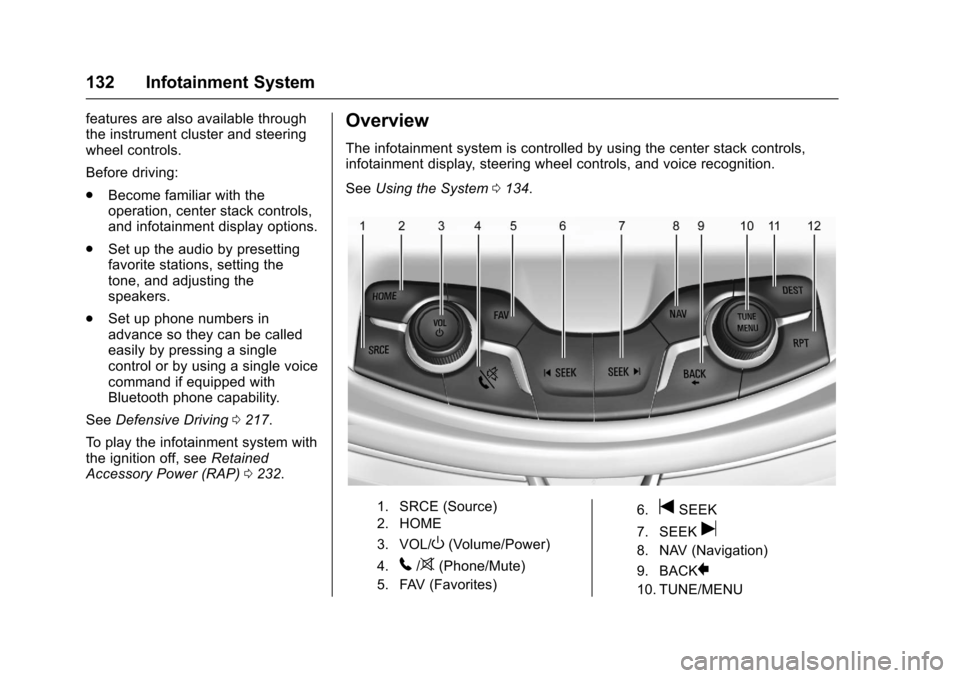
The infotainment system is controlled by using the center stack controls,infotainment display, steering wheel controls, and voice recognition.
SeeUsing the System0134.
1. SRCE (Source)
2. HOME
3. VOL/O(Volume/Power)
4.5/>(Phone/Mute)
5. FAV (Favorites)
6.tSEEK
7. SEEKu
8. NAV (Navigation)
9. BACK}
10. TUNE/MENU
Page 148 of 400
Chevrolet SS Sedan Owner Manual (GMNA-Localizing-U.S.-10122752) -2017 - crc - 8/31/16
Infotainment System 147
Troubleshooting
XM Travel Link services use theSiriusXM®Satellite Signal and GPSSatellite Signal to provide thisfeature.
When the vehicle is started, it cantake up to five minutes for the radioto receive the travel Link services.
Travel Link Messages
No GPS Signal :Move the vehicleinto a position that is visible tothe sky.
Acquiring Signal :Radio isdownloading the activationinformation or not receiving a goodsignal. Move the vehicle to open skyand restart the vehicle.
No XM Signal :Reception isblocked. Move the vehicle intoopen sky.
Radio Reception
Frequency interference, and staticcan occur during normal radioreception if items such as cell phonechargers, vehicle convenienceaccessories, and external electronic
devices are plugged into theaccessory power outlet. If there isinterference or static, unplug theitem from the accessory poweroutlet.
FM
FM signals only reach about 16 to65 km (10 to 40 mi). Although theradio has a built-in electronic circuitthat automatically works to reduceinterference, some static can occur,especially around tall buildings orhills, causing the sound to fade inand out.
AM
The range for most AM stations isgreater than for FM, especially atnight. The longer range can causestation frequencies to interfere witheach other. Static can occur whenthings like storms and power linesinterfere with radio reception. Whenthis happens, try reducing the trebleon the radio.
SiriusXM®Satellite Radio
Service
SiriusXM Satellite Radio Servicegives digital radio reception fromcoast to coast in the 48 contiguousUnited States, and in Canada. Justas with FM, tall buildings or hills caninterfere with satellite radio signals,causing the sound to fade in andout. In addition, traveling or standingunder heavy foliage, bridges,garages, or tunnels may cause lossof the SiriusXM signal for a periodof time.
Cellular Phone Usage
Cellular phone usage can causeinterference with the vehicle's radio.
Backglass Antenna
The AM-FM antenna is integratedwith the rear window defogger in therear window. Do not scratch theinside surface or damage the linesin the glass. If the inside surface isdamaged, it could interfere withradio reception. For proper radio
Page 186 of 400
Chevrolet SS Sedan Owner Manual (GMNA-Localizing-U.S.-10122752) -2017 - crc - 8/31/16
Infotainment System 185
Traffic Flow
The traffic flow status will display ingreen, yellow, or red lines besidethe road.
.Red indicates significantlyimpaired traffic flow with averagespeed less than 40 km/h(25 mph).
.Ye l l o w i n d i c a t e s s l i g h t l y i m p a i r e dtraffic flow with average speedbetween 40 and 73 km/h (25 and45 mph).
.Green indicates normal trafficflow with average speed above73 km/h (45 mph).
Closed Roads, Traffic Delays,Roadwork, Incidents, andAdvisories
Select the traffic event group fordisplay while in the map view. Someevents may cover more than onetraffic condition. See the followingtraffic conditions.
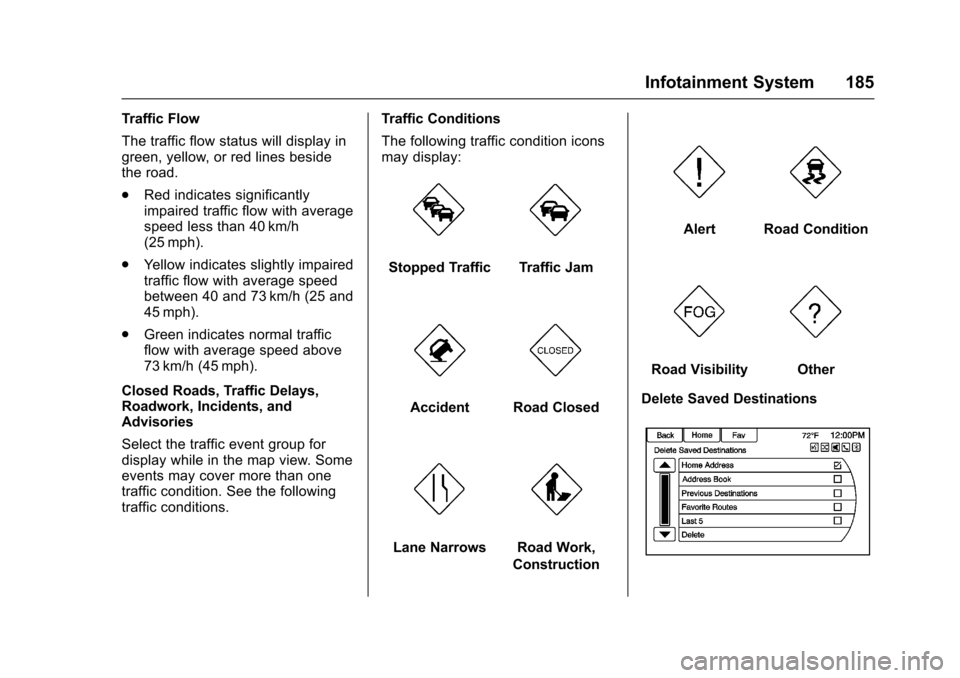
Traffic Conditions
The following traffic condition iconsmay display:
Stopped TrafficTraffic Jam
AccidentRoad Closed
Lane NarrowsRoad Work,
Construction
AlertRoad Condition
Road VisibilityOther
Delete Saved Destinations
Page 189 of 400
Chevrolet SS Sedan Owner Manual (GMNA-Localizing-U.S.-10122752) -2017 - crc - 8/31/16
188 Infotainment System
.Plural names of places might beannounced occasionally.
.It could take a long time tooperate automatic reroutingduring high-speed driving.
.Automatic rerouting mightdisplay a route returning to theset waypoint if heading for adestination without passingthrough a set waypoint.
.The route prohibits the entry of avehicle due to a regulation bytime or season or any otherregulation which may be given.
.Some routes might not besearched.
.The route to the destinationmight not be shown if there arenew roads, if roads haverecently changed, or if certainroads are not listed in the mapdata. SeeMaps0168.
To r e c a l i b r a t e t h e v e h i c l e ' s p o s i t i o non the map, park with the vehiclerunning for two to five minutes, untilthe vehicle position updates. Makesure the vehicle is parked in a
location that is safe and has a clearview of the sky and away from largeobstruction.
If the System Needs
Service
If the navigation system needsservice and the steps listed herehave been followed but there arestill problems, see your dealer forassistance.
Map Data Updates
The map data provided in thevehicle is the most up-to-dateinformation available when thevehicle was produced. The mapdata is updated periodically,provided that the map informationhas changed.
For questions about the operation ofthe navigation system or the updateprocess, contact the GM Nav DiscCenter toll-free phone number,1-877-NAV-DISC (1-877-628-3472)or go to the center’swebsite,www.gmnavdisc.com. If updates areneeded, call the GM Nav DiscCenter or order a new Map Update
online. To order map data, have thevehicle’sVehicleIdentificationNumber (VIN) available. SeeVehicle Identification Number (VIN)0361.
After receiving the updated mapdata, seeMaps0168.
Database Coverage
Explanations
Coverage areas vary with respect tothe level of map detail available forany given area. Some areas featuregreater levels of detail than others.If this happens, it does not meanthere is a problem with the system.As the map data is updated, moredetail can become available forareas which previously had limiteddetail. SeeMap Data Updates0188for more information.
Page 190 of 400
Chevrolet SS Sedan Owner Manual (GMNA-Localizing-U.S.-10122752) -2017 - crc - 8/31/16
Infotainment System 189
Voice Recognition
Voice recognition allows forhands-free operation of theinfotainment system features.
Voice recognition can be used whenthe radio is on or when RetainedAccessory Power (RAP) is active.SeeRetained Accessory Power(RAP)0232.Thesystemmaintainsaminimumvolumelevel.
Using Voice Recognition
1. Pressb/gon the steering
wheel. The audio systemmutes. A voice prompt states,“Please say a command.”Waituntil the tone is heard beforespeaking.
If there is no tone, make surethat the volume is turned up.
While voice recognition is
active, the system displays ag
symbol in the top right of theinfotainment display.
2. Clearly speak one of thecommands listed later in thissection.
Pressb/gtwice on the steering
wheel to skip the voice promptmessages.
Canceling Voice Recognition
1. Press and release$/ion
the steering wheel control tocancel a command, if thesystem response does notmatch the voice command,or say“Goodbye”or“Cancel.”
2. The system replies,“Goodbye.”
Helpful Hints for Speaking
Commands
.When multiple commands areavailable, choose the commandthat works best for you.
.Words in parentheses areoptional. For example, for thecommand“Tune FM(frequency),”saying“Tune FM87.7”or“Tune FM”are bothvalid commands.
.When the command isrecognized, the system willeither perform the function orask to confirm the choice.
.When the system does notrecognize the command, thesystem says“pardon.”
.If experiencing difficulty with thesystem recognizing a command,confirm that the command iscorrect. Try saying the commandclearly or wait for a brief momentafter the tone.
.Background noise such as aclimate control fan positioned onhigh, open windows, and veryloud outside noises, even if thewindows are closed, can causevoice commands to bemisunderstood.
.The system is able to recognizecommands in differentlanguages, such as English,Canadian French, and Spanish.The system only recognizescommands based on thelanguage selected.
.To i n c r e a s e o r d e c r e a s e t h evoice volume during a voicerecognition session, turn thevolume knob of the radio,or press the volume steeringwheel control. If the volume is