change wheel CHEVROLET SS 2017 1.G User Guide
[x] Cancel search | Manufacturer: CHEVROLET, Model Year: 2017, Model line: SS, Model: CHEVROLET SS 2017 1.GPages: 400, PDF Size: 7.31 MB
Page 197 of 400
Chevrolet SS Sedan Owner Manual (GMNA-Localizing-U.S.-10122752) -2017 - crc - 8/31/16
196 Infotainment System
5/>:Press to enter the Phonemain menu. Press and hold to muteor unmute.
Voice Recognition
The voice recognition system usescommands to control the systemand dial phone numbers.
When using voice recognition:
.The system may not recognizevoice commands if there is toomuch background noise.
.Atonesoundstoindicatethatthe system is ready for a voicecommand. Wait for the tone andthen speak.
.Speak clearly in a calm andnatural voice.
SeeVoice Recognition0189.
Audio System
Sound comes through the vehicle'sfront audio system speakers andoverrides the audio system. Use the
VOL/Oknob during a call to change
the volume level. The adjusted
volume level remains in memory forlater calls. The system maintains aminimum volume level.
SeeVoice Recognition0189.
Bluetooth Audio
SeeBluetooth Audio0163.
Pairing with Infotainment
Controls
ABluetooth-enabledcellphonemust be paired and then connectedto the vehicle before it can be used.See your cell phone manufacturer'suser guide for Bluetooth functionsbefore pairing the cell phone. If aBluetooth phone is not connected,calls will be made using OnStarHands-Free Calling, if available.SeeOnStar Overview0378.
Pairing Information
.ABluetooth-enabledphoneandan audio playback device can bepaired to the system at thesame time.
.Up to five devices can be pairedto the Bluetooth system.
.The pairing process is disabledwhen the vehicle is moving.
.Pairing only needs to becompleted once, unless thepairing information on the cellphone changes or the cell phoneis deleted from the system.
.Only one paired cell phone canbe connected to the Bluetoothsystem at a time.
.If multiple paired cell phones arewithin range of the system, theradio will connect to the firstphone in the list or to the phonethat was previously connected.
Pairing a Phone/Device
1. Press CONFIG on the center
stack or press5/>on the
steering wheel controls.
2. Select Phone Settings.
3. Select Pair Device (Phone).The radio displays“Pleasestart Bluetooth search on yourphone. Confirm or enternumber:.”If the devicesupports a four-digit Personal
Page 199 of 400
Chevrolet SS Sedan Owner Manual (GMNA-Localizing-U.S.-10122752) -2017 - crc - 8/31/16
198 Infotainment System
phone, select your vehicle,confirm and enter the PINprovided on the display.”
3. Start the search for Bluetoothdevices on the phone. Thenselect the device and follow theinstructions on the phone byeither entering the four-digitPIN or confirming the six-digitpasscode. The PIN is used inStep 4.
4. Locate and select the devicenamed after the vehicle makeand model in the list on the cellphone. Follow the instructionson the cell phone to enter thePIN provided in Step 3 or toconfirm the six-digit codematches. The system responds“successfully paired.”
5. Repeat Steps 1✓4topairadditional phones.
Listing All Paired and ConnectedPhones
The system can list all cell phonespaired to it. If a paired cell phone isalso connected to the vehicle, thesystem responds with“is connected”after that phone name.
1. Pressb/g.Thesystem
responds“Please say acommand,”followed by a tone.
2. Say“Device List.”
Deleting a Paired Phone
If the phone name to delete isunknown, see“Listing All Pairedand Connected Phones.”
1. Pressb/g.Thesystem
responds“Please say acommand,”followed by a tone.
2. Say“Delete Device.”
3. The system responds with:“Todelete a device, please touchits name on the display.”Selectthe device to delete on thedisplay and it will be removed.
To c a n c e l t h i s c o m m a n d , p r e s s$/
ion the steering wheel control or
press/BACK on the center stack.
Connecting to a Different Phoneor Device
To c o n n e c t t o a d i f f e r e n t c e l l p h o n e ,the system looks for the nextavailable cell phone. Depending onthe cell phone to be connected, thiscommand may need to be repeated.
1. Pressb/g.Thesystem
responds“Please say acommand,”followed by a tone.
2. Say“Change Phone.”
.To s e l e c t a d e v i c e , t o u c hthe name on the display.
.If another cell phone is notfound, the original phoneremains connected.
Page 202 of 400
Chevrolet SS Sedan Owner Manual (GMNA-Localizing-U.S.-10122752) -2017 - crc - 8/31/16
Infotainment System 201
Transferring a Call
Audio can be transferred betweenthe Bluetooth system and the cellphone.
The cell phone must be paired andconnected with the Bluetoothsystem before a call can betransferred.
To Transfer Audio from theBluetooth System to a Cell Phone
During a call with the audio in thevehicle, touch Transfer Call on theinfotainment display or press and
holdb/gon the steering wheel
controls.
To Transfer Audio to the BluetoothSystem from a Cell Phone
Use the audio transfer feature onthe cell phone. See your cell phonemanufacturer's user guide for moreinformation. Touch Transfer call onthe infotainment display or press
and holdb/gon the steering
wheel controls.
Dual Tone Multi-Frequency
(DTMF) Tones
The in-vehicle Bluetooth system cansend numbers during a call. This isused when calling a menu-drivenphone system.
Using the Infotainment Controls
1. Turn and press the TUNE/MENU knob and select EnterNumber.
2. Enter the phone number,or select Enter Number on theinfotainment display and selectdigits, then touch OK.
Hands-Free Phone
Using Bluetooth VoiceRecognition
To u s e v o i c e r e c o g n i t i o n , p r e s s t h eb/gicon on the steering wheelcontrols. Use the commands belowfor the various voice features. Foradditional information, say“Help”while in a voice recognition menu.
Making a Call
Calls can be made using thefollowing commands.
Dial or Call :These commands canbe used interchangeably to dial aphone number.
Digit Dial :This command allows aphone number to be dialed byentering the digits one at a time.
Re-dial :This command dials thelast number used on the cell phone.
Using the“Dial”or“Call”Command
To c a l l a n u m b e r :
1. Pressb/g.Thesystem
responds“Please say acommand,”followed by a tone.
2. Say“Dial”or“Call.”
3. Say the entire number withoutpausing, followed by“Dial.”
Once connected, the person calledwill be heard through the audiospeakers.
To c a l l u s i n g a n a m e t a g :
1. Pressb/g.Thesystem
responds“Please say acommand,”followed by a tone.
Page 215 of 400
Chevrolet SS Sedan Owner Manual (GMNA-Localizing-U.S.-10122752) -2017 - crc - 8/31/16
214 Climate Controls
Quick Cool Down
When entering the vehicle on a hotday, open the windows for a shorttime to allow the hot air to escape.
Automatic Transmission
If the vehicle is stopped for a longtime in hot weather and the engineis running and the air conditioning isoperating, move the shift lever toN(Neutral)orP(Park).
A/C Sound
Aslighthissingsoundwhentheairconditioning is turned off is normal.
Water Condensation
Water may drip from underneath thevehicle; this is normal.
Unsealed Dusty Roads
To h e l p p r e v e n t d u s t f r o m e n t e r i n gyour vehicle:
.When following other vehicleson dusty roads and the dust is
airborne, selecth.
.If the dust is not airborne, selectoutside air and set the fancontrol to high speed.
.Close all windows.
.Do not use recirculation for longperiods of time.
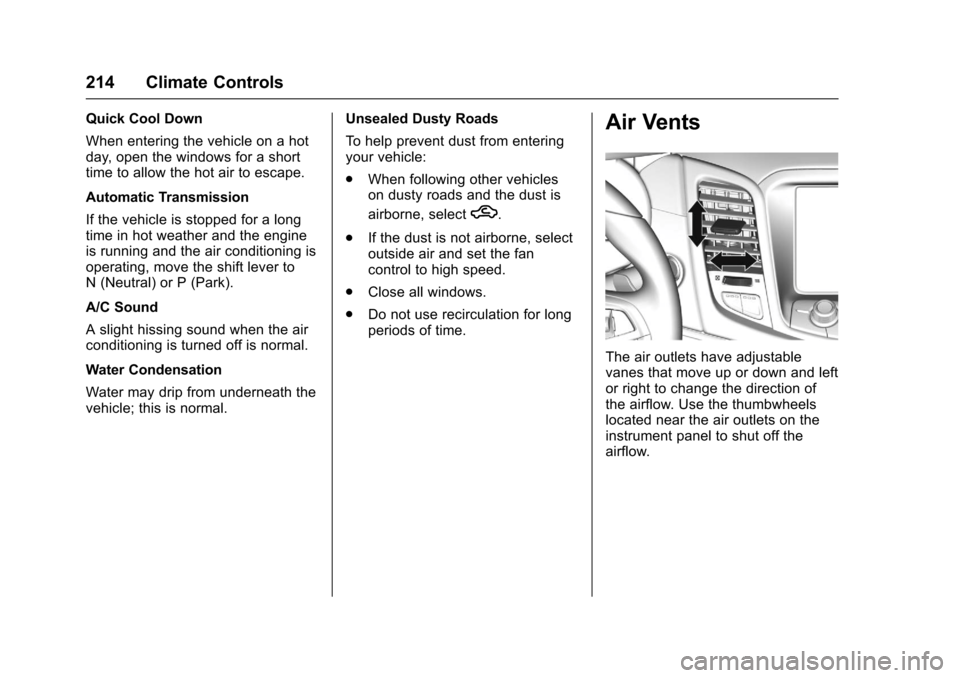
Air Vents
The air outlets have adjustablevanes that move up or down and leftor right to change the direction ofthe airflow. Use the thumbwheelslocated near the air outlets on theinstrument panel to shut off theairflow.
Page 237 of 400
Chevrolet SS Sedan Owner Manual (GMNA-Localizing-U.S.-10122752) -2017 - crc - 8/31/16
236 Driving and Operating
Running the Vehicle
While Parked
It is better not to park with theengine running.
If the vehicle is left with the enginerunning, follow the proper steps tobe sure the vehicle will not move.SeeShifting Into Park (AutomaticTr a n s m i s s i o n )0232andEngineExhaust0235.
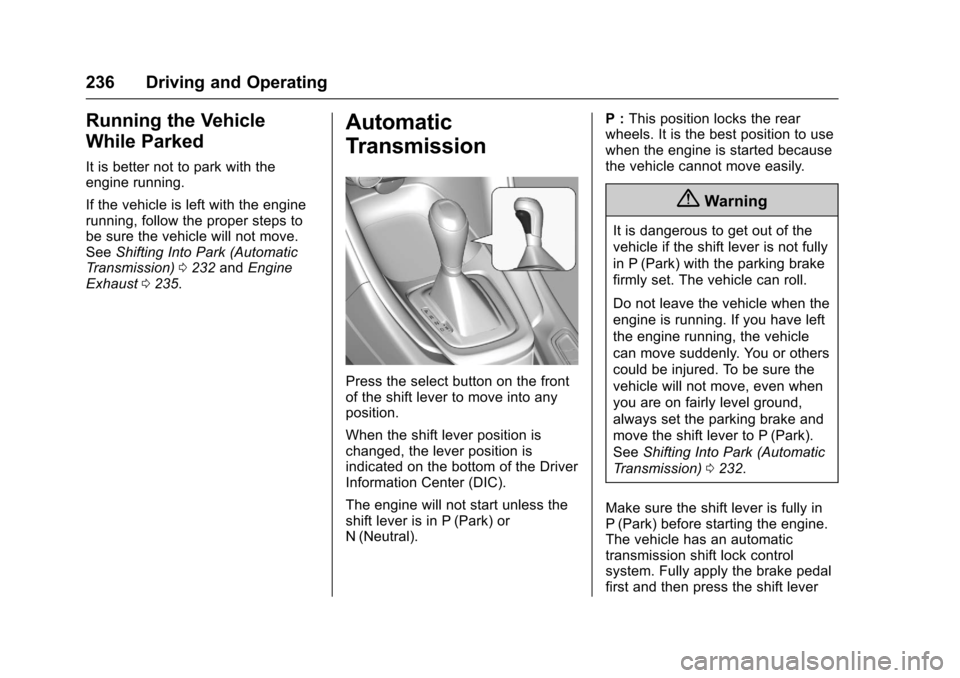
Automatic
Transmission
Press the select button on the frontof the shift lever to move into anyposition.
When the shift lever position ischanged, the lever position isindicated on the bottom of the DriverInformation Center (DIC).
The engine will not start unless theshift lever is in P (Park) orN(Neutral).
P:This position locks the rearwheels. It is the best position to usewhen the engine is started becausethe vehicle cannot move easily.
{Warning
It is dangerous to get out of the
vehicle if the shift lever is not fully
in P (Park) with the parking brake
firmly set. The vehicle can roll.
Do not leave the vehicle when the
engine is running. If you have left
the engine running, the vehicle
can move suddenly. You or others
could be injured. To be sure the
vehicle will not move, even when
you are on fairly level ground,
always set the parking brake and
move the shift lever to P (Park).
SeeShifting Into Park (Automatic
Tr a n s m i s s i o n )0232.
Make sure the shift lever is fully inP(Park) before starting the engine.The vehicle has an automatictransmission shift lock controlsystem. Fully apply the brake pedalfirst and then press the shift lever
Page 243 of 400
Chevrolet SS Sedan Owner Manual (GMNA-Localizing-U.S.-10122752) -2017 - crc - 8/31/16
242 Driving and Operating
If driving safely on a wet road and itbecomes necessary to slam on thebrakes and continue braking toavoid a sudden obstacle, acomputer senses the wheels areslowing down. If one of the wheelsis about to stop rolling, the computerwill separately work the brakes ateach wheel.
ABS can change the brake pressureto each wheel, as required, fasterthan any driver could. This can helpyou steer around the obstacle whilebraking hard.
As the brakes are applied, thecomputer keeps receiving updateson wheel speed and controlsbraking pressure accordingly.
Remember: ABS does not changethe time needed to get a foot up tothe brake pedal or always decreasestopping distance. If you get tooclose to the vehicle in front of you,there will not be enough time toapply the brakes if that vehiclesuddenly slows or stops. Alwaysleave enough room up ahead tostop, even with ABS.
Using ABS
Do not pump the brakes. Just holdthe brake pedal down firmly and letABS work. You may hear the ABSpump or motor operating and feelthe brake pedal pulsate. This isnormal.
Braking in Emergencies
ABS allows you to steer and brakeat the same time. In manyemergencies, steering can helpmore than even the very bestbraking.
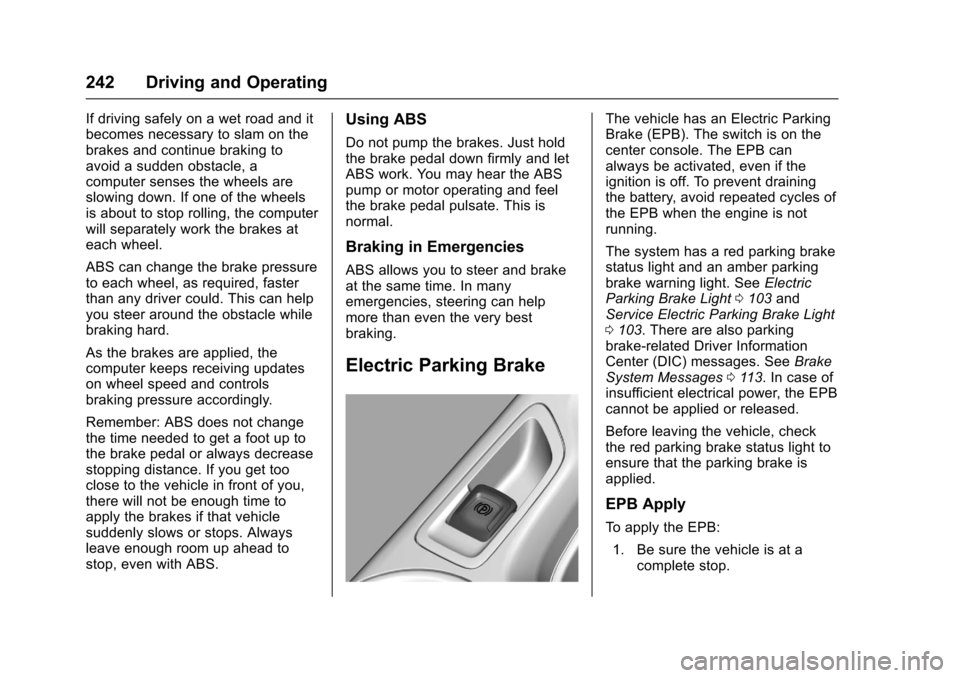
Electric Parking Brake
The vehicle has an Electric ParkingBrake (EPB). The switch is on thecenter console. The EPB canalways be activated, even if theignition is off. To prevent drainingthe battery, avoid repeated cycles ofthe EPB when the engine is notrunning.
The system has a red parking brakestatus light and an amber parkingbrake warning light. SeeElectricParking Brake Light0103andService Electric Parking Brake Light0103.Therearealsoparkingbrake-related Driver InformationCenter (DIC) messages. SeeBrakeSystem Messages011 3.Incaseofinsufficient electrical power, the EPBcannot be applied or released.
Before leaving the vehicle, checkthe red parking brake status light toensure that the parking brake isapplied.
EPB Apply
To a p p l y t h e E P B :
1. Be sure the vehicle is at acomplete stop.
Page 249 of 400
Chevrolet SS Sedan Owner Manual (GMNA-Localizing-U.S.-10122752) -2017 - crc - 8/31/16
248 Driving and Operating
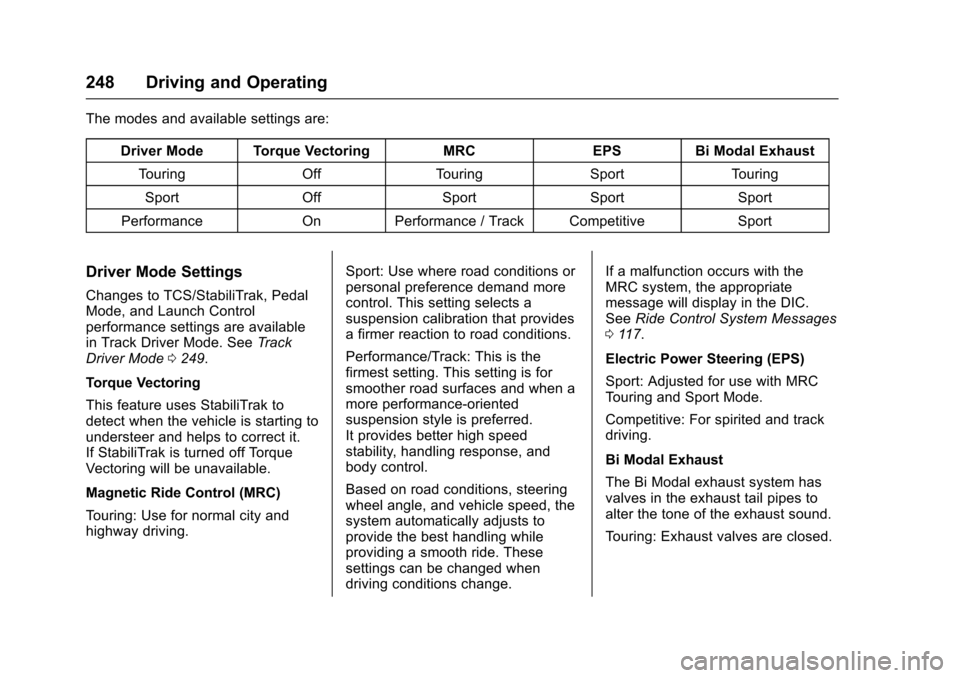
The modes and available settings are:
Driver Mode Torque VectoringMRCEPSBi Modal Exhaust
To u r i n gOffTo u r i n gSportTo u r i n g
SportOffSportSportSport
PerformanceOnPerformance / Track CompetitiveSport
Driver Mode Settings
Changes to TCS/StabiliTrak, PedalMode, and Launch Controlperformance settings are availablein Track Driver Mode. SeeTr a c kDriver Mode0249.
Torque Vectoring
This feature uses StabiliTrak todetect when the vehicle is starting toundersteer and helps to correct it.If StabiliTrak is turned off TorqueVectoring will be unavailable.
Magnetic Ride Control (MRC)
To u r i n g : U s e f o r n o r m a l c i t y a n dhighway driving.
Sport: Use where road conditions orpersonal preference demand morecontrol. This setting selects asuspension calibration that providesafirmerreactiontoroadconditions.
Performance/Track: This is thefirmest setting. This setting is forsmoother road surfaces and when amore performance-orientedsuspension style is preferred.It provides better high speedstability, handling response, andbody control.
Based on road conditions, steeringwheel angle, and vehicle speed, thesystem automatically adjusts toprovide the best handling whileproviding a smooth ride. Thesesettings can be changed whendriving conditions change.
If a malfunction occurs with theMRC system, the appropriatemessage will display in the DIC.SeeRide Control System Messages011 7.
Electric Power Steering (EPS)
Sport: Adjusted for use with MRCTo u r i n g a n d S p o r t M o d e .
Competitive: For spirited and trackdriving.
Bi Modal Exhaust
The Bi Modal exhaust system hasvalves in the exhaust tail pipes toalter the tone of the exhaust sound.
To u r i n g : E x h a u s t v a l v e s a r e c l o s e d .
Page 250 of 400
Chevrolet SS Sedan Owner Manual (GMNA-Localizing-U.S.-10122752) -2017 - crc - 8/31/16
Driving and Operating 249
Sport: Exhaust valves operate toprovide a sporty exhaust character.
Track Driver Mode
Track Driver Mode and LaunchControl are systems designed toallow increased performance whileaccelerating and/or cornering. Thisis accomplished by regulating andoptimizing the engine, brakes, andsuspension performance. Thesemodes are for use at a closedcourse race track and are notintended for use on public roads.These systems will not compensatefor driver inexperience or lack offamiliarity with the race track.
{Warning
Track Driver Mode and Launch
Control change the way
StabiliTrak and TCS perform and
should not be used on public
roads. These modes should only
be used on closed courses by
experienced drivers.
Caution
Attempting to shift when the drive
wheels are spinning and do not
have traction may cause damage
to the transmission. Damage
caused by misuse of the vehicle
is not covered by the vehicle
warranty. Do not attempt to shift
when the drive wheels do not
have traction.
Racing will result in the prematurewear of brakes, tires, and drivelinecomponents. Inspect and replacecomponents as necessary.
Page 251 of 400
Chevrolet SS Sedan Owner Manual (GMNA-Localizing-U.S.-10122752) -2017 - crc - 8/31/16
250 Driving and Operating
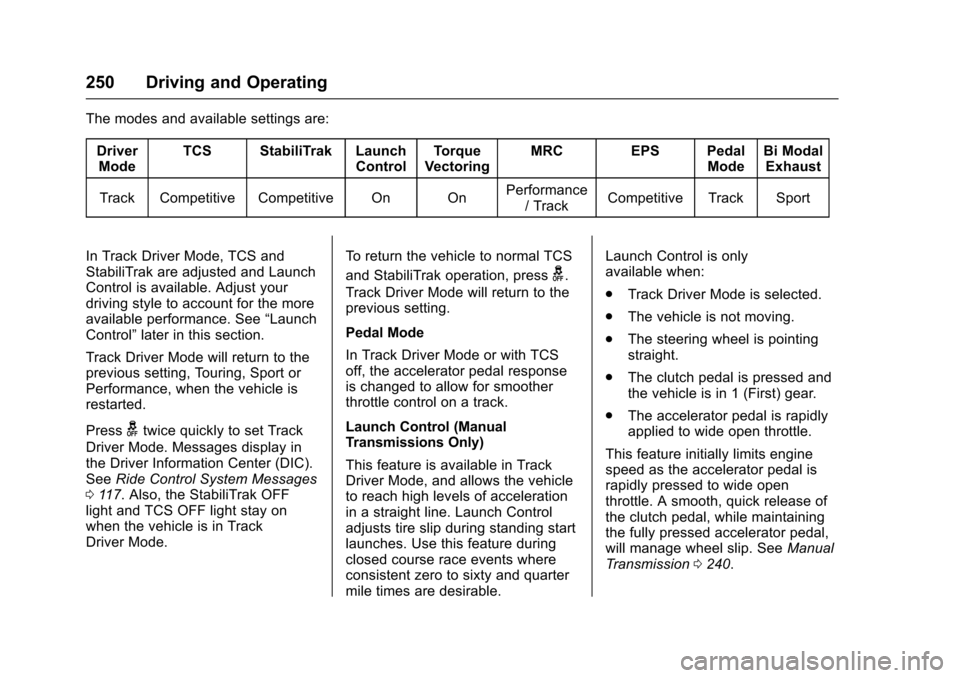
The modes and available settings are:
DriverModeTCS StabiliTrak LaunchControlTo r q u eVectoringMRC EPS PedalModeBi ModalExhaust
Track Competitive Competitive On OnPerformance/TrackCompetitive Track Sport
In Track Driver Mode, TCS andStabiliTrak are adjusted and LaunchControl is available. Adjust yourdriving style to account for the moreavailable performance. See“LaunchControl”later in this section.
Track Driver Mode will return to theprevious setting, Touring, Sport orPerformance, when the vehicle isrestarted.
Pressgtwice quickly to set Track
Driver Mode. Messages display inthe Driver Information Center (DIC).SeeRide Control System Messages011 7.Also,theStabiliTrakOFFlight and TCS OFF light stay onwhen the vehicle is in TrackDriver Mode.
To r e t u r n t h e v e h i c l e t o n o r m a l T C S
and StabiliTrak operation, pressg.
Track Driver Mode will return to theprevious setting.
Pedal Mode
In Track Driver Mode or with TCSoff, the accelerator pedal responseis changed to allow for smootherthrottle control on a track.
Launch Control (ManualTransmissions Only)
This feature is available in TrackDriver Mode, and allows the vehicleto reach high levels of accelerationin a straight line. Launch Controladjusts tire slip during standing startlaunches. Use this feature duringclosed course race events whereconsistent zero to sixty and quartermile times are desirable.
Launch Control is onlyavailable when:
.Track Driver Mode is selected.
.The vehicle is not moving.
.The steering wheel is pointingstraight.
.The clutch pedal is pressed andthe vehicle is in 1 (First) gear.
.The accelerator pedal is rapidlyapplied to wide open throttle.
This feature initially limits enginespeed as the accelerator pedal israpidly pressed to wide openthrottle. A smooth, quick release ofthe clutch pedal, while maintainingthe fully pressed accelerator pedal,will manage wheel slip. SeeManualTr a n s m i s s i o n0240.
Page 252 of 400
Chevrolet SS Sedan Owner Manual (GMNA-Localizing-U.S.-10122752) -2017 - crc - 8/31/16
Driving and Operating 251
After the vehicle is launched, thesystem continues in TrackDriver Mode.
Limited-Slip Rear Axle
Vehicles with a limited-slip rear axlecan give more traction on snow,mud, ice, sand, or gravel. Whentraction is low, this feature allowsthe drive wheel with the mosttraction to move the vehicle. Thelimited-slip rear axle also gives thedriver enhanced control whencornering hard or completing amaneuver, such as a lane change.For vehicles with a limited-slip rearaxle, driven under severeconditions, the rear axle fluid shouldbe changed. SeeTr a c k D r i v e r M o d e0249andMaintenance Schedule0349.
Cruise Control
With cruise control, the vehicle canmaintain a speed of about 40 km/h(25 mph) or more without keepingyour foot on the accelerator. Cruisecontrol does not work at speedsbelow 40 km/h (25 mph).
{Warning
Cruise control can be dangerous
where you cannot drive safely at
asteadyspeed.Donotuse
cruise control on winding roads or
in heavy traffic.
Cruise control can be dangerous
on slippery roads. On such roads,
fast changes in tire traction can
cause excessive wheel slip, and
you could lose control. Do not use
cruise control on slippery roads.
If the vehicle has the StabiliTrak®
system and begins to limit wheelspin while using cruise control, thecruise control will automaticallydisengage. SeeTr a c t i o n C o n t r o l /Electronic Stability Control0245.
When road conditions allow you tosafely use it again, the cruisecontrol can be turned back on.
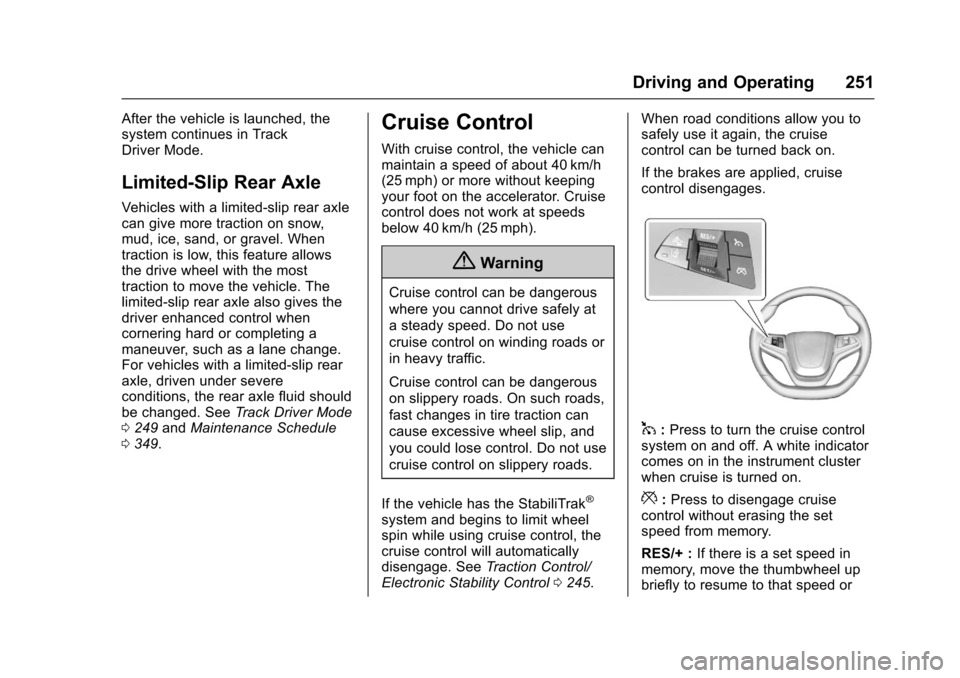
If the brakes are applied, cruisecontrol disengages.
1:Press to turn the cruise controlsystem on and off. A white indicatorcomes on in the instrument clusterwhen cruise is turned on.
*:Press to disengage cruisecontrol without erasing the setspeed from memory.
RES/+ :If there is a set speed inmemory, move the thumbwheel upbriefly to resume to that speed or