ignition CHEVROLET SS 2017 1.G User Guide
[x] Cancel search | Manufacturer: CHEVROLET, Model Year: 2017, Model line: SS, Model: CHEVROLET SS 2017 1.GPages: 400, PDF Size: 7.31 MB
Page 42 of 400
Chevrolet SS Sedan Owner Manual (GMNA-Localizing-U.S.-10122752) -2017 - crc - 8/31/16
Keys, Doors, and Windows 41
The power window switches on thedriver door control all the windows.Each passenger door has a switchthat controls only that window.
Power window switches work whenthe ignition is in ON/RUN, ACC/ACCESSORY, or RetainedAccessory Power (RAP). SeeRetained Accessory Power (RAP)0232.
Press the switch to lower thewindow. Pull the switch to raise thewindow.
Express Window Operation
Windows with an express-down orexpress-up feature allow the windowto be lowered or raised withoutholding the switch. Pull a windowswitch up or press it down all theway, release it, and the windowgoes up or down automatically. Stopthe window by pressing or pullingthe switch in the same direction asecond time, or by briefly operatingthe switch to the first detent in eitherdirection.
Express Window Anti-Pinch
Feature
If an object is in the path of thewindow when the express-up isactive, the window will stop at theobstruction and auto-reverse to apreset factory position. Weatherconditions such as severe icing maycause the window to auto-reverse.The window will return to normaloperation after the obstruction orcondition is removed.
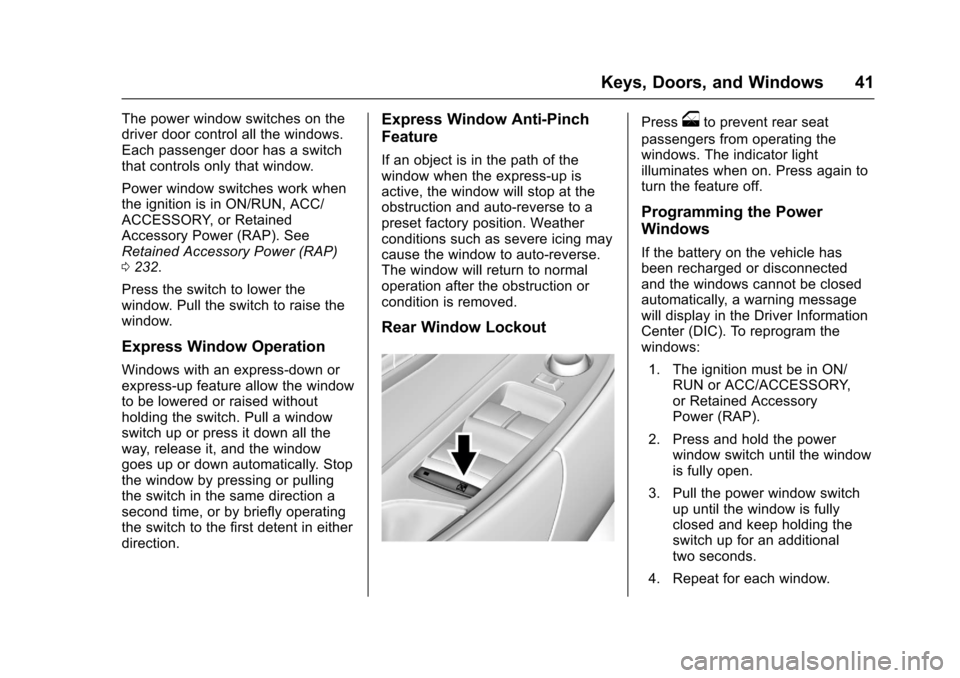
Rear Window Lockout
Pressoto prevent rear seat
passengers from operating thewindows. The indicator lightilluminates when on. Press again toturn the feature off.
Programming the Power
Windows
If the battery on the vehicle hasbeen recharged or disconnectedand the windows cannot be closedautomatically, a warning messagewill display in the Driver InformationCenter (DIC). To reprogram thewindows:
1. The ignition must be in ON/RUN or ACC/ACCESSORY,or Retained AccessoryPower (RAP).
2. Press and hold the powerwindow switch until the windowis fully open.
3. Pull the power window switchup until the window is fullyclosed and keep holding theswitch up for an additionaltwo seconds.
4. Repeat for each window.
Page 43 of 400
Chevrolet SS Sedan Owner Manual (GMNA-Localizing-U.S.-10122752) -2017 - crc - 8/31/16
42 Keys, Doors, and Windows
Sun Visors
Pull the sun visor down to blockglare. Detach the sun visor from thecenter mount to pivot to the sidewindow or, if equipped, extendalong the rod.
Roof
Sunroof
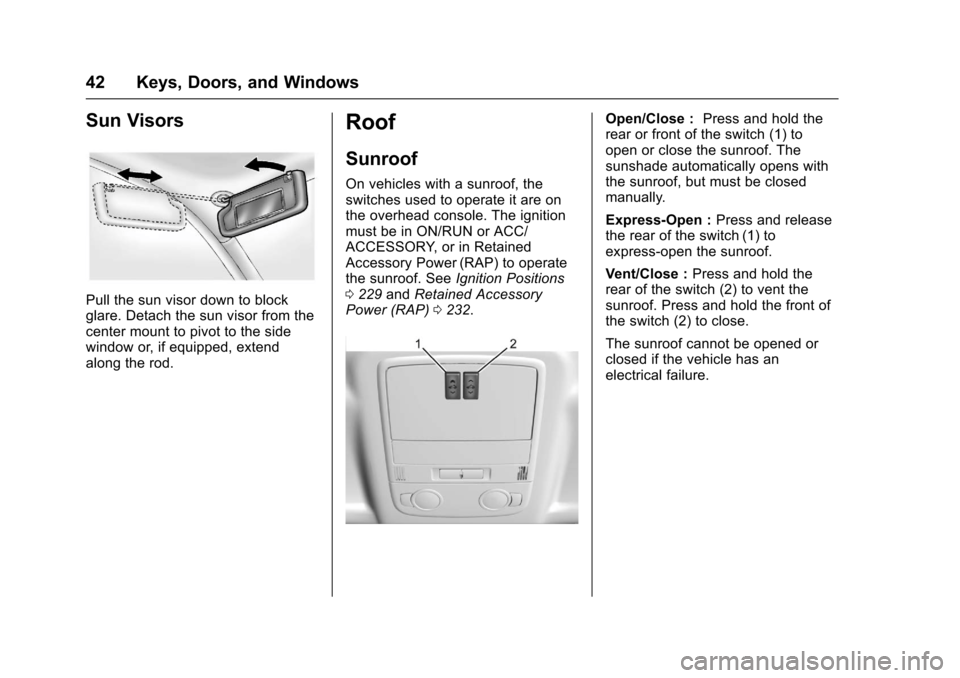
On vehicles with a sunroof, theswitches used to operate it are onthe overhead console. The ignitionmust be in ON/RUN or ACC/ACCESSORY, or in RetainedAccessory Power (RAP) to operatethe sunroof. SeeIgnition Positions0229andRetained AccessoryPower (RAP)0232.
Open/Close :Press and hold therear or front of the switch (1) toopen or close the sunroof. Thesunshade automatically opens withthe sunroof, but must be closedmanually.
Express-Open :Press and releasethe rear of the switch (1) toexpress-open the sunroof.
Vent/Close :Press and hold therear of the switch (2) to vent thesunroof. Press and hold the front ofthe switch (2) to close.
The sunroof cannot be opened orclosed if the vehicle has anelectrical failure.
Page 49 of 400
Chevrolet SS Sedan Owner Manual (GMNA-Localizing-U.S.-10122752) -2017 - crc - 8/31/16
48 Seats and Restraints
Memory Seats
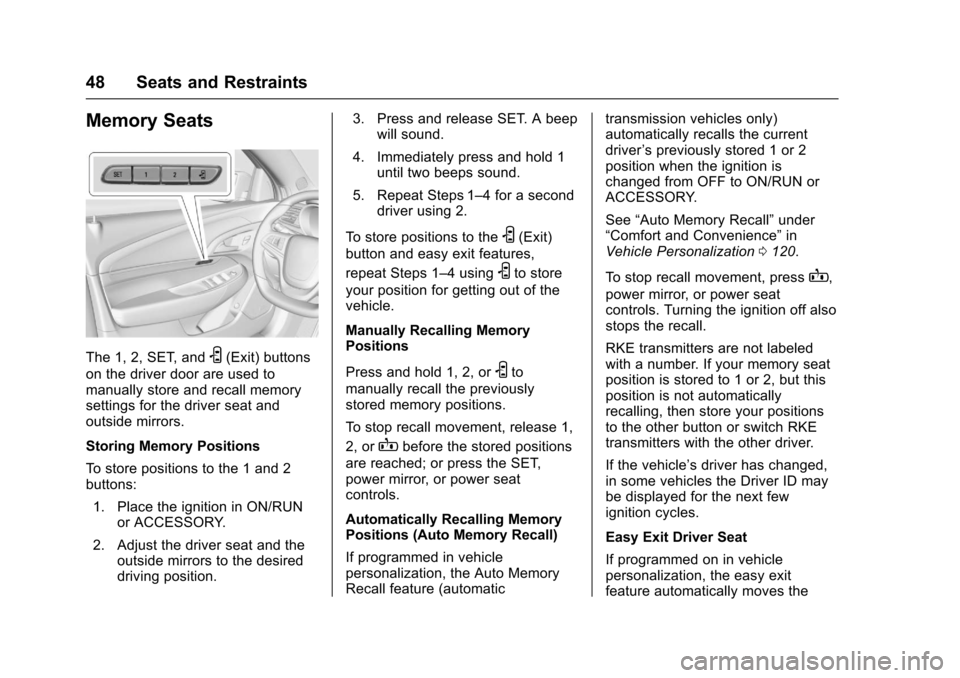
The 1, 2, SET, andS(Exit) buttons
on the driver door are used tomanually store and recall memorysettings for the driver seat andoutside mirrors.
Storing Memory Positions
To s t o r e p o s i t i o n s t o t h e 1 a n d 2buttons:
1. Place the ignition in ON/RUNor ACCESSORY.
2. Adjust the driver seat and theoutside mirrors to the desireddriving position.
3. Press and release SET. A beepwill sound.
4. Immediately press and hold 1until two beeps sound.
5. Repeat Steps 1–4foraseconddriver using 2.
To s t o r e p o s i t i o n s t o t h eS(Exit)
button and easy exit features,
repeat Steps 1–4usingSto store
your position for getting out of thevehicle.
Manually Recalling MemoryPositions
Press and hold 1, 2, orSto
manually recall the previouslystored memory positions.
To s t o p r e c a l l m o v e m e n t , r e l e a s e 1 ,
2, orBbefore the stored positions
are reached; or press the SET,power mirror, or power seatcontrols.
Automatically Recalling MemoryPositions (Auto Memory Recall)
If programmed in vehiclepersonalization, the Auto MemoryRecall feature (automatic
transmission vehicles only)automatically recalls the currentdriver’spreviouslystored1or2position when the ignition ischanged from OFF to ON/RUN orACCESSORY.
See“Auto Memory Recall”under“Comfort and Convenience”inVehicle Personalization0120.
To s t o p r e c a l l m o v e m e n t , p r e s sB,
power mirror, or power seatcontrols. Turning the ignition off alsostops the recall.
RKE transmitters are not labeledwith a number. If your memory seatposition is stored to 1 or 2, but thisposition is not automaticallyrecalling, then store your positionsto the other button or switch RKEtransmitters with the other driver.
If the vehicle’sdriverhaschanged,in some vehicles the Driver ID maybe displayed for the next fewignition cycles.
Easy Exit Driver Seat
If programmed on in vehiclepersonalization, the easy exitfeature automatically moves the
Page 51 of 400
Chevrolet SS Sedan Owner Manual (GMNA-Localizing-U.S.-10122752) -2017 - crc - 8/31/16
50 Seats and Restraints
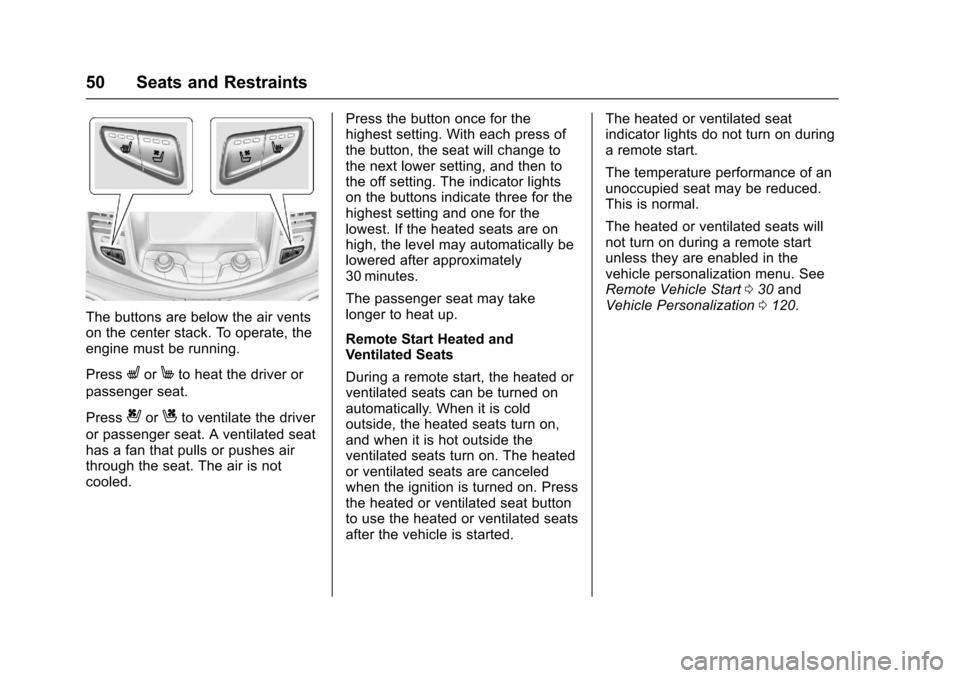
The buttons are below the air ventson the center stack. To operate, theengine must be running.
PressLorMto heat the driver or
passenger seat.
Press{orCto ventilate the driver
or passenger seat. A ventilated seathas a fan that pulls or pushes airthrough the seat. The air is notcooled.
Press the button once for thehighest setting. With each press ofthe button, the seat will change tothe next lower setting, and then tothe off setting. The indicator lightson the buttons indicate three for thehighest setting and one for thelowest. If the heated seats are onhigh, the level may automatically belowered after approximately30 minutes.
The passenger seat may takelonger to heat up.
Remote Start Heated andVentilated Seats
During a remote start, the heated orventilated seats can be turned onautomatically. When it is coldoutside, the heated seats turn on,and when it is hot outside theventilated seats turn on. The heatedor ventilated seats are canceledwhen the ignition is turned on. Pressthe heated or ventilated seat buttonto use the heated or ventilated seatsafter the vehicle is started.
The heated or ventilated seatindicator lights do not turn on duringaremotestart.
The temperature performance of anunoccupied seat may be reduced.This is normal.
The heated or ventilated seats willnot turn on during a remote startunless they are enabled in thevehicle personalization menu. SeeRemote Vehicle Start030andVehicle Personalization0120.
Page 93 of 400
Chevrolet SS Sedan Owner Manual (GMNA-Localizing-U.S.-10122752) -2017 - crc - 8/31/16
92 Instruments and Controls
_SRC^:Press to select an audiosource.
Use the thumbwheel to select thenext or previous favorite radiostation, MP3 track, USB track, andBluetooth Audio track.
Use_SRC to skip to the next song
or show using Pandora or Stitcher®.SeePandora Internet Radio0149orStitcher Internet Radio0153.
+x✓:Press + to increase the
volume. Press✓to decrease.
Horn
Pressaon the steering wheel pad
to sound the horn.
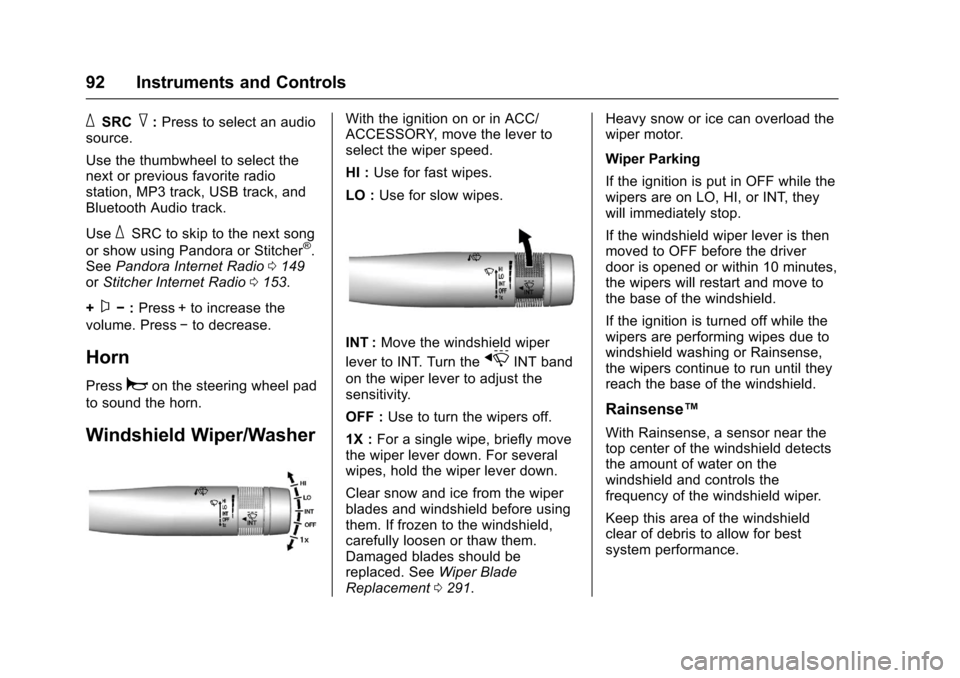
Windshield Wiper/Washer
With the ignition on or in ACC/ACCESSORY, move the lever toselect the wiper speed.
HI :Use for fast wipes.
LO :Use for slow wipes.
INT :Move the windshield wiper
lever to INT. Turn thexINT band
on the wiper lever to adjust thesensitivity.
OFF :Use to turn the wipers off.
1X :For a single wipe, briefly movethe wiper lever down. For severalwipes, hold the wiper lever down.
Clear snow and ice from the wiperblades and windshield before usingthem. If frozen to the windshield,carefully loosen or thaw them.Damaged blades should bereplaced. SeeWiper BladeReplacement0291.
Heavy snow or ice can overload thewiper motor.
Wiper Parking
If the ignition is put in OFF while thewipers are on LO, HI, or INT, theywill immediately stop.
If the windshield wiper lever is thenmoved to OFF before the driverdoor is opened or within 10 minutes,the wipers will restart and move tothe base of the windshield.
If the ignition is turned off while thewipers are performing wipes due towindshield washing or Rainsense,the wipers continue to run until theyreach the base of the windshield.
Rainsense™
With Rainsense, a sensor near thetop center of the windshield detectsthe amount of water on thewindshield and controls thefrequency of the windshield wiper.
Keep this area of the windshieldclear of debris to allow for bestsystem performance.
Page 98 of 400
Chevrolet SS Sedan Owner Manual (GMNA-Localizing-U.S.-10122752) -2017 - crc - 8/31/16
Instruments and Controls 97
Speedometer
The speedometer shows thevehicle's speed in either kilometersper hour (km/h) or miles perhour (mph).
Odometer
The odometer shows how far thevehicle has been driven, in eitherkilometers or miles.
Trip Odometer
The trip odometer shows how farthe vehicle has been driven sincethe trip odometer was last reset.
The trip odometer is accessed andreset through the Driver InformationCenter (DIC). SeeDriverInformation Center (DIC)0108.
Tachometer
The tachometer displays the enginespeed in revolutions perminute (rpm).
Caution
If the engine is operated with the
rpm’sinthewarningareaatthe
high end of the tachometer, the
vehicle could be damaged, and
the damage would not be covered
by the vehicle warranty. Do not
operate the engine with the rpm’s
in the warning area.
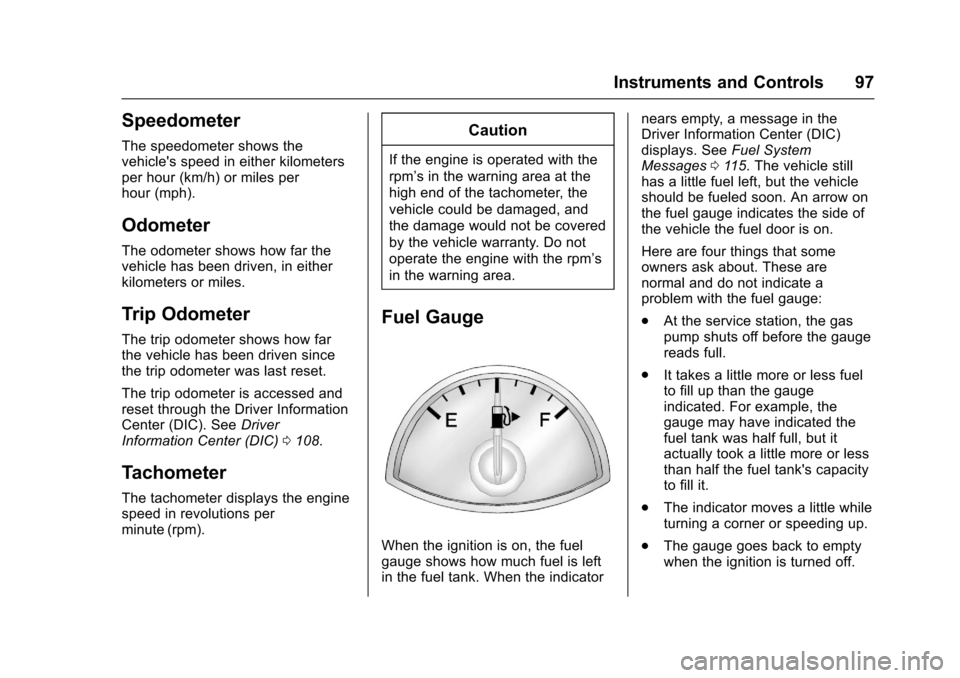
Fuel Gauge
When the ignition is on, the fuelgauge shows how much fuel is leftin the fuel tank. When the indicator
nears empty, a message in theDriver Information Center (DIC)displays. SeeFuel SystemMessages011 5.Thevehiclestillhas a little fuel left, but the vehicleshould be fueled soon. An arrow onthe fuel gauge indicates the side ofthe vehicle the fuel door is on.
Here are four things that someowners ask about. These arenormal and do not indicate aproblem with the fuel gauge:
.At the service station, the gaspump shuts off before the gaugereads full.
.It takes a little more or less fuelto fill up than the gaugeindicated. For example, thegauge may have indicated thefuel tank was half full, but itactually took a little more or lessthan half the fuel tank's capacityto fill it.
.The indicator moves a little whileturning a corner or speeding up.
.The gauge goes back to emptywhen the ignition is turned off.
Page 101 of 400
Chevrolet SS Sedan Owner Manual (GMNA-Localizing-U.S.-10122752) -2017 - crc - 8/31/16
100 Instruments and Controls
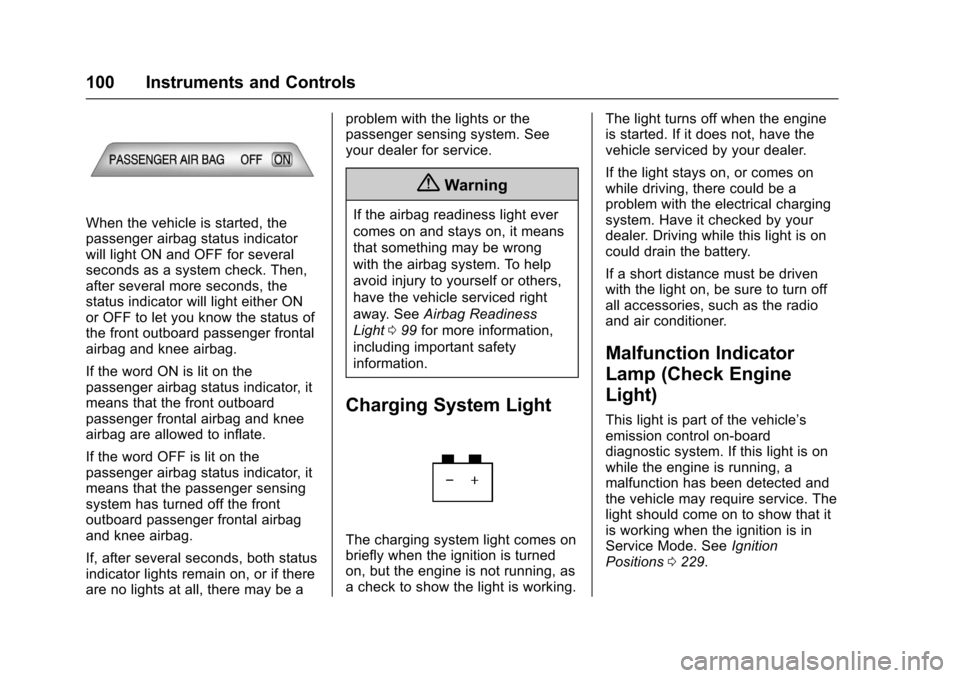
When the vehicle is started, thepassenger airbag status indicatorwill light ON and OFF for severalseconds as a system check. Then,after several more seconds, thestatus indicator will light either ONor OFF to let you know the status ofthe front outboard passenger frontalairbag and knee airbag.
If the word ON is lit on thepassenger airbag status indicator, itmeans that the front outboardpassenger frontal airbag and kneeairbag are allowed to inflate.
If the word OFF is lit on thepassenger airbag status indicator, itmeans that the passenger sensingsystem has turned off the frontoutboard passenger frontal airbagand knee airbag.
If, after several seconds, both statusindicator lights remain on, or if thereare no lights at all, there may be a
problem with the lights or thepassenger sensing system. Seeyour dealer for service.
{Warning
If the airbag readiness light ever
comes on and stays on, it means
that something may be wrong
with the airbag system. To help
avoid injury to yourself or others,
have the vehicle serviced right
away. SeeAirbag Readiness
Light099for more information,
including important safety
information.
Charging System Light
The charging system light comes onbriefly when the ignition is turnedon, but the engine is not running, asachecktoshowthelightisworking.
The light turns off when the engineis started. If it does not, have thevehicle serviced by your dealer.
If the light stays on, or comes onwhile driving, there could be aproblem with the electrical chargingsystem. Have it checked by yourdealer. Driving while this light is oncould drain the battery.
If a short distance must be drivenwith the light on, be sure to turn offall accessories, such as the radioand air conditioner.
Malfunction Indicator
Lamp (Check Engine
Light)
This light is part of the vehicle’semission control on-boarddiagnostic system. If this light is onwhile the engine is running, amalfunction has been detected andthe vehicle may require service. Thelight should come on to show that itis working when the ignition is inService Mode. SeeIgnitionPositions0229.
Page 103 of 400
Chevrolet SS Sedan Owner Manual (GMNA-Localizing-U.S.-10122752) -2017 - crc - 8/31/16
102 Instruments and Controls
If the light remains on, see yourdealer.
Emissions Inspection and
Maintenance Programs
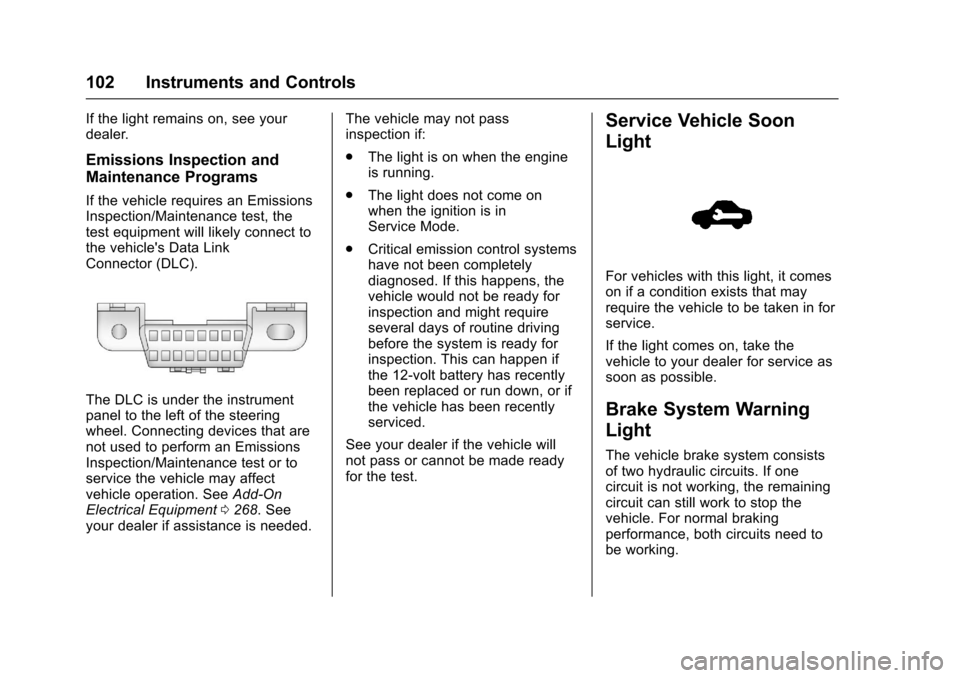
If the vehicle requires an EmissionsInspection/Maintenance test, thetest equipment will likely connect tothe vehicle's Data LinkConnector (DLC).
The DLC is under the instrumentpanel to the left of the steeringwheel. Connecting devices that arenot used to perform an EmissionsInspection/Maintenance test or toservice the vehicle may affectvehicle operation. SeeAdd-OnElectrical Equipment0268.Seeyour dealer if assistance is needed.
The vehicle may not passinspection if:
.The light is on when the engineis running.
.The light does not come onwhen the ignition is inService Mode.
.Critical emission control systemshave not been completelydiagnosed. If this happens, thevehicle would not be ready forinspection and might requireseveral days of routine drivingbefore the system is ready forinspection. This can happen ifthe 12-volt battery has recentlybeen replaced or run down, or ifthe vehicle has been recentlyserviced.
See your dealer if the vehicle willnot pass or cannot be made readyfor the test.
Service Vehicle Soon
Light
For vehicles with this light, it comeson if a condition exists that mayrequire the vehicle to be taken in forservice.
If the light comes on, take thevehicle to your dealer for service assoon as possible.
Brake System Warning
Light
The vehicle brake system consistsof two hydraulic circuits. If onecircuit is not working, the remainingcircuit can still work to stop thevehicle. For normal brakingperformance, both circuits need tobe working.
Page 107 of 400
Chevrolet SS Sedan Owner Manual (GMNA-Localizing-U.S.-10122752) -2017 - crc - 8/31/16
106 Instruments and Controls
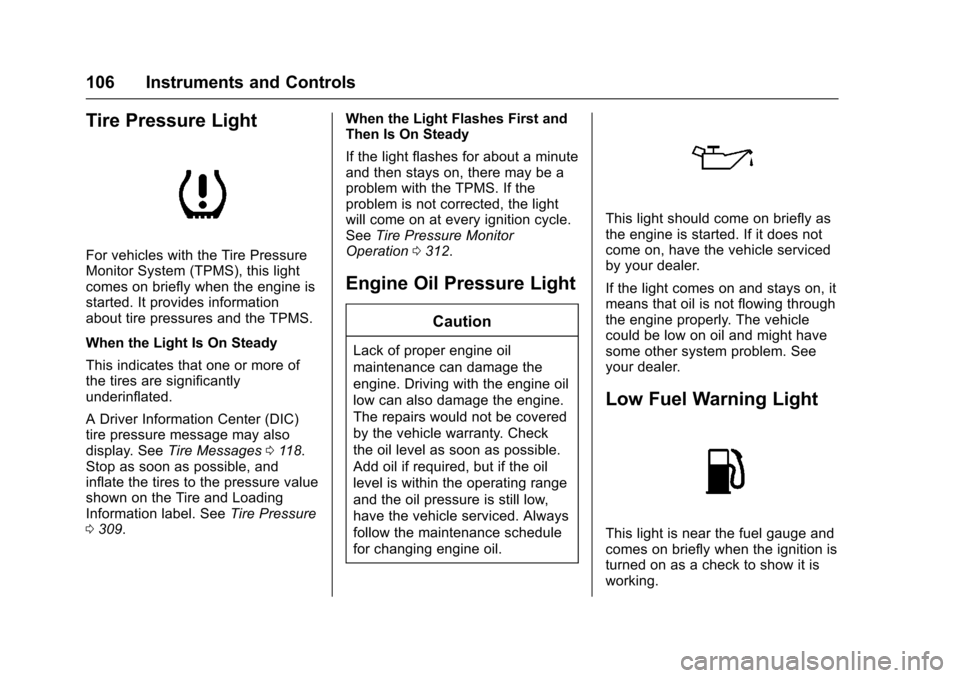
Tire Pressure Light
For vehicles with the Tire PressureMonitor System (TPMS), this lightcomes on briefly when the engine isstarted. It provides informationabout tire pressures and the TPMS.
When the Light Is On Steady
This indicates that one or more ofthe tires are significantlyunderinflated.
ADriverInformationCenter(DIC)tire pressure message may alsodisplay. SeeTire Messages011 8.Stop as soon as possible, andinflate the tires to the pressure valueshown on the Tire and LoadingInformation label. SeeTire Pressure0309.
When the Light Flashes First andThen Is On Steady
If the light flashes for about a minuteand then stays on, there may be aproblem with the TPMS. If theproblem is not corrected, the lightwill come on at every ignition cycle.SeeTire Pressure MonitorOperation0312.
Engine Oil Pressure Light
Caution
Lack of proper engine oil
maintenance can damage the
engine. Driving with the engine oil
low can also damage the engine.
The repairs would not be covered
by the vehicle warranty. Check
the oil level as soon as possible.
Add oil if required, but if the oil
level is within the operating range
and the oil pressure is still low,
have the vehicle serviced. Always
follow the maintenance schedule
for changing engine oil.
This light should come on briefly asthe engine is started. If it does notcome on, have the vehicle servicedby your dealer.
If the light comes on and stays on, itmeans that oil is not flowing throughthe engine properly. The vehiclecould be low on oil and might havesome other system problem. Seeyour dealer.
Low Fuel Warning Light
This light is near the fuel gauge andcomes on briefly when the ignition isturned on as a check to show it isworking.
Page 121 of 400
Chevrolet SS Sedan Owner Manual (GMNA-Localizing-U.S.-10122752) -2017 - crc - 8/31/16
120 Instruments and Controls
Vehicle Reminder
Messages
ICE POSSIBLE DRIVE
WITH CARE
This message displays when iceconditions are possible.
Vehicle Speed Messages
SPEED LIMITED TO XXX
This message displays when amalfunction is present in theMagnetic Ride Control system. Thevehicle speed will be limited to avalue determined by the vehiclewhen the shock absorber systemhas failed and the shocks are intheir full soft mode. Have the vehicleserviced as soon as possible.
Washer Fluid Messages
WASHER FLUID LOW ADD
FLUID
This message may display when thewasher fluid level is low. Fill thewindshield washer reservoir as soonas possible. SeeEngineCompartment Overview0274forthe location of the windshieldwasher reservoir. Also, seeWasherFluid0286.
Window Messages
OPEN, THEN CLOSE DRIVER/
PASSENGER WINDOW
This message is displayed when thewindow needs to be reprogrammed.If the vehicle's battery has beendischarged or disconnected, youmay need to program each frontwindow for the express-up feature towork. SeePower Windows040.
Vehicle
Personalization
Use the audio system controls toaccess the personalization menusfor customizing vehicle features.
The following are all possiblepersonalization features. Dependingon the vehicle, some may not beavailable.
HOME :Press to display the HomePage screen.
TUNE/MENU :Press to entermenus and select menu items. Turnto scroll through the menus.
/BACK :Press to exit or movebackward in a menu.
Entering the PersonalizationMenus
The ignition must be in the ONposition.
1. Press HOME.
2. Select the Config screenbutton.
3. Turn the TUNE/MENU knob tohighlight the desired setting.