ignition CHEVROLET SS 2017 1.G Owner's Manual
[x] Cancel search | Manufacturer: CHEVROLET, Model Year: 2017, Model line: SS, Model: CHEVROLET SS 2017 1.GPages: 400, PDF Size: 7.31 MB
Page 125 of 400

Chevrolet SS Sedan Owner Manual (GMNA-Localizing-U.S.-10122752) -2017 - crc - 8/31/16
124 Instruments and Controls
Vehicle Locator Lights
Select to turn this feature on or off.When on, the turn signals flash andthe headlamps and back-up lamps
will turn on whenKis pressed on
the Remote Keyless Entry (RKE)transmitter when it is dark outside.
Exit Lighting
This allows the selection of howlong the exterior lamps stay onwhen leaving the vehicle when it isdark outside.
Select Off, 30 Seconds, 1 Minute,or 2 Minutes.
Power Door Locks
Select and the following maydisplay:
.Open Door Anti Lock Out
.Auto Door Unlock
.Delayed Door Lock
Open Door Anti Lock Out
When on, this feature will keep thedriver door from locking when thedoor is open. If off, the DelayedDoor Lock menu will be available.
Select On or Off.
Auto Door Unlock
This allows the selection of whichdoors will automatically unlock whenthe vehicle is shifted into P (Park)and for a manual transmission whenthe ignition is turned off.
Select All Doors, Driver Door, or Off.
Delayed Door Lock
When on, this feature will delay thelocking of the doors. To override thedelay, press the power door lockswitch on the door.
Select On or Off.
Remote Lock/Unlock/Start
Select and the following maydisplay:
.Remote Unlock Feedback
.Remote Lock Feedback
.Remote Door Unlock
.Passive Door Unlock
.Passive Door Lock
.Remote Left in Veh. Reminder
Remote Unlock Feedback
If equipped, this allows the selectionof what type of feedback is givenwhen unlocking the vehicle with theRKE transmitter.
Select Flash Lights or Off.
Remote Lock Feedback
This allows the selection of whattype of feedback is given whenlocking the vehicle with the RemoteKeyless Entry (RKE) transmitter.
Select Lights and Horn, Lights Only,Horn Only, or Off.
Remote Door Unlock
This allows the selection of which
doors will unlock when pressingK
on the RKE transmitter.
Select Driver Door or All Doors.When set to Driver Door, the driver
door will unlock the first timeKis
pressed and all doors will unlock
whenKis pressed a second time.
When set to All Doors, all of thedoors will unlock with the first press
ofK.
Page 128 of 400
Chevrolet SS Sedan Owner Manual (GMNA-Localizing-U.S.-10122752) -2017 - crc - 8/31/16
Lighting 127
Daytime Running
Lamps (DRL)
The vehicle has DRL that illuminateat full intensity when the followingoccur:
.During daylight conditions.
.The engine is running.
If the lamp control is turned to;
or5the DRL will illuminate at
reduced intensity.
Automatic Headlamp
System
When it is dark enough outside andthe exterior lamp control is in theautomatic position, the headlampsand parking lamps will turn on andoff automatically. SeeExterior LampControls0126.
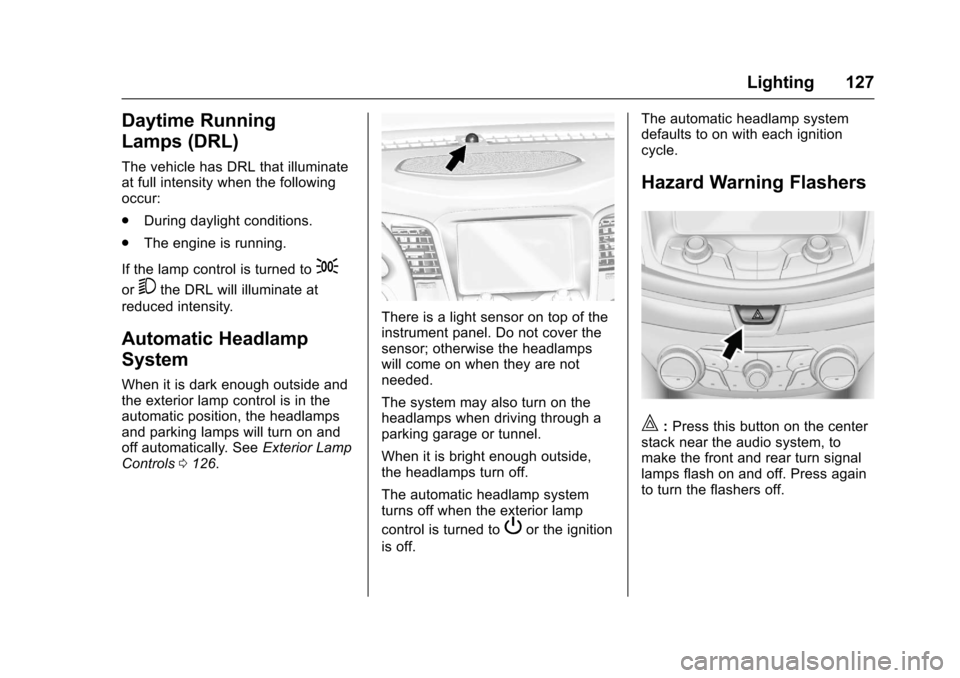
There is a light sensor on top of theinstrument panel. Do not cover thesensor; otherwise the headlampswill come on when they are notneeded.
The system may also turn on theheadlamps when driving through aparking garage or tunnel.
When it is bright enough outside,the headlamps turn off.
The automatic headlamp systemturns off when the exterior lamp
control is turned toPor the ignition
is off.
The automatic headlamp systemdefaults to on with each ignitioncycle.
Hazard Warning Flashers
|:Press this button on the centerstack near the audio system, tomake the front and rear turn signallamps flash on and off. Press againto turn the flashers off.
Page 130 of 400
Chevrolet SS Sedan Owner Manual (GMNA-Localizing-U.S.-10122752) -2017 - crc - 8/31/16
Lighting 129
Dome Lamps
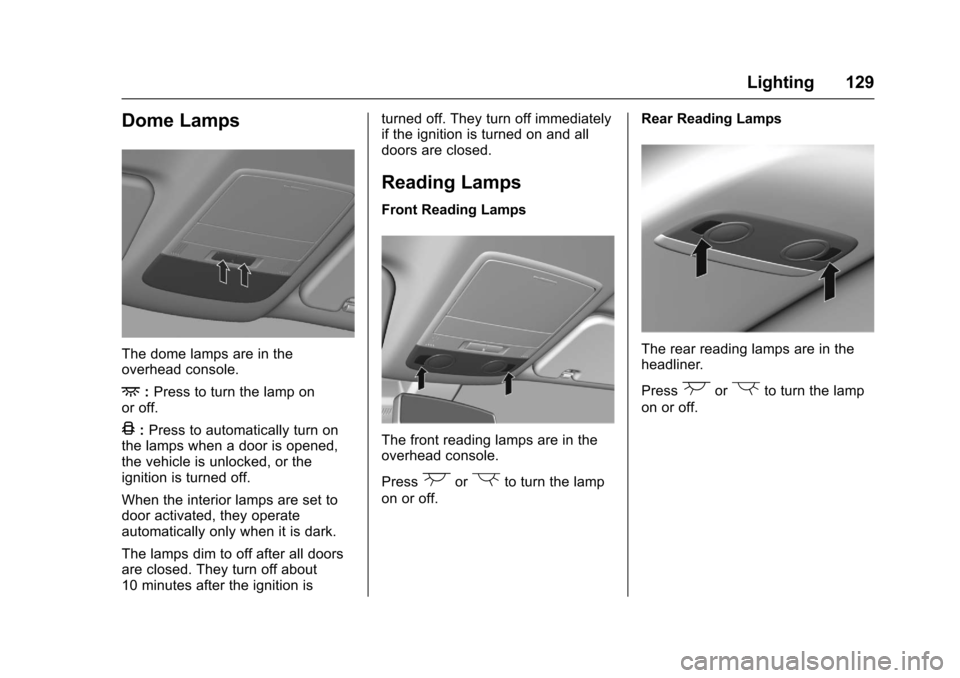
The dome lamps are in theoverhead console.
+:Press to turn the lamp onor off.
4:Press to automatically turn onthe lamps when a door is opened,the vehicle is unlocked, or theignition is turned off.
When the interior lamps are set todoor activated, they operateautomatically only when it is dark.
The lamps dim to off after all doorsare closed. They turn off about10 minutes after the ignition is
turned off. They turn off immediatelyif the ignition is turned on and alldoors are closed.
Reading Lamps
Front Reading Lamps
The front reading lamps are in theoverhead console.
Press(or)to turn the lamp
on or off.
Rear Reading Lamps
The rear reading lamps are in theheadliner.
Press(or)to turn the lamp
on or off.
Page 131 of 400
Chevrolet SS Sedan Owner Manual (GMNA-Localizing-U.S.-10122752) -2017 - crc - 8/31/16
130 Lighting
Lighting Features
Entry Lighting
Some exterior lamps and most ofthe interior lamps turn on briefly
whenKis pressed on the Remote
Keyless Entry (RKE) transmitter.After about 30 seconds the exteriorlamps turn off, and then the domeand remaining interior lamps will dimto off.
This feature can be changed. See“Ve h i c l e L o c a t o r L i g h t s”underVehicle Personalization0120.
Exit Lighting
The exterior lamps will illuminate anarea with limited lighting for a setamount of time when the ignition isturned to LOCK/OFF.
This feature can be changed. SeeVehicle Personalization0120.
Battery Power Protection
To p r e v e n t t h e b a t t e r y f r o m b e i n gdrained, the glove box, trunk, andreading lamps automatically turn off10 minutes after the ignition isturned off.
The lamps are reactivated if any ofthe following occur:
.The ignition is turned on.
.The vehicle is unlocked.
.The trunk is opened.
Page 133 of 400
Chevrolet SS Sedan Owner Manual (GMNA-Localizing-U.S.-10122752) -2017 - crc - 8/31/16
132 Infotainment System
features are also available throughthe instrument cluster and steeringwheel controls.
Before driving:
.Become familiar with theoperation, center stack controls,and infotainment display options.
.Set up the audio by presettingfavorite stations, setting thetone, and adjusting thespeakers.
.Set up phone numbers inadvance so they can be calledeasily by pressing a singlecontrol or by using a single voicecommand if equipped withBluetooth phone capability.
SeeDefensive Driving0217.
To p l a y t h e i n f o t a i n m e n t s y s t e m w i t hthe ignition off, seeRetainedAccessory Power (RAP)0232.
Overview
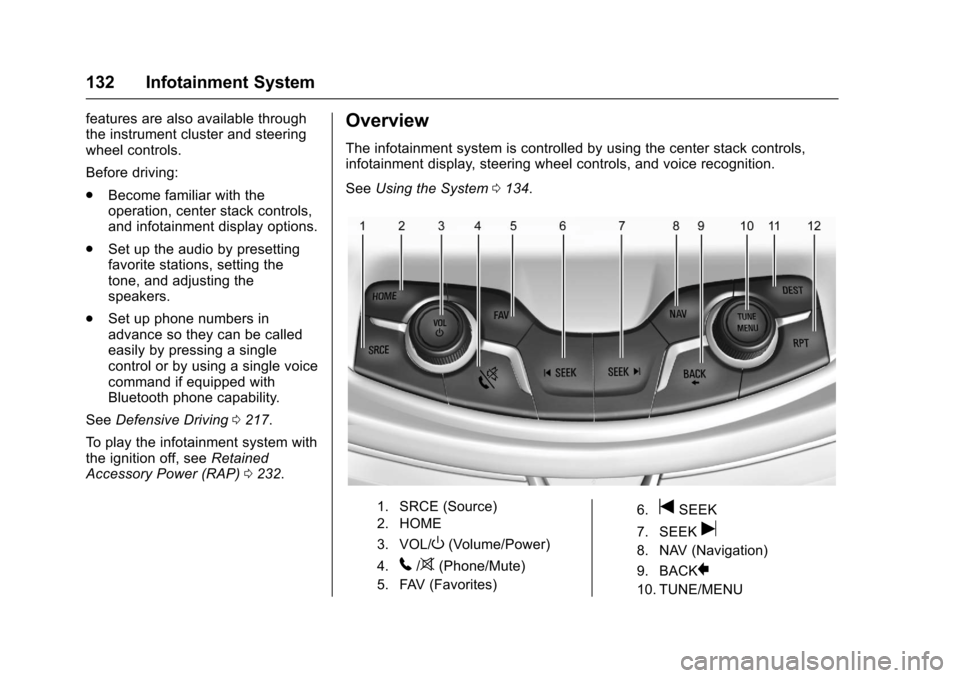
The infotainment system is controlled by using the center stack controls,infotainment display, steering wheel controls, and voice recognition.
SeeUsing the System0134.
1. SRCE (Source)
2. HOME
3. VOL/O(Volume/Power)
4.5/>(Phone/Mute)
5. FAV (Favorites)
6.tSEEK
7. SEEKu
8. NAV (Navigation)
9. BACK}
10. TUNE/MENU
Page 140 of 400
Chevrolet SS Sedan Owner Manual (GMNA-Localizing-U.S.-10122752) -2017 - crc - 8/31/16
Infotainment System 139
Cleaning High Gloss Surfaces
and Vehicle Information and
Radio Displays
For vehicles with high glosssurfaces or vehicle displays, use amicrofiber cloth to wipe surfaces.Before wiping the surface with themicrofiber cloth, use a soft bristlebrush to remove dirt that couldscratch the surface. Then use themicrofiber cloth by gently rubbing toclean. Never use window cleanersor solvents. Periodically hand washthe microfiber cloth separately,using mild soap. Do not use bleachor fabric softener. Rinse thoroughlyand air dry before next use.
Caution
Do not attach a device with a
suction cup to the display. This
may cause damage and would
not be covered by the warranty.
Software Updates
See www.chevrolet.com for softwareupdates.
Radio
AM-FM Radio
Playing the Radio
VOL/O:
.Press to turn the radio on or off.
.Turn to increase or decrease thevolume of the active source.
The steering wheel controls canalso be used to adjust the volume.SeeSteering Wheel Controls0134.
To p l a y t h e i n f o t a i n m e n t s y s t e m w i t hthe ignition off, seeRetainedAccessory Power (RAP)0232.
Audio Source
Press SRCE on the center stack orSRC on the steering wheel controlsto display and scroll through theavailable sources AM, FM, SiriusXM(if equipped), Pandora (if equipped),Stitcher, USB, and Bluetooth Audio.
Infotainment System Settings
Tone Settings
To a c c e s s t h e t o n e s e t t i n g s , t o u c hthe Tone Settings icon on the HomePage. Tone settings are specific toeach source.
To a d j u s t t h e s e t t i n g s :
.Bass: Touch + or✓to changethe level.
.Mid (Midrange): Touch + or✓tochange the level.
.Treble: Touch + or✓to changethe level.
.EQ: Touch or turn the TUNE/MENU knob to cycle through thepreset EQ options.
.Fade: Touch F or R for moresound from the front or rearspeakers. The middle positionbalances the sound between thefront and rear speakers.
.Balance: Touch L or R for moresound from the left or rightspeakers. The middle positionbalances the sound between theleft and right speakers.
Page 151 of 400
Chevrolet SS Sedan Owner Manual (GMNA-Localizing-U.S.-10122752) -2017 - crc - 8/31/16
150 Infotainment System
If nothing happens when theavailable Pandora icon is touched,download the latest Pandoraapplication and retry.
Pandora will always be highlightedon the Home Page when an iPhone,iPad, or iPod touch is connectedusing the USB port. To use, log intoyour account.
If the“Please See Device”messageis shown, the login screen maydisplay on the device.
If the“Please unlock your phone orrestart the app”message is shown,then the phone may be locked.Unlock the phone, close the app,then restart the app and make surethe Home Page is visible on thephone/device.
If Pandora is shut down on thephone or another audio app is used,Pandora may not start on the nextignition cycle. If iPod source isselected, it may show iPod and thenswitch to Pandora.
Using an Android Phone
1. Pair the Android phone usingBluetooth.
2. Use one of the following tolaunch:
.Launch the application onthe device.
.To u c h t h e P a n d o r a i c o n o nthe Home Page.
.Pressb/gand say
“Pandora”or“TunePandora.”
After Pandora has been launched,press SRCE on the center stack orpress SRC on the steering wheelcontrols to access Pandorafeatures.
If nothing happens when theavailable Pandora icon is touched,download the latest Pandoraapplication and retry.
If the“Please See Device”messageis shown, the login screen maydisplay on the device.
If the "Please unlock your phone orrestart the app" message is shown,then the phone may be locked.Unlock the phone, close the app,then restart the app to ensureproper communication.
Using a BlackBerry Phone
The phone must be unlocked. Tolaunch Pandora service:
1. Pair the BlackBerry phoneusing Bluetooth.
2. Use one of the following tolaunch:
.Launch the application onthe device.
.To u c h t h e P a n d o r a i c o n o nthe Home Page.
.Pressb/gand say
“Pandora”or“TunePandora.”
After Pandora has been launched,press SRCE on the center stack orpress SRC on the steering wheelcontrols to access Pandorafeatures.
If nothing happens when theavailable Pandora icon is touched,download the latest Pandoraapplication and retry.
If the“Please See Device”messageis shown, the login screen maydisplay on the device.
Page 152 of 400
Chevrolet SS Sedan Owner Manual (GMNA-Localizing-U.S.-10122752) -2017 - crc - 8/31/16
Infotainment System 151
If the "Please unlock your phone orrestart the app" message is shown,then the phone may be locked.Unlock the phone, close the app,and then restart the app to ensureproper communication.
Pandora Menus
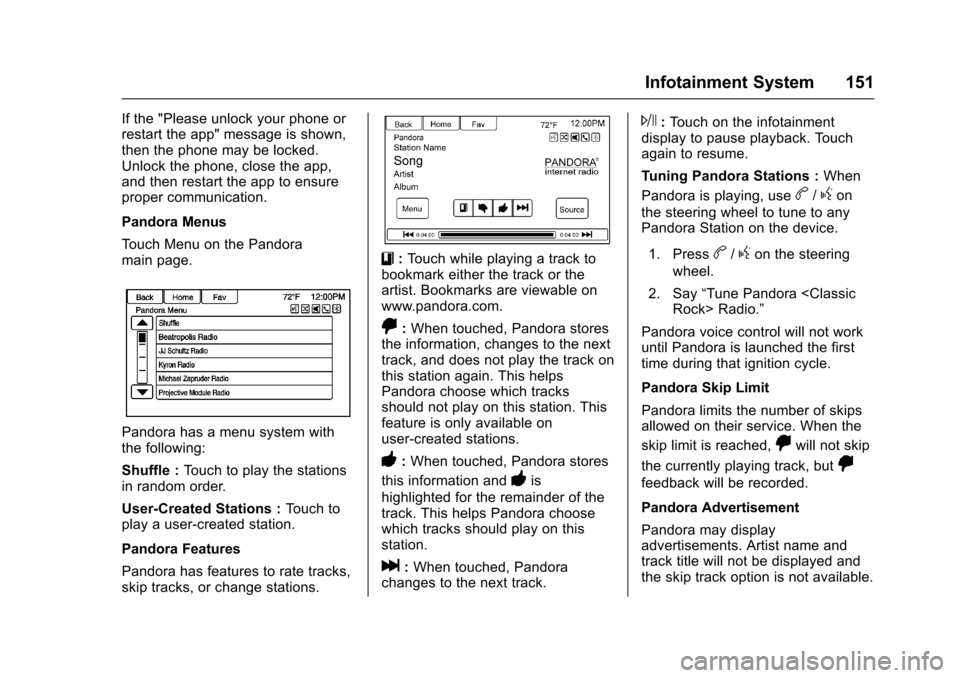
To u c h M e n u o n t h e P a n d o r amain page.
Pandora has a menu system withthe following:
Shuffle :To u c h t o p l a y t h e s t a t i o n sin random order.
User-Created Stations :To u c h t oplay a user-created station.
Pandora Features
Pandora has features to rate tracks,skip tracks, or change stations.
}:To u c h w h i l e p l a y i n g a t r a c k t obookmark either the track or theartist. Bookmarks are viewable onwww.pandora.com.
,:When touched, Pandora storesthe information, changes to the nexttrack, and does not play the track onthis station again. This helpsPandora choose which tracksshould not play on this station. Thisfeature is only available onuser-created stations.
-:When touched, Pandora stores
this information and-is
highlighted for the remainder of thetrack. This helps Pandora choosewhich tracks should play on thisstation.
l:When touched, Pandorachanges to the next track.
J:To u c h o n t h e i n f o t a i n m e n tdisplay to pause playback. Touchagain to resume.
Tu n i n g P a n d o r a S t a t i o n s :When
Pandora is playing, useb/gon
the steering wheel to tune to anyPandora Station on the device.
1. Pressb/gon the steering
wheel.
2. Say“Tune Pandora
Pandora voice control will not workuntil Pandora is launched the firsttime during that ignition cycle.
Pandora Skip Limit
Pandora limits the number of skipsallowed on their service. When the
skip limit is reached,,will not skip
the currently playing track, but,
feedback will be recorded.
Pandora Advertisement
Pandora may displayadvertisements. Artist name andtrack title will not be displayed andthe skip track option is not available.
Page 160 of 400
Chevrolet SS Sedan Owner Manual (GMNA-Localizing-U.S.-10122752) -2017 - crc - 8/31/16
Infotainment System 159
on the radio. User predefined coverart will always be used first. If nocover art is found Gracenote willuse generic genre graphics orimages of artists.
More Like This
The Gracenote database containsattributes for Music, such as genre,era of music, region, artist type,mood, etc. Use this to create aplaylist of up to 30 songs "more like"currently listened to song. Thisplaylist will be stored in the Playlistmenu when the device isreconnected. If songs are removedfrom the device, the system willsimply skip over those songs andplay the next available song.
Use the infotainment display orvoice recognition to create a MoreLike This Playlist. See“VoiceRecognition Commands”inVoiceRecognition0189.
Gracenote Indexing
While Gracenote is indexing,infotainment features are availableincluding selecting music from themenu. Voice recognition music will
not be available until the radio hascompleted indexing the device.Devices with more music may takelonger to index. The device willindex when plugged into the radiofor the first time. When Indexing isremoved from the display, the radiois ready to support music search.On the next connection or ignitioncycle, Indexing will show briefly onthe display. The radio is searchingfor changes to the device andpreparing the music list. If there areno changes, the voice recognitionmusic search will be available. Theradio will index and store twodevices with up to 10,000 songs oneach device.
USB MP3 Player and USB Drives
.The USB MP3 players and USBdrives connected must complywith the USB Mass StorageClass specification (USB MSC).
.Hard disk drives are notsupported.
.The radio will not be able to playback write-protected music.
.File systems supported: FAT32,NTFS, Linux, and HFS+.
.The following restrictions applyfor the data stored on a USBMP3 player or USB device:
⇣Maximum folder structuredepth: eight levels.
⇣Maximum number of MP3/WMA files that can bedisplayed: 10,000.
⇣Playlist entries must be in theform of relative paths.
⇣The system attribute forfolders/files that contain audiodata must not be set.
To p l a y a U S B d e v i c e , d o o n e o f t h efollowing:
.Connect the USB and it beginsto play.
.To u c h t h e N o w P l a y i n g i c o n o nthe Home Page.
.Press SRCE on the center stackto scroll until the USB sourcedisplay is available.
Page 214 of 400
Chevrolet SS Sedan Owner Manual (GMNA-Localizing-U.S.-10122752) -2017 - crc - 8/31/16
Climate Controls 213
AUTOhis displayed when the
system is automatically controllingthe combination of outside andrecirculated air for bestperformance.
Rear Window Defogger
The rear window defogger uses awarming grid to remove fog or frostfrom the rear window. It only workswhen the ignition is on.
K:Press to turn the rear windowdefogger on or off. The indicator onthe button turns on. The rearwindow defogger turns offautomatically if it is left on.
Caution
Using a razor blade or sharp
object on the inside rear window
can damage the antenna or
defogger. Repairs would not be
covered by the vehicle warranty.
Do not stick anything to the rear
window.
Heated Mirrors :If equipped withheated outside mirrors, the mirrorsheat to help clear fog or frost fromthe surface of the mirror when therear window defog button ispressed. SeeHeated Mirrors039.
Sensors
The automatic climate controlsystem uses sensors to maintaintemperatures. The solar sensor ison the instrument panel near thewindshield, and the outsidetemperature sensor is in front of theradiator.
The solar sensor monitors the solarradiation when operating in AUTOmode, adjusting the temperature,fan speed and air delivery.
The system may also supply coolerair to the side of the vehicle facingthe sun. The recirculation mode willalso be activated, as necessary.
The outside temperature sensor canbe affected by radiant heat whenthe vehicle is not moving.
To p r e v e n t f a l s e t e m p e r a t u r ereadings, the displayed temperaturewill not update at low vehiclespeeds.
If the vehicle has been turned off forless than four hours, thetemperature at start up will berecalled from previous operation.
Do not cover the sensors; otherwisethe automatic climate control systemwill not work properly.
Remote Start Climate Control
Operation
If equipped with the remote startfeature, when it is activated, theclimate control system will use theprevious settings. SeeRemoteVehicle Start030.
Regular Operation
Adjusting the Temperature
When the climate control systemhas stabilized, adjust thetemperature to a comfortablesetting.