steering CHEVROLET SS 2017 1.G User Guide
[x] Cancel search | Manufacturer: CHEVROLET, Model Year: 2017, Model line: SS, Model: CHEVROLET SS 2017 1.GPages: 400, PDF Size: 7.31 MB
Page 61 of 400
Chevrolet SS Sedan Owner Manual (GMNA-Localizing-U.S.-10122752) -2017 - crc - 8/31/16
60 Seats and Restraints
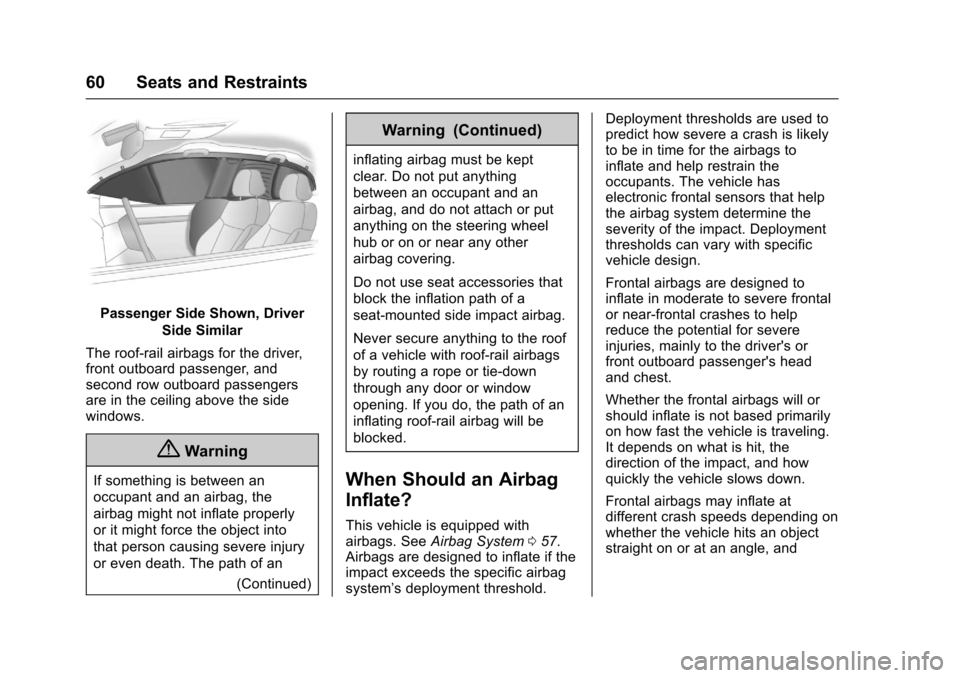
Passenger Side Shown, Driver
Side Similar
The roof-rail airbags for the driver,front outboard passenger, andsecond row outboard passengersare in the ceiling above the sidewindows.
{Warning
If something is between an
occupant and an airbag, the
airbag might not inflate properly
or it might force the object into
that person causing severe injury
or even death. The path of an
(Continued)
Warning (Continued)
inflating airbag must be kept
clear. Do not put anything
between an occupant and an
airbag, and do not attach or put
anything on the steering wheel
hub or on or near any other
airbag covering.
Do not use seat accessories that
block the inflation path of a
seat-mounted side impact airbag.
Never secure anything to the roof
of a vehicle with roof-rail airbags
by routing a rope or tie⇣down
through any door or window
opening. If you do, the path of an
inflating roof-rail airbag will be
blocked.
When Should an Airbag
Inflate?
This vehicle is equipped withairbags. SeeAirbag System057.Airbags are designed to inflate if theimpact exceeds the specific airbagsystem’sdeploymentthreshold.
Deployment thresholds are used topredict how severe a crash is likelyto be in time for the airbags toinflate and help restrain theoccupants. The vehicle haselectronic frontal sensors that helpthe airbag system determine theseverity of the impact. Deploymentthresholds can vary with specificvehicle design.
Frontal airbags are designed toinflate in moderate to severe frontalor near-frontal crashes to helpreduce the potential for severeinjuries, mainly to the driver's orfront outboard passenger's headand chest.
Whether the frontal airbags will orshould inflate is not based primarilyon how fast the vehicle is traveling.It depends on what is hit, thedirection of the impact, and howquickly the vehicle slows down.
Frontal airbags may inflate atdifferent crash speeds depending onwhether the vehicle hits an objectstraight on or at an angle, and
Page 62 of 400
Chevrolet SS Sedan Owner Manual (GMNA-Localizing-U.S.-10122752) -2017 - crc - 8/31/16
Seats and Restraints 61
whether the object is fixed ormoving, rigid or deformable, narrowor wide.
Frontal airbags are not intended toinflate during vehicle rollovers, inrear impacts, or in many sideimpacts.
In addition, the vehicle hasadvanced technology frontalairbags. Advanced technologyfrontal airbags adjust the restraintaccording to crash severity.
The vehicle also has seat positionsensors that enable the sensingsystem to monitor the position of thedriver seat and the front outboardpassenger seat. Seat positionsensors provide information that isused to adjust the deployment of thefrontal airbags.
Knee airbags are designed to inflatein moderate to severe frontalimpacts. Knee airbags are notdesigned to inflate during vehiclerollovers, in rear impacts, or in manyside impacts.
Seat-mounted side impact airbagsare designed to inflate in moderateto severe side crashes, dependingon the location of the impact.Seat-mounted side impact airbagsare not designed to inflate in frontalimpacts, near-frontal impacts,rollovers, or rear impacts.Aseat-mountedsideimpactairbagis designed to inflate on the side ofthe vehicle that is struck.
Roof-rail airbags are designed toinflate in moderate to severe sidecrashes, depending on the locationof the impact. In addition, theseroof-rail airbags are designed toinflate during a rollover or in asevere frontal impact. Roof-railairbags are not designed to inflate inrear impacts. Both roof-rail airbagswill inflate when either side of thevehicle is struck or if the sensingsystem predicts that the vehicle isabout to roll over on its side, or in asevere frontal impact.
In any particular crash, no one cansay whether an airbag should haveinflated simply because of thevehicle damage or repair costs.
What Makes an Airbag
Inflate?
In a deployment event, the sensingsystem sends an electrical signaltriggering a release of gas from theinflator. Gas from the inflator fills theairbag causing the bag to break outof the cover. The inflator, the airbag,and related hardware are all part ofthe airbag module.
For airbag locations, seeWhere Arethe Airbags?059.
How Does an Airbag
Restrain?
In moderate to severe frontal ornear frontal collisions, even beltedoccupants can contact the steeringwheel or the instrument panel. Inmoderate to severe side collisions,even belted occupants can contactthe inside of the vehicle.
Airbags supplement the protectionprovided by safety belts bydistributing the force of the impactmore evenly over theoccupant's body.
Page 64 of 400
Chevrolet SS Sedan Owner Manual (GMNA-Localizing-U.S.-10122752) -2017 - crc - 8/31/16
Seats and Restraints 63
Warning (Continued)
the vehicle, such as the fuel
system, brake and steering
systems, etc. Even if the vehicle
appears to be drivable after a
moderate crash, there may be
concealed damage that could
make it difficult to safely operate
the vehicle.
Use caution if you should attempt
to restart the engine after a crash
has occurred.
In many crashes severe enough toinflate the airbag, windshields arebroken by vehicle deformation.Additional windshield breakage mayalso occur from the front outboardpassenger airbag.
.Airbags are designed to inflateonly once. After an airbaginflates, you will need some newparts for the airbag system.If you do not get them, theairbag system will not be thereto help protect you in anothercrash. A new system will include
airbag modules and possiblyother parts. The service manualfor the vehicle covers the needto replace other parts.
.The vehicle has a crash sensingand diagnostic module whichrecords information after acrash. SeeVehicle DataRecording and Privacy0375andEvent Data Recorders0376.
.Let only qualified technicianswork on the airbag systems.Improper service can mean thatan airbag system will not workproperly. See your dealer forservice.
Passenger Sensing
System
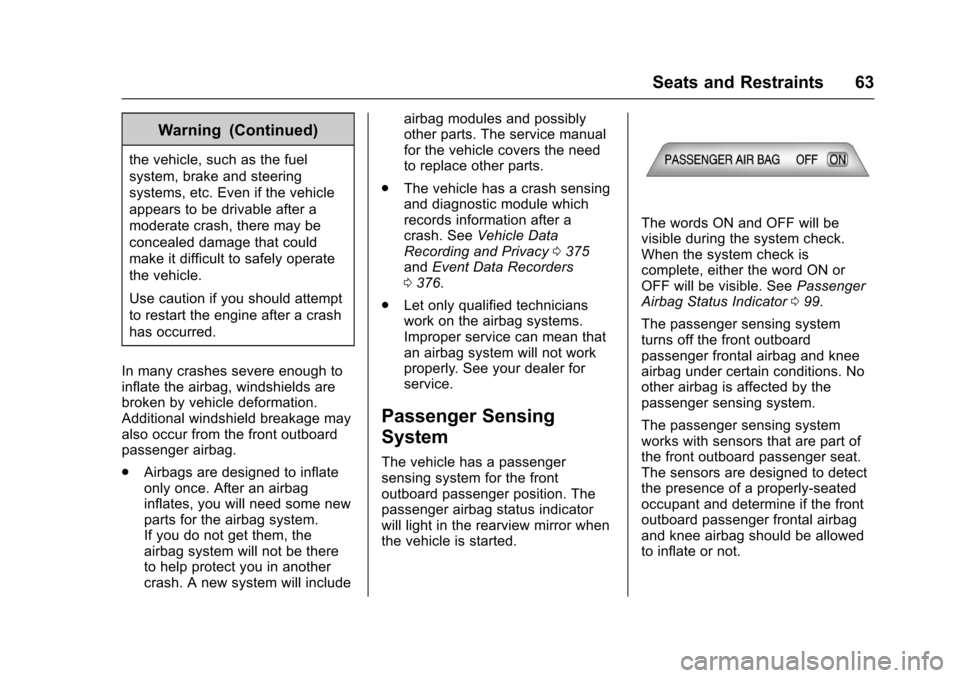
The vehicle has a passengersensing system for the frontoutboard passenger position. Thepassenger airbag status indicatorwill light in the rearview mirror whenthe vehicle is started.
The words ON and OFF will bevisible during the system check.When the system check iscomplete, either the word ON orOFF will be visible. SeePassengerAirbag Status Indicator099.
The passenger sensing systemturns off the front outboardpassenger frontal airbag and kneeairbag under certain conditions. Noother airbag is affected by thepassenger sensing system.
The passenger sensing systemworks with sensors that are part ofthe front outboard passenger seat.The sensors are designed to detectthe presence of a properly-seatedoccupant and determine if the frontoutboard passenger frontal airbagand knee airbag should be allowedto inflate or not.
Page 69 of 400
Chevrolet SS Sedan Owner Manual (GMNA-Localizing-U.S.-10122752) -2017 - crc - 8/31/16
68 Seats and Restraints
Adding Equipment to the
Airbag-Equipped Vehicle
Adding accessories that change thevehicle's frame, bumper system,height, front end, or side sheetmetal may keep the airbag systemfrom working properly. Theoperation of the airbag system canalso be affected by changing anyparts of the front seats, safety belts,airbag sensing and diagnosticmodule, steering wheel, instrumentpanel, any of the airbag modules,ceiling or pillar garnish trim, theinside rearview mirror, front sensors,side impact sensors, or airbagwiring.
Yo u r d e a l e r a n d t h e s e r v i c e m a n u a lhave information about the locationof the airbag sensors, sensing anddiagnostic module and airbagwiring.
In addition, the vehicle has apassenger sensing system for thefront outboard passenger position,which includes sensors that are partof the passenger's seat. Thepassenger sensing system may notoperate properly if the original seat
trim is replaced with non-GMcovers, upholstery or trim, or withGM covers, upholstery or trimdesigned for a different vehicle. Anyobject, such as an aftermarket seatheater or a comfort enhancing pador device, installed under or on topof the seat fabric, could alsointerfere with the operation of thepassenger sensing system. Thiscould either prevent properdeployment of the passengerairbag(s) or prevent the passengersensing system from properlyturning off the passenger airbag(s).SeePassenger Sensing System063.
If the vehicle has rollover roof-railairbags, seeDifferent Size Tiresand Wheels0318for additionalimportant information.
If you have to modify your vehiclebecause you have a disability andhave questions about whether themodifications will affect the vehicle'sairbag system, or if you havequestions about whether the airbagsystem will be affected if the vehicle
is modified for any other reason, callCustomer Assistance. SeeCustomer Assistance Offices0366.
Airbag System Check
The airbag system does not needregularly scheduled maintenance orreplacement. Make sure the airbagreadiness light is working. SeeAirbag Readiness Light099.
Caution
If an airbag covering is damaged,
opened, or broken, the airbag
may not work properly. Do not
open or break the airbag
coverings. If there are any
opened or broken airbag
coverings, have the airbag
covering and/or airbag module
replaced. For the location of the
airbags, seeWhere Are the
Airbags?059.Seeyourdealer
for service.
Page 91 of 400
Chevrolet SS Sedan Owner Manual (GMNA-Localizing-U.S.-10122752) -2017 - crc - 8/31/16
90 Instruments and Controls
Instruments and
Controls
Controls
Steering Wheel Adjustment . . . . 91Steering Wheel Controls . . . . . . . 91Horn . . . . . . . . . . . . . . . . . . . . . . . . . . . 92Windshield Wiper/Washer . . . . . . 92Clock . . . . . . . . . . . . . . . . . . . . . . . . . . 93Power Outlets . . . . . . . . . . . . . . . . . 94
Warning Lights, Gauges, and
Indicators
Warning Lights, Gauges, andIndicators . . . . . . . . . . . . . . . . . . . . 95Instrument Cluster . . . . . . . . . . . . . 96Speedometer . . . . . . . . . . . . . . . . . . 97Odometer . . . . . . . . . . . . . . . . . . . . . . 97Trip Odometer . . . . . . . . . . . . . . . . . 97Ta c h o m e t e r . . . . . . . . . . . . . . . . . . . . 9 7Fuel Gauge . . . . . . . . . . . . . . . . . . . . 97Engine Coolant TemperatureGauge . . . . . . . . . . . . . . . . . . . . . . . . 98Safety Belt Reminders . . . . . . . . . 98Airbag Readiness Light . . . . . . . . 99Passenger Airbag StatusIndicator . . . . . . . . . . . . . . . . . . . . . . 99Charging System Light . . . . . . . 100
Malfunction Indicator Lamp(Check Engine Light) . . . . . . . . 100Service Vehicle Soon Light . . . 102Brake System WarningLight . . . . . . . . . . . . . . . . . . . . . . . . 102Electric Parking BrakeLight . . . . . . . . . . . . . . . . . . . . . . . . 103Service Electric Parking BrakeLight . . . . . . . . . . . . . . . . . . . . . . . . 103Antilock Brake System (ABS)Warning Light . . . . . . . . . . . . . . . 104Lane Departure Warning(LDW) Light . . . . . . . . . . . . . . . . . 104Traction Off Light . . . . . . . . . . . . . 104StabiliTrak®OFF Light . . . . . . . . 105Traction Control System (TCS)/StabiliTrak®Light . . . . . . . . . . . 105Driver Mode Control Light . . . . 105Tire Pressure Light . . . . . . . . . . . 106Engine Oil Pressure Light . . . . 106Low Fuel Warning Light . . . . . . 106Security Light . . . . . . . . . . . . . . . . . 107High-Beam On Light . . . . . . . . . . 107Lamps On Reminder . . . . . . . . . 107Cruise Control Light . . . . . . . . . . 107Door Ajar Light . . . . . . . . . . . . . . . 108
Information Displays
Driver InformationCenter (DIC) . . . . . . . . . . . . . . . . 108Head-Up Display (HUD) . . . . . . 110
Vehicle Messages
Vehicle Messages . . . . . . . . . . . . 113Battery Voltage and ChargingMessages . . . . . . . . . . . . . . . . . . . 113Brake System Messages . . . . . 113Cruise Control Messages . . . . . 114Door Ajar Messages . . . . . . . . . . 114Engine Cooling SystemMessages . . . . . . . . . . . . . . . . . . . 114Engine Oil Messages . . . . . . . . . 115Engine Power Messages . . . . . 115Fuel System Messages . . . . . . . 115Key and Lock Messages . . . . . . 115Lamp Messages . . . . . . . . . . . . . . 116Object Detection SystemMessages . . . . . . . . . . . . . . . . . . . 116Ride Control SystemMessages . . . . . . . . . . . . . . . . . . . 117Security Messages . . . . . . . . . . . 117Service Vehicle Messages . . . . 118Starting the VehicleMessages . . . . . . . . . . . . . . . . . . . 118Tire Messages . . . . . . . . . . . . . . . . 118Transmission Messages . . . . . . 119Vehicle ReminderMessages . . . . . . . . . . . . . . . . . . . 120Vehicle Speed Messages . . . . . 120Washer Fluid Messages . . . . . . 120Window Messages . . . . . . . . . . . 120
Page 92 of 400
Chevrolet SS Sedan Owner Manual (GMNA-Localizing-U.S.-10122752) -2017 - crc - 8/31/16
Instruments and Controls 91
Vehicle Personalization
Vehicle Personalization . . . . . . . 120Controls
Steering Wheel
Adjustment
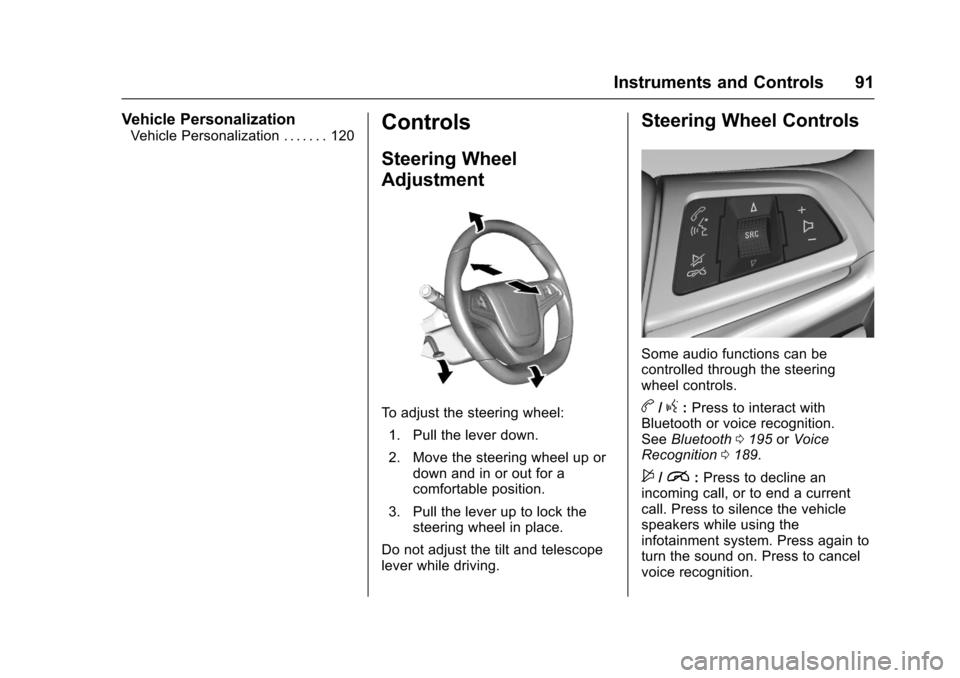
To a d j u s t t h e s t e e r i n g w h e e l :
1. Pull the lever down.
2. Move the steering wheel up ordown and in or out for acomfortable position.
3. Pull the lever up to lock thesteering wheel in place.
Do not adjust the tilt and telescopelever while driving.
Steering Wheel Controls
Some audio functions can becontrolled through the steeringwheel controls.
b/g:Press to interact withBluetooth or voice recognition.SeeBluetooth0195orVoiceRecognition0189.
$/i:Press to decline anincoming call, or to end a currentcall. Press to silence the vehiclespeakers while using theinfotainment system. Press again toturn the sound on. Press to cancelvoice recognition.
Page 93 of 400
Chevrolet SS Sedan Owner Manual (GMNA-Localizing-U.S.-10122752) -2017 - crc - 8/31/16
92 Instruments and Controls
_SRC^:Press to select an audiosource.
Use the thumbwheel to select thenext or previous favorite radiostation, MP3 track, USB track, andBluetooth Audio track.
Use_SRC to skip to the next song
or show using Pandora or Stitcher®.SeePandora Internet Radio0149orStitcher Internet Radio0153.
+x✓:Press + to increase the
volume. Press✓to decrease.
Horn
Pressaon the steering wheel pad
to sound the horn.
Windshield Wiper/Washer
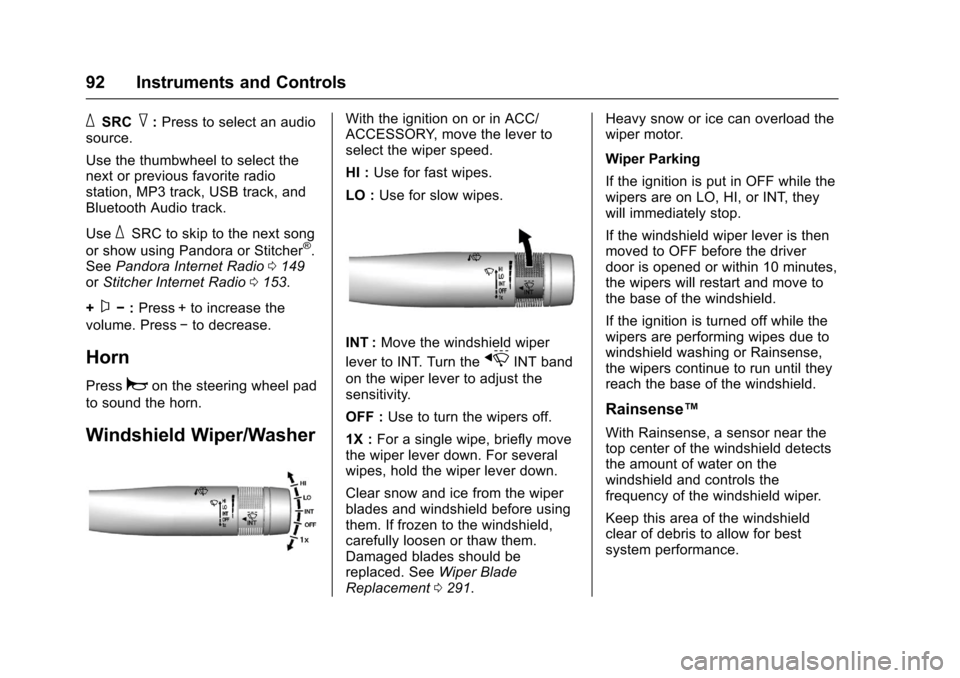
With the ignition on or in ACC/ACCESSORY, move the lever toselect the wiper speed.
HI :Use for fast wipes.
LO :Use for slow wipes.
INT :Move the windshield wiper
lever to INT. Turn thexINT band
on the wiper lever to adjust thesensitivity.
OFF :Use to turn the wipers off.
1X :For a single wipe, briefly movethe wiper lever down. For severalwipes, hold the wiper lever down.
Clear snow and ice from the wiperblades and windshield before usingthem. If frozen to the windshield,carefully loosen or thaw them.Damaged blades should bereplaced. SeeWiper BladeReplacement0291.
Heavy snow or ice can overload thewiper motor.
Wiper Parking
If the ignition is put in OFF while thewipers are on LO, HI, or INT, theywill immediately stop.
If the windshield wiper lever is thenmoved to OFF before the driverdoor is opened or within 10 minutes,the wipers will restart and move tothe base of the windshield.
If the ignition is turned off while thewipers are performing wipes due towindshield washing or Rainsense,the wipers continue to run until theyreach the base of the windshield.
Rainsense™
With Rainsense, a sensor near thetop center of the windshield detectsthe amount of water on thewindshield and controls thefrequency of the windshield wiper.
Keep this area of the windshieldclear of debris to allow for bestsystem performance.
Page 103 of 400
Chevrolet SS Sedan Owner Manual (GMNA-Localizing-U.S.-10122752) -2017 - crc - 8/31/16
102 Instruments and Controls
If the light remains on, see yourdealer.
Emissions Inspection and
Maintenance Programs
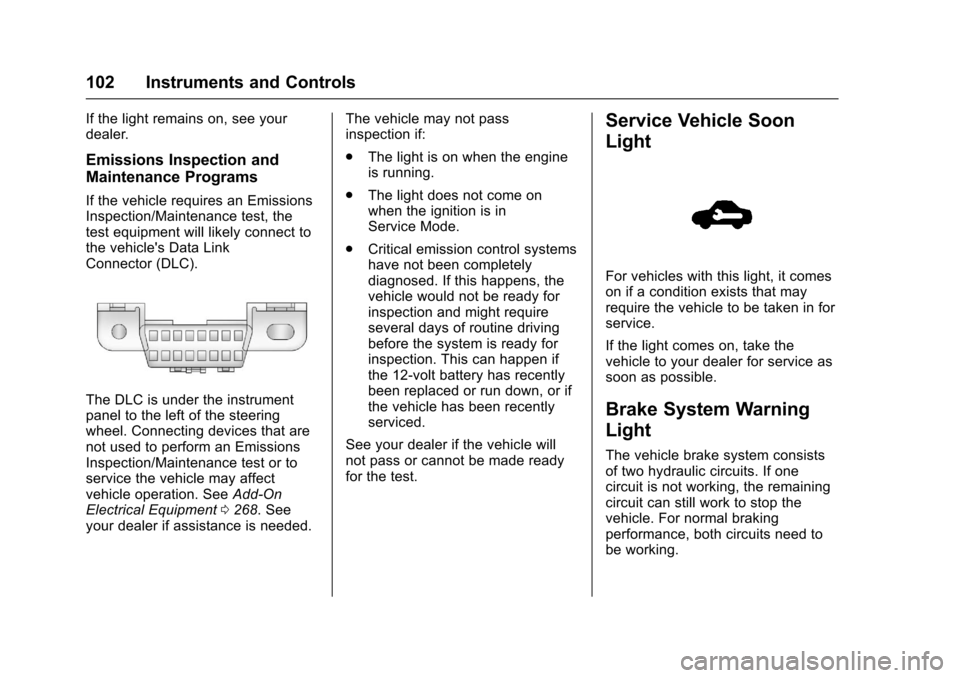
If the vehicle requires an EmissionsInspection/Maintenance test, thetest equipment will likely connect tothe vehicle's Data LinkConnector (DLC).
The DLC is under the instrumentpanel to the left of the steeringwheel. Connecting devices that arenot used to perform an EmissionsInspection/Maintenance test or toservice the vehicle may affectvehicle operation. SeeAdd-OnElectrical Equipment0268.Seeyour dealer if assistance is needed.
The vehicle may not passinspection if:
.The light is on when the engineis running.
.The light does not come onwhen the ignition is inService Mode.
.Critical emission control systemshave not been completelydiagnosed. If this happens, thevehicle would not be ready forinspection and might requireseveral days of routine drivingbefore the system is ready forinspection. This can happen ifthe 12-volt battery has recentlybeen replaced or run down, or ifthe vehicle has been recentlyserviced.
See your dealer if the vehicle willnot pass or cannot be made readyfor the test.
Service Vehicle Soon
Light
For vehicles with this light, it comeson if a condition exists that mayrequire the vehicle to be taken in forservice.
If the light comes on, take thevehicle to your dealer for service assoon as possible.
Brake System Warning
Light
The vehicle brake system consistsof two hydraulic circuits. If onecircuit is not working, the remainingcircuit can still work to stop thevehicle. For normal brakingperformance, both circuits need tobe working.
Page 109 of 400
Chevrolet SS Sedan Owner Manual (GMNA-Localizing-U.S.-10122752) -2017 - crc - 8/31/16
108 Instruments and Controls
Door Ajar Light
If equipped, this light comes onwhen a door is open or not securelylatched. Before driving, check thatall doors are properly closed. SeeDoor Ajar Messages011 4.
Information Displays
Driver Information
Center (DIC)
The DIC displays information aboutthe vehicle. It also displays warningmessages if a system problem isdetected. SeeVehicle Messages011 3.AllmessagesappearintheDIC display in the center of theinstrument cluster.
The vehicle may also have featuresthat can be customized through thecontrols on the radio. SeeVehiclePersonalization0120.
DIC Operation and Displays
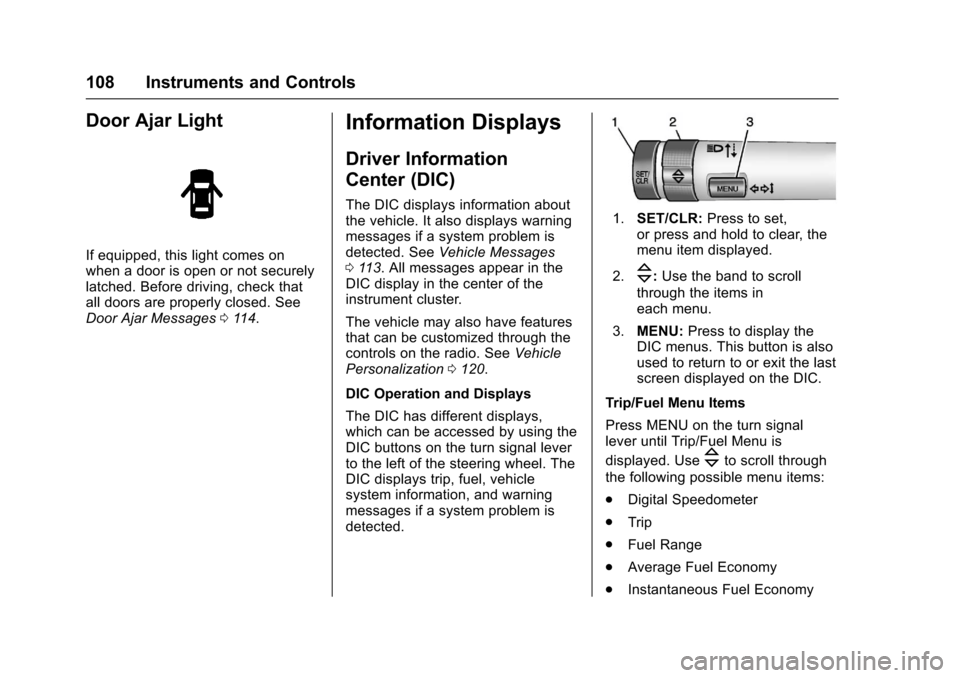
The DIC has different displays,which can be accessed by using theDIC buttons on the turn signal leverto the left of the steering wheel. TheDIC displays trip, fuel, vehiclesystem information, and warningmessages if a system problem isdetected.
1.SET/CLR:Press to set,or press and hold to clear, themenu item displayed.
2.\:Use the band to scroll
through the items ineach menu.
3.MENU:Press to display theDIC menus. This button is alsoused to return to or exit the lastscreen displayed on the DIC.
Trip/Fuel Menu Items
Press MENU on the turn signallever until Trip/Fuel Menu is
displayed. Use\to scroll through
the following possible menu items:
.Digital Speedometer
.Trip
.Fuel Range
.Average Fuel Economy
.Instantaneous Fuel Economy
Page 112 of 400
Chevrolet SS Sedan Owner Manual (GMNA-Localizing-U.S.-10122752) -2017 - crc - 8/31/16
Instruments and Controls 111
With HUD, some informationconcerning the operation of thevehicle is projected onto thewindshield. The image is projectedthrough the HUD lens on top of theinstrument panel. The informationappears as an image focused outtoward the front of the vehicle.
Caution
If you try to use the HUD image
as a parking aid, you may
misjudge the distance and
damage your vehicle. Do not use
the HUD image as a parking aid.
The HUD may display some of thefollowing alerts or information forvehicles equipped with thesefeatures:
.Speedometer
.Ta c h o m e t e r
.High Beam Indicator Symbol
.Forward Collision Alert Warnings
.Audio Functions
.Navigation
.Transmission Position
.Shift Up Meter
.Cruise Control Active
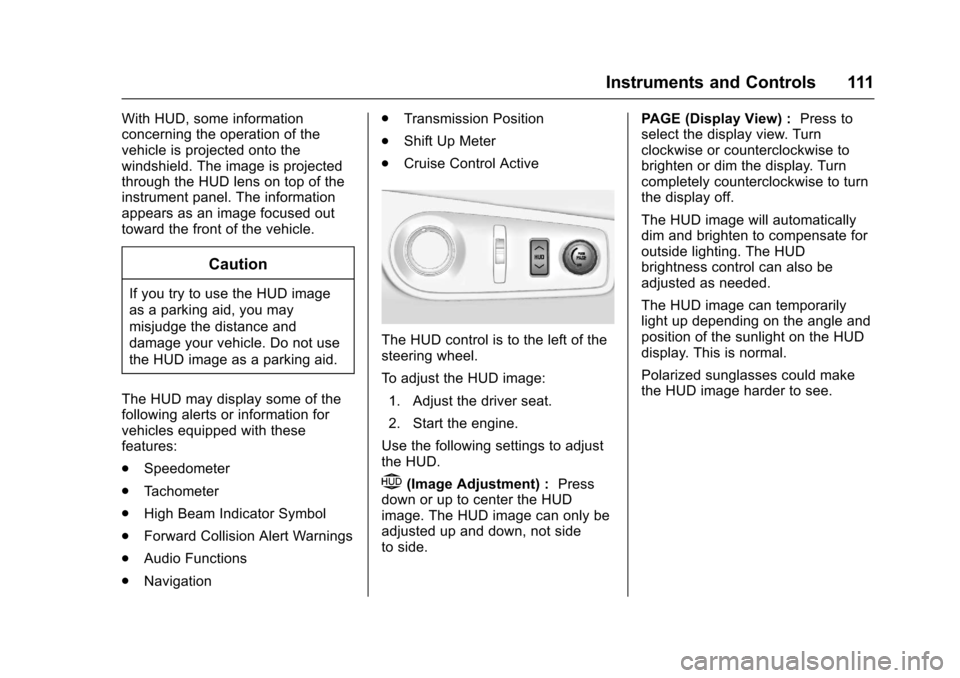
The HUD control is to the left of thesteering wheel.
To a d j u s t t h e H U D i m a g e :
1. Adjust the driver seat.
2. Start the engine.
Use the following settings to adjustthe HUD.
$(Image Adjustment) :Pressdown or up to center the HUDimage. The HUD image can only beadjusted up and down, not sideto side.
PA G E ( D i s p l a y V i e w ) :Press toselect the display view. Turnclockwise or counterclockwise tobrighten or dim the display. Turncompletely counterclockwise to turnthe display off.
The HUD image will automaticallydim and brighten to compensate foroutside lighting. The HUDbrightness control can also beadjusted as needed.
The HUD image can temporarilylight up depending on the angle andposition of the sunlight on the HUDdisplay. This is normal.
Polarized sunglasses could makethe HUD image harder to see.