tow CHEVROLET SS 2017 1.G User Guide
[x] Cancel search | Manufacturer: CHEVROLET, Model Year: 2017, Model line: SS, Model: CHEVROLET SS 2017 1.GPages: 400, PDF Size: 7.31 MB
Page 70 of 400
Chevrolet SS Sedan Owner Manual (GMNA-Localizing-U.S.-10122752) -2017 - crc - 8/31/16
Seats and Restraints 69
Replacing Airbag System
Parts after a Crash
{Warning
Acrashcandamagetheairbag
systems in the vehicle.
Adamagedairbagsystemmay
not properly protect you and your
passenger(s) in a crash, resulting
in serious injury or even death. To
help make sure the airbag
systems are working properly
after a crash, have them
inspected and any necessary
replacements made as soon as
possible.
If an airbag inflates, you will need toreplace airbag system parts. Seeyour dealer for service.
If the airbag readiness light stays onafter the vehicle is started or comeson when you are driving, the airbagsystem may not work properly. Havethe vehicle serviced right away. SeeAirbag Readiness Light099.
Child Restraints
Older Children
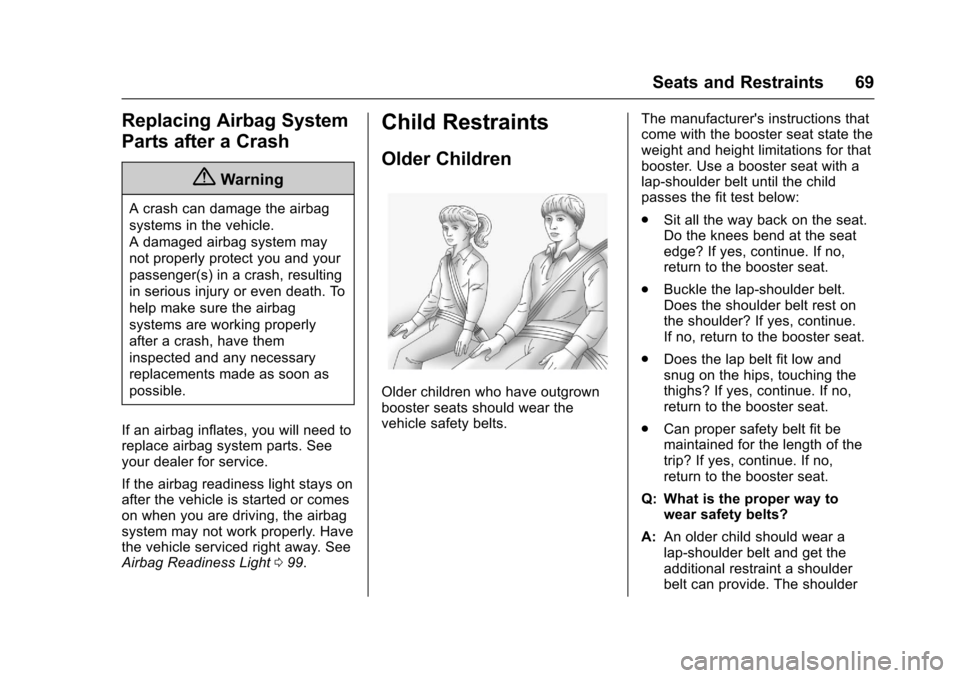
Older children who have outgrownbooster seats should wear thevehicle safety belts.
The manufacturer's instructions thatcome with the booster seat state theweight and height limitations for thatbooster. Use a booster seat with alap-shoulder belt until the childpasses the fit test below:
.Sit all the way back on the seat.Do the knees bend at the seatedge? If yes, continue. If no,return to the booster seat.
.Buckle the lap-shoulder belt.Does the shoulder belt rest onthe shoulder? If yes, continue.If no, return to the booster seat.
.Does the lap belt fit low andsnug on the hips, touching thethighs? If yes, continue. If no,return to the booster seat.
.Can proper safety belt fit bemaintained for the length of thetrip? If yes, continue. If no,return to the booster seat.
Q: What is the proper way towear safety belts?
A:An older child should wear alap-shoulder belt and get theadditional restraint a shoulderbelt can provide. The shoulder
Page 84 of 400
Chevrolet SS Sedan Owner Manual (GMNA-Localizing-U.S.-10122752) -2017 - crc - 8/31/16
Seats and Restraints 83
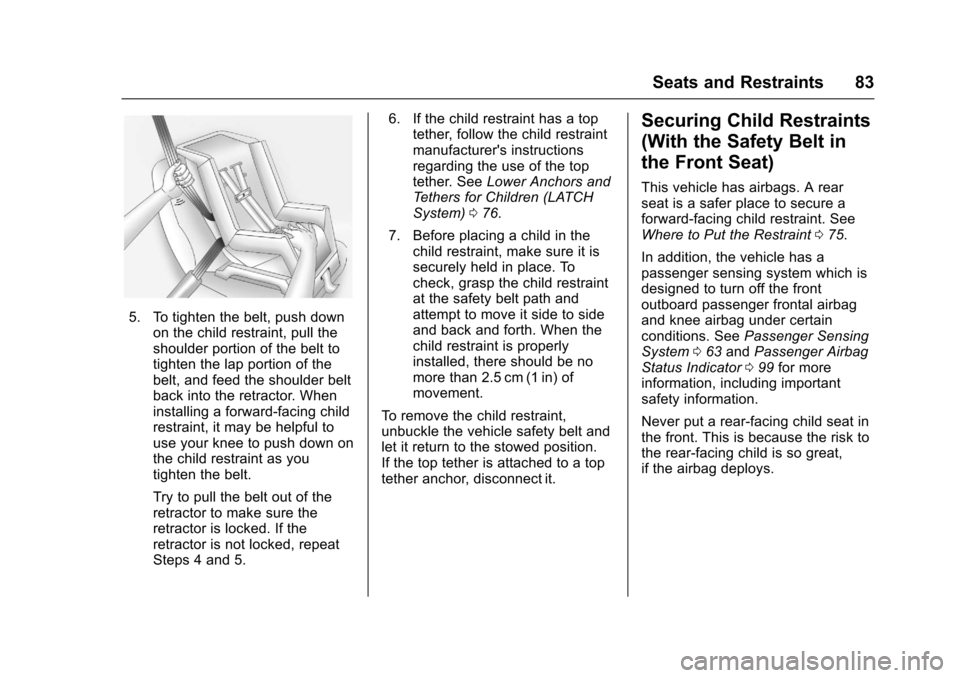
5. To tighten the belt, push downon the child restraint, pull theshoulder portion of the belt totighten the lap portion of thebelt, and feed the shoulder beltback into the retractor. Wheninstalling a forward-facing childrestraint, it may be helpful touse your knee to push down onthe child restraint as youtighten the belt.
Try to pull the belt out of theretractor to make sure theretractor is locked. If theretractor is not locked, repeatSteps 4 and 5.
6. If the child restraint has a toptether, follow the child restraintmanufacturer's instructionsregarding the use of the toptether. SeeLower Anchors andTe t h e r s f o r C h i l d r e n ( L AT C HSystem)076.
7. Before placing a child in thechild restraint, make sure it issecurely held in place. Tocheck, grasp the child restraintat the safety belt path andattempt to move it side to sideand back and forth. When thechild restraint is properlyinstalled, there should be nomore than 2.5 cm (1 in) ofmovement.
To r e m o v e t h e c h i l d r e s t r a i n t ,unbuckle the vehicle safety belt andlet it return to the stowed position.If the top tether is attached to a toptether anchor, disconnect it.
Securing Child Restraints
(With the Safety Belt in
the Front Seat)
This vehicle has airbags. A rearseat is a safer place to secure aforward-facing child restraint. SeeWhere to Put the Restraint075.
In addition, the vehicle has apassenger sensing system which isdesigned to turn off the frontoutboard passenger frontal airbagand knee airbag under certainconditions. SeePassenger SensingSystem063andPassenger AirbagStatus Indicator099for moreinformation, including importantsafety information.
Never put a rear-facing child seat inthe front. This is because the risk tothe rear-facing child is so great,if the airbag deploys.
Page 87 of 400
Chevrolet SS Sedan Owner Manual (GMNA-Localizing-U.S.-10122752) -2017 - crc - 8/31/16
86 Seats and Restraints
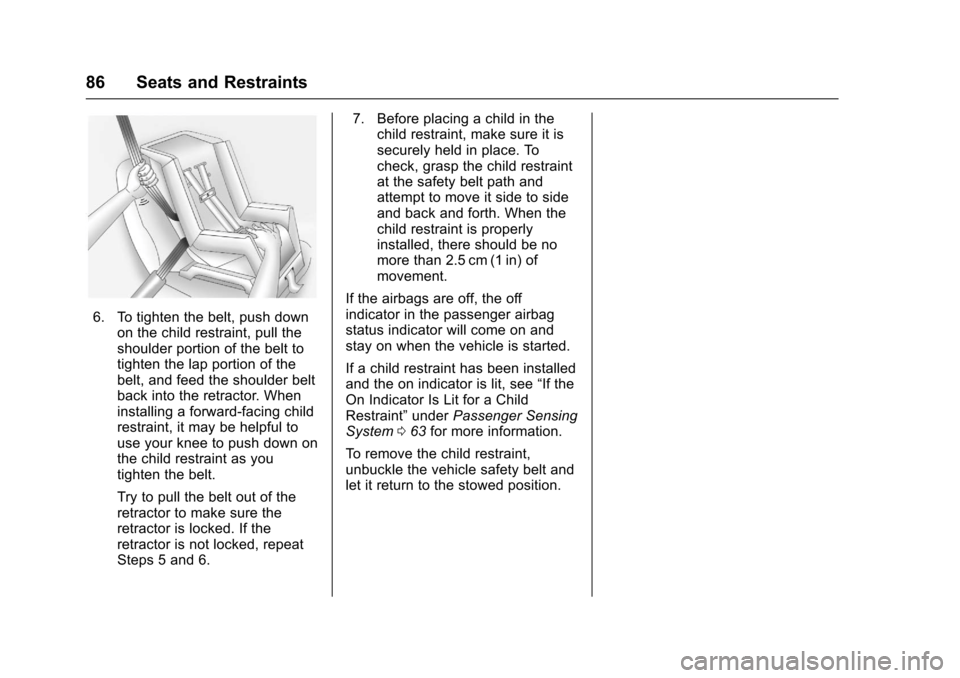
6. To tighten the belt, push downon the child restraint, pull theshoulder portion of the belt totighten the lap portion of thebelt, and feed the shoulder beltback into the retractor. Wheninstalling a forward-facing childrestraint, it may be helpful touse your knee to push down onthe child restraint as youtighten the belt.
Try to pull the belt out of theretractor to make sure theretractor is locked. If theretractor is not locked, repeatSteps 5 and 6.
7. Before placing a child in thechild restraint, make sure it issecurely held in place. Tocheck, grasp the child restraintat the safety belt path andattempt to move it side to sideand back and forth. When thechild restraint is properlyinstalled, there should be nomore than 2.5 cm (1 in) ofmovement.
If the airbags are off, the offindicator in the passenger airbagstatus indicator will come on andstay on when the vehicle is started.
If a child restraint has been installedand the on indicator is lit, see“If theOn Indicator Is Lit for a ChildRestraint”underPassenger SensingSystem063for more information.
To r e m o v e t h e c h i l d r e s t r a i n t ,unbuckle the vehicle safety belt andlet it return to the stowed position.
Page 93 of 400
Chevrolet SS Sedan Owner Manual (GMNA-Localizing-U.S.-10122752) -2017 - crc - 8/31/16
92 Instruments and Controls
_SRC^:Press to select an audiosource.
Use the thumbwheel to select thenext or previous favorite radiostation, MP3 track, USB track, andBluetooth Audio track.
Use_SRC to skip to the next song
or show using Pandora or Stitcher®.SeePandora Internet Radio0149orStitcher Internet Radio0153.
+x✓:Press + to increase the
volume. Press✓to decrease.
Horn
Pressaon the steering wheel pad
to sound the horn.
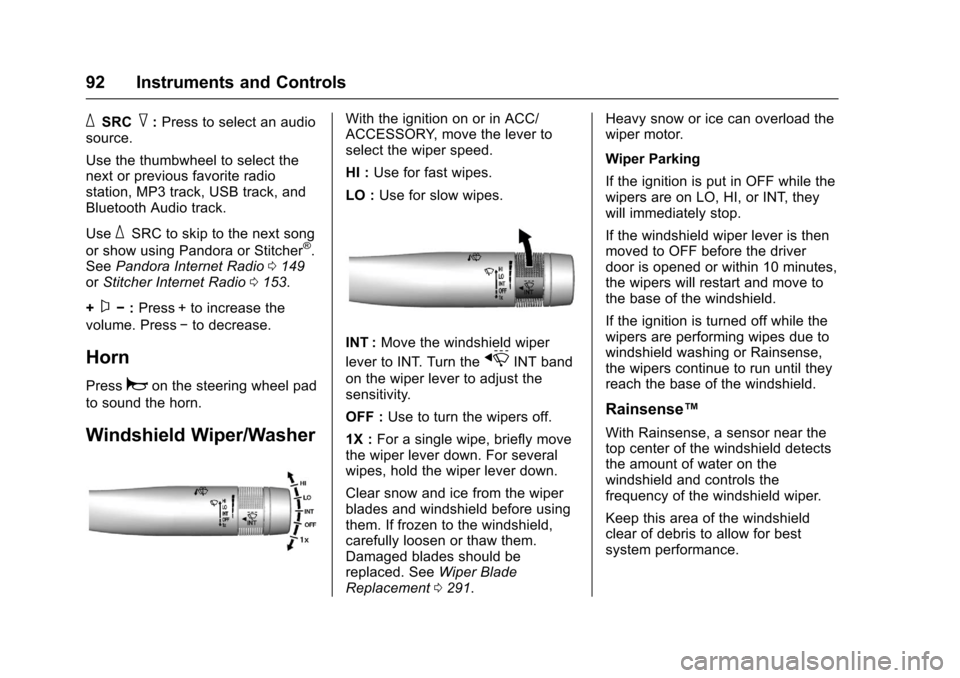
Windshield Wiper/Washer
With the ignition on or in ACC/ACCESSORY, move the lever toselect the wiper speed.
HI :Use for fast wipes.
LO :Use for slow wipes.
INT :Move the windshield wiper
lever to INT. Turn thexINT band
on the wiper lever to adjust thesensitivity.
OFF :Use to turn the wipers off.
1X :For a single wipe, briefly movethe wiper lever down. For severalwipes, hold the wiper lever down.
Clear snow and ice from the wiperblades and windshield before usingthem. If frozen to the windshield,carefully loosen or thaw them.Damaged blades should bereplaced. SeeWiper BladeReplacement0291.
Heavy snow or ice can overload thewiper motor.
Wiper Parking
If the ignition is put in OFF while thewipers are on LO, HI, or INT, theywill immediately stop.
If the windshield wiper lever is thenmoved to OFF before the driverdoor is opened or within 10 minutes,the wipers will restart and move tothe base of the windshield.
If the ignition is turned off while thewipers are performing wipes due towindshield washing or Rainsense,the wipers continue to run until theyreach the base of the windshield.
Rainsense™
With Rainsense, a sensor near thetop center of the windshield detectsthe amount of water on thewindshield and controls thefrequency of the windshield wiper.
Keep this area of the windshieldclear of debris to allow for bestsystem performance.
Page 94 of 400
Chevrolet SS Sedan Owner Manual (GMNA-Localizing-U.S.-10122752) -2017 - crc - 8/31/16
Instruments and Controls 93
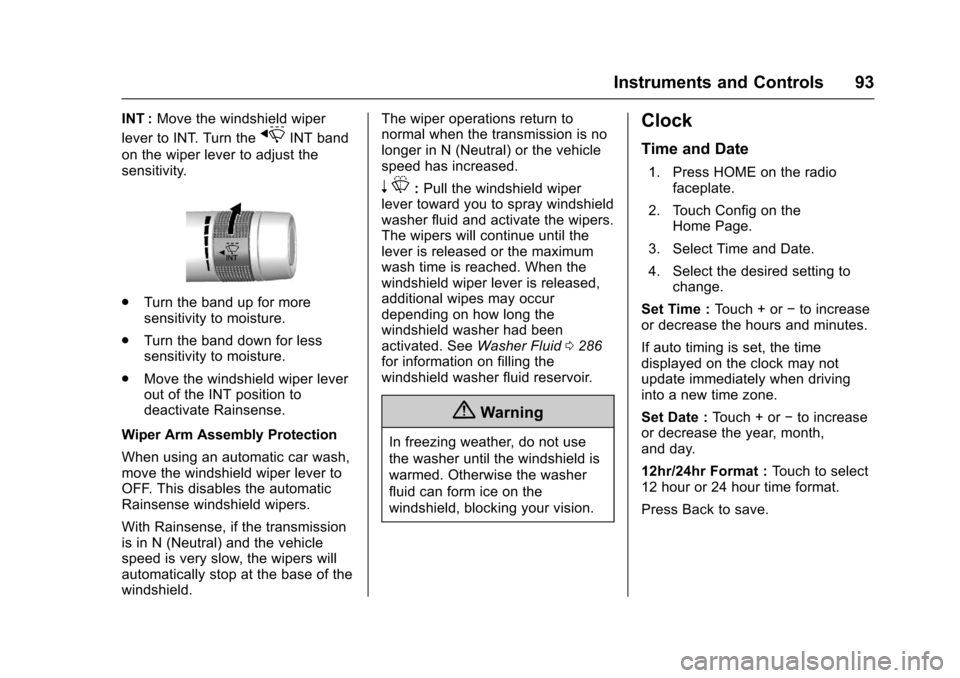
INT :Move the windshield wiper
lever to INT. Turn thexINT band
on the wiper lever to adjust thesensitivity.
.Turn the band up for moresensitivity to moisture.
.Turn the band down for lesssensitivity to moisture.
.Move the windshield wiper leverout of the INT position todeactivate Rainsense.
Wiper Arm Assembly Protection
When using an automatic car wash,move the windshield wiper lever toOFF. This disables the automaticRainsense windshield wipers.
With Rainsense, if the transmissionis in N (Neutral) and the vehiclespeed is very slow, the wipers willautomatically stop at the base of thewindshield.
The wiper operations return tonormal when the transmission is nolonger in N (Neutral) or the vehiclespeed has increased.
nL:Pull the windshield wiperlever toward you to spray windshieldwasher fluid and activate the wipers.The wipers will continue until thelever is released or the maximumwash time is reached. When thewindshield wiper lever is released,additional wipes may occurdepending on how long thewindshield washer had beenactivated. SeeWasher Fluid0286for information on filling thewindshield washer fluid reservoir.
{Warning
In freezing weather, do not use
the washer until the windshield is
warmed. Otherwise the washer
fluid can form ice on the
windshield, blocking your vision.
Clock
Time and Date
1. Press HOME on the radiofaceplate.
2. Touch Config on theHome Page.
3. Select Time and Date.
4. Select the desired setting tochange.
Set Time :To u c h + o r✓to increaseor decrease the hours and minutes.
If auto timing is set, the timedisplayed on the clock may notupdate immediately when drivinginto a new time zone.
Set Date :To u c h + o r✓to increaseor decrease the year, month,and day.
12hr/24hr Format :To u c h t o s e l e c t12 hour or 24 hour time format.
Press Back to save.
Page 104 of 400
Chevrolet SS Sedan Owner Manual (GMNA-Localizing-U.S.-10122752) -2017 - crc - 8/31/16
Instruments and Controls 103
If the warning light comes on, thereis a brake problem. Have the brakesystem inspected right away.
This light should come on brieflywhen the engine is started. If it doesnot come on then, have it fixed so itwill be ready to warn you if there isaproblem.
If the light comes on and stays on,there is a base brake problem.
{Warning
The brake system might not be
working properly if the brake
system warning light is on.
Driving with the brake system
warning light on can lead to a
crash. If the light is still on after
the vehicle has been pulled off
(Continued)
Warning (Continued)
the road and carefully stopped,
have the vehicle towed for
service.
Electric Parking Brake
Light
The parking brake status lightcomes on when the brake isapplied. If the light continuesflashing after the parking brake isreleased, or while driving, there is aproblem with the electric parkingbrake system. A message may alsodisplay on the Driver InformationCenter (DIC). SeeBrake SystemMessages011 3for moreinformation.
If the light does not come on,or remains flashing, see your dealer.
Service Electric Parking
Brake Light
The service electric parking brakelight should come on briefly whenstarting the vehicle. If it does notcome on, have the vehicle servicedby your dealer.
If this light stays on, there is aproblem with a system on thevehicle that is causing the parkingbrake system to work at a reducedlevel. The vehicle can still be driven,but should be taken to a dealer assoon as possible. SeeElectricParking Brake0242.Ifamessagedisplays in the Driver InformationCenter (DIC), seeBrake SystemMessages011 3.
Page 112 of 400
Chevrolet SS Sedan Owner Manual (GMNA-Localizing-U.S.-10122752) -2017 - crc - 8/31/16
Instruments and Controls 111
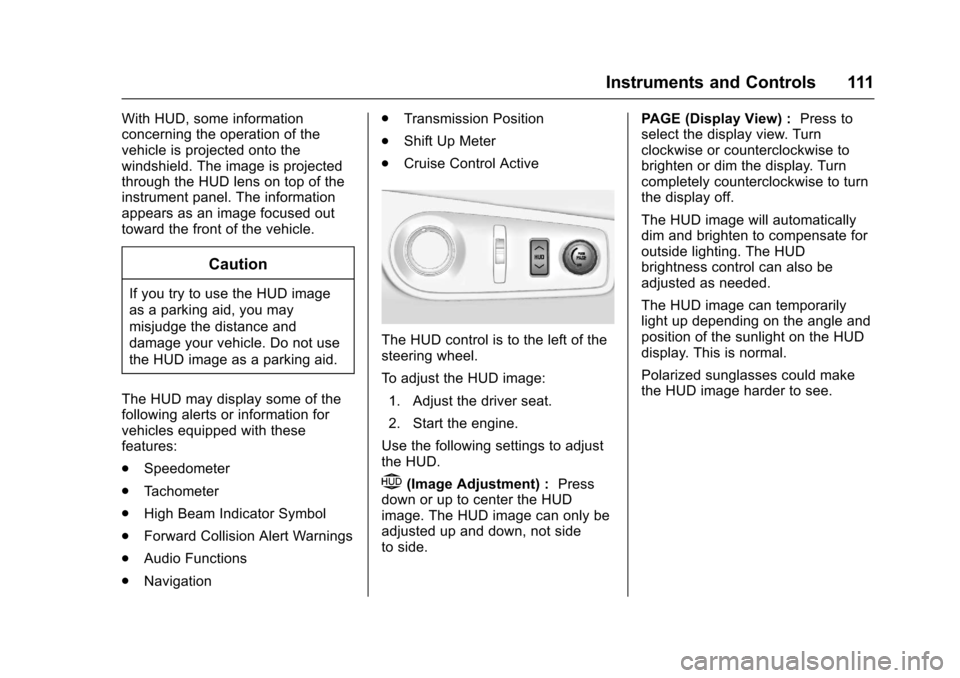
With HUD, some informationconcerning the operation of thevehicle is projected onto thewindshield. The image is projectedthrough the HUD lens on top of theinstrument panel. The informationappears as an image focused outtoward the front of the vehicle.
Caution
If you try to use the HUD image
as a parking aid, you may
misjudge the distance and
damage your vehicle. Do not use
the HUD image as a parking aid.
The HUD may display some of thefollowing alerts or information forvehicles equipped with thesefeatures:
.Speedometer
.Ta c h o m e t e r
.High Beam Indicator Symbol
.Forward Collision Alert Warnings
.Audio Functions
.Navigation
.Transmission Position
.Shift Up Meter
.Cruise Control Active
The HUD control is to the left of thesteering wheel.
To a d j u s t t h e H U D i m a g e :
1. Adjust the driver seat.
2. Start the engine.
Use the following settings to adjustthe HUD.
$(Image Adjustment) :Pressdown or up to center the HUDimage. The HUD image can only beadjusted up and down, not sideto side.
PA G E ( D i s p l a y V i e w ) :Press toselect the display view. Turnclockwise or counterclockwise tobrighten or dim the display. Turncompletely counterclockwise to turnthe display off.
The HUD image will automaticallydim and brighten to compensate foroutside lighting. The HUDbrightness control can also beadjusted as needed.
The HUD image can temporarilylight up depending on the angle andposition of the sunlight on the HUDdisplay. This is normal.
Polarized sunglasses could makethe HUD image harder to see.
Page 121 of 400
Chevrolet SS Sedan Owner Manual (GMNA-Localizing-U.S.-10122752) -2017 - crc - 8/31/16
120 Instruments and Controls
Vehicle Reminder
Messages
ICE POSSIBLE DRIVE
WITH CARE
This message displays when iceconditions are possible.
Vehicle Speed Messages
SPEED LIMITED TO XXX
This message displays when amalfunction is present in theMagnetic Ride Control system. Thevehicle speed will be limited to avalue determined by the vehiclewhen the shock absorber systemhas failed and the shocks are intheir full soft mode. Have the vehicleserviced as soon as possible.
Washer Fluid Messages
WASHER FLUID LOW ADD
FLUID
This message may display when thewasher fluid level is low. Fill thewindshield washer reservoir as soonas possible. SeeEngineCompartment Overview0274forthe location of the windshieldwasher reservoir. Also, seeWasherFluid0286.
Window Messages
OPEN, THEN CLOSE DRIVER/
PASSENGER WINDOW
This message is displayed when thewindow needs to be reprogrammed.If the vehicle's battery has beendischarged or disconnected, youmay need to program each frontwindow for the express-up feature towork. SeePower Windows040.
Vehicle
Personalization
Use the audio system controls toaccess the personalization menusfor customizing vehicle features.
The following are all possiblepersonalization features. Dependingon the vehicle, some may not beavailable.
HOME :Press to display the HomePage screen.
TUNE/MENU :Press to entermenus and select menu items. Turnto scroll through the menus.
/BACK :Press to exit or movebackward in a menu.
Entering the PersonalizationMenus
The ignition must be in the ONposition.
1. Press HOME.
2. Select the Config screenbutton.
3. Turn the TUNE/MENU knob tohighlight the desired setting.
Page 127 of 400
Chevrolet SS Sedan Owner Manual (GMNA-Localizing-U.S.-10122752) -2017 - crc - 8/31/16
126 Lighting
Lighting
Exterior Lighting
Exterior Lamp Controls . . . . . . . 126Headlamp High/Low-BeamChanger . . . . . . . . . . . . . . . . . . . . 126Flash-to-Pass . . . . . . . . . . . . . . . . 126Daytime RunningLamps (DRL) . . . . . . . . . . . . . . . 127Automatic HeadlampSystem . . . . . . . . . . . . . . . . . . . . . . 127Hazard Warning Flashers . . . . . 127Turn and Lane-ChangeSignals . . . . . . . . . . . . . . . . . . . . . . 128
Interior Lighting
Instrument Panel IlluminationControl . . . . . . . . . . . . . . . . . . . . . . 128Dome Lamps . . . . . . . . . . . . . . . . . 129Reading Lamps . . . . . . . . . . . . . . 129
Lighting Features
Entry Lighting . . . . . . . . . . . . . . . . 130Exit Lighting . . . . . . . . . . . . . . . . . . 130Battery Power Protection . . . . . 130
Exterior Lighting
Exterior Lamp Controls
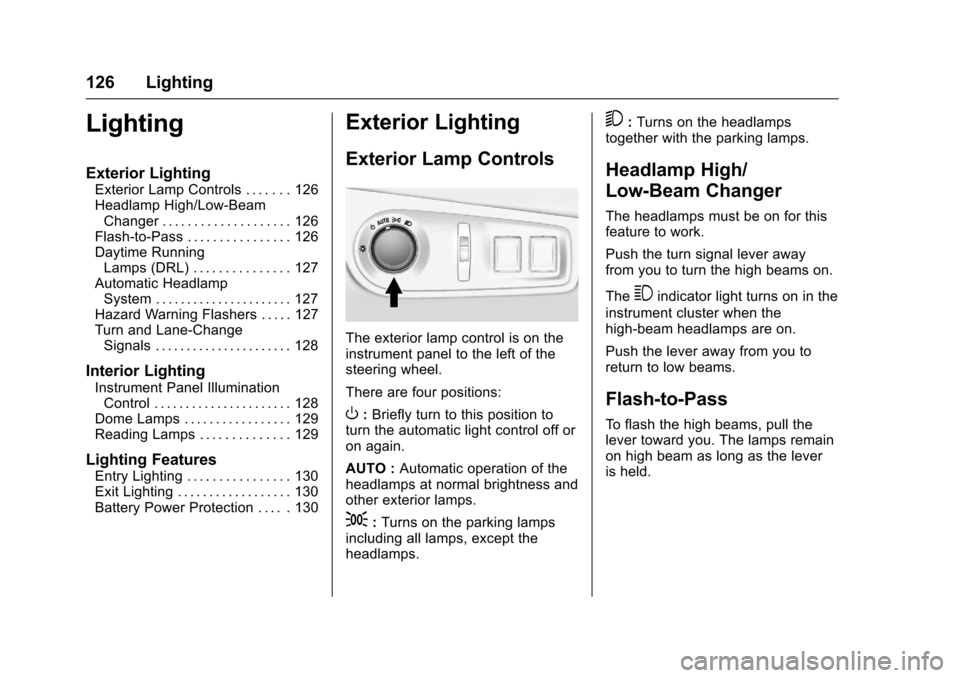
The exterior lamp control is on theinstrument panel to the left of thesteering wheel.
There are four positions:
O:Briefly turn to this position toturn the automatic light control off oron again.
AUTO :Automatic operation of theheadlamps at normal brightness andother exterior lamps.
;:Turns on the parking lampsincluding all lamps, except theheadlamps.
5:Turns on the headlampstogether with the parking lamps.
Headlamp High/
Low-Beam Changer
The headlamps must be on for thisfeature to work.
Push the turn signal lever awayfrom you to turn the high beams on.
The3indicator light turns on in the
instrument cluster when thehigh-beam headlamps are on.
Push the lever away from you toreturn to low beams.
Flash-to-Pass
To f l a s h t h e h i g h b e a m s , p u l l t h elever toward you. The lamps remainon high beam as long as the leveris held.
Page 150 of 400
Chevrolet SS Sedan Owner Manual (GMNA-Localizing-U.S.-10122752) -2017 - crc - 8/31/16
Infotainment System 149
5-day Forecast :Displays the5-day forecast for the weatherstation closest to the currentlocation. See“SiriusXM Travel LinkWeather”inSatellite Radio0142.
Nearby Fuel Stations :Displaysfuel prices and distances for closefuel stations. See“SiriusXM TravelLink Weather”under“SiriusXMTravel Link (If Equipped)”inSatelliteRadio0142.
Movie Showtimes :Displays a listof movies playing in the theatersclosest to current location. See“SiriusXM Travel Link MovieListings”inSatellite Radio0142.
Pandora Internet Radio
Pandora (if equipped) is a freeInternet radio service that streamspersonalized radio stations basedon artists, songs, genres, andcomedians. Create stations usingthe Pandora website or smartphone
application, then use-(thumbs up)
or,(thumbs down) to personalize
stations. To set up an account, or formore information, go towww.pandora.com.
AphoneortabletwithInternetconnection and the Pandoraapplication installed is required.Personal cell phone data plans areused. Make sure the latest versionis installed on the device and thevolume is turned up.
To i n s t a l l P a n d o r a :
.On an Android™phone orAndroid Tablet, go to the AndroidPlay Store, and search forPandora. Install to the phone,not to the SD card.
.On a BlackBerry®phone, go tothe BlackBerry App World™andsearch for Pandora.
.On an iPhone®,iPad®,oriPodtouch®,gototheiTunes®Storeand search for Pandora.
Launching Pandora
Connect the iPhone, iPad, or iPodtouch to the USB port, or connectan Android or BlackBerry throughBluetooth. SeeUSB0158
orBluetooth0195.Forfirst-timeuse, set up stations beforeconnecting to the vehicle. ThePandora icon will be available onthe Home Page and the sourcepop-up displays if the latestapplication is installed on thedevice.
Using the iPhone, iPod touch,or iPad
1. Plug the device into the USBport. The phone screen mustbe unlocked.
2. To launch, do one of thefollowing:
.Launch the application onthe device.
.To u c h t h e P a n d o r a i c o n o nthe Home Page.
.Pressb/gand say
“Pandora”or“TunePandora.”
.Accept any notification onthe screen of the device.
To r e l a u n c h P a n d o r a , p r e s s S R C Eon the center stack or press SRC onthe steering wheel controls.