change time CHEVROLET SS 2017 1.G Owner's Manual
[x] Cancel search | Manufacturer: CHEVROLET, Model Year: 2017, Model line: SS, Model: CHEVROLET SS 2017 1.GPages: 400, PDF Size: 7.31 MB
Page 192 of 400
Chevrolet SS Sedan Owner Manual (GMNA-Localizing-U.S.-10122752) -2017 - crc - 8/31/16
Infotainment System 191
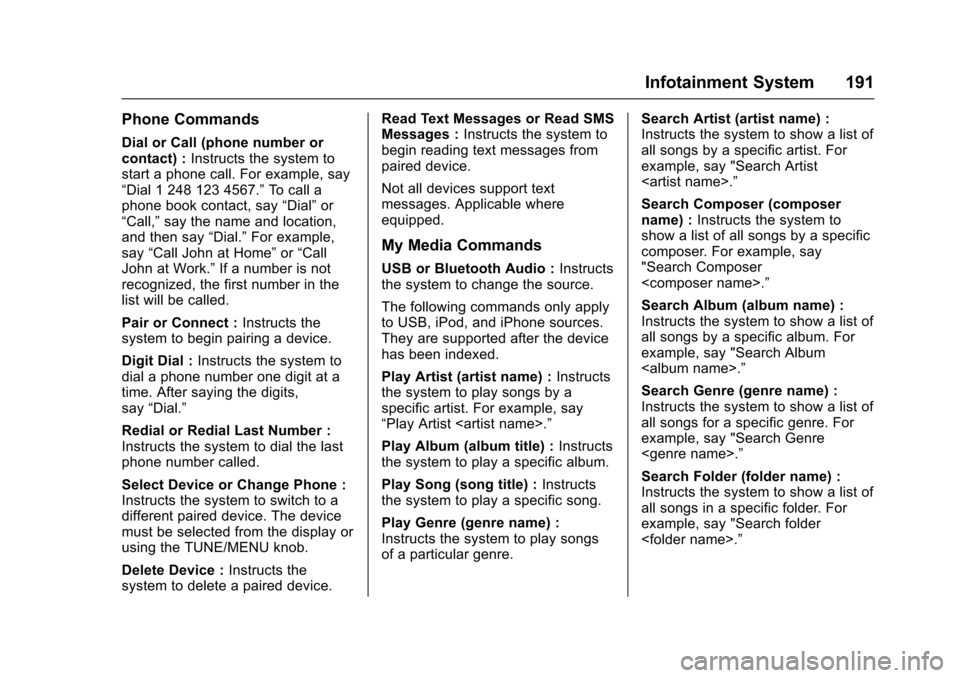
Phone Commands
Dial or Call (phone number orcontact) :Instructs the system tostart a phone call. For example, say“Dial 1 248 123 4567.”To c a l l aphone book contact, say“Dial”or“Call,”say the name and location,and then say“Dial.”For example,say“Call John at Home”or“CallJohn at Work.”If a number is notrecognized, the first number in thelist will be called.
Pair or Connect :Instructs thesystem to begin pairing a device.
Digit Dial :Instructs the system todial a phone number one digit at atime. After saying the digits,say“Dial.”
Redial or Redial Last Number :Instructs the system to dial the lastphone number called.
Select Device or Change Phone :Instructs the system to switch to adifferent paired device. The devicemust be selected from the display orusing the TUNE/MENU knob.
Delete Device :Instructs thesystem to delete a paired device.
Read Text Messages or Read SMSMessages :Instructs the system tobegin reading text messages frompaired device.
Not all devices support textmessages. Applicable whereequipped.
My Media Commands
USB or Bluetooth Audio :Instructsthe system to change the source.
The following commands only applyto USB, iPod, and iPhone sources.They are supported after the devicehas been indexed.
Play Artist (artist name) :Instructsthe system to play songs by aspecific artist. For example, say“Play Artist
Play Album (album title) :Instructsthe system to play a specific album.
Play Song (song title) :Instructsthe system to play a specific song.
Play Genre (genre name) :Instructs the system to play songsof a particular genre.
Search Artist (artist name) :Instructs the system to show a list ofall songs by a specific artist. Forexample, say "Search Artist
Search Composer (composername) :Instructs the system toshow a list of all songs by a specificcomposer. For example, say"Search Composer
Search Album (album name) :Instructs the system to show a list ofall songs by a specific album. Forexample, say "Search Album
Search Genre (genre name) :Instructs the system to show a list ofall songs for a specific genre. Forexample, say "Search Genre
Search Folder (folder name) :Instructs the system to show a list ofall songs in a specific folder. Forexample, say "Search folder
Page 194 of 400
Chevrolet SS Sedan Owner Manual (GMNA-Localizing-U.S.-10122752) -2017 - crc - 8/31/16
Infotainment System 193
2. Clearly speak the command“Navigation.”
3. Clearly speak one of thecommands in this section.
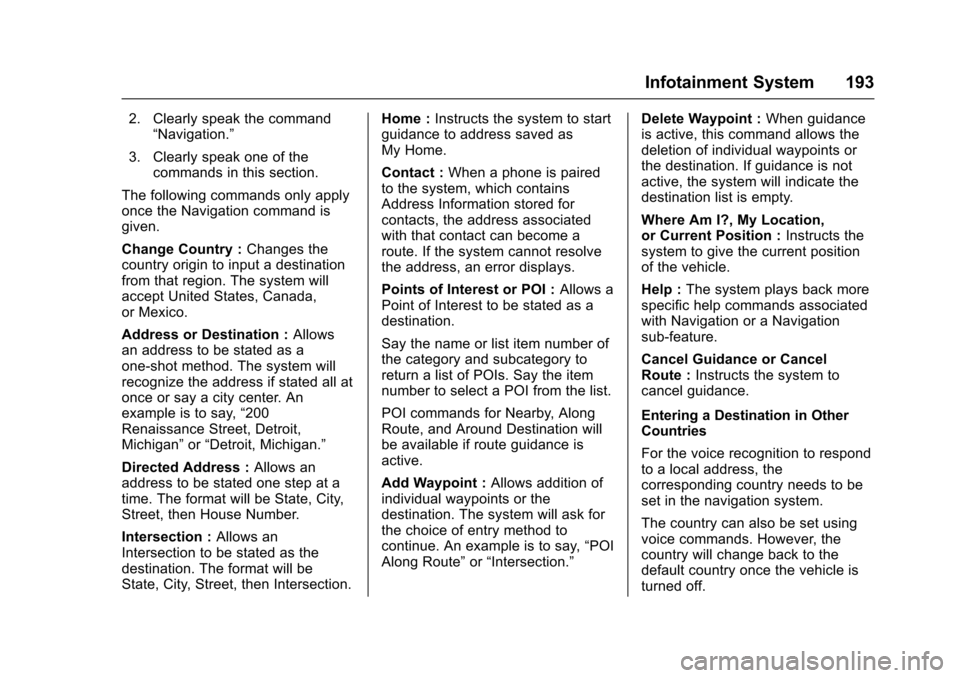
The following commands only applyonce the Navigation command isgiven.
Change Country :Changes thecountry origin to input a destinationfrom that region. The system willaccept United States, Canada,or Mexico.
Address or Destination :Allowsan address to be stated as aone-shot method. The system willrecognize the address if stated all atonce or say a city center. Anexample is to say,“200Renaissance Street, Detroit,Michigan”or“Detroit, Michigan.”
Directed Address :Allows anaddress to be stated one step at atime. The format will be State, City,Street, then House Number.
Intersection :Allows anIntersection to be stated as thedestination. The format will beState, City, Street, then Intersection.
Home :Instructs the system to startguidance to address saved asMy Home.
Contact :When a phone is pairedto the system, which containsAddress Information stored forcontacts, the address associatedwith that contact can become aroute. If the system cannot resolvethe address, an error displays.
Points of Interest or POI :Allows aPoint of Interest to be stated as adestination.
Say the name or list item number ofthe category and subcategory toreturn a list of POIs. Say the itemnumber to select a POI from the list.
POI commands for Nearby, AlongRoute, and Around Destination willbe available if route guidance isactive.
Add Waypoint :Allows addition ofindividual waypoints or thedestination. The system will ask forthe choice of entry method tocontinue. An example is to say,“POIAlong Route”or“Intersection.”
Delete Waypoint :When guidanceis active, this command allows thedeletion of individual waypoints orthe destination. If guidance is notactive, the system will indicate thedestination list is empty.
Where Am I?, My Location,or Current Position :Instructs thesystem to give the current positionof the vehicle.
Help :The system plays back morespecific help commands associatedwith Navigation or a Navigationsub-feature.
Cancel Guidance or CancelRoute :Instructs the system tocancel guidance.
Entering a Destination in OtherCountries
For the voice recognition to respondto a local address, thecorresponding country needs to beset in the navigation system.
The country can also be set usingvoice commands. However, thecountry will change back to thedefault country once the vehicle isturned off.
Page 197 of 400
Chevrolet SS Sedan Owner Manual (GMNA-Localizing-U.S.-10122752) -2017 - crc - 8/31/16
196 Infotainment System
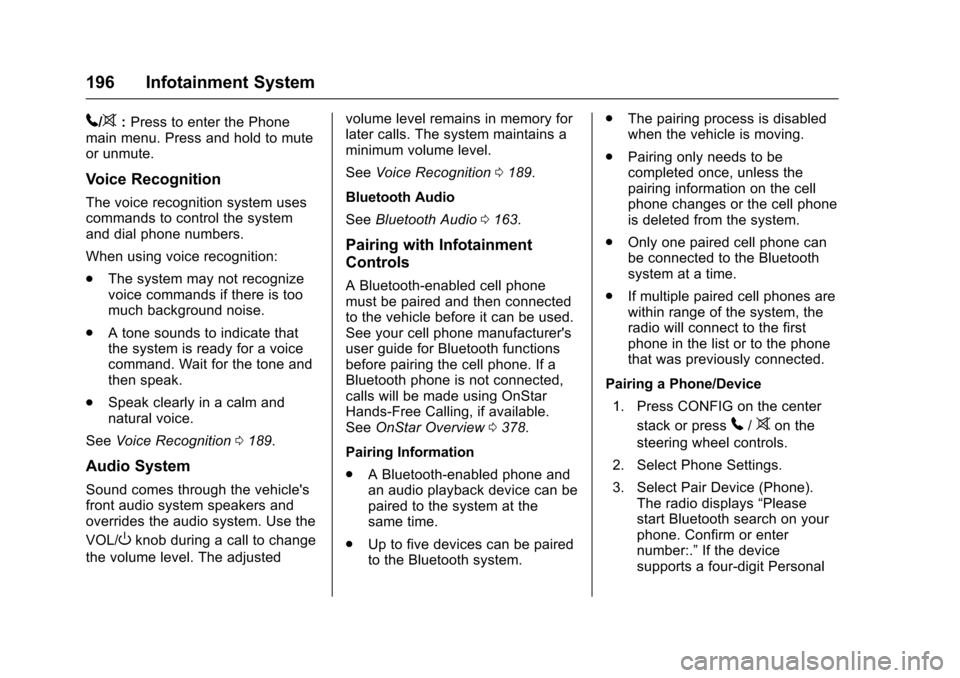
5/>:Press to enter the Phonemain menu. Press and hold to muteor unmute.
Voice Recognition
The voice recognition system usescommands to control the systemand dial phone numbers.
When using voice recognition:
.The system may not recognizevoice commands if there is toomuch background noise.
.Atonesoundstoindicatethatthe system is ready for a voicecommand. Wait for the tone andthen speak.
.Speak clearly in a calm andnatural voice.
SeeVoice Recognition0189.
Audio System
Sound comes through the vehicle'sfront audio system speakers andoverrides the audio system. Use the
VOL/Oknob during a call to change
the volume level. The adjusted
volume level remains in memory forlater calls. The system maintains aminimum volume level.
SeeVoice Recognition0189.
Bluetooth Audio
SeeBluetooth Audio0163.
Pairing with Infotainment
Controls
ABluetooth-enabledcellphonemust be paired and then connectedto the vehicle before it can be used.See your cell phone manufacturer'suser guide for Bluetooth functionsbefore pairing the cell phone. If aBluetooth phone is not connected,calls will be made using OnStarHands-Free Calling, if available.SeeOnStar Overview0378.
Pairing Information
.ABluetooth-enabledphoneandan audio playback device can bepaired to the system at thesame time.
.Up to five devices can be pairedto the Bluetooth system.
.The pairing process is disabledwhen the vehicle is moving.
.Pairing only needs to becompleted once, unless thepairing information on the cellphone changes or the cell phoneis deleted from the system.
.Only one paired cell phone canbe connected to the Bluetoothsystem at a time.
.If multiple paired cell phones arewithin range of the system, theradio will connect to the firstphone in the list or to the phonethat was previously connected.
Pairing a Phone/Device
1. Press CONFIG on the center
stack or press5/>on the
steering wheel controls.
2. Select Phone Settings.
3. Select Pair Device (Phone).The radio displays“Pleasestart Bluetooth search on yourphone. Confirm or enternumber:.”If the devicesupports a four-digit Personal
Page 202 of 400
Chevrolet SS Sedan Owner Manual (GMNA-Localizing-U.S.-10122752) -2017 - crc - 8/31/16
Infotainment System 201
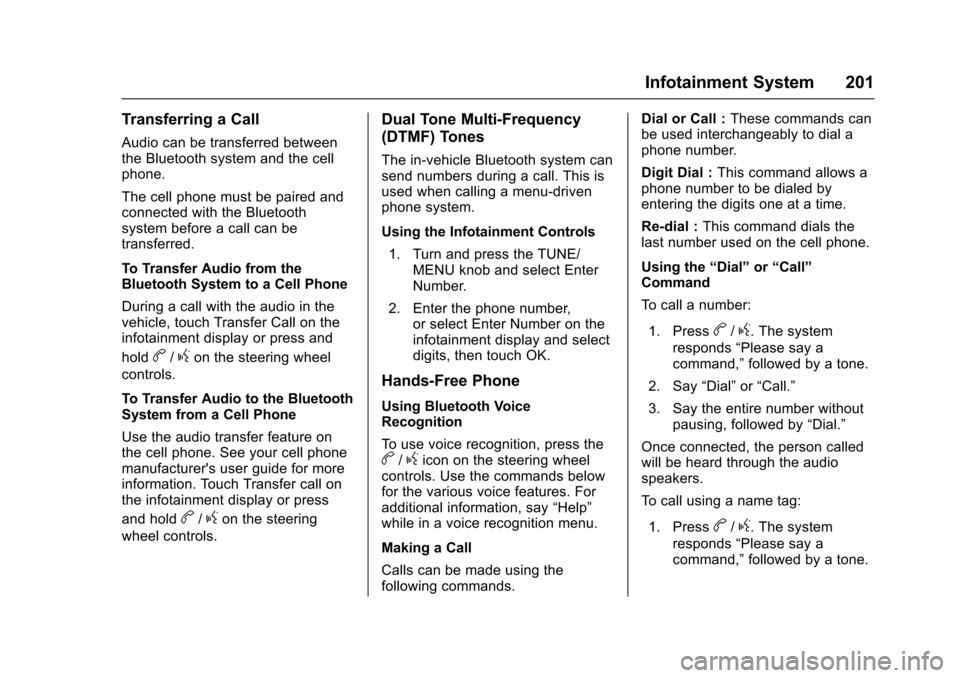
Transferring a Call
Audio can be transferred betweenthe Bluetooth system and the cellphone.
The cell phone must be paired andconnected with the Bluetoothsystem before a call can betransferred.
To Transfer Audio from theBluetooth System to a Cell Phone
During a call with the audio in thevehicle, touch Transfer Call on theinfotainment display or press and
holdb/gon the steering wheel
controls.
To Transfer Audio to the BluetoothSystem from a Cell Phone
Use the audio transfer feature onthe cell phone. See your cell phonemanufacturer's user guide for moreinformation. Touch Transfer call onthe infotainment display or press
and holdb/gon the steering
wheel controls.
Dual Tone Multi-Frequency
(DTMF) Tones
The in-vehicle Bluetooth system cansend numbers during a call. This isused when calling a menu-drivenphone system.
Using the Infotainment Controls
1. Turn and press the TUNE/MENU knob and select EnterNumber.
2. Enter the phone number,or select Enter Number on theinfotainment display and selectdigits, then touch OK.
Hands-Free Phone
Using Bluetooth VoiceRecognition
To u s e v o i c e r e c o g n i t i o n , p r e s s t h eb/gicon on the steering wheelcontrols. Use the commands belowfor the various voice features. Foradditional information, say“Help”while in a voice recognition menu.
Making a Call
Calls can be made using thefollowing commands.
Dial or Call :These commands canbe used interchangeably to dial aphone number.
Digit Dial :This command allows aphone number to be dialed byentering the digits one at a time.
Re-dial :This command dials thelast number used on the cell phone.
Using the“Dial”or“Call”Command
To c a l l a n u m b e r :
1. Pressb/g.Thesystem
responds“Please say acommand,”followed by a tone.
2. Say“Dial”or“Call.”
3. Say the entire number withoutpausing, followed by“Dial.”
Once connected, the person calledwill be heard through the audiospeakers.
To c a l l u s i n g a n a m e t a g :
1. Pressb/g.Thesystem
responds“Please say acommand,”followed by a tone.
Page 203 of 400
Chevrolet SS Sedan Owner Manual (GMNA-Localizing-U.S.-10122752) -2017 - crc - 8/31/16
202 Infotainment System
2. Say“Dial”or“Call”and thensay the name tag. For example“Call John at Work.”
Once connected, the person calledwill be heard through the audiospeakers.
Using the“Digit Dial”Command
This allows a phone number to bedialed by entering the digits one atatime.
1. Pressb/g.Thesystem
responds“Please say acommand,”followed by a tone.
2. Say“Digit Dial.”
3. Say each digit, one at a time,to dial. After each digit isentered, the system repeatsback the digit it heard followedby a tone. After the last digithas been entered, say“Dial.”
If an unwanted number is repeatedback, say“Clear”to clear the lastnumber.
Once connected, the person calledwill be heard through the audiospeakers.
Using the“Re-dial”Command
1. Pressb/g.Thesystem
responds“Please say acommand,”followed by a tone.
2. After the tone, say“Re-dial.”The system dials the lastnumber called from theconnected cell phone.
Once connected, the person calledwill be heard through the audiospeakers.
Clearing the System
Unless information is deleted out ofthe vehicle Bluetooth system, it willbe retained. This includes phonepairing information. For directionson how to delete this information,see“Deleting a Paired Phone/Device.”
Text Messaging
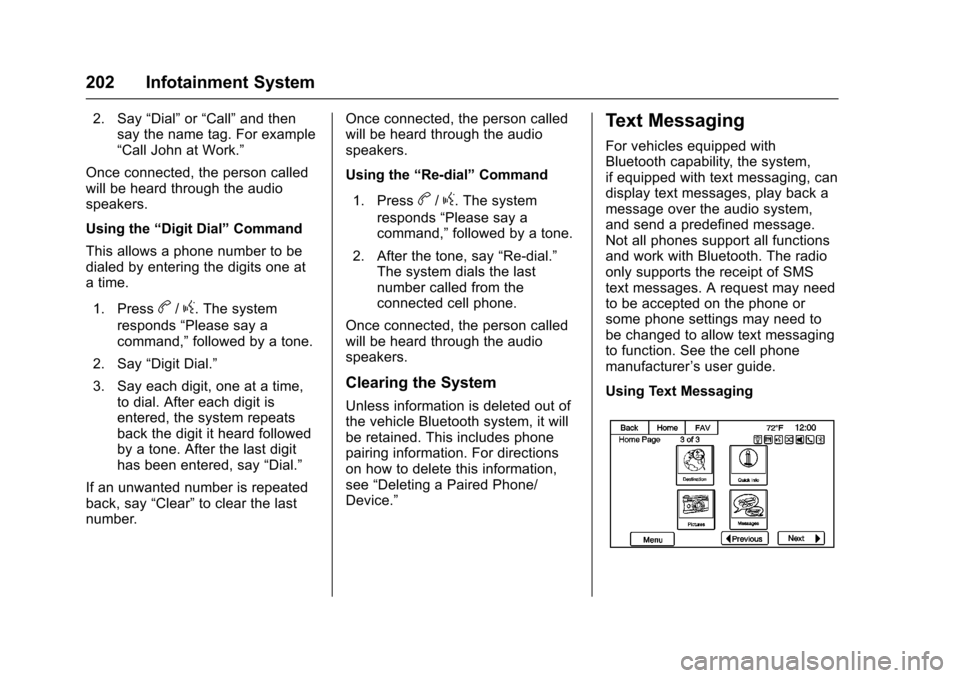
For vehicles equipped withBluetooth capability, the system,if equipped with text messaging, candisplay text messages, play back amessage over the audio system,and send a predefined message.Not all phones support all functionsand work with Bluetooth. The radioonly supports the receipt of SMStext messages. A request may needto be accepted on the phone orsome phone settings may need tobe changed to allow text messagingto function. See the cell phonemanufacturer’suserguide.
Using Text Messaging
Page 206 of 400
Chevrolet SS Sedan Owner Manual (GMNA-Localizing-U.S.-10122752) -2017 - crc - 8/31/16
Infotainment System 205
Trademarks and
License Agreements
FCC Information
SeeRadio Frequency Statement0374.
“Made for iPod”and“Made foriPhone”mean that an electronicaccessory has been designed toconnect specifically to iPod oriPhone and has been certified bythe developer to meet Appleperformance standards.
iPod and iPhone are trademarks ofApple Computer, Inc., registered inthe U.S. and other countries.
Fees and Taxes : Subscription fee,taxes, one time activation fee, andother fees may apply. Subscriptionfee is consumer only. All fees andprogramming subject to change.Subscriptions subject to CustomerAgreement available atwww.siriusxm.com. SiriusXM®
service only available in the48 contiguous United States andCanada.
Explicit Language Notice: Channelswith frequent explicit language areindicated with an“XL”preceding thechannel name. Channel blocking isavailable for SiriusXM SatelliteRadio receivers by notifyingSiriusXM:
.USA Customers—Seewww.siriusxm.com or call1-888-601-6296.
It is prohibited to copy, decompile,disassemble, reverse engineer,hack, manipulate, or otherwisemake available any technology orsoftware incorporated in receiverscompatible with the SiriusXM®
Satellite Radio System or thatsupport the SiriusXM website, theOnline Service or any of its content.Furthermore, the AMBER voicecompression software included inthis product is protected byintellectual property rights includingpatent rights, copyrights, and tradesecrets of Digital VoiceSystems, Inc.
General Requirements:
.ALicenseAgreementfromSiriusXM®is required for anyproduct that incorporatesSiriusXM Technology and/or foruse of any of the SiriusXMmarks to be manufactured,distributed, or marketed in theSiriusXM Service Area.
Gracenote
Gracenote®,Gracenotelogoandlogotype, and the "Powered byGracenote" logo are either a
Page 213 of 400
Chevrolet SS Sedan Owner Manual (GMNA-Localizing-U.S.-10122752) -2017 - crc - 8/31/16
212 Climate Controls
Dual-Zone Mode :Allows differenttemperatures to be set for the driverand passenger sides.
Enter Dual-Zone mode by adjustingthe passenger side temperaturewhen in Single-Zone mode.
Air Delivery Mode Controls :
PressY,),-,or[to change
the current airflow mode. Thecurrent mode selection appears inthe infotainment display. Changingthe mode cancels the automaticoperation and the system goes intosemi-automatic operation. PressAUTO to return to full automaticoperation.
Select from the following:
Y:Air is directed to the instrumentpanel outlets and console outlet.
):Air is divided between theinstrument panel outlets, consoleoutlet and the floor outlets. Coolerair is directed to the upper outletsand warmer air to the floor outlets.
[:Air is directed to the flooroutlets with some air directed to theouter instrument panel, windshield,and side window outlets.
-:Air is directed to the windshield,floor and side window outlets. Usethis mode to clear the windows offog or moisture and warm thepassengers.
5FRONT :Press to turn the
defrost on or off. The5FRONT
indicator appears in the display.Aportionoftheairisdirectedtothewindshield and side window outlets,with some air directed to the outerinstrument panel outlets.
For best results, clear all snow andice from the windshield beforedefrosting.
Air Conditioning
#:Press to turn the airconditioning system on or off. The#appears on the infotainmentdisplay when the air conditioning ison. When the air conditioning is
turned off,#OFF appears on the
infotainment display.
The air conditioning systemremoves moisture and heat fromthe air.
The air conditioning mightautomatically turn off during heavyacceleration, abnormal systempressure or very cold outsidetemperatures.
When-,h,or5FRONTis
selected, the air conditioning isautomatically switched on toimprove defogging performance andremove moisture from the air.
Recirculation
h:Press to change the air intakebetween recirculated air and outside
air.happears on the
infotainment display whenrecirculation is activated.
The recirculation mode recyclesinterior air and is not recommendedfor extended use. If it is used for along period of time, the systemautomatically lets some outside airinto the vehicle for ventilation.
Do not use the recirculation mode ifoccupants are smoking.
The recirculation mode cannot beturned on in defrost mode.
Page 215 of 400
Chevrolet SS Sedan Owner Manual (GMNA-Localizing-U.S.-10122752) -2017 - crc - 8/31/16
214 Climate Controls
Quick Cool Down
When entering the vehicle on a hotday, open the windows for a shorttime to allow the hot air to escape.
Automatic Transmission
If the vehicle is stopped for a longtime in hot weather and the engineis running and the air conditioning isoperating, move the shift lever toN(Neutral)orP(Park).
A/C Sound
Aslighthissingsoundwhentheairconditioning is turned off is normal.
Water Condensation
Water may drip from underneath thevehicle; this is normal.
Unsealed Dusty Roads
To h e l p p r e v e n t d u s t f r o m e n t e r i n gyour vehicle:
.When following other vehicleson dusty roads and the dust is
airborne, selecth.
.If the dust is not airborne, selectoutside air and set the fancontrol to high speed.
.Close all windows.
.Do not use recirculation for longperiods of time.
Air Vents
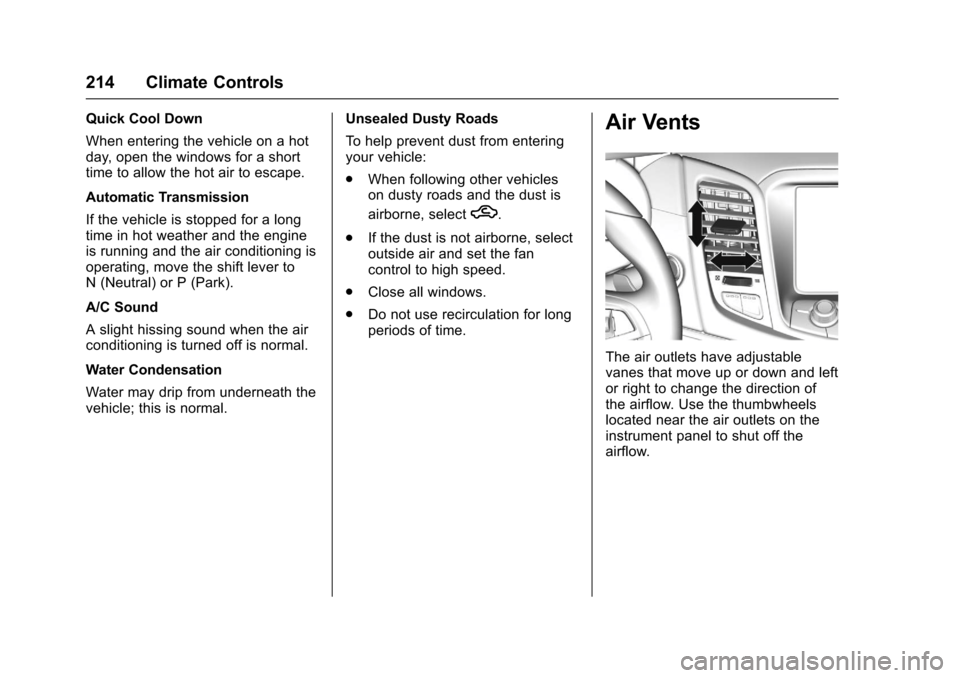
The air outlets have adjustablevanes that move up or down and leftor right to change the direction ofthe airflow. Use the thumbwheelslocated near the air outlets on theinstrument panel to shut off theairflow.
Page 232 of 400
Chevrolet SS Sedan Owner Manual (GMNA-Localizing-U.S.-10122752) -2017 - crc - 8/31/16
Driving and Operating 231
With the ignition off, pressing thebutton one time without the brakepedal applied will place the ignitionsystem in ACC/ACCESSORY.
The ignition will switch from ACC/ACCESSORY to OFF afterfive minutes to prevent batteryrundown.
ON/RUN/START (Green IndicatorLight) :This mode is for driving andstarting. With the ignition off, andthe brake pedal applied forautomatic transmission vehicles,and the clutch pedal applied formanual transmission vehicles,pressing the button once will placethe ignition system in ON/RUN/START. Once engine crankingbegins, release the button. Enginecranking will continue until theengine starts. SeeStarting theEngine0231.Theignitionwillthenremain in ON/RUN.
Service Only Mode
This power mode is available forservice and diagnostics, and toverify the proper operation of themalfunction indicator lamp as maybe required for emission inspection
purposes. With the vehicle off, andthe brake pedal not applied,pressing and holding the button formore than five seconds will placethe vehicle in Service Only Mode.The instruments and audio systemswill operate as they do in ON/RUN,but the vehicle will not be able to bedriven. The engine will not start inService Only Mode. Press thebutton again to turn the vehicle off.
Starting the Engine
Place the transmission in theproper gear.
Caution
If you add electrical parts or
accessories, you could change
the way the engine operates. Any
resulting damage would not be
covered by the vehicle warranty.
SeeAdd-On Electrical Equipment
0268.
Automatic Transmission
Move the shift lever to P (Park) orN(Neutral). To restart the vehiclewhen it is already moving, useN(Neutral) only.
Caution
Do not try to shift to P (Park) if the
vehicle is moving. If you do, you
could damage the transmission.
Shift to P (Park) only when the
vehicle is stopped.
Manual Transmission
The shift lever should be in Neutraland the parking brake engaged.Hold the clutch pedal down to thefloor and start the engine.
Starting Procedure
1. With the Keyless Accesssystem, the RKE transmittermust be in the vehicle. PressENGINE START/STOP with thebrake pedal applied onvehicles with an automatictransmission, and the clutchpedal applied on vehicles with
Page 243 of 400
Chevrolet SS Sedan Owner Manual (GMNA-Localizing-U.S.-10122752) -2017 - crc - 8/31/16
242 Driving and Operating
If driving safely on a wet road and itbecomes necessary to slam on thebrakes and continue braking toavoid a sudden obstacle, acomputer senses the wheels areslowing down. If one of the wheelsis about to stop rolling, the computerwill separately work the brakes ateach wheel.
ABS can change the brake pressureto each wheel, as required, fasterthan any driver could. This can helpyou steer around the obstacle whilebraking hard.
As the brakes are applied, thecomputer keeps receiving updateson wheel speed and controlsbraking pressure accordingly.
Remember: ABS does not changethe time needed to get a foot up tothe brake pedal or always decreasestopping distance. If you get tooclose to the vehicle in front of you,there will not be enough time toapply the brakes if that vehiclesuddenly slows or stops. Alwaysleave enough room up ahead tostop, even with ABS.
Using ABS
Do not pump the brakes. Just holdthe brake pedal down firmly and letABS work. You may hear the ABSpump or motor operating and feelthe brake pedal pulsate. This isnormal.
Braking in Emergencies
ABS allows you to steer and brakeat the same time. In manyemergencies, steering can helpmore than even the very bestbraking.
Electric Parking Brake
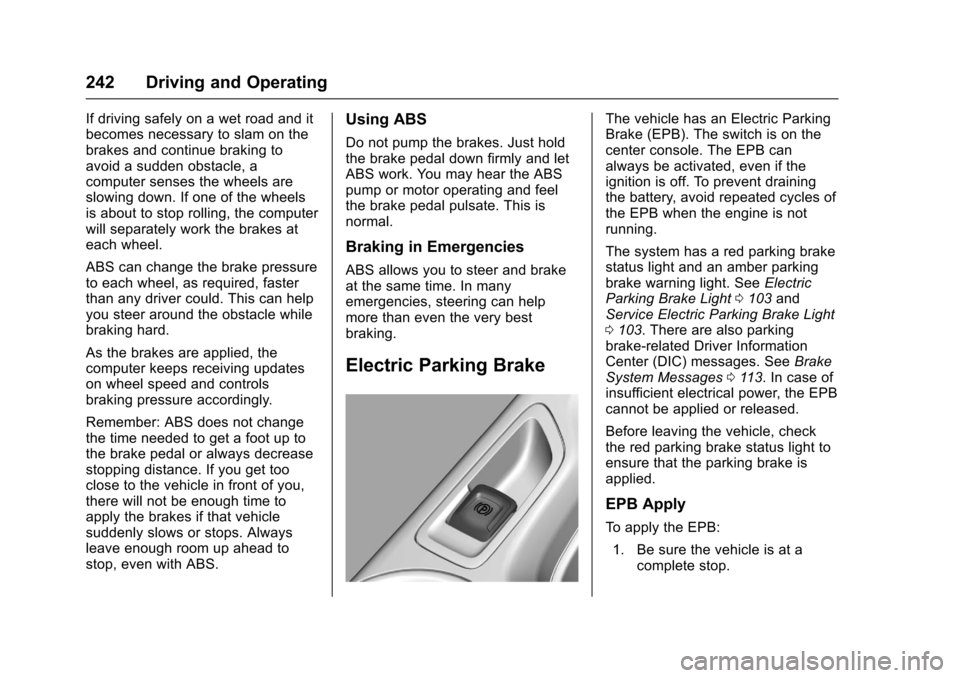
The vehicle has an Electric ParkingBrake (EPB). The switch is on thecenter console. The EPB canalways be activated, even if theignition is off. To prevent drainingthe battery, avoid repeated cycles ofthe EPB when the engine is notrunning.
The system has a red parking brakestatus light and an amber parkingbrake warning light. SeeElectricParking Brake Light0103andService Electric Parking Brake Light0103.Therearealsoparkingbrake-related Driver InformationCenter (DIC) messages. SeeBrakeSystem Messages011 3.Incaseofinsufficient electrical power, the EPBcannot be applied or released.
Before leaving the vehicle, checkthe red parking brake status light toensure that the parking brake isapplied.
EPB Apply
To a p p l y t h e E P B :
1. Be sure the vehicle is at acomplete stop.