key CHEVROLET SS 2017 1.G Owner's Manual
[x] Cancel search | Manufacturer: CHEVROLET, Model Year: 2017, Model line: SS, Model: CHEVROLET SS 2017 1.GPages: 400, PDF Size: 7.31 MB
Page 41 of 400
Chevrolet SS Sedan Owner Manual (GMNA-Localizing-U.S.-10122752) -2017 - crc - 8/31/16
40 Keys, Doors, and Windows
Interior Mirrors
Interior Rearview Mirrors
Adjust the rearview mirror for a clearview of the area behind yourvehicle.
If equipped with OnStar, there arethree buttons at the bottom of themirror. See your dealer for moreinformation on the system and howto subscribe to OnStar. SeeOnStarOverview0378.
To a v o i d a c c i d e n t a l O n S t a r c a l l s ,clean the mirror with the ignition off.Do not spray glass cleaner directlyon the mirror. Use a soft toweldampened with water.
Automatic Dimming
Rearview Mirror
The rearview mirror automaticallydims to reduce the glare of theheadlamps from behind. Thisfeature comes on when the vehicleis started.
Windows
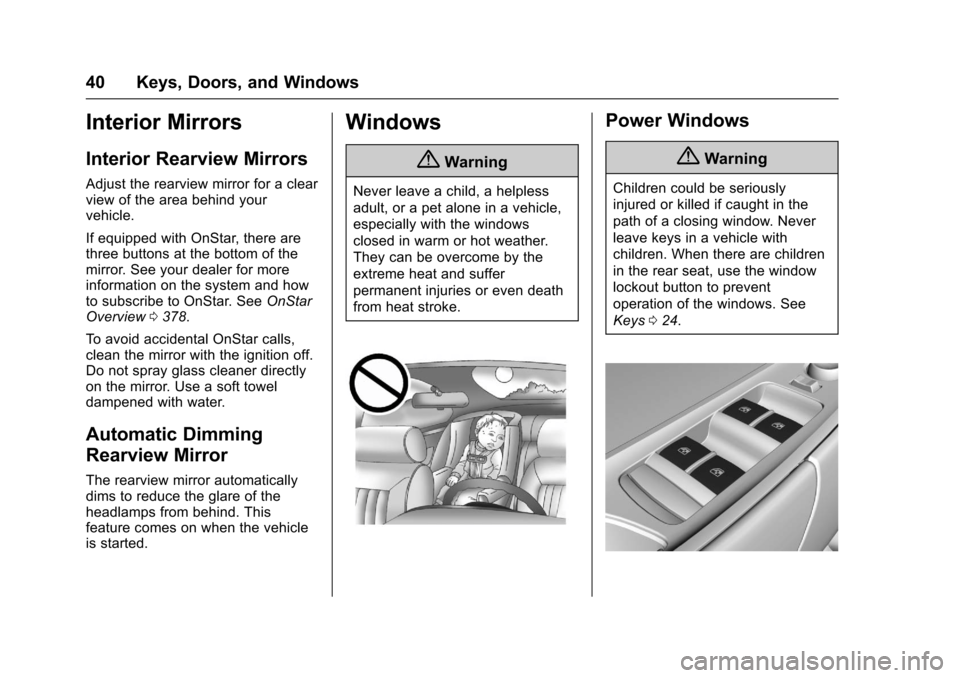
{Warning
Never leave a child, a helpless
adult, or a pet alone in a vehicle,
especially with the windows
closed in warm or hot weather.
They can be overcome by the
extreme heat and suffer
permanent injuries or even death
from heat stroke.
Power Windows
{Warning
Children could be seriously
injured or killed if caught in the
path of a closing window. Never
leave keys in a vehicle with
children. When there are children
in the rear seat, use the window
lockout button to prevent
operation of the windows. See
Keys024.
Page 42 of 400
Chevrolet SS Sedan Owner Manual (GMNA-Localizing-U.S.-10122752) -2017 - crc - 8/31/16
Keys, Doors, and Windows 41
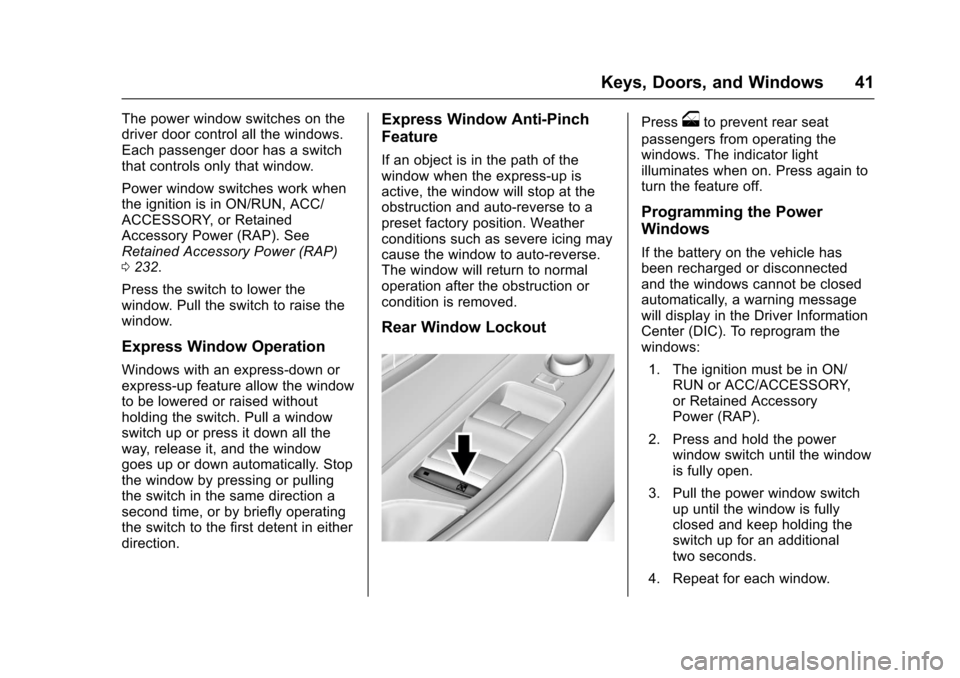
The power window switches on thedriver door control all the windows.Each passenger door has a switchthat controls only that window.
Power window switches work whenthe ignition is in ON/RUN, ACC/ACCESSORY, or RetainedAccessory Power (RAP). SeeRetained Accessory Power (RAP)0232.
Press the switch to lower thewindow. Pull the switch to raise thewindow.
Express Window Operation
Windows with an express-down orexpress-up feature allow the windowto be lowered or raised withoutholding the switch. Pull a windowswitch up or press it down all theway, release it, and the windowgoes up or down automatically. Stopthe window by pressing or pullingthe switch in the same direction asecond time, or by briefly operatingthe switch to the first detent in eitherdirection.
Express Window Anti-Pinch
Feature
If an object is in the path of thewindow when the express-up isactive, the window will stop at theobstruction and auto-reverse to apreset factory position. Weatherconditions such as severe icing maycause the window to auto-reverse.The window will return to normaloperation after the obstruction orcondition is removed.
Rear Window Lockout
Pressoto prevent rear seat
passengers from operating thewindows. The indicator lightilluminates when on. Press again toturn the feature off.
Programming the Power
Windows
If the battery on the vehicle hasbeen recharged or disconnectedand the windows cannot be closedautomatically, a warning messagewill display in the Driver InformationCenter (DIC). To reprogram thewindows:
1. The ignition must be in ON/RUN or ACC/ACCESSORY,or Retained AccessoryPower (RAP).
2. Press and hold the powerwindow switch until the windowis fully open.
3. Pull the power window switchup until the window is fullyclosed and keep holding theswitch up for an additionaltwo seconds.
4. Repeat for each window.
Page 43 of 400
Chevrolet SS Sedan Owner Manual (GMNA-Localizing-U.S.-10122752) -2017 - crc - 8/31/16
42 Keys, Doors, and Windows
Sun Visors
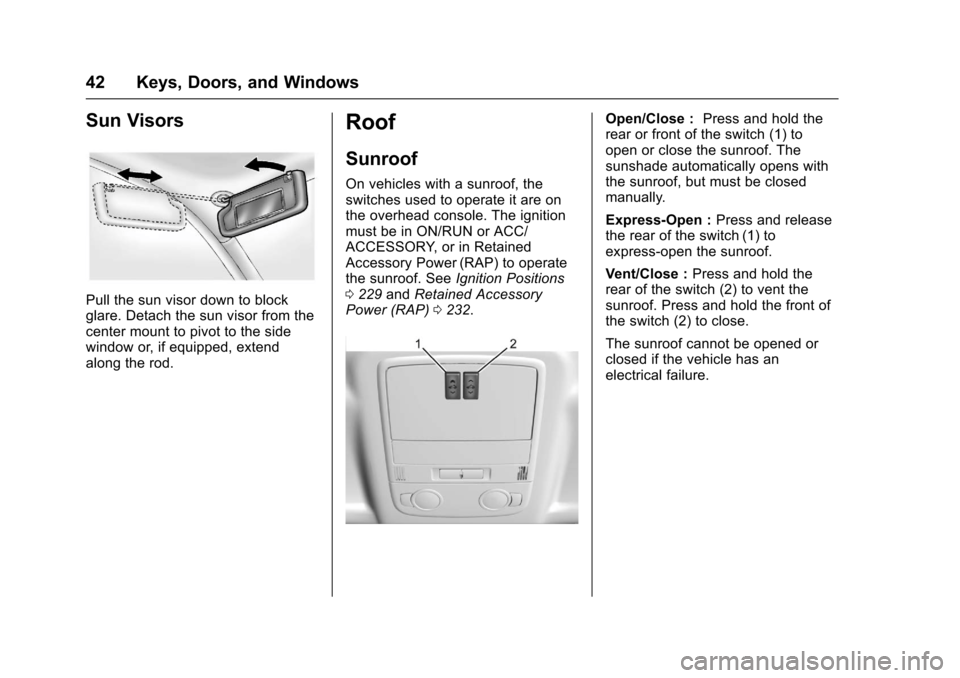
Pull the sun visor down to blockglare. Detach the sun visor from thecenter mount to pivot to the sidewindow or, if equipped, extendalong the rod.
Roof
Sunroof
On vehicles with a sunroof, theswitches used to operate it are onthe overhead console. The ignitionmust be in ON/RUN or ACC/ACCESSORY, or in RetainedAccessory Power (RAP) to operatethe sunroof. SeeIgnition Positions0229andRetained AccessoryPower (RAP)0232.
Open/Close :Press and hold therear or front of the switch (1) toopen or close the sunroof. Thesunshade automatically opens withthe sunroof, but must be closedmanually.
Express-Open :Press and releasethe rear of the switch (1) toexpress-open the sunroof.
Vent/Close :Press and hold therear of the switch (2) to vent thesunroof. Press and hold the front ofthe switch (2) to close.
The sunroof cannot be opened orclosed if the vehicle has anelectrical failure.
Page 44 of 400
Chevrolet SS Sedan Owner Manual (GMNA-Localizing-U.S.-10122752) -2017 - crc - 8/31/16
Keys, Doors, and Windows 43
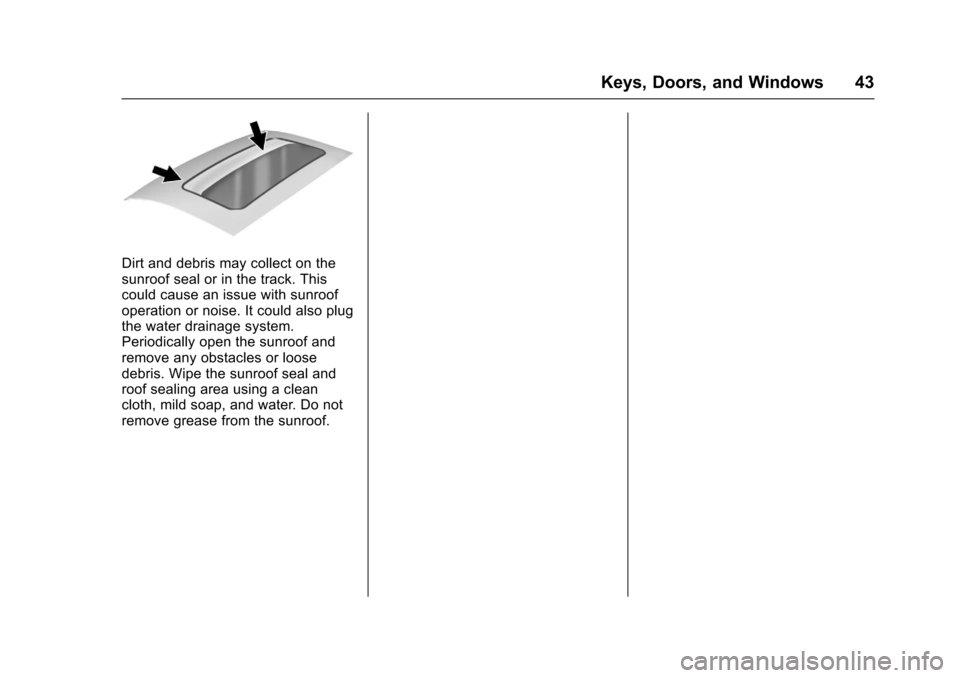
Dirt and debris may collect on thesunroof seal or in the track. Thiscould cause an issue with sunroofoperation or noise. It could also plugthe water drainage system.Periodically open the sunroof andremove any obstacles or loosedebris. Wipe the sunroof seal androof sealing area using a cleancloth, mild soap, and water. Do notremove grease from the sunroof.
Page 56 of 400
Chevrolet SS Sedan Owner Manual (GMNA-Localizing-U.S.-10122752) -2017 - crc - 8/31/16
Seats and Restraints 55
To u n l a t c h t h e b e l t , p u s h t h e b u t t o non the buckle. The belt shouldreturn to its stowed position.
Always stow the safety belt slowly.If the safety belt webbing returnsquickly to the stowed position, theretractor may lock and cannot bepulled out. If this happens, pull thesafety belt straight out firmly tounlock the webbing, and thenrelease it. If the webbing is stilllocked in the retractor, see yourdealer.
Before a door is closed, be sure thesafety belt is out of the way. If adoor is slammed against a safetybelt, damage can occur to both thesafety belt and the vehicle.
Safety Belt Pretensioners
This vehicle has safety beltpretensioners for the front outboardoccupants. Although the safety beltpretensioners cannot be seen, theyare part of the safety belt assembly.They can help tighten the safetybelts during the early stages of amoderate to severe frontal, nearfrontal, or rear crash if the thresholdconditions for pretensioner
activation are met. Safety beltpretensioners can also help tightenthe safety belts in a side crash or arollover event.
Pretensioners work only once. If thepretensioners activate in a crash,the pretensioners and probablyother parts of the vehicle's safetybelt system will need to be replaced.SeeReplacing Safety Belt SystemParts after a Crash056.
Do not sit on the outboard safetybelt while entering or exiting thevehicle or at any time while sitting inthe seat. Sitting on the safety beltcan damage the webbing andhardware.
Safety Belt Use During
Pregnancy
Safety belts work for everyone,including pregnant women. Like alloccupants, they are more likely tobe seriously injured if they do notwear safety belts.
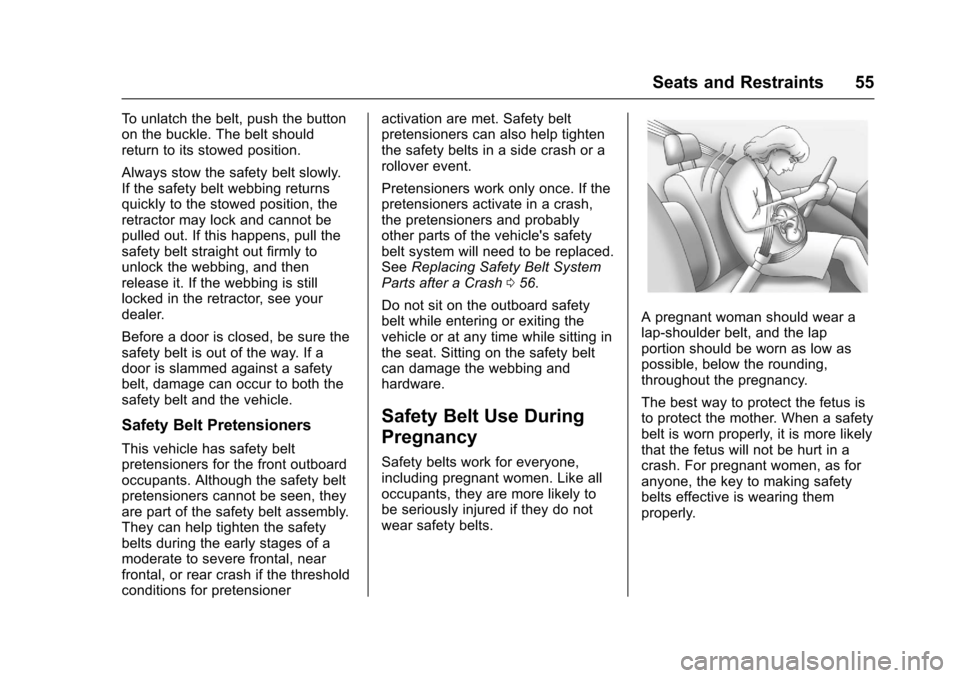
Apregnantwomanshouldwearalap-shoulder belt, and the lapportion should be worn as low aspossible, below the rounding,throughout the pregnancy.
The best way to protect the fetus isto protect the mother. When a safetybelt is worn properly, it is more likelythat the fetus will not be hurt in acrash. For pregnant women, as foranyone, the key to making safetybelts effective is wearing themproperly.
Page 91 of 400
Chevrolet SS Sedan Owner Manual (GMNA-Localizing-U.S.-10122752) -2017 - crc - 8/31/16
90 Instruments and Controls
Instruments and
Controls
Controls
Steering Wheel Adjustment . . . . 91Steering Wheel Controls . . . . . . . 91Horn . . . . . . . . . . . . . . . . . . . . . . . . . . . 92Windshield Wiper/Washer . . . . . . 92Clock . . . . . . . . . . . . . . . . . . . . . . . . . . 93Power Outlets . . . . . . . . . . . . . . . . . 94
Warning Lights, Gauges, and
Indicators
Warning Lights, Gauges, andIndicators . . . . . . . . . . . . . . . . . . . . 95Instrument Cluster . . . . . . . . . . . . . 96Speedometer . . . . . . . . . . . . . . . . . . 97Odometer . . . . . . . . . . . . . . . . . . . . . . 97Trip Odometer . . . . . . . . . . . . . . . . . 97Ta c h o m e t e r . . . . . . . . . . . . . . . . . . . . 9 7Fuel Gauge . . . . . . . . . . . . . . . . . . . . 97Engine Coolant TemperatureGauge . . . . . . . . . . . . . . . . . . . . . . . . 98Safety Belt Reminders . . . . . . . . . 98Airbag Readiness Light . . . . . . . . 99Passenger Airbag StatusIndicator . . . . . . . . . . . . . . . . . . . . . . 99Charging System Light . . . . . . . 100
Malfunction Indicator Lamp(Check Engine Light) . . . . . . . . 100Service Vehicle Soon Light . . . 102Brake System WarningLight . . . . . . . . . . . . . . . . . . . . . . . . 102Electric Parking BrakeLight . . . . . . . . . . . . . . . . . . . . . . . . 103Service Electric Parking BrakeLight . . . . . . . . . . . . . . . . . . . . . . . . 103Antilock Brake System (ABS)Warning Light . . . . . . . . . . . . . . . 104Lane Departure Warning(LDW) Light . . . . . . . . . . . . . . . . . 104Traction Off Light . . . . . . . . . . . . . 104StabiliTrak®OFF Light . . . . . . . . 105Traction Control System (TCS)/StabiliTrak®Light . . . . . . . . . . . 105Driver Mode Control Light . . . . 105Tire Pressure Light . . . . . . . . . . . 106Engine Oil Pressure Light . . . . 106Low Fuel Warning Light . . . . . . 106Security Light . . . . . . . . . . . . . . . . . 107High-Beam On Light . . . . . . . . . . 107Lamps On Reminder . . . . . . . . . 107Cruise Control Light . . . . . . . . . . 107Door Ajar Light . . . . . . . . . . . . . . . 108
Information Displays
Driver InformationCenter (DIC) . . . . . . . . . . . . . . . . 108Head-Up Display (HUD) . . . . . . 110
Vehicle Messages
Vehicle Messages . . . . . . . . . . . . 113Battery Voltage and ChargingMessages . . . . . . . . . . . . . . . . . . . 113Brake System Messages . . . . . 113Cruise Control Messages . . . . . 114Door Ajar Messages . . . . . . . . . . 114Engine Cooling SystemMessages . . . . . . . . . . . . . . . . . . . 114Engine Oil Messages . . . . . . . . . 115Engine Power Messages . . . . . 115Fuel System Messages . . . . . . . 115Key and Lock Messages . . . . . . 115Lamp Messages . . . . . . . . . . . . . . 116Object Detection SystemMessages . . . . . . . . . . . . . . . . . . . 116Ride Control SystemMessages . . . . . . . . . . . . . . . . . . . 117Security Messages . . . . . . . . . . . 117Service Vehicle Messages . . . . 118Starting the VehicleMessages . . . . . . . . . . . . . . . . . . . 118Tire Messages . . . . . . . . . . . . . . . . 118Transmission Messages . . . . . . 119Vehicle ReminderMessages . . . . . . . . . . . . . . . . . . . 120Vehicle Speed Messages . . . . . 120Washer Fluid Messages . . . . . . 120Window Messages . . . . . . . . . . . 120
Page 116 of 400
Chevrolet SS Sedan Owner Manual (GMNA-Localizing-U.S.-10122752) -2017 - crc - 8/31/16
Instruments and Controls 115
Engine Oil Messages
CHANGE ENGINE OIL SOON
This message displays whenservice is required for the vehicle.See your dealer.SeeEngine Oil0275andMaintenance Schedule0349.
Acknowledging the CHANGEENGINE OIL SOON message willnot reset the system. See“Remaining Oil Life”underDriverInformation Center (DIC)0108andEngine Oil Life System0277.
ENGINE OIL LOW—ADD OIL
On some vehicles, this messagedisplays when the engine oil levelmay be too low. Check the oil levelbefore filling to the recommendedlevel. If the oil is not low and thismessage remains on, take thevehicle to your dealer for service.SeeEngine Oil0275.
OIL PRESSURE LOW STOP
ENGINE
This message displays when thevehicle's engine oil pressure is low.The oil pressure light also appearson the instrument cluster. SeeEngine Oil Pressure Light0106.
Stop the vehicle immediately, asengine damage can result fromdriving a vehicle with low oilpressure. Have the vehicle servicedby your dealer as soon as possiblewhen this message is displayed.
Engine Power Messages
ENGINE POWER IS REDUCED
This message displays when thevehicle's engine power is reduced.Reduced engine power can affectthe vehicle's ability to accelerate.If this message is on, but there is noreduction in performance, proceedto your destination. Theperformance may be reduced thenext time the vehicle is driven. Thevehicle may be driven at a reducedspeed while this message is on, butmaximum acceleration and speed
may be reduced. Anytime thismessage stays on, or displaysrepeatedly, the vehicle should betaken to your dealer for service assoon as possible.
Fuel System Messages
FUEL LEVEL LOW
This message displays when thevehicle is low on fuel. Refuel assoon as possible.
Key and Lock Messages
NO REMOTE DETECTED
This message displays when thetransmitter battery is weak onvehicles with Keyless Access. See“Starting the Vehicle with a LowTransmitter Battery”underRemoteKeyless Entry (RKE) SystemOperation025.
Page 117 of 400
Chevrolet SS Sedan Owner Manual (GMNA-Localizing-U.S.-10122752) -2017 - crc - 8/31/16
116 Instruments and Controls
NO REMOTE DETECTED
PRESS BRAKE TO RESTART
or NO REMOTE DETECTED
PRESS CLUTCH TO RESTART
This message displays if the RKEtransmitter is no longer detected inthe vehicle. Press the brake pedalor clutch to restart the vehicle.
REPLACE BATTERY IN
REMOTE KEY
This message displays when thebattery in the Remote Keyless Entry(RKE) transmitter needs to bereplaced. See“BatteryReplacement”underRemoteKeyless Entry (RKE) SystemOperation025.
USE TRANSMITTER POCKET
TO START
This message displays when tryingto start the vehicle if an RKEtransmitter is not detected. Thetransmitter battery may be weak.See“Starting the Vehicle with a LowTransmitter Battery”underRemoteKeyless Entry (RKE) SystemOperation025.
Lamp Messages
AUTOMATIC LIGHT CONTROL
ON/OFF
This message is displayed when theautomatic light control has beenturned on or off. SeeAutomaticHeadlamp System0127.
CHECK XXX TURN
SIGNAL LAMP
When one of the turn signals is out,this message displays to showwhich bulb needs to be replaced.SeeBulb Replacement0293andReplacement Bulbs0294.
TURN SIGNAL ON
This message is displayed if theturn signal has been left on. Turn offthe turn signal.
Object Detection System
Messages
FORWARD COLLISION
ALERT OFF
This message displays when theForward Collision Alert has beenturned off.
FRONT CAMERA BLOCKED
CLEAN WINDSHIELD
This message displays when thecamera is blocked. Cleaning theoutside of the windshield behind therearview mirror may correct theissue. The Lane Departure Warningsystem will not operate. ForwardCollision Alert (FCA) may not workor may not work as well.
LANE DEPARTURE WARNING
UNAVAILABLE
This message displays whenattempting to activate the LaneDeparture Warning (LDW) systemwhen it is temporarily unavailable.The LDW system does not needservice.
Page 119 of 400
Chevrolet SS Sedan Owner Manual (GMNA-Localizing-U.S.-10122752) -2017 - crc - 8/31/16
118 Instruments and Controls
Service Vehicle Messages
SERVICE AC SYSTEM
This message displays if there is aproblem with the air conditioningsystem. Take the vehicle to yourdealer for service.
SERVICE POWER STEERING
This message displays and a chimemay sound when there may be aproblem with the power steeringsystem. If this message displaysand a reduction in steeringperformance or loss of powersteering assistance is noticed, seeyour dealer.
SERVICE SUSPENSION
SYSTEM
This message displays when theMagnetic Ride Control system hasdetected a malfunction and thevehicle speed will be limited. Thesystem must be serviced. See yourdealer. SeeDriver Mode Control0247and“SPEED LIMITED TOXXX”underVehicle SpeedMessages0120.
SERVICE VEHICLE SOON
This message displays if there is aproblem with the vehicle. Take thevehicle to your dealer for service.
Starting the Vehicle
Messages
PRESS BRAKE TO START
This message is displayed whenattempting to start an automatictransmission equipped vehiclewithout first pressing the brakepedal.
PRESS CLUTCH TO START
This message is displayed whenattempting to start a manualtransmission equipped vehiclewithout first pressing the clutchpedal.
SERVICE KEYLESS START
SYSTEM
This message is displayed if there isaproblemwiththepushbuttonstartsystem. Take the vehicle to yourdealer for service.
Tire Messages
SERVICE TIRE MONITOR
SYSTEM
This message displays if there is aproblem with the Tire PressureMonitor System (TPMS). SeeTirePressure Monitor Operation0312for more information.
TIRE LEARNING ACTIVE
This message displays when thesystem is learning new tires. SeeTire Pressure Monitor Operation0312for more information.
TIRE PRESSURE LOW ADD
AIR TO TIRE
On vehicles with the Tire PressureMonitor System (TPMS), thismessage displays when thepressure in one or more of thevehicle's tires is low.
There is also an icon with thewarning that will indicate thelocation of the low tire.
The low tire pressure warning lightwill also come on. SeeTirePressure Light0106.
Page 124 of 400
Chevrolet SS Sedan Owner Manual (GMNA-Localizing-U.S.-10122752) -2017 - crc - 8/31/16
Instruments and Controls 123
Select High, Medium, or Low.
Remote Start Auto Cool Seat
When on and it is hot outside, theventilated seats will turn onautomatically.
Select to turn on or off.
Remote Start Auto Heat Seat
When on and it is cold outside, theheated seats will turn onautomatically.
Select to turn on or off.
Comfort and Convenience
Select and the following maydisplay:
.Easy Exit Driver Seat
.Auto Memory Recall
.Chime Volume
.Button Chime
.Reverse Tilt Mirror
Easy Exit Driver Seat
This feature moves the seatrearward to a preset positionallowing the driver more room to exitthe vehicle.
See“Easy Exit Driver Seat”underMemory Seats048.
Select On or Off.
Auto Memory Recall
When on, this feature will recall thestored seat positions for the RemoteKeyless Entry (RKE) transmitterbeing used. SeeMemory Seats048.
Select On or Off.
Chime Volume
This allows the selection of thechime volume level.
Select Normal or High.
Button Chime
Select to turn this feature on or off.
Reverse Tilt Mirror
This allows the feature to be turnedon or off.
Select Off, On - Driver andPassenger, On - Driver, or On -Passenger.
Collision/Detection Systems
Select and the following maydisplay, if equipped:
.Side Blind Zone Alert
.Rear Cross Traffic Alert
Side Blind Zone Alert
This allows the Side Blind ZoneAlert feature to be turned on or off.SeeSide Blind Zone Alert (SBZA)0261.
Select On or Off.
Rear Cross Traffic Alert
This allows the Rear Cross TrafficAlert feature to be turned on or off.SeeAssistance Systems for Parkingor Backing0254.
Select On or Off.
Lighting
Select and the following maydisplay:
.Vehicle Locator Lights
.Exit Lighting