key CHEVROLET SS 2017 1.G Owner's Guide
[x] Cancel search | Manufacturer: CHEVROLET, Model Year: 2017, Model line: SS, Model: CHEVROLET SS 2017 1.GPages: 400, PDF Size: 7.31 MB
Page 125 of 400

Chevrolet SS Sedan Owner Manual (GMNA-Localizing-U.S.-10122752) -2017 - crc - 8/31/16
124 Instruments and Controls
Vehicle Locator Lights
Select to turn this feature on or off.When on, the turn signals flash andthe headlamps and back-up lamps
will turn on whenKis pressed on
the Remote Keyless Entry (RKE)transmitter when it is dark outside.
Exit Lighting
This allows the selection of howlong the exterior lamps stay onwhen leaving the vehicle when it isdark outside.
Select Off, 30 Seconds, 1 Minute,or 2 Minutes.
Power Door Locks
Select and the following maydisplay:
.Open Door Anti Lock Out
.Auto Door Unlock
.Delayed Door Lock
Open Door Anti Lock Out
When on, this feature will keep thedriver door from locking when thedoor is open. If off, the DelayedDoor Lock menu will be available.
Select On or Off.
Auto Door Unlock
This allows the selection of whichdoors will automatically unlock whenthe vehicle is shifted into P (Park)and for a manual transmission whenthe ignition is turned off.
Select All Doors, Driver Door, or Off.
Delayed Door Lock
When on, this feature will delay thelocking of the doors. To override thedelay, press the power door lockswitch on the door.
Select On or Off.
Remote Lock/Unlock/Start
Select and the following maydisplay:
.Remote Unlock Feedback
.Remote Lock Feedback
.Remote Door Unlock
.Passive Door Unlock
.Passive Door Lock
.Remote Left in Veh. Reminder
Remote Unlock Feedback
If equipped, this allows the selectionof what type of feedback is givenwhen unlocking the vehicle with theRKE transmitter.
Select Flash Lights or Off.
Remote Lock Feedback
This allows the selection of whattype of feedback is given whenlocking the vehicle with the RemoteKeyless Entry (RKE) transmitter.
Select Lights and Horn, Lights Only,Horn Only, or Off.
Remote Door Unlock
This allows the selection of which
doors will unlock when pressingK
on the RKE transmitter.
Select Driver Door or All Doors.When set to Driver Door, the driver
door will unlock the first timeKis
pressed and all doors will unlock
whenKis pressed a second time.
When set to All Doors, all of thedoors will unlock with the first press
ofK.
Page 126 of 400
Chevrolet SS Sedan Owner Manual (GMNA-Localizing-U.S.-10122752) -2017 - crc - 8/31/16
Instruments and Controls 125
Passive Door Unlock
This allows the selection of whatdoors will unlock when using thebutton on the driver door to unlockthe vehicle.
Select All Doors or DriverDoor Only.
Passive Door Lock
This allows passive locking to beturned on or off and selectsfeedback. SeeRemote KeylessEntry (RKE) System Operation025.
Select On with Horn Chirp, On,or Off.
Remote Left in Veh. Reminder
Select to turn this feature on or off.This feature sounds an alert whenthe RKE transmitter is left in thevehicle.
Return to Factory Settings?
Select to return all vehiclepersonalization to the defaultsettings.
Select Yes or No.
Page 131 of 400
Chevrolet SS Sedan Owner Manual (GMNA-Localizing-U.S.-10122752) -2017 - crc - 8/31/16
130 Lighting
Lighting Features
Entry Lighting
Some exterior lamps and most ofthe interior lamps turn on briefly
whenKis pressed on the Remote
Keyless Entry (RKE) transmitter.After about 30 seconds the exteriorlamps turn off, and then the domeand remaining interior lamps will dimto off.
This feature can be changed. See“Ve h i c l e L o c a t o r L i g h t s”underVehicle Personalization0120.
Exit Lighting
The exterior lamps will illuminate anarea with limited lighting for a setamount of time when the ignition isturned to LOCK/OFF.
This feature can be changed. SeeVehicle Personalization0120.
Battery Power Protection
To p r e v e n t t h e b a t t e r y f r o m b e i n gdrained, the glove box, trunk, andreading lamps automatically turn off10 minutes after the ignition isturned off.
The lamps are reactivated if any ofthe following occur:
.The ignition is turned on.
.The vehicle is unlocked.
.The trunk is opened.
Page 172 of 400
Chevrolet SS Sedan Owner Manual (GMNA-Localizing-U.S.-10122752) -2017 - crc - 8/31/16
Infotainment System 171
Destination
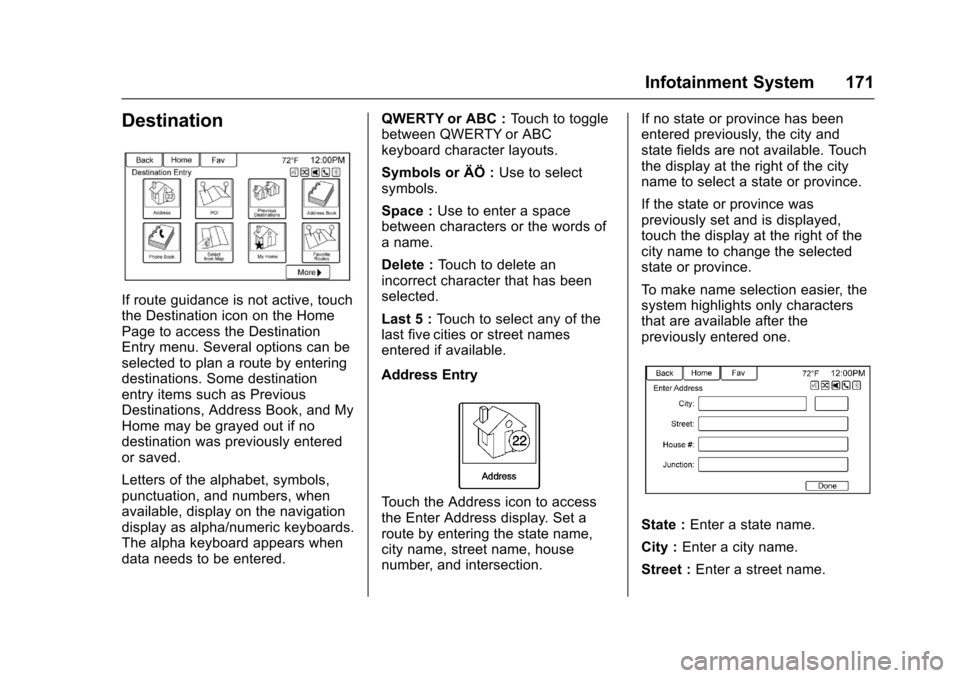
If route guidance is not active, touchthe Destination icon on the HomePage to access the DestinationEntry menu. Several options can beselected to plan a route by enteringdestinations. Some destinationentry items such as PreviousDestinations, Address Book, and MyHome may be grayed out if nodestination was previously enteredor saved.
Letters of the alphabet, symbols,punctuation, and numbers, whenavailable, display on the navigationdisplay as alpha/numeric keyboards.The alpha keyboard appears whendata needs to be entered.
QWERTY or ABC :To u c h t o t o g g l ebetween QWERTY or ABCkeyboard character layouts.
Symbols or ÄÖ :Use to selectsymbols.
Space :Use to enter a spacebetween characters or the words ofaname.
Delete :To u c h t o d e l e t e a nincorrect character that has beenselected.
Last 5 :To u c h t o s e l e c t a n y o f t h elast five cities or street namesentered if available.
Address Entry
To u c h t h e A d d r e s s i c o n t o a c c e s sthe Enter Address display. Set aroute by entering the state name,city name, street name, housenumber, and intersection.
If no state or province has beenentered previously, the city andstate fields are not available. Touchthe display at the right of the cityname to select a state or province.
If the state or province waspreviously set and is displayed,touch the display at the right of thecity name to change the selectedstate or province.
To m a k e n a m e s e l e c t i o n e a s i e r , t h esystem highlights only charactersthat are available after thepreviously entered one.
State :Enter a state name.
City :Enter a city name.
Street :Enter a street name.
Page 174 of 400
Chevrolet SS Sedan Owner Manual (GMNA-Localizing-U.S.-10122752) -2017 - crc - 8/31/16
Infotainment System 173
The POI List allows selection of adestination search by Category,Name, or Telephone Number.
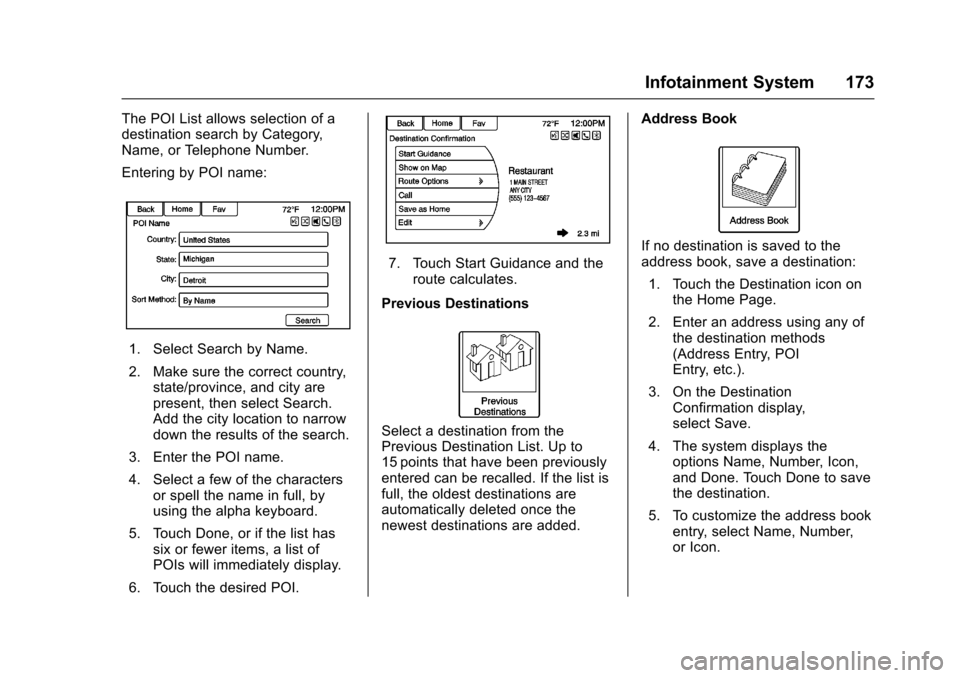
Entering by POI name:
1. Select Search by Name.
2. Make sure the correct country,state/province, and city arepresent, then select Search.Add the city location to narrowdown the results of the search.
3. Enter the POI name.
4. Select a few of the charactersor spell the name in full, byusing the alpha keyboard.
5. Touch Done, or if the list hassix or fewer items, a list ofPOIs will immediately display.
6. Touch the desired POI.
7. Touch Start Guidance and theroute calculates.
Previous Destinations
Select a destination from thePrevious Destination List. Up to15 points that have been previouslyentered can be recalled. If the list isfull, the oldest destinations areautomatically deleted once thenewest destinations are added.
Address Book
If no destination is saved to theaddress book, save a destination:
1. Touch the Destination icon onthe Home Page.
2. Enter an address using any ofthe destination methods(Address Entry, POIEntry, etc.).
3. On the DestinationConfirmation display,select Save.
4. The system displays theoptions Name, Number, Icon,and Done. Touch Done to savethe destination.
5. To customize the address bookentry, select Name, Number,or Icon.
Page 176 of 400
Chevrolet SS Sedan Owner Manual (GMNA-Localizing-U.S.-10122752) -2017 - crc - 8/31/16
Infotainment System 175
2. Touch the Favorite Routesoption to display Add FavoriteRoute.
3. Select Add Favorite Route andenter a favorite route name.
4. Touch OK and the displayreturns to the favoriteroutes list.
5. Select the favorite route andadd a waypoint using any ofthe destination methods, suchas address entry, POIentry, etc.
Selecting a Favorite Route:
1. Touch the Destination icon onthe Home Page to displayFavorite Routes.
2. Touch the Favorite Routesoption to display a list ofavailable favorite routes.
3. Scroll and select a favoriteroute.
4. Touch the Start Guidanceoption. The route calculates.
Deleting a Favorite Route:
1. Touch the Destination icon onthe Home Page to display theFavorite Routes option. Touchthis option to display the list ofavailable favorite routes.
2. Scroll and select the route tobe deleted.
3. Touch Edit.
4. Touch Delete Favorite Route.
Changing the route name:
1. Touch the Destination icon onthe Home Page to display theFavorite Routes option. Touchthis option to display the list ofavailable favorite routes.
2. Touch the Edit option.
3. Select Edit Name.
4. Using the keypad, enterthe name.
5. Touch Done. The new namewill be in the FavoriteRoutes Menu.
My Home
If no home destination is entered,save a destination by touching theDestination icon on the Home Page.Enter a destination using any of thedestination entry methods (AddressEntry, POI Entry, etc.). Select Saveas Home from the DestinationConfirmation display.
If a destination is already saved ashome, touch the Destination icon onthe Home Page to display the MyHome option. Touch this option tostart route guidance.
Page 178 of 400
Chevrolet SS Sedan Owner Manual (GMNA-Localizing-U.S.-10122752) -2017 - crc - 8/31/16
Infotainment System 177
4. Select Category from the POISelection menu to access thePOI List.
5. Select any of the line optionssuch as All POIs.
6. Select Sort Method from thePOI Selection menu to accessthe Search Order menu. Selectone of the two optionsavailable. These options are ByDistance or By Name.
7. Select Search.
8. Select the desired POI.
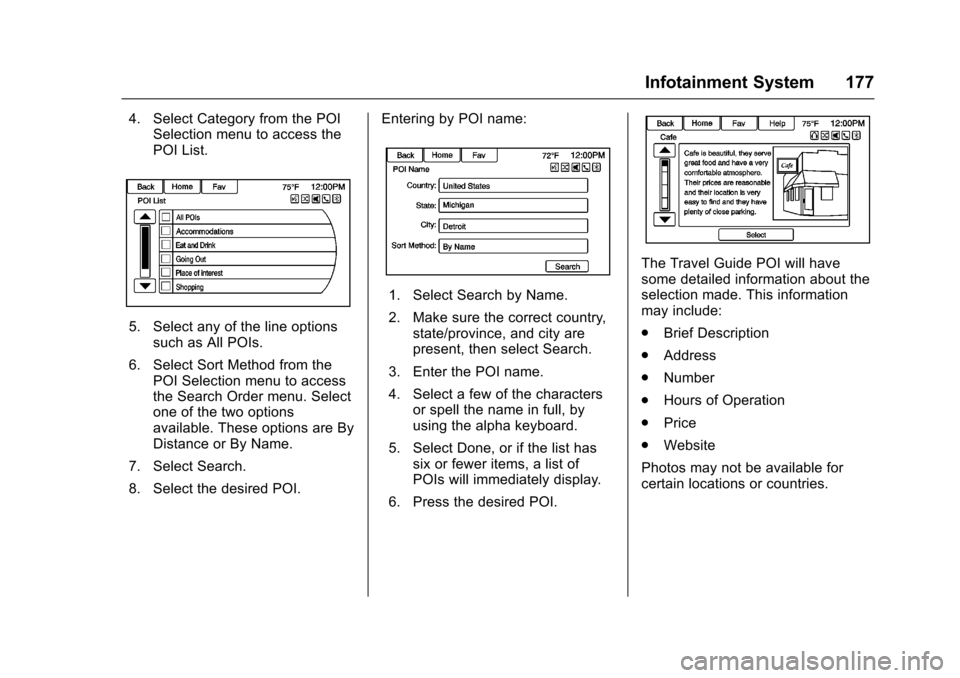
Entering by POI name:
1. Select Search by Name.
2. Make sure the correct country,state/province, and city arepresent, then select Search.
3. Enter the POI name.
4. Select a few of the charactersor spell the name in full, byusing the alpha keyboard.
5. Select Done, or if the list hassix or fewer items, a list ofPOIs will immediately display.
6. Press the desired POI.
The Travel Guide POI will havesome detailed information about theselection made. This informationmay include:
.Brief Description
.Address
.Number
.Hours of Operation
.Price
.Website
Photos may not be available forcertain locations or countries.
Page 230 of 400
Chevrolet SS Sedan Owner Manual (GMNA-Localizing-U.S.-10122752) -2017 - crc - 8/31/16
Driving and Operating 229
{Warning
Things inside the vehicle can
strike and injure people in a
sudden stop or turn, or in a
crash.
.Put things in the cargo
area of the vehicle. In the
cargo area, put them as
far forward as possible.
Try to spread the weight
evenly.
.Never stack heavier
things, like suitcases,
inside the vehicle so that
some of them are above
the tops of the seats.
.Do not leave an
unsecured child restraint
in the vehicle.
.Secure loose items in the
vehicle.
.Do not leave a seat
folded down unless
needed.
Starting and
Operating
New Vehicle Break-In
Use the following precautions toimprove performance:
.For the first 1000 km (621 mi):
Do not make full throttle starts.
Avoid downshifting to brake orslow the vehicle.
Do not drive at any one constantspeed.
Use moderate acceleration inlower gears.
Avoid vehicle speeds above11 0 k m / h ( 6 8 m p h ) .
.Between the first 1000 km(621 mi) and 5000 km (3,107 mi),heavy acceleration in lowergears may be used.
Vehicle speeds above 110 km/h(68 mph) should be limited tofive minutes per use.
.Avoid making hard stops for thefirst 350 km (217 mi) to avoidpremature wear and earlyreplacement of brakes.
Ignition Positions
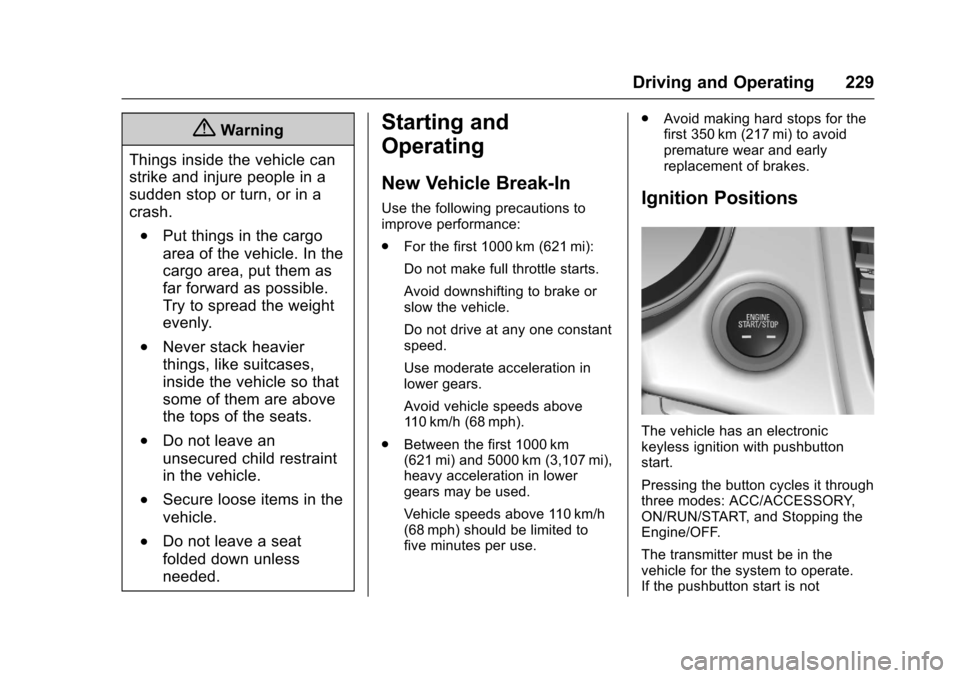
The vehicle has an electronickeyless ignition with pushbuttonstart.
Pressing the button cycles it throughthree modes: ACC/ACCESSORY,ON/RUN/START, and Stopping theEngine/OFF.
The transmitter must be in thevehicle for the system to operate.If the pushbutton start is not
Page 231 of 400
Chevrolet SS Sedan Owner Manual (GMNA-Localizing-U.S.-10122752) -2017 - crc - 8/31/16
230 Driving and Operating
working, the vehicle may be near astrong radio antenna signal causinginterference to the Keyless Accesssystem. SeeRemote Keyless Entry(RKE) System Operation025.
To s h i f t o u t o f P ( P a r k ) , t h e v e h i c l emust be in ACC/ACCESSORY orON/RUN and the brake pedal mustbe applied.
Stopping the Engine/OFF (NoIndicator Lights) :When thevehicle is stopped, press ENGINESTART/STOP once to turn theengine off.
If the vehicle is in P (Park), theignition will turn off, and RetainedAccessory Power (RAP) will remainactive. SeeRetained AccessoryPower (RAP)0232.
Automatic Transmission
If the vehicle is not in P (Park), theignition will return to ACC/ACCESSORY and display amessage in the Driver InformationCenter (DIC). SeeTr a n s m i s s i o nMessages011 9.Whenthevehicleis shifted into P (Park), the ignitionsystem will switch to OFF.
Manual Transmission
If the vehicle is stationary, theignition will turn OFF, and RetainedAccessory Power (RAP) will remainactive. SeeRetained AccessoryPower (RAP)0232.
Do not turn the engine off when thevehicle is moving. This will cause aloss of power assist in the brakeand steering systems and disablethe airbags.
If the vehicle must be shut off in anemergency:
1. Brake using a firm and steadypressure. Do not pump thebrakes repeatedly. This maydeplete power assist, requiringincreased brake pedal force.
2. Shift the vehicle to N (Neutral).This can be done while thevehicle is moving. After shiftingto N (Neutral), firmly apply thebrakes and steer the vehicle toasafelocation.
3. Come to a complete stop. Shiftto P (Park) with an automatictransmission, or Neutral with amanual transmission. Turn theignition to OFF.
4. Set the parking brake. SeeElectric Parking Brake0242.
{Warning
Turning off the vehicle while
moving may cause loss of power
assist in the brake and steering
systems and disable the airbags.
While driving, only shut the
vehicle off in an emergency.
If the vehicle cannot be pulled over,and must be shut off while driving,press and hold ENGINE START/STOP for longer than two seconds,or press twice in five seconds.
ACC/ACCESSORY (AmberIndicator Light) :This mode allowsyou to use some electricalaccessories when the engine is off.
Page 232 of 400
Chevrolet SS Sedan Owner Manual (GMNA-Localizing-U.S.-10122752) -2017 - crc - 8/31/16
Driving and Operating 231
With the ignition off, pressing thebutton one time without the brakepedal applied will place the ignitionsystem in ACC/ACCESSORY.
The ignition will switch from ACC/ACCESSORY to OFF afterfive minutes to prevent batteryrundown.
ON/RUN/START (Green IndicatorLight) :This mode is for driving andstarting. With the ignition off, andthe brake pedal applied forautomatic transmission vehicles,and the clutch pedal applied formanual transmission vehicles,pressing the button once will placethe ignition system in ON/RUN/START. Once engine crankingbegins, release the button. Enginecranking will continue until theengine starts. SeeStarting theEngine0231.Theignitionwillthenremain in ON/RUN.
Service Only Mode
This power mode is available forservice and diagnostics, and toverify the proper operation of themalfunction indicator lamp as maybe required for emission inspection
purposes. With the vehicle off, andthe brake pedal not applied,pressing and holding the button formore than five seconds will placethe vehicle in Service Only Mode.The instruments and audio systemswill operate as they do in ON/RUN,but the vehicle will not be able to bedriven. The engine will not start inService Only Mode. Press thebutton again to turn the vehicle off.
Starting the Engine
Place the transmission in theproper gear.
Caution
If you add electrical parts or
accessories, you could change
the way the engine operates. Any
resulting damage would not be
covered by the vehicle warranty.
SeeAdd-On Electrical Equipment
0268.
Automatic Transmission
Move the shift lever to P (Park) orN(Neutral). To restart the vehiclewhen it is already moving, useN(Neutral) only.
Caution
Do not try to shift to P (Park) if the
vehicle is moving. If you do, you
could damage the transmission.
Shift to P (Park) only when the
vehicle is stopped.
Manual Transmission
The shift lever should be in Neutraland the parking brake engaged.Hold the clutch pedal down to thefloor and start the engine.
Starting Procedure
1. With the Keyless Accesssystem, the RKE transmittermust be in the vehicle. PressENGINE START/STOP with thebrake pedal applied onvehicles with an automatictransmission, and the clutchpedal applied on vehicles with