service CHEVROLET SS 2017 1.G Owner's Manual
[x] Cancel search | Manufacturer: CHEVROLET, Model Year: 2017, Model line: SS, Model: CHEVROLET SS 2017 1.GPages: 400, PDF Size: 7.31 MB
Page 108 of 400
Chevrolet SS Sedan Owner Manual (GMNA-Localizing-U.S.-10122752) -2017 - crc - 8/31/16
Instruments and Controls 107
It also comes on when the fuel tankis low on fuel. The light turns offwhen fuel is added. If it does not,have the vehicle serviced.
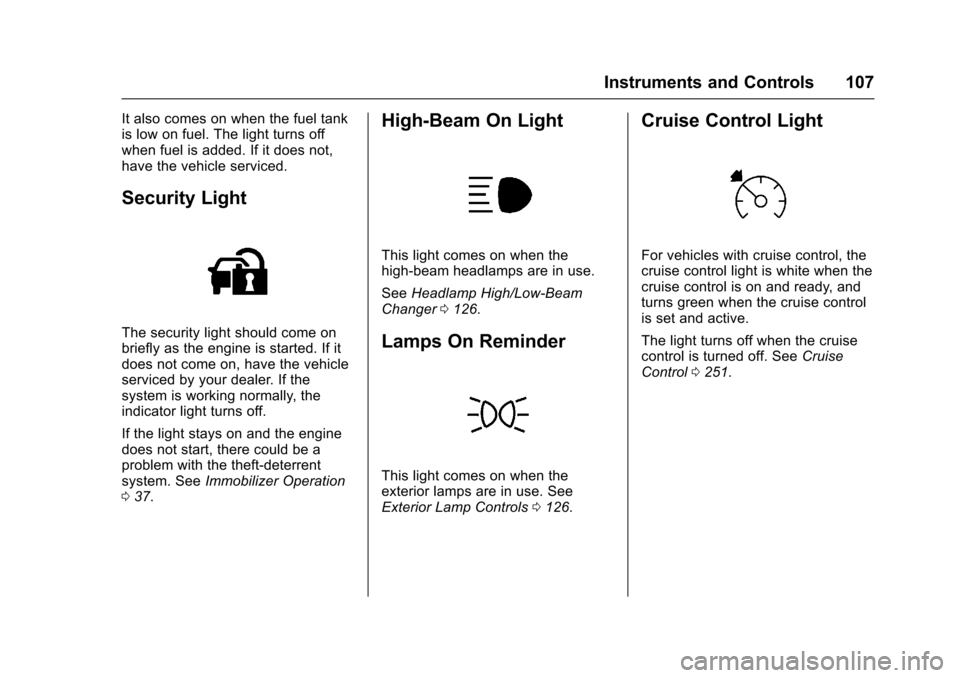
Security Light
The security light should come onbriefly as the engine is started. If itdoes not come on, have the vehicleserviced by your dealer. If thesystem is working normally, theindicator light turns off.
If the light stays on and the enginedoes not start, there could be aproblem with the theft-deterrentsystem. SeeImmobilizer Operation037.
High-Beam On Light
This light comes on when thehigh-beam headlamps are in use.
SeeHeadlamp High/Low-BeamChanger0126.
Lamps On Reminder
This light comes on when theexterior lamps are in use. SeeExterior Lamp Controls0126.
Cruise Control Light
For vehicles with cruise control, thecruise control light is white when thecruise control is on and ready, andturns green when the cruise controlis set and active.
The light turns off when the cruisecontrol is turned off. SeeCruiseControl0251.
Page 114 of 400
Chevrolet SS Sedan Owner Manual (GMNA-Localizing-U.S.-10122752) -2017 - crc - 8/31/16
Instruments and Controls 113
Vehicle Messages
Messages displayed on the DICindicate the status of the vehicle orsome action that may be needed tocorrect a condition. Multiplemessages may display one after theother.
The messages that do not requireimmediate action can beacknowledged and cleared bypressing SET/CLR. The messagesthat require immediate action cannotbe cleared until that action isperformed. All messages should betaken seriously and clearing themessages does not correct theproblem.
The following are some of thevehicle messages that may bedisplayed depending on yourvehicle content.
Battery Voltage and
Charging Messages
BATTERY SAVER ACTIVE
This message displays when thevehicle has detected that the batteryvoltage is dropping beyond areasonable point. The battery saversystem starts reducing features ofthe vehicle that may be noticed. Atthe point that features are disabled,this message displays. Turn offunnecessary accessories to allowthe battery to recharge.
LOW BATTERY
This message is displayed when thebattery voltage is low. SeeBattery -North America0288.
SERVICE BATTERY
CHARGING SYSTEM
This message is displayed whenthere is a fault in the batterycharging system. Take the vehicle toyour dealer for service.
Brake System Messages
BRAKE FLUID LOW
This message displays when thebrake fluid level is low. SeeBrakeFluid0287.
RELEASE PARKING BRAKE
This message displays if the ElectricParking Brake is on while thevehicle is in motion. Release itbefore attempting to drive. SeeElectric Parking Brake0242.
SERVICE BRAKE ASSIST
This message displays when thereis a problem with the brake boostsystem. When this messagedisplays, the brake pedal may beharder to push and the stoppingdistance may be longer. See yourdealer for service.
SERVICE PARKING BRAKE
This message displays when thereis a problem with the ElectricParking Brake. See your dealer forservice.
Page 116 of 400
Chevrolet SS Sedan Owner Manual (GMNA-Localizing-U.S.-10122752) -2017 - crc - 8/31/16
Instruments and Controls 115
Engine Oil Messages
CHANGE ENGINE OIL SOON
This message displays whenservice is required for the vehicle.See your dealer.SeeEngine Oil0275andMaintenance Schedule0349.
Acknowledging the CHANGEENGINE OIL SOON message willnot reset the system. See“Remaining Oil Life”underDriverInformation Center (DIC)0108andEngine Oil Life System0277.
ENGINE OIL LOW—ADD OIL
On some vehicles, this messagedisplays when the engine oil levelmay be too low. Check the oil levelbefore filling to the recommendedlevel. If the oil is not low and thismessage remains on, take thevehicle to your dealer for service.SeeEngine Oil0275.
OIL PRESSURE LOW STOP
ENGINE
This message displays when thevehicle's engine oil pressure is low.The oil pressure light also appearson the instrument cluster. SeeEngine Oil Pressure Light0106.
Stop the vehicle immediately, asengine damage can result fromdriving a vehicle with low oilpressure. Have the vehicle servicedby your dealer as soon as possiblewhen this message is displayed.
Engine Power Messages
ENGINE POWER IS REDUCED
This message displays when thevehicle's engine power is reduced.Reduced engine power can affectthe vehicle's ability to accelerate.If this message is on, but there is noreduction in performance, proceedto your destination. Theperformance may be reduced thenext time the vehicle is driven. Thevehicle may be driven at a reducedspeed while this message is on, butmaximum acceleration and speed
may be reduced. Anytime thismessage stays on, or displaysrepeatedly, the vehicle should betaken to your dealer for service assoon as possible.
Fuel System Messages
FUEL LEVEL LOW
This message displays when thevehicle is low on fuel. Refuel assoon as possible.
Key and Lock Messages
NO REMOTE DETECTED
This message displays when thetransmitter battery is weak onvehicles with Keyless Access. See“Starting the Vehicle with a LowTransmitter Battery”underRemoteKeyless Entry (RKE) SystemOperation025.
Page 117 of 400
Chevrolet SS Sedan Owner Manual (GMNA-Localizing-U.S.-10122752) -2017 - crc - 8/31/16
116 Instruments and Controls
NO REMOTE DETECTED
PRESS BRAKE TO RESTART
or NO REMOTE DETECTED
PRESS CLUTCH TO RESTART
This message displays if the RKEtransmitter is no longer detected inthe vehicle. Press the brake pedalor clutch to restart the vehicle.
REPLACE BATTERY IN
REMOTE KEY
This message displays when thebattery in the Remote Keyless Entry(RKE) transmitter needs to bereplaced. See“BatteryReplacement”underRemoteKeyless Entry (RKE) SystemOperation025.
USE TRANSMITTER POCKET
TO START
This message displays when tryingto start the vehicle if an RKEtransmitter is not detected. Thetransmitter battery may be weak.See“Starting the Vehicle with a LowTransmitter Battery”underRemoteKeyless Entry (RKE) SystemOperation025.
Lamp Messages
AUTOMATIC LIGHT CONTROL
ON/OFF
This message is displayed when theautomatic light control has beenturned on or off. SeeAutomaticHeadlamp System0127.
CHECK XXX TURN
SIGNAL LAMP
When one of the turn signals is out,this message displays to showwhich bulb needs to be replaced.SeeBulb Replacement0293andReplacement Bulbs0294.
TURN SIGNAL ON
This message is displayed if theturn signal has been left on. Turn offthe turn signal.
Object Detection System
Messages
FORWARD COLLISION
ALERT OFF
This message displays when theForward Collision Alert has beenturned off.
FRONT CAMERA BLOCKED
CLEAN WINDSHIELD
This message displays when thecamera is blocked. Cleaning theoutside of the windshield behind therearview mirror may correct theissue. The Lane Departure Warningsystem will not operate. ForwardCollision Alert (FCA) may not workor may not work as well.
LANE DEPARTURE WARNING
UNAVAILABLE
This message displays whenattempting to activate the LaneDeparture Warning (LDW) systemwhen it is temporarily unavailable.The LDW system does not needservice.
Page 118 of 400
Chevrolet SS Sedan Owner Manual (GMNA-Localizing-U.S.-10122752) -2017 - crc - 8/31/16
Instruments and Controls 117
This message could be due to thecamera being blocked. Cleaning theoutside of the windshield behind therearview mirror may correct theissue.
PARK ASSIST OFF
This message displays when theParking Assist system has beenturned off or when there is atemporary condition causing thesystem to be disabled.
SERVICE FRONT CAMERA
If this message remains on aftercontinued driving, the vehicle needsservice. Do not use the LaneDeparture Warning (LDW) andForward Collision Alert (FCA)features. Take the vehicle to yourdealer.
SERVICE PARKING ASSIST
This message displays if there is aproblem with the Parking Assistsystem. Do not use this system tohelp you park. See your dealer forservice.
SERVICE SIDE DETECTION
SYSTEM
If this message remains on aftercontinued driving, the vehicle needsservice. Side Blind Zone Alert(SBZA) and Rear Cross Traffic Alert(RCTA) features will not work. Takethe vehicle to your dealer.
SIDE BLIND ZONE ALERT OFF
This message indicates that thedriver has turned the Side BlindZone Alert (SBZA) system off.
SIDE DETECTION SYSTEM
UNAVAILABLE
This message indicates that SideBlind Zone Alert (SBZA) and RearCross Traffic Alert (RCTA) aredisabled either because the sensoris blocked and cannot detectvehicles in the blind zone, or thevehicle is passing through an openarea, such as the desert, wherethere is insufficient data foroperation. This message may alsoactivate during heavy rain or due toroad spray. The vehicle does not
need service. For cleaning, see"Washing the Vehicle" underExterior Care0338.
Ride Control System
Messages
SERVICE TRACTION
CONTROL
This message displays when thereis a problem with the TractionControl System (TCS). SeeTr a c t i o nControl/Electronic Stability Control0245.
SERVICE STABILITRAK
This message displays if there is aproblem with the StabiliTrak system.SeeTr a c t i o n C o n t r o l / E l e c t r o n i cStability Control0245.
Security Messages
THEFT ATTEMPTED
This message displays if the vehicledetects a tamper condition.
Page 119 of 400
Chevrolet SS Sedan Owner Manual (GMNA-Localizing-U.S.-10122752) -2017 - crc - 8/31/16
118 Instruments and Controls
Service Vehicle Messages
SERVICE AC SYSTEM
This message displays if there is aproblem with the air conditioningsystem. Take the vehicle to yourdealer for service.
SERVICE POWER STEERING
This message displays and a chimemay sound when there may be aproblem with the power steeringsystem. If this message displaysand a reduction in steeringperformance or loss of powersteering assistance is noticed, seeyour dealer.
SERVICE SUSPENSION
SYSTEM
This message displays when theMagnetic Ride Control system hasdetected a malfunction and thevehicle speed will be limited. Thesystem must be serviced. See yourdealer. SeeDriver Mode Control0247and“SPEED LIMITED TOXXX”underVehicle SpeedMessages0120.
SERVICE VEHICLE SOON
This message displays if there is aproblem with the vehicle. Take thevehicle to your dealer for service.
Starting the Vehicle
Messages
PRESS BRAKE TO START
This message is displayed whenattempting to start an automatictransmission equipped vehiclewithout first pressing the brakepedal.
PRESS CLUTCH TO START
This message is displayed whenattempting to start a manualtransmission equipped vehiclewithout first pressing the clutchpedal.
SERVICE KEYLESS START
SYSTEM
This message is displayed if there isaproblemwiththepushbuttonstartsystem. Take the vehicle to yourdealer for service.
Tire Messages
SERVICE TIRE MONITOR
SYSTEM
This message displays if there is aproblem with the Tire PressureMonitor System (TPMS). SeeTirePressure Monitor Operation0312for more information.
TIRE LEARNING ACTIVE
This message displays when thesystem is learning new tires. SeeTire Pressure Monitor Operation0312for more information.
TIRE PRESSURE LOW ADD
AIR TO TIRE
On vehicles with the Tire PressureMonitor System (TPMS), thismessage displays when thepressure in one or more of thevehicle's tires is low.
There is also an icon with thewarning that will indicate thelocation of the low tire.
The low tire pressure warning lightwill also come on. SeeTirePressure Light0106.
Page 120 of 400
Chevrolet SS Sedan Owner Manual (GMNA-Localizing-U.S.-10122752) -2017 - crc - 8/31/16
Instruments and Controls 119
If a tire pressure message displays,inflate the tires until the tire pressureis equal to the values shown on theTire and Loading Information label.SeeTires0303,Vehicle LoadLimits0226,andTire Pressure0309.
More than one tire pressuremessage can be received at a time.To r e a d t h e o t h e r m e s s a g e s t h a tmay have been sent at the sametime, press the SET/CLR button.The DIC also shows the tirepressure values. SeeDriverInformation Center (DIC)0108.
Transmission Messages
1–4 SHIFT
This message displays when youcan only shift from 1 (First) to4(Fourth)insteadof1(First)to2(Second).SeeManualTr a n s m i s s i o n0240.
PERFORMANCE MODE
ACTIVATED
This message displays when theautomatic transmission entersperformance mode. See“Performance Mode”inAutomaticTr a n s m i s s i o n0236.
SERVICE TRANSMISSION
This message displays if there is aproblem with the transmission. Seeyour dealer.
SHIFT DENIED
This message displays when usingthe Active Select mode andattempting to shift to a gear notappropriate for the vehicle speedand engine revolutions perminute (rpm). SeeManual Mode0238.
SHIFT TO PARK
This message displays when thetransmission needs to be shifted toP(Park). This may appear whenattempting to remove the RKEtransmitter from the vehicle if thevehicle is not in P (Park).
SPORT MODE ON or SPORT
MODE OFF
These messages display when theshift lever is moved into or out ofSport Shift mode. See“Sport ShiftMode”inAutomatic Transmission0236.
TRANSMISSION HOT—IDLE
ENGINE
This message displays and a chimesounds if the transmission fluid inthe vehicle gets hot. Driving with thetransmission fluid temperature highcan cause damage to the vehicle.Stop the vehicle and let it idle toallow the transmission to cool. Thismessage clears when the fluidtemperature reaches a safe level.
Page 121 of 400
Chevrolet SS Sedan Owner Manual (GMNA-Localizing-U.S.-10122752) -2017 - crc - 8/31/16
120 Instruments and Controls
Vehicle Reminder
Messages
ICE POSSIBLE DRIVE
WITH CARE
This message displays when iceconditions are possible.
Vehicle Speed Messages
SPEED LIMITED TO XXX
This message displays when amalfunction is present in theMagnetic Ride Control system. Thevehicle speed will be limited to avalue determined by the vehiclewhen the shock absorber systemhas failed and the shocks are intheir full soft mode. Have the vehicleserviced as soon as possible.
Washer Fluid Messages
WASHER FLUID LOW ADD
FLUID
This message may display when thewasher fluid level is low. Fill thewindshield washer reservoir as soonas possible. SeeEngineCompartment Overview0274forthe location of the windshieldwasher reservoir. Also, seeWasherFluid0286.
Window Messages
OPEN, THEN CLOSE DRIVER/
PASSENGER WINDOW
This message is displayed when thewindow needs to be reprogrammed.If the vehicle's battery has beendischarged or disconnected, youmay need to program each frontwindow for the express-up feature towork. SeePower Windows040.
Vehicle
Personalization
Use the audio system controls toaccess the personalization menusfor customizing vehicle features.
The following are all possiblepersonalization features. Dependingon the vehicle, some may not beavailable.
HOME :Press to display the HomePage screen.
TUNE/MENU :Press to entermenus and select menu items. Turnto scroll through the menus.
/BACK :Press to exit or movebackward in a menu.
Entering the PersonalizationMenus
The ignition must be in the ONposition.
1. Press HOME.
2. Select the Config screenbutton.
3. Turn the TUNE/MENU knob tohighlight the desired setting.
Page 132 of 400
Chevrolet SS Sedan Owner Manual (GMNA-Localizing-U.S.-10122752) -2017 - crc - 8/31/16
Infotainment System 131
Infotainment
System
Introduction
Infotainment . . . . . . . . . . . . . . . . . . 131Overview . . . . . . . . . . . . . . . . . . . . . 132Steering Wheel Controls . . . . . . 134Using the System . . . . . . . . . . . . 134Software Updates . . . . . . . . . . . . 139
Radio
AM-FM Radio . . . . . . . . . . . . . . . . 139Radio Data System (RDS) . . . . 141Satellite Radio . . . . . . . . . . . . . . . . 142Radio Reception . . . . . . . . . . . . . . 147Backglass Antenna . . . . . . . . . . . 147Multi-Band Antenna . . . . . . . . . . 148Quick Info . . . . . . . . . . . . . . . . . . . . 148Pandora Internet Radio . . . . . . . 149Stitcher Internet Radio . . . . . . . . 153Pictures . . . . . . . . . . . . . . . . . . . . . . 157
Audio Players
USB . . . . . . . . . . . . . . . . . . . . . . . . . . 158Bluetooth Audio . . . . . . . . . . . . . . 163
OnStar System
OnStar System . . . . . . . . . . . . . . . 165
Navigation
Using the NavigationSystem . . . . . . . . . . . . . . . . . . . . . . 165Maps . . . . . . . . . . . . . . . . . . . . . . . . . 168Navigation Symbols . . . . . . . . . . 169Destination . . . . . . . . . . . . . . . . . . . 171OnStar®DestinationDownload . . . . . . . . . . . . . . . . . . . 180Configure Menu . . . . . . . . . . . . . . 181Global PositioningSystem (GPS) . . . . . . . . . . . . . . 186Vehicle Positioning . . . . . . . . . . . 187Problems with RouteGuidance . . . . . . . . . . . . . . . . . . . 187If the System NeedsService . . . . . . . . . . . . . . . . . . . . . 188Map Data Updates . . . . . . . . . . . 188Database CoverageExplanations . . . . . . . . . . . . . . . . 188
Voice Recognition
Voice Recognition . . . . . . . . . . . . 189
Bluetooth Phone/Devices
Bluetooth . . . . . . . . . . . . . . . . . . . . . 195Te x t M e s s a g i n g . . . . . . . . . . . . . . . 2 0 2
Trademarks and License
Agreements
Trademarks and LicenseAgreements . . . . . . . . . . . . . . . . . 205
Introduction
Infotainment
Read the following pages tobecome familiar with these features.
{Warning
Ta k i n g y o u r e y e s o f f t h e r o a d f o r
too long or too often while using
any infotainment feature can
cause a crash. You or others
could be injured or killed. Do not
give extended attention to
infotainment tasks while driving.
Limit your glances at the vehicle
displays and focus your attention
on driving. Use voice commands
whenever possible.
The infotainment system has built-infeatures intended to help avoiddistraction by disabling somefunctions when driving. Thesefunctions may gray out when theyare unavailable. Many infotainment
Page 144 of 400
Chevrolet SS Sedan Owner Manual (GMNA-Localizing-U.S.-10122752) -2017 - crc - 8/31/16
Infotainment System 143
Adding or Removing SiriusXM
Categories
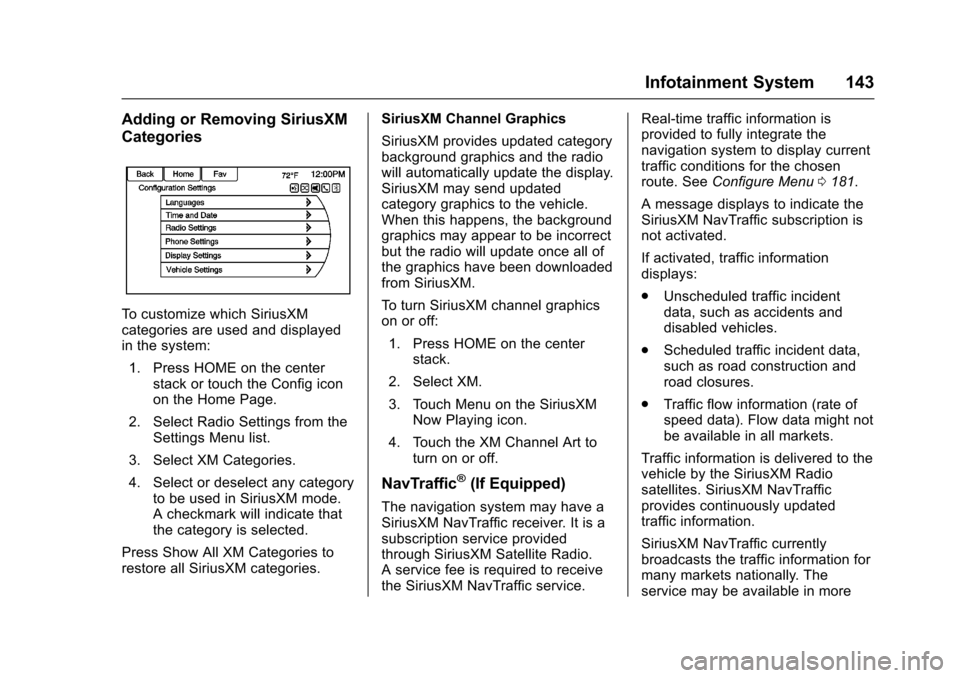
To c u s t o m i z e w h i c h S i r i u s X Mcategories are used and displayedin the system:
1. Press HOME on the centerstack or touch the Config iconon the Home Page.
2. Select Radio Settings from theSettings Menu list.
3. Select XM Categories.
4. Select or deselect any categoryto be used in SiriusXM mode.Acheckmarkwillindicatethatthe category is selected.
Press Show All XM Categories torestore all SiriusXM categories.
SiriusXM Channel Graphics
SiriusXM provides updated categorybackground graphics and the radiowill automatically update the display.SiriusXM may send updatedcategory graphics to the vehicle.When this happens, the backgroundgraphics may appear to be incorrectbut the radio will update once all ofthe graphics have been downloadedfrom SiriusXM.
To t u r n S i r i u s X M c h a n n e l g r a p h i c son or off:
1. Press HOME on the centerstack.
2. Select XM.
3. Touch Menu on the SiriusXMNow Playing icon.
4. Touch the XM Channel Art toturn on or off.
NavTraffic®(If Equipped)
The navigation system may have aSiriusXM NavTraffic receiver. It is asubscription service providedthrough SiriusXM Satellite Radio.Aservicefeeisrequiredtoreceivethe SiriusXM NavTraffic service.
Real-time traffic information isprovided to fully integrate thenavigation system to display currenttraffic conditions for the chosenroute. SeeConfigure Menu0181.
AmessagedisplaystoindicatetheSiriusXM NavTraffic subscription isnot activated.
If activated, traffic informationdisplays:
.Unscheduled traffic incidentdata, such as accidents anddisabled vehicles.
.Scheduled traffic incident data,such as road construction androad closures.
.Traffic flow information (rate ofspeed data). Flow data might notbe available in all markets.
Traffic information is delivered to thevehicle by the SiriusXM Radiosatellites. SiriusXM NavTrafficprovides continuously updatedtraffic information.
SiriusXM NavTraffic currentlybroadcasts the traffic information formany markets nationally. Theservice may be available in more