bluetooth CHEVROLET SS 2017 1.G Owner's Guide
[x] Cancel search | Manufacturer: CHEVROLET, Model Year: 2017, Model line: SS, Model: CHEVROLET SS 2017 1.GPages: 400, PDF Size: 7.31 MB
Page 201 of 400
Chevrolet SS Sedan Owner Manual (GMNA-Localizing-U.S.-10122752) -2017 - crc - 8/31/16
200 Infotainment System
Using Steering Wheel Controls
Pressb/gto answer or$/ito
decline the call.
Call Waiting Using the
Infotainment Controls
Call waiting must be supported onthe Bluetooth phone and enabled bythe wireless service carrier to work.
Switching Between Calls (CallWaiting Calls Only)
To s w i t c h b e t w e e n c a l l s t u r n a n dpress the TUNE/MENU knob andselect Switch Call or select SwitchCall on the display.
Call Waiting Using Steering
Wheel Controls
Call waiting must be supported onthe cell phone and enabled by thewireless service carrier.
.Pressb/gto answer an
incoming call when another callis active. The original call isplaced on hold.
.Pressb/gagain to return to
the original call.
.To d e c l i n e a n s w e r i n g t h eincoming call, touch Decline onthe infotainment display or takeno action.
.Press$/ito disconnect the
current call and switch to the callon hold.
Conference Calling Using the
Infotainment Controls
Conference calling and three-waycalling must be supported on theBluetooth phone and enabled by thewireless service carrier to work. Thisfeature is only supported when thevehicle is not moving.
To s t a r t a c o n f e r e n c e w h i l e i n acurrent call:
1. Turn and press the TUNE/MENU knob and select EnterNumber.
2. Enter the phone number andselect OK.
3. After the call has been placed,turn the TUNE/MENU knob andchoose Merge Calls.
4. To add more callers to theconference call, repeat Steps 1✓3. The number of callers thatcan be added is limited by yourwireless service carrier.
Ending a Call
Using the Infotainment Controls
Turn and press the TUNE/MENUknob and select Hang Up or touchHang Up on the display.
Using Steering Wheel Controls
Press$/i.
Muting a Call
During a call, all sounds from insidethe vehicle can be muted so that theperson on the other end of the callcannot hear them.
Using the Infotainment Controls
Turn and press the TUNE/MENUknob and select Mute Call. Pressagain to cancel mute.
Page 202 of 400
Chevrolet SS Sedan Owner Manual (GMNA-Localizing-U.S.-10122752) -2017 - crc - 8/31/16
Infotainment System 201
Transferring a Call
Audio can be transferred betweenthe Bluetooth system and the cellphone.
The cell phone must be paired andconnected with the Bluetoothsystem before a call can betransferred.
To Transfer Audio from theBluetooth System to a Cell Phone
During a call with the audio in thevehicle, touch Transfer Call on theinfotainment display or press and
holdb/gon the steering wheel
controls.
To Transfer Audio to the BluetoothSystem from a Cell Phone
Use the audio transfer feature onthe cell phone. See your cell phonemanufacturer's user guide for moreinformation. Touch Transfer call onthe infotainment display or press
and holdb/gon the steering
wheel controls.
Dual Tone Multi-Frequency
(DTMF) Tones
The in-vehicle Bluetooth system cansend numbers during a call. This isused when calling a menu-drivenphone system.
Using the Infotainment Controls
1. Turn and press the TUNE/MENU knob and select EnterNumber.
2. Enter the phone number,or select Enter Number on theinfotainment display and selectdigits, then touch OK.
Hands-Free Phone
Using Bluetooth VoiceRecognition
To u s e v o i c e r e c o g n i t i o n , p r e s s t h eb/gicon on the steering wheelcontrols. Use the commands belowfor the various voice features. Foradditional information, say“Help”while in a voice recognition menu.
Making a Call
Calls can be made using thefollowing commands.
Dial or Call :These commands canbe used interchangeably to dial aphone number.
Digit Dial :This command allows aphone number to be dialed byentering the digits one at a time.
Re-dial :This command dials thelast number used on the cell phone.
Using the“Dial”or“Call”Command
To c a l l a n u m b e r :
1. Pressb/g.Thesystem
responds“Please say acommand,”followed by a tone.
2. Say“Dial”or“Call.”
3. Say the entire number withoutpausing, followed by“Dial.”
Once connected, the person calledwill be heard through the audiospeakers.
To c a l l u s i n g a n a m e t a g :
1. Pressb/g.Thesystem
responds“Please say acommand,”followed by a tone.
Page 203 of 400
Chevrolet SS Sedan Owner Manual (GMNA-Localizing-U.S.-10122752) -2017 - crc - 8/31/16
202 Infotainment System
2. Say“Dial”or“Call”and thensay the name tag. For example“Call John at Work.”
Once connected, the person calledwill be heard through the audiospeakers.
Using the“Digit Dial”Command
This allows a phone number to bedialed by entering the digits one atatime.
1. Pressb/g.Thesystem
responds“Please say acommand,”followed by a tone.
2. Say“Digit Dial.”
3. Say each digit, one at a time,to dial. After each digit isentered, the system repeatsback the digit it heard followedby a tone. After the last digithas been entered, say“Dial.”
If an unwanted number is repeatedback, say“Clear”to clear the lastnumber.
Once connected, the person calledwill be heard through the audiospeakers.
Using the“Re-dial”Command
1. Pressb/g.Thesystem
responds“Please say acommand,”followed by a tone.
2. After the tone, say“Re-dial.”The system dials the lastnumber called from theconnected cell phone.
Once connected, the person calledwill be heard through the audiospeakers.
Clearing the System
Unless information is deleted out ofthe vehicle Bluetooth system, it willbe retained. This includes phonepairing information. For directionson how to delete this information,see“Deleting a Paired Phone/Device.”
Text Messaging
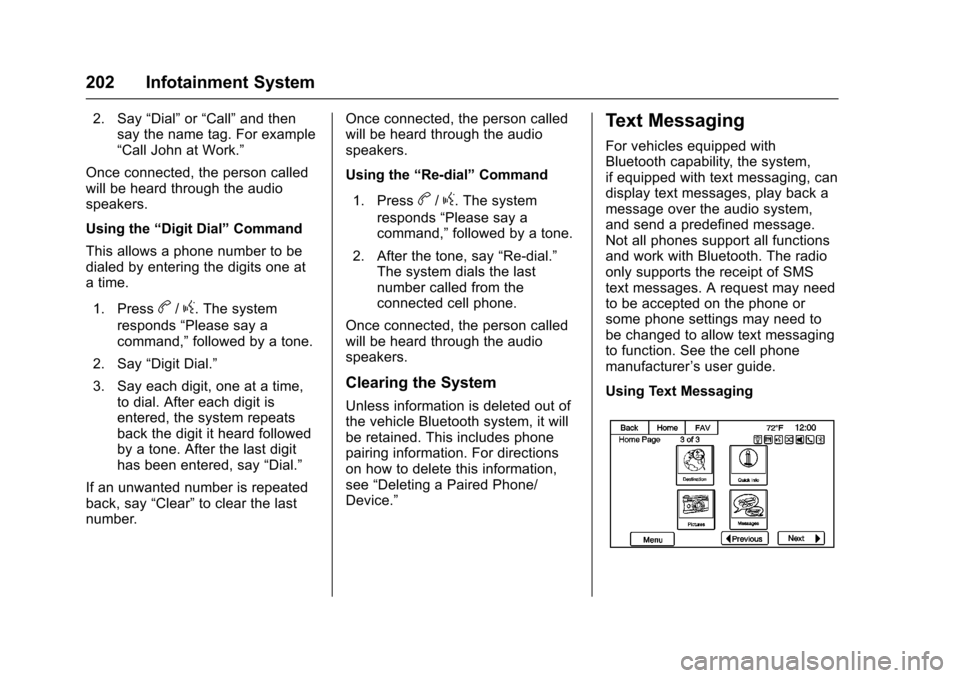
For vehicles equipped withBluetooth capability, the system,if equipped with text messaging, candisplay text messages, play back amessage over the audio system,and send a predefined message.Not all phones support all functionsand work with Bluetooth. The radioonly supports the receipt of SMStext messages. A request may needto be accepted on the phone orsome phone settings may need tobe changed to allow text messagingto function. See the cell phonemanufacturer’suserguide.
Using Text Messaging
Page 204 of 400
Chevrolet SS Sedan Owner Manual (GMNA-Localizing-U.S.-10122752) -2017 - crc - 8/31/16
Infotainment System 203
1. Touch the Messages icon onthe Home Page or select TextMessages from the Phonemain page. Until all textmessages are retrieved, theHome Page icon will remaingray and the Phone main pageoption will be removed.
This feature will be disabled ifthe paired Bluetooth devicedoes not support SMS TextMessaging.
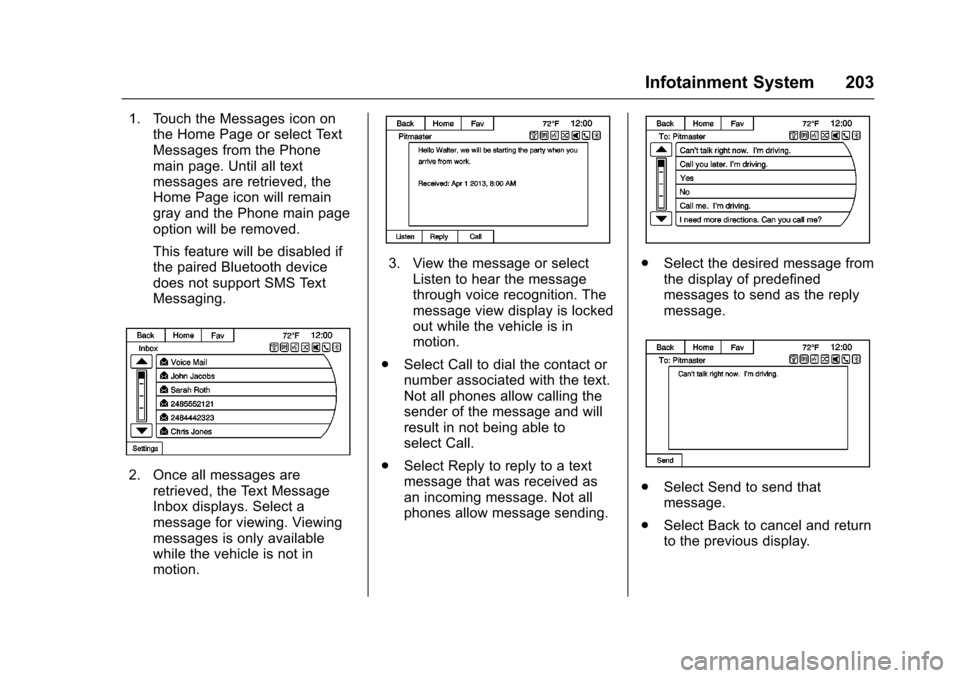
2. Once all messages areretrieved, the Text MessageInbox displays. Select amessage for viewing. Viewingmessages is only availablewhile the vehicle is not inmotion.
3. View the message or selectListen to hear the messagethrough voice recognition. Themessage view display is lockedout while the vehicle is inmotion.
.Select Call to dial the contact ornumber associated with the text.Not all phones allow calling thesender of the message and willresult in not being able toselect Call.
.Select Reply to reply to a textmessage that was received asan incoming message. Not allphones allow message sending.
.Select the desired message fromthe display of predefinedmessages to send as the replymessage.
.Select Send to send thatmessage.
.Select Back to cancel and returnto the previous display.
Page 207 of 400
Chevrolet SS Sedan Owner Manual (GMNA-Localizing-U.S.-10122752) -2017 - crc - 8/31/16
206 Infotainment System
registered trademark or a trademarkof Gracenote, Inc. in the UnitedStates and/or other countries.
Bluetooth
The Bluetooth®word mark andlogos are owned by the Bluetooth®
SIG, Inc. and any use of such marksby General Motors is under license.Other trademarks and trade namesare those of their respective owners.
Pandora (If Equipped)
Pandora is a registered trademarkof Pandora Media, Inc., used underlicense.
Manufactured under license fromDolby Laboratories. Dolby and thedouble-D symbol are trademarks ofDolby Laboratories.
Map End User License
Agreement (Optional
Equipment Applies Where
Equipped)
END USER TERMS
The data (“Data”)isprovidedforyour personal, internal use only andnot for resale. It is protected bycopyright, and is subject to thefollowing terms and conditionswhich are agreed to by you, on theone hand, and PanasonicAutomotive Systems Company ofAmerica (“PA N A S O N I C”)anditslicensors (including their licensorsand suppliers) on the other hand.
©2014HERENorthAmerica,LLC.All rights reserved.
In addition, the Lonely Planet TravelGuide content is subject to thefollowing supplier notices (ifequipped):
©2014LonelyPlanetPublicationsPty Ltd. All rights reserved.
PA N A S O N I C a n d i t s c o n t e n tproviders have tried to make thisinformation as accurate as possible,
but it is provided“as is”andPA N A S O N I C a n d i t s c o n t e n tproviders accept no responsibilityfor any loss, injury or inconvenienceresulting from this information. Youshould verify critical information (likevisas, health and safety) before youtravel.
TERMS AND CONDITIONS
Personal Use Only. You agree touse this Data together with theGeneral Motors MyLink or IntelliLinkConnected Navigation RadioPlatform for the solely personal,non-commercial purposes for whichyou were licensed, and not forservice bureau, time-sharing orother similar purposes. Accordingly,but subject to the restrictions setforth in the following paragraphs,you agree not to otherwisereproduce, copy, modify, decompile,disassemble, create any derivativeworks of, or reverse engineer anyportion of this Data, and may nottransfer or distribute it in any form,for any purpose, except to theextent permitted by mandatory laws.
Page 390 of 400

Chevrolet SS Sedan Owner Manual (GMNA-Localizing-U.S.-10122752) -2017 - crc - 9/1/16
Index 389
Assistance Systems for
Driving . . . . . . . . . . . . . . . . . . . . . . . . 259
Assistance Systems for
Parking and Backing . . . . . . . . . . 254
Audio
Bluetooth . . . . . . . . . . . . . . . . . . . . . 163
Automatic
Dimming Mirrors . . . . . . . . . . . . . . . . 39
Door Locks . . . . . . . . . . . . . . . . . . . . . 33
Headlamp System . . . . . . . . . . . . 127
Transmission . . . . . . . . . . . . . . . . . 236
Transmission Fluid . . . . . . . . . . . 278
Automatic Transmission
Manual Mode . . . . . . . . . . . . . . . . . 238
Shift Lock Control Function
Check . . . . . . . . . . . . . . . . . . . . . . . 290
Axle, Rear . . . . . . . . . . . . . . . . . . . . . . 289
B
Backglass Antenna . . . . . . . . . . . . . 147
Battery
Power Protection . . . . . . . . . . . . . 130
Voltage and Charging
Messages . . . . . . . . . . . . . . . . . . . .113
Battery - North America . . . . 288, 335
Blade Replacement, Wiper . . . . . 291
Bluetooth . . . . . . . . . . . . . . . . . . . . . . . 195
Bluetooth Audio . . . . . . . . . . . . . . . . 163
Brake
Parking, Electric . . . . . . . . . . . . . . 242
System Warning Light . . . . . . . . 102
Brakes . . . . . . . . . . . . . . . . . . . . . . . . . . 287
Antilock . . . . . . . . . . . . . . . . . . . . . . . 241
Assist . . . . . . . . . . . . . . . . . . . . . . . . . 244
Fluid . . . . . . . . . . . . . . . . . . . . . . . . . . 287
System Messages . . . . . . . . . . . . .113
Braking . . . . . . . . . . . . . . . . . . . . . . . . . 218
Break-In, New Vehicle . . . . . . . . . . 229
Bulb Replacement . . . . . . . . . . . . . . 294
Headlamp Aiming . . . . . . . . . . . . . 292
Headlamps . . . . . . . . . . . . . . . . . . . 293
High Intensity Discharge
(HID) Lighting . . . . . . . . . . . . . . . 293
License Plate Lamps . . . . . . . . . 293
Buying New Tires . . . . . . . . . . . . . . . 317
C
California
Fuel Requirements . . . . . . . . . . . 265
Perchlorate Materials
Requirements . . . . . . . . . . . . . . . 271
California
Proposition
65 Warning . . . . . . . . . .271, 288, 335
Capacities and
Specifications . . . . . . . . . . . . . . . . . 362
Carbon Monoxide
Engine Exhaust . . . . . . . . . . . . . . . 235
Trunk . . . . . . . . . . . . . . . . . . . . . . . . . . . 35
Winter Driving . . . . . . . . . . . . . . . . 224
Caution, Danger, and Warning . . . . 2
Center Console Storage . . . . . . . . . 87
Chains, Tire . . . . . . . . . . . . . . . . . . . . 321
Charging System Light . . . . . . . . . 100
Check
Malfunction Indicator
Engine Light . . . . . . . . . . . . . . . . 100
Child Restraints
Infants and Young Children . . . . . 71
Lower Anchors and Tethers
for Children . . . . . . . . . . . . . . . . . . . 76
Older Children . . . . . . . . . . . . . . . . . . 69
Securing . . . . . . . . . . . . . . . . . . . . 81, 83
Systems . . . . . . . . . . . . . . . . . . . . . . . . 73
Cleaning
Exterior Care . . . . . . . . . . . . . . . . . 338
Interior Care . . . . . . . . . . . . . . . . . . 343
Climate Control Systems
Dual Automatic . . . . . . . . . . . . . . . 210
Clock . . . . . . . . . . . . . . . . . . . . . . . . . . . . 93
Cluster, Instrument . . . . . . . . . . . . . . 96
Clutch, Hydraulic . . . . . . . . . . . . . . . 279
Collision Damage Repair . . . . . . . 371