phone CHEVROLET SS 2017 1.G Service Manual
[x] Cancel search | Manufacturer: CHEVROLET, Model Year: 2017, Model line: SS, Model: CHEVROLET SS 2017 1.GPages: 400, PDF Size: 7.31 MB
Page 203 of 400
Chevrolet SS Sedan Owner Manual (GMNA-Localizing-U.S.-10122752) -2017 - crc - 8/31/16
202 Infotainment System
2. Say“Dial”or“Call”and thensay the name tag. For example“Call John at Work.”
Once connected, the person calledwill be heard through the audiospeakers.
Using the“Digit Dial”Command
This allows a phone number to bedialed by entering the digits one atatime.
1. Pressb/g.Thesystem
responds“Please say acommand,”followed by a tone.
2. Say“Digit Dial.”
3. Say each digit, one at a time,to dial. After each digit isentered, the system repeatsback the digit it heard followedby a tone. After the last digithas been entered, say“Dial.”
If an unwanted number is repeatedback, say“Clear”to clear the lastnumber.
Once connected, the person calledwill be heard through the audiospeakers.
Using the“Re-dial”Command
1. Pressb/g.Thesystem
responds“Please say acommand,”followed by a tone.
2. After the tone, say“Re-dial.”The system dials the lastnumber called from theconnected cell phone.
Once connected, the person calledwill be heard through the audiospeakers.
Clearing the System
Unless information is deleted out ofthe vehicle Bluetooth system, it willbe retained. This includes phonepairing information. For directionson how to delete this information,see“Deleting a Paired Phone/Device.”
Text Messaging
For vehicles equipped withBluetooth capability, the system,if equipped with text messaging, candisplay text messages, play back amessage over the audio system,and send a predefined message.Not all phones support all functionsand work with Bluetooth. The radioonly supports the receipt of SMStext messages. A request may needto be accepted on the phone orsome phone settings may need tobe changed to allow text messagingto function. See the cell phonemanufacturer’suserguide.
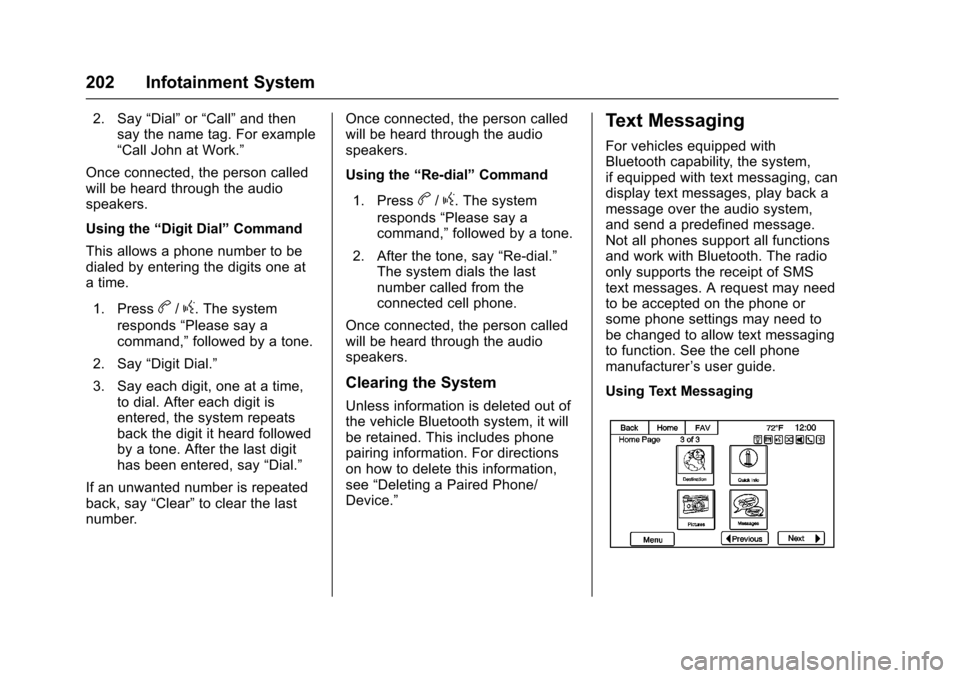
Using Text Messaging
Page 204 of 400
Chevrolet SS Sedan Owner Manual (GMNA-Localizing-U.S.-10122752) -2017 - crc - 8/31/16
Infotainment System 203
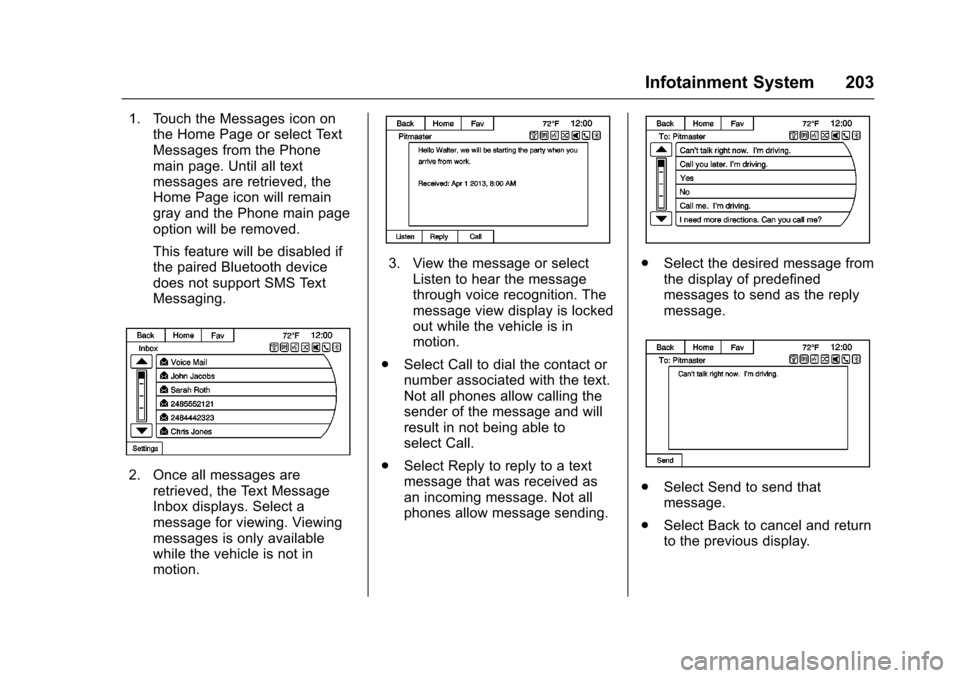
1. Touch the Messages icon onthe Home Page or select TextMessages from the Phonemain page. Until all textmessages are retrieved, theHome Page icon will remaingray and the Phone main pageoption will be removed.
This feature will be disabled ifthe paired Bluetooth devicedoes not support SMS TextMessaging.
2. Once all messages areretrieved, the Text MessageInbox displays. Select amessage for viewing. Viewingmessages is only availablewhile the vehicle is not inmotion.
3. View the message or selectListen to hear the messagethrough voice recognition. Themessage view display is lockedout while the vehicle is inmotion.
.Select Call to dial the contact ornumber associated with the text.Not all phones allow calling thesender of the message and willresult in not being able toselect Call.
.Select Reply to reply to a textmessage that was received asan incoming message. Not allphones allow message sending.
.Select the desired message fromthe display of predefinedmessages to send as the replymessage.
.Select Send to send thatmessage.
.Select Back to cancel and returnto the previous display.
Page 206 of 400
Chevrolet SS Sedan Owner Manual (GMNA-Localizing-U.S.-10122752) -2017 - crc - 8/31/16
Infotainment System 205
Trademarks and
License Agreements
FCC Information
SeeRadio Frequency Statement0374.
“Made for iPod”and“Made foriPhone”mean that an electronicaccessory has been designed toconnect specifically to iPod oriPhone and has been certified bythe developer to meet Appleperformance standards.
iPod and iPhone are trademarks ofApple Computer, Inc., registered inthe U.S. and other countries.
Fees and Taxes : Subscription fee,taxes, one time activation fee, andother fees may apply. Subscriptionfee is consumer only. All fees andprogramming subject to change.Subscriptions subject to CustomerAgreement available atwww.siriusxm.com. SiriusXM®
service only available in the48 contiguous United States andCanada.
Explicit Language Notice: Channelswith frequent explicit language areindicated with an“XL”preceding thechannel name. Channel blocking isavailable for SiriusXM SatelliteRadio receivers by notifyingSiriusXM:
.USA Customers—Seewww.siriusxm.com or call1-888-601-6296.
It is prohibited to copy, decompile,disassemble, reverse engineer,hack, manipulate, or otherwisemake available any technology orsoftware incorporated in receiverscompatible with the SiriusXM®
Satellite Radio System or thatsupport the SiriusXM website, theOnline Service or any of its content.Furthermore, the AMBER voicecompression software included inthis product is protected byintellectual property rights includingpatent rights, copyrights, and tradesecrets of Digital VoiceSystems, Inc.
General Requirements:
.ALicenseAgreementfromSiriusXM®is required for anyproduct that incorporatesSiriusXM Technology and/or foruse of any of the SiriusXMmarks to be manufactured,distributed, or marketed in theSiriusXM Service Area.
Gracenote
Gracenote®,Gracenotelogoandlogotype, and the "Powered byGracenote" logo are either a
Page 208 of 400
Chevrolet SS Sedan Owner Manual (GMNA-Localizing-U.S.-10122752) -2017 - crc - 8/31/16
Infotainment System 207
Restrictions
Except where you have beenspecifically licensed to do so byPA N A S O N I C , a n d w i t h o u t l i m i t i n gthe preceding paragraph, you maynot (a) use this Data with anyproducts, systems, or applicationsinstalled or otherwise connected toor in communication with vehicles,capable of vehicle navigation,positioning, dispatch, real time routeguidance, fleet management orsimilar applications; or (b) with or incommunication with any positioningdevices or any mobile orwireless-connected electronic orcomputer devices, including withoutlimitation cellular phones, palmtopand handheld computers, pagers,and personal digital assistantsor PDAs
Warning
The Data may contain inaccurate orincomplete information due to thepassage of time, changingcircumstances, sources used andthe nature of collecting
comprehensive geographic data,any of which may lead to incorrectresults.
No Warranty
This Data is provided to you“as is,”and you agree to use it at your ownrisk. PANASONIC and its licensors(and their licensors and suppliers)make no guarantees,representations or warranties of anykind, express or implied, arising bylaw or otherwise, including but notlimited to, content, quality, accuracy,completeness, effectiveness,reliability, fitness for a particularpurpose, usefulness, use or resultsto be obtained from this Data,or that the Data or server will beuninterrupted or error-free.
Disclaimer of Warranty
PA N A S O N I C A N D I T S L I C E N S O R S(INCLUDING THEIR LICENSORSAND SUPPLIERS) DISCLAIM ANYWARRANTIES, EXPRESS ORIMPLIED, OF QUALITY,PERFORMANCE,MERCHANTABILITY, FITNESSFOR A PARTICULAR PURPOSEOR NON-INFRINGEMENT. Some
States, Territories and Countries donot allow certain warrantyexclusions, so to that extent theabove exclusion may not applyto you.
Disclaimer of Liability
PA N A S O N I C A N D I T S L I C E N S O R S(INCLUDING THEIR LICENSORSAND SUPPLIERS) SHALL NOT BELIABLE TO YOU: IN RESPECT OFANY CLAIM, DEMAND ORACTION, IRRESPECTIVE OF THENATURE OF THE CAUSE OF THECLAIM, DEMAND OR ACTIONALLEGING ANY LOSS, INJURYOR DAMAGES, DIRECT ORINDIRECT, WHICH MAY RESULTFROM THE USE OR POSSESSIONOF THE INFORMATION; OR FORANY LOSS OF PROFIT, REVENUE,CONTRACTS OR SAVINGS, ORANY OTHER DIRECT, INDIRECT,INCIDENTAL, SPECIAL ORCONSEQUENTIAL DAMAGESARISING OUT OF YOUR USE OFOR INABILITY TO USE THISINFORMATION, ANY DEFECT INTHE INFORMATION, OR THEBREACH OF THESE TERMS ORCONDITIONS, WHETHER IN AN
Page 218 of 400
Chevrolet SS Sedan Owner Manual (GMNA-Localizing-U.S.-10122752) -2017 - crc - 8/31/16
Driving and Operating 217
Driving Information
Distracted Driving
Distraction comes in many formsand can take your focus from thetask of driving. Exercise goodjudgment and do not let otheractivities divert your attention awayfrom the road. Many localgovernments have enacted lawsregarding driver distraction. Becomefamiliar with the local laws inyour area.
To a v o i d d i s t r a c t e d d r i v i n g , k e e pyour eyes on the road, keep yourhands on the steering wheel, andfocus your attention on driving.
.Do not use a phone indemanding driving situations.Use a hands-free method toplace or receive necessaryphone calls.
.Watch the road. Do not read,take notes, or look upinformation on phones or otherelectronic devices.
.Designate a front seatpassenger to handle potentialdistractions.
.Become familiar with vehiclefeatures before driving, such asprogramming favorite radiostations and adjusting climatecontrol and seat settings.Program all trip information intoany navigation device prior todriving.
.Wait until the vehicle is parkedto retrieve items that have fallento the floor.
.Stop or park the vehicle to tendto children.
.Keep pets in an appropriatecarrier or restraint.
.Avoid stressful conversationswhile driving, whether with apassenger or on a cell phone.
{Warning
Ta k i n g y o u r e y e s o f f t h e r o a d t o o
long or too often could cause a
crash resulting in injury or death.
Focus your attention on driving.
Refer to the infotainment section formore information on using thatsystem and the navigation system,if equipped, including pairing andusing a cell phone.
Defensive Driving
Defensive driving means“alwaysexpect the unexpected.”The firststep in driving defensively is to wearthe safety belt. SeeSafety Belts051.
.Assume that other road users(pedestrians, bicyclists, andother drivers) are going to becareless and make mistakes.Anticipate what they might doand be ready.
.Allow enough following distancebetween you and the driver infront of you.
.Focus on the task of driving.
Page 267 of 400
Chevrolet SS Sedan Owner Manual (GMNA-Localizing-U.S.-10122752) -2017 - crc - 8/31/16
266 Driving and Operating
Fuels in Foreign
Countries
The U.S., Canada, and Mexico postfuel octane ratings in anti-knockindex (AKI). For fuel not to use in aforeign country, see“ProhibitedFuels”inFuel0264.
Fuel Additives
To k e e p f u e l s y s t e m s c l e a n , T O PTIER®detergent gasoline isrecommended. SeeFuel0264.
If TOP TIER detergent gasoline isnot available, one bottle of GM FuelSystem Treatment Cleaner added tothe fuel tank at every engine oilchange, can help. GM Fuel SystemTreatment Cleaner is the onlygasoline additive recommended byGeneral Motors. It is available atyour dealer.
Filling the Tank
{Warning
Fuel vapors and fuel fires burn
violently and can cause injury or
death.
.To h e l p a v o i d i n j u r i e s t o y o uand others, read and followall the instructions on thefuel pump island.
.Turn off the engine whenrefueling.
.Keep sparks, flames, andsmoking materials awayfrom fuel.
.Do not leave the fuel pumpunattended.
.Do not use a cell phonewhile refueling.
.Do not re-enter the vehiclewhile pumping fuel.
.Keep children away fromthe fuel pump and never letchildren pump fuel.
(Continued)
Warning (Continued)
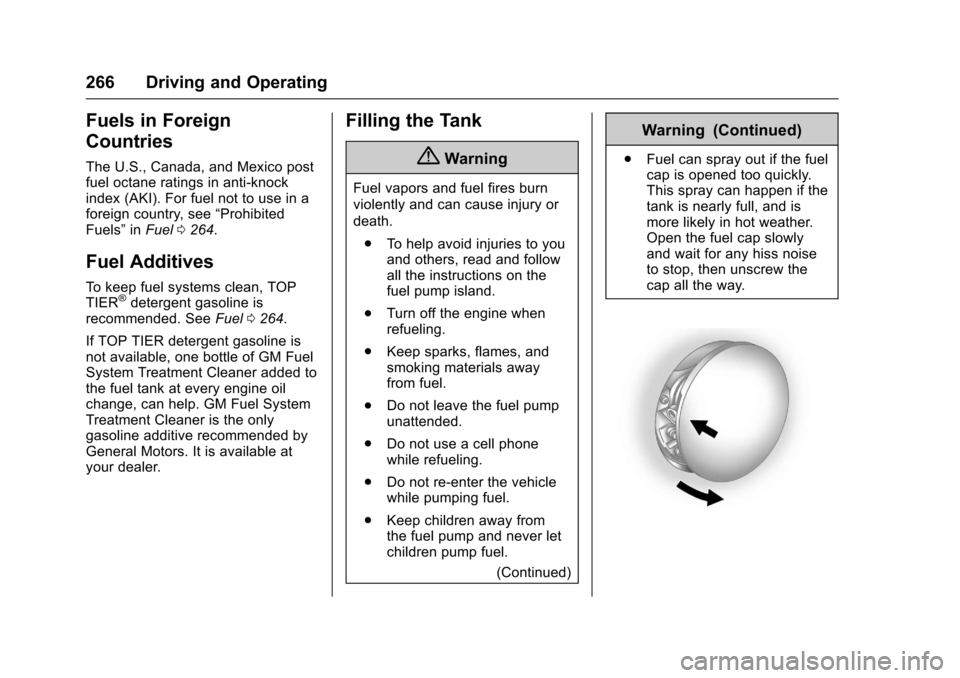
.Fuel can spray out if the fuelcap is opened too quickly.This spray can happen if thetank is nearly full, and ismore likely in hot weather.Open the fuel cap slowlyand wait for any hiss noiseto stop, then unscrew thecap all the way.
Page 269 of 400
Chevrolet SS Sedan Owner Manual (GMNA-Localizing-U.S.-10122752) -2017 - crc - 8/31/16
268 Driving and Operating
Warning (Continued)
.Fill the container no morethan 95% full to allow forexpansion.
.Do not smoke, lightmatches, or use lighterswhile pumping fuel.
.Avoid using cell phones orother electronic devices.
Trailer Towing
The vehicle is neither designed norintended to tow a trailer.
Conversions and
Add-Ons
Add-On Electrical
Equipment
{Warning
The Data Link Connector (DLC) is
used for vehicle service and
Emission Inspection/Maintenance
testing. SeeMalfunction Indicator
Lamp (Check Engine Light)0100
.Adeviceconnectedtothe
DLC—such as an aftermarket
fleet or driver-behavior tracking
device—may interfere with
vehicle systems. This could affect
vehicle operation and cause a
crash. Such devices may also
access information stored in the
vehicle’ssystems.
Page 366 of 400
Chevrolet SS Sedan Owner Manual (GMNA-Localizing-U.S.-10122752) -2017 - crc - 8/31/16
Customer Information 365
resolved by your dealership withoutfurther help, in the U.S., call theChevrolet Customer AssistanceCenter at 1-800-222-1020. InCanada, call General Motors ofCanada Customer Care Centre at1-800-263-3777 (English),or 1-800-263-7854 (French).
We encourage you to call thetoll-free number in order to give yourinquiry prompt attention. Have thefollowing information available togive the Customer Assistancerepresentative:
.Vehicle IdentificationNumber (VIN). This is availablefrom the vehicle registration ortitle, or the plate at the top left ofthe instrument panel and visiblethrough the windshield.
.Dealership name and location.
.Vehicle delivery date andpresent mileage.
When contacting Chevrolet,remember that your concern willlikely be resolved at a dealer'sfacility. That is why we suggestfollowing Step One first.
STEP THREE—U.S. Owners :Both General Motors and yourdealer are committed to makingsure you are completely satisfiedwith your new vehicle. However,if you continue to remain unsatisfiedafter following the procedureoutlined in Steps One and Two, youcan file with the Better BusinessBureau (BBB) Auto Line®Programto enforce your rights.
The BBB Auto Line Program is anout-of-court program administeredby the Council of Better BusinessBureaus to settle automotivedisputes regarding vehicle repairs orthe interpretation of the New VehicleLimited Warranty. Although you maybe required to resort to this informaldispute resolution program prior tofiling a court action, use of theprogram is free of charge and yourcase will generally be heard within40 days. If you do not agree with thedecision given in your case, youmay reject it and proceed with anyother venue for relief availableto you.
Yo u m a y c o n t a c t t h e B B B A u t o L i n eProgram using the toll-freetelephone number or write them atthe following address:
BBB Auto Line ProgramCouncil of Better Business Bureaus,Inc.3033 Wilson BoulevardSuite 600Arlington, VA 22201
Te l e p h o n e : 1 - 8 0 0 - 9 5 5 - 5 1 0 0http://www.bbb.org/council/programs-services/dispute-handling-and-resolution/bbb-auto-line
This program is available in all50 states and the District ofColumbia. Eligibility is limited byvehicle age, mileage, and otherfactors. General Motors reservesthe right to change eligibilitylimitations and/or discontinue itsparticipation in this program.
STEP THREE—CanadianOwners :In the event that you donot feel your concerns have beenaddressed after following theprocedure outlined in Steps Oneand Two, General Motors of Canada
Page 368 of 400
Chevrolet SS Sedan Owner Manual (GMNA-Localizing-U.S.-10122752) -2017 - crc - 8/31/16
Customer Information 367
Te l e p h o n e d e v i c e s ( T T Y s ) )Roadside Assistance:1-800-268-6800
Overseas
Please contact the local GeneralMotors Business Unit.
Customer Assistance for
Text Telephone (TTY)
Users
To a s s i s t c u s t o m e r s w h o a r e d e a f ,hard of hearing, or speech-impairedand who use Text Telephones(TTYs), Chevrolet has TTYequipment available at its CustomerAssistance Center. Any TTY user inthe U.S. can communicate withChevrolet by dialing:1-800-833-2438. TTY users inCanada can dial 1-800-263-3830.
Online Owner Center
Online Owner Experience
(U.S.) my.chevrolet.com
The Chevrolet online ownerexperience allows interaction withChevrolet and keeps importantvehicle-specific information in oneplace.
Membership Benefits
E:Download owner manuals andview vehicle-specific how-to videos.
G:View maintenance schedules,alerts, and OnStar VehicleDiagnostic Information. Scheduleservice appointments.
I:View and print dealer-recordedservice records and self-recordedservice records.
D:Select a preferred dealer andview locations, maps, phonenumbers, and hours.
r:Track your vehicle’swarrantyinformation.
J:View active recalls by VehicleIdentification Number (VIN). SeeVehicle Identification Number (VIN)0361.
H:View GM Card, SiriusXMSatellite radio (if equipped), andOnStar account information (ifequipped).
F:Chat with online helprepresentatives.
See my.chevrolet.com to registeryour vehicle.
Chevrolet Owner Centre
(Canada) chevroletowner.ca
Visit the Chevrolet Owner Centre:
.Chat live with online helprepresentatives.
.Locate owner resources such aslease-end, financing, andwarranty information.
.Retrieve your favorite articles,quizzes, tips, and multimediagalleries organized into theFeatured Articles and Auto CareSections.
.Download owner manuals.
Page 369 of 400
Chevrolet SS Sedan Owner Manual (GMNA-Localizing-U.S.-10122752) -2017 - crc - 8/31/16
368 Customer Information
.Find theChevrolet-recommendedmaintenance services.
GM Mobility
Reimbursement Program
This program is available toqualified applicants for costreimbursement of eligibleaftermarket adaptive equipmentrequired for the vehicle, such ashand controls or a wheelchair/scooter lift for the vehicle.
For more information on the limitedoffer, visit www.gmmobility.com orcall the GM Mobility AssistanceCenter at 1-800-323-9935. TextTe l e p h o n e ( T T Y ) u s e r s , c a l l1-800-833-9935.
General Motors of Canada also hasaMobilityProgram.Visitwww.gm.caor call 1-800-GM-DRIVE (463-7483)for details. TTY users call1-800-263-3830.
Roadside Assistance
Program
For U.S.-purchased vehicles, call1-800-243-8872. (Text Telephone(TTY): 1-888-889-2438.)
For Canadian-purchased vehicles,call 1-800-268-6800.
Service is available 24 hours a day,365 days a year.
Calling for Assistance
When calling Roadside Assistance,have the following informationready:
.Yo u r n a m e , h o m e a d d r e s s , a n dhome telephone number.
.Te l e p h o n e n u m b e r o f y o u rlocation.
.Location of the vehicle.
.Model, year, color, and licenseplate number of the vehicle.
.Odometer reading, VehicleIdentification Number (VIN), anddelivery date of the vehicle.
.Description of the problem.
Coverage
Services are provided for theduration of the vehicle’spowertrainwarranty.
In the U.S., anyone driving thevehicle is covered. In Canada, aperson driving the vehicle withoutpermission from the owner is notcovered.
Roadside Assistance is not a part ofthe New Vehicle Limited Warranty.General Motors North America andChevrolet reserve the right to makeany changes or discontinue theRoadside Assistance program atany time without notification.
General Motors North America andChevrolet reserve the right to limitservices or payment to an owner ordriver if they decide the claims aremade too often, or the same type ofclaim is made many times.