light CHEVROLET SS 2017 1.G Workshop Manual
[x] Cancel search | Manufacturer: CHEVROLET, Model Year: 2017, Model line: SS, Model: CHEVROLET SS 2017 1.GPages: 400, PDF Size: 7.31 MB
Page 130 of 400
Chevrolet SS Sedan Owner Manual (GMNA-Localizing-U.S.-10122752) -2017 - crc - 8/31/16
Lighting 129
Dome Lamps
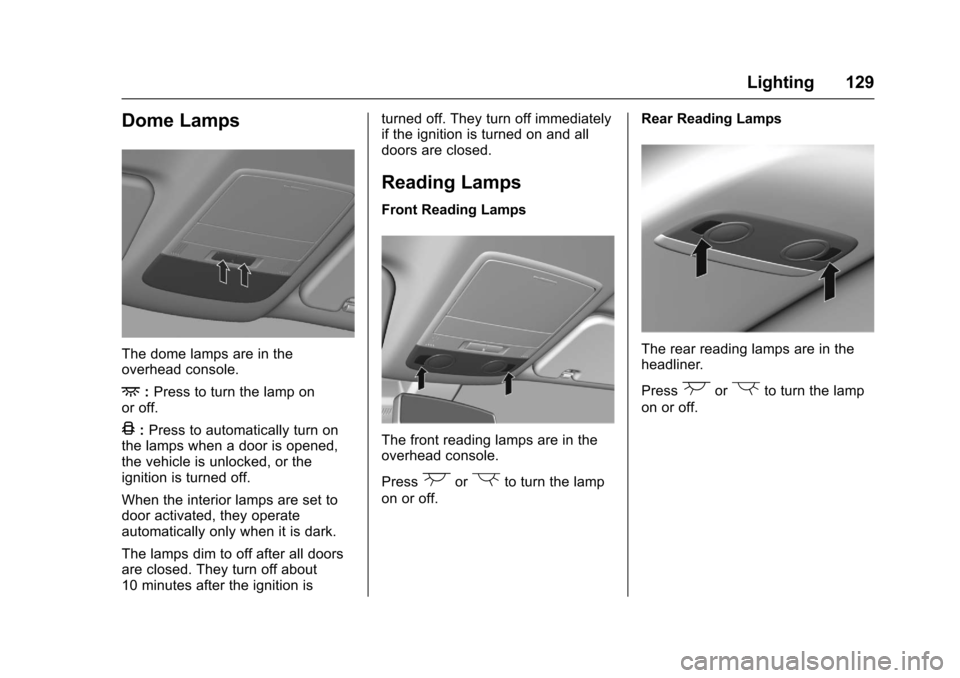
The dome lamps are in theoverhead console.
+:Press to turn the lamp onor off.
4:Press to automatically turn onthe lamps when a door is opened,the vehicle is unlocked, or theignition is turned off.
When the interior lamps are set todoor activated, they operateautomatically only when it is dark.
The lamps dim to off after all doorsare closed. They turn off about10 minutes after the ignition is
turned off. They turn off immediatelyif the ignition is turned on and alldoors are closed.
Reading Lamps
Front Reading Lamps
The front reading lamps are in theoverhead console.
Press(or)to turn the lamp
on or off.
Rear Reading Lamps
The rear reading lamps are in theheadliner.
Press(or)to turn the lamp
on or off.
Page 131 of 400
Chevrolet SS Sedan Owner Manual (GMNA-Localizing-U.S.-10122752) -2017 - crc - 8/31/16
130 Lighting
Lighting Features
Entry Lighting
Some exterior lamps and most ofthe interior lamps turn on briefly
whenKis pressed on the Remote
Keyless Entry (RKE) transmitter.After about 30 seconds the exteriorlamps turn off, and then the domeand remaining interior lamps will dimto off.
This feature can be changed. See“Ve h i c l e L o c a t o r L i g h t s”underVehicle Personalization0120.
Exit Lighting
The exterior lamps will illuminate anarea with limited lighting for a setamount of time when the ignition isturned to LOCK/OFF.
This feature can be changed. SeeVehicle Personalization0120.
Battery Power Protection
To p r e v e n t t h e b a t t e r y f r o m b e i n gdrained, the glove box, trunk, andreading lamps automatically turn off10 minutes after the ignition isturned off.
The lamps are reactivated if any ofthe following occur:
.The ignition is turned on.
.The vehicle is unlocked.
.The trunk is opened.
Page 135 of 400
Chevrolet SS Sedan Owner Manual (GMNA-Localizing-U.S.-10122752) -2017 - crc - 8/31/16
134 Infotainment System
.If a destination has already beenentered, press to access theDestination Menu. SeeDestination0171.
RPT :Press to repeat the last voiceguidance prompt.
Infotainment Display Icons
The touch icons are on theinfotainment display and highlightedwhen a feature is available. Sometoggle display icons highlight whenactive and gray out when inactive.
Steering Wheel Controls
Depending on the vehicle options,some audio functions can becontrolled through the steeringwheel controls.
b/g:Press to answer incomingcalls, interact with Bluetooth, or startvoice recognition. SeeBluetooth0195orVoice Recognition0189.
$/i:Press to decline incomingcalls or to end a current call. Pressto silence the vehicle speakerswhile using the infotainment system.Press again to turn the sound on.Press to cancel voice recognition.
_SRC^:Press to select an audiosource.
Use the thumbwheel to select thenext or previous favorite radiostation, MP3 track, USB, andBluetooth Audio.
Use_SRC to skip to the next song
or show using Stitcher. SeeStitcherInternet Radio0153.
+x✓:Press + to increase the
volume. Press✓to decrease.
Using the System
The infotainment system iscontrolled by touching the display,and by using the center stackcontrols.
Voice recognition, through thesteering wheel controls, can beused to control the infotainmentfeatures.
Pressb/gon the steering wheel
controls to begin voice recognition.SeeVoice Recognition0189.
Home Page
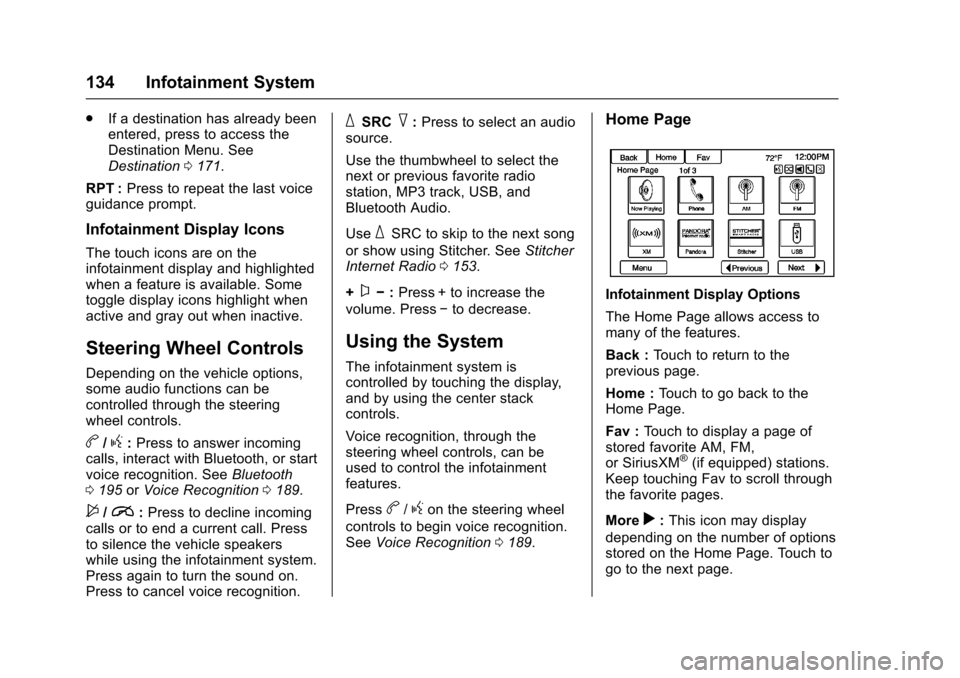
Infotainment Display Options
The Home Page allows access tomany of the features.
Back :To u c h t o r e t u r n t o t h eprevious page.
Home :To u c h t o g o b a c k t o t h eHome Page.
Fav :To u c h t o d i s p l a y a p a g e o fstored favorite AM, FM,or SiriusXM®(if equipped) stations.Keep touching Fav to scroll throughthe favorite pages.
Morer:This icon may display
depending on the number of optionsstored on the Home Page. Touch togo to the next page.
Page 136 of 400
Chevrolet SS Sedan Owner Manual (GMNA-Localizing-U.S.-10122752) -2017 - crc - 8/31/16
Infotainment System 135
qPrevious :Press to go to theprevious page.
Nextr:Press to go to the
next page.
Home Page Customization
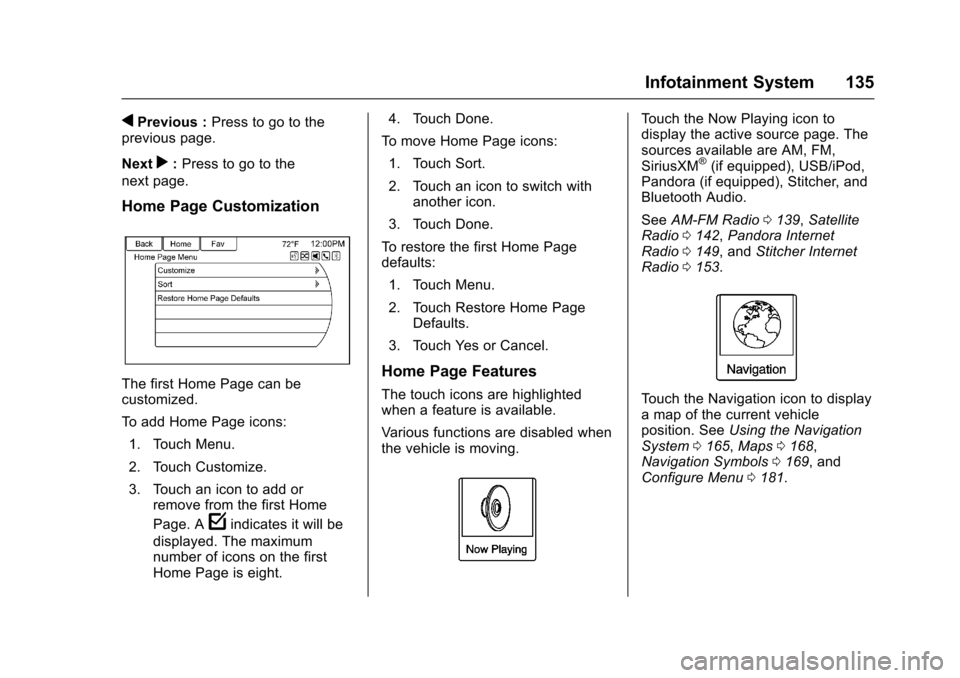
The first Home Page can becustomized.
To a d d H o m e P a g e i c o n s :
1. Touch Menu.
2. Touch Customize.
3. Touch an icon to add orremove from the first Home
Page. Afindicates it will be
displayed. The maximumnumber of icons on the firstHome Page is eight.
4. Touch Done.
To m o v e H o m e P a g e i c o n s :
1. Touch Sort.
2. Touch an icon to switch withanother icon.
3. Touch Done.
To r e s t o r e t h e f i r s t H o m e P a g edefaults:
1. Touch Menu.
2. Touch Restore Home PageDefaults.
3. Touch Yes or Cancel.
Home Page Features
The touch icons are highlightedwhen a feature is available.
Va r i o u s f u n c t i o n s a r e d i s a b l e d w h e nthe vehicle is moving.
To u c h t h e N o w P l a y i n g i c o n t odisplay the active source page. Thesources available are AM, FM,SiriusXM®(if equipped), USB/iPod,Pandora (if equipped), Stitcher, andBluetooth Audio.
SeeAM-FM Radio0139,SatelliteRadio0142,Pandora InternetRadio0149,andStitcher InternetRadio0153.
To u c h t h e N a v i g a t i o n i c o n t o d i s p l a yamapofthecurrentvehicleposition. SeeUsing the NavigationSystem0165,Maps0168,Navigation Symbols0169,andConfigure Menu0181.
Page 151 of 400
Chevrolet SS Sedan Owner Manual (GMNA-Localizing-U.S.-10122752) -2017 - crc - 8/31/16
150 Infotainment System
If nothing happens when theavailable Pandora icon is touched,download the latest Pandoraapplication and retry.
Pandora will always be highlightedon the Home Page when an iPhone,iPad, or iPod touch is connectedusing the USB port. To use, log intoyour account.
If the“Please See Device”messageis shown, the login screen maydisplay on the device.
If the“Please unlock your phone orrestart the app”message is shown,then the phone may be locked.Unlock the phone, close the app,then restart the app and make surethe Home Page is visible on thephone/device.
If Pandora is shut down on thephone or another audio app is used,Pandora may not start on the nextignition cycle. If iPod source isselected, it may show iPod and thenswitch to Pandora.
Using an Android Phone
1. Pair the Android phone usingBluetooth.
2. Use one of the following tolaunch:
.Launch the application onthe device.
.To u c h t h e P a n d o r a i c o n o nthe Home Page.
.Pressb/gand say
“Pandora”or“TunePandora.”
After Pandora has been launched,press SRCE on the center stack orpress SRC on the steering wheelcontrols to access Pandorafeatures.
If nothing happens when theavailable Pandora icon is touched,download the latest Pandoraapplication and retry.
If the“Please See Device”messageis shown, the login screen maydisplay on the device.
If the "Please unlock your phone orrestart the app" message is shown,then the phone may be locked.Unlock the phone, close the app,then restart the app to ensureproper communication.
Using a BlackBerry Phone
The phone must be unlocked. Tolaunch Pandora service:
1. Pair the BlackBerry phoneusing Bluetooth.
2. Use one of the following tolaunch:
.Launch the application onthe device.
.To u c h t h e P a n d o r a i c o n o nthe Home Page.
.Pressb/gand say
“Pandora”or“TunePandora.”
After Pandora has been launched,press SRCE on the center stack orpress SRC on the steering wheelcontrols to access Pandorafeatures.
If nothing happens when theavailable Pandora icon is touched,download the latest Pandoraapplication and retry.
If the“Please See Device”messageis shown, the login screen maydisplay on the device.
Page 152 of 400
Chevrolet SS Sedan Owner Manual (GMNA-Localizing-U.S.-10122752) -2017 - crc - 8/31/16
Infotainment System 151
If the "Please unlock your phone orrestart the app" message is shown,then the phone may be locked.Unlock the phone, close the app,and then restart the app to ensureproper communication.
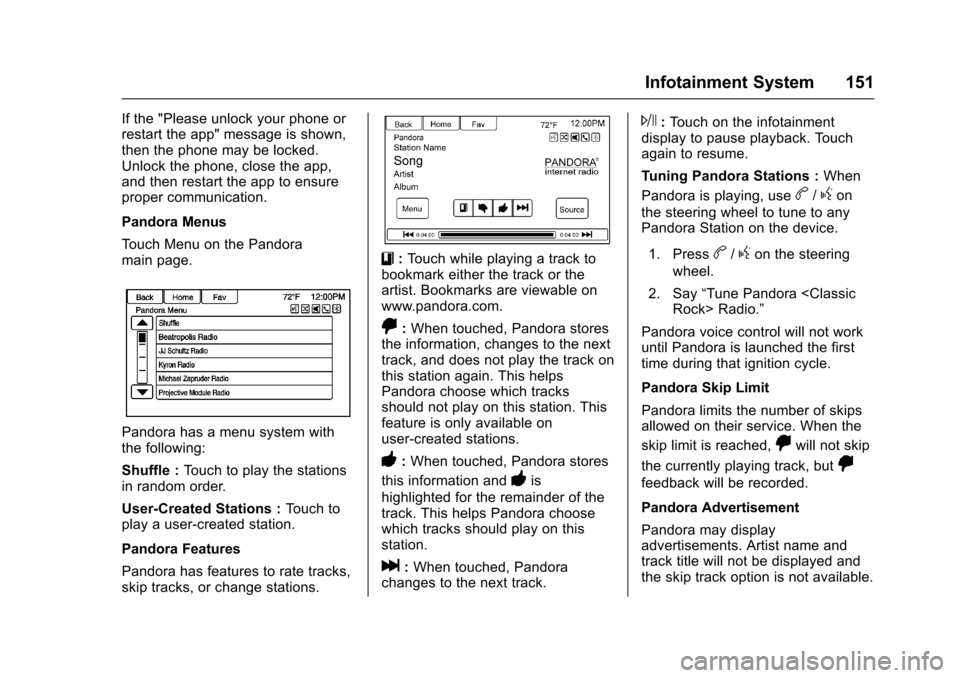
Pandora Menus
To u c h M e n u o n t h e P a n d o r amain page.
Pandora has a menu system withthe following:
Shuffle :To u c h t o p l a y t h e s t a t i o n sin random order.
User-Created Stations :To u c h t oplay a user-created station.
Pandora Features
Pandora has features to rate tracks,skip tracks, or change stations.
}:To u c h w h i l e p l a y i n g a t r a c k t obookmark either the track or theartist. Bookmarks are viewable onwww.pandora.com.
,:When touched, Pandora storesthe information, changes to the nexttrack, and does not play the track onthis station again. This helpsPandora choose which tracksshould not play on this station. Thisfeature is only available onuser-created stations.
-:When touched, Pandora stores
this information and-is
highlighted for the remainder of thetrack. This helps Pandora choosewhich tracks should play on thisstation.
l:When touched, Pandorachanges to the next track.
J:To u c h o n t h e i n f o t a i n m e n tdisplay to pause playback. Touchagain to resume.
Tu n i n g P a n d o r a S t a t i o n s :When
Pandora is playing, useb/gon
the steering wheel to tune to anyPandora Station on the device.
1. Pressb/gon the steering
wheel.
2. Say“Tune Pandora
Pandora voice control will not workuntil Pandora is launched the firsttime during that ignition cycle.
Pandora Skip Limit
Pandora limits the number of skipsallowed on their service. When the
skip limit is reached,,will not skip
the currently playing track, but,
feedback will be recorded.
Pandora Advertisement
Pandora may displayadvertisements. Artist name andtrack title will not be displayed andthe skip track option is not available.
Page 153 of 400
Chevrolet SS Sedan Owner Manual (GMNA-Localizing-U.S.-10122752) -2017 - crc - 8/31/16
152 Infotainment System
Switching Between Pandora andStitcher
To s w i t c h b e t w e e n P a n d o r a a n dStitcher, touch the application iconon the iPhone, iPod touch, or iPad.This is not required for Androiddevices. SeeStitcher Internet Radio0153.
Pandora Troubleshooting
Unable to Connect Device toVehicle
If the device is unable to connect tothe USB or Bluetooth:
1. Turn the vehicle off.
2. Open and close the driver door,wait about 30 seconds, and tryto connect the device again.
Unable to Start Pandora
If the device is unable to launchPandora:
.Check that the latest version ofPandora is installed.
.Check that there is an activeaccount logged into Pandora.
.Have at least one stationcreated.
.For Android and BlackBerrydevices, check that the device ispaired with the vehicle, and theBluetooth icon on the display ishighlighted.
.For iPhone, iPod touch, or iPaddevices, check that the USBcable is connected to the USBport and the screen is unlocked.
.Close Pandora on the deviceand launch again. Devices thatallow multitasking may requirean extra step to quit the Pandoraapplication. See the cell phonemanufacturer's user guide.
Thumbs Up or Thumbs DownError
If there is an error trying to rate a
track with the,or-icons, the
message“Thumbs Down Error”or“Thumbs Up Error”will display.To u c h O K t o r e t r y.
Loss of Audio
Loss of Pandora audio can happenin different ways:
.Weak or lost data connection.
.Device needs to be charged.
.Application needs to berelaunched.
.Connection between phone andradio lost.
.If any iPhone, iPod touch,or iPad is connected toBluetooth and the dockconnector, go to the Airplay iconon the device and select dockconnector or disconnect andreconnect the dock connector onthe device.
.The volume is too low. Turn upthe volume on the device.
.The battery saver and taskmanager applications on thephone can cause Pandora tofunction incorrectly. Removethose apps from the phone orremove Pandora and Bluetoothfrom the task lists.
Page 155 of 400
Chevrolet SS Sedan Owner Manual (GMNA-Localizing-U.S.-10122752) -2017 - crc - 8/31/16
154 Infotainment System
pop-up displays if the latestapplication is installed on thedevice.
Using the iPhone, iPod touch,or iPad
1. Plug the device into the USBport. The phone screen mustbe unlocked.
2. Use one of the following tolaunch:
.To u c h t h e a p p l i c a t i o n o nthe device.
.To u c h t h e S t i t c h e r i c o n o nthe Home Page.
.Pressb/gand say
“Stitcher”or“Tune Stitcher.”
.Accept any notification onthe screen of the device.
3. If Stitcher does not beginplaying, select a category andthen a station.
After Stitcher has been launched,press SRCE on the center stack orpress SRC on the steering wheelcontrols to access Stitcher features.
If nothing happens when theavailable Stitcher icon is touched,download the latest Stitcherapplication and retry.
Stitcher will always be highlightedon the Home Page when an iPhone,iPad, or iPod touch is connectedusing the USB port. To use, log intoyour account.
If the“Please See Device”messageis shown, the login screen maydisplay on the device.
If the "Please unlock your phone orrestart the app" message is shown,then the phone may be locked.Unlock the phone, close the app,then restart the app to make surethe Home Page is visible on thephone/device.
Using an Android Phone
1. Pair the Android phone usingBluetooth.
2. Use one of the following tolaunch:
.To u c h t h e a p p l i c a t i o n o nthe device.
.To u c h t h e S t i t c h e r i c o n o nthe Home Page.
.Pressb/gand say
“Stitcher”or“Tune Stitcher.”
3. If Stitcher does not beginplaying, select a category andthen a station.
After Stitcher has been launched,press SRCE on the center stack orpress SRC on the steering wheelcontrols to access Stitcher features.
If nothing happens when theavailable Stitcher icon is touched,download the latest Stitcherapplication and retry.
If the“Please See Device”messageis shown, the login screen maydisplay on the device.
If the“Please unlock your phone orrestart the app”message is shown,then the phone may be locked.Unlock the phone, close the app,then restart the app to ensureproper communication.
Page 156 of 400
Chevrolet SS Sedan Owner Manual (GMNA-Localizing-U.S.-10122752) -2017 - crc - 8/31/16
Infotainment System 155
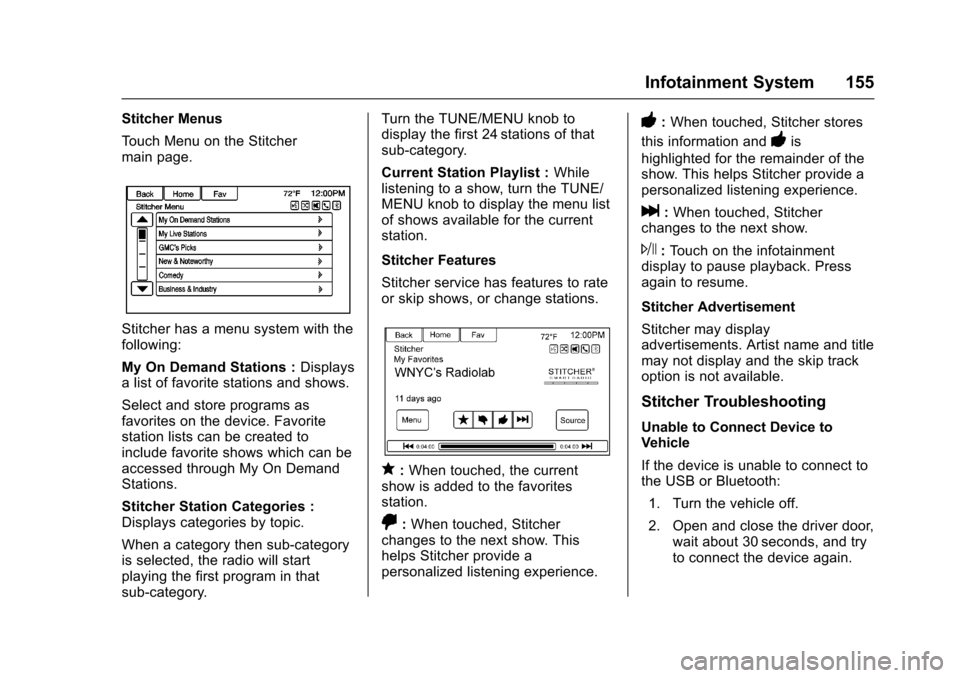
Stitcher Menus
To u c h M e n u o n t h e S t i t c h e rmain page.
Stitcher has a menu system with thefollowing:
My On Demand Stations :Displaysalistoffavoritestationsandshows.
Select and store programs asfavorites on the device. Favoritestation lists can be created toinclude favorite shows which can beaccessed through My On DemandStations.
Stitcher Station Categories :Displays categories by topic.
When a category then sub-categoryis selected, the radio will startplaying the first program in thatsub-category.
Turn the TUNE/MENU knob todisplay the first 24 stations of thatsub-category.
Current Station Playlist :Whilelistening to a show, turn the TUNE/MENU knob to display the menu listof shows available for the currentstation.
Stitcher Features
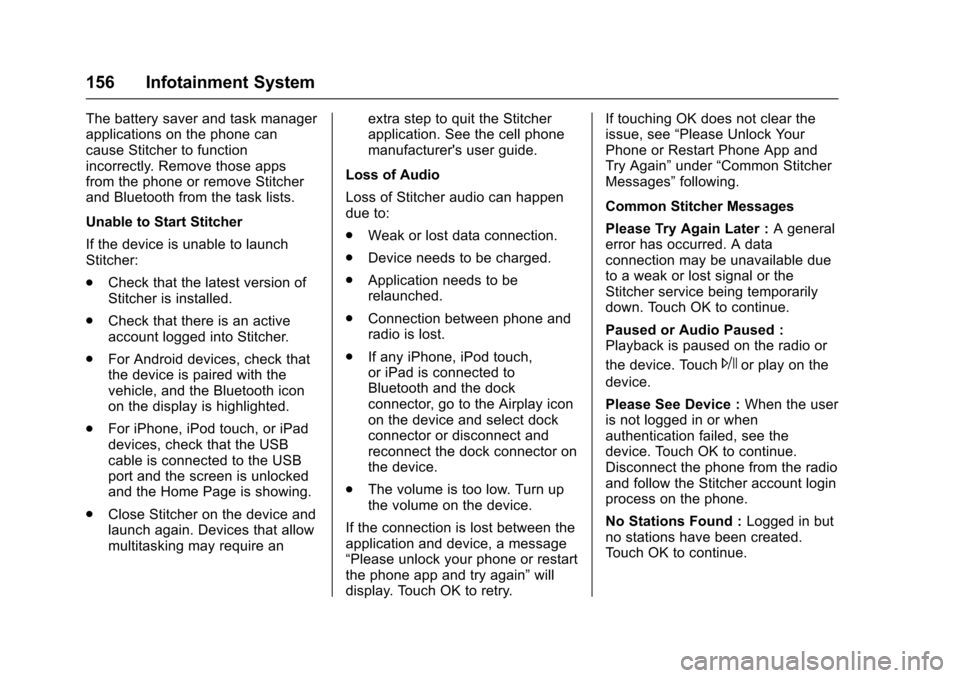
Stitcher service has features to rateor skip shows, or change stations.
q:When touched, the currentshow is added to the favoritesstation.
,:When touched, Stitcherchanges to the next show. Thishelps Stitcher provide apersonalized listening experience.
-:When touched, Stitcher stores
this information and-is
highlighted for the remainder of theshow. This helps Stitcher provide apersonalized listening experience.
l:When touched, Stitcherchanges to the next show.
J:To u c h o n t h e i n f o t a i n m e n tdisplay to pause playback. Pressagain to resume.
Stitcher Advertisement
Stitcher may displayadvertisements. Artist name and titlemay not display and the skip trackoption is not available.
Stitcher Troubleshooting
Unable to Connect Device toVehicle
If the device is unable to connect tothe USB or Bluetooth:
1. Turn the vehicle off.
2. Open and close the driver door,wait about 30 seconds, and tryto connect the device again.
Page 157 of 400
Chevrolet SS Sedan Owner Manual (GMNA-Localizing-U.S.-10122752) -2017 - crc - 8/31/16
156 Infotainment System
The battery saver and task managerapplications on the phone cancause Stitcher to functionincorrectly. Remove those appsfrom the phone or remove Stitcherand Bluetooth from the task lists.
Unable to Start Stitcher
If the device is unable to launchStitcher:
.Check that the latest version ofStitcher is installed.
.Check that there is an activeaccount logged into Stitcher.
.For Android devices, check thatthe device is paired with thevehicle, and the Bluetooth iconon the display is highlighted.
.For iPhone, iPod touch, or iPaddevices, check that the USBcable is connected to the USBport and the screen is unlockedand the Home Page is showing.
.Close Stitcher on the device andlaunch again. Devices that allowmultitasking may require an
extra step to quit the Stitcherapplication. See the cell phonemanufacturer's user guide.
Loss of Audio
Loss of Stitcher audio can happendue to:
.Weak or lost data connection.
.Device needs to be charged.
.Application needs to berelaunched.
.Connection between phone andradio is lost.
.If any iPhone, iPod touch,or iPad is connected toBluetooth and the dockconnector, go to the Airplay iconon the device and select dockconnector or disconnect andreconnect the dock connector onthe device.
.The volume is too low. Turn upthe volume on the device.
If the connection is lost between theapplication and device, a message“Please unlock your phone or restartthe phone app and try again”willdisplay. Touch OK to retry.
If touching OK does not clear theissue, see“Please Unlock YourPhone or Restart Phone App andTry Again”under“Common StitcherMessages”following.
Common Stitcher Messages
Please Try Again Later :Ageneralerror has occurred. A dataconnection may be unavailable dueto a weak or lost signal or theStitcher service being temporarilydown. Touch OK to continue.
Paused or Audio Paused :Playback is paused on the radio or
the device. TouchJor play on the
device.
Please See Device :When the useris not logged in or whenauthentication failed, see thedevice. Touch OK to continue.Disconnect the phone from the radioand follow the Stitcher account loginprocess on the phone.
No Stations Found :Logged in butno stations have been created.To u c h O K t o c o n t i n u e .