infotainment CHEVROLET SS 2017 1.G Repair Manual
[x] Cancel search | Manufacturer: CHEVROLET, Model Year: 2017, Model line: SS, Model: CHEVROLET SS 2017 1.GPages: 400, PDF Size: 7.31 MB
Page 186 of 400
Chevrolet SS Sedan Owner Manual (GMNA-Localizing-U.S.-10122752) -2017 - crc - 8/31/16
Infotainment System 185
Traffic Flow
The traffic flow status will display ingreen, yellow, or red lines besidethe road.
.Red indicates significantlyimpaired traffic flow with averagespeed less than 40 km/h(25 mph).
.Ye l l o w i n d i c a t e s s l i g h t l y i m p a i r e dtraffic flow with average speedbetween 40 and 73 km/h (25 and45 mph).
.Green indicates normal trafficflow with average speed above73 km/h (45 mph).
Closed Roads, Traffic Delays,Roadwork, Incidents, andAdvisories
Select the traffic event group fordisplay while in the map view. Someevents may cover more than onetraffic condition. See the followingtraffic conditions.
Traffic Conditions
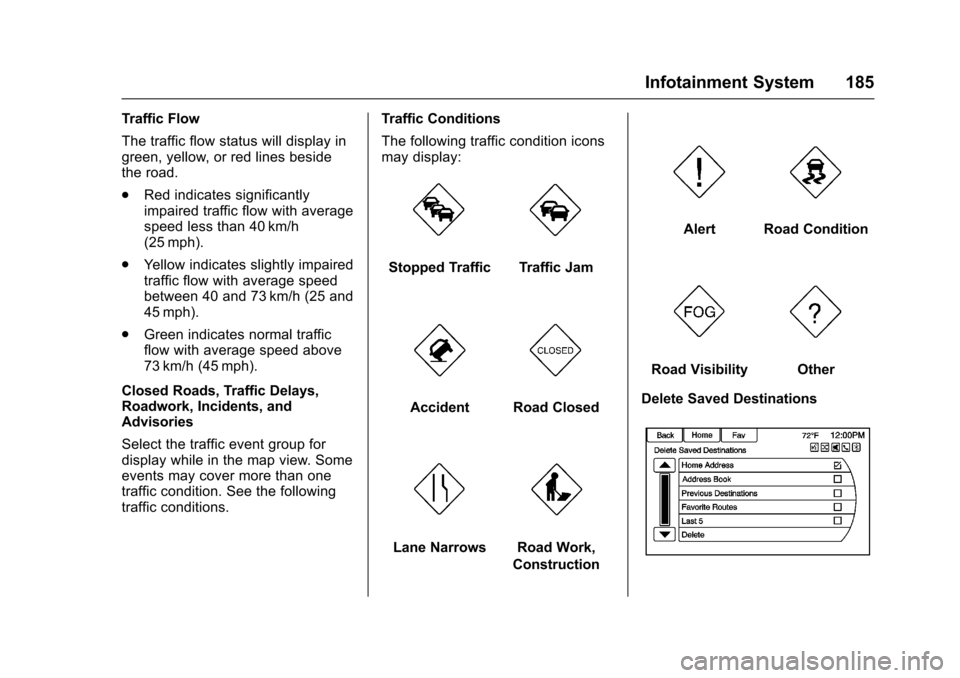
The following traffic condition iconsmay display:
Stopped TrafficTraffic Jam
AccidentRoad Closed
Lane NarrowsRoad Work,
Construction
AlertRoad Condition
Road VisibilityOther
Delete Saved Destinations
Page 187 of 400
Chevrolet SS Sedan Owner Manual (GMNA-Localizing-U.S.-10122752) -2017 - crc - 8/31/16
186 Infotainment System
To u c h t o d e l e t e a l l s a v e ddestinations. A Delete SavedDestinations submenu displays.Select the desired options fordeletion and touch Delete at thebottom to continue. A confirmationdisplays requesting to delete orcancel.
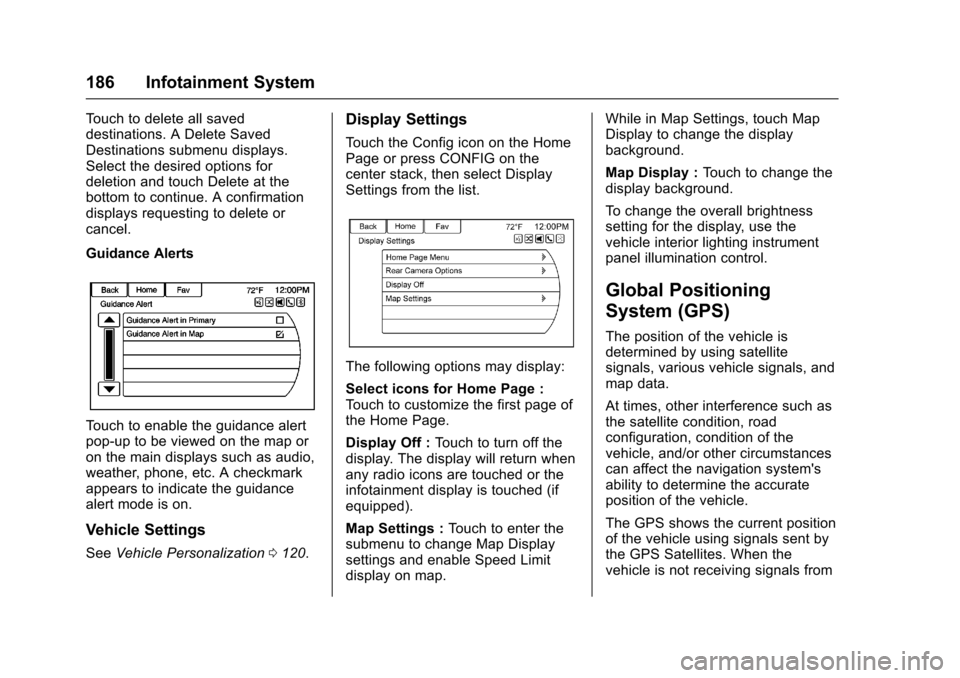
Guidance Alerts
To u c h t o e n a b l e t h e g u i d a n c e a l e r tpop-up to be viewed on the map oron the main displays such as audio,weather, phone, etc. A checkmarkappears to indicate the guidancealert mode is on.
Vehicle Settings
SeeVehicle Personalization0120.
Display Settings
To u c h t h e C o n f i g i c o n o n t h e H o m ePage or press CONFIG on thecenter stack, then select DisplaySettings from the list.
The following options may display:
Select icons for Home Page :To u c h t o c u s t o m i z e t h e f i r s t p a g e o fthe Home Page.
Display Off :To u c h t o t u r n o f f t h edisplay. The display will return whenany radio icons are touched or theinfotainment display is touched (ifequipped).
Map Settings :To u c h t o e n t e r t h esubmenu to change Map Displaysettings and enable Speed Limitdisplay on map.
While in Map Settings, touch MapDisplay to change the displaybackground.
Map Display :To u c h t o c h a n g e t h edisplay background.
To c h a n g e t h e o v e r a l l b r i g h t n e s ssetting for the display, use thevehicle interior lighting instrumentpanel illumination control.
Global Positioning
System (GPS)
The position of the vehicle isdetermined by using satellitesignals, various vehicle signals, andmap data.
At times, other interference such asthe satellite condition, roadconfiguration, condition of thevehicle, and/or other circumstancescan affect the navigation system'sability to determine the accurateposition of the vehicle.
The GPS shows the current positionof the vehicle using signals sent bythe GPS Satellites. When thevehicle is not receiving signals from
Page 188 of 400
Chevrolet SS Sedan Owner Manual (GMNA-Localizing-U.S.-10122752) -2017 - crc - 8/31/16
Infotainment System 187
the satellites, a symbol appears onthe map display. SeeNavigationSymbols0169.
This system might not be availableor interference can occur if any ofthe following are true:
.Signals are obstructed by tallbuildings, trees, large trucks,or a tunnel.
.Satellites are being repaired orimproved.
For more information if the GPS isnot functioning properly, seeProblems with Route Guidance0187andIf the System NeedsService0188.
Vehicle Positioning
At times, the position of the vehicleon the map could be inaccurate dueto one or more of the followingreasons:
.The road system has changed.
.The vehicle is driving on slipperyroad surfaces such as sand,gravel, or snow.
.The vehicle is traveling onwinding roads or long straightroads.
.The vehicle is approaching a tallbuilding or a large vehicle.
.The surface streets run parallelto a freeway.
.The vehicle has been transferredby a vehicle carrier or a ferry.
.The current position calibrationis set incorrectly.
.The vehicle is traveling at highspeed.
.The vehicle changes directionsmore than once, or the vehicle isturning on a turn table in aparking lot.
.The vehicle is entering and/orexiting a parking lot, garage, or alot with a roof.
.The GPS signal is not received.
.Aroofcarrierisinstalledonthevehicle.
.Tire chains have been installed.
.The tires are replaced or worn.
.The tire pressure for the tires isincorrect.
.This is the first navigation useafter the map data is updated.
.The 12-volt battery isdisconnected for several days.
.The vehicle is driving in heavytraffic where driving is at lowspeeds, and the vehicle isstopped and started repeatedly.
Problems with Route
Guidance
Inappropriate route guidance canoccur under one or more of thefollowing conditions:
.The turn was not made on theroad indicated.
.Route guidance might not beavailable when using automaticrerouting for the next right orleft turn.
.The route might not be changedwhen using automatic rerouting.
.There is no route guidance whenturning at an intersection.
Page 189 of 400
Chevrolet SS Sedan Owner Manual (GMNA-Localizing-U.S.-10122752) -2017 - crc - 8/31/16
188 Infotainment System
.Plural names of places might beannounced occasionally.
.It could take a long time tooperate automatic reroutingduring high-speed driving.
.Automatic rerouting mightdisplay a route returning to theset waypoint if heading for adestination without passingthrough a set waypoint.
.The route prohibits the entry of avehicle due to a regulation bytime or season or any otherregulation which may be given.
.Some routes might not besearched.
.The route to the destinationmight not be shown if there arenew roads, if roads haverecently changed, or if certainroads are not listed in the mapdata. SeeMaps0168.
To r e c a l i b r a t e t h e v e h i c l e ' s p o s i t i o non the map, park with the vehiclerunning for two to five minutes, untilthe vehicle position updates. Makesure the vehicle is parked in a
location that is safe and has a clearview of the sky and away from largeobstruction.
If the System Needs
Service
If the navigation system needsservice and the steps listed herehave been followed but there arestill problems, see your dealer forassistance.
Map Data Updates
The map data provided in thevehicle is the most up-to-dateinformation available when thevehicle was produced. The mapdata is updated periodically,provided that the map informationhas changed.
For questions about the operation ofthe navigation system or the updateprocess, contact the GM Nav DiscCenter toll-free phone number,1-877-NAV-DISC (1-877-628-3472)or go to the center’swebsite,www.gmnavdisc.com. If updates areneeded, call the GM Nav DiscCenter or order a new Map Update
online. To order map data, have thevehicle’sVehicleIdentificationNumber (VIN) available. SeeVehicle Identification Number (VIN)0361.
After receiving the updated mapdata, seeMaps0168.
Database Coverage
Explanations
Coverage areas vary with respect tothe level of map detail available forany given area. Some areas featuregreater levels of detail than others.If this happens, it does not meanthere is a problem with the system.As the map data is updated, moredetail can become available forareas which previously had limiteddetail. SeeMap Data Updates0188for more information.
Page 190 of 400
Chevrolet SS Sedan Owner Manual (GMNA-Localizing-U.S.-10122752) -2017 - crc - 8/31/16
Infotainment System 189
Voice Recognition
Voice recognition allows forhands-free operation of theinfotainment system features.
Voice recognition can be used whenthe radio is on or when RetainedAccessory Power (RAP) is active.SeeRetained Accessory Power(RAP)0232.Thesystemmaintainsaminimumvolumelevel.
Using Voice Recognition
1. Pressb/gon the steering
wheel. The audio systemmutes. A voice prompt states,“Please say a command.”Waituntil the tone is heard beforespeaking.
If there is no tone, make surethat the volume is turned up.
While voice recognition is
active, the system displays ag
symbol in the top right of theinfotainment display.
2. Clearly speak one of thecommands listed later in thissection.
Pressb/gtwice on the steering
wheel to skip the voice promptmessages.
Canceling Voice Recognition
1. Press and release$/ion
the steering wheel control tocancel a command, if thesystem response does notmatch the voice command,or say“Goodbye”or“Cancel.”
2. The system replies,“Goodbye.”
Helpful Hints for Speaking
Commands
.When multiple commands areavailable, choose the commandthat works best for you.
.Words in parentheses areoptional. For example, for thecommand“Tune FM(frequency),”saying“Tune FM87.7”or“Tune FM”are bothvalid commands.
.When the command isrecognized, the system willeither perform the function orask to confirm the choice.
.When the system does notrecognize the command, thesystem says“pardon.”
.If experiencing difficulty with thesystem recognizing a command,confirm that the command iscorrect. Try saying the commandclearly or wait for a brief momentafter the tone.
.Background noise such as aclimate control fan positioned onhigh, open windows, and veryloud outside noises, even if thewindows are closed, can causevoice commands to bemisunderstood.
.The system is able to recognizecommands in differentlanguages, such as English,Canadian French, and Spanish.The system only recognizescommands based on thelanguage selected.
.To i n c r e a s e o r d e c r e a s e t h evoice volume during a voicerecognition session, turn thevolume knob of the radio,or press the volume steeringwheel control. If the volume is
Page 191 of 400
Chevrolet SS Sedan Owner Manual (GMNA-Localizing-U.S.-10122752) -2017 - crc - 8/31/16
190 Infotainment System
adjusted during a voicerecognition session, a Volumebar appears on the displayshowing the voice volume levelas it is being adjusted. This alsochanges the volume of theguidance prompts.
.When using navigationcommands, take the time tobecome familiar with theaddress. Long delays whengiving the address can result inthe system not recognizing theaddress or routing to differentlocation than intended.
.When providing the housenumber portion of the address,the system recognizes both digitformat and numerical text. Anexample would be to say,“3-0-0-0-1”or“ThirtyThousand One.”
.If the system providesdestination in another country onseveral attempts, say the“Change Country”command andsay the country of interest. Thecountry default is the UnitedStates. To enter a destination in
Canada or Mexico, the countrywill first have to be changed inthe system.
Voice Recognition Help
To e n t e r t h e h e l p p l a y b a c k s e s s i o n ,clearly speak one of the helpcommands.
Help :The system plays back morespecific help commands such asRadio Settings for the user tochoose from.
Radio :Use this command to learnabout how to select a band (AM,FM, or XM), and how to changeradio stations by speakingfrequency numbers.
Phone :Use this command to learnabout how to dial, pair a device,or delete a device.
My Media :Use this command tolearn how to play specific tracks,artists, albums, devices connectedto the USB port, or to changesources.
Settings :Use this command tolearn about how to turn Verbose onor off, or set the language.
Voice Recognition Commands
The following list shows the voicecommands available for theinfotainment system with a briefdescription of each. The commandsare listed with the optional words inparentheses. To use the voicecommands, see the previousinstructions.
Radio Commands
Tu n e A M , Tu n e F M , Tu n e X M ,Tu n e P a n d o r a , Tu n e S t i t c h e r :Instructs the system to go to thespecific band and the last channel.
Tu n e A M ( f r e q u e n c y ) , Tu n e F M(frequency), Tune XM (channelnumber), or Tune XM (channelname) :Instructs the system to goto the specific station.
Thumbs Up :Instructs the systemto give the current song or station athumbs up in Pandora or Stitcher.
Thumbs Down :Instructs thesystem to give the current song orstation a thumbs down in Pandoraor Stitcher.
Page 192 of 400
Chevrolet SS Sedan Owner Manual (GMNA-Localizing-U.S.-10122752) -2017 - crc - 8/31/16
Infotainment System 191
Phone Commands
Dial or Call (phone number orcontact) :Instructs the system tostart a phone call. For example, say“Dial 1 248 123 4567.”To c a l l aphone book contact, say“Dial”or“Call,”say the name and location,and then say“Dial.”For example,say“Call John at Home”or“CallJohn at Work.”If a number is notrecognized, the first number in thelist will be called.
Pair or Connect :Instructs thesystem to begin pairing a device.
Digit Dial :Instructs the system todial a phone number one digit at atime. After saying the digits,say“Dial.”
Redial or Redial Last Number :Instructs the system to dial the lastphone number called.
Select Device or Change Phone :Instructs the system to switch to adifferent paired device. The devicemust be selected from the display orusing the TUNE/MENU knob.
Delete Device :Instructs thesystem to delete a paired device.
Read Text Messages or Read SMSMessages :Instructs the system tobegin reading text messages frompaired device.
Not all devices support textmessages. Applicable whereequipped.
My Media Commands
USB or Bluetooth Audio :Instructsthe system to change the source.
The following commands only applyto USB, iPod, and iPhone sources.They are supported after the devicehas been indexed.
Play Artist (artist name) :Instructsthe system to play songs by aspecific artist. For example, say“Play Artist
Play Album (album title) :Instructsthe system to play a specific album.
Play Song (song title) :Instructsthe system to play a specific song.
Play Genre (genre name) :Instructs the system to play songsof a particular genre.
Search Artist (artist name) :Instructs the system to show a list ofall songs by a specific artist. Forexample, say "Search Artist
Search Composer (composername) :Instructs the system toshow a list of all songs by a specificcomposer. For example, say"Search Composer
Search Album (album name) :Instructs the system to show a list ofall songs by a specific album. Forexample, say "Search Album
Search Genre (genre name) :Instructs the system to show a list ofall songs for a specific genre. Forexample, say "Search Genre
Search Folder (folder name) :Instructs the system to show a list ofall songs in a specific folder. Forexample, say "Search folder
Page 193 of 400
Chevrolet SS Sedan Owner Manual (GMNA-Localizing-U.S.-10122752) -2017 - crc - 8/31/16
192 Infotainment System
Search Playlist (playlist name) :Instructs the system to show a list ofall songs in a specific playlist. Forexample, say "Search playlist
Search Audiobook (audiobookname) :Instructs the system toshow a list of all tracks in a specificaudiobook. For example, say"Search audiobook
Search Playlist (playlist name) :Instructs the system to show a list ofall songs in a specific playlist. Forexample, say "Search playlist
Search Podcast (podcast name) :Instructs the system to show a list ofall tracks in a specific podcast. Forexample, say "Search podcast
More Like This :Instructs thesystem to create a playlist of trackssimilar to the current track playing.
Settings Commands
Verbose (set) on (mode), Verbose(set) off (mode) :Instructs thesystem to turn voice prompts on oroff. When off, this feature turns offvoice prompts.
Language (language) :Instructsthe system to set the language.
List Devices :Instructs the systemto give a list of devices to use.
Other Commands
Goodbye :Instructs the system toend a phone call or voicerecognition.
Cancel :Instructs the system tocancel an action.
Go Back, Back, Previous :Instructs the system to go back to aprior menu.
Main Menu :Instructs the system togo to the main menu.
Yes, Yep, Yup, Ya, Sure, Right,Correct, OK, Positive, You Got it,Probably, You Bet :These can beused to say“Ye s .”
No, Nope, Na, No way, Wrong,Incorrect, Negative, Not really, NoIsaid,NoIDidNot,NoIDoNot:These can be used to say“No.”
Next Page, Page Down :Instructsthe system to scroll forward onepage in a list.
Previous Page, Page Up :Instructsthe system to scroll back one pagein a list.
Navigation Commands (If
Equipped)
To a c t i v a t e t h e n a v i g a t i o n v o i c erecognition:
1. Pressb/gon the steering
wheel. The audio systemmutes. A voice prompt says,“Please say a command.”Waituntil the tone is heard beforespeaking.
If there is no tone, make surethe volume is turned up.
While voice recognition isactive, the system shows asymbol in the top right of thedisplay.
Page 194 of 400
Chevrolet SS Sedan Owner Manual (GMNA-Localizing-U.S.-10122752) -2017 - crc - 8/31/16
Infotainment System 193
2. Clearly speak the command“Navigation.”
3. Clearly speak one of thecommands in this section.
The following commands only applyonce the Navigation command isgiven.
Change Country :Changes thecountry origin to input a destinationfrom that region. The system willaccept United States, Canada,or Mexico.
Address or Destination :Allowsan address to be stated as aone-shot method. The system willrecognize the address if stated all atonce or say a city center. Anexample is to say,“200Renaissance Street, Detroit,Michigan”or“Detroit, Michigan.”
Directed Address :Allows anaddress to be stated one step at atime. The format will be State, City,Street, then House Number.
Intersection :Allows anIntersection to be stated as thedestination. The format will beState, City, Street, then Intersection.
Home :Instructs the system to startguidance to address saved asMy Home.
Contact :When a phone is pairedto the system, which containsAddress Information stored forcontacts, the address associatedwith that contact can become aroute. If the system cannot resolvethe address, an error displays.
Points of Interest or POI :Allows aPoint of Interest to be stated as adestination.
Say the name or list item number ofthe category and subcategory toreturn a list of POIs. Say the itemnumber to select a POI from the list.
POI commands for Nearby, AlongRoute, and Around Destination willbe available if route guidance isactive.
Add Waypoint :Allows addition ofindividual waypoints or thedestination. The system will ask forthe choice of entry method tocontinue. An example is to say,“POIAlong Route”or“Intersection.”
Delete Waypoint :When guidanceis active, this command allows thedeletion of individual waypoints orthe destination. If guidance is notactive, the system will indicate thedestination list is empty.
Where Am I?, My Location,or Current Position :Instructs thesystem to give the current positionof the vehicle.
Help :The system plays back morespecific help commands associatedwith Navigation or a Navigationsub-feature.
Cancel Guidance or CancelRoute :Instructs the system tocancel guidance.
Entering a Destination in OtherCountries
For the voice recognition to respondto a local address, thecorresponding country needs to beset in the navigation system.
The country can also be set usingvoice commands. However, thecountry will change back to thedefault country once the vehicle isturned off.
Page 195 of 400
Chevrolet SS Sedan Owner Manual (GMNA-Localizing-U.S.-10122752) -2017 - crc - 8/31/16
194 Infotainment System
1. Pressb/gon the steering
wheel.
2. Say“Navigation.”
3. Say“Change Country.”
4. Say the country name. Forexample, say“Canada.”
OnStar Command (If Equipped)
To a c t i v a t e O n S t a r v o i c e
recognition, pressQon the mirror
or pressb/gon the steering
wheel and say“OnStar”after thebeep. This will activate the OnStarvoice control. SeeOnStar Overview0378.
Help Commands
.Help
.Hands-Free Calling (If Equipped)
.Turn-by-Turn Directions
.OnStar Info
After each list of help commands,the following are available:
.Go Back
.Repeat
.Cancel
.Help
.Goodbye
Hands-Free Calling
.Call
.Store
.Commands
⇣Call
⇣Store
⇣My Number
⇣Minutes
⇣Store Last Number
⇣Digit Dial
⇣Redial
⇣Dial
⇣Number Recall
⇣Directory
⇣Digit Store
Turn-by-Turn Directions
.Directory
.Plan Route
.Commands
⇣Directory
⇣Store Destination
⇣Plan Route
⇣Delete Destination
⇣Mute Directions
OnStar Info
.Messages
.Minutes
.My Number
.Commands
⇣Messages
⇣Virtual Advisor
⇣My Number
⇣Minutes
⇣Number Recall
⇣Advisor Playback
.Virtual Advisor
Virtual Advisor
Choose this option to connect to alive Advisor.