sport mode CHEVROLET SS 2017 1.G Owners Manual
[x] Cancel search | Manufacturer: CHEVROLET, Model Year: 2017, Model line: SS, Model: CHEVROLET SS 2017 1.GPages: 400, PDF Size: 7.31 MB
Page 17 of 400
Chevrolet SS Sedan Owner Manual (GMNA-Localizing-U.S.-10122752) -2017 - crc - 8/31/16
16 In Brief
Climate Controls
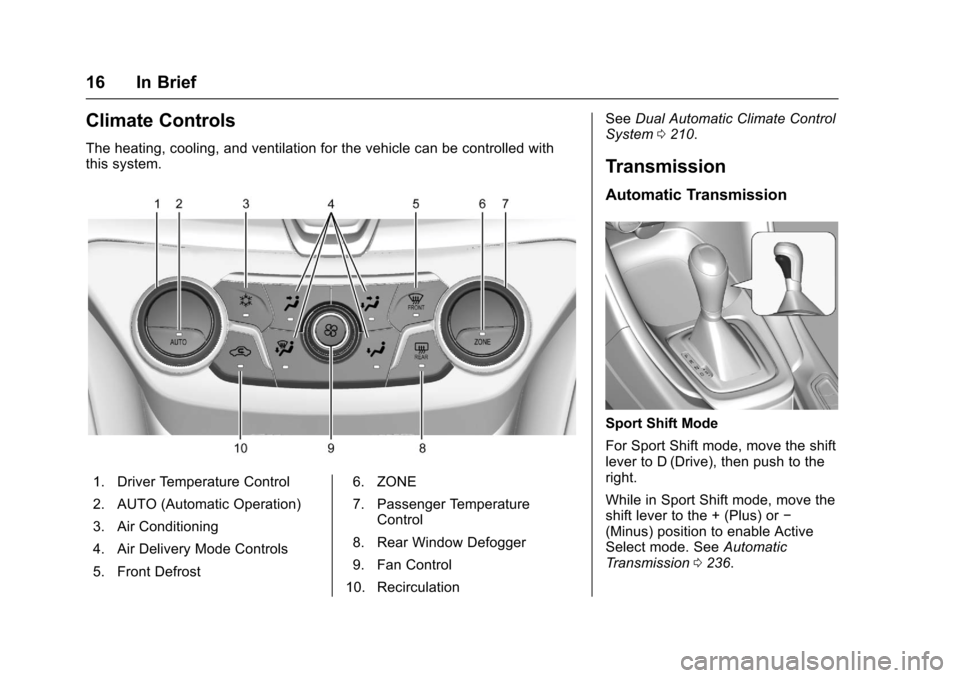
The heating, cooling, and ventilation for the vehicle can be controlled withthis system.
1. Driver Temperature Control
2. AUTO (Automatic Operation)
3. Air Conditioning
4. Air Delivery Mode Controls
5. Front Defrost
6. ZONE
7. Passenger TemperatureControl
8. Rear Window Defogger
9. Fan Control
10. Recirculation
SeeDual Automatic Climate ControlSystem0210.
Transmission
Automatic Transmission
Sport Shift Mode
For Sport Shift mode, move the shiftlever to D (Drive), then push to theright.
While in Sport Shift mode, move theshift lever to the + (Plus) or✓(Minus) position to enable ActiveSelect mode. SeeAutomaticTr a n s m i s s i o n0236.
Page 106 of 400
Chevrolet SS Sedan Owner Manual (GMNA-Localizing-U.S.-10122752) -2017 - crc - 8/31/16
Instruments and Controls 105
If the TCS is off, wheel spin is notlimited. Adjust driving accordingly.
SeeTr a c t i o n C o n t r o l / E l e c t r o n i cStability Control0245.
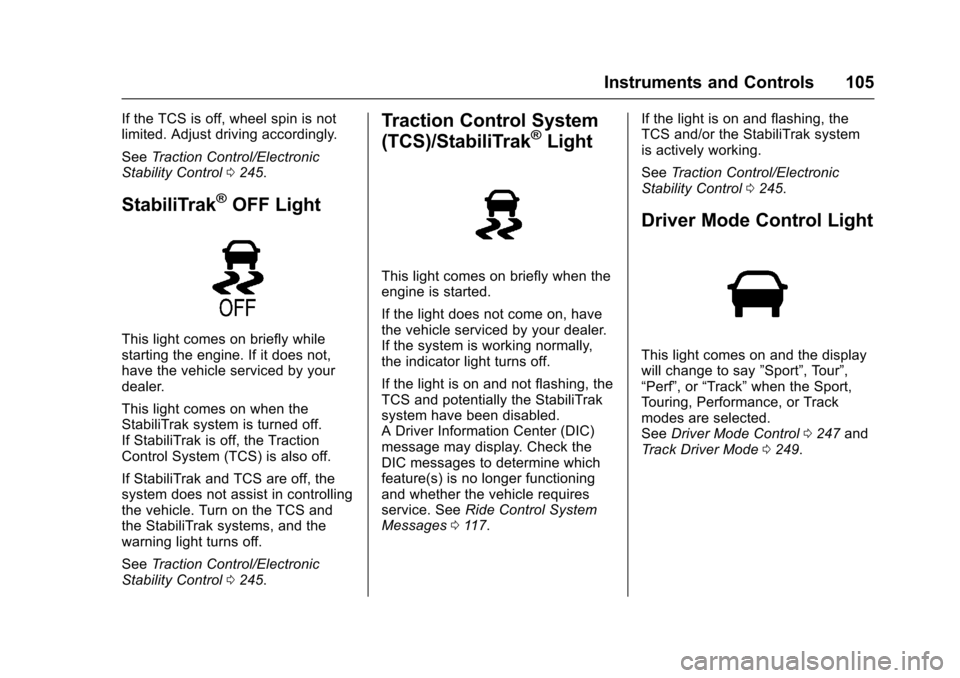
StabiliTrak®OFF Light
This light comes on briefly whilestarting the engine. If it does not,have the vehicle serviced by yourdealer.
This light comes on when theStabiliTrak system is turned off.If StabiliTrak is off, the TractionControl System (TCS) is also off.
If StabiliTrak and TCS are off, thesystem does not assist in controllingthe vehicle. Turn on the TCS andthe StabiliTrak systems, and thewarning light turns off.
SeeTr a c t i o n C o n t r o l / E l e c t r o n i cStability Control0245.
Traction Control System
(TCS)/StabiliTrak®Light
This light comes on briefly when theengine is started.
If the light does not come on, havethe vehicle serviced by your dealer.If the system is working normally,the indicator light turns off.
If the light is on and not flashing, theTCS and potentially the StabiliTraksystem have been disabled.ADriverInformationCenter(DIC)message may display. Check theDIC messages to determine whichfeature(s) is no longer functioningand whether the vehicle requiresservice. SeeRide Control SystemMessages011 7.
If the light is on and flashing, theTCS and/or the StabiliTrak systemis actively working.
SeeTr a c t i o n C o n t r o l / E l e c t r o n i cStability Control0245.
Driver Mode Control Light
This light comes on and the displaywill change to say”Sport”,Tour”,“Perf”,or“Track”when the Sport,To u r i n g , P e r f o r m a n c e , o r T r a c kmodes are selected.SeeDriver Mode Control0247andTr a c k D r i v e r M o d e0249.
Page 120 of 400
Chevrolet SS Sedan Owner Manual (GMNA-Localizing-U.S.-10122752) -2017 - crc - 8/31/16
Instruments and Controls 119
If a tire pressure message displays,inflate the tires until the tire pressureis equal to the values shown on theTire and Loading Information label.SeeTires0303,Vehicle LoadLimits0226,andTire Pressure0309.
More than one tire pressuremessage can be received at a time.To r e a d t h e o t h e r m e s s a g e s t h a tmay have been sent at the sametime, press the SET/CLR button.The DIC also shows the tirepressure values. SeeDriverInformation Center (DIC)0108.
Transmission Messages
1–4 SHIFT
This message displays when youcan only shift from 1 (First) to4(Fourth)insteadof1(First)to2(Second).SeeManualTr a n s m i s s i o n0240.
PERFORMANCE MODE
ACTIVATED
This message displays when theautomatic transmission entersperformance mode. See“Performance Mode”inAutomaticTr a n s m i s s i o n0236.
SERVICE TRANSMISSION
This message displays if there is aproblem with the transmission. Seeyour dealer.
SHIFT DENIED
This message displays when usingthe Active Select mode andattempting to shift to a gear notappropriate for the vehicle speedand engine revolutions perminute (rpm). SeeManual Mode0238.
SHIFT TO PARK
This message displays when thetransmission needs to be shifted toP(Park). This may appear whenattempting to remove the RKEtransmitter from the vehicle if thevehicle is not in P (Park).
SPORT MODE ON or SPORT
MODE OFF
These messages display when theshift lever is moved into or out ofSport Shift mode. See“Sport ShiftMode”inAutomatic Transmission0236.
TRANSMISSION HOT—IDLE
ENGINE
This message displays and a chimesounds if the transmission fluid inthe vehicle gets hot. Driving with thetransmission fluid temperature highcan cause damage to the vehicle.Stop the vehicle and let it idle toallow the transmission to cool. Thismessage clears when the fluidtemperature reaches a safe level.
Page 171 of 400
Chevrolet SS Sedan Owner Manual (GMNA-Localizing-U.S.-10122752) -2017 - crc - 8/31/16
170 Infotainment System
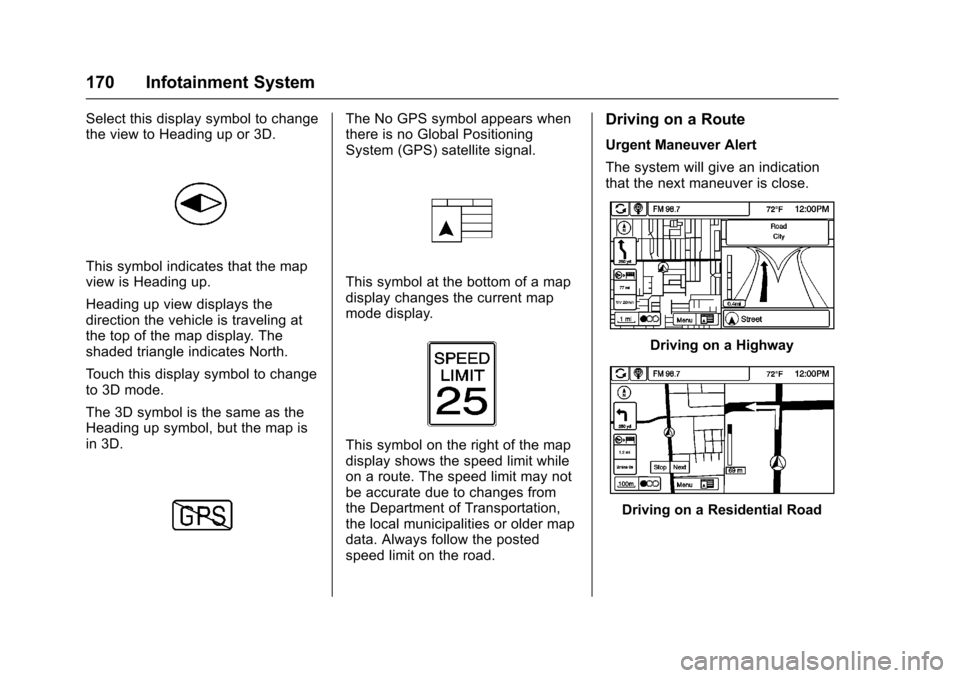
Select this display symbol to changethe view to Heading up or 3D.
This symbol indicates that the mapview is Heading up.
Heading up view displays thedirection the vehicle is traveling atthe top of the map display. Theshaded triangle indicates North.
To u c h t h i s d i s p l a y s y m b o l t o c h a n g eto 3D mode.
The 3D symbol is the same as theHeading up symbol, but the map isin 3D.
The No GPS symbol appears whenthere is no Global PositioningSystem (GPS) satellite signal.
This symbol at the bottom of a mapdisplay changes the current mapmode display.
This symbol on the right of the mapdisplay shows the speed limit whileon a route. The speed limit may notbe accurate due to changes fromthe Department of Transportation,the local municipalities or older mapdata. Always follow the postedspeed limit on the road.
Driving on a Route
Urgent Maneuver Alert
The system will give an indicationthat the next maneuver is close.
Driving on a Highway
Driving on a Residential Road
Page 238 of 400
Chevrolet SS Sedan Owner Manual (GMNA-Localizing-U.S.-10122752) -2017 - crc - 8/31/16
Driving and Operating 237
button before shifting from P (Park)when the ignition is in ON/RUN orACC/ACCESSORY. If the vehiclewill not shift out of P (Park), easepressure on the shift lever and pushthe shift lever all the way intoP(Park) while maintaining brakeapplication. Then press the shiftlever button and move the shift leverinto another gear. SeeShifting outof Park0233.
R:Use this gear to back up.
At low vehicle speeds, R (Reverse)can also be used to rock the vehicleback and forth to get out of snow,ice, or sand without damaging thetransmission. SeeIf the Vehicle IsStuck0225for additionalinformation.
Caution
Shifting to R (Reverse) while the
vehicle is moving forward could
damage the transmission. The
repairs would not be covered by
the vehicle warranty. Shift to
R(Reverse) only after the vehicle
is stopped.
N:In this position, the engine doesnot connect with the wheels. Torestart the engine when the vehicleis already moving, useN(Neutral) only.
{Warning
Shifting into a drive gear while the
engine is running at high speed is
dangerous. Unless your foot is
firmly on the brake pedal, the
vehicle could move very rapidly.
Yo u c o u l d l o s e c o n t r o l a n d h i t
people or objects. Do not shift
into a drive gear while the engine
is running at high speed.
Caution
Shifting out of P (Park) or
N(Neutral) with the engine
running at high speed may
damage the transmission. The
repairs would not be covered by
the vehicle warranty. Be sure the
engine is not running at high
speed when shifting the vehicle.
D:Use this position for generaldriving. The transmissionautomatically selects theappropriate gear according to thecurrent load and driving conditions.
Caution
If the vehicle does not shift gears,
the transmission could be
damaged. Have the vehicle
serviced right away.
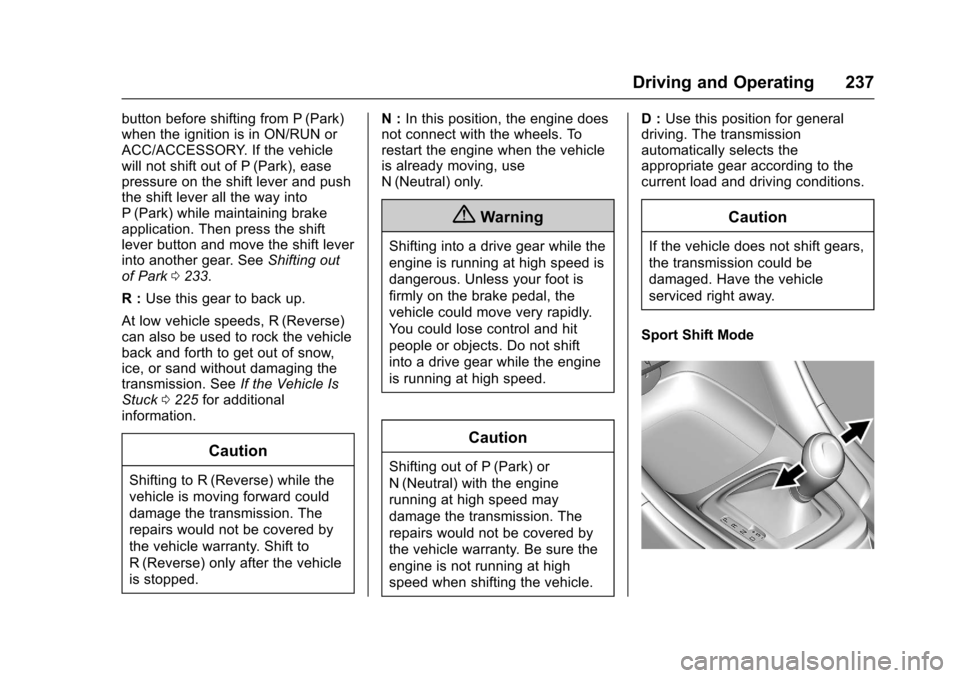
Sport Shift Mode
Page 239 of 400
Chevrolet SS Sedan Owner Manual (GMNA-Localizing-U.S.-10122752) -2017 - crc - 8/31/16
238 Driving and Operating
Sport Shift mode can be selectedwhere maximum responsiveness isrequired.
When operated in Sport Shift mode,the transmission will delay upshiftsand allow earlier downshifts.
Performance Mode
In addition, the transmission cansense aggressive driving, at whichpoint it may delay upshifting anddownshift earlier when braking. Thisis designed to maximize vehicleperformance. SeeTr a n s m i s s i o nMessages011 9
To a c t i v a t e S p o r t S h i f t m o d e :
1. Move the shift lever toD(Drive).
2. Push the shift lever to the right.
Sport Mode On is displayed onthe DIC.
Do not move the shift lever to+(Plus) or✓(Minus), otherwiseActive Select mode will beenabled.
3. To return to Normal Shift mode,move the shift lever left, toD(Drive). Sport Mode Off isdisplayed on the DIC.
On the bottom of the display, Sappears as long as Sport Shiftmode is selected.
Normal Shift Mode
Normal shift mode is recommendedfor normal or freeway driving, as itprovides optimum fuel economy.
When the shift lever is moved toD(Drive), normal shift mode isselected.
Manual Mode
Active Select (A/S) Mode
A/S mode allows gears to beselected manually.
It can also provide engine brakingby selecting the appropriate lowergear on a steep downhill grade.
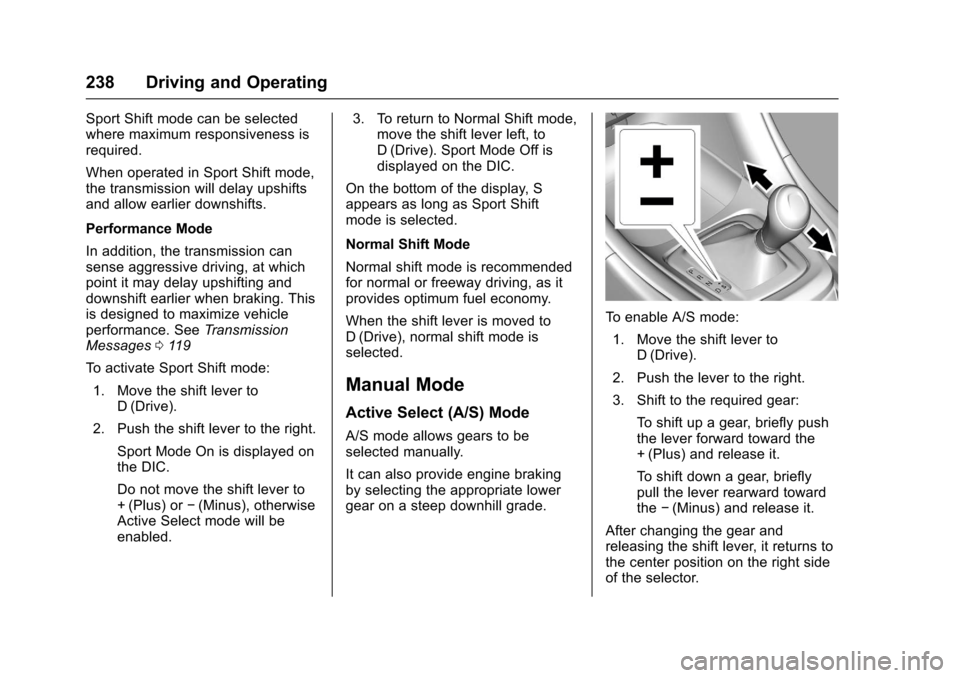
To e n a b l e A / S m o d e :
1. Move the shift lever toD(Drive).
2. Push the lever to the right.
3. Shift to the required gear:
To s h i f t u p a g e a r, b r i e f l y p u s hthe lever forward toward the+(Plus) and release it.
To s h i f t d o w n a g e a r, b r i e f l ypull the lever rearward towardthe✓(Minus) and release it.
After changing the gear andreleasing the shift lever, it returns tothe center position on the right sideof the selector.
Page 240 of 400
Chevrolet SS Sedan Owner Manual (GMNA-Localizing-U.S.-10122752) -2017 - crc - 8/31/16
Driving and Operating 239
On the bottom of the display, M andthe currently selected gear appearas long as A/S mode is selected.
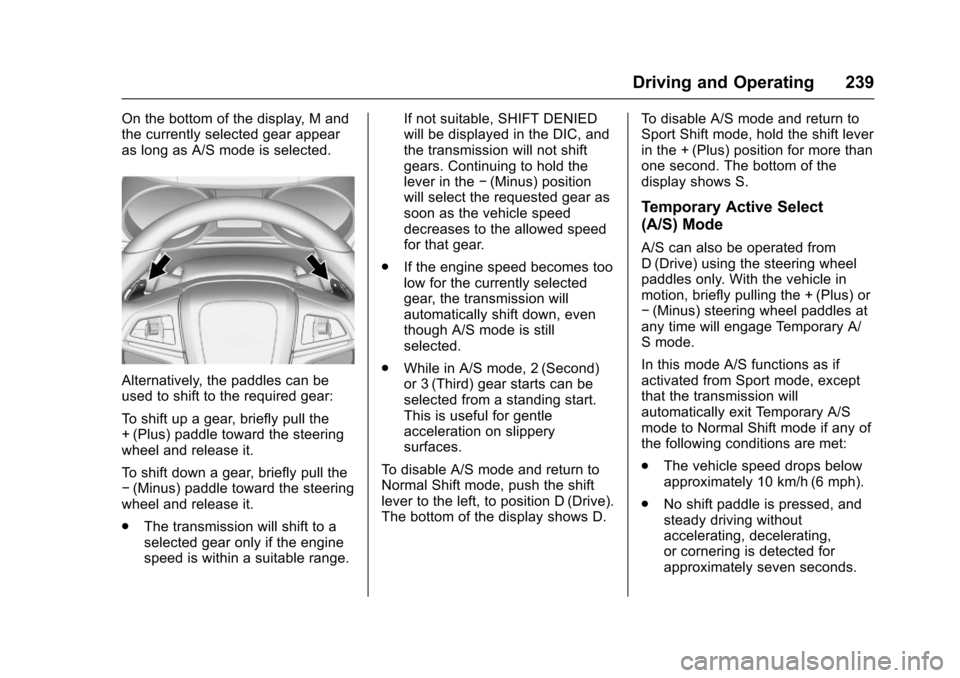
Alternatively, the paddles can beused to shift to the required gear:
To s h i f t u p a g e a r, b r i e f l y p u l l t h e+(Plus) paddle toward the steeringwheel and release it.
To s h i f t d o w n a g e a r, b r i e f l y p u l l t h e✓(Minus) paddle toward the steeringwheel and release it.
.The transmission will shift to aselected gear only if the enginespeed is within a suitable range.
If not suitable, SHIFT DENIEDwill be displayed in the DIC, andthe transmission will not shiftgears. Continuing to hold thelever in the✓(Minus) positionwill select the requested gear assoon as the vehicle speeddecreases to the allowed speedfor that gear.
.If the engine speed becomes toolow for the currently selectedgear, the transmission willautomatically shift down, eventhough A/S mode is stillselected.
.While in A/S mode, 2 (Second)or 3 (Third) gear starts can beselected from a standing start.This is useful for gentleacceleration on slipperysurfaces.
To d i s a b l e A / S m o d e a n d r e t u r n t oNormal Shift mode, push the shiftlever to the left, to position D (Drive).The bottom of the display shows D.
To d i s a b l e A / S m o d e a n d r e t u r n t oSport Shift mode, hold the shift leverin the + (Plus) position for more thanone second. The bottom of thedisplay shows S.
Temporary Active Select
(A/S) Mode
A/S can also be operated fromD(Drive) using the steering wheelpaddles only. With the vehicle inmotion, briefly pulling the + (Plus) or✓(Minus) steering wheel paddles atany time will engage Temporary A/Smode.
In this mode A/S functions as ifactivated from Sport mode, exceptthat the transmission willautomatically exit Temporary A/Smode to Normal Shift mode if any ofthe following conditions are met:
.The vehicle speed drops belowapproximately 10 km/h (6 mph).
.No shift paddle is pressed, andsteady driving withoutaccelerating, decelerating,or cornering is detected forapproximately seven seconds.
Page 241 of 400
Chevrolet SS Sedan Owner Manual (GMNA-Localizing-U.S.-10122752) -2017 - crc - 8/31/16
240 Driving and Operating
.The + (Plus) steering wheelpaddle is pulled and held formore than one second.
.The shift lever is moved out ofD(Drive) to Sport Shift mode.
Manual Transmission
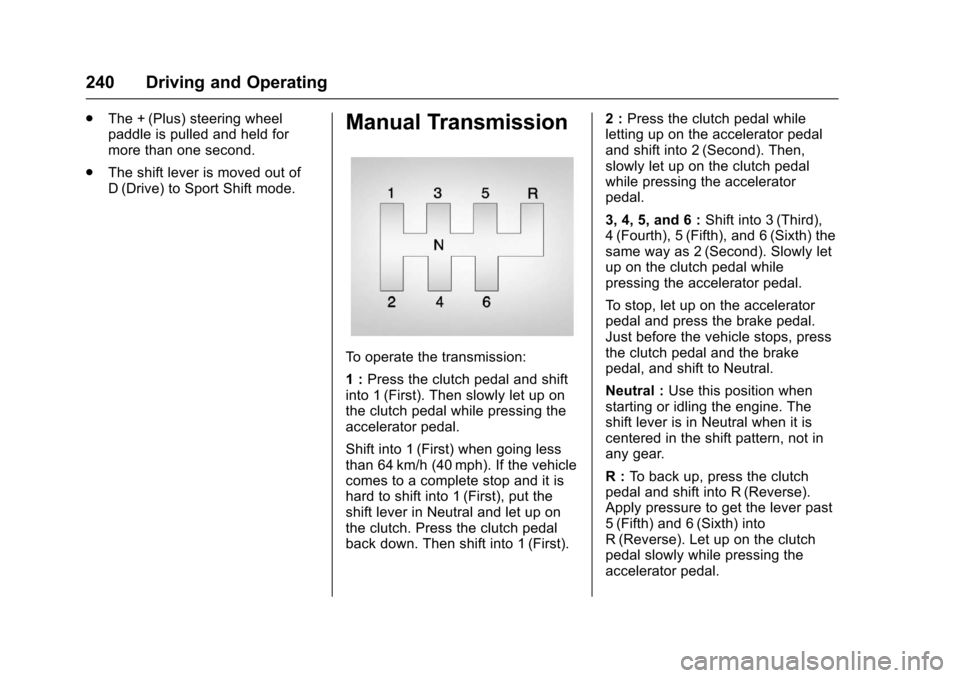
To o p e r a t e t h e t r a n s m i s s i o n :
1:Press the clutch pedal and shiftinto 1 (First). Then slowly let up onthe clutch pedal while pressing theaccelerator pedal.
Shift into 1 (First) when going lessthan 64 km/h (40 mph). If the vehiclecomes to a complete stop and it ishard to shift into 1 (First), put theshift lever in Neutral and let up onthe clutch. Press the clutch pedalback down. Then shift into 1 (First).
2:Press the clutch pedal whileletting up on the accelerator pedaland shift into 2 (Second). Then,slowly let up on the clutch pedalwhile pressing the acceleratorpedal.
3, 4, 5, and 6 :Shift into 3 (Third),4(Fourth), 5(Fifth), and 6(Sixth) thesame way as 2 (Second). Slowly letup on the clutch pedal whilepressing the accelerator pedal.
To s t o p , l e t u p o n t h e a c c e l e r a t o rpedal and press the brake pedal.Just before the vehicle stops, pressthe clutch pedal and the brakepedal, and shift to Neutral.
Neutral :Use this position whenstarting or idling the engine. Theshift lever is in Neutral when it iscentered in the shift pattern, not inany gear.
R:To b a c k u p , p r e s s t h e c l u t c hpedal and shift into R (Reverse).Apply pressure to get the lever past5(Fifth) and 6(Sixth) intoR(Reverse). Let up on the clutchpedal slowly while pressing theaccelerator pedal.
Page 248 of 400
Chevrolet SS Sedan Owner Manual (GMNA-Localizing-U.S.-10122752) -2017 - crc - 8/31/16
Driving and Operating 247
Driver Mode Control
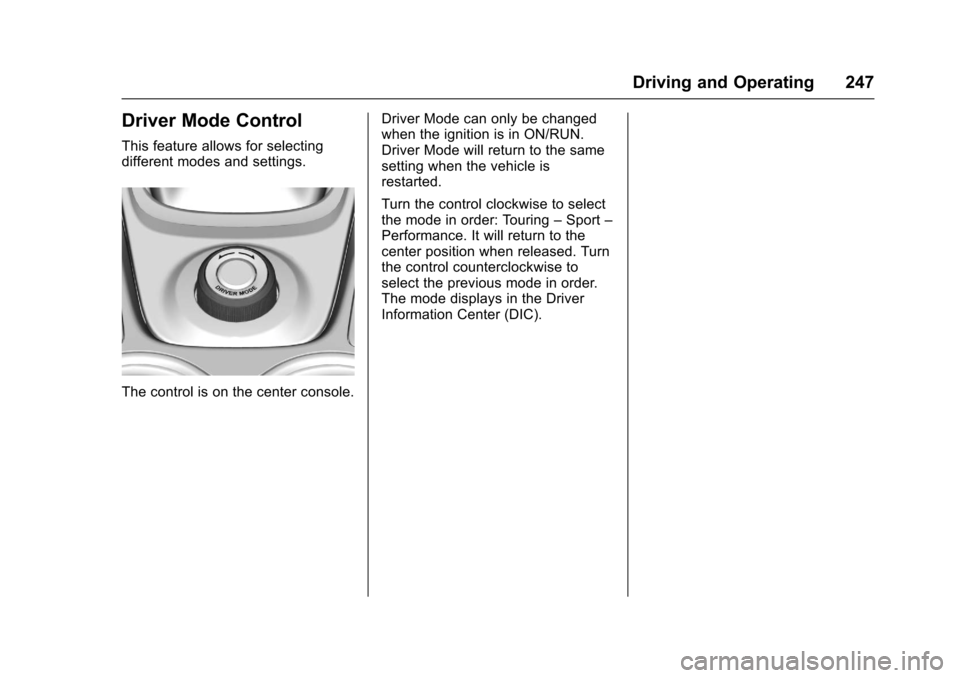
This feature allows for selectingdifferent modes and settings.
The control is on the center console.
Driver Mode can only be changedwhen the ignition is in ON/RUN.Driver Mode will return to the samesetting when the vehicle isrestarted.
Turn the control clockwise to selectthe mode in order: Touring–Sport–Performance. It will return to thecenter position when released. Turnthe control counterclockwise toselect the previous mode in order.The mode displays in the DriverInformation Center (DIC).
Page 249 of 400
Chevrolet SS Sedan Owner Manual (GMNA-Localizing-U.S.-10122752) -2017 - crc - 8/31/16
248 Driving and Operating
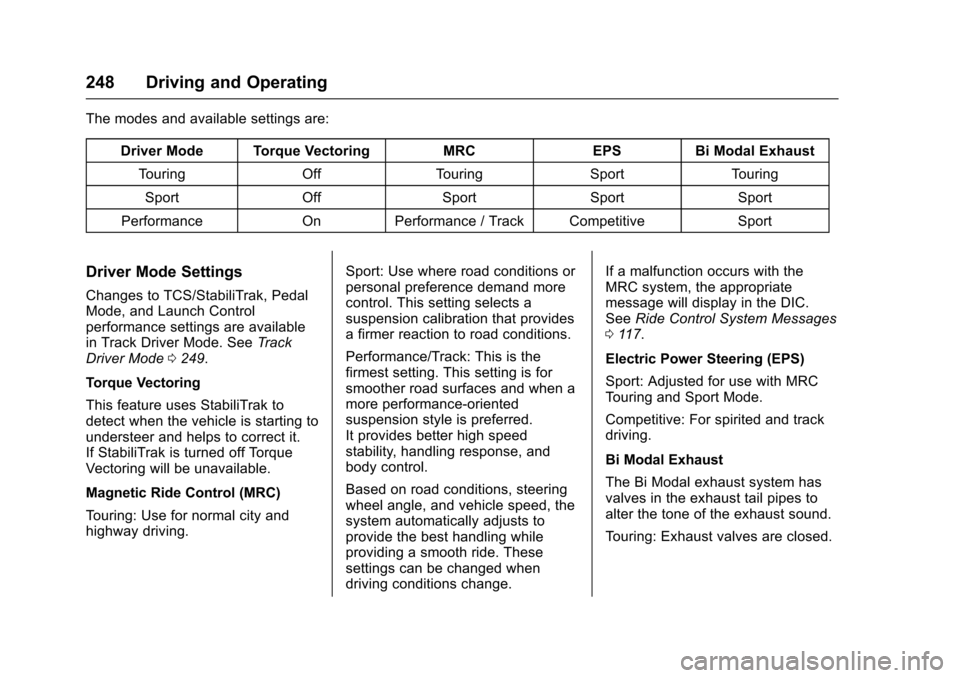
The modes and available settings are:
Driver Mode Torque VectoringMRCEPSBi Modal Exhaust
To u r i n gOffTo u r i n gSportTo u r i n g
SportOffSportSportSport
PerformanceOnPerformance / Track CompetitiveSport
Driver Mode Settings
Changes to TCS/StabiliTrak, PedalMode, and Launch Controlperformance settings are availablein Track Driver Mode. SeeTr a c kDriver Mode0249.
Torque Vectoring
This feature uses StabiliTrak todetect when the vehicle is starting toundersteer and helps to correct it.If StabiliTrak is turned off TorqueVectoring will be unavailable.
Magnetic Ride Control (MRC)
To u r i n g : U s e f o r n o r m a l c i t y a n dhighway driving.
Sport: Use where road conditions orpersonal preference demand morecontrol. This setting selects asuspension calibration that providesafirmerreactiontoroadconditions.
Performance/Track: This is thefirmest setting. This setting is forsmoother road surfaces and when amore performance-orientedsuspension style is preferred.It provides better high speedstability, handling response, andbody control.
Based on road conditions, steeringwheel angle, and vehicle speed, thesystem automatically adjusts toprovide the best handling whileproviding a smooth ride. Thesesettings can be changed whendriving conditions change.
If a malfunction occurs with theMRC system, the appropriatemessage will display in the DIC.SeeRide Control System Messages011 7.
Electric Power Steering (EPS)
Sport: Adjusted for use with MRCTo u r i n g a n d S p o r t M o d e .
Competitive: For spirited and trackdriving.
Bi Modal Exhaust
The Bi Modal exhaust system hasvalves in the exhaust tail pipes toalter the tone of the exhaust sound.
To u r i n g : E x h a u s t v a l v e s a r e c l o s e d .