battery CHEVROLET SSR 2005 1.G User Guide
[x] Cancel search | Manufacturer: CHEVROLET, Model Year: 2005, Model line: SSR, Model: CHEVROLET SSR 2005 1.GPages: 388, PDF Size: 2.5 MB
Page 111 of 388

Lowering the Convertible Top
Notice:If you operate the convertible top switch
continuously while the ignition is in ACCESSORY,
the battery will drain and you might not be able
to start your vehicle. Do not use the convertible
top switch for extended periods of time when
the ignition is in ACCESSORY.
The ignition must be in RUN or ACCESSORY, your
foot must be on the brake, and the vehicle must
be stopped in order to lower the convertible top.
a(Top Open):Press and hold this symbol
on the convertible top switch located on the center
console switchbank to open the convertible top.
The windows will lower automatically when the top
begins to lower. Two chimes will sound when the
convertible top is fully opened.
A “Roof Cycle Timeout” message will display on the
Driver Information Center (DIC) and the convertible
top will stop moving when the programmed time limit
is exceeded for the lowered position. See “Roof
Cycle Timeout” underDIC Warnings and Messages
on page 3-45.If the convertible top cannot be lowered using the
convertible top switch, the fuse may need to be
replaced. SeeFuses and Circuit Breakers on page 5-84
for more information.
If the convertible top still does not operate, contact your
GM dealer.
Roof Tonneau
Notice:Opening the cargo cover manually when the
convertible top is not in the full-open or full-closed
position could damage the tonneau cover and the
convertible top. Always make sure the convertible
top is in the full-closed or full-opened position before
manually opening the cargo cover.
The vehicle has a roof tonneau that is raised or lowered
along with the convertible top using the convertible
top switch.
If roof tonneau does not raise or lower when using the
convertible top switch, verify that the cargo cover is
closed. The roof tonneau will not raise or lower if the
cargo cover is open. SeeCargo Cover on page 2-36and
for more information. There will also be a message
displayed on the on the Driver Information Center (DIC).
SeeDIC Warnings and Messages on page 3-45for more
information on possible DIC messages and how to clear
them from the display.
2-53
Page 112 of 388

If the cargo area is closed and the roof tonneau does
not raise or lower, check to see if a fuse is blown.
SeeFuses and Circuit Breakers on page 5-84for more
information.
Contact your GM dealer if the roof tonneau still does not
raise or lower after replacing the fuse.
The roof tonneau can manually be raised or lowered in
the event of a power loss. SeeRaising the Convertible
Top on page 2-54for instructions.
Raising the Convertible Top
Notice:If you operate the convertible top switch
continuously while the ignition is in ACCESSORY,
the battery will drain and you might not be able
to start your vehicle. Do not use the convertible
top switch for extended periods of time when
the ignition is in ACCESSORY.
The ignition must be in RUN or ACCESSORY, your
foot must be on the brake, and the vehicle must
be stopped in order to raise the convertible top.
b(Top Closed):Press and hold this symbol on
the convertible top switch located on the center console
switchbank to close the convertible top. Two chimes
will sound when the top is fully closed.A “Roof Cycle Timeout” message will display on the
Driver Information Center (DIC) and the convertible top
will stop moving when the programmed time limit is
exceeded for the raised position. See “Roof Cycle
Timeout” underDIC Warnings and Messages on
page 3-45.
If the convertible top cannot be raised by using the
convertible top switch, the fuse may need to be
replaced. SeeFuses and Circuit Breakers on page 5-84
for more information.
If the convertible top still cannot be lowered or raised,
contact your GM dealer.
The roof tonneau and convertible top can be raised in
the event of a power loss. Two people are needed to lift
the roof tonneau and convertible top when using the
following procedure.
1. Turn the ignition to OFF.
2. Open both doors.
3. In the area behind the seats, locate the two sets of
cables behind the carpet aps. The cables on the
driver’s side are located behind the tire inator
kit. The tire inator kit must be removed to access
the cables. SeeTire Inator Kit on page 5-68
for instructions on how to remove the tire inator kit.
2-54
Page 119 of 388

Instrument Panel Overview...............................3-4
Hazard Warning Flashers................................3-5
Other Warning Devices...................................3-5
Horn.............................................................3-6
Tilt Wheel.....................................................3-6
Turn Signal/Multifunction Lever.........................3-6
Turn and Lane-Change Signals........................3-7
Headlamp High/Low-Beam Changer..................3-8
Flash-to-Pass.................................................3-8
Windshield Wipers..........................................3-8
Windshield Washer.........................................3-9
Cruise Control................................................3-9
Exterior Lamps.............................................3-12
Headlamps on Reminder................................3-13
Daytime Running Lamps (DRL).......................3-14
Automatic Headlamp System..........................3-14
Fog Lamps..................................................3-15
Interior Lamps..............................................3-16
Instrument Panel Brightness...........................3-16
Theater Dimming..........................................3-17
Exit Lighting.................................................3-17
Perimeter Lighting.........................................3-17
Map Lamps.................................................3-17
Battery Run-Down Protection..........................3-17Center Console Switchbank............................3-18
Accessory Power Outlets...............................3-18
Ashtrays and Cigarette Lighter........................3-19
Climate Controls............................................3-20
Climate Control System.................................3-20
Outlet Adjustment.........................................3-22
Warning Lights, Gages, and Indicators............3-23
Instrument Panel Cluster................................3-24
Speedometer and Odometer...........................3-25
Trip Odometer..............................................3-25
Tachometer.................................................3-26
Engine Speed Limiter....................................3-26
Safety Belt Reminder Light.............................3-26
Airbag Readiness Light..................................3-27
Airbag Off Light............................................3-28
Charging System Light..................................3-29
Brake System Warning Light..........................3-30
Anti-Lock Brake System Warning Light.............3-31
Traction Control System (TCS) Warning
Light (Automatic Transmission)....................3-31
Engine Coolant Temperature Gage...................3-32
Malfunction Indicator Lamp.............................3-32
Oil Pressure Gage........................................3-36
Section 3 Instrument Panel
3-1
Page 135 of 388

Theater Dimming
This feature allows for a three to ®ve-second fade out
of the courtesy lamps instead of immediate turn off.
Exit Lighting
With the exit lighting, the interior lamps will come on
when you remove the key from the ignition to help you
see while exiting the vehicle.
Perimeter Lighting
When the button with the unlock symbol on the remote
keyless entry transmitter is pressed, the DRL, parking
lamps and back-up lamps will come on if it is dark
enough outside.
This feature can be personalized for up to two drivers.
See
DIC Vehicle Personalization on page 3-52for
more information.
Map Lamps
If your vehicle has front map lamps, they are located on
the inside rearview mirror. They will automatically come
on for approximately 40 seconds when the doors are
unlocked with the remote keyless entry transmitter or
until the ignition key is turned to RUN or ACCESSORY.
The lamps will also stay on for approximately 40 seconds
after you exit the vehicle unless you lock the doors with
the remote keyless entry transmitter.
You can also turn the lamps on and off by pressing the
button near each lamp.
Battery Run-Down Protection
This feature shuts off all lamps that are left on for
more than 10 minutes when the ignition is off. This
will keep your battery from running down.
3-17
Page 136 of 388
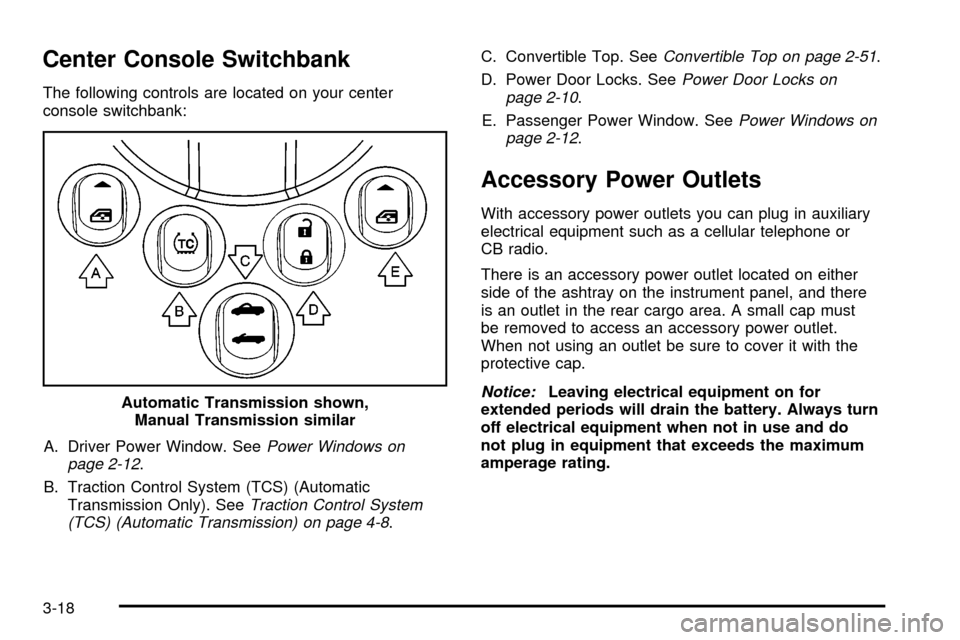
Center Console Switchbank
The following controls are located on your center
console switchbank:A. Driver Power Window. See
Power Windows on
page 2-12.
B. Traction Control System (TCS) (Automatic Transmission Only). See
Traction Control System
(TCS) (Automatic Transmission) on page 4-8. C. Convertible Top. See
Convertible Top on page 2-51.
D. Power Door Locks. See
Power Door Locks on
page 2-10.
E. Passenger Power Window. See
Power Windows on
page 2-12.
Accessory Power Outlets
With accessory power outlets you can plug in auxiliary
electrical equipment such as a cellular telephone or
CB radio.
There is an accessory power outlet located on either
side of the ashtray on the instrument panel, and there
is an outlet in the rear cargo area. A small cap must
be removed to access an accessory power outlet.
When not using an outlet be sure to cover it with the
protective cap.
Notice:Leaving electrical equipment on for
extended periods will drain the battery. Always turn
off electrical equipment when not in use and do
not plug in equipment that exceeds the maximum
amperage rating.
Automatic Transmission shown,
Manual Transmission similar
3-18
Page 147 of 388

{CAUTION:
If the airbag readiness light ever comes on
when you have turned off the passenger's
frontal airbag, it means that something may be
wrong with the airbag system. The passenger's
frontal airbag could in¯ate even though the
switch is off. If this ever happens, do not let
anyone whom the national government has
identi®ed as a member of a passenger airbag
risk group sit in the passenger's position
(for example, do not secure a rear-facing
child restraint in your vehicle) until you have
your vehicle serviced. See
Airbag Off Switch
on page 1-47
.
Charging System Light
The charging system light
will come on brie¯y when
you turn on the ignition,
but the engine is not
running, as a check to
show you it is working.
It should go out once the engine is running. If it stays
on, or comes on while you are driving, you may have
a problem with the charging system. It could indicate
that you have problems with a generator drive belt, or
another electrical problem. Have it checked right
away. Driving while this light is on could drain your
battery.
If you must drive a short distance with the light on,
be certain to turn off all your accessories, such as the
radio and air conditioner.
3-29
Page 153 of 388

Have you recently changed brands of fuel?
If so, be sure to fuel your vehicle with quality fuel. See
Gasoline Octane on page 5-5. Poor fuel quality will
cause your engine not to run as efficiently as designed.
You may notice this as stalling after start-up, stalling
when you put the vehicle into gear, mis®ring, hesitation
on acceleration, or stumbling on acceleration. (These
conditions may go away once the engine is warmed up.)
This will be detected by the system and cause the
light to turn on.
If you experience one or more of these conditions,
change the fuel brand you use. It will require at least
one full tank of the proper fuel to turn the light off.
If none of the above steps have made the light turn off,
your dealer can check the vehicle. Your dealer has
the proper test equipment and diagnostic tools to ®x
any mechanical or electrical problems that may
have developed.
Emissions Inspection and Maintenance
Programs
Some state/provincial and local governments have or
may begin programs to inspect the emission control
equipment on your vehicle. Failure to pass this
inspection could prevent you from getting a vehicle
registration.
Here are some things you need to know to help your
vehicle pass an inspection:
Your vehicle will not pass this inspection if the check
engine light is on or not working properly.
Your vehicle will not pass this inspection if the OBD
(on-board diagnostic) system determines that critical
emission control systems have not been completely
diagnosed by the system. The vehicle would be
considered not ready for inspection. This can happen
if you have recently replaced your battery or if your
battery has run down. The diagnostic system is
designed to evaluate critical emission control systems
during normal driving. This may take several days
of routine driving. If you have done this and your vehicle
still does not pass the inspection for lack of OBD
system readiness, your GM dealer can prepare the
vehicle for inspection.
3-35
Page 158 of 388

Auxiliary Gage Package
A. Voltmeter Gage
B. Delivered Torque Gage
C. Outside Temperature Gage
Your vehicle may have an auxiliary gage package
located at the front of the center console.
Voltmeter Gage
This gage (A) is located
on the left side of the
gage package.
When your engine is not running, but the ignition is in
RUN, this gage shows your battery's state of charge in
DC volts.
When the ignition is on and the engine is running, the
gage shows the condition of the charging system.
Readings between the low and high warning zones
indicate the normal operating range.
Readings in the low warning zone may occur when a
large number of electrical accessories are operating in
the vehicle and the engine is left at an idle for an
extended period. This condition is normal since the
charging system is not able to provide full power
at engine idle. As engine speeds are increased, this
condition should correct itself as higher engine speeds
allow the charging system to create maximum power.
3-40
Page 163 of 388

Personalization
q
(Personalization):Press this button to access
the vehicle personalization menu and customize
the personalization settings on your vehicle. See
DIC
Vehicle Personalization on page 3-52for more
information.
Select
r
(Select): Press this button to reset certain
DIC functions, acknowledge DIC warning messages and
clear them from the DIC, and set your personalization
settings.
DIC Warnings and Messages
Messages are displayed on the DIC to notify the driver
that the status of the vehicle has changed and that
some action may be needed by the driver to correct the
condition. Multiple messages may appear one after
another. Some messages may not require immediate
action but you should press the select button to
acknowledge that you received the message and
clear it from the display. Some messages cannot be
cleared from the display because they are more urgent. These messages require action before they can be
removed from the DIC display. The following are
the possible messages that can be displayed and some
information about them.
Battery Not Charging
If the battery is not charging during operation, this
message will appear on the DIC. The charging system
light may also be displayed on the instrument panel
cluster. See
Charging System Light on page 3-29for more information. Driving your vehicle when
the battery is not charging properly can drain the
battery. Have the electrical system checked by your
GM dealer as soon as possible. Press the select button
to acknowledge this message and clear it from the
DIC display.
Battery Voltage Too High
This message will be displayed when the battery
voltage is higher than normal and you try to raise or
lower the convertible top. The charging system light may
also be displayed on the instrument panel cluster.
See
Charging System Light on page 3-29for more
information. Press the select button to acknowledge the
message and clear it from the DIC display.
3-45
Page 164 of 388
Battery Voltage Too Low
This message will be displayed when the battery
voltage is lower than normal and you try to raise or
lower the convertible top. The charging system light
may also be displayed on the instrument panel cluster.
See
Charging System Light on page 3-29for more
information. Press the select button to acknowledge the
message and clear it from the DIC display.
Cargo Cover Ajar
This message will be displayed when trying to open
or close the convertible top while the cargo cover
is open. Make sure the cargo cover is fully closed
before trying to open or close the convertible top.
This message will clear itself from the DIC once the
cargo cover is closed.
Change Trans (Transmission) Fluid
(Automatic Transmission Only)
If your transmission ¯uid in your vehicle needs to
be changed, this message will appear on the DIC.
See
Automatic Transmission Fluid on page 5-21andScheduled Maintenance on page 6-4for more
information.
Check Oil Level
If the oil level in the vehicle is low, this message will
appear on the DIC. Check the oil level and add oil
as necessary. See
Engine Oil on page 5-13for more
information. Press the select button to acknowledge this
message and clear it from the DIC display.
Depress Brake
This message will be displayed on the DIC when you
try to raise or lower the convertible top without ®rst
pressing the brake pedal. The brake pedal must
be pressed in order to operate the convertible top.
See
Convertible Top on page 2-51for more information.
Pressing the brake pedal will clear the message, or
you can press the select button to acknowledge
and clear the message from the DIC display.
Driver Door Ajar
This message will be displayed on the DIC and a
chime will sound when the driver's door is not closed
completely. Stop the vehicle, check the door for
obstacles, and close the door again. Fully closing the
driver's door will clear this message from the display,
or you can press the select button to acknowledge
the message and clear it from the DIC display.
3-46