automatic transmission CHEVROLET SSR 2006 1.G User Guide
[x] Cancel search | Manufacturer: CHEVROLET, Model Year: 2006, Model line: SSR, Model: CHEVROLET SSR 2006 1.GPages: 390, PDF Size: 2.44 MB
Page 119 of 390
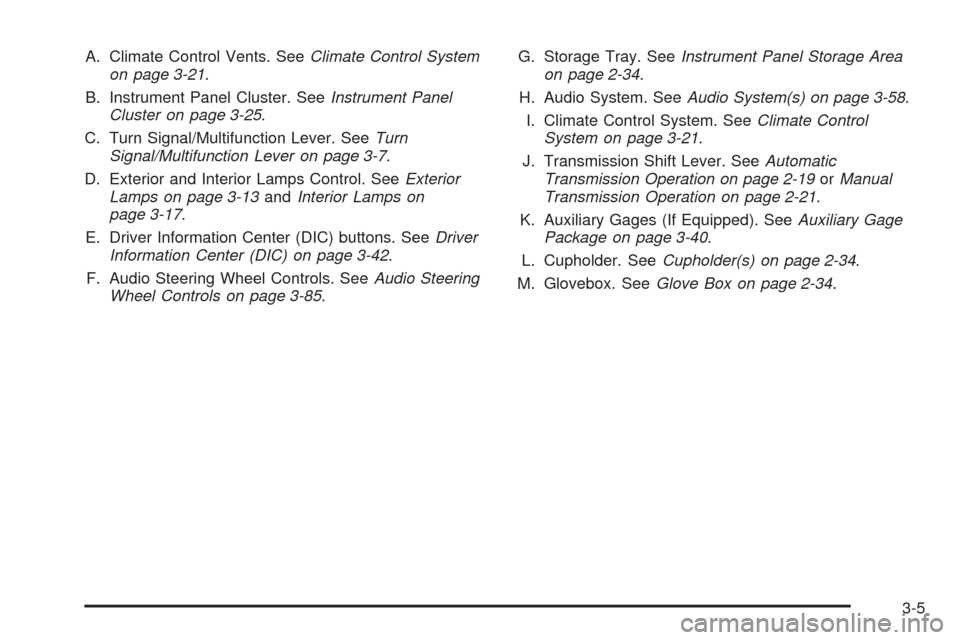
A. Climate Control Vents. SeeClimate Control System
on page 3-21.
B. Instrument Panel Cluster. SeeInstrument Panel
Cluster on page 3-25.
C. Turn Signal/Multifunction Lever. SeeTurn
Signal/Multifunction Lever on page 3-7.
D. Exterior and Interior Lamps Control. SeeExterior
Lamps on page 3-13andInterior Lamps on
page 3-17.
E. Driver Information Center (DIC) buttons. SeeDriver
Information Center (DIC) on page 3-42.
F. Audio Steering Wheel Controls. SeeAudio Steering
Wheel Controls on page 3-85.G. Storage Tray. SeeInstrument Panel Storage Area
on page 2-34.
H. Audio System. SeeAudio System(s) on page 3-58.
I. Climate Control System. SeeClimate Control
System on page 3-21.
J. Transmission Shift Lever. SeeAutomatic
Transmission Operation on page 2-19orManual
Transmission Operation on page 2-21.
K. Auxiliary Gages (If Equipped). SeeAuxiliary Gage
Package on page 3-40.
L. Cupholder. SeeCupholder(s) on page 2-34.
M. Glovebox. SeeGlove Box on page 2-34.
3-5
Page 128 of 390

Headlamps on Reminder
A reminder chime will sound when your headlamps or
parking lamps are manually turned on, the driver’s door
is open and your ignition is in OFF or ACCESSORY.
To turn the chime off, turn the knob all the way
counterclockwise. In the automatic mode, the headlamps
turn off once the ignition key is in OFF.
Daytime Running Lamps (DRL)
Daytime Running Lamps (DRL) can make it easier for
others to see the front of your vehicle during the
day. DRL can be helpful in many different driving
conditions, but they can be especially helpful in the short
periods after dawn and before sunset. Fully functional
daytime running lamps are required on all vehicles
first sold in Canada.The DRL system will make your headlamps come on
at reduced brightness when the following conditions
are met:
•Ignition is on.
•Exterior lamps knob is in AUTO.
•Light sensor detects daytime light.
•Automatic transmission is not in PARK (P).
•The parking brake is not set.
When the DRL are on, only your headlamps will be on.
The taillamps, sidemarker and other lamps won’t be
on. The instrument panel won’t be lit up either.
When it begins to get dark, the headlamps will
automatically switch from DRL to the regular headlamps.
3-14
Page 129 of 390

To idle your vehicle with the DRL off, set the parking
brake when the ignition is off and then start your vehicle.
The DRL will stay off until you release the parking brake.
In DRL mode further cycling of the park brake will
do the following if your vehicle was made in the
United States:
•If your vehicle has an automatic transmission,
pulling up the parking brake and then releasing
it will turn on the DRL. If you repeat this, the DRL
will turn off and stay off. This applies to the
automatic headlamps as well.
•If your vehicle has a manual transmission, pulling
the parking brake up will turn off the DRLs. If the
parking brake is released, the DRLs will turn
on. After the first cycle of the park brake, the
automatic headlamps will stay on and the system
does not respond to further cycling of the park brake
until the next time you turn on your vehicle.
Automatic Headlamp System
When it is dark enough outside, your automatic
headlamp system will turn on your headlamps at the
normal brightness along with other lamps such as
the taillamps, sidemarker, parking lamps and the
instrument panel lights when the exterior lamps knob is
turned to AUTO. SeeExterior Lamps on page 3-13
for more information. The radio lights will also be on.
Your vehicle is equipped with a light sensor on the top of
the instrument panel. Be sure it is not covered or the
system will be on whenever the ignition is on.
The system may also turn on your lights when driving
through a parking garage, heavy overcast weather
or a tunnel. This is normal.
There is a delay in the transition between the daytime
and nighttime operation of the Daytime Running
Lamps (DRL) and the automatic headlamp systems so
that driving under bridges or bright overhead street
lights does not affect the system. The DRL and
automatic headlamp system will only be affected when
the light sensor sees a change in lighting lasting
longer than the delay. SeeDaytime Running Lamps
(DRL) on page 3-14for more information.
3-15
Page 133 of 390
Center Console Switchbank
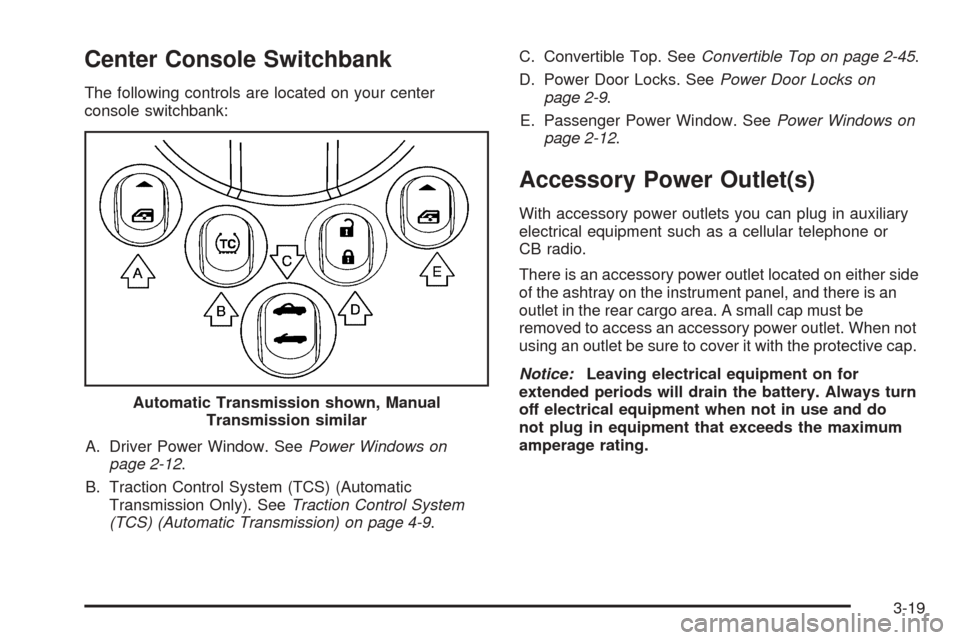
The following controls are located on your center
console switchbank:
A. Driver Power Window. SeePower Windows on
page 2-12.
B. Traction Control System (TCS) (Automatic
Transmission Only). SeeTraction Control System
(TCS) (Automatic Transmission) on page 4-9.C. Convertible Top. SeeConvertible Top on page 2-45.
D. Power Door Locks. SeePower Door Locks on
page 2-9.
E. Passenger Power Window. SeePower Windows on
page 2-12.
Accessory Power Outlet(s)
With accessory power outlets you can plug in auxiliary
electrical equipment such as a cellular telephone or
CB radio.
There is an accessory power outlet located on either side
of the ashtray on the instrument panel, and there is an
outlet in the rear cargo area. A small cap must be
removed to access an accessory power outlet. When not
using an outlet be sure to cover it with the protective cap.
Notice:Leaving electrical equipment on for
extended periods will drain the battery. Always turn
off electrical equipment when not in use and do
not plug in equipment that exceeds the maximum
amperage rating. Automatic Transmission shown, Manual
Transmission similar
3-19
Page 139 of 390
Instrument Panel Cluster
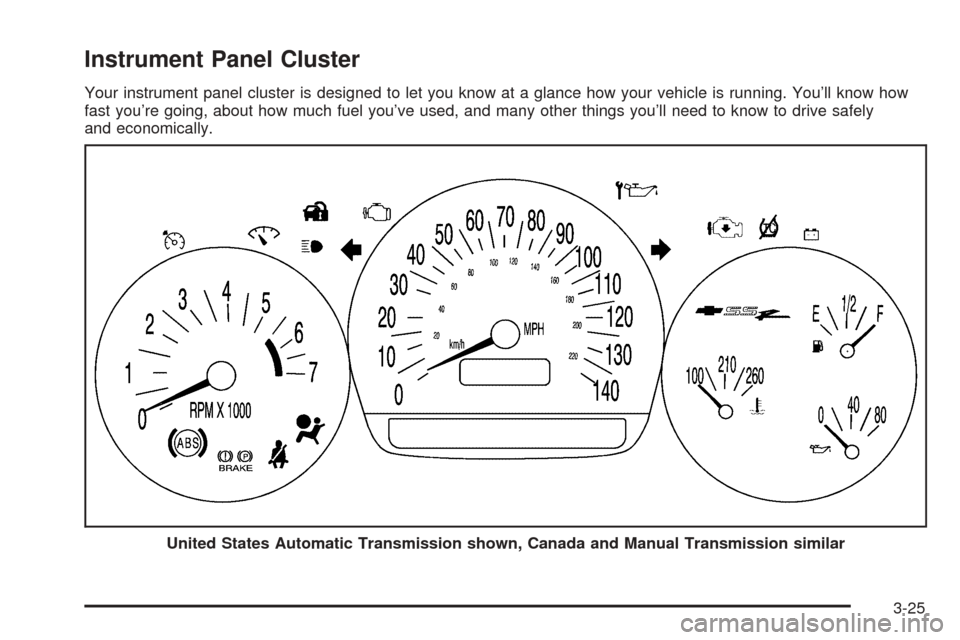
Your instrument panel cluster is designed to let you know at a glance how your vehicle is running. You’ll know how
fast you’re going, about how much fuel you’ve used, and many other things you’ll need to know to drive safely
and economically.
United States Automatic Transmission shown, Canada and Manual Transmission similar
3-25
Page 160 of 390
Battery Not Charging
If the battery is not charging during operation, this
message will appear on the DIC. The charging system
light may also be displayed on the instrument panel
cluster. SeeCharging System Light on page 3-30for
more information. Driving your vehicle when the battery is
not charging properly can drain the battery. Have the
electrical system checked by your GM dealer as soon as
possible. Press the select button to acknowledge this
message and clear it from the DIC display.
Battery Voltage Too High
This message will be displayed when the battery
voltage is higher than normal and you try to raise or
lower the convertible top. The charging system light may
also be displayed on the instrument panel cluster.
SeeCharging System Light on page 3-30for more
information. Press the select button to acknowledge the
message and clear it from the DIC display.
Battery Voltage Too Low
This message will be displayed when the battery
voltage is lower than normal and you try to raise or
lower the convertible top. The charging system light may
also be displayed on the instrument panel cluster.
SeeCharging System Light on page 3-30for more
information. Press the select button to acknowledge the
message and clear it from the DIC display.
Cargo Cover Ajar
This message will be displayed when trying to open or
close the convertible top while the cargo cover is
open. Make sure the cargo cover is fully closed before
trying to open or close the convertible top. This
message will clear itself from the DIC once the cargo
cover is closed.
Change Trans (Transmission) Fluid
(Automatic Transmission Only)
If the transmission fluid needs to be changed, this
message will appear on the DIC. SeeAutomatic
Transmission Fluid on page 5-20andScheduled
Maintenance on page 6-4for more information.
Check Oil Level
If the oil level in the vehicle is low, this message will
appear on the DIC. Check the oil level and add oil
as necessary. SeeEngine Oil on page 5-13for more
information. Press the select button to acknowledge this
message and clear it from the DIC display.
3-46
Page 165 of 390

Stop Vehicle
This message will be displayed when attempting to
release the cargo cover while the vehicle is in motion.
The vehicle must be stopped to release the cargo cover.
SeeCargo Cover on page 2-35for more information.
Tlat (Tonneau Latch) Hall Switch Fault
This message will be displayed when trying to raise
or lower the convertible top and there is a problem with
this switch. If the message persists, see your
GM dealer for service.
Tonn (Tonneau) Hall Switch Fault
This message will be displayed when trying to raise or
lower the convertible top and there is a fault with
this switch. If the message persists, see your GM dealer
for service.
Tonn (Tonneau) Latd (Latched)
Switch Fault
This message will be displayed when trying to raise or
lower the convertible top and there is a fault with
this switch. If the message persists, see your GM dealer
for service.
Traction Active (Automatic
Transmission Only)
This message, along with the Traction Control
System (TCS) warning light on the instrument panel
cluster, will be displayed when the TCS system is active.
Press the select button to acknowledge this message
and clear it from the DIC display. SeeTraction Control
System (TCS) (Automatic Transmission) on page 4-9
andTraction Control System (TCS) Warning Light
on page 3-32for more information.
Trans (Transmission) Hot Idle
(Automatic Transmission Only)
If the transmission fluid in the vehicle becomes too hot,
this message will appear on the DIC. Stop the vehicle
and let it idle to allow the transmission fluid to cool. This
message will clear when the fluid temperature reaches
a safe level. SeeAutomatic Transmission Fluid on
page 5-20for more information.
3-51
Page 166 of 390

Turn Signal On
If a turn signal is left on for 3/4 mile (1.2 km), this
message will appear on the display and you will hear a
chime. Move the turn signal/multifunction lever to the
off position. Press the select button to acknowledge this
message and clear it from the display. SeeTurn
Signal/Multifunction Lever on page 3-7for more
information.
Unknown Speed
This message will be displayed when trying to raise or
lower the convertible top and the roof controller
cannot communicate with the Powertrain Control
Module (PCM). See your GM dealer for service.
DIC Vehicle Personalization
Your vehicle has a personalization feature that allows
you to program certain features to a preferred setting for
up to two drivers. The number of programmable
features varies depending upon which model of the
vehicle you purchased. Once the features are
programmed, the saved settings are recalled by pressing
the unlock button on the remote keyless entry
transmitter, 1 or 2, or by pressing the appropriate
memory button, 1 or 2, located on the outboard side of
the driver’s seat. SeeMemory Seat on page 2-53
for more information.The following is a list of available
programmable options:
•AUTOMATIC LOCKING (Automatic
Transmission only)
•AUTOMATIC UNLOCKING
•REMOTE LOCK FEEDBACK
•REMOTE UNLOCK FEEDBACK
•HEADLAMPS ON AT EXIT
•PERIMETER LIGHTING
•SEAT POSITION RECALL, if equipped
•ALARM WARNING TYPE
•DISPLAY LANGUAGE
•DISPLAY UNITS – U.S./MET
q(Personalization):Press this button located on the
steering wheel to access the vehicle personalization
menu and customize the personalization settings
on your vehicle.
3-52
Page 167 of 390

Automatic Locking (Automatic
Transmission only)
This feature allows you to choose how the vehicle’s
doors are locked on your automatic transmission vehicle.
Press the personalization button until AUTOMATIC
LOCKING appears in the display. To access the modes
for AUTOMATIC LOCKING, press the select button.
Once AUTOMATIC LOCKING is selected, press
the select button to scroll through the following modes:
Mode 1:LOCK DOORS OUT OF PARK
Mode 2:LOCK DOORS WITH SPEED
If you choose Mode 1, the doors will lock when the
vehicle is shifted out of PARK (P).
If you choose Mode 2, the doors will lock when
the vehicle speed is above 8 mph (13 km/h) for
three seconds.
Scroll through the list of modes. When the mode you
want is displayed on the DIC, press the personalization
button to set your choice, return to the personalization
menu, and advance to the next programmable feature.
For more information on automatic door locks, see
Programmable Automatic Door Locks on page 2-10.
Automatic Unlocking
This feature allows you to choose how the vehicle’s
doors are unlocked. Press the personalization button
until AUTOMATIC UNLOCKING appears in the display.
To access the modes for AUTOMATIC UNLOCKING,
press the select button. Once AUTOMATIC
UNLOCKING is selected, press the select button to
scroll through the following modes:
Mode 1:UNLOCK ALL IN PARK (Automatic
Transmission only)
Mode 2:UNLOCK ALL AT KEY OUT
Mode 3:UNLOCK DRIVER IN PARK (Automatic
Transmission only)
Mode 4:UNLOCK DOORS MANUALLY
If you choose Mode 1, all of the doors will unlock when
the vehicle is shifted into PARK (P).
If you choose Mode 2, all of the doors will unlock when
the key is taken out of the ignition.
If you choose Mode 3, the driver’s door will be unlocked
when the vehicle is shifted into PARK (P).
If you choose Mode 4, the doors will not be unlocked
automatically.
3-53
Page 201 of 390
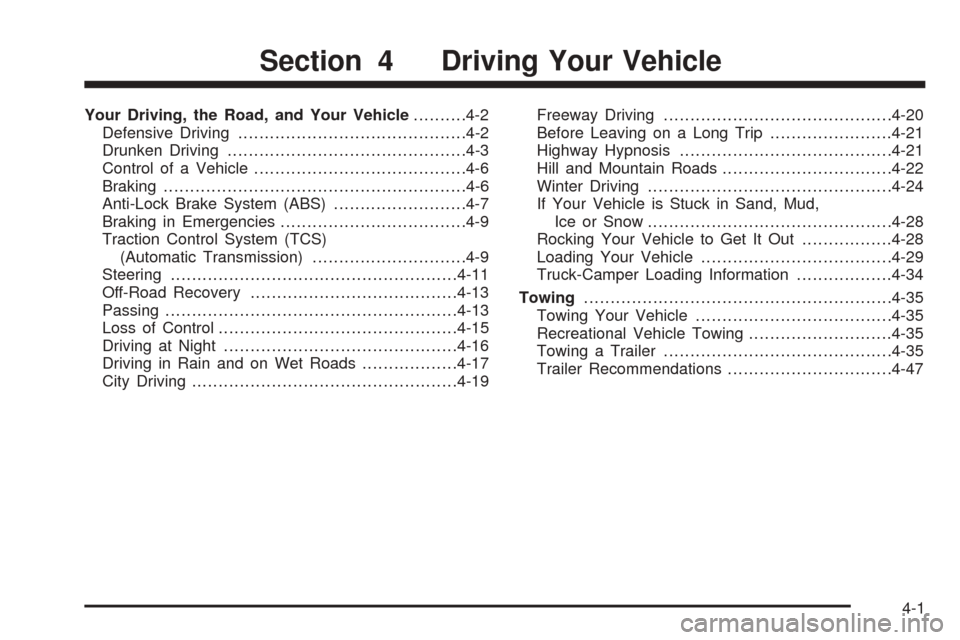
Your Driving, the Road, and Your Vehicle..........4-2
Defensive Driving...........................................4-2
Drunken Driving.............................................4-3
Control of a Vehicle........................................4-6
Braking.........................................................4-6
Anti-Lock Brake System (ABS).........................4-7
Braking in Emergencies...................................4-9
Traction Control System (TCS)
(Automatic Transmission).............................4-9
Steering......................................................4-11
Off-Road Recovery.......................................4-13
Passing.......................................................4-13
Loss of Control.............................................4-15
Driving at Night............................................4-16
Driving in Rain and on Wet Roads..................4-17
City Driving..................................................4-19Freeway Driving...........................................4-20
Before Leaving on a Long Trip.......................4-21
Highway Hypnosis........................................4-21
Hill and Mountain Roads................................4-22
Winter Driving..............................................4-24
If Your Vehicle is Stuck in Sand, Mud,
Ice or Snow..............................................4-28
Rocking Your Vehicle to Get It Out.................4-28
Loading Your Vehicle....................................4-29
Truck-Camper Loading Information..................4-34
Towing..........................................................4-35
Towing Your Vehicle.....................................4-35
Recreational Vehicle Towing...........................4-35
Towing a Trailer...........................................4-35
Trailer Recommendations...............................4-47
Section 4 Driving Your Vehicle
4-1