light CHEVROLET SUBURBAN 2012 10.G Owners Manual
[x] Cancel search | Manufacturer: CHEVROLET, Model Year: 2012, Model line: SUBURBAN, Model: CHEVROLET SUBURBAN 2012 10.GPages: 514, PDF Size: 7.54 MB
Page 310 of 514
Black plate (48,1)Chevrolet Tahoe/Suburban Owner Manual - 2012
9-48 Driving and Operating
StabiliTrak may also turn off
automatically if it determines that a
problem exists with the system.
If the problem does not clear itself
after restarting the vehicle, see your
dealer for service.
Non-hybrid vehicles with StabiliTrak
have a Trailer Sway Control (TSC)
feature. SeeTrailer Sway Control
(TSC) on page 9‑84.
Non-hybrid vehicles with StabiliTrak
have a Hill Start Assist (HSA)
feature. See Hill Start Assist (HSA)
on page 9‑44.
Adding non‐dealer accessories can
affect the vehicle's performance.
See Accessories and Modifications
on page 10‑3.Locking Rear Axle
Vehicles with a locking rear axle can
give more traction on snow, mud,
ice, sand, or gravel. It works like a
standard axle most of the time, but
when traction is low, this feature will
allow the rear wheel with the most
traction to move the vehicle.
Continuous Damping
Control (CDC)
This vehicle may have a continuous
damping control system called
Autoride
®. With this feature,
improved vehicle ride and handling
is provided under a variety of
passenger and loading conditions.
Autoride is fully automatic and
uses a computer controller to
continuously monitor vehicle speed,
wheel to body position, lift/dive,
and steering position of the vehicle.
The controller then sends signals
to each shock absorber to independently adjust the damping
level to provide the optimum
vehicle ride.
Autoride also interact with the tow/
haul mode that, when activated, will
provide additional control of the
shock absorbers. This additional
control results in better ride and
handling characteristics when the
vehicle is loaded or towing a trailer.
See
“Tow/Haul Mode” underTrailer
Towing on page 9‑70 for more
information.Automatic Level Control
The automatic level control rear
suspension is available on light‐duty
vehicles and comes as a part of the
Continuous Damping Control (CDC)
suspension, if equipped.
This type of level control is fully
automatic and will provide a better
leveled riding position as well as
better handling under a variety of
passenger and loading conditions.
Page 311 of 514
Black plate (49,1)Chevrolet Tahoe/Suburban Owner Manual - 2012
Driving and Operating 9-49
An air compressor connected to the
rear shocks will raise or lower the
rear of the vehicle to maintain
proper vehicle height. The system
is activated when the ignition key
is turned to ON/RUN and will
automatically adjust vehicle height
thereafter. The system may exhaust
(lower vehicle height) for up to
ten minutes after the ignition key
has been turned off. You may hear
the air compressor operating when
the height is being adjusted.
If a weight‐distributing hitch is being
used, it is recommended to allow
the shocks to inflate, thereby
leveling the vehicle prior to adjusting
the hitch.Cruise Control
{WARNING
Cruise control can be dangerous
where you cannot drive safely at
a steady speed. So, do not use
the cruise control on winding
roads or in heavy traffic.
Cruise control can be dangerous
on slippery roads. On such roads,
fast changes in tire traction can
cause excessive wheel slip, and
you could lose control. Do not use
cruise control on slippery roads.
With cruise control, a speed of
about 40 km/h (25 mph) or more can
be maintained without keeping your
foot on the accelerator. Cruise
control does not work at speeds
below about 40 km/h (25 mph).
When the brakes are applied, cruise
control is turned off. If the vehicle has StabiliTrak and the
system begins to limit wheel spin,
cruise control will automatically
disengage. See
StabiliTrak
®System
on page 9‑45. When road conditions
allow the cruise control to be safely
used again, it can be turned
back on.
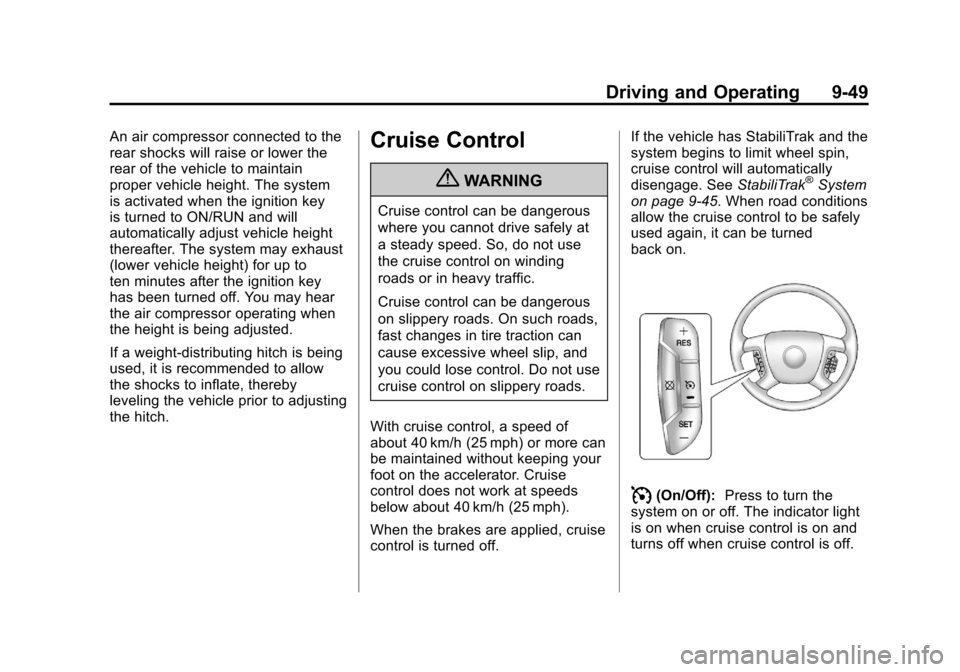
I(On/Off): Press to turn the
system on or off. The indicator light
is on when cruise control is on and
turns off when cruise control is off.
Page 312 of 514
Black plate (50,1)Chevrolet Tahoe/Suburban Owner Manual - 2012
9-50 Driving and Operating
+RES (Resume/Accelerate):
Press briefly to make the vehicle
resume to a previously set speed,
or press and hold to accelerate.
SET−(Set/Coast): Press to set the
speed and activate cruise control or
make the vehicle decelerate.
[(Cancel): Press to disengage
cruise control without erasing the
set speed from memory.
Setting Cruise Control
If the cruise button is on when not in
use, it could get bumped and go into
cruise when not desired. Keep the
cruise control switch off when cruise
is not being used.
The cruise control light on the
instrument panel cluster comes on
after the cruise control has been set
to the desired speed.
1. Press the
Ibutton.
2. Get up to the desired speed. 3. Press the SET−
button located
on the steering wheel and
release it.
4. Take your foot off the accelerator.
Resuming a Set Speed
If the cruise control is set at a
desired speed and then the brakes
are applied, the cruise control is
disengaged without erasing the set
speed from memory.
Once the vehicle speed reaches
about 40 km/h (25 mph) or more,
press the +RES button on the
steering wheel. The vehicle returns
to the previous set speed and stays
there.
Increasing Speed While Using
Cruise Control
If the cruise control system is
already activated,
.Press and hold the +RES button
on the steering wheel until the
desired speed is reached, then
release it.
.To increase vehicle speed in
small amounts, press the +RES
button. Each time this is done,
the vehicle goes about 1.6 km/h
(1 mph) faster.
Reducing Speed While Using
Cruise Control
If the cruise control system is
already activated,
.Press and hold the SET– button
on the steering wheel until the
desired lower speed is reached,
then release it.
.To slow down in small amounts,
press the SET– button on the
steering wheel briefly. Each time
this is done, the vehicle goes
about 1.6 km/h (1 mph) slower.
Passing Another Vehicle While
Using Cruise Control
Use the accelerator pedal to
increase the vehicle speed. When
you take your foot off the pedal,
the vehicle will slow down to the
previous set cruise speed.
Page 313 of 514
Black plate (51,1)Chevrolet Tahoe/Suburban Owner Manual - 2012
Driving and Operating 9-51
Using Cruise Control on Hills
How well the cruise control works
on hills depends on the vehicle
speed, the load, and the steepness
of the hills. When going up steep
hills, pressing the accelerator pedal
may be necessary to maintain
vehicle speed.
While going downhill, the Cruise
Grade Braking feature may
automatically shift to a lower gear
to keep the vehicle's speed down.
It may be necessary to apply
the brake or manually shift the
transmission to a lower gear. The
vehicle may shift to a higher gear
when grade braking assistance is
no longer required. Cruise Grade
Braking is not available while in
Range Selection Mode. See "Range
Selection Mode" underManual
Mode on page 9‑34. When the brakes are manually
applied the cruise control is
disengaged.
Ending Cruise Control
There are three ways to end cruise
control:
.To disengage cruise control,
step lightly on the brake pedal.
.Press the[on the steering
wheel.
.To turn off the cruise control,
press
Ion the steering wheel.
Erasing Speed Memory
The cruise control set speed is
erased from memory by pressing
the
Ibutton or if the ignition is
turned off.
Object Detection
Systems
Ultrasonic Parking Assist
If available, the Ultrasonic Rear
Parking Assist (URPA) system uses
sensors on the rear bumper to
assist with parking and avoiding
objects while in R (Reverse).
{WARNING
The URPA system does not
detect pedestrians, bicyclists,
animals, or any other objects
located below the bumper or that
are too close or too far from the
vehicle. To prevent injury, death,
or vehicle damage, even with
URPA, always check behind the
vehicle and check all mirrors
before backing.
Page 314 of 514
Black plate (52,1)Chevrolet Tahoe/Suburban Owner Manual - 2012
9-52 Driving and Operating
How the System Works
URPA comes on automatically when
the shift lever is moved into
R (Reverse). A single tone sounds
to indicate the system is working.
URPA operates only at speeds less
than 8 km/h (5 mph).
An obstacle is indicated by
audible beeps. The time between
the beeps gets shorter as the
vehicle approaches the obstacle.
A continuous tone is heard
when the distance is less than
30 cm (12 in).
To be detected, objects must be at
least 25 cm (10 in) off the ground
and below liftgate level. Objects
must also be within 2.5 m (8 ft) from
the rear bumper. This distance may
be less during warmer or humid
weather.
Turning the System On and Off
Press this button, located next to
the radio, to disable URPA.
The indicator light comes on and
PARK ASSIST OFF displays on the
Driver Information Center (DIC).
SeeObject Detection System
Messages on page 5‑40.
When the System Does Not
Seem to Work Properly
The following messages may be
displayed on the DIC:
SERVICE PARK ASSIST: this
message occurs, take the vehicle to
your dealer for repair. PARK ASSIST OFF:
This
message occurs if the driver
disables the system or if the
vehicle is driven above 8 km/h
(5 mph) in R (Reverse).
PARK ASST BLOCKED SEE
OWNERS MANUAL: This
message can occur under the
following conditions:
.The ultrasonic sensors are not
clean. Keep the rear bumper
free of mud, dirt, snow, ice,
slush, and frost. The message
may not clear until frost or ice
has melted all around and inside
the sensor.
.A trailer is attached to the
vehicle, or a bicycle or an object
hanging out of the liftgate during
the current or last drive cycle.
URPA will return to normal
operation after it is determined
the object is removed. This
could take a few drive cycles.
.A tow bar is attached to the
vehicle.
Page 315 of 514
Black plate (53,1)Chevrolet Tahoe/Suburban Owner Manual - 2012
Driving and Operating 9-53
Other conditions may affect
system performance, such as
vibrations from a jackhammer or
the compression of air brakes on a
very large truck.
Side Blind Zone
Alert (SBZA)
If available, the Side Blind Zone
Alert system is a lane changing aid
that assists drivers with avoiding
crashes that occur with vehicles in
the side blind zones.
{WARNING
SBZA does not detect vehicles
rapidly approaching outside of the
side blind zones, pedestrians,
bicyclists, or animals. Failure to
use proper care when changing
lanes may result in injury, death,
or vehicle damage. Always check
for other vehicles and use the
turn signals when changing lanes.
SBZA Detection Zones
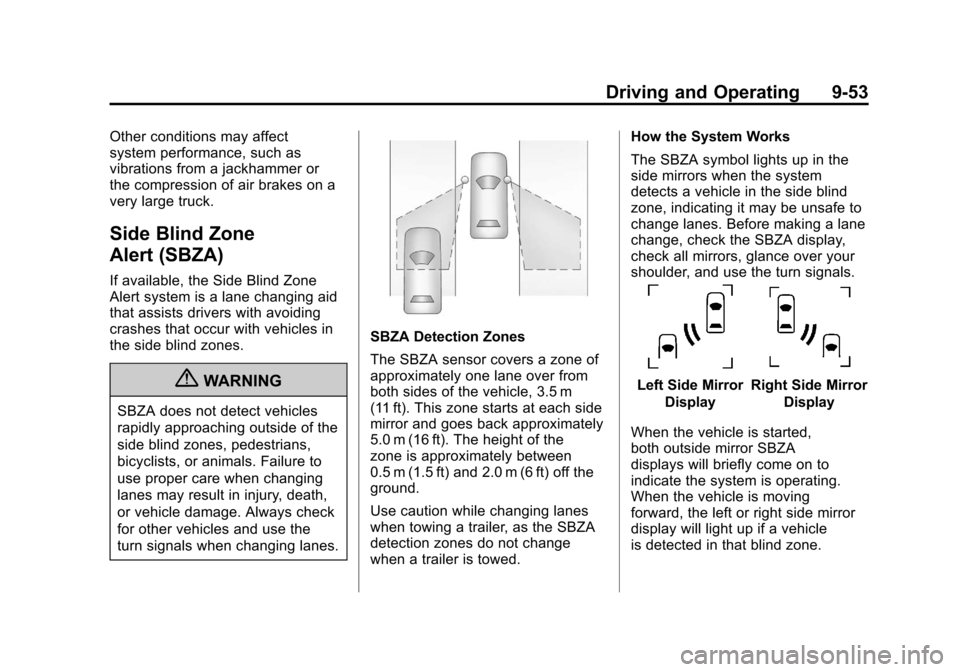
The SBZA sensor covers a zone of
approximately one lane over from
both sides of the vehicle, 3.5 m
(11 ft). This zone starts at each side
mirror and goes back approximately
5.0 m (16 ft). The height of the
zone is approximately between
0.5 m (1.5 ft) and 2.0 m (6 ft) off the
ground.
Use caution while changing lanes
when towing a trailer, as the SBZA
detection zones do not change
when a trailer is towed.How the System Works
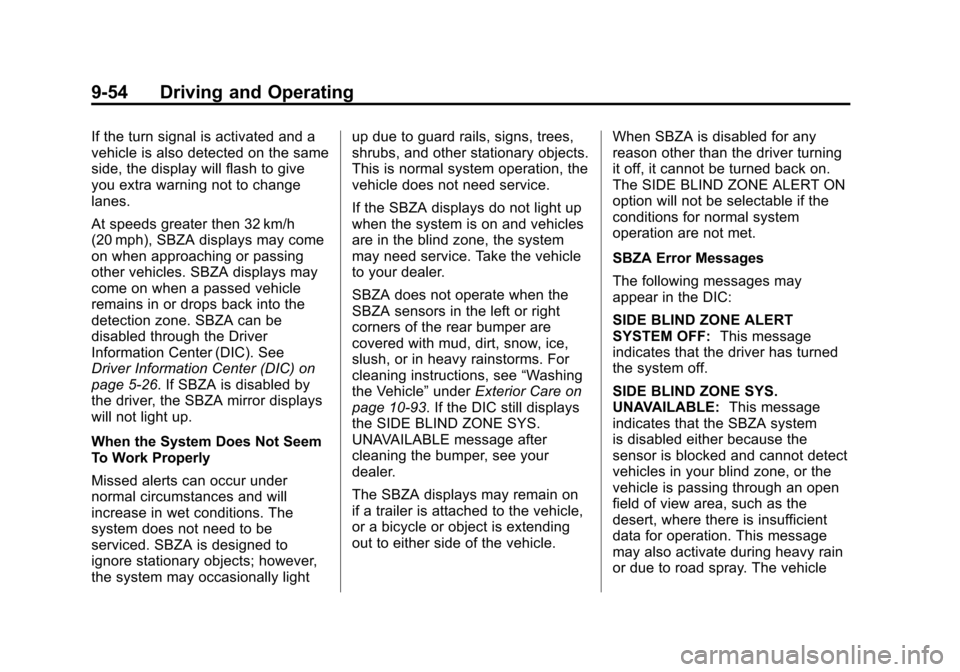
The SBZA symbol lights up in the
side mirrors when the system
detects a vehicle in the side blind
zone, indicating it may be unsafe to
change lanes. Before making a lane
change, check the SBZA display,
check all mirrors, glance over your
shoulder, and use the turn signals.
Left Side Mirror
DisplayRight Side Mirror Display
When the vehicle is started,
both outside mirror SBZA
displays will briefly come on to
indicate the system is operating.
When the vehicle is moving
forward, the left or right side mirror
display will light up if a vehicle
is detected in that blind zone.
Page 316 of 514
Black plate (54,1)Chevrolet Tahoe/Suburban Owner Manual - 2012
9-54 Driving and Operating
If the turn signal is activated and a
vehicle is also detected on the same
side, the display will flash to give
you extra warning not to change
lanes.
At speeds greater then 32 km/h
(20 mph), SBZA displays may come
on when approaching or passing
other vehicles. SBZA displays may
come on when a passed vehicle
remains in or drops back into the
detection zone. SBZA can be
disabled through the Driver
Information Center (DIC). See
Driver Information Center (DIC) on
page 5‑26. If SBZA is disabled by
the driver, the SBZA mirror displays
will not light up.
When the System Does Not Seem
To Work Properly
Missed alerts can occur under
normal circumstances and will
increase in wet conditions. The
system does not need to be
serviced. SBZA is designed to
ignore stationary objects; however,
the system may occasionally lightup due to guard rails, signs, trees,
shrubs, and other stationary objects.
This is normal system operation, the
vehicle does not need service.
If the SBZA displays do not light up
when the system is on and vehicles
are in the blind zone, the system
may need service. Take the vehicle
to your dealer.
SBZA does not operate when the
SBZA sensors in the left or right
corners of the rear bumper are
covered with mud, dirt, snow, ice,
slush, or in heavy rainstorms. For
cleaning instructions, see
“Washing
the Vehicle” underExterior Care on
page 10‑93. If the DIC still displays
the SIDE BLIND ZONE SYS.
UNAVAILABLE message after
cleaning the bumper, see your
dealer.
The SBZA displays may remain on
if a trailer is attached to the vehicle,
or a bicycle or object is extending
out to either side of the vehicle. When SBZA is disabled for any
reason other than the driver turning
it off, it cannot be turned back on.
The SIDE BLIND ZONE ALERT ON
option will not be selectable if the
conditions for normal system
operation are not met.
SBZA Error Messages
The following messages may
appear in the DIC:
SIDE BLIND ZONE ALERT
SYSTEM OFF:
This message
indicates that the driver has turned
the system off.
SIDE BLIND ZONE SYS.
UNAVAILABLE: This message
indicates that the SBZA system
is disabled either because the
sensor is blocked and cannot detect
vehicles in your blind zone, or the
vehicle is passing through an open
field of view area, such as the
desert, where there is insufficient
data for operation. This message
may also activate during heavy rain
or due to road spray. The vehicle
Page 318 of 514
Black plate (56,1)Chevrolet Tahoe/Suburban Owner Manual - 2012
9-56 Driving and Operating
Turning the RVC System On or Off
To turn off the RVC system, press
and hold
z, located on the inside
rearview mirror, until the left
indicator light turns off. The RVC
display is now disabled.
To turn the RVC system on, press
and hold
zuntil the left indicator
light comes on. The RVC system
display will appear in the mirror.
Vehicles with Navigation
System
The RVC system is designed to
help the driver when backing up by
displaying a view of the area behind
the vehicle. When the vehicle is
shifted into R (Reverse), the video
image appears on the navigation
screen. After a delay, the navigation
screen displays the last screen after
the vehicle is shifted out of
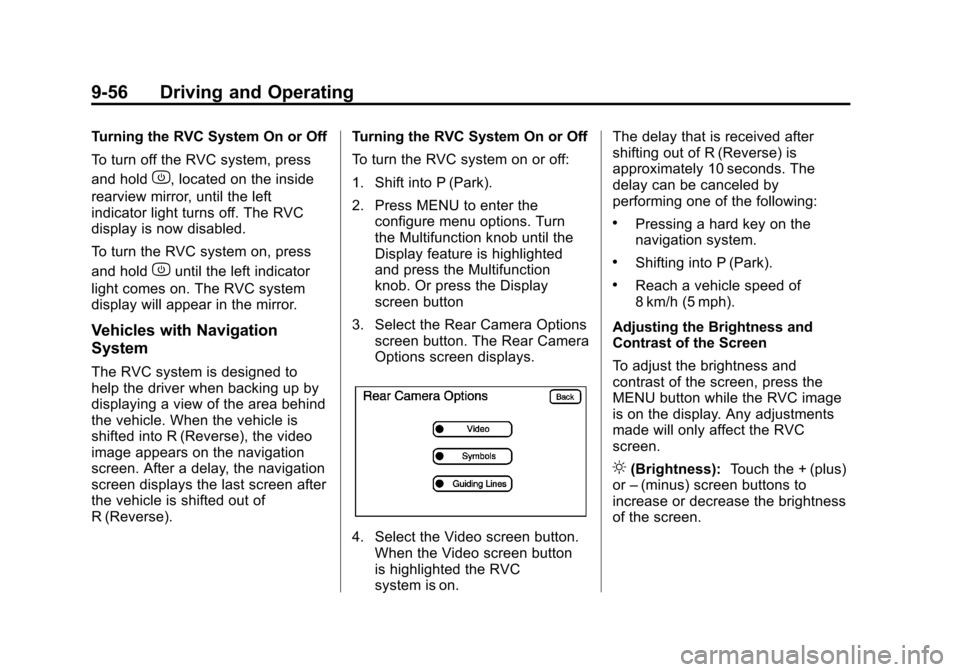
R (Reverse). Turning the RVC System On or Off
To turn the RVC system on or off:
1. Shift into P (Park).
2. Press MENU to enter the
configure menu options. Turn
the Multifunction knob until the
Display feature is highlighted
and press the Multifunction
knob. Or press the Display
screen button
3. Select the Rear Camera Options screen button. The Rear Camera
Options screen displays.
4. Select the Video screen button.When the Video screen button
is highlighted the RVC
system is on. The delay that is received after
shifting out of R (Reverse) is
approximately 10 seconds. The
delay can be canceled by
performing one of the following:
.Pressing a hard key on the
navigation system.
.Shifting into P (Park).
.Reach a vehicle speed of
8 km/h (5 mph).
Adjusting the Brightness and
Contrast of the Screen
To adjust the brightness and
contrast of the screen, press the
MENU button while the RVC image
is on the display. Any adjustments
made will only affect the RVC
screen.
](Brightness): Touch the + (plus)
or –(minus) screen buttons to
increase or decrease the brightness
of the screen.
Page 319 of 514
Black plate (57,1)Chevrolet Tahoe/Suburban Owner Manual - 2012
Driving and Operating 9-57
_(Contrast):Touch the + (plus)
or –(minus) screen buttons to
increase or decrease the contrast of
the screen.
Symbols
The navigation system may have a
feature that allows for viewing
parking assist symbols on the
navigation screen while using the
RVC. The Ultrasonic Rear Park
Assist (URPA) system must not be
disabled to use the caution symbols.
If URPA has been disabled and
the symbols have been turned on,
the Rear Parking Assist Symbols
Unavailable error message may
display. See Ultrasonic Parking
Assist on page 9‑51.
The symbols appear near objects
detected by the URPA system. The
symbol may cover the object when
viewing the navigation screen. To turn the symbols on or off:
1. Make sure that URPA has not
been disabled.
2. Shift into P (Park).
3. Press MENU to enter the configure menu options. Turn
the Multifunction knob until the
Display feature is highlighted
and press the Multifunction
knob. Or press the Display
screen button
4. Select the Rear Camera Options screen button. The Rear Camera
Options screen displays.
5. Touch the Symbols screen button. The screen button will be
highlighted when on. Guidelines
The RVC system has a guideline
overlay that can help the driver align
the vehicle when backing into a
parking spot.
To turn the guidelines on or off:
1. Make sure that URPA has not
been disabled.
2. Shift into P (Park).
3. Press MENU to enter the configure menu options. Turn
the Multifunction knob until the
Display feature is highlighted
and press the Multifunction
knob. Or press the Display
screen button
4. Select the Rear Camera Options screen button. The Rear Camera
Options screen displays.
5. Touch the Guidelines screen button. The screen button will be
highlighted when on.
Page 321 of 514
Black plate (59,1)Chevrolet Tahoe/Suburban Owner Manual - 2012
Driving and Operating 9-59
.The back of the vehicle is in
an accident, the position and
mounting angle of the camera
can change or the camera can
be affected. Be sure to have the
camera and its position and
mounting angle checked at your
dealer.
The RVC system display in the
rearview mirror may turn off or not
appear as expected due to one of
the following conditions. If this
occurs the left indicator light on the
mirror will flash.
.A slow flash may indicate a loss
of video signal, or no video
signal present during the reverse
cycle.
.A fast flash may indicate that
the display has been on for the
maximum allowable time during
a reverse cycle, or the display
has reached an Over
Temperature limit.
The fast flash conditions are
used to protect the video
device from high temperature
conditions. Once conditions
return to normal the device will
reset and the green indicator will
stop flashing. During any of these fault conditions,
the display will be blank and the
indicator will flash while the vehicle
is in R (Reverse) or until the
conditions return to normal.
Press and hold
zwhen the left
indicator light is flashing to turn off
the video display along with the left
indicator light.