low CHEVROLET SUBURBAN 2012 10.G Owners Manual
[x] Cancel search | Manufacturer: CHEVROLET, Model Year: 2012, Model line: SUBURBAN, Model: CHEVROLET SUBURBAN 2012 10.GPages: 514, PDF Size: 7.54 MB
Page 247 of 514

Black plate (53,1)Chevrolet Tahoe/Suburban Owner Manual - 2012
Infotainment System 7-53
Transferring Audio from the
Bluetooth System to a Cell Phone
During a call with the audio in the
vehicle:
1. Press
b/g.
2. Say “Transfer Call.”
Transferring Audio to the
Bluetooth System from a Cell
Phone
During a call with the audio on the
cell phone, press
b/g. The audio
transfers to the vehicle. If the audio
does not transfer to the vehicle, use
the audio transfer feature on the
cell phone. See your cell phone
manufacturer's user guide for more
information.
Voice Pass-Thru
Voice pass‐thru allows access to the
voice recognition commands on the
cell phone. See your cell phone
manufacturer's user guide to see if
the cell phone supports this feature. To access contacts stored in the cell
phone:
1. Press and hold
b/gfor
two seconds.
2. Say “Bluetooth.” This command
can be skipped.
3. Say “Voice.” The system
responds “OK, accessing
The cell phone's normal prompt
messages will go through their cycle
according to the phone's operating
instructions.
Dual Tone Multi-Frequency
(DTMF) Tones
The Bluetooth system can send
numbers and the numbers stored as
name tags during a call. You can
use this feature when calling a
menu‐driven phone system.
Account numbers can also be
stored for use. Sending a Number or Name Tag
During a Call
1. Press
b/g. The system
responds “Ready,”followed by
a tone.
2. Say “Dial.”
3. Say the number or name tag to send.
Clearing the System
Unless information is deleted out of
the in‐vehicle Bluetooth system, it
will be retained indefinitely. This
includes all saved name tags in the
phone book and phone pairing
information. For information on how
to delete this information, see the
previous section “Deleting a Paired
Phone” and the previous sections
on deleting name tags.
Page 250 of 514

Black plate (2,1)Chevrolet Tahoe/Suburban Owner Manual - 2012
8-2 Climate Controls
Temperature Control:Move
the thumbwheels up or down
to increase or decrease the
temperature on the driver side or
the passenger side of the vehicle
for the dual zone system.
9(Fan Control): Turn the left
knob clockwise or counterclockwise
to increase or decrease the fan
speed. Turn the knob all the way
counterclockwise to turn the front
system off.
Air Delivery Mode Control: Turn
clockwise or counterclockwise to
change the airflow direction inside
the vehicle. By positioning the knob
between two modes, a combination
of those modes is selected.
Select from the following modes:
H(Vent): Air is directed to the
instrument panel outlets.
)(Bi-Level): Air is divided
between the instrument panel and
floor outlets. Some air is directed
towards the windshield and side window outlets. Cooler air is
directed to the upper outlets and
warmer air to the floor outlets.
6(Floor):
Air is directed to the
floor outlets, with some of the air
directed to the windshield, side
window, and second row floor
outlets. In this mode, the system
automatically selects outside air.
Recirculation cannot be selected
when in Floor Mode.
-(Defog): The defog mode is
used to clear the windows of fog
or moisture. Air is directed to the
windshield, floor outlets, and side
window vents. In this mode, the
system turns off recirculation and
runs the air conditioning compressor
unless the outside temperature is
close to freezing. The recirculation
mode cannot be selected while in
the defog mode.
0(Defrost): The defrost mode
is used to remove fog or frost from
the windshield more quickly. Air is
directed to the windshield and side
window vents, with some directed to
the floor vents. In this mode, the
system automatically forces outside
air into the vehicle. The recirculation
mode cannot be selected while
in the defrost mode. The air
conditioning compressor runs
automatically in this setting, unless
the outside temperature is close to
freezing.
Do not drive the vehicle until all the
windows are clear.
#(Air Conditioning): Press this
button to turn the air conditioning
system on or off. An indicator
light comes on to show that the
air conditioning is on. The air
conditioning can be selected in any
mode as long as the fan switch
is on.
Page 252 of 514
Black plate (4,1)Chevrolet Tahoe/Suburban Owner Manual - 2012
8-4 Climate Controls
For vehicles with heated outside
rearview mirrors, the mirrors will
heat to help clear fog or frost from
the surface of the mirror when
the rear window defog button is
pressed.
Notice:Do not use anything
sharp on the inside of the rear
window. If you do, you could cut
or damage the warming grid, and
the repairs would not be covered
by the vehicle warranty. Do not
attach a temporary vehicle
license, tape, a decal, or anything
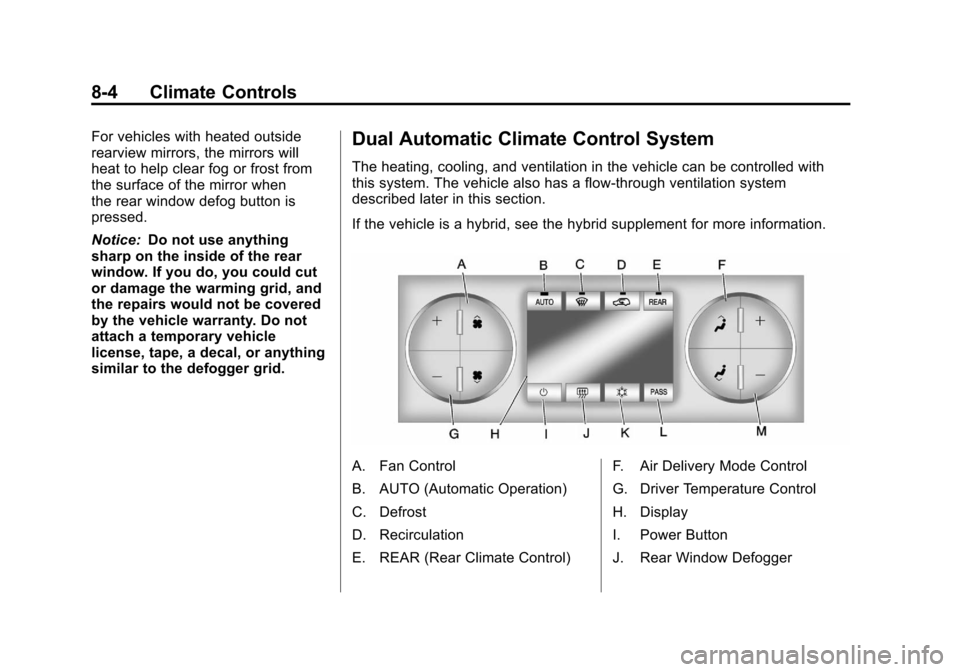
similar to the defogger grid.Dual Automatic Climate Control System
The heating, cooling, and ventilation in the vehicle can be controlled with
this system. The vehicle also has a flow-through ventilation system
described later in this section.
If the vehicle is a hybrid, see the hybrid supplement for more information.
A. Fan Control
B. AUTO (Automatic Operation)
C. Defrost
D. Recirculation
E. REAR (Rear Climate Control) F. Air Delivery Mode Control
G. Driver Temperature Control
H. Display
I. Power Button
J. Rear Window Defogger
Page 253 of 514
Black plate (5,1)Chevrolet Tahoe/Suburban Owner Manual - 2012
Climate Controls 8-5
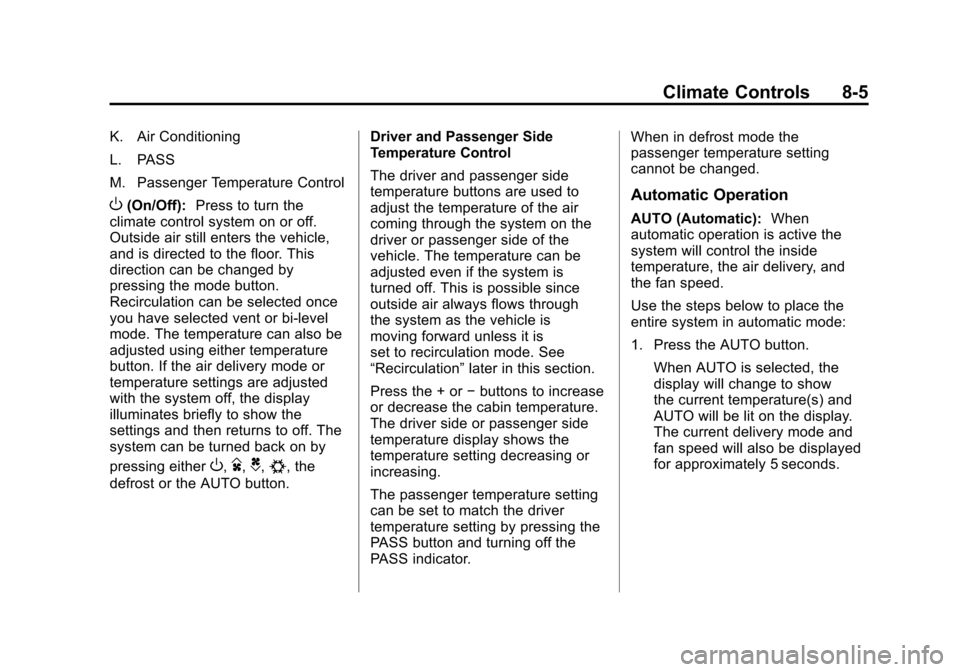
K. Air Conditioning
L. PASS
M. Passenger Temperature Control
O(On/Off):Press to turn the
climate control system on or off.
Outside air still enters the vehicle,
and is directed to the floor. This
direction can be changed by
pressing the mode button.
Recirculation can be selected once
you have selected vent or bi-level
mode. The temperature can also be
adjusted using either temperature
button. If the air delivery mode or
temperature settings are adjusted
with the system off, the display
illuminates briefly to show the
settings and then returns to off. The
system can be turned back on by
pressing either
O,D,C,#, the
defrost or the AUTO button. Driver and Passenger Side
Temperature Control
The driver and passenger side
temperature buttons are used to
adjust the temperature of the air
coming through the system on the
driver or passenger side of the
vehicle. The temperature can be
adjusted even if the system is
turned off. This is possible since
outside air always flows through
the system as the vehicle is
moving forward unless it is
set to recirculation mode. See
“Recirculation”
later in this section.
Press the + or −buttons to increase
or decrease the cabin temperature.
The driver side or passenger side
temperature display shows the
temperature setting decreasing or
increasing.
The passenger temperature setting
can be set to match the driver
temperature setting by pressing the
PASS button and turning off the
PASS indicator. When in defrost mode the
passenger temperature setting
cannot be changed.
Automatic Operation
AUTO (Automatic):
When
automatic operation is active the
system will control the inside
temperature, the air delivery, and
the fan speed.
Use the steps below to place the
entire system in automatic mode:
1. Press the AUTO button.
When AUTO is selected, the
display will change to show
the current temperature(s) and
AUTO will be lit on the display.
The current delivery mode and
fan speed will also be displayed
for approximately 5 seconds.
Page 254 of 514
Black plate (6,1)Chevrolet Tahoe/Suburban Owner Manual - 2012
8-6 Climate Controls
When AUTO is selected, the
air conditioning operation and
air inlet will be automatically
controlled. The air conditioning
compressor will run when the
outside temperature is over
about 4°C (40°F). The air inlet
will normally be set to outside
air. If it is hot outside, the air
inlet may automatically switch
to recirculate inside air to help
quickly cool down the vehicle.
The light on the button comes on
in recirculation.
2. Set the driver and passenger temperature.
To find your comfort setting, start
with a 23°C (74°F) temperature
setting and allow about
20 minutes for the system to
regulate. Use the driver or
passenger temperature buttons
to adjust the temperature setting
as necessary. If a temperature
setting of 15°C (60°F) is chosen,
the system remains at the
maximum cooling setting. If a temperature setting of 32°C
(90°F) is chosen, the system
remains at the maximum
heat setting. Choosing either
maximum setting will not cause
the vehicle to heat or cool any
faster.
Do not cover the solar sensor
located on the top of the instrument
panel near the windshield. This
sensor regulates air temperature
based on sun load and also turns
on the headlamps. For more
information on the solar sensor, see
“Sensors” later in this section.
To avoid blowing cold air in cold
weather, the system will delay
turning on the fan until warm air
is available. The length of delay
depends on the engine coolant
temperature. Pressing the fan
switch will override this delay and
change the fan to a selected speed.Manual Operation
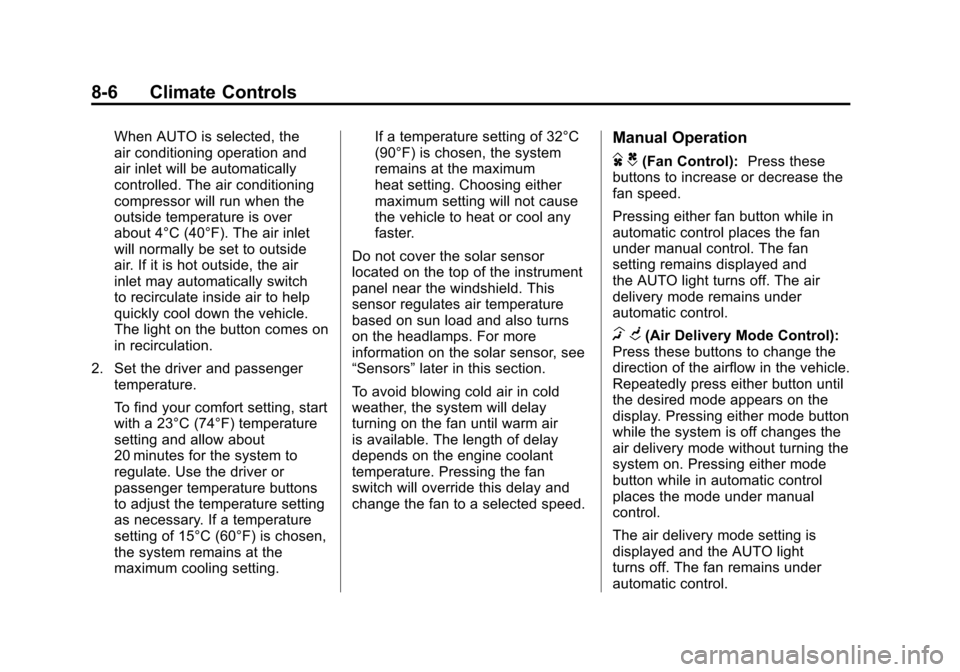
D C(Fan Control): Press these
buttons to increase or decrease the
fan speed.
Pressing either fan button while in
automatic control places the fan
under manual control. The fan
setting remains displayed and
the AUTO light turns off. The air
delivery mode remains under
automatic control.
H G(Air Delivery Mode Control):
Press these buttons to change the
direction of the airflow in the vehicle.
Repeatedly press either button until
the desired mode appears on the
display. Pressing either mode button
while the system is off changes the
air delivery mode without turning the
system on. Pressing either mode
button while in automatic control
places the mode under manual
control.
The air delivery mode setting is
displayed and the AUTO light
turns off. The fan remains under
automatic control.
Page 255 of 514

Black plate (7,1)Chevrolet Tahoe/Suburban Owner Manual - 2012
Climate Controls 8-7
H(Vent):Air is directed to the
instrument panel outlets.
)(Bi-Level): Air is divided
between the instrument panel and
floor outlets. Some air is directed
towards the windshield and side
window outlets.
6(Floor): Air is directed to the
floor outlets, with some to the
windshield, side window outlets,
and second row floor outlets. In this
mode, the system automatically
selects outside air.
-(Defog): This mode clears the
windows of fog or moisture. Air is
directed to the windshield, floor
outlets, and side window vents. In
this mode, the system turns off
recirculation and runs the air
conditioning compressor unless
the outside temperature is close to
freezing. The recirculation mode
cannot be selected while in the
defog mode.
0(Defrost): This mode removes
fog or frost from the windshield
more quickly. Air is directed to the
windshield and side window vents,
with some directed to the floor
vents. In this mode, the system
automatically forces outside air
into the vehicle and runs the air
conditioning compressor unless the
outside temperature is close to
freezing. The recirculation mode
cannot be selected while in the
defrost mode.
The passenger temperature
control cannot be activated while in
defrost mode. If the PASS button is
pressed, the button indicator flashes
three times and will not work. If the
passenger temperature buttons are
adjusted, the driver temperature
indicator changes. The passenger
temperature will not be displayed.
If vent, bi-level, or floor mode is
selected again, the climate control
system displays the previous
temperature settings. Do not drive the vehicle until all the
windows are clear.
#(Air Conditioning):
Press to
turn the air conditioning (A/C)
compressor on and off. An indicator
light comes on to show that the air
conditioning is on.
If this button is pressed when the
air conditioning compressor is
unavailable, the indicator flashes
three times and then turns off. If the air conditioning is on and the
outside temperature drops below a
temperature which is too cool for air
conditioning to be effective, the air
conditioning light turns off to show
that the air conditioning mode has
been canceled.
On hot days, open the windows long
enough to let hot inside air escape.
This helps to reduce the time it
takes for the vehicle to cool down.
It also helps the system to operate
more efficiently.
Page 258 of 514
Black plate (10,1)Chevrolet Tahoe/Suburban Owner Manual - 2012
8-10 Climate Controls
Rear Climate Control System (Rear Climate
Control Only)
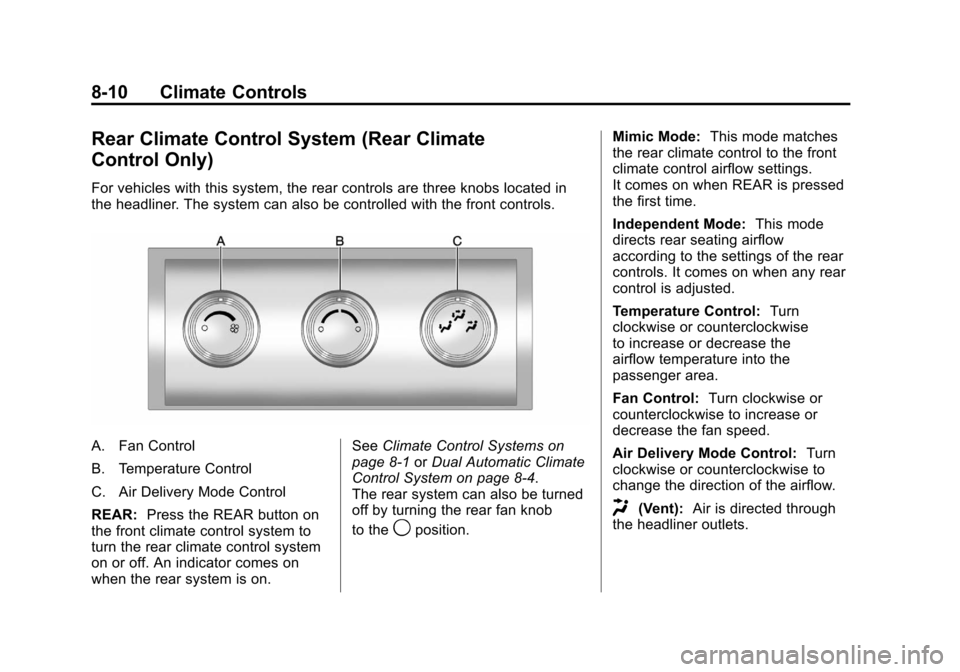
For vehicles with this system, the rear controls are three knobs located in
the headliner. The system can also be controlled with the front controls.
A. Fan Control
B. Temperature Control
C. Air Delivery Mode Control
REAR:Press the REAR button on
the front climate control system to
turn the rear climate control system
on or off. An indicator comes on
when the rear system is on. See
Climate Control Systems on
page 8‑1 orDual Automatic Climate
Control System on page 8‑4.
The rear system can also be turned
off by turning the rear fan knob
to the
9position. Mimic Mode:
This mode matches
the rear climate control to the front
climate control airflow settings.
It comes on when REAR is pressed
the first time.
Independent Mode: This mode
directs rear seating airflow
according to the settings of the rear
controls. It comes on when any rear
control is adjusted.
Temperature Control: Turn
clockwise or counterclockwise
to increase or decrease the
airflow temperature into the
passenger area.
Fan Control: Turn clockwise or
counterclockwise to increase or
decrease the fan speed.
Air Delivery Mode Control: Turn
clockwise or counterclockwise to
change the direction of the airflow.
H(Vent): Air is directed through
the headliner outlets.
Page 259 of 514
Black plate (11,1)Chevrolet Tahoe/Suburban Owner Manual - 2012
Climate Controls 8-11
)(Bi-Level):Air is directed
through the floor and headliner
outlets. The rear system floor
outlets are located directly behind
the second row seats. The flow can
be divided between vent and floor
outlets depending upon where the
knob is placed between the settings.
6(Floor): Air is directed to the
floor outlets. The rear system floor
outlets are located directly behind
the second row seats.
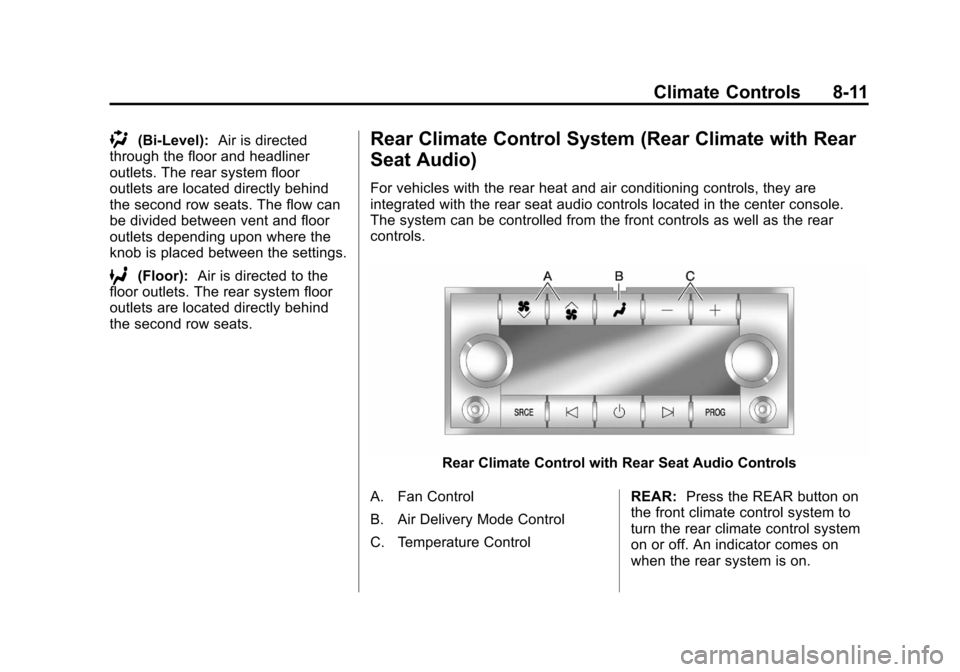
Rear Climate Control System (Rear Climate with Rear
Seat Audio)
For vehicles with the rear heat and air conditioning controls, they are
integrated with the rear seat audio controls located in the center console.
The system can be controlled from the front controls as well as the rear
controls.
Rear Climate Control with Rear Seat Audio Controls
A. Fan Control
B. Air Delivery Mode Control
C. Temperature Control REAR:
Press the REAR button on
the front climate control system to
turn the rear climate control system
on or off. An indicator comes on
when the rear system is on.
Page 260 of 514
Black plate (12,1)Chevrolet Tahoe/Suburban Owner Manual - 2012
8-12 Climate Controls
The rear climate control system can
also be turned off by pressing and
holding the
Cbutton. To turn the
system on from the rear seats,
press any rear climate control
button, except the
Cbutton.
Mimic Mode: This mode matches
the rear climate control to the front
climate control airflow settings.
It comes on when REAR is pressed
the first time.
Independent Mode: This mode
directs rear seating airflow
according to the settings of the
rear controls.
To turn the system on from the
rear, press any rear climate control
button, except the
Cbutton.
Automatic Operation, If
Equipped
AUTO: Press the air delivery mode
button until this setting is selected to
control the inside temperature, air
delivery, and fan speed. AUTO
appears in the display when
automatic operation is active.
+ or −(Increase/Decrease
Temperature): Press the +
or −buttons to increase or
decrease the cabin temperature.
The rear control temperature
display will show the temperature
setting increasing or decreasing.
The display only indicates climate
control functions when the system is
in rear independent mode.
Manual Operation
D C(Fan Control): Press these
buttons on the rear seat audio
control panel to increase or
decrease the airflow. Pressing the
fan up button when the system is
off will turn the system on. The air
delivery mode will remain under
automatic control.
+ or −(Temperature Control):
Press these buttons to adjust
the temperature of the air flowing
into the passenger area. Press
the + button for warmer air and
press the −button for cooler air.
N(Air Delivery Mode Control):
Press the mode button to change
the direction of the airflow in the
vehicle. Repeatedly press the
button until the desired mode
appears on the display. Multiple
presses will cycle through the
delivery selections.
Page 261 of 514
Black plate (13,1)Chevrolet Tahoe/Suburban Owner Manual - 2012
Climate Controls 8-13
Air Vents
Use the air outlets located in the
center and on the side of the
instrument panel to direct the
airflow.
Operation Tips
.Keep the hood and front air
inlets free of ice, snow, or any
other obstruction (such as
leaves). The heater and
defroster will work far better,
reducing the chance of fogging
the inside of the windows.
.When you enter a vehicle in cold
weather, press the fan up button
to the maximum fan level before
driving. This helps clear the
intake ducts of snow and
moisture, and reduces the
chance of fogging the inside of
the window.
.Keep the air path under the front
seats clear of objects. This helps
air to circulate throughout the
vehicle.
.Adding outside equipment to the
front of the vehicle, such as
hood-air deflectors, may affect
the performance of the heating
and air conditioning system.
Check with your dealer before
adding equipment to the outside
of the vehicle.