center console CHEVROLET TAHOE 2018 User Guide
[x] Cancel search | Manufacturer: CHEVROLET, Model Year: 2018, Model line: TAHOE, Model: CHEVROLET TAHOE 2018Pages: 443, PDF Size: 6.05 MB
Page 139 of 443
Chevrolet Tahoe/Suburban Owner Manual (GMNA-Localizing-U.S./Canada/
Mexico-11349385) - 2018 - crc - 11/3/17
138 Instruments and Controls
To set the clock display:1. Touch SETTINGS on the Home Page, then touch Time
and Date.
2. Touch Clock Display, then touch Off or On to turn the
clock display off or on.
3. Touch
Sto go back to the
previous menu.
Power Outlets
Power Outlets 12-Volt Direct
Current
Accessory power outlets can be
used to plug in electrical equipment,
such as a cell phone, MP3
player, etc.
The vehicle may have up to five
accessory power outlets:
Vehicles with a Center Console
. One in front of the cupholders on
the center console
. One inside the center storage
console .
One on the rear of the center
storage console
. One in the third row seat on the
driver side
. One in the rear cargo area on
the passenger side
Vehicles with Bench Seats
. One on the center stack below
the climate control system
. One in the storage area on the
bench seat
. One on the rear of the center
armrest storage
. One in the third row seat area on
the driver side
. One in the rear cargo area on
the passenger side
Lift the cover to access and replace
when not in use.
The accessory power outlets are
powered as follows:
. The power outlet near the
cupholders for vehicles with a
center console or on the center
stack for vehicles with bench seats, can be configured to
operate using Retained
Accessory Power (RAP) or
battery power modes. If these
power outlets are used while in
the battery power mode, this
could cause interference
between the Remote Keyless
Entry (RKE) transmitter and the
vehicle, and the vehicle may not
start.
See
Ignition Positions (Key
Access) 0219 orIgnition
Positions (Keyless Access)
0 217.
. The power outlets in the third
row seat area or in the rear
cargo area are powered at all
times. The power outlets inside
the storage area, on the rear of
the console, or on the bench
seat are only powered when the
ignition is on or in ACC/
ACCESSORY, or when RAP is
active.
Page 140 of 443
Chevrolet Tahoe/Suburban Owner Manual (GMNA-Localizing-U.S./Canada/
Mexico-11349385) - 2018 - crc - 11/3/17
Instruments and Controls 139
{Warning
Power is always supplied to the
outlet, if configured accordingly.
Do not leave electrical equipment
plugged in when the vehicle is not
in use because the vehicle could
catch fire and cause injury or
death.
Caution
Leaving electrical equipment
plugged in for an extended period
of time while the ignition is off will
drain the battery. Always unplug
electrical equipment when not in
use and do not plug in equipment
that exceeds the maximum
15 amp rating.
Certain power accessory plugs may
not be compatible with the
accessory power outlet and could
overload vehicle or adapter fuses.
If a problem is experienced, see
your dealer. When adding electrical equipment,
be sure to follow the proper
installation instructions included with
the equipment. See
Add-On
Electrical Equipment 0288.
Caution
Hanging heavy equipment from
the power outlet can cause
damage not covered by the
vehicle warranty. The power
outlets are designed for
accessory power plugs only, such
as cell phone charge cords.
Power Outlet 110/120-Volt
Alternating Current
If equipped with this power outlet, it
can be used to plug in electrical
equipment that uses a maximum
limit of 150 watts.
For vehicles with a center console,
the 110/120-volt power outlet is on
the rear of the center console. For vehicles with bench seats, the
110/120-volt power outlet is on the
center stack below the climate
controls.
An indicator light on the outlet turns
on to show it is in use. The light
comes on when the ignition is on,
equipment requiring less than 150
watts is plugged into the outlet, and
no system fault is detected.
The indicator light does not come on
when the ignition is off or if the
equipment is not fully seated into
the outlet.
If equipment is connected using
more than 150 watts or a system
fault is detected, a protection circuit
shuts off the power supply and the
indicator light turns off. To reset the
circuit, unplug the item and plug it
back in or turn the ignition off and
then back to on. The power restarts
when equipment using 150 watts or
less is plugged into the outlet and a
system fault is not detected.
Page 141 of 443
Chevrolet Tahoe/Suburban Owner Manual (GMNA-Localizing-U.S./Canada/
Mexico-11349385) - 2018 - crc - 11/3/17
140 Instruments and Controls
The power outlet is not designed for
the following, and may not work
properly if they are plugged in:
.Equipment with high initial peak
wattage, such as
compressor-driven refrigerators
and electric power tools
. Other equipment requiring
an extremely stable power
supply, such as
microcomputer-controlled
electric blankets and touch
sensor lamps
. Medical equipment
Wireless Charging
The vehicle may have wireless
charging on top of the center
console. See Center Console
Storage 0128. The system
operates at 145 kHz and wirelessly
charges one Qi compatible mobile
device. The power output of the
system is capable of charging at a
rate up to 1 amp (5W), as requested
by the compatible mobile device.
See Radio Frequency Statement
0 414. To check for phone or other device
compatibility:
.
In the U.S., see
my.chevrolet.com/learn.
. In Canada, see
gmtotalconnect.ca.
. Or, see your dealer for details.
{Warning
Wireless charging can affect the
operation of an implanted
pacemaker or other medical
devices. If you have one, it is
recommended to consult with
your doctor before using the
wireless charging system.
The vehicle must be on, in ACC/
ACCESSORY, or Retained
Accessory Power (RAP) must be
active. The wireless charging
feature may not correctly indicate
charging when the vehicle is in RAP.
See Retained Accessory Power
(RAP) 0224. The operating temperature is
−20 °C
(−4 °F) to 60 °C (140 °F) for the
charging system and 0 °C (32 °F) to
35 °C (95 °F) for the phone.
{Warning
Remove all objects from the
charging pad before charging
your mobile device. Objects, such
as coins, keys, rings, paper clips,
or cards, between the phone and
charging pad will become very
hot. On the rare occasion that the
charging system does not detect
an object, and the object gets
wedged between the phone and
charger, remove the phone and
allow the object to cool before
removing it from the charging
pad, to prevent burns.
Page 153 of 443
Chevrolet Tahoe/Suburban Owner Manual (GMNA-Localizing-U.S./Canada/
Mexico-11349385) - 2018 - crc - 11/3/17
152 Instruments and Controls
The airbag readiness light comes on
for several seconds when the
vehicle is started. If the light does
not come on then, have it fixed
immediately.
{Warning
If the airbag readiness light stays
on after the vehicle is started or
comes on while driving, it means
the airbag system might not be
working properly. The airbags in
the vehicle might not inflate in a
crash, or they could even inflate
without a crash. To help avoid
injury, have the vehicle serviced
right away.
If there is a problem with the airbag
system, a Driver Information Center
(DIC) message may also come on.
Passenger Airbag Status
Indicator
The vehicle has a passenger
sensing system. See Passenger
Sensing System 099 for important
safety information. The passenger
airbag status indicator is in the
overhead console.
United States
Canada and Mexico
When the vehicle is started, the
passenger airbag status indicator
will light ON and OFF, or the
symbols for on and off, for several
seconds as a system check. Then, after several more seconds, the
status indicator will light either ON
or OFF, or the on or off symbol, to
let you know the status of the front
outboard passenger frontal airbag.
If the word ON or the on symbol is
lit on the passenger airbag status
indicator, it means that the front
outboard passenger frontal airbag is
allowed to inflate.
If the word OFF or the off symbol is
lit on the airbag status indicator, it
means that the passenger sensing
system has turned off the front
outboard passenger frontal airbag.
If, after several seconds, both status
indicator lights remain on, or if there
are no lights at all, there may be a
problem with the lights or the
passenger sensing system. See
your dealer for service.{Warning
If the airbag readiness light ever
comes on and stays on, it means
that something may be wrong
(Continued)
Page 187 of 443
Chevrolet Tahoe/Suburban Owner Manual (GMNA-Localizing-U.S./Canada/
Mexico-11349385) - 2018 - crc - 11/3/17
186 Lighting
The lever returns to its starting
position whenever it is released.
If after signaling a turn or a lane
change the arrows flash rapidly or
do not come on, a signal bulb could
be burned out.
Replace any burned out bulbs. If a
bulb is not burned out, check the
fuse. SeeFuses and Circuit
Breakers 0325.
Turn Signal On Chime
If the turn signal is left on for more
than 1.2 km (0.75 mi), a chime
sounds at each flash of the turn
signal. The message TURN
SIGNAL ON will also appear in the
Driver Information Center (DIC). To
turn the chime and message off,
move the turn signal lever to the off
position.Fog Lamps
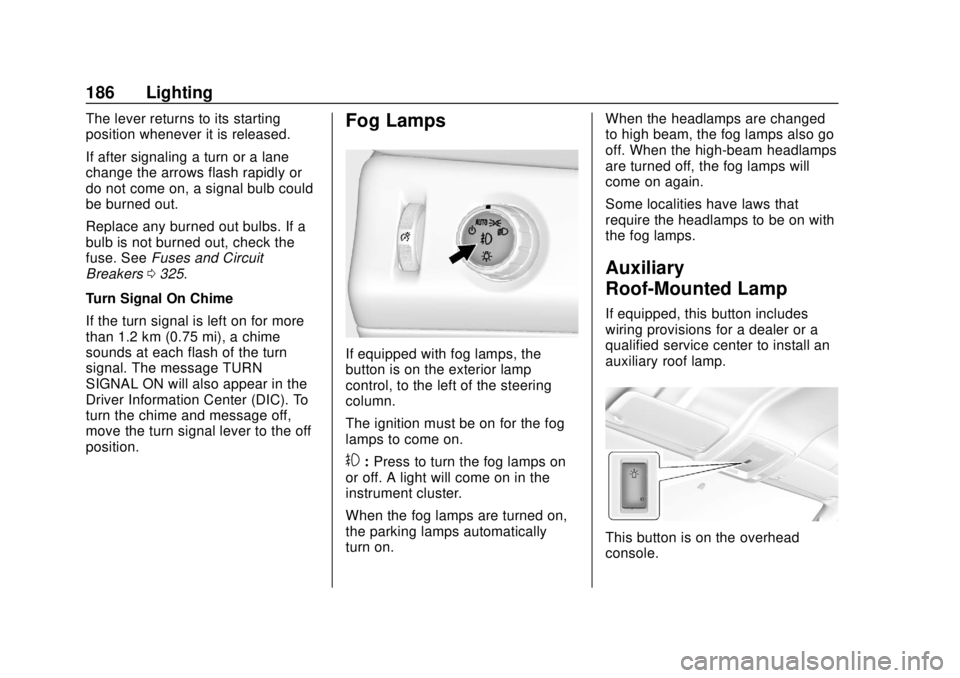
If equipped with fog lamps, the
button is on the exterior lamp
control, to the left of the steering
column.
The ignition must be on for the fog
lamps to come on.
#: Press to turn the fog lamps on
or off. A light will come on in the
instrument cluster.
When the fog lamps are turned on,
the parking lamps automatically
turn on. When the headlamps are changed
to high beam, the fog lamps also go
off. When the high-beam headlamps
are turned off, the fog lamps will
come on again.
Some localities have laws that
require the headlamps to be on with
the fog lamps.
Auxiliary
Roof-Mounted Lamp
If equipped, this button includes
wiring provisions for a dealer or a
qualified service center to install an
auxiliary roof lamp.
This button is on the overhead
console.
Page 197 of 443

Chevrolet Tahoe/Suburban Owner Manual (GMNA-Localizing-U.S./Canada/
Mexico-11349385) - 2018 - crc - 11/3/17
196 Climate Controls
There is also an exterior
temperature sensor behind the front
grille. This sensor reads the outside
air temperature and helps maintain
the temperature inside the vehicle.
Any cover on the front of the
vehicle, including a snowplow, could
cause a false reading in the
displayed temperature.
The climate control system uses the
information from these sensors to
maintain comfort settings by
adjusting the outlet temperature, fan
speed, and air delivery mode. The
system may also supply cooler air to
the side of the vehicle facing the
sun. The recirculation mode will also
be used as needed to maintain cool
outlet temperatures.
Rear Climate Control
System
The rear climate control system is
located on the rear of the center
console storage. The rear climate
settings can be adjusted with this
system.
1. Fan Control
2. AUTO (Automatic Operation)
3. MODE (Air Delivery ModeControl)
4. TEMP (Temperature Control)
5. Heated Rear Seats (If Equipped)
If the dual automatic climate control
system rear climate control lockout
feature is locked, the rear climate
control settings can only be
adjusted from the front seat.
Automatic Operation
AUTO : Press AUTO to
automatically control the
temperature, air delivery, and fan
speed for rear seat passengers. A is
indicated in the display when
automatic operation is active.
If any of the rear climate control
settings are manually adjusted, full
automatic operation is cancelled.
Press AUTO to return to full
automatic operation.
The display only indicates climate
control functions when the system is
in rear independent mode.
Manual Operation
9: Turn clockwise or
counterclockwise to increase or
decrease the fan speed. Turn
completely counterclockwise to turn
the fan/power off.
TEMP : Turn clockwise or
counterclockwise to increase or
decrease the airflow temperature
into the passenger area. If the
SYNC button is pressed on the front
Page 432 of 443

Chevrolet Tahoe/Suburban Owner Manual (GMNA-Localizing-U.S./Canada/
Mexico-11349385) - 2018 - crc - 11/3/17
Index 431
Assistance Program,Roadside . . . . . . . . . . . . . . . . . . . . . . 408
Assistance Systems for Driving . . . . . . . . . . . . . . . . . . . . . . . . 258
Assistance Systems for Parking and Backing . . . . . . . . . . 256
Automatic
Door Locks . . . . . . . . . . . . . . . . . . . . . 46
Forward Braking . . . . . . . . . . . . . . 261
Headlamp System . . . . . . . . . . . . 184
Level Control . . . . . . . . . . . . . . . . . 245
Transmission . . . . . . . . . . . . . . . . . 228
Transmission Fluid . . . . . . 301, 304
Automatic Transmission Manual Mode . . . . . . . . . . . . . . . . . 231
Shift Lock Control FunctionCheck . . . . . . . . . . . . . . . . . . . . . . . 317
Auxiliary Roof Mounted Lamp . . . . . . . . . . 186
Axle, Front . . . . . . . . . . . . . . . . . . . . . . 315
Axle, Rear . . . . . . . . . . . . . . . . . . . . . . 315
B
Battery Exterior Lighting BatterySaver . . . . . . . . . . . . . . . . . . . . . . . 189
Load Management . . . . . . . . . . . . 189 Battery (cont'd)
Power Protection . . . . . . . . . . . . . 189
Battery - North America . . . . 314, 368
Blade Replacement, Wiper . . . . . 318
Blind Spot Mirrors . . . . . . . . . . . . . . . 58
Brake Pedal and AdjustableThrottle . . . . . . . . . . . . . . . . . . . . . . 217
System Warning Light . . . . . . . . 155
Brakes . . . . . . . . . . . . . . . . . . . . . . . . . . 312 Antilock . . . . . . . . . . . . . . . . . . . . . . . 239
Assist . . . . . . . . . . . . . . . . . . . . . . . . . 241
Fluid . . . . . . . . . . . . . . . . . . . . . . . . . . 312
Parking . . . . . . . . . . . . . . . . . . . . . . . 240
Braking . . . . . . . . . . . . . . . . . . . . . . . . . 202 Automatic Forward . . . . . . . . . . . 261
Break-In, New Vehicle . . . . . . . . . . 216
Bulb Replacement Fog Lamps . . . . . . . . . . . . . . . . . . . 322
Front Turn Signal Lamps . . . . . 322
Halogen Bulbs . . . . . . . . . . . . . . . . 321
Headlamp Aiming . . . . . . . . . . . . . 320
Headlamps . . . . . . . . . . . . . . . . . . . 321
High Intensity Discharge(HID) Lighting . . . . . . . . . . . . . . . 321
License Plate Lamps . . . . . . . . . 324 Bulb Replacement (cont'd)
Taillamps, Turn Signal,
Stoplamps, and Back-up
Lamps . . . . . . . . . . . . . . . . . . . . . . 322
Buying New Tires . . . . . . . . . . . . . . . 352
C
Calibration . . . . . . . . . . . . . . . . . . . . . . 136
California Fuel Requirements . . . . . . . . . . . 267
Perchlorate Materials
Requirements . . . . . . . . . . . . . . . 291
California Proposition
65 Warning . . . . . . . . . .291, 314, 368,
Back Cover
Canadian Vehicle Owners . . . . . . . . 2
Capacities and Specifications . . . . . . . . . . . . . . . . . 402
Carbon Monoxide Engine Exhaust . . . . . . . . . . . . . . . 227
Liftgate . . . . . . . . . . . . . . . . . . . . . . . . . 47
Winter Driving . . . . . . . . . . . . . . . . 210
Cargo
Tie-Downs . . . . . . . . . . . . . . . . . . . . 129
Caution, Danger, and Warning . . . . 3
Center Console Storage . . . . . . . . 128
Center Seat . . . . . . . . . . . . . . . . . . . . . 67
Page 440 of 443

Chevrolet Tahoe/Suburban Owner Manual (GMNA-Localizing-U.S./Canada/
Mexico-11349385) - 2018 - crc - 11/3/17
Index 439
Seats (cont'd)Reclining Seatbacks . . . . . . . . . . . . 68
Second Row . . . . . . . . . . . . . . . . . . . . 75
Third Row Seat . . . . . . . . . . . . . . . . . 79
Second Row Seats . . . . . . . . . . . . . . 75
Securing Child Restraints . . . . . . . . . . . . . . . . 121, 123
Security Light . . . . . . . . . . . . . . . . . . . . . . . . . . 159
OnStar . . . . . . . . . . . . . . . . . . . . . . . 420
Vehicle . . . . . . . . . . . . . . . . . . . . . . . . . 53
Vehicle Alarm . . . . . . . . . . . . . . . . . . . 53
Service . . . . . . . . . . . . . . . . . . . . . . . . . 199 Accessories and
Modifications . . . . . . . . . . . . . . . . 291
Doing Your Own Work . . . . . . . . 292
Maintenance Records . . . . . . . . 400
Maintenance, General Information . . . . . . . . . . . . . . . . . . 387
Parts Identification Label . . . . . 401
Publications Ordering Information . . . . . . . . . . . . . . . . . . 413
Scheduling Appointments . . . . . 410
Services Special Application . . . . . . . . . . . 394
Servicing the Airbag . . . . . . . . . . . . 103 Shift Lock Control Function
Check, Automatic
Transmission . . . . . . . . . . . . . . . . . . 317
Shifting Into Park . . . . . . . . . . . . . . . . . . . . . . 224
Out of Park . . . . . . . . . . . . . . . . . . . 225
Side Blind Zone Alert (SBZA) . . . 262
Signals, Turn and
Lane-Change . . . . . . . . . . . . . . . . . 185
Special Application Services . . . . 394
Specifications and Capacities . . . . . . . . . . . . . . . . . . . . . 402
Speedometer . . . . . . . . . . . . . . . . . . . 147
StabiliTrak OFF Light . . . . . . . . . . . . . . . . . . . . . 158
Start Assist, Hill . . . . . . . . . . . . . . . . . 241
Start Vehicle, Remote . . . . . . . . . . . 43
Starter Switch Check . . . . . . . . . . . 316
Starting the Engine . . . . . . . . . . . . . 221
Steering . . . . . . . . . . . . . . . . . . . . . . . . 203 Fluid, Power . . . . . . . . . . . . . . . . . . .311
Heated Wheel . . . . . . . . . . . . . . . . 133
Wheel Adjustment . . . . . . . . . . . . 132
Wheel Controls . . . . . . . . . . . . . . . 133
Steps
Power Assist . . . . . . . . . . . . . . . . . . . 52
Stoplamps and Back-up Lamps Bulb Replacement . . . . . . . . . . . . 322 Storage
Rear . . . . . . . . . . . . . . . . . . . . . . . . . . 128
Storage Areas Armrest . . . . . . . . . . . . . . . . . . . . . . . 128
Center Console . . . . . . . . . . . . . . . 128
Convenience Net . . . . . . . . . . . . . 129
Glove Box . . . . . . . . . . . . . . . . . . . . 127
Instrument Panel . . . . . . . . . . . . . 127
Roof Rack System . . . . . . . . . . . . 129
Sunglasses . . . . . . . . . . . . . . . . . . . 128
Storage Compartments . . . . . . . . . 127
Struts
Gas . . . . . . . . . . . . . . . . . . . . . . . . . . . 319
Stuck Vehicle . . . . . . . . . . . . . . . . . . . 211
Sun Visors . . . . . . . . . . . . . . . . . . . . . . . 62
Sunglass Storage . . . . . . . . . . . . . . . 128
Sunroof . . . . . . . . . . . . . . . . . . . . . . . . . . 62
Symbols . . . . . . . . . . . . . . . . . . . . . . . . . . 3
System Forward CollisionAlert (FCA) . . . . . . . . . . . . . . . . . . 258
Infotainment . . . . . . . . . . . . . 191, 417
Roof Rack . . . . . . . . . . . . . . . . . . . . 129
Systems Driver Assistance . . . . . . . . . . . . . 255
T
Tachometer . . . . . . . . . . . . . . . . . . . . . 147