ventilated CHEVROLET TAHOE 2018 Owner's Manual
[x] Cancel search | Manufacturer: CHEVROLET, Model Year: 2018, Model line: TAHOE, Model: CHEVROLET TAHOE 2018Pages: 443, PDF Size: 6.05 MB
Page 6 of 443
Chevrolet Tahoe/Suburban Owner Manual (GMNA-Localizing-U.S./Canada/
Mexico-11349385) - 2018 - crc - 11/3/17
In Brief 5
In Brief
Instrument Panel
Instrument Panel Overview . . . . . . 6
Initial Drive Information
Initial Drive Information . . . . . . . . . . 8
Remote Keyless Entry (RKE)System . . . . . . . . . . . . . . . . . . . . . . . . 8
Remote Vehicle Start . . . . . . . . . . . 9
Door Locks . . . . . . . . . . . . . . . . . . . . . 9
Liftgate . . . . . . . . . . . . . . . . . . . . . . . . 10
Windows . . . . . . . . . . . . . . . . . . . . . . . 11
Seat Adjustment . . . . . . . . . . . . . . . 11
Memory Features . . . . . . . . . . . . . . 13
Second Row Seats . . . . . . . . . . . . 13
Third Row Seats . . . . . . . . . . . . . . . 13
Heated and Ventilated Seats . . . 14
Head Restraint Adjustment . . . . 15
Seat Belts . . . . . . . . . . . . . . . . . . . . . 15
Passenger Sensing System . . . 15
Mirror Adjustment . . . . . . . . . . . . . . 16
Steering Wheel Adjustment . . . . 17
Throttle and Brake Pedal Adjustment . . . . . . . . . . . . . . . . . . . 18
Interior Lighting . . . . . . . . . . . . . . . . 18
Exterior Lighting . . . . . . . . . . . . . . . 19
Windshield Wiper/Washer . . . . . . 19
Climate Controls . . . . . . . . . . . . . . . 20 Transmission . . . . . . . . . . . . . . . . . . 21
Four-Wheel Drive . . . . . . . . . . . . . . 21
Vehicle Features
Infotainment System . . . . . . . . . . . 22
Steering Wheel Controls . . . . . . . 22
Cruise Control . . . . . . . . . . . . . . . . . 23
Driver Information
Center (DIC) . . . . . . . . . . . . . . . . . 23
Forward Collision Alert (FCA) System . . . . . . . . . . . . . . . . . . . . . . . 24
Forward Automatic Braking (FAB) . . . . . . . . . . . . . . . . 24
Lane Keep Assist (LKA) (1500 Series) . . . . . . . . . . . . . . . . . . . . . . . 24
Lane Change Alert (LCA) . . . . . . 24
Rear Vision Camera (RVC) . . . . 24
Rear Cross Traffic Alert (RCTA) System . . . . . . . . . . . . . . . . . . . . . . . 25
Parking Assist . . . . . . . . . . . . . . . . . 25
Power Outlets . . . . . . . . . . . . . . . . . 25
Universal Remote System . . . . . 26
Sunroof . . . . . . . . . . . . . . . . . . . . . . . . 26
Performance and Maintenance
Traction Control/Electronic Stability Control . . . . . . . . . . . . . . 27
Tire Pressure Monitor . . . . . . . . . . 27
Fuel . . . . . . . . . . . . . . . . . . . . . . . . . . . 28
E85 or FlexFuel . . . . . . . . . . . . . . . . 28
Engine Oil Life System . . . . . . . . 28 Driving for Better Fuel
Economy . . . . . . . . . . . . . . . . . . . . . 29
Roadside Assistance Program . . . . . . . . . . . . . . . . . . . . . . 29
Page 8 of 443

Chevrolet Tahoe/Suburban Owner Manual (GMNA-Localizing-U.S./Canada/
Mexico-11349385) - 2018 - crc - 11/3/17
In Brief 7
1.Air Vents 0197.
2. Head-Up Display (HUD) 0165
(If Equipped).
3.
gTraction Control/Electronic
Stability Control 0242.
jPower Assist Steps 052 (If
Equipped).
XParking Assist Button (If
Equipped). See Assistance
Systems for Parking or Backing
0 256.
ALane Keep Assist (LKA)
(1500 Series) 0265 (If
Equipped).
0Pedal Adjust Switch (If
Equipped). See Adjustable
Throttle and Brake Pedal
0 217.
4. Turn Signal Lever. See Turn
and Lane-Change Signals
0 185.
Windshield Wiper/Washer
0 134. 5. Favorite Switches (Out of
View). See Steering Wheel
Controls 0133.
Volume Switches (Out of View).
See Steering Wheel Controls
0 133.
6. Instrument Cluster 0143.
7. Hazard Warning Flashers
0185.
8. Shift Lever. See Automatic
Transmission 0228.
Tow/Haul Selector Button. See
Tow/Haul Mode 0233.
Range Selection Mode (If
Equipped). See Manual Mode
0 231.
9. Light Sensor. See Automatic
Headlamp System 0184.
10. Infotainment 0191.
11. Dual Automatic Climate Control
System 0192.
12. Heated and Ventilated Front
Seats 072 (If Equipped). 13. 110/120-Volt Power Outlet (If
Equipped). See Power Outlets
0 138.
14. Power Outlets 0138 (If
Equipped).
15. Rear Climate Control Buttons. SeeDual Automatic Climate
Control System 0192.
16. Steering Wheel Controls 0133.
17. Horn 0133.
18. Steering Wheel Adjustment
0132.
19. Hood Release. See Hood
0 292.
20. Cruise Control 0245.
Adaptive Cruise Control 0248
(If Equipped).
Forward Collision Alert (FCA)
System 0258 (If Equipped).
Heated Steering Wheel 0133
(If Equipped).
21. Trailer Brake Control Panel (If Equipped). See Towing
Equipment 0278.
Page 15 of 443
Chevrolet Tahoe/Suburban Owner Manual (GMNA-Localizing-U.S./Canada/
Mexico-11349385) - 2018 - crc - 11/3/17
14 In Brief
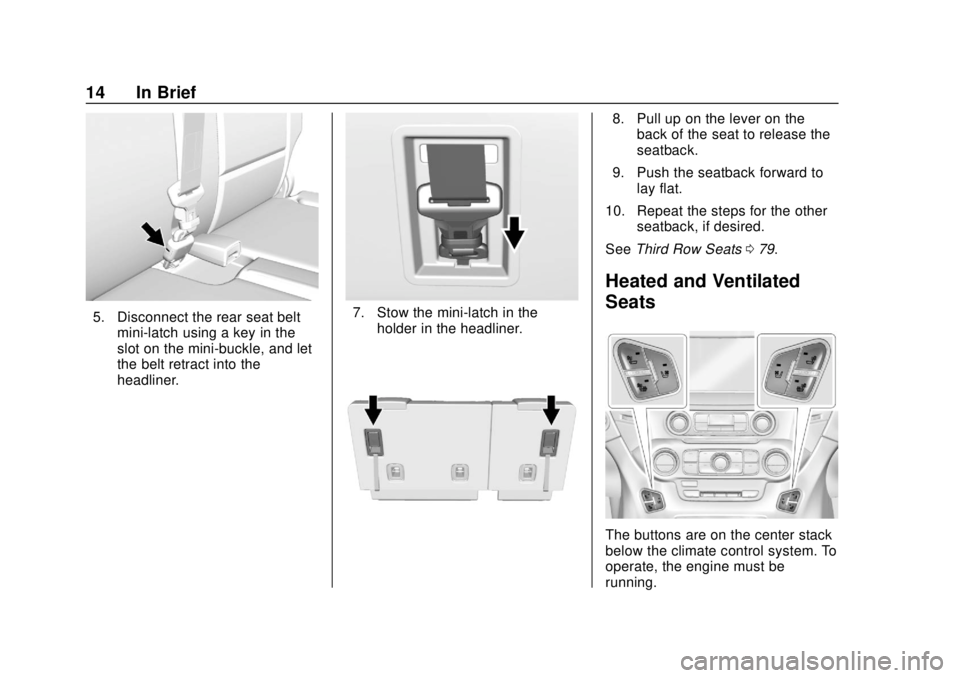
5. Disconnect the rear seat beltmini-latch using a key in the
slot on the mini-buckle, and let
the belt retract into the
headliner.7. Stow the mini-latch in theholder in the headliner.
8. Pull up on the lever on theback of the seat to release the
seatback.
9. Push the seatback forward to lay flat.
10. Repeat the steps for the other seatback, if desired.
See Third Row Seats 079.
Heated and Ventilated
Seats
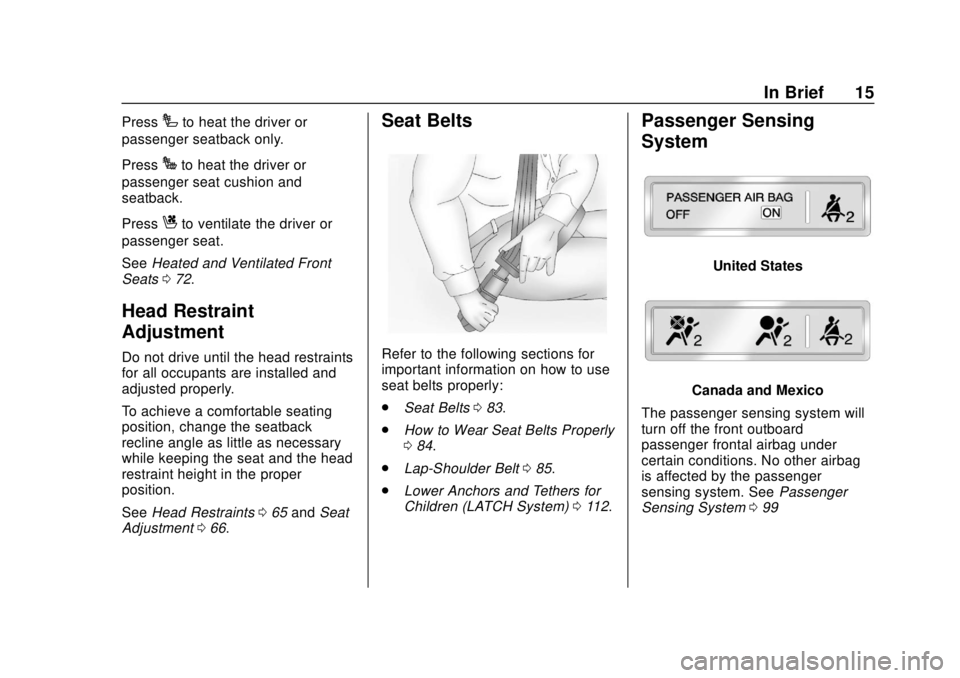
The buttons are on the center stack
below the climate control system. To
operate, the engine must be
running.
Page 16 of 443
Chevrolet Tahoe/Suburban Owner Manual (GMNA-Localizing-U.S./Canada/
Mexico-11349385) - 2018 - crc - 11/3/17
In Brief 15
PressIto heat the driver or
passenger seatback only.
Press
Jto heat the driver or
passenger seat cushion and
seatback.
Press
Cto ventilate the driver or
passenger seat.
See Heated and Ventilated Front
Seats 072.
Head Restraint
Adjustment
Do not drive until the head restraints
for all occupants are installed and
adjusted properly.
To achieve a comfortable seating
position, change the seatback
recline angle as little as necessary
while keeping the seat and the head
restraint height in the proper
position.
See Head Restraints 065 and Seat
Adjustment 066.
Seat Belts
Refer to the following sections for
important information on how to use
seat belts properly:
.
Seat Belts 083.
. How to Wear Seat Belts Properly
084.
. Lap-Shoulder Belt 085.
. Lower Anchors and Tethers for
Children (LATCH System) 0112.
Passenger Sensing
System
United States
Canada and Mexico
The passenger sensing system will
turn off the front outboard
passenger frontal airbag under
certain conditions. No other airbag
is affected by the passenger
sensing system. See Passenger
Sensing System 099
Page 44 of 443
Chevrolet Tahoe/Suburban Owner Manual (GMNA-Localizing-U.S./Canada/
Mexico-11349385) - 2018 - crc - 11/3/17
Keys, Doors, and Windows 43
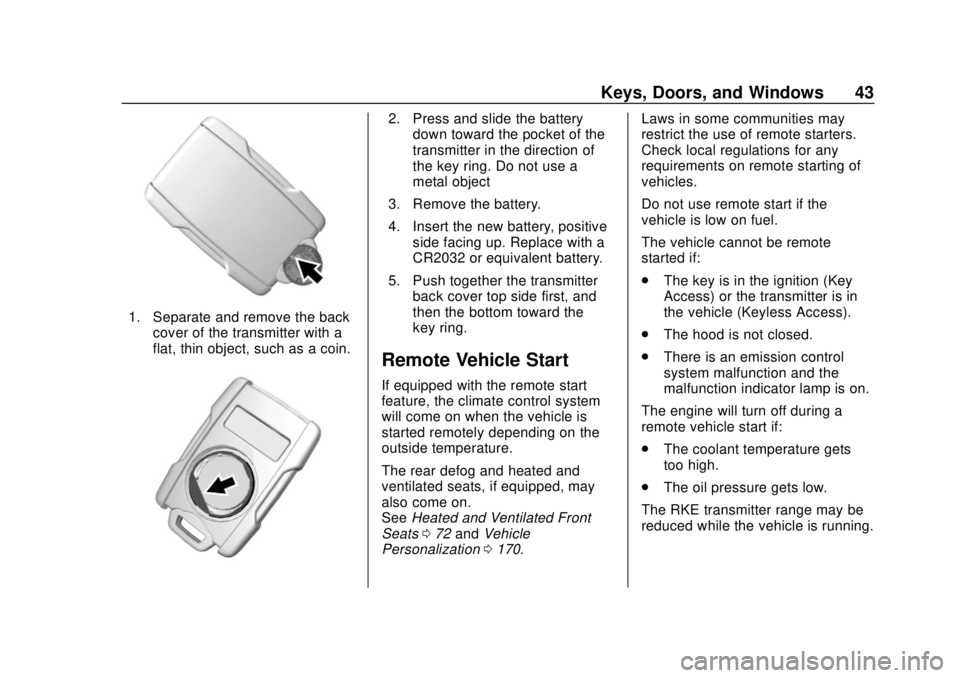
1. Separate and remove the backcover of the transmitter with a
flat, thin object, such as a coin.
2. Press and slide the batterydown toward the pocket of the
transmitter in the direction of
the key ring. Do not use a
metal object
3. Remove the battery.
4. Insert the new battery, positive side facing up. Replace with a
CR2032 or equivalent battery.
5. Push together the transmitter back cover top side first, and
then the bottom toward the
key ring.
Remote Vehicle Start
If equipped with the remote start
feature, the climate control system
will come on when the vehicle is
started remotely depending on the
outside temperature.
The rear defog and heated and
ventilated seats, if equipped, may
also come on.
See Heated and Ventilated Front
Seats 072 and Vehicle
Personalization 0170. Laws in some communities may
restrict the use of remote starters.
Check local regulations for any
requirements on remote starting of
vehicles.
Do not use remote start if the
vehicle is low on fuel.
The vehicle cannot be remote
started if:
.
The key is in the ignition (Key
Access) or the transmitter is in
the vehicle (Keyless Access).
. The hood is not closed.
. There is an emission control
system malfunction and the
malfunction indicator lamp is on.
The engine will turn off during a
remote vehicle start if:
. The coolant temperature gets
too high.
. The oil pressure gets low.
The RKE transmitter range may be
reduced while the vehicle is running.
Page 65 of 443
Chevrolet Tahoe/Suburban Owner Manual (GMNA-Localizing-U.S./Canada/
Mexico-11349385) - 2018 - crc - 11/3/17
64 Seats and Restraints
Seats and
Restraints
Head Restraints
Head Restraints . . . . . . . . . . . . . . . 65
Front Seats
Seat Adjustment . . . . . . . . . . . . . . . 66
Center Seat . . . . . . . . . . . . . . . . . . . . 67
Power Seat Adjustment . . . . . . . . 67
Lumbar Adjustment . . . . . . . . . . . . 67
Reclining Seatbacks . . . . . . . . . . . 68
Memory Seats . . . . . . . . . . . . . . . . . 69
Heated and Ventilated FrontSeats . . . . . . . . . . . . . . . . . . . . . . . . . 72
Rear Seats
Rear Seats . . . . . . . . . . . . . . . . . . . . 74
Heated Rear Seats (IfEquipped) . . . . . . . . . . . . . . . . . . . . 74
Second Row Seats . . . . . . . . . . . . 75
Third Row Seats . . . . . . . . . . . . . . . 79
Seat Belts
Seat Belts . . . . . . . . . . . . . . . . . . . . . 83
How to Wear Seat Belts Properly . . . . . . . . . . . . . . . . . . . . . . 84
Lap-Shoulder Belt . . . . . . . . . . . . . 85 Seat Belt Use During
Pregnancy . . . . . . . . . . . . . . . . . . . . 89
Lap Belt . . . . . . . . . . . . . . . . . . . . . . . 90
Seat Belt Extender . . . . . . . . . . . . . 91
Safety System Check . . . . . . . . . . 91
Seat Belt Care . . . . . . . . . . . . . . . . . 91
Replacing Seat Belt System Parts after a Crash . . . . . . . . . . . 91
Airbag System
Airbag System . . . . . . . . . . . . . . . . . 92
Where Are the Airbags? . . . . . . . 94
When Should an AirbagInflate? . . . . . . . . . . . . . . . . . . . . . . . 96
What Makes an Airbag Inflate? . . . . . . . . . . . . . . . . . . . . . . . 97
How Does an Airbag
Restrain? . . . . . . . . . . . . . . . . . . . . . 97
What Will You See after an Airbag Inflates? . . . . . . . . . . . . . . 97
Passenger Sensing System . . . 99
Servicing the Airbag-Equipped Vehicle . . . . . . . . . . . . . . . . . . . . . . 103
Adding Equipment to the Airbag-Equipped Vehicle . . . . 103
Airbag System Check . . . . . . . . 104
Replacing Airbag System Parts after a Crash . . . . . . . . . . . . . . . . 104
Child Restraints
Older Children . . . . . . . . . . . . . . . . 105 Infants and Young Children . . . 107
Child Restraint Systems . . . . . . 109
Where to Put the Restraint . . . . 111
Lower Anchors and Tethers for
Children (LATCH System) . . . 112
Replacing LATCH System Parts After a Crash . . . . . . . . . 120
Securing Child Restraints (With the Seat Belt in the
Rear Seat) . . . . . . . . . . . . . . . . . . 121
Securing Child Restraints (With the Seat Belt in the Center
Front Seat) . . . . . . . . . . . . . . . . . . 123
Securing Child Restraints (With the Seat Belt in the Front
Passenger Seat) . . . . . . . . . . . . 123
Page 73 of 443
Chevrolet Tahoe/Suburban Owner Manual (GMNA-Localizing-U.S./Canada/
Mexico-11349385) - 2018 - crc - 11/3/17
72 Seats and Restraints
.Power steering wheel,
if equipped
. Adjustable pedals, if equipped
If the stored memory seat position
does not automatically recall or
recalls to the wrong positions, the
driver ’s RKE transmitter number (1
or 2) may not match the memory
button number that positions were
saved to. Try storing the position to
the other memory button or try the
other RKE transmitter.
Easy Exit Recall
Easy Exit Recall is not linked to an
RKE transmitter. The position stored
to
Bis used for all drivers. To turn
Easy Exit Recall on or off, see
"Vehicle Personalization Settings"
previously in this section and
Vehicle Personalization 0170.
If turned on, the positions saved to
Bare automatically recalled when
one of the following occurs:
. The vehicle is turned off and the
driver door is opened within a
short time. .
The vehicle is turned off with the
driver door open.
To stop Easy Exit Recall movement,
press any of the following memory
controls:
. Power seat
. Memory SET, 1, 2, or
B
.Power mirror, with the driver or
passenger side mirror selected
. Power steering wheel,
if equipped
. Adjustable pedals, if equipped
Obstructions
If something has blocked the driver
seat and/or power steering wheel
while recalling a memory position,
the recall may stop. Remove the
obstruction and try the recall again.
If the memory position still does not
recall, see your dealer for service.
Heated and Ventilated
Front Seats
{Warning
If temperature change or pain to
the skin cannot be felt, the seat
heater may cause burns. To
reduce the risk of burns, use care
when using the seat heater,
especially for long periods of
time. Do not place anything on
the seat that insulates against
heat, such as a blanket, cushion,
cover, or similar item. This may
cause the seat heater to
overheat. An overheated seat
heater may cause a burn or may
damage the seat.
Page 74 of 443
Chevrolet Tahoe/Suburban Owner Manual (GMNA-Localizing-U.S./Canada/
Mexico-11349385) - 2018 - crc - 11/3/17
Seats and Restraints 73
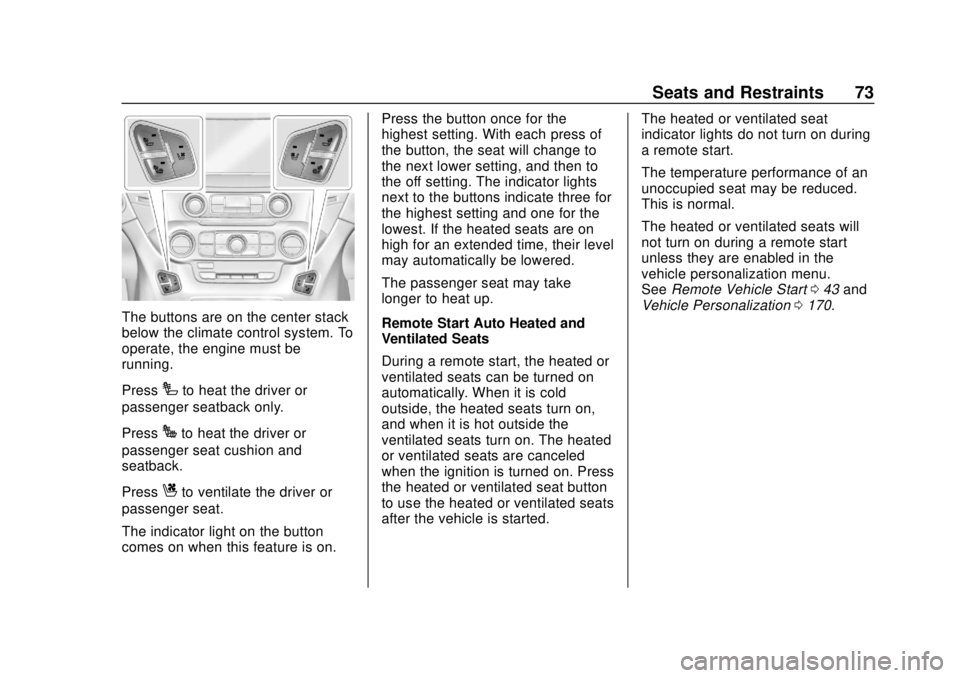
The buttons are on the center stack
below the climate control system. To
operate, the engine must be
running.
Press
Ito heat the driver or
passenger seatback only.
Press
Jto heat the driver or
passenger seat cushion and
seatback.
Press
Cto ventilate the driver or
passenger seat.
The indicator light on the button
comes on when this feature is on. Press the button once for the
highest setting. With each press of
the button, the seat will change to
the next lower setting, and then to
the off setting. The indicator lights
next to the buttons indicate three for
the highest setting and one for the
lowest. If the heated seats are on
high for an extended time, their level
may automatically be lowered.
The passenger seat may take
longer to heat up.
Remote Start Auto Heated and
Ventilated Seats
During a remote start, the heated or
ventilated seats can be turned on
automatically. When it is cold
outside, the heated seats turn on,
and when it is hot outside the
ventilated seats turn on. The heated
or ventilated seats are canceled
when the ignition is turned on. Press
the heated or ventilated seat button
to use the heated or ventilated seats
after the vehicle is started.
The heated or ventilated seat
indicator lights do not turn on during
a remote start.
The temperature performance of an
unoccupied seat may be reduced.
This is normal.
The heated or ventilated seats will
not turn on during a remote start
unless they are enabled in the
vehicle personalization menu.
See
Remote Vehicle Start 043 and
Vehicle Personalization 0170.
Page 75 of 443
Chevrolet Tahoe/Suburban Owner Manual (GMNA-Localizing-U.S./Canada/
Mexico-11349385) - 2018 - crc - 11/3/17
74 Seats and Restraints
Rear Seats
Rear Seat Reminder
If equipped, the message REAR
SEAT REMINDER LOOK IN REAR
SEAT displays under certain
conditions indicating there may be
an item or passenger in the rear
seat. Check before exiting the
vehicle.
This feature will activate when a
second row door is opened while
the vehicle is on or up to 10 minutes
before the vehicle is turned on.
There will be an alert when the
vehicle is turned off. The alert does
not directly detect objects in the rear
seat; instead, under certain
conditions, it detects when a rear
door is opened and closed,
indicating that there may be
something in the rear seat.
The feature is active only once each
time the vehicle is turned on and off,
and will require reactivation by
opening and closing the second row
doors. There may be an alert even
when there is nothing in the rear
seat; for example, if a child enteredthe vehicle through the rear door
and left the vehicle without the
vehicle being shut off.
The feature can be turned on or off.
See
Vehicle Personalization 0170.
Heated Rear Seats (If
Equipped)
{Warning
If you cannot feel temperature
change or pain to the skin, the
seat heater may cause burns.
See the Warning under Heated
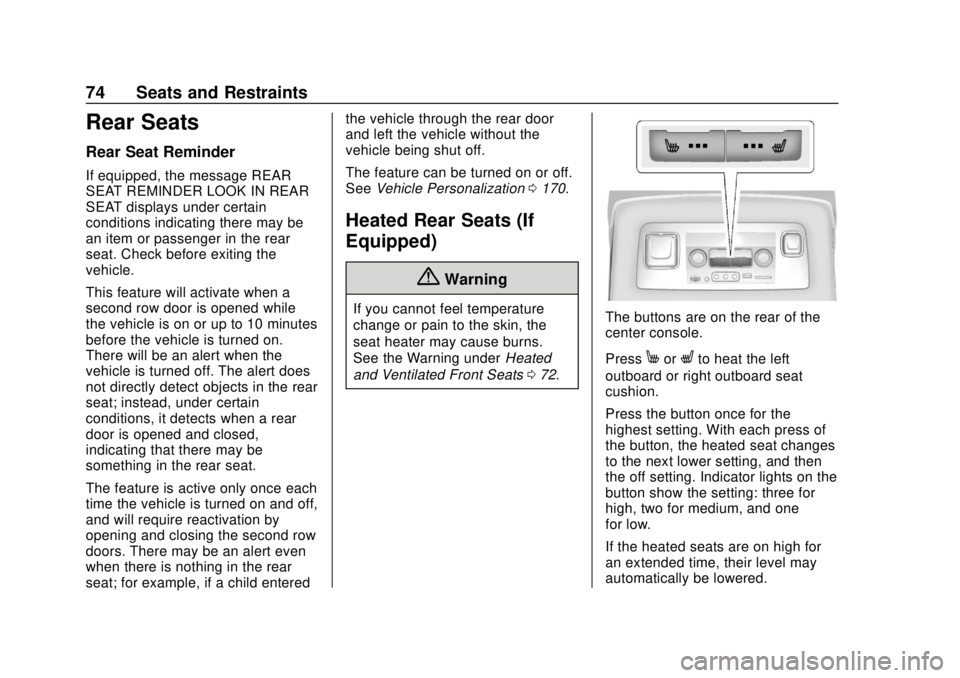
and Ventilated Front Seats 072.The buttons are on the rear of the
center console.
Press
MorLto heat the left
outboard or right outboard seat
cushion.
Press the button once for the
highest setting. With each press of
the button, the heated seat changes
to the next lower setting, and then
the off setting. Indicator lights on the
button show the setting: three for
high, two for medium, and one
for low.
If the heated seats are on high for
an extended time, their level may
automatically be lowered.
Page 176 of 443
Chevrolet Tahoe/Suburban Owner Manual (GMNA-Localizing-U.S./Canada/
Mexico-11349385) - 2018 - crc - 11/3/17
Instruments and Controls 175
Select Off, Lights and Horn, Lights
Only, or Horn Only.
Remote Door Unlock
This allows selection of which doors
will unlock when pressing
Kon the
RKE transmitter.
Select All Doors or Driver
Door Only.
Remote Start Auto Cooled Seats
If equipped and turned on, this
feature will turn the ventilated seats
on when using remote start on
warm days.
Select Off or On.
Remote Start Auto Heat Seats
If equipped and turned on, this
feature will turn the heated seats on
when using remote start on
cold days.
Select Off or On.
Remote Window Operation
This allows the windows to be
opened when pressing and
holding
Kon the RKE transmitter. See
Remote Keyless Entry (RKE)
System Operation (Keyless Access)
0 35 orRemote Keyless Entry
(RKE) System Operation (Key
Access) 041.
Select Off or On.
Passive Door Unlock
This allows the selection of what
doors will unlock when using the
button on the driver door to unlock
the vehicle.
Select All Doors or Driver Door.
Passive Door Lock
This allows passive locking to be
turned on or off and selects
feedback.
See Remote Keyless Entry (RKE)
System Operation (Keyless Access)
0 35 orRemote Keyless Entry
(RKE) System Operation (Key
Access) 041.
Select Off, On with Horn
Chirp, or On. Remote Left in Vehicle Alert
This feature sounds an alert when
the RKE transmitter is left in the
vehicle. This menu also enables
Remote No Longer in Vehicle Alert.
Select Off or On.
Bluetooth
Select and the following may
display:
.
Pair New Device
. Device Management
. Ringtones
. Voice Mail Numbers
. Text Message Alerts
Pair New Device
Select to pair a new device. See
“Pairing” under“Bluetooth
(Infotainment Controls)” in the
infotainment manual.
Device Management
Select to connect to a different
phone source, disconnect a phone,
or delete a phone.