light CHEVROLET TRACKER 1994 Owner's Manual
[x] Cancel search | Manufacturer: CHEVROLET, Model Year: 1994, Model line: TRACKER, Model: CHEVROLET TRACKER 1994Pages: 258, PDF Size: 14.43 MB
Page 72 of 258
I1 1
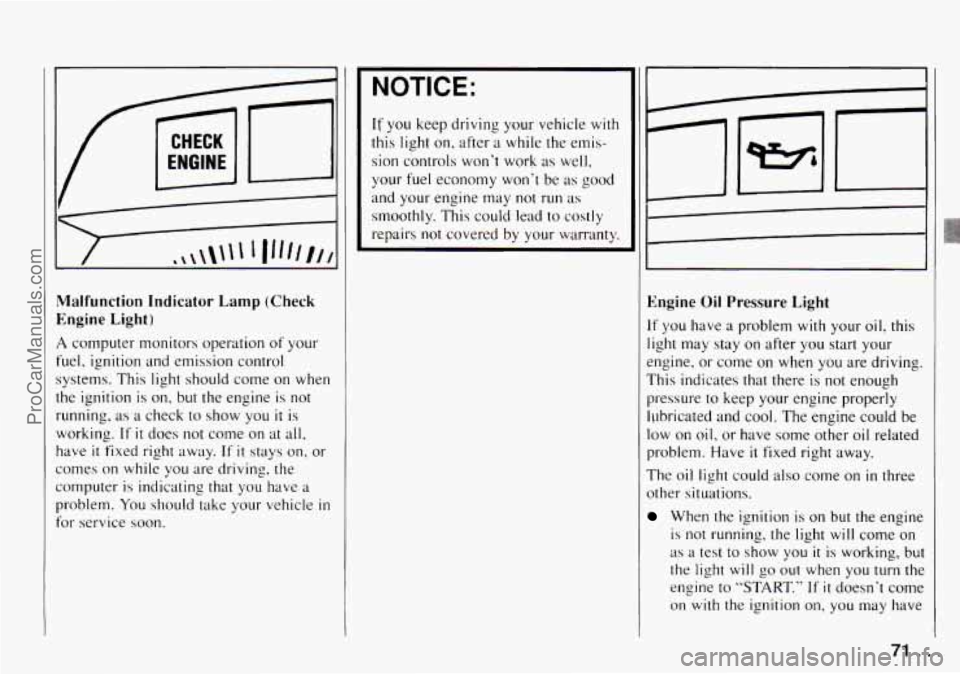
Malfunction Indicator Lamp (Check
Engine Light)
A computer monitors operation of your
fuel, ignition and emission control
1 systems. This light should come on when
the ignition is
on, but the engine is not
running, as a check to show you it is
working.
If it does not come on at all,
have it fixed right away. If it stays on. or
comes on while
you are driving, the
computer
is indicating that you have a
problem.
You should take your vehicle in
for service soon.
NOTICE:
If you keep driving your vehicle with
this light on. after
a while the ernis-
sion controls won't work as well,
your
fuel economy won't be as good
and your engine may
not run as
smoothly. This could lead to costly
repairs
not covered by your warranty.
Engine Oil Pressure Light
If you have a problem with your oil? this
light may stay
on after you start your
engine, or come
on when you are driving.
This indicates that there is not enough
pressure
to keep your engine properly
ILJbricated and
cool. The engine could be
low on oil, or have some other oil related
problem. Have
it fixed right away.
The oil light could also come
on in three
other situations.
When the ignition is on but the engine
is not running, the light will come on
as a test to show you it is working, but
the light will
go out when you turn the
engine to
"START." If it doesn't come
on with the ignition
on, you may have
71
ProCarManuals.com
Page 73 of 258
Features and Controls
a problem with the fuse or bulb. Have
it fixed right away.
Sometimes when the engine is idling
at a stop, the light may blink on and
off. This is normal.
If you make a hard stop, the light may
come on for a moment. This is
normal.
A CAUTION:
Don't keep driving if the oil pressure
is low, If' you do, your engine can
be~ome so hot that it catches fae.
You UT ol;krers could be burned.
Check your oil as SQOD as possible
and have yaw vehicle serviced.
NOTICE:
Damage to your engine from
neglected oil problems can be costly
and is not covered by your warranty.
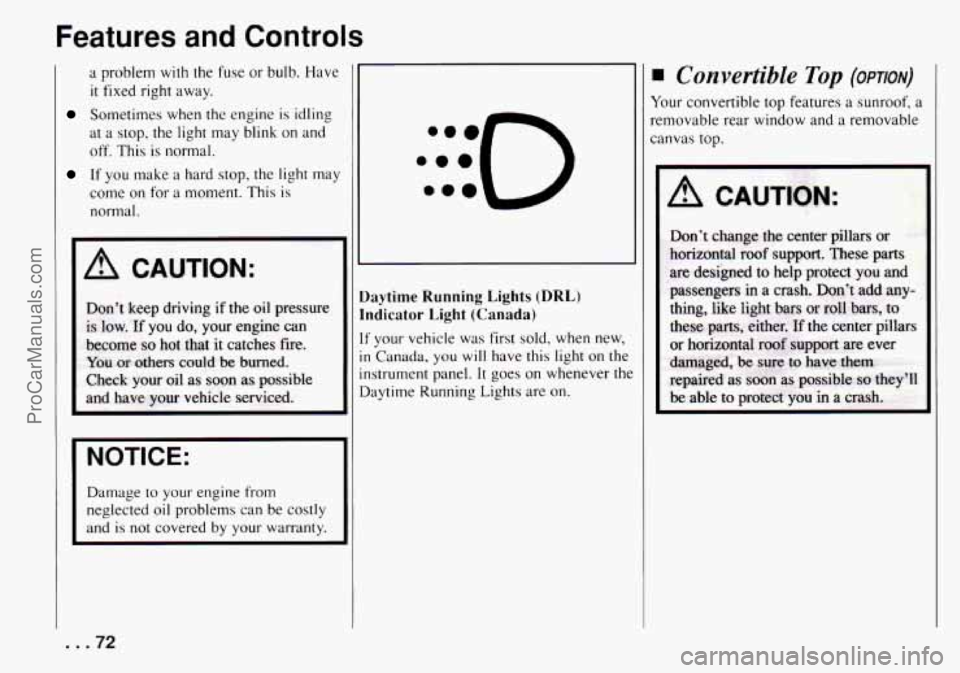
laytime Running Lights (DRL)
ndicator Light (Canada)
F your vehicle was first sold, when new,
I Canada, you will have this light on the
xtrument panel.
It goes on whenever the
laytime Running Lights are on.
Convertible Top (OPTION)
Your convertible top features a sunroof, a
removable rear window and a removable
canvas top.
A CAlJTtON:
... 72
ProCarManuals.com
Page 76 of 258
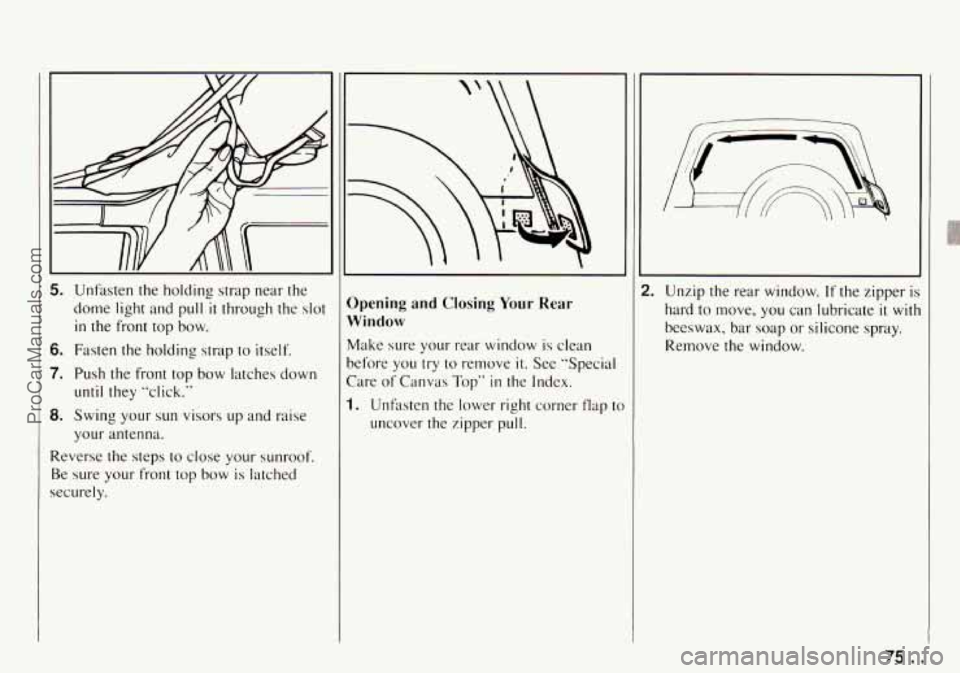
5. Unfasten the holding strap near the
dome light and pull
it through the slot
in the front top bow.
6. Fasten the holding strap to itself.
7. Push the front top bow latches down
8. Swing your sun visors up and raise
Reverse the steps
to close your sunroof.
Be sure
your front top bow is latched
securely. until they “click.“
your antenna.
“\
Opening and Closing Your Rear
Window
Make sure your rear window is clean
before you
try to remove it. See “Special
Care
of Canvas Top” in the Index.
1. Unfaten the lower right corner flap t(
uncover the zipper pull. Unzip the rear window.
If the zipper is
hard to move, you can lubricate it with
beeswax, bar soap or silicone spray.
Remove the window.
/3.. . ProCarManuals.com
Page 80 of 258
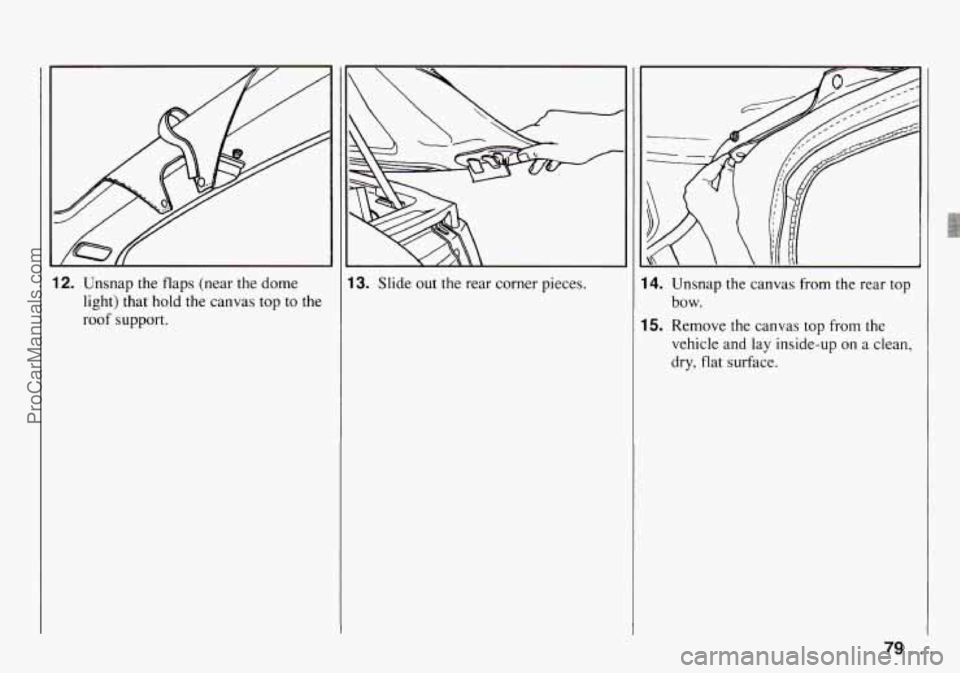
12. Unsnap the flaps (near the dome
light) that hold the canvas top to the
roof support.
13. Slide out the rear corner pieces. 14. Unsnap the canvas from the rear top
15. Remove the canvas top from the
bow.
vehicle and lay inside-up on a clean,
dry, flat surface.
79 ...
ProCarManuals.com
Page 86 of 258

Ventilation
For mild outside temperatures, when little
heating or cooling is needed, you can still
direct outside air through your vehicle.
1. Move the air intake lever to .
2. Move the airflow lever to :$ .
3. Adjust the temperature lever to a
4. Move the fan control lever to # .
comfortable setting.
Defogging and Defrosting
Windows
1. Slide the air intake lever to -.
2. Slide the airflow lever to to
direct air to the windshield vents.
3. Slide the temperature lever toward the
4. Slide the fan lever to # .
When the windshield is clear, turn down
the fan speed.
To defog the side windows, slide the
airflow lever to
,?A . For increased
airflow to
the side vents, close the center
vents
.
right.
4ir Conditioner Controls
The air conditioning system uses the Sam
:ontrols as the heating system. The
unction of each lever is explained under
‘Heater Controls”
in this part. The
ncoming air is cooled and dehumidified
nstead of being heated.
UC: Push this button to change your
:omfort control system from heating to
lir conditioning. A light will come on
when the air conditioning is on. The
‘A/C” button can also control the
wmidity
in your vehicle.
Cooling
The air conditioner works best if you keep
your windows closed.
On very hot days,
open the windows just
long enough for
the hot air to escape.
1. Push the “A/,’, button.
2. Move the air intake lever to-for
normal cooling. For faster cooling
move the lever to&
.
3. Move the airflow lever to *> .
4. Move the temperature control lever
5. Move the fan control lever to # .
toward the left.
Dehumidifying
On days when it is raining or the humidity
is
high, follow these dehumidifying steps
instead of the cooling directions. It will
help clean windows that are cloudy with
moisture.
1. Push the “A/,” button.
2. Move the air intake lever tom.
3. Move the airflow lever to 9.
4. Move the fan control lever toward
3s.
5. Adjust the temperature control lever to
a comfortable setting.
85 ...
ProCarManuals.com
Page 87 of 258

Comfort Controls and Audio Systems
?ear Window Defogger
’he rear window defogger uses a
varrning grid to remove fog from the rear
.vindow.
’ress the switch
to turn on the defogger.
9n indicator light n,ill come on below the
;witch
to remind you that the defogger is
m. Press the switch again
to turn the
jefogger off. The rear window defogger
vi11 also turn off if you turn the ignition
;witch
to ”ACC” or “LOCK.”
lo not attach anything like a temporary
xhicle license
or a decal across the
lefogger grid on the rear window.
NOTICE:
Don‘t use a razor blade or something
else sharp on the inside
of the rear
window.
If you do, you could cut or
damage the warming
grid. and the
repairs wouldn‘t
be covcrcd by your
warranty.
Vow- Through Ventilation
system
’our Geo‘s flow-through ventilation
,ystem supplies
outside air into the
whicle when
it is moving. Outside air
vill also enter the vehicle when the heater
)r the ilir conditioning flln is running.
. .86
ProCarManuals.com
Page 89 of 258

Comfort Controls and Audio Systems
Setting the Clock
AM/FM Stereo
1, Press and hold "RCL" (TIME SET).
At the same time. press and hold
"TUNE
4'' (HR) until the correct
hour appears.
2. Press and hold "RCL" (TIME SET).
At the sane time press and hold
"TUNE
b" (MIN) until the correct
minute appears.
AM/FM Stereo with Cassette Tape
Player
1. Press and hold "RCL/PROG" (TIME
SET). At
the same time, press and
hold "TUNE
4" (HR) until the
correct hour appears.
2. Press and hold "RCL/PROG" (TIME
SET). At
the same time press and
hold "TUNE
b" (MIN) until the
correct minute appears.
AMlFM Stereo with Cassette Tape
and Compact Disc Player
1. Press and hold "RCL TA" (TIME
SET). At the same time, press and
hold "TUNE
4" (HR) until the
correct hour appears.
2. Press and hold "RCL TA'' (TIME
SET). At the same time press and
hold
"TUNE b" (MIN) until the
correct minute appears.
STEREO
1:o §
AM/FM Stereo
To Play the Radio
Turn the "ON/VOL" knob to turn the
system on or
off.
Volume: Turn the "ON/VOL" knob to
adjust
the volume.
Finding a Station
Hand:
Press "AM-FM" to get AM or
FM. The lighted display shows your
selection.
Tune: Press "TUNE b "or "TUNE 4"
to go to a higher or lower station. Press
and hold
to continue tuning and release
when
you find your station. The display
will show the frequency of each station
tuned.
Seek: Press "SEEK b "or "SEEK 4"
and the radio will tune to the next higher
or lower station and stay there.
..A8
ProCarManuals.com
Page 90 of 258

Pushbuttons: The six pushbuttons let
you return to your favorite stations. To
set
the pushbuttons for up to 12 stations
(6 AM and 6 FM), just:
1. Tune in the station.
2. Press and hold one of the
pushbuttons for at least two seconds.
The sound will go away for a second
and will return when
the station is
stored.
Repeat these steps for each pushbutton.
Setting the Tone
Treble:
Turn the “TREB” knob to the
right to hear more treble.
Bass: Turn the “BASS” control behind
the “TREB” knob to the right to hear
more bass.
Adjusting the Speakers
Fade:
Turn the “FADE’ knob to move
the sound between the front and rear
speakers.
Balance: Turn the “BAL” conrrol
behind the “FADE’ knob to move the
sound between the left and right
speakers.
Recall
Press “RCL” to see the station being
played for a moment. Or, press
it if you
want to see the time when
the ignition is
off.
AM!FM Stereo with Cassette
Tape Player
To Play the Radio
Turn the “ON/VOL” knob to turn the
system on or off.
Volume: Turn the “ON/VOL” knob to
adjust the volume.
Finding a Station
Band:
Press “AM-FM” to get AM, FM1
or
FM2. The lighted display shows your
selection.
Tune: Press and hold “TUNE b’, or
“TUNE
4’’ to go to higher or lower
stations. Release when you find your
station. The display
will show the
frequency of each station tuned.
Seek: Press “SEEK b” or “SEEK 4’’
and the radio will tune to the next
higher or lower station and stay there.
89. ..
ProCarManuals.com
Page 91 of 258

Comfort Controls and Audio Systems
Pushbuttons: The six pushbuttons let you
return to your favorite stations. To set
the
pushbuttons for up to 18 stations (6 AM,
6 FM1 and 6 FM2), jus#:
1. Tune in the station.
2. Press and hold one of the pushbuttons
for more than two seconds. The sound
will go away for a second and will
return when the station is stored.
Repeat these steps for each pushbutton.
Preset Scan: Press the “PRESET SCAN’
button
to hear each of your preset stations
for a few seconds. When you want to stop
at a Chosen statioq, press “PRESET
SCAN” again.
Setting the Tone
Treble:
Turn the “TREB” knob to the
right to hear more treble.
Bass: Turn the“BASS” control behind
the “TREB” knpb to the right to hear
more bass.
Treble and bass cannot be adjusted
manually when “TONE SELECT” is on.
Loud: To increase the bass tone at low
volumes, press the
“LOUD” button.
Tone Select: Press “TONE SELECT” to
choose preset treble and bass equalization settings designed
for “ROCK,”
“NEWS,”
”POP,” “JAZZ’ and “CLASSICAL.”
“ROCK” will appear when you first press
“TONE SELECT.” Each time you press
it, another setting will appear on the
display. Press
it after “CLASSICAL” and
tone control will be back to the treble and
bass knobs.
Adjusting the Speakers
Fade:
Turn the “FADE’ knob to move the
sound between the front and rear
speakers.
Balance: Turn the “BAL” control behind
the “FADE” knob to move the sound
between the
right and left speakers.
Recall
Press “RCL” to see the station being
played for a moment. Or, press it if you
want to see the time when the ignition is
off.
To Play a Cassette Tape
Your tape player is built to work best with
tapes that are
30 to 45 minutes long on
each side. Tapes longer than that are
so
thin they may not work well in this player. The
longer side with the tape visible
should face to the right.
If you hear
nothing or hear just a garbled sound, it
may not be in squarely. Press
“MA” to
remove the tape and start over.
Once the tape is playing, use the knobs
for volume, fade and balance, just as you
do for radio. The lighted arrows show
which side of the tape is playing.
Metal Tapes: Your bias is set
automatically. When a metal or chrome
tape
is inserted, “MTL” will appear on the
display.
Fast Forward: Press “FF” to advance
rapidly to another part of the tape. Press
“FF,” “RCL/PROG’ or “HA” to return to
playing speed.
Rewind: Press “REV to reverse the tape
rapidly. Press
“RW,” “RCL/PROG” or
“.A” to return to playing speed.
Next Selection: Press “NEXT” to go
forward to the beginning of the next
selection. Press
“NEXT” again or press
“RCLPROG’ or
‘,.A’’ to cancel this
function.
For “NEXT” to work properly, your tape
must have
at least three or four seconds of
silence between each selection.
... 90
ProCarManuals.com
Page 94 of 258

L
(STOP)
(EJECT)
AM/FM Stereo with Cassette
Tape and Compact Disc Player
To Play the Radio
Turn the “ON/VOL” knob to turn the
system on or off.
Volume: Turn the “ON/VOL” knob to
adjust the volume.
Finding a Station
Band:
Press “AM-FM” to get AM, FMl
or
FM2. The lighted display shows your
selection.
%ne: Press and hold “TUNE F” or
“TUNE
4’’ to go to higher or lower
stations. Release when you find your
station. The display will indicate the
frequency of each station tuned.
Seek: Press “SEEK F” or “SEEK 4’’
and the radio will tune to the next higher
or lower station and stay there.
Pushbuttons: The six pushbuttons let
you return to your favorite stations.
To
set the pushbuttons for up to 18 stations
(6 AM, 6 FM1 and 6 FM2), just:
1. Tune in the station.
2. Press and hold one of the pushbuttons
for more than two seconds.
The
sound will go away for a second and
will return when the station
is stored.
Repeat these steps for each pushbutton.
Preset Scan: Press the “PSCAN’ button
to hear each of your
FM preset stations
for a few seconds. When you want to
stop at a chosen station, press “PSCAN”
again.
Setting the Tone
Treble:
Turn the “TREB” knob to the
right to hear more treble.
Bass: Turn the “BASS” control behind
the “TREB” knob to the right to hear
more bass.
Treble and bass cannot be adjusted
manually whenl“TONE SELECT” is on.
Loud: To increase the bass tone at low
volumes, press the “LOUD” button.
93 ...
ProCarManuals.com