mirror CHEVROLET TRAVERSE 2009 1.G User Guide
[x] Cancel search | Manufacturer: CHEVROLET, Model Year: 2009, Model line: TRAVERSE, Model: CHEVROLET TRAVERSE 2009 1.GPages: 422, PDF Size: 2.06 MB
Page 96 of 422
Automatic Dimming Mirror
Operation
Automatic dimming reduces the
glare from the headlamps of
the vehicle behind you. The dimming
feature comes on and the indicator
light illuminates each time the
ignition is turned to start.
Cleaning the Mirror
Do not spray glass cleaner directly
on the mirror. Use a soft towel
dampened with water.
Outside Power Mirrors
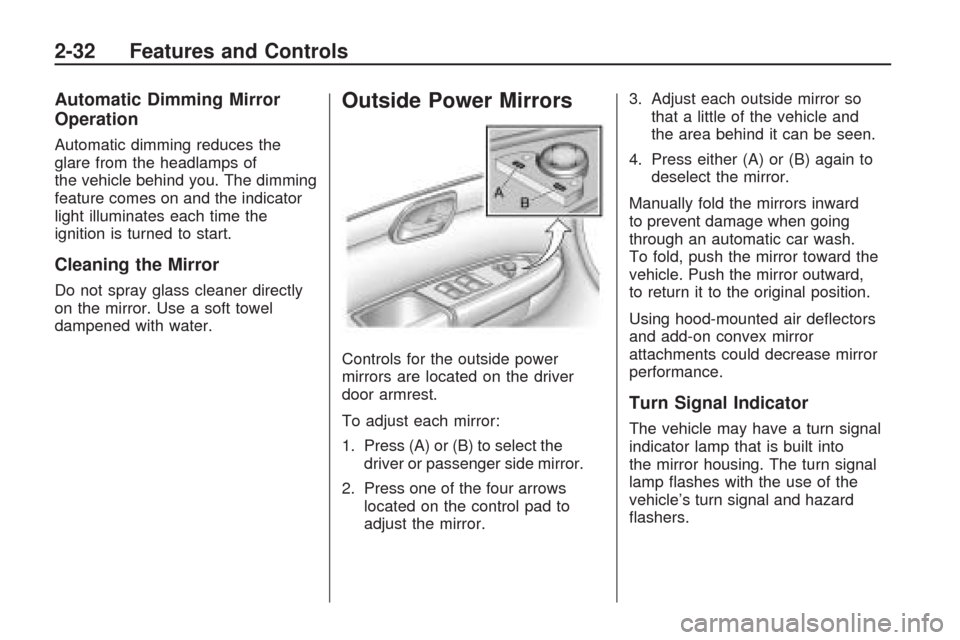
Controls for the outside power
mirrors are located on the driver
door armrest.
To adjust each mirror:
1. Press (A) or (B) to select the
driver or passenger side mirror.
2. Press one of the four arrows
located on the control pad to
adjust the mirror.3. Adjust each outside mirror so
that a little of the vehicle and
the area behind it can be seen.
4. Press either (A) or (B) again to
deselect the mirror.
Manually fold the mirrors inward
to prevent damage when going
through an automatic car wash.
To fold, push the mirror toward the
vehicle. Push the mirror outward,
to return it to the original position.
Using hood-mounted air deectors
and add-on convex mirror
attachments could decrease mirror
performance.
Turn Signal Indicator
The vehicle may have a turn signal
indicator lamp that is built into
the mirror housing. The turn signal
lamp ashes with the use of the
vehicle’s turn signal and hazard
ashers.
2-32 Features and Controls
Page 97 of 422
Outside Power Foldaway
Mirrors
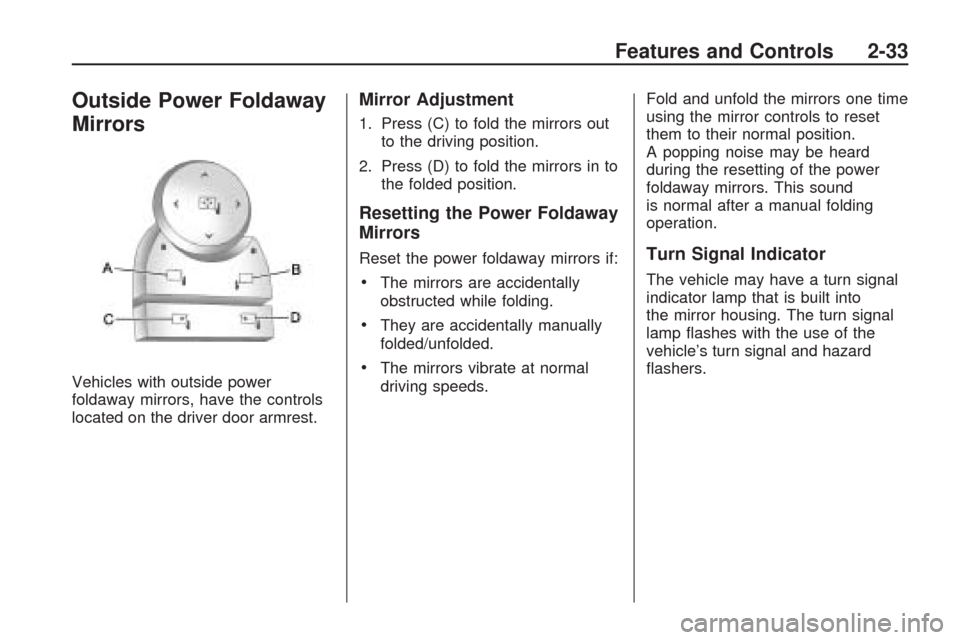
Vehicles with outside power
foldaway mirrors, have the controls
located on the driver door armrest.
Mirror Adjustment
1. Press (C) to fold the mirrors out
to the driving position.
2. Press (D) to fold the mirrors in to
the folded position.
Resetting the Power Foldaway
Mirrors
Reset the power foldaway mirrors if:
The mirrors are accidentally
obstructed while folding.
They are accidentally manually
folded/unfolded.
The mirrors vibrate at normal
driving speeds.Fold and unfold the mirrors one time
using the mirror controls to reset
them to their normal position.
A popping noise may be heard
during the resetting of the power
foldaway mirrors. This sound
is normal after a manual folding
operation.
Turn Signal Indicator
The vehicle may have a turn signal
indicator lamp that is built into
the mirror housing. The turn signal
lamp ashes with the use of the
vehicle’s turn signal and hazard
ashers.
Features and Controls 2-33
Page 98 of 422
Blind Spot Mirrors
The blind spot mirror is a small
convex mirror built into the upper and
outer corner of both outside mirrors.
It is designed to increase driver
visibility and show objects that may
be in the vehicle’s blind zone.
Driving with the Blind Spot
Mirror
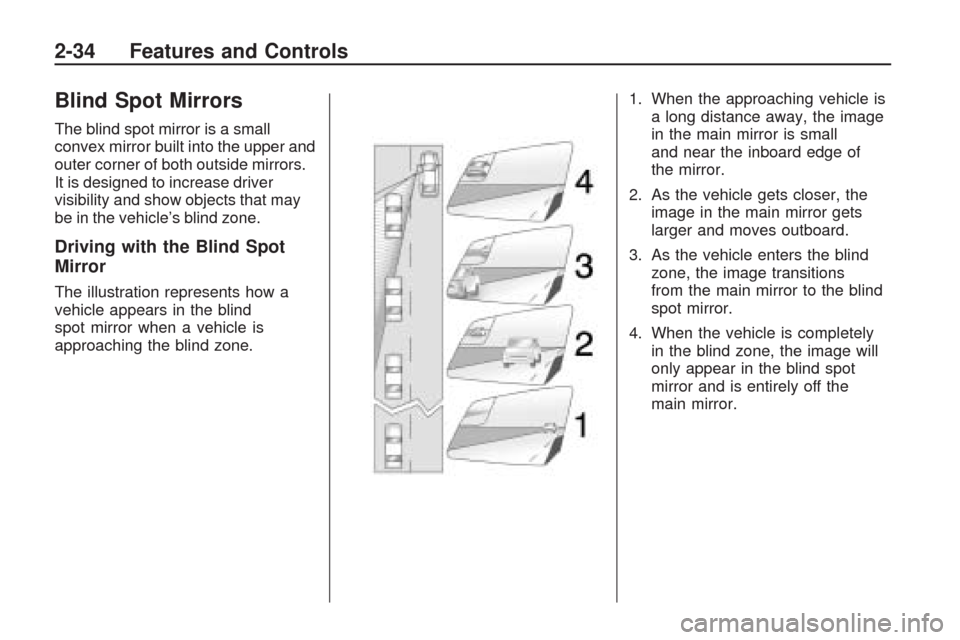
The illustration represents how a
vehicle appears in the blind
spot mirror when a vehicle is
approaching the blind zone.1. When the approaching vehicle is
a long distance away, the image
in the main mirror is small
and near the inboard edge of
the mirror.
2. As the vehicle gets closer, the
image in the main mirror gets
larger and moves outboard.
3. As the vehicle enters the blind
zone, the image transitions
from the main mirror to the blind
spot mirror.
4. When the vehicle is completely
in the blind zone, the image will
only appear in the blind spot
mirror and is entirely off the
main mirror.
2-34 Features and Controls
Page 99 of 422
Using the Outside Mirror with
the Blind Spot Mirror
1. Set the main mirror so that the
side of your vehicle can just be
seen and your blind spot
mirror has an unobstructed view.
2. When checking for traffic or
before changing a lane, look at
the main driver/passenger side
mirror to observe traffic in the
adjacent lane, behind your
vehicle. Check the blind spot
mirror for a vehicle in the blind
zone. Then, glance over your
shoulder to double check
before moving slowly into the
adjacent lane.
Park Tilt Mirrors
If the vehicle has the memory
package, the outside mirrors have a
park tilt feature. This feature tilts the
outside mirrors to a preselected
position when the vehicle is in
R (Reverse). This allows the driver to
view the curb for parallel parking.The passenger and/or driver mirror
returns to its original position
when the vehicle is shifted out of
R (Reverse), or the ignition is turned
off or to OFF/LOCK.
This feature can be turned on or off
through the Driver Information
Center (DIC). SeeDIC Vehicle
Customization (With DIC Buttons)
on page 3-65andMemory Seat
and Mirrors on page 1-6for
more information.
Outside Convex Mirror
{CAUTION
A convex mirror can make things
(like other vehicles) look farther
away than they really are. If you
cut too sharply into the right lane,
you could hit a vehicle on the
right. Check the inside mirror or
glance over your shoulder before
changing lanes.The passenger side mirror is convex
shaped. A convex mirror’s surface
is curved so more can be seen from
the driver seat.
Outside Heated Mirrors
For vehicles with heated mirrors:
<(Rear Window Defogger):
Press to heat the mirrors.
See “Rear Window Defogger” under
Dual Automatic Climate Control
System on page 3-22for more
information.
Features and Controls 2-35
Page 100 of 422
Object Detection
Systems
Ultrasonic Rear Parking
Assist (URPA)
For vehicles with the Ultrasonic
Rear Parking Assist (URPA) system,
it operates at speeds less than
5 mph (8 km/h), and assists the
driver with parking and avoiding
objects while in R (Reverse).
The sensors on the rear bumper are
used to detect the distance to an
object up to 8 feet (2.5 m) behind
the vehicle, and at least 10 inches
(25.4 cm) off the ground.
{CAUTION
The Ultrasonic Rear Parking
Assist (URPA) system does not
replace driver vision. It cannot
detect:
objects that are below the
bumper, underneath the
vehicle, or if they are too
close or far from the vehicle
children, pedestrians,
bicyclists, or pets.
If you do not use proper care
before and while backing; vehicle
damage, injury, or death could
occur. Even with URPA, always
check behind the vehicle before
backing up. While backing, be
sure to look for objects and check
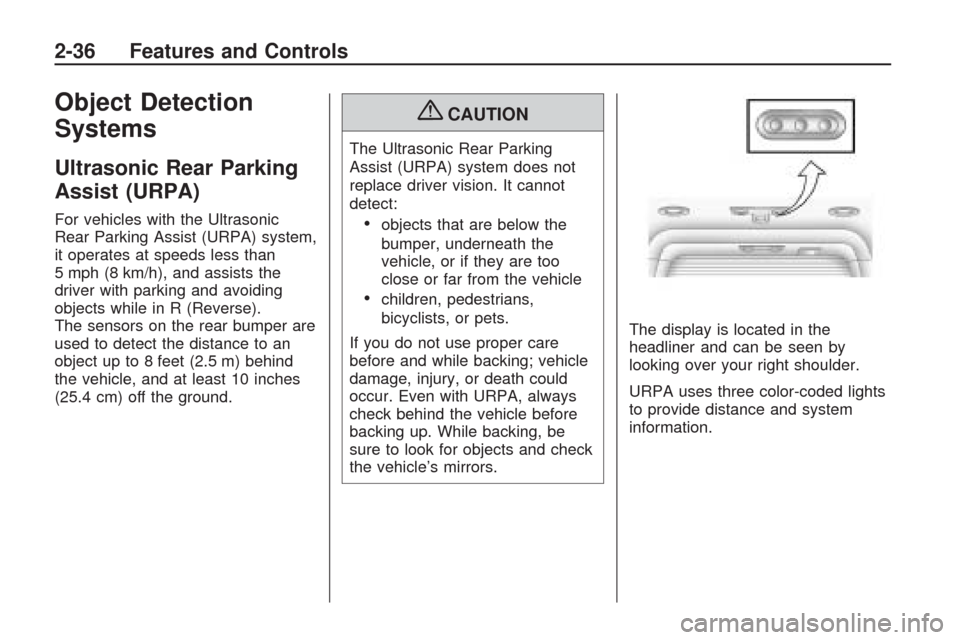
the vehicle’s mirrors.The display is located in the
headliner and can be seen by
looking over your right shoulder.
URPA uses three color-coded lights
to provide distance and system
information.
2-36 Features and Controls
Page 103 of 422
CAUTION (Continued)
So if you do not use proper care
before backing up, you could hit a
vehicle, child, pedestrian, bicyclist,
or pet, resulting in vehicle
damage, injury, or death. Even
though the vehicle has the RVC
system, always check carefully
before backing up by checking
behind and around the vehicle.
Vehicles Without Navigation
System
The rear vision camera system is
designed to help the driver
when backing up by displaying a
view of the area behind the vehicle.
When the key is in the ON/RUN
position and the driver shifts
the vehicle into R (Reverse), the
video image automatically appears
on the inside rear view mirror.Once the driver shifts out of
R (Reverse), the video image
automatically disappears from the
inside rear view mirror.
Turning the Rear Vision Camera
System Off or On
To turn off the rear vision camera
system, press and hold
z, located
on the inside rearview mirror,
until the left indicator light turns off.
The rear vision camera display
is now disabled.
To turn the rear vision camera
system on again, press and
hold
zuntil the left indicator light
illuminates. The rear vision
camera system display is now
enabled and the display will appear
in the mirror normally.
Vehicles With Navigation
System
The rear vision camera system is
designed to help the driver when
backing up by displaying a view
of the area behind the vehicle.
When the driver shifts the vehicle
into R (Reverse), the video image
automatically appears on the
navigation screen. Once the driver
shifts out of R (Reverse), the
navigation screen will go back to the
last screen that had been displayed,
after a delay.
Turning the Rear Vision Camera
System On or Off
To turn the rear vision camera
system on or off:
1. Shift into P (Park).
2. Press the MENU button to enter
the congure menu options, then
press the MENU hard key to
select Display or touch the
Display screen button.
Features and Controls 2-39
Page 107 of 422
The back of the vehicle is in an
accident, the position and
mounting angle of the camera can
change or the camera can be
affected. Be sure to have the
camera and its position and
mounting angle checked at your
dealer/retailer.
There are extreme temperature
changes.
The rear vision camera system
display in the rearview mirror may
turn off or not appear as expected
due to one of the following
conditions. If this occurs the left
indicator light on the mirror will ash.
A slow ash may indicate a
loss of video signal, or no
video signal present during the
reverse cycle.
A fast ash may indicate that the
display has been on for the
maximum allowable time during a
reverse cycle, or the display has
reached an Over Temperature
limit.
The fast ash conditions are used
to protect the video device from
high temperature conditions.
Once conditions return to normal
the device will reset and the
green indicator will stop ashing.
During any of these fault conditions,
the display will be blank and the
indicator will continue to ash as long
as the vehicle is in R (Reverse) or
until the conditions return to normal.
Pressing and holding
zwhen the
left indicator light is ashing will turn
off the video display along with
the left indicator light.
OnStar®System
OnStar uses several innovative
technologies and live advisors to
provide a wide range of safety,
security, information, and
convenience services. If the airbags
deploy, the system is designed to
make an automatic call to OnStar
Emergency advisors who can
request emergency services be sent
to your location. If the keys are
locked in the vehicle, call OnStar at
1-888-4-ONSTAR to have a signal
sent to unlock the doors. OnStar
Hands-Free Calling, including
30 trial minutes good for 60 days, is
available on most vehicles. OnStar
Turn-by-Turn Navigation service,
with one trial route, is available on
most vehicles. Press the OnStar
button to have an OnStar advisor
contact Roadside Service.
Features and Controls 2-43
Page 120 of 422
Sunroof
The vehicle may have a sunroof
over the front seats and a rear
sunroof over the second row seats.
The rear sunroof does not open.
The switches to operate the
front sunroof and rear sunshade
are located on the headliner
above the rearview mirror.
The ignition must be in ON/RUN or
ACC/ACCESSORY to operate
the sunroof. SeeIgnition Positions
on page 2-21.
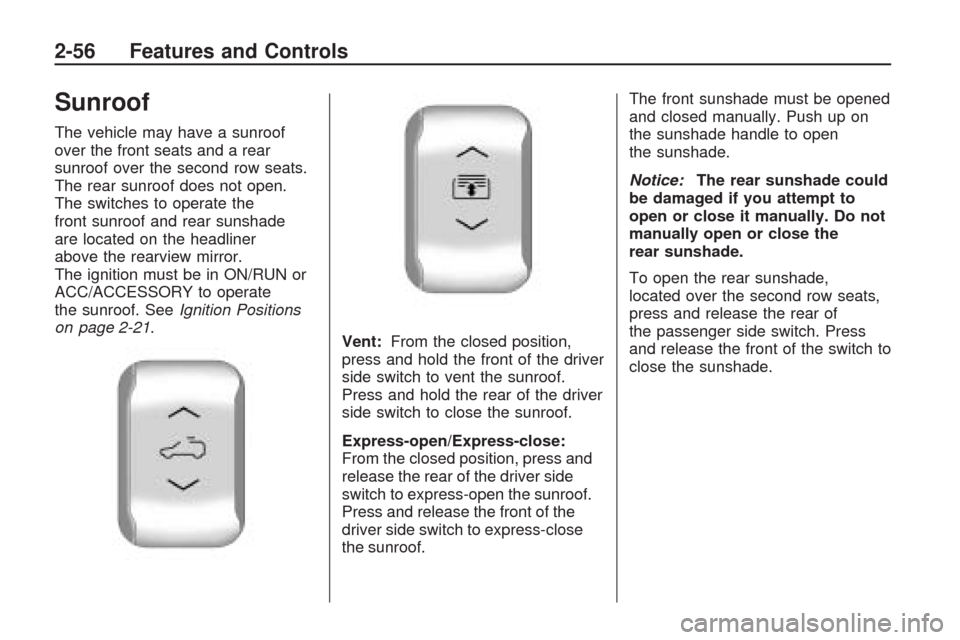
Vent:From the closed position,
press and hold the front of the driver
side switch to vent the sunroof.
Press and hold the rear of the driver
side switch to close the sunroof.
Express-open/Express-close:
From the closed position, press and
release the rear of the driver side
switch to express-open the sunroof.
Press and release the front of the
driver side switch to express-close
the sunroof.The front sunshade must be opened
and closed manually. Push up on
the sunshade handle to open
the sunshade.
Notice:The rear sunshade could
be damaged if you attempt to
open or close it manually. Do not
manually open or close the
rear sunshade.
To open the rear sunshade,
located over the second row seats,
press and release the rear of
the passenger side switch. Press
and release the front of the switch to
close the sunshade.
2-56 Features and Controls
Page 134 of 422
Courtesy Lamps
When a door is opened, the
courtesy lamps automatically
come on. They make it easier
when entering and exiting the
vehicle. The lamps can also be
turned on manually by fully turning
the instrument panel brightness
control clockwise.
The reading lamps, located on the
headliner above the rearview mirror,
can be turned on or off independent
of the automatic courtesy lamps,
when the doors are closed.
Dome Lamps
The dome lamps automatically
come on when a door is opened,
unless the dome lamp override
button is pressed in.
The lamps can also be turned on
and off by turning the instrument
panel brightness control clockwise
to the farthest position.
Dome Lamp Override
The dome lamp override button is
located next to the exterior lamps
control.
The dome lamp override sets the
dome lamps to remain off or come on
automatically when a door is opened.
E(Dome Lamp Override):Press
the button in and the dome lamps
remain off when a door is opened.
Press the button again to return it
to the extended position so that
the dome lamps come on when
a door is opened.
Entry Lighting
For vehicles with courtesy lamps,
they come on and stay on for a set
time whenever the unlock symbol
is pressed on the Remote Keyless
Entry (RKE) transmitter, if the
vehicle has one.If a door is opened, the lamps stay
on while it is open and then turn off
automatically about 20 seconds after
the door is closed. If the unlock
symbol is pressed and no door is
opened, the lamps turn off after
about 20 seconds.
Entry lighting includes a feature
called theater dimming. With theater
dimming, the lamps do not turn off
at the end of the delay time. Instead,
they slowly dim and then go out.
The delay time is canceled if the
ignition key is turned to ON/RUN
or the power door lock switch is
pressed. The lamps will dim
right away.
When the ignition is on, illuminated
entry is inactive, which means the
courtesy lamps will not come on
unless a door is opened.
3-14 Instrument Panel
Page 141 of 422
The air conditioning system
removes moisture from the air,
so a small amount of water might
drip under the vehicle while idling
or after turning off the engine.
This is normal.
@(Recirculation):Press to
turn the recirculation mode on or off.
An indicator light comes on when
recirculation is on. When the engine
is turned off, the recirculation mode
automatically turns off and must
be re-selected when the engine
is turned on again.
This mode recirculates and helps to
quickly cool the air inside the vehicle.
It can be used to prevent outside air
and odors from entering the vehicle.The recirculation mode cannot be
used with oor, defrost, or defogging
modes. If recirculation is selected in
these modes, the indicator ashes
three times and turns off. The air
conditioning also comes on when
this mode is activated unless the
outside air temperature is less than
40°F (4°C). While in recirculation
mode the windows can fog when the
weather is cold and damp. To clear
the fog, select either the defog or
defrost mode and increase the fan
speed.
REAR (Rear Climate Control):
Press to turn the rear heating
and air conditioning on or off.
SeeRear Air Conditioning and
Heating System on page 3-28or
Rear Air Conditioning and Heating
System and Electronic Climate
Controls on page 3-29.
Rear Window Defogger
The rear window defogger uses a
warming grid to remove fog from the
rear window.
<(Rear Window Defogger):
Press to turn the rear window
defogger on or off. The rear
window defogger stays on for about
10 minutes, before automatically
turning off. The defogger will also
turn off when the engine is turned off.
Do not drive the vehicle until all the
windows are clear.
For vehicles with heated outside
rearview mirrors, fog or frost
is cleared from the surface of
the mirror when
sharp on the inside of the rear
window. If you do, you could cut
or damage the warming grid, and
the repairs would not be covered
by the vehicle warranty. Do not
attach a temporary vehicle
license, tape, a decal or anything
similar to the defogger grid.
Instrument Panel 3-21