maintenance reset CHEVROLET TRAVERSE 2010 1.G Owners Manual
[x] Cancel search | Manufacturer: CHEVROLET, Model Year: 2010, Model line: TRAVERSE, Model: CHEVROLET TRAVERSE 2010 1.GPages: 448, PDF Size: 6.96 MB
Page 27 of 448
In Brief 1-21
Tire Pressure Monitor
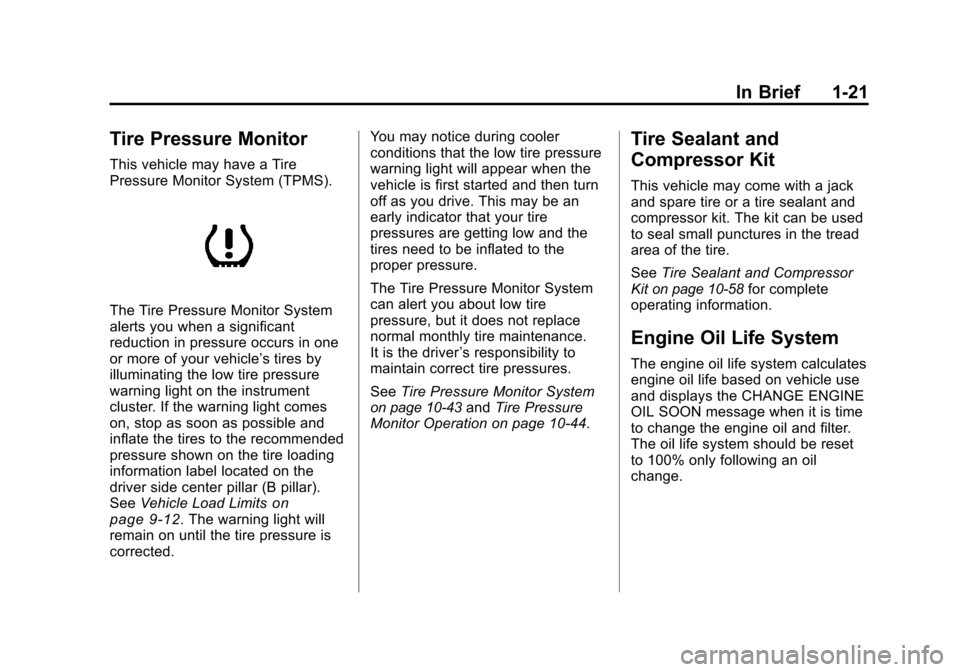
This vehicle may have a Tire
Pressure Monitor System (TPMS).
The Tire Pressure Monitor System
alerts you when a significant
reduction in pressure occurs in one
or more of your vehicle’s tires by
illuminating the low tire pressure
warning light on the instrument
cluster. If the warning light comes
on, stop as soon as possible and
inflate the tires to the recommended
pressure shown on the tire loading
information label located on the
driver side center pillar (B pillar).
SeeVehicle Load Limits
on
page 9‑12. The warning light will
remain on until the tire pressure is
corrected. You may notice during cooler
conditions that the low tire pressure
warning light will appear when the
vehicle is first started and then turn
off as you drive. This may be an
early indicator that your tire
pressures are getting low and the
tires need to be inflated to the
proper pressure.
The Tire Pressure Monitor System
can alert you about low tire
pressure, but it does not replace
normal monthly tire maintenance.
It is the driver
’s responsibility to
maintain correct tire pressures.
See Tire Pressure Monitor System
on page 10‑43andTire Pressure
Monitor Operation on page 10‑44.
Tire Sealant and
Compressor Kit
This vehicle may come with a jack
and spare tire or a tire sealant and
compressor kit. The kit can be used
to seal small punctures in the tread
area of the tire.
See Tire Sealant and Compressor
Kit
on page 10‑58for complete
operating information.
Engine Oil Life System
The engine oil life system calculates
engine oil life based on vehicle use
and displays the CHANGE ENGINE
OIL SOON message when it is time
to change the engine oil and filter.
The oil life system should be reset
to 100% only following an oil
change.
Page 28 of 448
1-22 In Brief
Resetting the Oil Life System
1. Turn the ignition to ON/RUN,with the engine off.
2. If the vehicle has Driver Information Center (DIC)
buttons: Press the vehicle
information button until OIL LIFE
REMAINING displays.
If the vehicle does not have
Driver Information Center (DIC)
buttons: The vehicle must be in
P (Park) to access this display.
Press the trip odometer reset
stem until OIL LIFE REMAINING
displays.
3. If the vehicle has Driver Information Center (DIC)
buttons: Press and hold the set/
reset button until “100%”is
displayed. Three chimes sound
and the CHANGE ENGINE OIL
SOON message goes off. If the vehicle does not have
Driver Information Center (DIC)
buttons: Press and hold the trip
odometer reset stem until OIL
LIFE REMAINING shows
“100%.”
Three chimes sound
and the CHANGE ENGINE OIL
SOON message goes off.
4. Turn the key to LOCK/OFF.
See Engine Oil Life System
on
page 10‑10.
Driving for Better Fuel
Economy
Driving habits can affect fuel
mileage. Here are some driving tips
to get the best fuel economy
possible.
.Avoid fast starts and accelerate
smoothly.
.Brake gradually and avoid
abrupt stops.
.Avoid idling the engine for long
periods of time.
.When road and weather
conditions are appropriate, use
cruise control, if equipped.
.Always follow posted speed
limits or drive more slowly when
conditions require.
.Keep vehicle tires properly
inflated.
.Combine several trips into a
single trip.
.Replace the vehicle's tires with
the same TPC Spec number
molded into the tire's sidewall
near the size.
.Follow recommended scheduled
maintenance.
Page 150 of 448
5-24 Instruments and Controls
will alert you to change the oil on a
schedule consistent with your
driving conditions.
When the remaining oil life is low,
the CHANGE ENGINE OIL SOON
message will appear on the display.
See“CHANGE ENGINE OIL SOON”
under Engine Oil Messages
on
page 5‑34. You should change the
oil as soon as you can. See Engine
Oil
on page 10‑8. In addition to the
engine oil life system monitoring the
oil life, additional maintenance is
recommended in the Maintenance
Schedule in this manual. See
Scheduled Maintenance
on
page 11‑2for more information.
Remember, you must reset the OIL
LIFE display yourself after each oil
change. It will not reset itself. Also,
be careful not to reset the OIL LIFE
display accidentally at any time
other than when the oil has just
been changed. It cannot be reset
accurately until the next oil change.
To reset the engine oil life system,
see Engine Oil Life System
on
page 10‑10. PARK ASSIST
If your vehicle has the Ultrasonic
Rear Parking Assist (URPA) system,
press the vehicle information button
until PARK ASSIST displays. This
display allows the system to be
turned on or off. Once in this
display, press the set/reset button to
select between ON or OFF. If you
choose ON, the system will be
turned on. If you choose OFF, the
system will be turned off. The URPA
system automatically turns back on
after each vehicle start. When the
URPA system is turned off and the
vehicle is shifted out of P (Park), the
DIC will display the PARK ASSIST
OFF message as a reminder that
the system has been turned off. See
Object Detection System Messages
on page 5‑35and
Ultrasonic
Parking Assiston page 9‑33for
more information.
UNITS
Press the vehicle information button
until UNITS displays. This display
allows you to select between English or Metric units of
measurement. Once in this display,
press the set/reset button to select
between ENGLISH or METRIC
units. All of the vehicle information
will then be displayed in the unit of
measurement selected.
FRONT TIRES or REAR TIRES
On vehicles with the Tire Pressure
Monitor System (TPMS), the
pressure for each tire can be viewed
in the DIC. The tire pressure will be
shown in either pounds per square
inch (psi) or kilopascals (kPa).
Press the vehicle information button
until the DIC displays FRONT
TIRES PSI (kPa) LEFT ##
RIGHT ##. Press the vehicle
information button again until the
DIC displays REAR TIRES
PSI (kPa) LEFT ## RIGHT ##.
If a low tire pressure condition is
detected by the system while
driving, a message advising you
add air to a specific tire will appear
Page 155 of 448
Instruments and Controls 5-29
driven 5 miles (8 km) before it is
started again, and then the
retro-active reset feature is
activated, the display will show
5 miles (8 km). As the vehicle begins
moving, the display will then
increase to 5.1 miles (8.2 km),
5.2 miles (8.4 km), etc.
If the retro-active reset feature is
activated after the vehicle is started,
but before it begins moving, the
display will show the number of
miles (mi) or kilometers (km) that
were driven during the last ignition
cycle.
OIL LIFE
To access this display, the vehicle
must be in P (Park). Press the trip
odometer reset stem until OIL LIFE
REMAINING displays. This display
shows an estimate of the oil's
remaining useful life. If you see
99% OIL LIFE REMAINING on the
display, that means 99% of the
current oil life remains. The engine
oil life system will alert you tochange the oil on a schedule
consistent with your driving
conditions.
When the remaining oil life is low,
the CHANGE ENGINE OIL SOON
message will appear on the display.
See
“CHANGE ENGINE OIL SOON”
under Engine Oil Messages
on
page 5‑34. You should change the
oil as soon as you can. See Engine
Oil
on page 10‑8. In addition to the
engine oil life system monitoring the
oil life, additional maintenance is
recommended in the Maintenance
Schedule in this manual. See
Scheduled Maintenance
on
page 11‑2for more information.
Remember, you must reset the OIL
LIFE display yourself after each oil
change. It will not reset itself. Also,
be careful not to reset the OIL LIFE
display accidentally at any time
other than when the oil has just
been changed. It cannot be reset
accurately until the next oil change.
To reset the engine oil life system,
see Engine Oil Life System
on
page 10‑10. PARK ASSIST
To access this display, the vehicle
must be in P (Park). If your vehicle
has the Ultrasonic Rear Parking
Assist (URPA) system, press the trip
odometer reset stem until PARK
ASSIST displays. This display
allows the system to be turned on or
off. Once in this display, press and
hold the trip odometer reset stem to
select between ON or OFF. If you
choose ON, the system will be
turned on. If you choose OFF, the
system will be turned off. The URPA
system automatically turns back on
after each vehicle start. When the
URPA system is turned off and the
vehicle is shifted out of P (Park), the
DIC will display the PARK ASSIST
OFF message as a reminder that
the system has been turned off. See
Object Detection System Messages
on page 5‑35and
Ultrasonic
Parking Assiston page 9‑33for
more information.
Page 160 of 448
5-34 Instruments and Controls
Engine Oil Messages
CHANGE ENGINE OIL SOON
This message displays when the
engine oil needs to be changed.
When you change the engine oil, be
sure to reset the CHANGE ENGINE
OIL SOON message. SeeEngine
Oil Life System
on page 10‑10for
information on how to reset the
message. See Engine Oil
on
page 10‑8and Scheduled
Maintenanceon page 11‑2for
more information.
OIL PRESSURE LOW STOP
ENGINE
Notice: If you drive your vehicle
while the engine oil pressure is
low, severe engine damage may
occur. If a low oil pressure
warning appears on the
instrument panel cluster and/or
DIC, stop the vehicle as soon as
possible. Do not drive the vehicle
until the cause of the low oil pressure is corrected. See
Engine
Oil
on page 10‑8for more
information.
This message displays if low oil
pressure levels occur. Stop the
vehicle as soon as safely possible
and do not operate it until the cause
of the low oil pressure has been
corrected. Check the oil as soon as
possible and have your vehicle
serviced by your dealer. See Engine
Oil on page 10‑8.
Engine Power Messages
ENGINE POWER IS REDUCED
This message displays and a chime
sounds when the cooling system
temperature gets too hot and the
engine further enters the engine
coolant protection mode. See
Engine Overheating
on page 10‑18for further information.
This message also displays when
the vehicle's engine power is
reduced. Reduced engine power
can affect the vehicle's ability to accelerate. If this message is on,
but there is no reduction in
performance, proceed to your
destination. The performance may
be reduced the next time the vehicle
is driven. The vehicle may be driven
at a reduced speed while this
message is on, but acceleration and
speed may be reduced. Anytime
this message stays on, the vehicle
should be taken to your dealer for
service as soon as possible.
Fuel System Messages
FUEL LEVEL LOW
This message displays and a chime
sounds if the fuel level is low. Refuel
as soon as possible. See
Fuel
Gauge
on page 5‑12and Fuelon
page 9‑40for more information.
Page 319 of 448
Vehicle Care 10-11
If the vehicle has Driver Information
Center (DIC) buttons:
1. Turn the ignition to ON/RUN,with the engine off.
2. Press the vehicle information button until OIL LIFE
REMAINING displays.
3. Press and hold the set/reset button until “100%”is displayed.
Three chimes sound and the
CHANGE ENGINE OIL SOON
message goes off.
4. Turn the key to LOCK/OFF.
If the CHANGE ENGINE OIL SOON
message comes back on when the
vehicle is started, the engine oil life
system has not reset. Repeat the
procedure.What to Do with Used Oil
Used engine oil contains certain
elements that can be unhealthy for
your skin and could even cause
cancer. Do not let used oil stay on
your skin for very long. Clean your
skin and nails with soap and water,
or a good hand cleaner. Wash or
properly dispose of clothing or rags
containing used engine oil. See the
manufacturer's warnings about the
use and disposal of oil products.
Used oil can be a threat to the
environment. If you change your
own oil, be sure to drain all the oil
from the filter before disposal. Never
dispose of oil by putting it in the
trash, pouring it on the ground, into
sewers, or into streams or bodies of
water. Recycle it by taking it to a
place that collects used oil.
Automatic Transmission
Fluid
It is not necessary to check the
transmission fluid level.
A transmission fluid leak is the only
reason for fluid loss. If a leak
occurs, take the vehicle to the
dealer and have it repaired as soon
as possible.
Change the fluid at the intervals
listed in Scheduled Maintenance
on
page 11‑2, and be sure to use the
transmission fluid listed in
Recommended Fluids and
Lubricants on page 11‑7.
Notice: Use of the incorrect
automatic transmission fluid may
damage the vehicle, and the
damages may not be covered by
the vehicle's warranty. Always
use the automatic transmission
fluid listed in Recommended
Fluids and Lubricants
on
page 11‑7.
Page 335 of 448
Vehicle Care 10-27
For the proper size and type see
Maintenance Replacement Partson
page 11‑9.
Backglass Wiper Blade
To replace the backglass wiper
blade:
1. Pull the wiper blade assembly away from the backglass.
The backglass wiper blade will
not lock in a vertical position so
care should be used when
pulling it away from the vehicle.
2. Rotate the wiper blade assembly, hold the wiper arm in
position, and push the blade
away from the wiper arm.
3. Replace the wiper blade.
4. Return the wiper arm and blade assembly to the rest position on
the glass.
Headlamp Aiming
Headlamp aim has been preset at
the factory and should need no
further adjustment.
However, if your vehicle is damaged
in a crash, the headlamp aim may
be affected. Aim adjustment to the
low-beam headlamps may be
necessary if oncoming drivers flash
their high-beam headlamps at you
(for vertical aim).
If the headlamps need to be
re-aimed, it is recommended that
you take the vehicle to your dealer
for service.
Bulb Replacement
For the proper type of replacement
bulbs, see Replacement Bulbson
page 10‑29.
For any bulb changing procedure
not listed in this section, contact
your dealer.
Halogen Bulbs
{WARNING
Halogen bulbs have pressurized
gas inside and can burst if you
drop or scratch the bulb. You or
others could be injured. Be sure
to read and follow the instructions
on the bulb package.
Page 356 of 448
10-48 Vehicle Care
Tire Inspection
We recommend that you
regularly inspect your vehicle's
tires, including the spare tire,
if the vehicle has one, for signs
of wear or damage. SeeWhen It
Is Time for New Tires
on
page 10‑49
for more information.
Tire Rotation
Tires should be rotated every
5,000 to 8,000 miles (8 000 to
13 000 km). See Scheduled
Maintenance
on page 11‑2.
The purpose of a regular tire
rotation is to achieve a uniform
wear for all tires on the vehicle.
This will ensure that the vehicle
continues to perform most like it
did when the tires were new. Any time you notice unusual
wear, rotate the tires as soon as
possible and check wheel
alignment. Also check for
damaged tires or wheels. See
When It Is Time for New Tires
on
page 10‑49
and Wheel
Replacement
on page 10‑54.
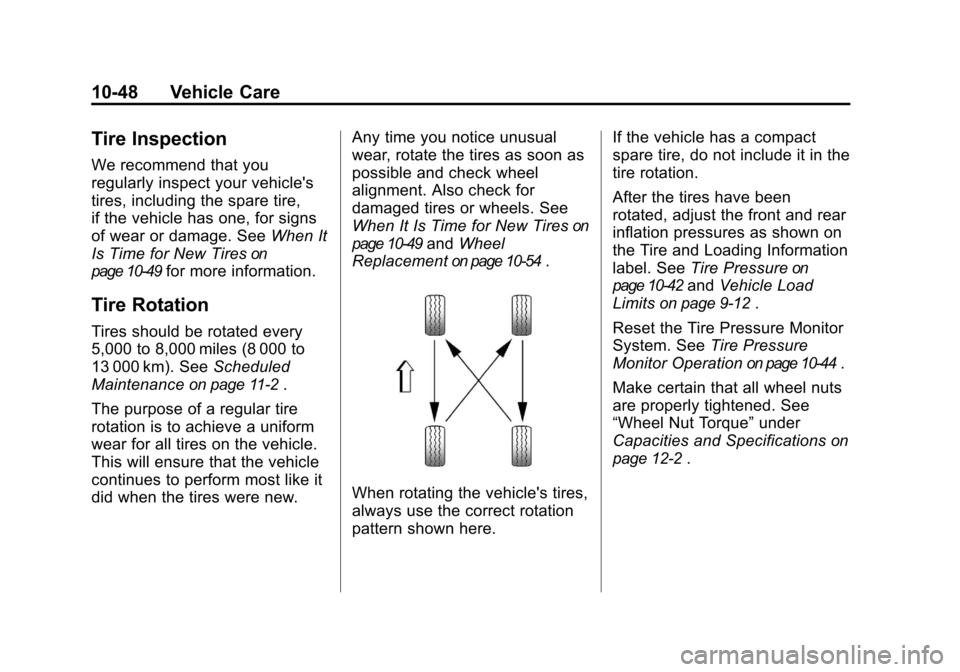
When rotating the vehicle's tires,
always use the correct rotation
pattern shown here. If the vehicle has a compact
spare tire, do not include it in the
tire rotation.
After the tires have been
rotated, adjust the front and rear
inflation pressures as shown on
the Tire and Loading Information
label. See
Tire Pressure
on
page 10‑42
and Vehicle Load
Limits
on page 9‑12.
Reset the Tire Pressure Monitor
System. See Tire Pressure
Monitor Operation
on page 10‑44.
Make certain that all wheel nuts
are properly tightened. See
“Wheel Nut Torque” under
Capacities and Specifications
on
page 12‑2
.
Page 402 of 448
11-2 Service and Maintenance
{WARNING
Performing maintenance work can
be dangerous. Some jobs can
cause serious injury. Perform
maintenance work only if you
have the required know-how and
the proper tools and equipment.
If in doubt, see your dealer to
have a qualified technician do the
work. SeeDoing Your Own
Service Work on page 10‑4.
At your dealer, you can be certain
that you will receive the highest
level of service available. Your
dealer has specially trained service
technicians, uses genuine
replacement parts, as well as, up to
date tools and equipment to ensure
fast and accurate diagnostics. The proper replacement parts,
fluids, and lubricants to use are
listed in
Recommended Fluids and
Lubricantson page 11‑7and
Maintenance Replacement Partson
page 11‑9. We recommend the use
of genuine parts from your dealer.
Rotation of New Tires
To maintain ride, handling, and
performance of the vehicle, it is
important that the first rotation
service for new tires be performed
when they have 8 000 to 13 000 km
(5,000 to 8,000 miles). See Tire
Rotation on page 10‑48.
Scheduled
Maintenance
When the Change Engine Oil
Soon Message Displays
Change engine oil and filter. See
Engine Oilon page 10‑8. An
Emission Control Service.
When the CHANGE ENGINE OIL
SOON message displays, service is
required for the vehicle as soon as
possible, within the next 1 000 km/
600 miles. If driving under the best
conditions, the engine oil life system
might not indicate the need for
vehicle service for more than a year.
The engine oil and filter must be
changed at least once a year and
the oil life system must be reset.
Your dealer has trained service
technicians who will perform this
Page 403 of 448
Service and Maintenance 11-3
work and reset the system. If the
engine oil life system is reset
accidentally, service the vehicle
within 5 000 km/3,000 miles since
the last service. Reset the oil life
system whenever the oil is changed.
SeeEngine Oil Life System
on
page 10‑10.
When the CHANGE ENGINE OIL
SOON message displays, certain
services, checks, and inspections
are required. The services
described for Maintenance Ishould
be performed at every engine oil
change. The services described for
Maintenance IIshould be
performed when:
.Maintenance Iwas performed
the last time the engine oil was
changed.
.It has been 10 months or more
since the CHANGE ENGINE OIL
SOON message has displayed
or since the last service.
Maintenance I
.Change engine oil and filter. See
Engine Oilon page 10‑8.An
Emission Control Service.
.Engine coolant level check. See
Engine Coolant on page 10‑14.
.Windshield washer fluid level
check. See Washer Fluidon
page 10‑21.
.Tire inflation check. See Tire
Pressure on page 10‑42.
.Tire wear inspection. See Tire
Inspection on page 10‑48.
.Rotate tires. See Tire Rotationon page 10‑48.
.Fluids visual leak check (or
every 12 months, whichever
occurs first). A leak in any
system must be repaired and the
fluid level checked.
.Engine air cleaner filter
inspection (vehicles driven in
dusty conditions only). See
Engine Air Cleaner/Filter
on
page 10‑12.
.Brake system inspection (or
every 12 months, whichever
occurs first).
Maintenance II
.Perform all services described in
MaintenanceI.
.Steering and suspension
inspection. Visual inspection for
damaged, loose, or missing
parts or signs of wear.
.Engine cooling system
inspection. Visual inspection of
hoses, pipes, fittings, and
clamps and replacement,
if needed.
.Windshield wiper blade
inspection for wear, cracking,
or contamination and windshield
and wiper blade cleaning,
if contaminated. See Exterior
Care
on page 10‑86. Worn or
damaged wiper blade
replacement. See Wiper Blade
Replacement on page 10‑26.