buttons CHEVROLET TRAVERSE 2017 1.G User Guide
[x] Cancel search | Manufacturer: CHEVROLET, Model Year: 2017, Model line: TRAVERSE, Model: CHEVROLET TRAVERSE 2017 1.GPages: 394, PDF Size: 6.47 MB
Page 38 of 394
Chevrolet Traverse Owner Manual (GMNA-Localizing-U.S./Canada/Mexico-
9955676) - 2017 - crc - 3/29/16
Keys, Doors, and Windows 37
Warning (Continued)
.Young children who get into
unlocked vehicles may be
unable to get out. A child
can be overcome by
extreme heat and can suffer
permanent injuries or even
death from heat stroke.
Always lock the vehicle
whenever leaving it.
. Outsiders can easily enter
through an unlocked door
when you slow down or stop
the vehicle. Locking the
doors can help prevent this
from happening.
To lock or unlock a door manually:
. From the inside use the door
lock knob on the window sill.
. From the outside turn the key
toward the front or rear of the
vehicle, or press the or button on
the Remote Keyless Entry (RKE)
transmitter.
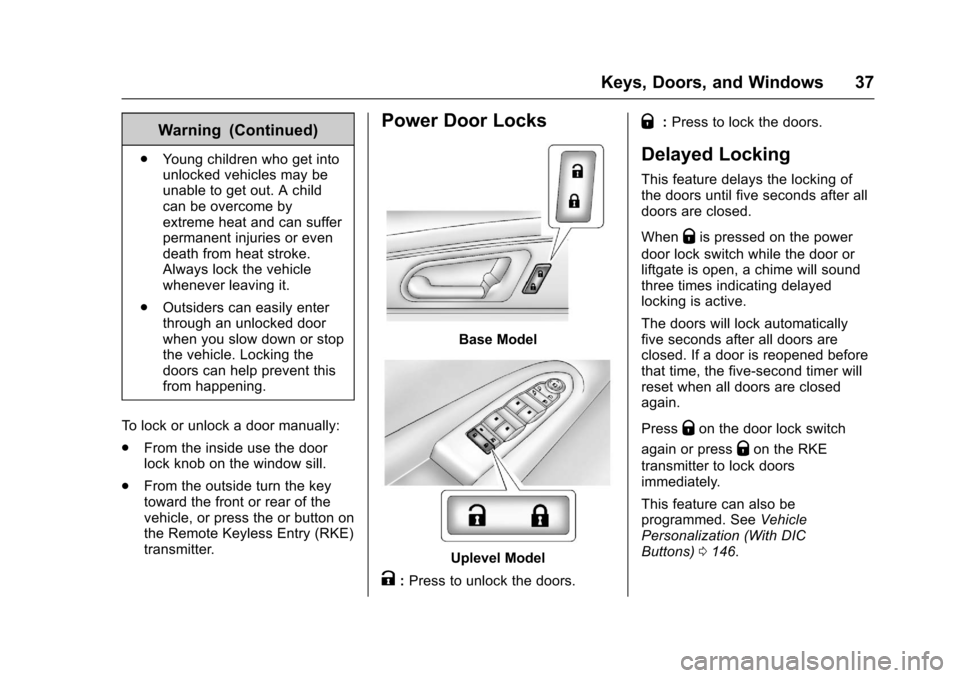
Power Door Locks
Base Model
Uplevel Model
K:Press to unlock the doors.
Q:Press to lock the doors.
Delayed Locking
This feature delays the locking of
the doors until five seconds after all
doors are closed.
When
Qis pressed on the power
door lock switch while the door or
liftgate is open, a chime will sound
three times indicating delayed
locking is active.
The doors will lock automatically
five seconds after all doors are
closed. If a door is reopened before
that time, the five-second timer will
reset when all doors are closed
again.
Press
Qon the door lock switch
again or press
Qon the RKE
transmitter to lock doors
immediately.
This feature can also be
programmed. See Vehicle
Personalization (With DIC
Buttons) 0146.
Page 39 of 394
Chevrolet Traverse Owner Manual (GMNA-Localizing-U.S./Canada/Mexico-
9955676) - 2017 - crc - 3/29/16
38 Keys, Doors, and Windows
Automatic Door Locks
The doors will lock automatically
when all doors are closed, the
ignition is on, and the vehicle is
shifted out of P (Park).
To unlock the doors:
.Press
Kon the power door lock
switch.
. Shift the transmission into
P (Park).
Automatic door locking cannot be
disabled. Automatic door unlocking
can be programmed. See Vehicle
Personalization (With DIC
Buttons) 0146.
Lockout Protection
When locking is requested with the
driver door open and the key in the
ignition, all the doors will lock and
then the driver door will unlock.
This can be manually overridden by
pressing and holding
Qon the
power door lock switch.
Safety Locks
Caution
Pulling the inside door handle
while the rear door safety locks
are engaged could damage your
vehicle. Do not pull the inside
door handle while the rear door
safety locks are engaged.
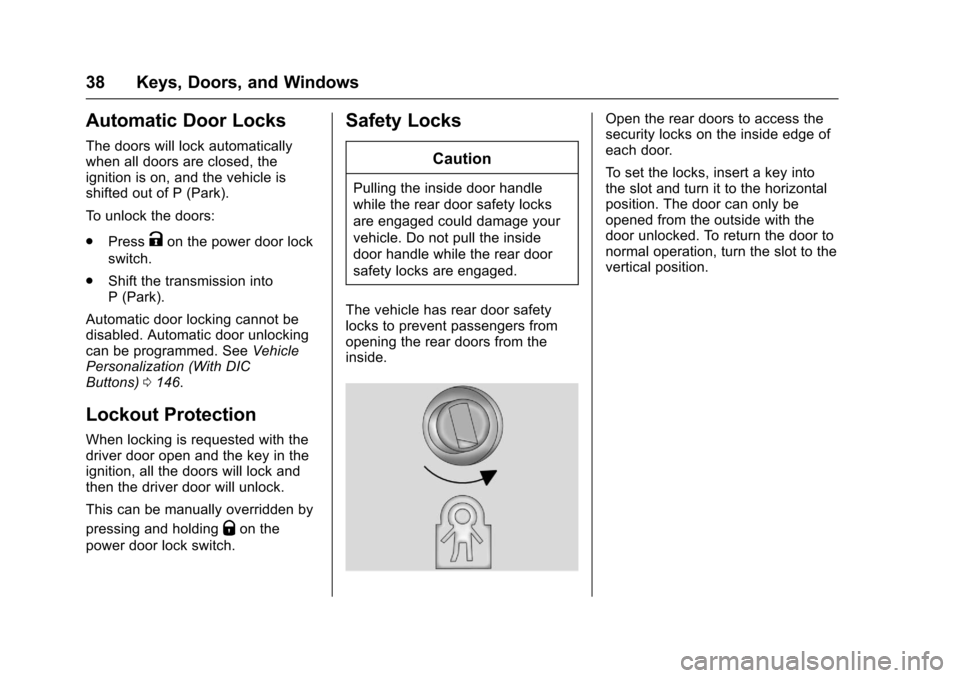
The vehicle has rear door safety
locks to prevent passengers from
opening the rear doors from the
inside.
Open the rear doors to access the
security locks on the inside edge of
each door.
To set the locks, insert a key into
the slot and turn it to the horizontal
position. The door can only be
opened from the outside with the
door unlocked. To return the door to
normal operation, turn the slot to the
vertical position.
Page 41 of 394
Chevrolet Traverse Owner Manual (GMNA-Localizing-U.S./Canada/Mexico-
9955676) - 2017 - crc - 3/29/16
40 Keys, Doors, and Windows
{Warning
You or others could be injured if
caught in the path of the power
liftgate. Make sure there is no one
in the way of the liftgate as it is
opening and closing.
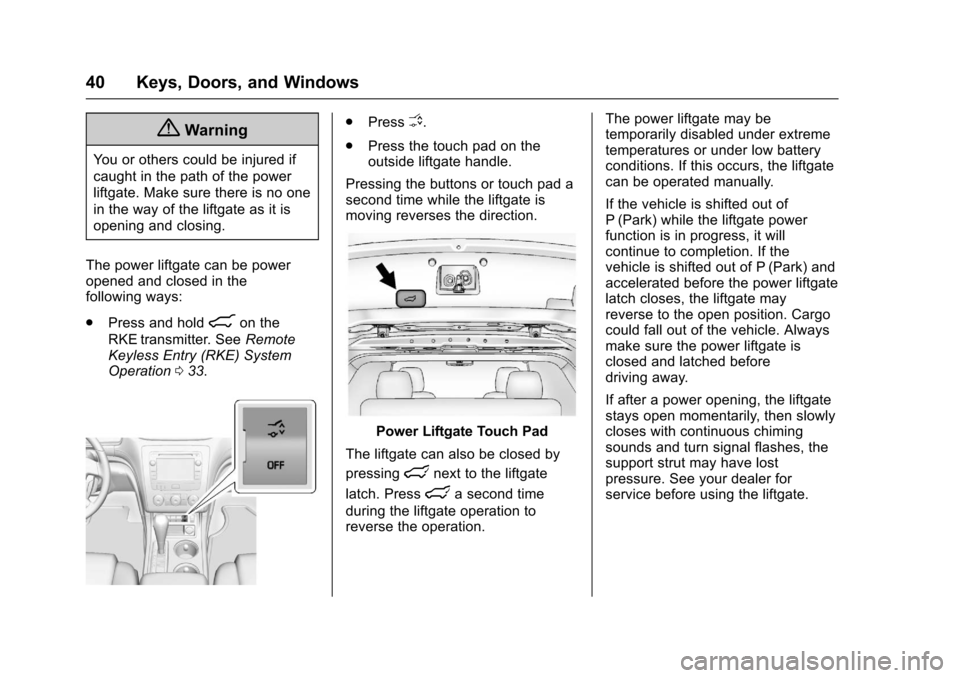
The power liftgate can be power
opened and closed in the
following ways:
. Press and hold
8on the
RKE transmitter. See Remote
Keyless Entry (RKE) System
Operation 033.
.
PressO.
. Press the touch pad on the
outside liftgate handle.
Pressing the buttons or touch pad a
second time while the liftgate is
moving reverses the direction.
Power Liftgate Touch Pad
The liftgate can also be closed by
pressing
lnext to the liftgate
latch. Press
la second time
during the liftgate operation to
reverse the operation. The power liftgate may be
temporarily disabled under extreme
temperatures or under low battery
conditions. If this occurs, the liftgate
can be operated manually.
If the vehicle is shifted out of
P (Park) while the liftgate power
function is in progress, it will
continue to completion. If the
vehicle is shifted out of P (Park) and
accelerated before the power liftgate
latch closes, the liftgate may
reverse to the open position. Cargo
could fall out of the vehicle. Always
make sure the power liftgate is
closed and latched before
driving away.
If after a power opening, the liftgate
stays open momentarily, then slowly
closes with continuous chiming
sounds and turn signal flashes, the
support strut may have lost
pressure. See your dealer for
service before using the liftgate.
Page 47 of 394
Chevrolet Traverse Owner Manual (GMNA-Localizing-U.S./Canada/Mexico-
9955676) - 2017 - crc - 3/29/16
46 Keys, Doors, and Windows
Folding Mirrors
For vehicles with manual folding
mirrors, push the mirror toward the
vehicle. Pull the mirror out to return
to its original position.
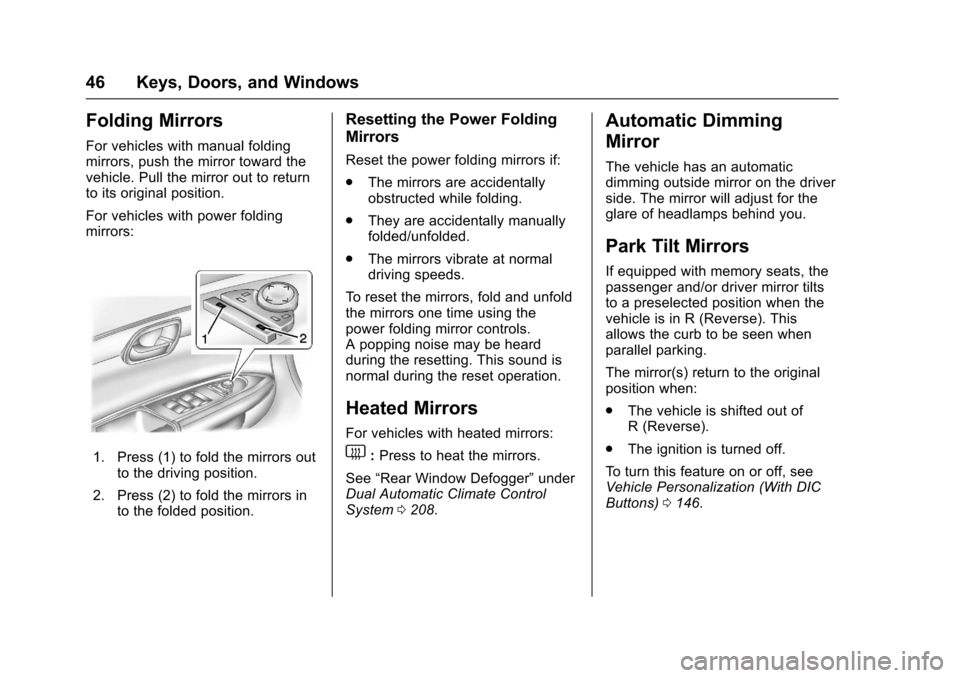
For vehicles with power folding
mirrors:
1. Press (1) to fold the mirrors outto the driving position.
2. Press (2) to fold the mirrors in to the folded position.
Resetting the Power Folding
Mirrors
Reset the power folding mirrors if:
.The mirrors are accidentally
obstructed while folding.
. They are accidentally manually
folded/unfolded.
. The mirrors vibrate at normal
driving speeds.
To reset the mirrors, fold and unfold
the mirrors one time using the
power folding mirror controls.
A popping noise may be heard
during the resetting. This sound is
normal during the reset operation.
Heated Mirrors
For vehicles with heated mirrors:
1: Press to heat the mirrors.
See “Rear Window Defogger” under
Dual Automatic Climate Control
System 0208.
Automatic Dimming
Mirror
The vehicle has an automatic
dimming outside mirror on the driver
side. The mirror will adjust for the
glare of headlamps behind you.
Park Tilt Mirrors
If equipped with memory seats, the
passenger and/or driver mirror tilts
to a preselected position when the
vehicle is in R (Reverse). This
allows the curb to be seen when
parallel parking.
The mirror(s) return to the original
position when:
.
The vehicle is shifted out of
R (Reverse).
. The ignition is turned off.
To turn this feature on or off, see
Vehicle Personalization (With DIC
Buttons) 0146.
Page 48 of 394
Chevrolet Traverse Owner Manual (GMNA-Localizing-U.S./Canada/Mexico-
9955676) - 2017 - crc - 3/29/16
Keys, Doors, and Windows 47
Interior Mirrors
Interior Rearview Mirrors
Adjust the rearview mirror for a clear
view of the area behind your
vehicle.
If equipped with OnStar, the vehicle
may have three control buttons at
the bottom of the mirror. See your
dealer for more information about
OnStar and how to subscribe to it.
See“OnStar,” if equipped.
Do not spray glass cleaner directly
on the mirror. Use a soft towel
dampened with water.
Manual Rearview Mirror
If equipped, push the tab forward for
daytime use and pull it for nighttime
use to avoid glare from the
headlamps from behind.
Automatic Dimming
Rearview Mirror
If equipped, automatic dimming
reduces the glare of the headlamps
from behind. This feature comes on
when the vehicle is started.
Windows
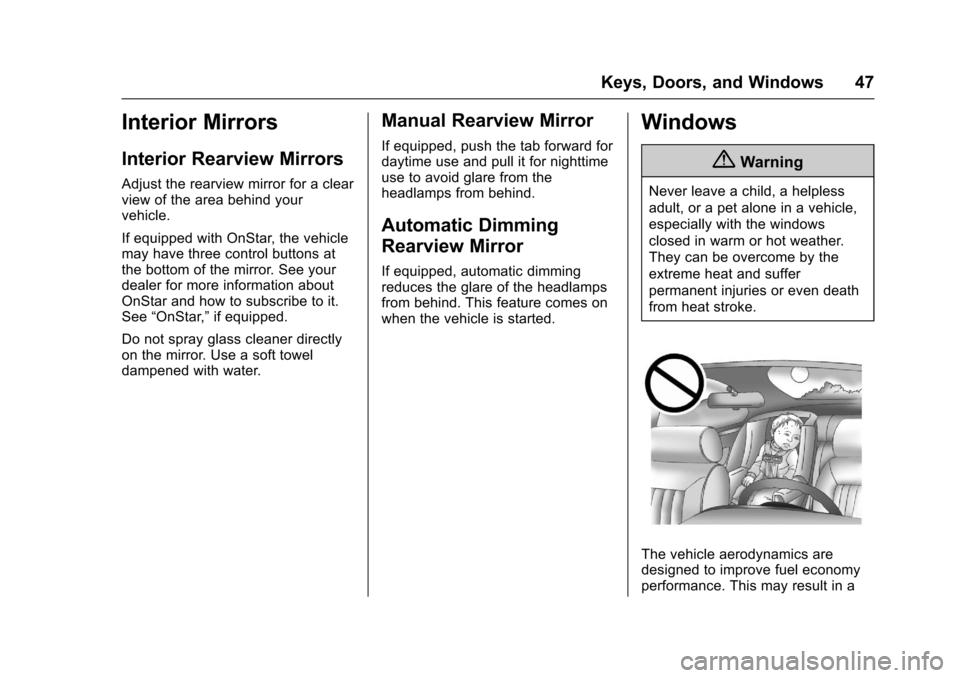
{Warning
Never leave a child, a helpless
adult, or a pet alone in a vehicle,
especially with the windows
closed in warm or hot weather.
They can be overcome by the
extreme heat and suffer
permanent injuries or even death
from heat stroke.
The vehicle aerodynamics are
designed to improve fuel economy
performance. This may result in a
Page 58 of 394

Chevrolet Traverse Owner Manual (GMNA-Localizing-U.S./Canada/Mexico-
9955676) - 2017 - crc - 3/29/16
Seats and Restraints 57
2. Push and pull on the seatbackto make sure it is locked.
Power Reclining Seatbacks
To adjust a power seatback,
if equipped:
.Tilt the top of the control
rearward to recline.
. Tilt the top of the control forward
to raise.
Memory Seats
If equipped, the controls on the
driver door are used to program and
recall memory settings for the driver
seat and outside mirrors.
Storing Memory Positions
To save into memory:
1. Adjust the driver seat, seatback recliner, and both outside
mirrors.
Not all vehicles will have the
ability to save and recall the
mirror positions. 2. Press and hold 1 until
two beeps sound.
3. Repeat for a second driver position using 2.
To recall, press and release 1 or 2.
The vehicle must be in P (Park).
A single beep will sound. The seat
and outside mirrors will move to the
position previously stored for the
identified driver.
Memory Remote Recall
The memory feature can recall the
driver seat and outside mirrors to
stored positions when entering the
vehicle.
To activate, unlock the driver door
with the Remote Keyless
Entry (RKE) transmitter. The driver
seat and outside mirrors will move
to the memory position associated
with the transmitter used to unlock
the vehicle.
This feature is turned on or off using
the vehicle personalization menu.
See Vehicle Personalization (With
DIC Buttons) 0146.
Page 59 of 394
Chevrolet Traverse Owner Manual (GMNA-Localizing-U.S./Canada/Mexico-
9955676) - 2017 - crc - 3/29/16
58 Seats and Restraints
To stop recall movement, press one
of the power seat controls, memory
buttons, or the power mirror buttons.
If something has blocked the driver
seat while recalling a memory
position, the recall may stop.
Remove the obstruction; then press
and hold the appropriate manual
control for the memory item that is
not recalling for two seconds. Try
recalling the memory position again
by pressing the appropriate memory
button. If the memory position is still
not recalling, see your dealer for
service.
Easy Exit Driver Seat
This feature can move the seat
rearward to allow extra room to exit
the vehicle.
S(Easy Exit Driver Seat) :Press
to activate the recall. The vehicle
must be in P (Park).
If this feature is programmed on in
the vehicle personalization menu,
automatic seat movement occurs
when the ignition key is removed. A single beep sounds. The driver
seat moves back approximately
8 cm (3 in). To move the seat back
farther, press
Sagain until the seat
is all the way back.
If something has blocked the driver
seat while recalling the exit position,
the recall may stop. Remove the
obstruction; then press and hold the
power seat control rearward for
two seconds. Try recalling the exit
position again. If the exit position is
still not recalling, see your dealer for
service.
See Vehicle Personalization (With
DIC Buttons) 0146.
Heated and Cooled Front
Seats
{Warning
If you cannot feel temperature
change or pain to the skin, the
seat heater may cause burns. To
reduce the risk of burns, people
with such a condition should use
(Continued)
Warning (Continued)
care when using the seat heater,
especially for long periods of
time. Do not place anything on
the seat that insulates against
heat, such as a blanket, cushion,
cover, or similar item. This may
cause the seat heater to
overheat. An overheated seat
heater may cause a burn or may
damage the seat.
Page 60 of 394

Chevrolet Traverse Owner Manual (GMNA-Localizing-U.S./Canada/Mexico-
9955676) - 2017 - crc - 3/29/16
Seats and Restraints 59
Heated and Cooled Seat ButtonsShown, Heated Seat Buttons Similar
If equipped, the buttons are on the
center stack. To operate, the engine
must be running.
I: If equipped, press to heat the
seatback only.
H: If equipped, press to cool the
entire seat.
J: Press to heat the seat and
seatback.
Press the button once for the
highest setting. With each press of
the button, the seat will change to
the next lower setting, and then to the off setting. The lights indicate
three for the highest setting and one
for the lowest.
The passenger heated seat may
take longer to heat up.
The heated and/or cooled seats are
canceled after the ignition is
turned off.
Remote Start Heated Seats
When it is cold outside, the heated
seats may turn on automatically
during a remote vehicle start. The
heated seats will be canceled when
the ignition is turned on. Press the
desired heated seat button to use
the heated seats after the vehicle is
started.
The heated seat button lights will
not turn on during a remote start.
The temperature of an unoccupied
seat may be reduced.
See
Remote Vehicle Start 035.
Rear Seats
1. Seat Adjustment Handle
2. Reclining Seatback Strap
3. Sliding Seat Lever
Entering and Exiting the
Third Row
{Warning
Using the third row seating
position while the second row is
folded, or folded and tumbled,
could cause injury in a sudden
(Continued)
Page 109 of 394
Chevrolet Traverse Owner Manual (GMNA-Localizing-U.S./Canada/Mexico-
9955676) - 2017 - crc - 3/29/16
108 Instruments and Controls
Instruments and
Controls
Controls
Steering Wheel Adjustment . . . 109
Steering Wheel Controls(Radio without
Touchscreen) . . . . . . . . . . . . . . . 109
Steering Wheel Controls (Radio with Touchscreen) . . . 110
Heated Steering Wheel . . . . . . . 111
Horn . . . . . . . . . . . . . . . . . . . . . . . . . . 111
Windshield Wiper/Washer . . . . . 111
Rear Window Wiper/ Washer . . . . . . . . . . . . . . . . . . . . . . 112
Compass . . . . . . . . . . . . . . . . . . . . . 112
Clock (Radio without Touchscreen) . . . . . . . . . . . . . . . . 114
Clock (Radio with Touchscreen) . . . . . . . . . . . . . . . . 115
Power Outlets . . . . . . . . . . . . . . . . 115
Warning Lights, Gauges, and
Indicators
Warning Lights, Gauges, and Indicators . . . . . . . . . . . . . . . . . . . 117
Instrument Cluster . . . . . . . . . . . . 118
Speedometer . . . . . . . . . . . . . . . . . 119
Odometer . . . . . . . . . . . . . . . . . . . . . 119 Tachometer . . . . . . . . . . . . . . . . . . . 119
Fuel Gauge . . . . . . . . . . . . . . . . . . . 119
Engine Coolant Temperature
Gauge . . . . . . . . . . . . . . . . . . . . . . 120
Voltmeter Gauge . . . . . . . . . . . . . 121
Safety Belt Reminders . . . . . . . . 121
Airbag Readiness Light . . . . . . . 122
Passenger Airbag Status
Indicator . . . . . . . . . . . . . . . . . . . . 122
Charging System Light . . . . . . . 123
Malfunction Indicator Lamp (Check Engine Light) . . . . . . . . 124
Brake System Warning Light . . . . . . . . . . . . . . . . . . . . . . . . 126
Antilock Brake System (ABS) Warning Light . . . . . . . . . . . . . . . 126
Tow/Haul Mode Light . . . . . . . . . 127
Lane Departure Warning (LDW) Light . . . . . . . . . . . . . . . . . 127
Vehicle Ahead Indicator . . . . . . 127
StabiliTrak
®Indicator Light . . . 127
Engine Coolant Temperature Warning Light . . . . . . . . . . . . . . . 128
Tire Pressure Light . . . . . . . . . . . 128
Engine Oil Pressure Light . . . . 128
Security Light . . . . . . . . . . . . . . . . . 129
High-Beam On Light . . . . . . . . . . 129
Cruise Control Light . . . . . . . . . . 130
Information Displays
Driver Information Center (DIC) (With DIC Buttons) . . . . . . . . . . 130
Driver Information Center (DIC) (Without DIC Buttons) . . . . . . . 135
Vehicle Messages
Vehicle Messages . . . . . . . . . . . . 137
Battery Voltage and ChargingMessages . . . . . . . . . . . . . . . . . . . 138
Brake System Messages . . . . . 138
Cruise Control Messages . . . . . 138
Door Ajar Messages . . . . . . . . . . 138
Engine Cooling System Messages . . . . . . . . . . . . . . . . . . . 139
Engine Oil Messages . . . . . . . . . 140
Engine Power Messages . . . . . 140
Fuel System Messages . . . . . . . 141
Key and Lock Messages . . . . . 141
Lamp Messages . . . . . . . . . . . . . . 141
Object Detection System Messages . . . . . . . . . . . . . . . . . . . 141
Ride Control System Messages . . . . . . . . . . . . . . . . . . . 143
Airbag System Messages . . . . 143
Security Messages . . . . . . . . . . . 143
Service Vehicle Messages . . . . 144
Tire Messages . . . . . . . . . . . . . . . . 144
Transmission Messages . . . . . . 145
Vehicle Reminder Messages . . . . . . . . . . . . . . . . . . . 146
Page 110 of 394
Chevrolet Traverse Owner Manual (GMNA-Localizing-U.S./Canada/Mexico-
9955676) - 2017 - crc - 3/29/16
Instruments and Controls 109
Vehicle Speed Messages . . . . . 146
Washer Fluid Messages . . . . . . 146
Vehicle Personalization
Vehicle Personalization (WithDIC Buttons) . . . . . . . . . . . . . . . . 146
Universal Remote System
Universal Remote System . . . . 153
Universal Remote SystemProgramming . . . . . . . . . . . . . . . 153
Universal Remote System Operation . . . . . . . . . . . . . . . . . . . 156
Controls
Steering Wheel
Adjustment
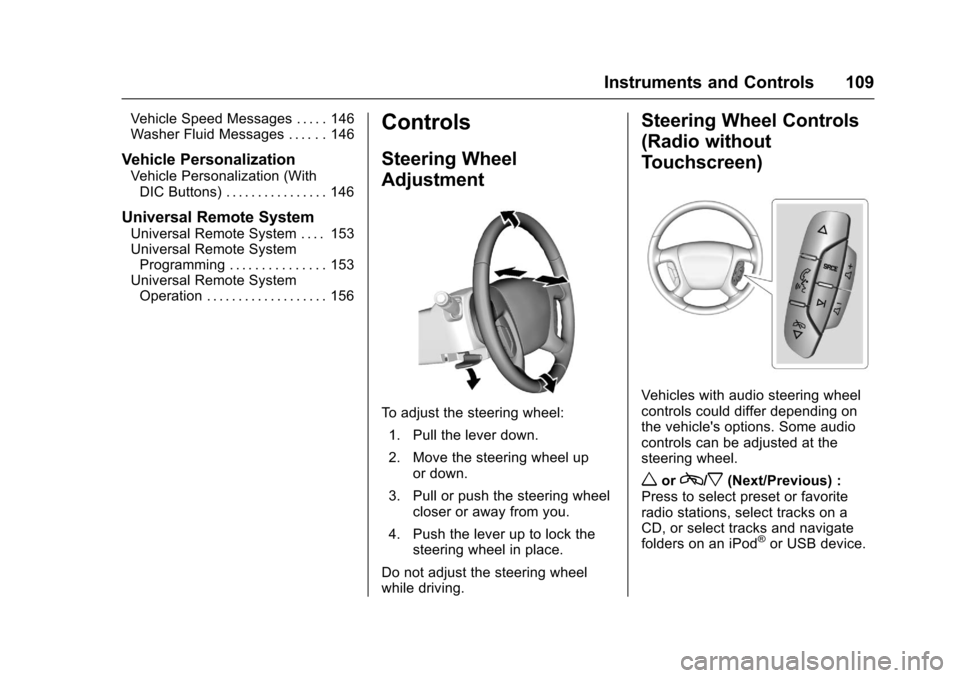
To adjust the steering wheel:
1. Pull the lever down.
2. Move the steering wheel up or down.
3. Pull or push the steering wheel closer or away from you.
4. Push the lever up to lock the steering wheel in place.
Do not adjust the steering wheel
while driving.
Steering Wheel Controls
(Radio without
Touchscreen)
Vehicles with audio steering wheel
controls could differ depending on
the vehicle's options. Some audio
controls can be adjusted at the
steering wheel.
worc/x(Next/Previous) :
Press to select preset or favorite
radio stations, select tracks on a
CD, or select tracks and navigate
folders on an iPod
®or USB device.