camera CHEVROLET TRAVERSE 2021 User Guide
[x] Cancel search | Manufacturer: CHEVROLET, Model Year: 2021, Model line: TRAVERSE, Model: CHEVROLET TRAVERSE 2021Pages: 369, PDF Size: 8.12 MB
Page 230 of 369
Chevrolet Traverse Owner Manual (GMNA-Localizing-U.S./Canada/Mexico-
14637844) - 2021 - CRC - 3/26/21
Driving and Operating 229
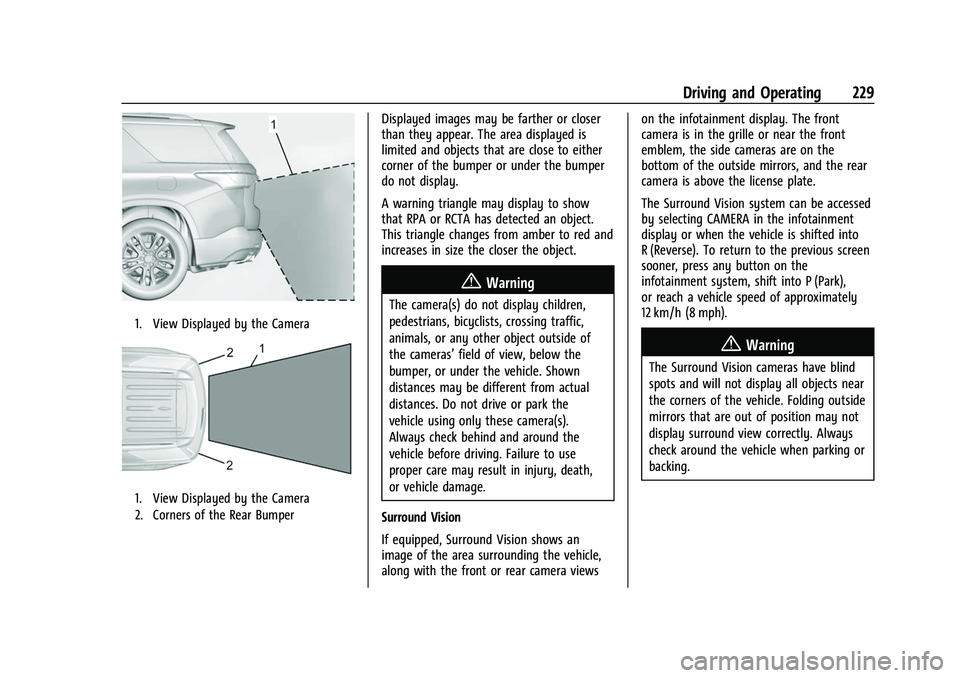
1. View Displayed by the Camera
1. View Displayed by the Camera
2. Corners of the Rear Bumper
Displayed images may be farther or closer
than they appear. The area displayed is
limited and objects that are close to either
corner of the bumper or under the bumper
do not display.
A warning triangle may display to show
that RPA or RCTA has detected an object.
This triangle changes from amber to red and
increases in size the closer the object.
{Warning
The camera(s) do not display children,
pedestrians, bicyclists, crossing traffic,
animals, or any other object outside of
the cameras’field of view, below the
bumper, or under the vehicle. Shown
distances may be different from actual
distances. Do not drive or park the
vehicle using only these camera(s).
Always check behind and around the
vehicle before driving. Failure to use
proper care may result in injury, death,
or vehicle damage.
Surround Vision
If equipped, Surround Vision shows an
image of the area surrounding the vehicle,
along with the front or rear camera views on the infotainment display. The front
camera is in the grille or near the front
emblem, the side cameras are on the
bottom of the outside mirrors, and the rear
camera is above the license plate.
The Surround Vision system can be accessed
by selecting CAMERA in the infotainment
display or when the vehicle is shifted into
R (Reverse). To return to the previous screen
sooner, press any button on the
infotainment system, shift into P (Park),
or reach a vehicle speed of approximately
12 km/h (8 mph).
{Warning
The Surround Vision cameras have blind
spots and will not display all objects near
the corners of the vehicle. Folding outside
mirrors that are out of position may not
display surround view correctly. Always
check around the vehicle when parking or
backing.
Page 231 of 369
Chevrolet Traverse Owner Manual (GMNA-Localizing-U.S./Canada/Mexico-
14637844) - 2021 - CRC - 3/26/21
230 Driving and Operating
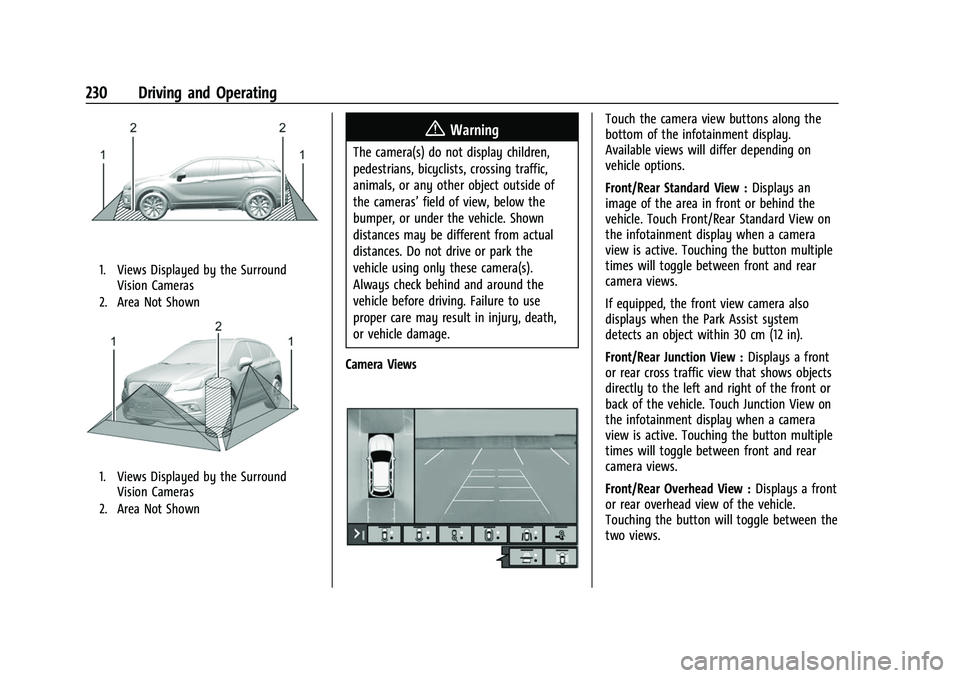
1. Views Displayed by the SurroundVision Cameras
2. Area Not Shown
1. Views Displayed by the Surround Vision Cameras
2. Area Not Shown
{Warning
The camera(s) do not display children,
pedestrians, bicyclists, crossing traffic,
animals, or any other object outside of
the cameras’ field of view, below the
bumper, or under the vehicle. Shown
distances may be different from actual
distances. Do not drive or park the
vehicle using only these camera(s).
Always check behind and around the
vehicle before driving. Failure to use
proper care may result in injury, death,
or vehicle damage.
Camera Views
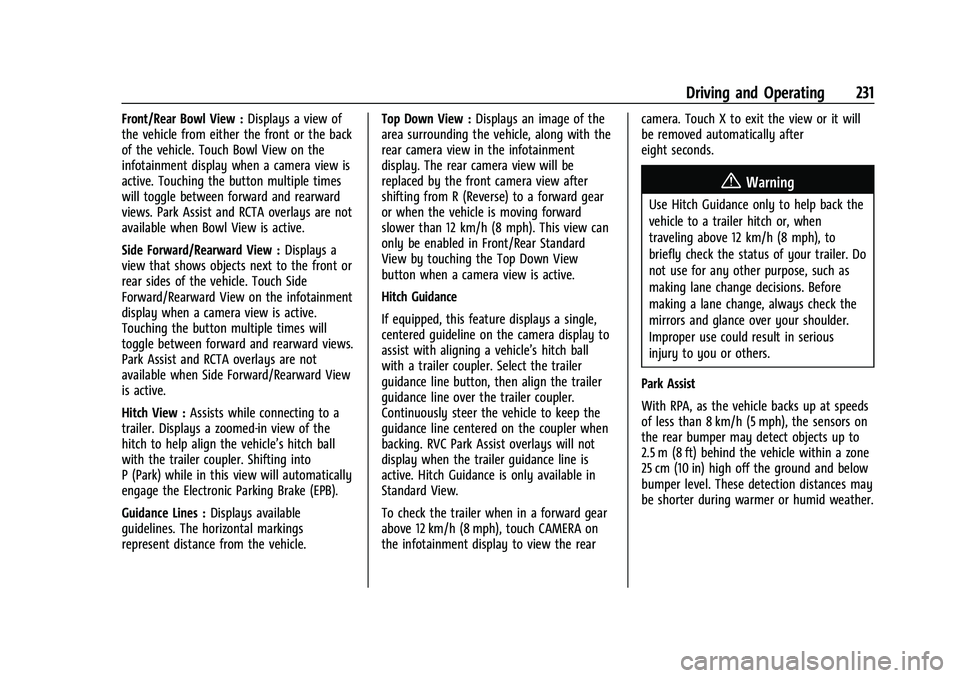
Touch the camera view buttons along the
bottom of the infotainment display.
Available views will differ depending on
vehicle options.
Front/Rear Standard View : Displays an
image of the area in front or behind the
vehicle. Touch Front/Rear Standard View on
the infotainment display when a camera
view is active. Touching the button multiple
times will toggle between front and rear
camera views.
If equipped, the front view camera also
displays when the Park Assist system
detects an object within 30 cm (12 in).
Front/Rear Junction View : Displays a front
or rear cross traffic view that shows objects
directly to the left and right of the front or
back of the vehicle. Touch Junction View on
the infotainment display when a camera
view is active. Touching the button multiple
times will toggle between front and rear
camera views.
Front/Rear Overhead View : Displays a front
or rear overhead view of the vehicle.
Touching the button will toggle between the
two views.
Page 232 of 369
Chevrolet Traverse Owner Manual (GMNA-Localizing-U.S./Canada/Mexico-
14637844) - 2021 - CRC - 3/26/21
Driving and Operating 231
Front/Rear Bowl View :Displays a view of
the vehicle from either the front or the back
of the vehicle. Touch Bowl View on the
infotainment display when a camera view is
active. Touching the button multiple times
will toggle between forward and rearward
views. Park Assist and RCTA overlays are not
available when Bowl View is active.
Side Forward/Rearward View : Displays a
view that shows objects next to the front or
rear sides of the vehicle. Touch Side
Forward/Rearward View on the infotainment
display when a camera view is active.
Touching the button multiple times will
toggle between forward and rearward views.
Park Assist and RCTA overlays are not
available when Side Forward/Rearward View
is active.
Hitch View : Assists while connecting to a
trailer. Displays a zoomed-in view of the
hitch to help align the vehicle’s hitch ball
with the trailer coupler. Shifting into
P (Park) while in this view will automatically
engage the Electronic Parking Brake (EPB).
Guidance Lines : Displays available
guidelines. The horizontal markings
represent distance from the vehicle. Top Down View :
Displays an image of the
area surrounding the vehicle, along with the
rear camera view in the infotainment
display. The rear camera view will be
replaced by the front camera view after
shifting from R (Reverse) to a forward gear
or when the vehicle is moving forward
slower than 12 km/h (8 mph). This view can
only be enabled in Front/Rear Standard
View by touching the Top Down View
button when a camera view is active.
Hitch Guidance
If equipped, this feature displays a single,
centered guideline on the camera display to
assist with aligning a vehicle’s hitch ball
with a trailer coupler. Select the trailer
guidance line button, then align the trailer
guidance line over the trailer coupler.
Continuously steer the vehicle to keep the
guidance line centered on the coupler when
backing. RVC Park Assist overlays will not
display when the trailer guidance line is
active. Hitch Guidance is only available in
Standard View.
To check the trailer when in a forward gear
above 12 km/h (8 mph), touch CAMERA on
the infotainment display to view the rear camera. Touch X to exit the view or it will
be removed automatically after
eight seconds.
{Warning
Use Hitch Guidance only to help back the
vehicle to a trailer hitch or, when
traveling above 12 km/h (8 mph), to
briefly check the status of your trailer. Do
not use for any other purpose, such as
making lane change decisions. Before
making a lane change, always check the
mirrors and glance over your shoulder.
Improper use could result in serious
injury to you or others.
Park Assist
With RPA, as the vehicle backs up at speeds
of less than 8 km/h (5 mph), the sensors on
the rear bumper may detect objects up to
2.5 m (8 ft) behind the vehicle within a zone
25 cm (10 in) high off the ground and below
bumper level. These detection distances may
be shorter during warmer or humid weather.
Page 240 of 369

Chevrolet Traverse Owner Manual (GMNA-Localizing-U.S./Canada/Mexico-
14637844) - 2021 - CRC - 3/26/21
Driving and Operating 239
LCA displays may not come on when
passing a vehicle quickly, for a stopped
vehicle, or when towing a trailer. The LCA
detection zones that extend back from the
side of the vehicle do not move further back
when a trailer is towed. Use caution while
changing lanes when towing a trailer. LCA
may alert to objects attached to the vehicle,
such as a trailer, bicycle, or object extending
out to either side of the vehicle. Attached
objects may also interfere with the
detection of vehicles. This is normal system
operation; the vehicle does not need service.
LCA may not always alert the driver to
vehicles in the next lane over, especially in
wet conditions or when driving on sharp
curves. The system does not need to be
serviced. The system may light up due to
guardrails, signs, trees, shrubs, and other
non-moving objects. This is normal system
operation; the vehicle does not need service.
LCA may not operate when the LCA sensors
in the left or right corners of the rear
bumper are covered with mud, dirt, snow,
ice, or slush, or in heavy rainstorms. For
cleaning instructions, see "Washing the
Vehicle" underExterior Care0314. If the DIC
still displays the system unavailable message after cleaning both sides of the
vehicle toward the rear corners of the
vehicle, see your dealer.
If the LCA displays do not light up when
moving vehicles are in the side blind zone or
are rapidly approaching this zone and the
system is clean, the system may need
service. Take the vehicle to your dealer.
Radio Frequency Information
See
Radio Frequency Statement 0346.
Lane Keep Assist (LKA)
If equipped, LKA may help avoid crashes due
to unintentional lane departures. This
system uses a camera to detect lane
markings between 60 km/h (37 mph) and
180 km/h (112 mph). It may assist by gently
turning the steering wheel if the vehicle
approaches a detected lane marking. It may
also provide a Lane Departure Warning
(LDW) alert if the vehicle crosses a detected
lane marking. LKA can be overridden by
turning the steering wheel. This system is
not intended to keep the vehicle centered in
the lane. LKA will not assist and alert if the
turn signal is active in the direction of lane
departure, or if it detects that you are
accelerating, braking or actively steering.
{Warning
The LKA system does not continuously
steer the vehicle. It may not keep the
vehicle in the lane or give a Lane
Departure Warning (LDW) alert, even if a
lane marking is detected.
The LKA and LDW systems may not:
.Provide an alert or enough steering
assist to avoid a lane departure or
crash.
.Detect lane markings under poor
weather or visibility conditions. This
can occur if the windshield or
headlamps are blocked by dirt, snow,
or ice; if they are not in proper
condition; or if the sun shines directly
into the camera.
.Detect road edges.
.Detect lanes on winding or hilly roads.
If LKA only detects lane markings on one
side of the road, it will only assist or
provide an LDW alert when approaching
the lane on the side where it has
detected a lane marking. Even with LKA
and LDW, you must steer the vehicle. (Continued)
Page 241 of 369

Chevrolet Traverse Owner Manual (GMNA-Localizing-U.S./Canada/Mexico-
14637844) - 2021 - CRC - 3/26/21
240 Driving and Operating
Warning (Continued)
Always keep your attention on the road
and maintain proper vehicle position
within the lane, or vehicle damage,
injury, or death could occur. Always keep
the windshield, headlamps, and camera
sensors clean and in good repair. Do not
use LKA in bad weather conditions or on
roads with unclear lane markings, such as
construction zones.
{Warning
Using LKA while towing a trailer or on
slippery roads could cause loss of control
of the vehicle and a crash. Turn the
system off.
How the System Works
LKA uses a camera sensor installed on the
windshield ahead of the rearview mirror to
detect lane markings. It may provide brief
steering assist if it detects an unintended
lane departure. It may further provide an
audible alert that a lane marking has been
crossed.To turn LKA on and off, press
Aon the
center console. If equipped, the indicator
light on the button comes on when LKA is
on and turns off when LKA is disabled.
Ais green if LKA is ready to assist. LKA
may assist by gently turning the steering
wheel if the vehicle approaches a detected
lane marking.
Ais amber when
assisting. It may also provide a Lane
Departure Warning (LDW) alert by flashing
Aamber if the vehicle crosses a
detected lane marking. Additionally, there
may be three beeps on the right or left,
depending on the lane departure direction.
Take Steering
The LKA system does not continuously steer
the vehicle. If LKA does not detect active
driver steering, an alert and chime may be
provided. Steer the vehicle to dismiss. LKA
may become temporarily unavailable after
repeated take steering alerts.
When the System Does Not Seem to
Work Properly
The system performance may be
affected by:
.Close vehicles ahead.
.Sudden lighting changes, such as when
driving through tunnels.
.Banked roads.
.Roads with poor lane markings, such as
two-lane roads.
A camera blocked message may display if
the camera is blocked. Some driver
assistance systems may have reduced
performance or not work at all. An LKA or
LDW unavailable message may display if the
systems are temporarily unavailable. This
message could be due to a blocked camera.
The LKA system does not need service. Clean
the outside of the windshield behind the
rearview mirror.
LKA assistance and/or LDW alerts may occur
due to tar marks, shadows, cracks in the
road, temporary or construction lane
markings, or other road imperfections. This
is normal system operation; the vehicle does
not need service. Turn LKA off if these
conditions continue.
Page 273 of 369

Chevrolet Traverse Owner Manual (GMNA-Localizing-U.S./Canada/Mexico-
14637844) - 2021 - CRC - 3/26/21
272 Vehicle Care
Front Wiper Blade Replacement
To replace the front wiper blades:1. Pull the windshield wiper assembly away from the windshield.
2. Lift up on the latch in the middle of thewiper blade where the wiper arm
attaches.
3. With the latch open, pull the wiper blade down toward the windshield far enough
to release it from the J-hooked end of
the wiper arm.
4. Remove the wiper blade.
5. Reverse Steps 1–3 for wiper blade replacement.
Caution
Damage may occur if the wiper blades
are not in contact with the windshield
before turning on the wiper system.
Rear Wiper Blade Replacement
To replace the rear wiper blade:
1. Slide a plastic tool under the cover andpush upward to unsnap.
2. Slide the cover toward the wiper blade tip to unhook it from the blade
assembly.
3. Remove the cover.
4. Lift the wiper arm away from the windshield.
5. Push the release lever (2) to disengagethe hook and push the wiper arm (1) out
of the blade assembly (3).
6. Push the new blade assembly securely on the wiper arm until the release lever
clicks into place.
7. To reinstall the cover, ensure that the cover hook slides into the slot in the
blade assembly.
8. Snap the cover down to secure.
Windshield Replacement
Driver Assistance Systems
If the windshield needs to be replaced and
the vehicle is equipped with a front camera
sensor for the Driver Assistance Systems, a
GM replacement windshield is
recommended. The replacement windshield
must be installed according to GM
Page 276 of 369
Chevrolet Traverse Owner Manual (GMNA-Localizing-U.S./Canada/Mexico-
14637844) - 2021 - CRC - 3/26/21
Vehicle Care 275
License Plate Lamp
This applies only to vehicles without rear
camera mirrors. All other vehicles are
equipped with LED license plate lamps.
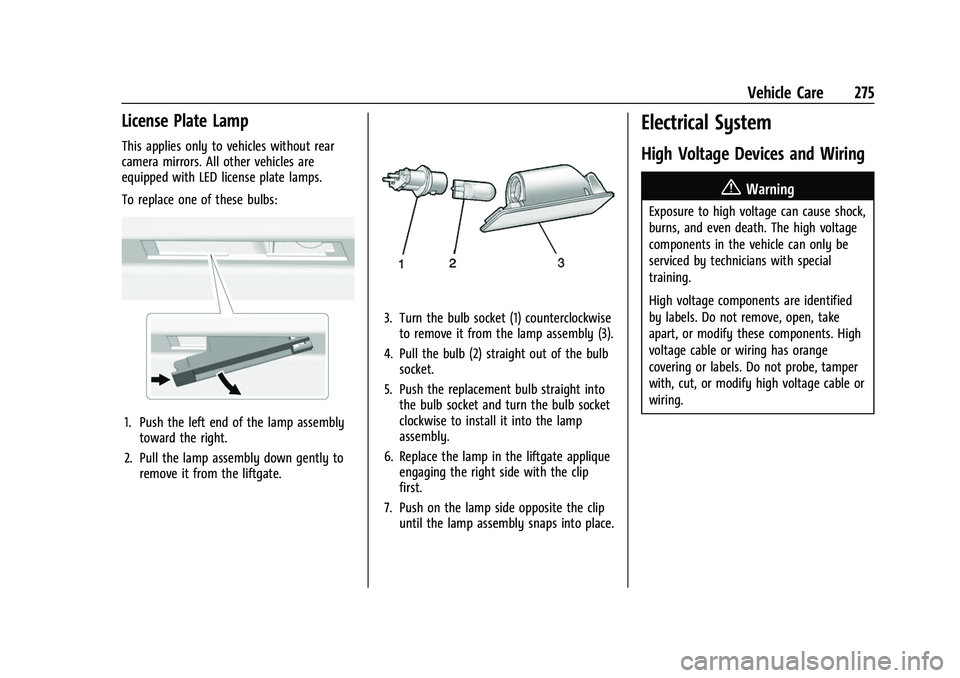
To replace one of these bulbs:
1. Push the left end of the lamp assemblytoward the right.
2. Pull the lamp assembly down gently to remove it from the liftgate.
3. Turn the bulb socket (1) counterclockwiseto remove it from the lamp assembly (3).
4. Pull the bulb (2) straight out of the bulb socket.
5. Push the replacement bulb straight into the bulb socket and turn the bulb socket
clockwise to install it into the lamp
assembly.
6. Replace the lamp in the liftgate applique engaging the right side with the clip
first.
7. Push on the lamp side opposite the clip until the lamp assembly snaps into place.
Electrical System
High Voltage Devices and Wiring
{Warning
Exposure to high voltage can cause shock,
burns, and even death. The high voltage
components in the vehicle can only be
serviced by technicians with special
training.
High voltage components are identified
by labels. Do not remove, open, take
apart, or modify these components. High
voltage cable or wiring has orange
covering or labels. Do not probe, tamper
with, cut, or modify high voltage cable or
wiring.
Page 364 of 369

Chevrolet Traverse Owner Manual (GMNA-Localizing-U.S./Canada/Mexico-
14637844) - 2021 - CRC - 3/26/21
Index 363
Memory Seats . . . . . . . . . . . . . . . . . . . . . . . . . . . . 39
MessagesEngine Power . . . . . . . . . . . . . . . . . . . . . . . . . . . 114
Vehicle . . . . . . . . . . . . . . . . . . . . . . . . . . . . . . . . . 114
Vehicle Speed . . . . . . . . . . . . . . . . . . . . . . . . . . . 115
Mirror Rear Camera . . . . . . . . . . . . . . . . . . . . . . . . . . . . 28
Mirrors Automatic Dimming . . . . . . . . . . . . . . . . . . . . 27
Automatic Dimming Rearview . . . . . . . . . . 28
Convex . . . . . . . . . . . . . . . . . . . . . . . . . . . . . . . . . 26
Folding . . . . . . . . . . . . . . . . . . . . . . . . . . . . . . . . . 27
Heated . . . . . . . . . . . . . . . . . . . . . . . . . . . . . . . . . 27
Manual Rearview . . . . . . . . . . . . . . . . . . . . . . . 28
Power . . . . . . . . . . . . . . . . . . . . . . . . . . . . . . . . . . 27
Tilt in Reverse . . . . . . . . . . . . . . . . . . . . . . . . . . 27
Mirrors, Interior Rearview . . . . . . . . . . . . . . . . . 28
Mode . . . . . . . . . . . . . . . . . . . . . . . . . . . . . . . . . . . . . 215 Driver Control . . . . . . . . . . . . . . . . . . . . . . . . . 215
Monitor System, Tire Pressure . . . . . . . . . . . 292
Multi-band Antenna . . . . . . . . . . . . . . . . . . . . . .138
N
Navigation Connected Services . . . . . . . . . . . . . . . . . . . . 354
Destination . . . . . . . . . . . . . . . . . . . . . . . . . . . . 147 Navigation (cont'd)
Using the System . . . . . . . . . . . . . . . . . . . . . . 142
Navigation Symbols . . . . . . . . . . . . . . . . . . . . . 146
New Vehicle Break-In . . . . . . . . . . . . . . . . . . . . 201
O
Odometer . . . . . . . . . . . . . . . . . . . . . . . . . . . . . . . .101 Trip . . . . . . . . . . . . . . . . . . . . . . . . . . . . . . . . . . . . 101
Off-Road . . . . . . . . . . . . . . . . . . . . . . . . . . . . . . . . . 192 Driving . . . . . . . . . . . . . . . . . . . . . . . . . . . . . . . . 192
Recovery . . . . . . . . . . . . . . . . . . . . . . . . . . . . . . . . 191
Oil
Engine . . . . . . . . . . . . . . . . . . . . . . . . . . . . . . . . . 260
Engine Oil Life System . . . . . . . . . . . . . . . . . 262
Pressure Light . . . . . . . . . . . . . . . . . . . . . . . . . 109
Older Children, Restraints . . . . . . . . . . . . . . . . . 65
Online Owner Center . . . . . . . . . . . . . . . . . . . . 340
OnStar . . . . . . . . . . . . . . . . . . . . . . . . . . . . . . . . . . . 348
OnStar Additional Information . . . . . . . . . . . 350
OnStar Emergency . . . . . . . . . . . . . . . . . . . . . . . 350
OnStar Overview . . . . . . . . . . . . . . . . . . . . . . . . . 349
OnStar Security . . . . . . . . . . . . . . . . . . . . . . . . . . 350
OnStar System . . . . . . . . . . . . . . . . . . . . . . 142, 152
Operation Fog Lamps . . . . . . . . . . . . . . . . . . . . . . . . . . . . . 125
Outlets
Power . . . . . . . . . . . . . . . . . . . . . . . . . . . . . . . . . . 93
Overheating, Engine . . . . . . . . . . . . . . . . . . . . . 267 Overview . . . . . . . . . . . . . . . . . . . . . . . . . . . . . . . . 130
Instrument Panel . . . . . . . . . . . . . . . . . . . . . . . . 4
P
Park
Shifting Into . . . . . . . . . . . . . . . . . . . . . . . . . . . 206
Shifting Out of . . . . . . . . . . . . . . . . . . . . . . . . 206
Park Assist . . . . . . . . . . . . . . . . . . . . . . . . . . . . . . . 228
Parking Brake and P (Park) MechanismCheck . . . . . . . . . . . . . . . . . . . . . . . . . . . . . . . . . 271
Extended . . . . . . . . . . . . . . . . . . . . . . . . . . . . . . 207
Over Things That Burn . . . . . . . . . . . . . . . . . 207
Parking or Backing Assistance Systems . . . . . . . . . . . . . . . . . . . . 228
Passenger Airbag Status Indicator . . . . . . . . 103
Passenger Compartment Air Filter . . . . . . . .187
Passenger Sensing System . . . . . . . . . . . . . . . . .61
Pedestrian Ahead Indicator . . . . . . . . . . . . . . 108
Perchlorate Materials Requirements, California . . . . . . . . . . . . . . . . . . . . . . . . . . . . . . 256
Personalization Vehicle . . . . . . . . . . . . . . . . . . . . . . . . . . . . . . . . . 115
Phone Apple CarPlay and Android Auto . . . . . . . 164
Bluetooth . . . . . . . . . . . . . . . . . . . . . . . . . . . . . . 160
Port USB . . . . . . . . . . . . . . . . . . . . . . . . . . . . . . . . . . . . 138
Page 365 of 369
Chevrolet Traverse Owner Manual (GMNA-Localizing-U.S./Canada/Mexico-
14637844) - 2021 - CRC - 3/26/21
364 Index
PositioningVehicle . . . . . . . . . . . . . . . . . . . . . . . . . . . . . . . . 153
Power Door Locks . . . . . . . . . . . . . . . . . . . . . . . . . . . . . . . 17
Mirrors . . . . . . . . . . . . . . . . . . . . . . . . . . . . . . . . . 27
Outlets . . . . . . . . . . . . . . . . . . . . . . . . . . . . . . . . . 93
Protection, Battery . . . . . . . . . . . . . . . . . . . . . 128
Retained Accessory (RAP) . . . . . . . . . . . . . . 205
Seat Adjustment . . . . . . . . . . . . . . . . . . . . . . . . 36
Windows . . . . . . . . . . . . . . . . . . . . . . . . . . . . . . . 30
Pregnancy, Using Seat Belts . . . . . . . . . . . . . . 54
Privacy
Vehicle Data Recording . . . . . . . . . . . . . . . . 347
Problems with Route Guidance . . . . . . . . . . . 153
Program Courtesy Transportation . . . . . . . . . . . . . . . 343
Prohibited Fuels . . . . . . . . . . . . . . . . . . . . . . . . . .241
Proposition 65 Warning, California . . . . . . . . . . . . . . . . . . . .256, 270, 309, Back Cover
Publication Ordering Information . . . . . . . . 345
R
Radio Data System (RDS) . . . . . . . . . . . . . . . . 136
Radio Frequency Statement . . . . . . . . . . . . . . 346
Radio Reception . . . . . . . . . . . . . . . . . . . . . . . . . . 137
Radios
AM-FM Radio . . . . . . . . . . . . . . . . . . . . . . . . . . 135 Radios (cont'd)
Satellite . . . . . . . . . . . . . . . . . . . . . . . . . . . . . . . . . 137
Reading Lamps . . . . . . . . . . . . . . . . . . . . . . . . . . 126
Rear Camera Mirror . . . . . . . . . . . . . . . . . . . . . . . 28
Rear Climate Control System . . . . . . . . . . . . 186
Rear Seats . . . . . . . . . . . . . . . . . . . . . . . . . . . . . . . . 42 Heated . . . . . . . . . . . . . . . . . . . . . . . . . . . . . . . . . 45
Rear Vision Camera (RVC) . . . . . . . . . . . . . . . . 228
Rear Window Washer/Wiper . . . . . . . . . . . . . 92
Rearview Mirrors . . . . . . . . . . . . . . . . . . . . . . . . . 28 Automatic Dimming . . . . . . . . . . . . . . . . . . . . 28
Reclining Seatbacks . . . . . . . . . . . . . . . . . . . . . . . .37
Recognition
Voice . . . . . . . . . . . . . . . . . . . . . . . . . . . . . . . . . . 154
Recommended Fuel . . . . . . . . . . . . . . . . . . . . . . . . . . . . . . . . . . . . 241
Recommended Fluids and Lubricants . . . . . . 331
Records Maintenance . . . . . . . . . . . . . . . . . . . . . . . . . . . 333
Recreational Vehicle Towing . . . . . . . . . . . . . . 312
Reimbursement Program, GM Mobility . . . . . . . . . . . . . . . . . . . . . . . . . . . . . . . .341
Remote Keyless Entry (RKE) System . . . . . . . .7
Remote Vehicle Start . . . . . . . . . . . . . . . . . . . . . . 13
Replacement Parts Airbags . . . . . . . . . . . . . . . . . . . . . . . . . . . . . . . . . 65
Maintenance . . . . . . . . . . . . . . . . . . . . . . . . . . . 332
Replacing Airbag System . . . . . . . . . . . . . . . . . . 65 Replacing LATCH System Parts after a
Crash . . . . . . . . . . . . . . . . . . . . . . . . . . . . . . . . . . . 80
Replacing Seat Belt System Parts after a Crash . . . . . . . . . . . . . . . . . . . . . . . . . . . . . . . . . .55
Reporting Safety Defects Canadian Government . . . . . . . . . . . . . . . . . 346
General Motors . . . . . . . . . . . . . . . . . . . . . . . . 347
U.S. Government . . . . . . . . . . . . . . . . . . . . . . . 346
Restraints Where to Put . . . . . . . . . . . . . . . . . . . . . . . . . . . 70
Retained Accessory Power (RAP) . . . . . . . . . 205
Reverse Tilt Mirrors . . . . . . . . . . . . . . . . . . . . . . . .27
Roads
Driving, Wet . . . . . . . . . . . . . . . . . . . . . . . . . . . 195
Roadside Assistance Program . . . . . . . . . . . . .341
Roof Sunroof . . . . . . . . . . . . . . . . . . . . . . . . . . . . . . . . . . 31
Roof Rack System . . . . . . . . . . . . . . . . . . . . . . . . . 87
Rotation, Tires . . . . . . . . . . . . . . . . . . . . . . . . . . . 296
Routing, Engine Drive Belt . . . . . . . . . . . . . . . 337
Running the Vehicle While Parked . . . . . . . 208
S
Safety Defects Reporting Canadian Government . . . . . . . . . . . . . . . . . 346
General Motors . . . . . . . . . . . . . . . . . . . . . . . . 347