power steering CHEVROLET TRAVERSE 2021 User Guide
[x] Cancel search | Manufacturer: CHEVROLET, Model Year: 2021, Model line: TRAVERSE, Model: CHEVROLET TRAVERSE 2021Pages: 369, PDF Size: 8.12 MB
Page 132 of 369
Chevrolet Traverse Owner Manual (GMNA-Localizing-U.S./Canada/Mexico-
14637844) - 2021 - CRC - 3/26/21
Infotainment System 131
.When the power is on and the
system is not muted, a quick
status pane will display when
Ois
pressed. Pressing
Owill mute the
system and trigger this pane to
show a long press is required to
actually power down the system.
.Turn to decrease or increase the
volume.
4.6
.Radio: Press and release to go to
the next station or channel. Press
and hold to fast seek the next
strongest station or channel.
.USB/Bluetooth: Press to seek the
next track. Press and hold to fast
forward through a track. Release to
return to playing speed. See USB
Port 0138 or
Bluetooth Audio 0141.
5.Por5
.PressPto open. PressPagain
to close. Keep the storage area
closed when not in use.
.Press5and release to access the
phone display or answer an
incoming call. Home Page
The Home Page is where vehicle application
icons are accessed. Some applications are
disabled when the vehicle is moving.
Swipe left or right across the display to
access the pages of icons.
Managing Home Page Icons
1. Touch and hold any of the Home Page icons to enter edit mode.
2. Continue holding the icon and drag it to the desired position.
3. Release your finger to drop the icon in the desired position.
4. To move an application to another page, drag the icon to the edge of the display
toward the desired page.
5. Continue dragging and dropping application icons as desired.
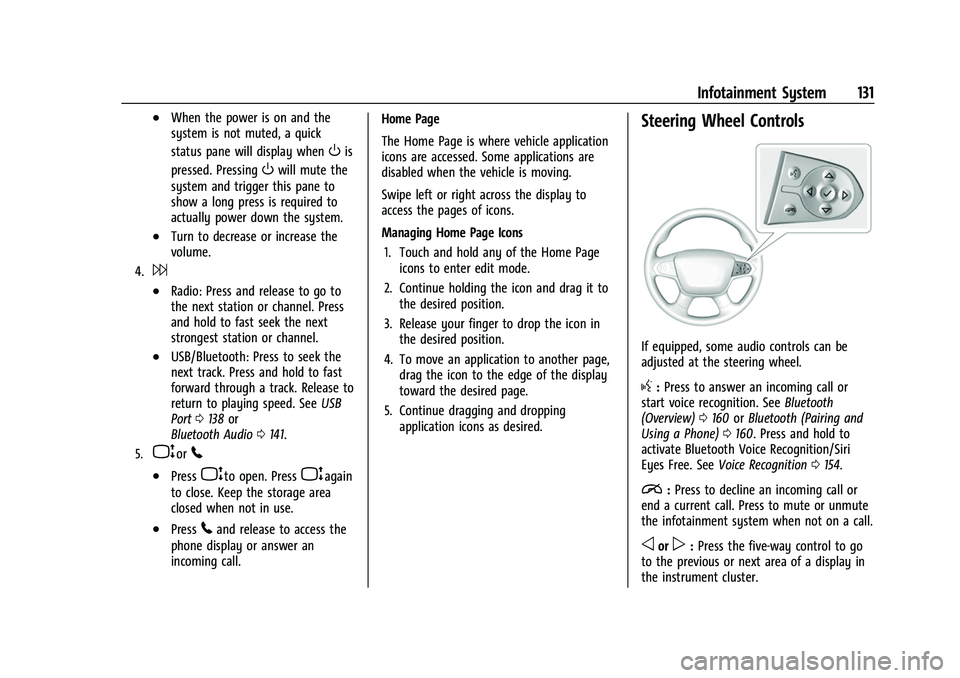
Steering Wheel Controls
If equipped, some audio controls can be
adjusted at the steering wheel.
g:Press to answer an incoming call or
start voice recognition. See Bluetooth
(Overview) 0160 orBluetooth (Pairing and
Using a Phone) 0160. Press and hold to
activate Bluetooth Voice Recognition/Siri
Eyes Free. See Voice Recognition 0154.
i:Press to decline an incoming call or
end a current call. Press to mute or unmute
the infotainment system when not on a call.
oorp: Press the five-way control to go
to the previous or next area of a display in
the instrument cluster.
Page 189 of 369
Chevrolet Traverse Owner Manual (GMNA-Localizing-U.S./Canada/Mexico-
14637844) - 2021 - CRC - 3/26/21
188 Driving and Operating
Driving and Operating
Driving Information
Driving for Better Fuel Economy . . . . . . . 189
Distracted Driving . . . . . . . . . . . . . . . . . . . . . 189
Defensive Driving . . . . . . . . . . . . . . . . . . . . . . 189
Impaired Driving . . . . . . . . . . . . . . . . . . . . . . 190
Control of a Vehicle . . . . . . . . . . . . . . . . . . . 190
Braking . . . . . . . . . . . . . . . . . . . . . . . . . . . . . . . . 190
Steering . . . . . . . . . . . . . . . . . . . . . . . . . . . . . . . 190
Off-Road Recovery . . . . . . . . . . . . . . . . . . . . . 191
Loss of Control . . . . . . . . . . . . . . . . . . . . . . . . 192
Off-Road Driving . . . . . . . . . . . . . . . . . . . . . . . 192
Driving on Wet Roads . . . . . . . . . . . . . . . . . 195
Hill and Mountain Roads . . . . . . . . . . . . . . 196
Winter Driving . . . . . . . . . . . . . . . . . . . . . . . . 196
If the Vehicle Is Stuck . . . . . . . . . . . . . . . . . 197
Vehicle Load Limits . . . . . . . . . . . . . . . . . . . . 198
Starting and Operating
New Vehicle Break-In . . . . . . . . . . . . . . . . . . 201
Ignition Positions . . . . . . . . . . . . . . . . . . . . . . 201
Starting the Engine . . . . . . . . . . . . . . . . . . . 203
Stop/Start System . . . . . . . . . . . . . . . . . . . . 204
Engine Heater . . . . . . . . . . . . . . . . . . . . . . . . . 204
Retained Accessory Power (RAP) . . . . . . . 205
Shifting Into Park . . . . . . . . . . . . . . . . . . . . . 206
Shifting out of Park . . . . . . . . . . . . . . . . . . . 206
Parking over Things That Burn . . . . . . . . 207
Extended Parking . . . . . . . . . . . . . . . . . . . . . . 207
Engine Exhaust
Engine Exhaust . . . . . . . . . . . . . . . . . . . . . . . . 207
Running the Vehicle While Parked . . . . 208
Automatic Transmission
Automatic Transmission . . . . . . . . . . . . . . . 208
Manual Mode . . . . . . . . . . . . . . . . . . . . . . . . . 209
Tow/Haul Mode . . . . . . . . . . . . . . . . . . . . . . . 210
Drive Systems
All-Wheel Drive . . . . . . . . . . . . . . . . . . . . . . . . 211
Brakes
Antilock Brake System (ABS) . . . . . . . . . . . 211
Electric Parking Brake . . . . . . . . . . . . . . . . . . 212
Brake Assist . . . . . . . . . . . . . . . . . . . . . . . . . . . . 213
Hill Start Assist (HSA) . . . . . . . . . . . . . . . . . . 213
Ride Control Systems
Traction Control/Electronic StabilityControl . . . . . . . . . . . . . . . . . . . . . . . . . . . . . . 214
Driver Mode Control . . . . . . . . . . . . . . . . . . . 215
Cruise Control
Cruise Control . . . . . . . . . . . . . . . . . . . . . . . . . . 217
Adaptive Cruise Control (Advanced) . . . . 219
Driver Assistance Systems
Driver Assistance Systems . . . . . . . . . . . . . 227
Assistance Systems for Parking or Backing . . . . . . . . . . . . . . . . . . . . . . . . . . . . . . 228
Assistance Systems for Driving . . . . . . . . 232 Forward Collision Alert (FCA)
System . . . . . . . . . . . . . . . . . . . . . . . . . . . . . . 232
Automatic Emergency Braking (AEB) . . . . . . . . . . . . . . . . . . . . . . . . 234
Front Pedestrian Braking (FPB)
System . . . . . . . . . . . . . . . . . . . . . . . . . . . . . . 236
Side Blind Zone Alert (SBZA) . . . . . . . . . . . 237
Lane Change Alert (LCA) . . . . . . . . . . . . . . . 237
Lane Keep Assist (LKA) . . . . . . . . . . . . . . . . 239
Fuel
Top Tier Fuel . . . . . . . . . . . . . . . . . . . . . . . . . . 241
Recommended Fuel . . . . . . . . . . . . . . . . . . . . 241
Prohibited Fuels . . . . . . . . . . . . . . . . . . . . . . . 241
Fuels in Foreign Countries . . . . . . . . . . . . . 241
Fuel Additives . . . . . . . . . . . . . . . . . . . . . . . . . 242
Filling the Tank . . . . . . . . . . . . . . . . . . . . . . . . 242
Filling a Portable Fuel Container . . . . . . . 243
Trailer Towing
General Towing Information . . . . . . . . . . . 243
Driving Characteristics and Towing Tips . . . . . . . . . . . . . . . . . . . . . . . . . 244
Trailer Towing . . . . . . . . . . . . . . . . . . . . . . . . . 247
Towing Equipment . . . . . . . . . . . . . . . . . . . . 250
Trailer Sway Control (TSC) . . . . . . . . . . . . . 253
Conversions and Add-Ons
Add-On Electrical Equipment . . . . . . . . . . . 254
Page 191 of 369
Chevrolet Traverse Owner Manual (GMNA-Localizing-U.S./Canada/Mexico-
14637844) - 2021 - CRC - 3/26/21
190 Driving and Operating
.Assume that other road users
(pedestrians, bicyclists, and other drivers)
are going to be careless and make
mistakes. Anticipate what they may do
and be ready.
.Allow enough following distance between
you and the driver in front of you.
.Focus on the task of driving.
Impaired Driving
Death and injury associated with impaired
driving is a global tragedy.
{Warning
Drinking alcohol or taking drugs and then
driving is very dangerous. Your reflexes,
perceptions, attentiveness, and judgment
can be affected by even a small amount
of alcohol or drugs. You can have a
serious—or even fatal —collision if you
drive after drinking or taking drugs.
Do not drive while under the influence of
alcohol or drugs, or ride with a driver
who has been drinking or is impaired by
drugs. Find alternate transportation
home; or if you are with a group,
designate a driver who will remain sober.
Control of a Vehicle
Braking, steering, and accelerating are
important factors in helping to control a
vehicle while driving.
Braking
Braking action involves perception time and
reaction time. Deciding to push the brake
pedal is perception time. Actually doing it is
reaction time.
Average driver reaction time is about
three-quarters of a second. In that time, a
vehicle moving at 100 km/h (60 mph) travels
20 m (66 ft), which could be a lot of
distance in an emergency.
Helpful braking tips to keep in mind include:
.Keep enough distance between you and
the vehicle in front of you.
.Avoid needless heavy braking.
.Keep pace with traffic.
If the engine ever stops while the vehicle is
being driven, brake normally but do not
pump the brakes. Doing so could make the
pedal harder to push down. If the engine
stops, there will be some power brake assist
but it will be used when the brake is applied. Once the power assist is used up, it
can take longer to stop and the brake pedal
will be harder to push.
Steering
Electric Power Steering
Caution
To avoid damage to the steering system,
do not drive over curbs, parking barriers,
or similar objects at speeds greater than
3 km/h (1 mph). Use care when driving
over other objects such as lane dividers
and speed bumps. Damage caused by
misuse of the vehicle is not covered by
the vehicle warranty.
Page 192 of 369
Chevrolet Traverse Owner Manual (GMNA-Localizing-U.S./Canada/Mexico-
14637844) - 2021 - CRC - 3/26/21
Driving and Operating 191
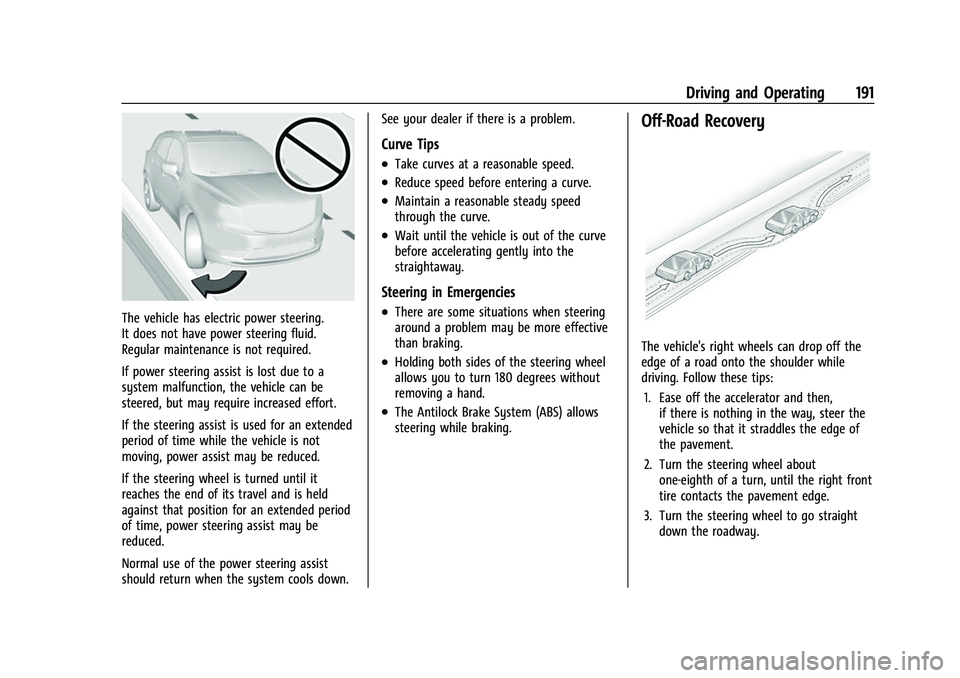
The vehicle has electric power steering.
It does not have power steering fluid.
Regular maintenance is not required.
If power steering assist is lost due to a
system malfunction, the vehicle can be
steered, but may require increased effort.
If the steering assist is used for an extended
period of time while the vehicle is not
moving, power assist may be reduced.
If the steering wheel is turned until it
reaches the end of its travel and is held
against that position for an extended period
of time, power steering assist may be
reduced.
Normal use of the power steering assist
should return when the system cools down.See your dealer if there is a problem.
Curve Tips
.Take curves at a reasonable speed.
.Reduce speed before entering a curve.
.Maintain a reasonable steady speed
through the curve.
.Wait until the vehicle is out of the curve
before accelerating gently into the
straightaway.
Steering in Emergencies
.There are some situations when steering
around a problem may be more effective
than braking.
.Holding both sides of the steering wheel
allows you to turn 180 degrees without
removing a hand.
.The Antilock Brake System (ABS) allows
steering while braking.
Off-Road Recovery
The vehicle's right wheels can drop off the
edge of a road onto the shoulder while
driving. Follow these tips:
1. Ease off the accelerator and then, if there is nothing in the way, steer the
vehicle so that it straddles the edge of
the pavement.
2. Turn the steering wheel about one-eighth of a turn, until the right front
tire contacts the pavement edge.
3. Turn the steering wheel to go straight down the roadway.
Page 203 of 369
Chevrolet Traverse Owner Manual (GMNA-Localizing-U.S./Canada/Mexico-
14637844) - 2021 - CRC - 3/26/21
202 Driving and Operating
The Remote Keyless Entry (RKE) transmitter
must be in the vehicle for the system to
operate. If the pushbutton start is not
working, the vehicle may be near a strong
radio antenna signal causing interference to
the Keyless Access system. SeeRemote
Keyless Entry (RKE) System Operation 07.
To shift out of P (Park), the ignition must be
on or in service mode and the brake pedal
must be applied.
Stopping the Engine/OFF (No Indicator
Lights) : When the vehicle is stopped, press
ENGINE START/STOP once to turn the
engine off.
If the vehicle is in P (Park), the ignition will
turn off, and Retained Accessory Power
(RAP) will remain active. See Retained
Accessory Power (RAP) 0205.
If the vehicle is not in P (Park), the ignition
will return to ACC/ACCESSORY and display
the message SHIFT TO PARK in the Driver
Information Center (DIC). When the vehicle
is shifted into P (Park), the ignition will
turn off.
Do not turn the engine off when the vehicle
is moving. This will cause a loss of power
assist in the brake and steering systems and
disable the airbags. If the vehicle must be shut off in an
emergency:
1. Brake using a firm and steady pressure. Do not pump the brakes repeatedly. This
may deplete power assist, requiring
increased brake pedal force.
2. Shift the vehicle to N (Neutral). This can be done while the vehicle is moving.
After shifting to N (Neutral), firmly apply
the brakes and steer the vehicle to a
safe location.
3. Come to a complete stop, shift to P (Park), and turn the ignition off. The
shift lever must be in P (Park) to turn the
ignition off.
4. Set the parking brake. See Electric
Parking Brake 0212.
{Warning
Turning off the vehicle while moving may
cause loss of power assist in the brake
and steering systems and disable the
airbags. While driving, only shut the
vehicle off in an emergency. If the vehicle cannot be pulled over, and
must be shut off while driving, press and
hold ENGINE START/STOP for longer than
two seconds, or press twice in five seconds.
ACC/ACCESSORY (Amber Indicator Light) :
This mode allows some electrical accessories
to be used when the engine is off.
With the ignition off, pressing the button
one time without the brake pedal applied
will place the ignition system in ACC/
ACCESSORY.
The ignition will switch from ACC/
ACCESSORY to OFF after five minutes to
prevent battery rundown.
ON/RUN/START (Green Indicator Light) :
This
mode is for driving and starting. With the
ignition off, and the brake pedal applied,
pressing the button once will place the
ignition system in ON/RUN/START. Once
engine cranking begins, release the button.
Engine cranking will continue until the
engine starts. See Starting the Engine 0203.
The ignition will then remain in ON/RUN.
Service Mode
This power mode is available for service and
diagnostics, and to verify the proper
operation of the malfunction indicator lamp
as may be required for emission inspection
Page 212 of 369

Chevrolet Traverse Owner Manual (GMNA-Localizing-U.S./Canada/Mexico-
14637844) - 2021 - CRC - 3/26/21
Driving and Operating 211
Automatic Engine Grade Braking
Automatic Engine Grade Braking assists
when driving downhill. It maintains vehicle
speed by automatically implementing a shift
pattern that uses the engine and the
transmission to slow the vehicle. The system
will automatically command downshifts to
reduce vehicle speed. The normal shift
pattern will return once the vehicle is on a
low grade or when the accelerator pedal is
pressed.
While in the Electronic Range Select (ERS)
mode, grade braking is deactivated, allowing
the driver to select a range and limiting the
highest gear available. Grade braking is
available for normal driving and in Tow/
Haul Mode.
SeeAutomatic Transmission 0208.
Drive Systems
All-Wheel Drive
Vehicles with this feature can operate in
All-Wheel Drive (AWD) Mode.
Turn the knob to4to select AWD.
The AWD Mode will stay selected until the
mode is changed. See Driver Mode Control
0 215.
When operated in Two-wheel drive, the
vehicle will deliver power to the front
wheels only and may provide better fuel
economy.
When using a compact spare tire on an
AWD vehicle, the system automatically
detects the compact spare and reduces AWD
performance to protect the system. To
restore full AWD operation and prevent
excessive wear on the system, replace the
compact spare with a full-size tire as soon as
possible. See Compact Spare Tire 0308.
Brakes
Antilock Brake System (ABS)
The Antilock Brake System (ABS) helps
prevent a braking skid and maintain steering
while braking hard.
ABS performs a system check when the
vehicle is first driven. A momentary motor
or clicking noise may be heard while this
test is going on, and the brake pedal may
move slightly. This is normal.
If there is a problem with ABS, this warning
light stays on. See Antilock Brake System
(ABS) Warning Light 0107.
ABS does not change the time needed to
get a foot on the brake pedal and does not
always decrease stopping distance. If you
get too close to the vehicle ahead, there will
not be enough time to apply the brakes if
that vehicle suddenly slows or stops. Always
leave enough room ahead to stop, even
with ABS.
Page 213 of 369
Chevrolet Traverse Owner Manual (GMNA-Localizing-U.S./Canada/Mexico-
14637844) - 2021 - CRC - 3/26/21
212 Driving and Operating
Using ABS
Do not pump the brakes. Just hold the brake
pedal down firmly. Hearing or feeling ABS
operate is normal.
Braking in Emergencies
ABS allows steering and braking at the same
time. In many emergencies, steering can
help even more than braking.
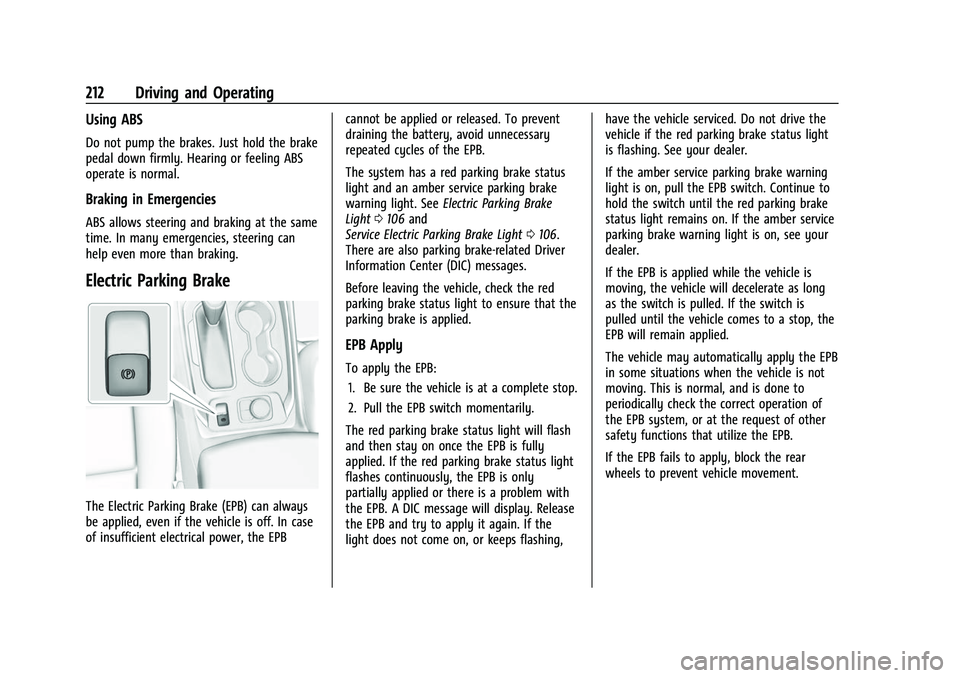
Electric Parking Brake
The Electric Parking Brake (EPB) can always
be applied, even if the vehicle is off. In case
of insufficient electrical power, the EPBcannot be applied or released. To prevent
draining the battery, avoid unnecessary
repeated cycles of the EPB.
The system has a red parking brake status
light and an amber service parking brake
warning light. See
Electric Parking Brake
Light 0106 and
Service Electric Parking Brake Light 0106.
There are also parking brake-related Driver
Information Center (DIC) messages.
Before leaving the vehicle, check the red
parking brake status light to ensure that the
parking brake is applied.
EPB Apply
To apply the EPB:
1. Be sure the vehicle is at a complete stop.
2. Pull the EPB switch momentarily.
The red parking brake status light will flash
and then stay on once the EPB is fully
applied. If the red parking brake status light
flashes continuously, the EPB is only
partially applied or there is a problem with
the EPB. A DIC message will display. Release
the EPB and try to apply it again. If the
light does not come on, or keeps flashing, have the vehicle serviced. Do not drive the
vehicle if the red parking brake status light
is flashing. See your dealer.
If the amber service parking brake warning
light is on, pull the EPB switch. Continue to
hold the switch until the red parking brake
status light remains on. If the amber service
parking brake warning light is on, see your
dealer.
If the EPB is applied while the vehicle is
moving, the vehicle will decelerate as long
as the switch is pulled. If the switch is
pulled until the vehicle comes to a stop, the
EPB will remain applied.
The vehicle may automatically apply the EPB
in some situations when the vehicle is not
moving. This is normal, and is done to
periodically check the correct operation of
the EPB system, or at the request of other
safety functions that utilize the EPB.
If the EPB fails to apply, block the rear
wheels to prevent vehicle movement.
Page 280 of 369
Chevrolet Traverse Owner Manual (GMNA-Localizing-U.S./Canada/Mexico-
14637844) - 2021 - CRC - 3/26/21
Vehicle Care 279
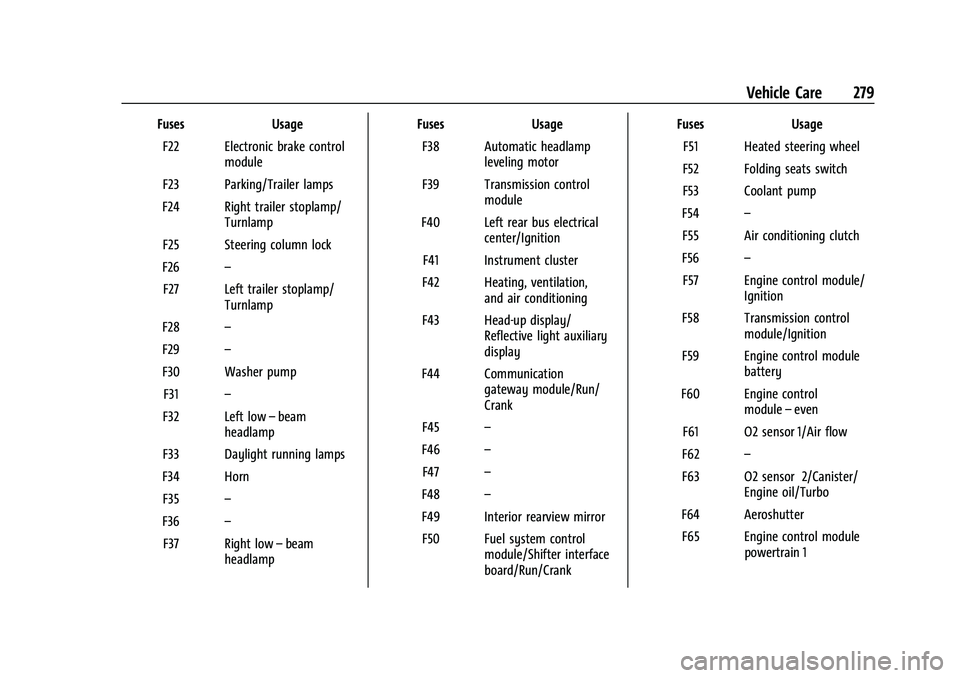
FusesUsage
F22 Electronic brake control module
F23 Parking/Trailer lamps
F24 Right trailer stoplamp/ Turnlamp
F25 Steering column lock
F26 –
F27 Left trailer stoplamp/ Turnlamp
F28 –
F29 –
F30 Washer pump F31 –
F32 Left low –beam
headlamp
F33 Daylight running lamps
F34 Horn F35 –
F36 –
F37 Right low –beam
headlamp Fuses
Usage
F38 Automatic headlamp leveling motor
F39 Transmission control module
F40 Left rear bus electrical center/Ignition
F41 Instrument cluster
F42 Heating, ventilation, and air conditioning
F43 Head-up display/ Reflective light auxiliary
display
F44 Communication gateway module/Run/
Crank
F45 –
F46 –
F47 –
F48 –
F49 Interior rearview mirror F50 Fuel system control module/Shifter interface
board/Run/Crank Fuses
Usage
F51 Heated steering wheel
F52 Folding seats switch
F53 Coolant pump
F54 –
F55 Air conditioning clutch
F56 –
F57 Engine control module/ Ignition
F58 Transmission control module/Ignition
F59 Engine control module battery
F60 Engine control module–even
F61 O2 sensor 1/Air flow
F62 –
F63 O2 sensor 2/Canister/ Engine oil/Turbo
F64 Aeroshutter F65 Engine control module powertrain 1
Page 282 of 369
Chevrolet Traverse Owner Manual (GMNA-Localizing-U.S./Canada/Mexico-
14637844) - 2021 - CRC - 3/26/21
Vehicle Care 281
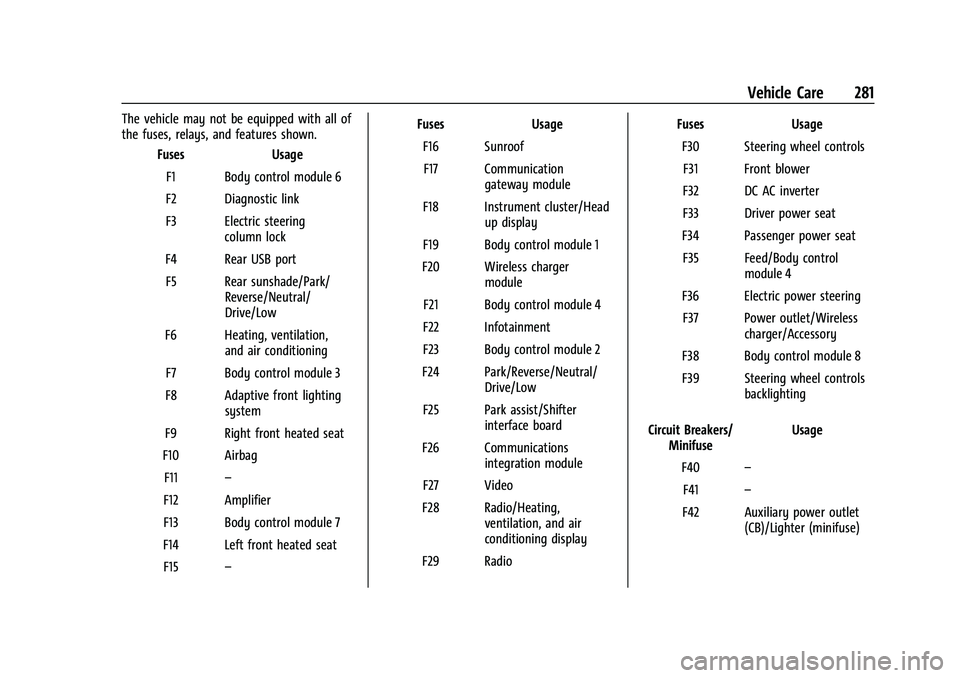
The vehicle may not be equipped with all of
the fuses, relays, and features shown.Fuses Usage
F1 Body control module 6
F2 Diagnostic link
F3 Electric steering column lock
F4 Rear USB port F5 Rear sunshade/Park/ Reverse/Neutral/
Drive/Low
F6 Heating, ventilation, and air conditioning
F7 Body control module 3
F8 Adaptive front lighting system
F9 Right front heated seat
F10 Airbag F11 –
F12 Amplifier
F13 Body control module 7
F14 Left front heated seat F15 – Fuses Usage
F16 SunroofF17 Communication gateway module
F18 Instrument cluster/Head up display
F19 Body control module 1
F20 Wireless charger module
F21 Body control module 4
F22 Infotainment
F23 Body control module 2
F24 Park/Reverse/Neutral/ Drive/Low
F25 Park assist/Shifter interface board
F26 Communications integration module
F27 Video
F28 Radio/Heating, ventilation, and air
conditioning display
F29 Radio Fuses Usage
F30 Steering wheel controlsF31 Front blower
F32 DC AC inverter
F33 Driver power seat
F34 Passenger power seat F35 Feed/Body control module 4
F36 Electric power steering F37 Power outlet/Wireless charger/Accessory
F38 Body control module 8
F39 Steering wheel controls backlighting
Circuit Breakers/ Minifuse Usage
F40 –
F41 –
F42 Auxiliary power outlet (CB)/Lighter (minifuse)
Page 318 of 369
Chevrolet Traverse Owner Manual (GMNA-Localizing-U.S./Canada/Mexico-
14637844) - 2021 - CRC - 3/26/21
Vehicle Care 317
Caution (Continued)
or brushes. Use only GM approved
cleaners. Do not drive the vehicle through
an automatic car wash that uses silicon
carbide tire/wheel cleaning brushes.
Damage could occur and the repairs
would not be covered by the vehicle
warranty.
Brake System
Visually inspect brake lines and hoses for
proper attachment, connections, binding,
leaks, cracks, chafing, etc. Inspect disc brake
pads for wear and rotors for surface
condition. Inspect drum brake linings/shoes
for wear or cracks. Inspect all other brake
parts for cracks and leaks.
Steering, Suspension, and Chassis
Components
Visually inspect steering, suspension, and
chassis components for damaged, loose,
or missing parts or signs of wear at least
once a year.
Inspect power steering for proper electrical
connections, binding, cracks, chafing, etc.Visually check constant velocity joint boots
and axle seals for leaks.
Body Component Lubrication
Lubricate all key lock cylinders, hood hinges,
liftgate hinges, and the steel fuel door
hinges, unless the components are plastic.
Applying silicone grease on weatherstrips
with a clean cloth will make them last
longer, seal better, and not stick or squeak.
Underbody Maintenance
At least twice a year, spring and fall, use
plain water to flush any corrosive materials
from the underbody. Take care to
thoroughly clean any areas where mud and
other debris can collect.
Do not directly power wash the transfer
case and/or front/rear axle output seals.
High pressure water can overcome the seals
and contaminate the fluid. Contaminated
fluid will decrease the life of the transfer
case and/or axles and should be replaced.
Sheet Metal Damage
If the vehicle is damaged and requires sheet
metal repair or replacement, make sure the
body repair shop applies anti-corrosion
material to parts repaired or replaced to
restore corrosion protection.Original manufacturer replacement parts will
provide the corrosion protection while
maintaining the vehicle warranty.
Finish Damage
Quickly repair minor chips and scratches
with touch-up materials available from your
dealer to avoid corrosion. Larger areas of
finish damage can be corrected in your
dealer's body and paint shop.
Chemical Paint Spotting
Airborne pollutants can fall upon and attack
painted vehicle surfaces causing blotchy,
ring-shaped discolorations, and small,
irregular dark spots etched into the paint
surface. See
“Finish Care” previously in this
section.
Interior Care
To prevent dirt particle abrasions, regularly
clean the vehicle's interior. Before using
cleaners, read and follow all safety
instructions on the label. While cleaning the
interior, open the doors and windows to get
proper ventilation. Newspapers or dark
garments can transfer color to the vehicle’s
interior.