Drive CHEVROLET TRAX 2015 1.G Workshop Manual
[x] Cancel search | Manufacturer: CHEVROLET, Model Year: 2015, Model line: TRAX, Model: CHEVROLET TRAX 2015 1.GPages: 409, PDF Size: 5.58 MB
Page 141 of 409
Black plate (26,1)Chevrolet TRAX Owner Manual (GMNA-Localizing-U.S./Canada/Mexico-
7576294) - 2015 - CRC - 2/6/15
5-26 Instruments and Controls
Tire Messages
LF XX, RF XX, LR XX,
or RR XX
A message displays when the tire
pressure is low. It shows the
location of the low tire and the
approximate pressure of the low tire.
If a tire pressure message appears,
stop as soon as you can. Inflate the
tires by adding air until the tire
pressure is equal to the values
shown on the Tire and Loading
Information label. SeeTires on
page 10-41, Vehicle Load Limits on
page 9-10, and Tire Pressure on
page 10-48.
Trip Computer
The trip computer is located in the
Driver Information Center (DIC).
It provides the driver with driving
information such as average speed,
fuel range, average fuel economy,
and a timer.
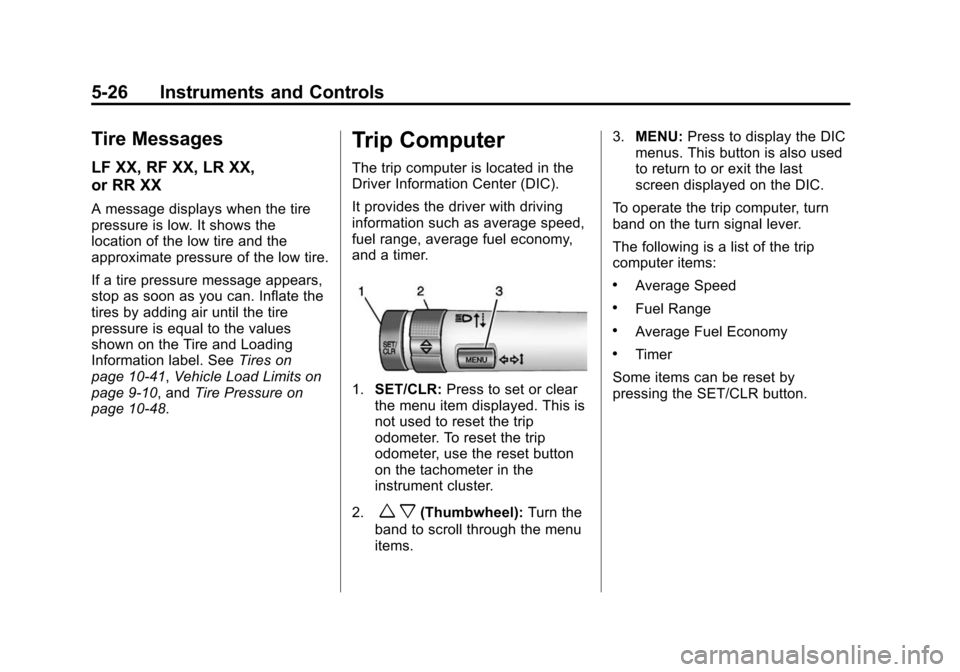
1. SET/CLR: Press to set or clear
the menu item displayed. This is
not used to reset the trip
odometer. To reset the trip
odometer, use the reset button
on the tachometer in the
instrument cluster.
2.
w x(Thumbwheel): Turn the
band to scroll through the menu
items. 3.
MENU: Press to display the DIC
menus. This button is also used
to return to or exit the last
screen displayed on the DIC.
To operate the trip computer, turn
band on the turn signal lever.
The following is a list of the trip
computer items:
.Average Speed
.Fuel Range
.Average Fuel Economy
.Timer
Some items can be reset by
pressing the SET/CLR button.
Page 142 of 409
Black plate (27,1)Chevrolet TRAX Owner Manual (GMNA-Localizing-U.S./Canada/Mexico-
7576294) - 2015 - CRC - 2/6/15
Instruments and Controls 5-27
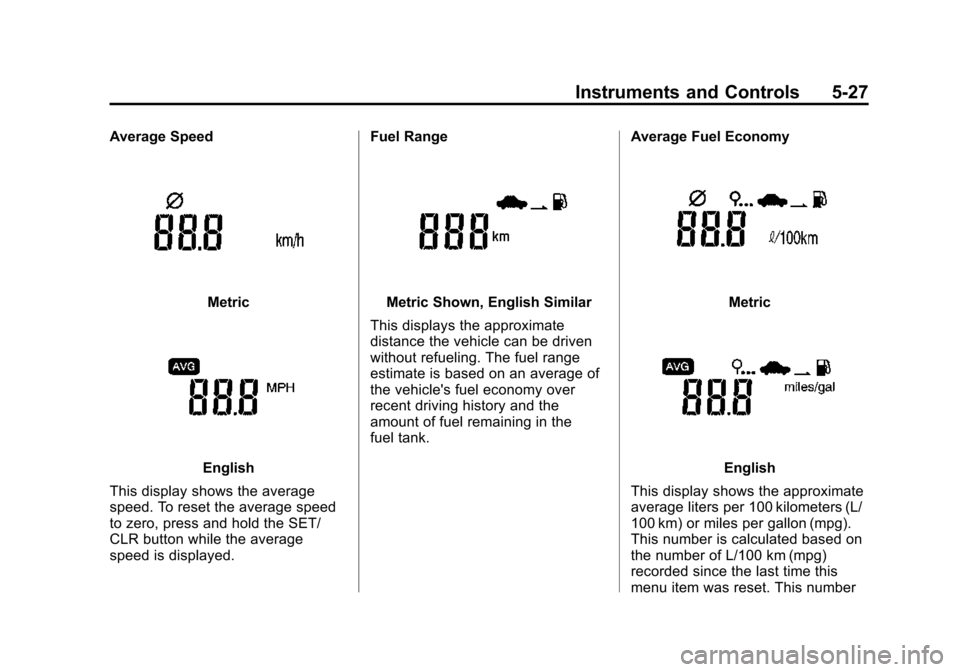
Average Speed
Metric
English
This display shows the average
speed. To reset the average speed
to zero, press and hold the SET/
CLR button while the average
speed is displayed. Fuel Range
Metric Shown, English Similar
This displays the approximate
distance the vehicle can be driven
without refueling. The fuel range
estimate is based on an average of
the vehicle's fuel economy over
recent driving history and the
amount of fuel remaining in the
fuel tank. Average Fuel EconomyMetric
English
This display shows the approximate
average liters per 100 kilometers (L/
100 km) or miles per gallon (mpg).
This number is calculated based on
the number of L/100 km (mpg)
recorded since the last time this
menu item was reset. This number
Page 146 of 409
Black plate (31,1)Chevrolet TRAX Owner Manual (GMNA-Localizing-U.S./Canada/Mexico-
7576294) - 2015 - CRC - 2/6/15
Instruments and Controls 5-31
Power Door Locks
Select and the following may
display:
.Auto Door Unlock
.Unlocked Door Anti Lock Out
.Delayed Door Lock
Auto Door Unlock
This allows selection of which of the
doors will automatically unlock when
the vehicle is shifted into P (Park).
Select All Doors, Driver Door, or Off.
Unlocked Door Anti Lock Out
When on, this feature will keep the
driver door from locking when the
door is open. If Off is selected, the
Delayed Door Lock menu will be
available and the door will lock as
programmed through this menu.
Select On or Off.
Delayed Door Lock
When on, this feature will delay the
locking of the doors after the last
door is closed. Select On or Off.
Remote Lock, Unlock, Start
Select and the following may
display:
.Remote Unlock Light Feedback
.Remote Lock Feedback
.Remote Door Unlock
Remote Unlock Light Feedback
When on, the exterior lamps will
flash when unlocking the vehicle
with the Remote Keyless Entry
(RKE) transmitter.
Select Flash Lights or Lights Off.
Remote Lock Feedback
This allows the selection of what
type of feedback is given when
pressing
Qon the RKE transmitter.
Select from Lights and Horn, Lights
Only, Horn Only, or Off. Remote Door Unlock
This allows selection of which doors
will unlock when pressing
Kon the
RKE transmitter.
When set to Driver Door, the driver
door will unlock the first time
Kis
pressed and all doors will unlock
when the button is pressed a
second time. When set to All Doors,
all of the doors will unlock at the first
press of
K.
Select from Driver Door or All
Doors.
Personalization Menu (Radio
with Touchscreen)
Settings can be made with the
ignition on and the vehicle not
moving.
The following are all possible
personalization features. Depending
on the vehicle, some may not be
available.
D(Home): Press to access the
Home Page Menu.
Page 149 of 409
Black plate (34,1)Chevrolet TRAX Owner Manual (GMNA-Localizing-U.S./Canada/Mexico-
7576294) - 2015 - CRC - 2/6/15
5-34 Instruments and Controls
Chime Volume
This allows selection of the chime
volume level.
Select Normal or High.
Auto Wipe in Reverse Gear
This allows this feature to be turned
on or off. When on, and the front
wipers are on, the rear window
wiper will turn on automatically
when the vehicle is shifted into
R (Reverse).
Select On or Off.
Collision/Detection
Select and the following may
display:
.Park Assist
Park Assist
This allows this feature to be turned
on or off.
Select On or Off. Lighting
Select and the following may
display:
.Exit Lighting
.Vehicle Locator Lights
Exit Lighting
This allows selection of how long
the exterior lamps stay on when
leaving the vehicle and it is dark
outside.
Select Off, 30 Sec, 60 Sec,
or 120 Sec.
Vehicle Locator Lights
This allows the vehicle locator lights
to come on when unlocking the
vehicle with the RKE transmitter.
Select On or Off. Power Door Locks
Select and the following may
display:
.Auto Door Unlock
.Unlocked Door Anti Lock Out
.Delayed Door Lock
Auto Door Unlock
This allows selection of which of the
doors will automatically unlock when
the vehicle is shifted into P (Park).
Select All Doors, Driver Door, or Off.
Unlocked Door Anti Lock Out
When on, this feature will keep the
driver door from locking when the
door is open. If Off is selected, the
Delayed Door Lock menu will be
available and the door will lock as
programmed through this menu.
Select On or Off.
Page 150 of 409
Black plate (35,1)Chevrolet TRAX Owner Manual (GMNA-Localizing-U.S./Canada/Mexico-
7576294) - 2015 - CRC - 2/6/15
Instruments and Controls 5-35
Delayed Door Lock
When on, this feature will delay the
locking of the doors until
five seconds after the last door is
closed. Three chimes will signal that
delayed locking is in use. Pressing
either
QorKon the RKE
transmitter twice will override the
delayed locking feature and
immediately lock all of the doors.
Select On or Off.
Lock, Unlock Settings
Select and the following may
display:
.Remote Unlock Light Feedback
.Remote Lock Light & Horn
Feedback
.Remote Door Unlock
Remote Unlock Light Feedback
When on, the exterior lamps will
flash when unlocking the vehicle
with the RKE transmitter.
Select Flash Lights or Lights Off. Remote Lock Light & Horn
Feedback
This allows selection of what type of
feedback is given when pressing
Q
on the RKE transmitter.
Select Lights Only, Lights & Horn,
Horn Only, or Off.
Remote Door Unlock
This allows selection of which doors
will unlock when pressing
Kon the
RKE transmitter.
When set to Driver Door, the driver
door will unlock the first time
Kis
pressed and all doors will unlock
when the button is pressed a
second time. When set to All Doors,
all of the doors will unlock at the first
press of
K.
Select All Doors or Driver Door. Rear Camera Option
Select and the following may
display:
.Symbols
.Guidelines
Symbols
This feature will turn on the symbols
in the rear camera display.
Select On or Off.
Guidelines
This feature will turn on the
guidelines in the rear camera
display.
Select On or Off.
Vehicle Factory Settings
This feature will turn the vehicle
personalization to the default
settings.
Select Yes or No.
Language
Select language, then select from
the available language(s).
Page 152 of 409
Black plate (1,1)Chevrolet TRAX Owner Manual (GMNA-Localizing-U.S./Canada/Mexico-
7576294) - 2015 - CRC - 2/6/15
Lighting 6-1
Lighting
Exterior Lighting
Exterior Lamp Controls . . . . . . . . 6-1
Headlamp High/Low-BeamChanger . . . . . . . . . . . . . . . . . . . . . 6-2
Flash-to-Pass . . . . . . . . . . . . . . . . . 6-2
Daytime Running Lamps (DRL) . . . . . . . . . . . . . . . . 6-2
Automatic Headlamp System . . . . . . . . . . . . . . . . . . . . . . 6-3
Hazard Warning Flashers . . . . . 6-3
Turn and Lane-Change Signals . . . . . . . . . . . . . . . . . . . . . . 6-4
Front Fog Lamps . . . . . . . . . . . . . . 6-4
Interior Lighting
Instrument Panel Illumination Control . . . . . . . . . . . . . . . . . . . . . . 6-5
Courtesy Lamps . . . . . . . . . . . . . . 6-5
Dome Lamps . . . . . . . . . . . . . . . . . 6-5
Reading Lamps . . . . . . . . . . . . . . . 6-6
Lighting Features
Battery Load Management . . . . 6-6
Battery Power Protection . . . . . . 6-7
Exterior Lighting
Exterior Lamp Controls
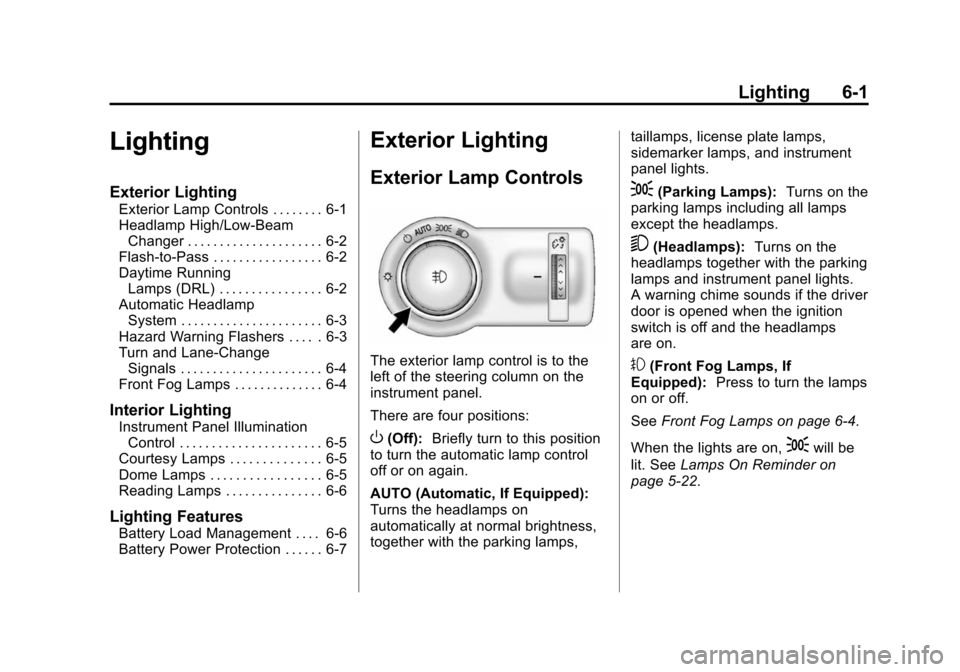
The exterior lamp control is to the
left of the steering column on the
instrument panel.
There are four positions:
O(Off): Briefly turn to this position
to turn the automatic lamp control
off or on again.
AUTO (Automatic, If Equipped):
Turns the headlamps on
automatically at normal brightness,
together with the parking lamps, taillamps, license plate lamps,
sidemarker lamps, and instrument
panel lights.
;(Parking Lamps):
Turns on the
parking lamps including all lamps
except the headlamps.
5(Headlamps): Turns on the
headlamps together with the parking
lamps and instrument panel lights.
A warning chime sounds if the driver
door is opened when the ignition
switch is off and the headlamps
are on.
#(Front Fog Lamps, If
Equipped): Press to turn the lamps
on or off.
See Front Fog Lamps on page 6-4.
When the lights are on,
;will be
lit. See Lamps On Reminder on
page 5-22.
Page 157 of 409
Black plate (6,1)Chevrolet TRAX Owner Manual (GMNA-Localizing-U.S./Canada/Mexico-
7576294) - 2015 - CRC - 2/6/15
6-6 Lighting
H(Door):When the button is
returned to the middle position, the
lamps turn on automatically when a
door is opened.
R(On): Press to turn on the dome
lamps.
Reading Lamps
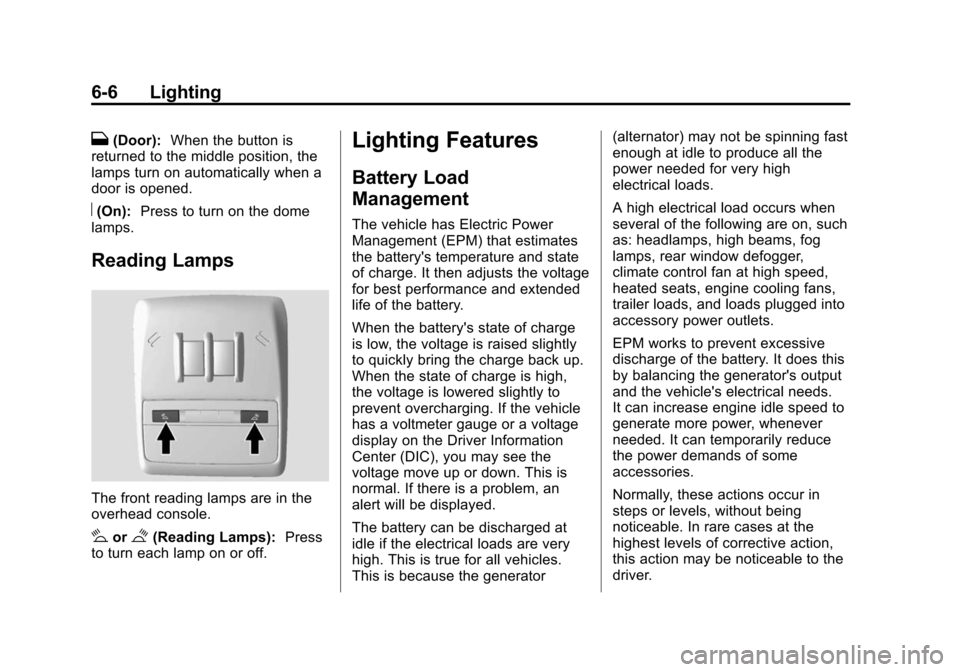
The front reading lamps are in the
overhead console.
#or$(Reading Lamps): Press
to turn each lamp on or off.
Lighting Features
Battery Load
Management
The vehicle has Electric Power
Management (EPM) that estimates
the battery's temperature and state
of charge. It then adjusts the voltage
for best performance and extended
life of the battery.
When the battery's state of charge
is low, the voltage is raised slightly
to quickly bring the charge back up.
When the state of charge is high,
the voltage is lowered slightly to
prevent overcharging. If the vehicle
has a voltmeter gauge or a voltage
display on the Driver Information
Center (DIC), you may see the
voltage move up or down. This is
normal. If there is a problem, an
alert will be displayed.
The battery can be discharged at
idle if the electrical loads are very
high. This is true for all vehicles.
This is because the generator (alternator) may not be spinning fast
enough at idle to produce all the
power needed for very high
electrical loads.
A high electrical load occurs when
several of the following are on, such
as: headlamps, high beams, fog
lamps, rear window defogger,
climate control fan at high speed,
heated seats, engine cooling fans,
trailer loads, and loads plugged into
accessory power outlets.
EPM works to prevent excessive
discharge of the battery. It does this
by balancing the generator's output
and the vehicle's electrical needs.
It can increase engine idle speed to
generate more power, whenever
needed. It can temporarily reduce
the power demands of some
accessories.
Normally, these actions occur in
steps or levels, without being
noticeable. In rare cases at the
highest levels of corrective action,
this action may be noticeable to the
driver.
Page 179 of 409
Black plate (20,1)Chevrolet TRAX Owner Manual (GMNA-Localizing-U.S./Canada/Mexico-
7576294) - 2015 - CRC - 2/6/15
7-20 Infotainment System
Selecting a CD Track
Using the control buttons:
.Press SEEK¨or©SEEK to
select the next or previous track.
.Turn the MENU/TUNE knob.
Using the CD Menu:
1. Turn the MENU/TUNE knob.
2. Select Tracks List.
3. Select the track.
Playing Tracks in Random Order
Turn the MENU/TUNE knob and set
Shuffle Songs to On.
Fast Forward and Rewind
Press and hold SEEK
¨or©SEEK
to fast forward or rewind within the
current track.
Selecting an MP3 Track
Using the control buttons:
.Press SEEK¨or©SEEK to
select the next or previous track.
.Turn the MENU/TUNE knob. Using the CD Menu:
1. Turn the MENU/TUNE knob.
2. Select Playlists/Folders.
3. Select the playlist or folder.
4. Select the track.
Searching for MP3 Tracks
The search feature may take some
time to display the information after
reading the disc due to the amount
of information stored on the disc.
FM automatically plays while the
disc is being read.
Tracks can be searched by:
.Playlists
.Artists
.Albums
.Song Titles
.Genres
.Folder View
To search for tracks:
1. Turn the MENU/TUNE knob.
2. Select Search. 3. Select: Playlists, Artists, Albums,
Song Titles, Genres,
or Folder View.
4. Select the track.
USB Port
The USB port is in the storage area
to the right of the infotainment
system. See Overview (Radio with
Touchscreen) on page 7-7 or
Overview (AM-FM Radio) on
page 7-3 orOverview (Radio with
CD/USB) on page 7-5.
Portable devices are controlled by
using the menu system described in
Operation on page 7-8.
Radio without Touchscreen
If equipped with a USB port, the
following devices may be connected
and controlled by the infotainment
system:
.iPods
.PlaysForSure Devices (PFDs)
.USB Drives
Page 180 of 409
Black plate (21,1)Chevrolet TRAX Owner Manual (GMNA-Localizing-U.S./Canada/Mexico-
7576294) - 2015 - CRC - 2/6/15
Infotainment System 7-21
.Zunes®
Not all iPods, PFDs, USB Drives,
and Zunes are compatible with the
infotainment system.
Connecting and Controlling
an iPod®
Not all iPods can be controlled by
the infotainment system.
Connecting an iPod
Connect the iPod to the USB port.
Searching for a Track
Tracks can be searched for by:
.Playlists
.Artists
.Albums
.Song Titles
.Podcasts
.Genres
.Audiobooks
.ComposersTo search for tracks:
1. Turn the MENU/TUNE knob.
2. Select Search.
3. Select: Playlists, Artists, Albums,
Song Titles, Podcasts, Genres,
Audiobooks, or Composers.
4. Select the track.
Shuffle
Turn the MENU/TUNE knob and set
Shuffle Songs (Random) to On or
Off, then press the
/BACK button
to return to the main screen.
On: Plays tracks in the current
folder in random order.
Off: Plays tracks in the current
folder in sequential order.
Repeat
Turn the MENU/TUNE knob and set
Repeat to On or Off, then press the
/BACK button to return to the main
screen.
On: Repeats the current track. Off:
Playback starts from the
beginning of the current track after
the last track finishes.
Connecting and Controlling a
PlaysForSure Device (PFD)
or Zune
Connecting a PFD or Zune
Connect the PFD or Zune to the
USB port.
Searching for a Track
Tracks can be searched for by:
.Playlists
.Artists
.Albums
.Song Titles
.Podcasts
.Genres
To search for tracks:
1. Turn the MENU/TUNE knob.
2. Select Search.
Page 181 of 409
Black plate (22,1)Chevrolet TRAX Owner Manual (GMNA-Localizing-U.S./Canada/Mexico-
7576294) - 2015 - CRC - 2/6/15
7-22 Infotainment System
3. Select: Playlists, Artists, Albums,Song Titles, Podcasts,
or Genres.
4. Select the track.
Shuffle Functionality
Turn the MENU/TUNE knob and set
Shuffle Songs (Random) to On
or Off.
On: Plays current tracks in random
order.
Off: Plays current tracks in
sequential order.
Repeat Functionality
Turn the MENU/TUNE knob and set
Repeat to On or Off.
Repeat On: Repeats the current
track.
Repeat Off: Playback starts from
the beginning of the current track
after the last track finishes.Connecting and Controlling a
USB Drive
The infotainment system can only
play back .mp3 and .wma files from
a USB drive.
Only the first 2,500 songs are
recognized on the device.
When a device is not supported, the
message “No supported data found.
You can safely disconnect the
device” appears.
Connecting a USB Drive
Connect the USB drive to the
USB port.
Searching for a Track
It is normal for the search feature to
take some time to display the
information after reading the device
due to the amount of information
stored.
Files that do not have any meta
data stored in the ID3 tag display as
Unknown. Tracks can be searched for by:
.Playlists*
.Artists
.Albums
.Song Titles
.Genres
.Folder View
*This only displays if a playlist is
found on the device.
To search for tracks:
1. Turn the MENU/TUNE knob.
2. Select Search.
3. Select: Playlists, Artists, Albums, Song Titles, Genres,
or Folder View.
4. Select the track.
Shuffle Functionality
Turn the MENU/TUNE knob and set
Shuffle Songs (Random) to On
or Off.
On: Plays current tracks in random
order.